traction control CADILLAC ESCALADE 2022 Owner's Manual
[x] Cancel search | Manufacturer: CADILLAC, Model Year: 2022, Model line: ESCALADE, Model: CADILLAC ESCALADE 2022Pages: 508, PDF Size: 9.18 MB
Page 260 of 508
Cadillac Escalade Owner Manual (GMNA-Localizing-U.S./Canada/Mexico-
15567102) - 2022 - CRC - 11/17/21
DRIVING AND OPERATING 259
4n(Four-Wheel Drive Low) :This
setting engages the front axle and
delivers extra torque. Choose 4
nwhen
driving off-road in deep sand, deep
mud, or deep snow, and while
climbing or descending steep hills.
While driving in 4
n, keep vehicle
speed below 72 km/h (45 mph).
Shifting into 4
nwill turn Traction
Control and StabiliTrak/ESC off. See
Traction Control/Electronic Stability
Control 0265.
Shifts between 2
m, 4m, and AUTO
Any of these shifts can be made at
normal driving speed.
The actual 4x4 shift request is only
made after the button is released. The
4x4 graphic will remain flashing until
the shift request has completed. A DIC
message displays to indicate that the
4x4 transfer case has been requested
to shift to the new desired state.
Once the 4x4 shift has completed, the
DIC message disappears, the 4x4
graphic stops flashing, and the current
setting is indicated. When a shift to 2
mis completed
successfully while in P (Park), the
parking brake will engage. To resume
driving, shift the transmission to the
desired gear and manually release the
parking bake or press the accelerator
pedal to begin driving. See Electric
Parking Brake 0262.
If equipped, use 4
n, AUTO, or 4mto
provide additional traction when
parking on a steep grade with poor
traction such as ice, snow, mud,
or gravel.
Shifting Into 4
n
1. The ignition must be on and the vehicle must be stopped or moving
less than 5 km/h (3 mph) with the
transmission in N (Neutral). It is
best for the vehicle to be moving
1.6 to 3.2 km/h (1 to 2 mph).
2. Press 4
n. The actual 4x4 shift
request is only made after the
button is released. The 4x4 graphic
will remain flashing until the shift
request has completed. A DIC
message displays to indicate that the 4x4 transfer case has been
requested to shift to the new
desired state.
Once the 4x4 shift has completed,
the DIC message disappears, the
4x4 graphic stops flashing and the
current setting is indicated.
If vehicle speed is higher when shift
request occurs, a DIC message
displays. Reduce vehicle speed.
If the transmission is not in
N (Neutral) when shift request occurs,
a DIC message displays. The vehicle
will allow 20 seconds for the shift to
occur. After this time, a graphic in the
instrument cluster will indicate that
the transfer case is in 4
n.
Caution
Shifting the transmission into gear
before the requested mode indicator
light has stopped flashing could
damage the transfer case.
If the transmission is not shifted into
N (Neutral) or the vehicle has not
slowed to 5 km/h (3 mph) within
Page 262 of 508
Cadillac Escalade Owner Manual (GMNA-Localizing-U.S./Canada/Mexico-
15567102) - 2022 - CRC - 11/17/21
DRIVING AND OPERATING 261
3. Shift the transmission toN (Neutral).
4. Shift the transfer case to 2
m.
Transfer case shifts out of
N (Neutral) can only be made into
2
m. When the shift to 2mis
complete, the graphic in the
instrument cluster will stop
flashing. If the transfer case cannot
complete a shift, the graphic will
return to the previously selected
setting.
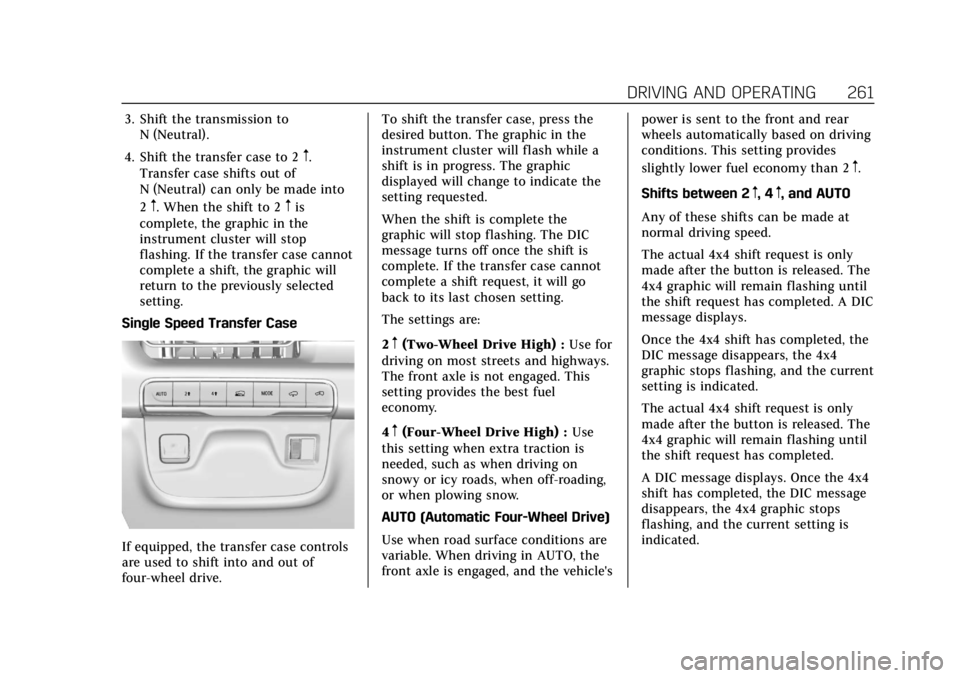
Single Speed Transfer Case
If equipped, the transfer case controls
are used to shift into and out of
four-wheel drive. To shift the transfer case, press the
desired button. The graphic in the
instrument cluster will flash while a
shift is in progress. The graphic
displayed will change to indicate the
setting requested.
When the shift is complete the
graphic will stop flashing. The DIC
message turns off once the shift is
complete. If the transfer case cannot
complete a shift request, it will go
back to its last chosen setting.
The settings are:
2
m(Two-Wheel Drive High) :
Use for
driving on most streets and highways.
The front axle is not engaged. This
setting provides the best fuel
economy.
4
m(Four-Wheel Drive High) : Use
this setting when extra traction is
needed, such as when driving on
snowy or icy roads, when off-roading,
or when plowing snow.
AUTO (Automatic Four-Wheel Drive)
Use when road surface conditions are
variable. When driving in AUTO, the
front axle is engaged, and the vehicle's power is sent to the front and rear
wheels automatically based on driving
conditions. This setting provides
slightly lower fuel economy than 2
m.
Shifts between 2
m, 4m, and AUTO
Any of these shifts can be made at
normal driving speed.
The actual 4x4 shift request is only
made after the button is released. The
4x4 graphic will remain flashing until
the shift request has completed. A DIC
message displays.
Once the 4x4 shift has completed, the
DIC message disappears, the 4x4
graphic stops flashing, and the current
setting is indicated.
The actual 4x4 shift request is only
made after the button is released. The
4x4 graphic will remain flashing until
the shift request has completed.
A DIC message displays. Once the 4x4
shift has completed, the DIC message
disappears, the 4x4 graphic stops
flashing, and the current setting is
indicated.
Page 266 of 508
Cadillac Escalade Owner Manual (GMNA-Localizing-U.S./Canada/Mexico-
15567102) - 2022 - CRC - 11/17/21
DRIVING AND OPERATING 265
When Automatic Vehicle Hold (AVH)
is turned on and the vehicle is braked
to a stop, AVH prevents the vehicle
from moving during the transition
from brake pedal release to accelerator
pedal apply. The brakes release when
the accelerator pedal is applied. The
brakes may also release under other
conditions. Do not rely on AVH to
hold the vehicle.
If the accelerator pedal is not applied
within a few minutes, the Electric
Parking Brake will apply. The parking
brake will also apply if the driver door
is opened or the driver seat belt is
unfastened while AVH is holding the
vehicle.
AVH can be turned on by pressing
AUTO HOLD. The indicator light on
the switch will come on. The AVH
light on the instrument panel will
come on while AVH is actively holding
the vehicle. SeeAutomatic Vehicle Hold
(AVH) Light 0126.Ride Control Systems
Traction Control/Electronic
Stability Control
System Operation
The vehicle has a Traction Control
System (TCS) and StabiliTrak/
Electronic Stability Control (ESC).
These systems help limit wheel spin
and assist the driver in maintaining
control, especially on slippery road
conditions.
TCS activates if it senses any of the
drive wheels are spinning or beginning
to lose traction. When this happens,
TCS applies the brakes to the spinning
wheels and reduces engine power to
limit wheel spin.
StabiliTrak/ESC activates when the
vehicle senses a difference between
the intended path and the direction
the vehicle is actually traveling.
StabiliTrak/ESC selectively applies
braking pressure to one or more of the
vehicle wheel brakes to assist the
driver in keeping the vehicle on the
intended path. Trailer Sway Control (TSC) is also on automatically when
the vehicle is started. See
Trailer Sway
Control (TSC) 0354.
If cruise control is being used and
traction control or StabiliTrak/ESC
begins to limit wheel spin, cruise
control will disengage. Cruise control
may be turned back on when road
conditions allow.
Both systems come on automatically
when the vehicle is started and begins
to move. The systems may be heard or
felt while they are operating or while
performing diagnostic checks. This is
normal and does not mean there is a
problem with the vehicle.
It is recommended to leave both
systems on for normal driving
conditions, but it may be necessary to
turn TCS off if the vehicle gets stuck
in sand, mud, ice, or snow. See If the
Vehicle Is Stuck 0241 and “Turning
the Systems Off and On ”later in this
section.
When the transfer case (if equipped)
is in Four-Wheel Drive Low, the TCS
and StabiliTrak/ESC are automatically
Page 267 of 508
Cadillac Escalade Owner Manual (GMNA-Localizing-U.S./Canada/Mexico-
15567102) - 2022 - CRC - 11/17/21
266 DRIVING AND OPERATING
disabled,gcomes on, and the
appropriate message will appear on
the Driver Information Center (DIC).
The indicator light for both systems is
to the right of the center stack and
below the screen. This light will:
.Flash when TCS is limiting
wheel spin
.Flash when StabiliTrak/ESC is
activated
.Turn on and stay on when either
system is not working
See Traction Control System (TCS)/
StabiliTrak Light 0128.
If either system fails to turn on or to
activate, a message displays in the
Driver Information Center (DIC), and
dcomes on and stays on to indicate
that the system is inactive and is not
assisting the driver in maintaining
control. Adjust driving accordingly. If
dcomes on and stays on:
1. Stop the vehicle.
2. Turn the engine off and wait 15 seconds.
3. Start the engine.
Drive the vehicle. If
dcomes on and
stays on, see your dealer as soon as
possible.
Turning the Systems Off and On
Caution
Do not repeatedly brake or
accelerate heavily when TCS is off.
The vehicle driveline could be
damaged.
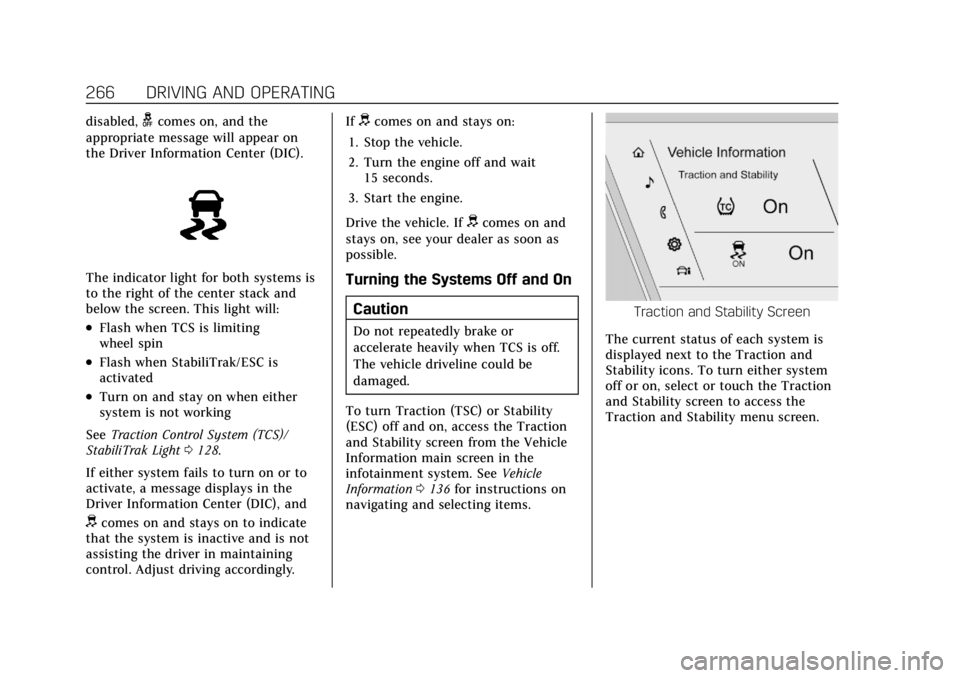
To turn Traction (TSC) or Stability
(ESC) off and on, access the Traction
and Stability screen from the Vehicle
Information main screen in the
infotainment system. See Vehicle
Information 0136 for instructions on
navigating and selecting items.
Traction and Stability Screen
The current status of each system is
displayed next to the Traction and
Stability icons. To turn either system
off or on, select or touch the Traction
and Stability screen to access the
Traction and Stability menu screen.
Page 268 of 508

Cadillac Escalade Owner Manual (GMNA-Localizing-U.S./Canada/Mexico-
15567102) - 2022 - CRC - 11/17/21
DRIVING AND OPERATING 267
Traction and Stability Menu
To turn off TCS, select or touch the
Traction virtual button on the screen.
The traction off light
idisplays in
the instrument cluster. See Traction
Off Light 0128.
If TCS is limiting wheel spin when
disabled, the system will not turn off
until the wheels stop spinning.
To turn TCS back on, select or touch
the Traction virtual button on the
screen. The traction off light
i
displayed in the instrument cluster
will turn off. To turn StabiliTrak/ESC off, first turn
off TCS to enable the Stability virtual
button on the screen, then select or
touch the Stability virtual button. The
StabiliTrak/ESC off light
gwill display
in the instrument cluster. See
StabiliTrak OFF Light 0128.
To turn StabiliTrak/ESC back on,
select or touch the Stability virtual
button on the screen. StabiliTrak/ESC
will turn on, but TCS will remain off.
TCS cannot be on when StabiliTrak/
ESC is off. If both systems are turned
off, selecting or touching the Traction
virtual button will turn both systems
back on.
StabiliTrak/ESC will automatically
turn on if the vehicle exceeds 56 km/h
(35 mph) and cannot be turned off
again until speed is reduced. Traction
control will remain off. Vehicles
equipped with the four corner air
suspension re-enable StabiliTrak/ESC
at 32 km/h (20 mph). The vehicle has a Trailer Sway Control
(TSC) feature and a Hill Start Assist
(HSA) feature. See
Trailer Sway Control
(TSC) 0354 or
Hill Start Assist (HSA) 0264.
Adding accessories can affect the
vehicle performance. See Accessories
and Modifications 0369.
Driver Mode Control
Driver Mode Control (DMC) allows the
driver to adjust the overall driving
experience to better suit preference by
adjusting multiple subsystems
simultaneously. Drive mode
availability and affected vehicle
subsystems are dependent upon
vehicle trim level, region, and optional
features.
Tour will be the default mode at every
ignition cycle. A unique and persistent
indicator will be displayed in the
instrument cluster for each mode.
Depending on trim level, Tour mode,
Sport mode, Snow/Ice mode, Off-Road
mode, Tow/Haul mode, Terrain mode,
and My mode may be available.
Page 269 of 508
Cadillac Escalade Owner Manual (GMNA-Localizing-U.S./Canada/Mexico-
15567102) - 2022 - CRC - 11/17/21
268 DRIVING AND OPERATING
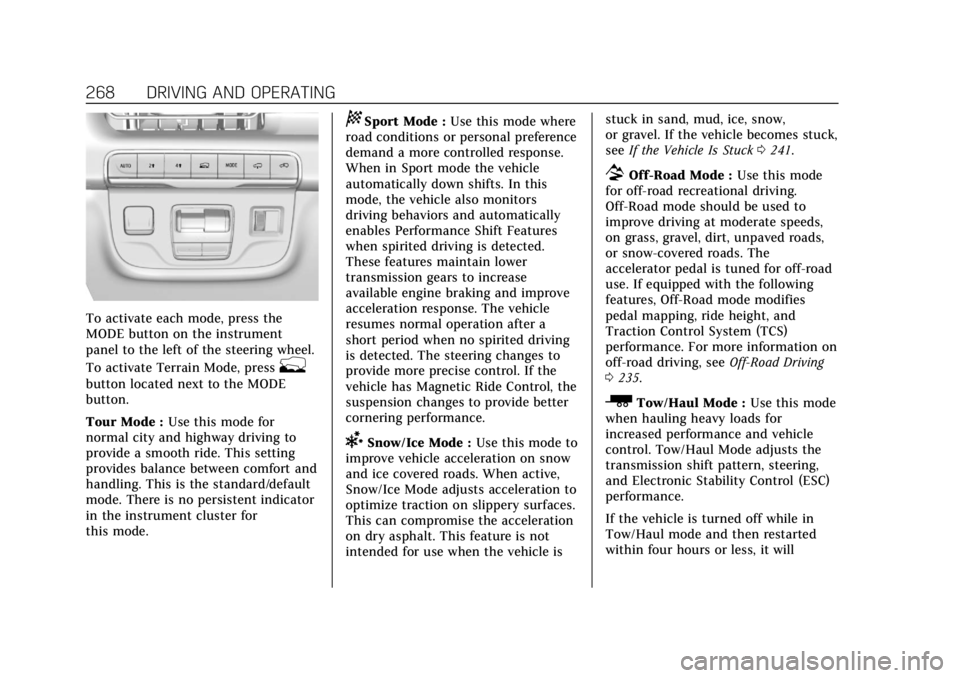
To activate each mode, press the
MODE button on the instrument
panel to the left of the steering wheel.
To activate Terrain Mode, press
g
button located next to the MODE
button.
Tour Mode :Use this mode for
normal city and highway driving to
provide a smooth ride. This setting
provides balance between comfort and
handling. This is the standard/default
mode. There is no persistent indicator
in the instrument cluster for
this mode.
8Sport Mode : Use this mode where
road conditions or personal preference
demand a more controlled response.
When in Sport mode the vehicle
automatically down shifts. In this
mode, the vehicle also monitors
driving behaviors and automatically
enables Performance Shift Features
when spirited driving is detected.
These features maintain lower
transmission gears to increase
available engine braking and improve
acceleration response. The vehicle
resumes normal operation after a
short period when no spirited driving
is detected. The steering changes to
provide more precise control. If the
vehicle has Magnetic Ride Control, the
suspension changes to provide better
cornering performance.
6Snow/Ice Mode : Use this mode to
improve vehicle acceleration on snow
and ice covered roads. When active,
Snow/Ice Mode adjusts acceleration to
optimize traction on slippery surfaces.
This can compromise the acceleration
on dry asphalt. This feature is not
intended for use when the vehicle is stuck in sand, mud, ice, snow,
or gravel. If the vehicle becomes stuck,
see
If the Vehicle Is Stuck 0241.
7Off-Road Mode : Use this mode
for off-road recreational driving.
Off-Road mode should be used to
improve driving at moderate speeds,
on grass, gravel, dirt, unpaved roads,
or snow-covered roads. The
accelerator pedal is tuned for off-road
use. If equipped with the following
features, Off-Road mode modifies
pedal mapping, ride height, and
Traction Control System (TCS)
performance. For more information on
off-road driving, see Off-Road Driving
0 235.
_Tow/Haul Mode : Use this mode
when hauling heavy loads for
increased performance and vehicle
control. Tow/Haul Mode adjusts the
transmission shift pattern, steering,
and Electronic Stability Control (ESC)
performance.
If the vehicle is turned off while in
Tow/Haul mode and then restarted
within four hours or less, it will
Page 271 of 508
Cadillac Escalade Owner Manual (GMNA-Localizing-U.S./Canada/Mexico-
15567102) - 2022 - CRC - 11/17/21
270 DRIVING AND OPERATING
The following settings may be
available depending on region, trim
level, and optional features.
Engine Sound :Engine sound settings
adjusts the volume of engine noise.
Engine sound is quieter at lower
settings and louder at higher settings.
Steering : Steering setting adjusts the
effort required to turn the steering
wheel. Steering feel is less responsive
at lower settings and more responsive
at higher settings.
Suspension : Suspension adjusts the
stiffness of the shocks and / or
springs. The ride is more comfortable
at lower settings and stiffer at higher
settings for better control.
Visualization
This feature shows handling and
performance settings on the
infotainment display when changing
drive modes.Magnetic Ride Control
This vehicle may have a semi-active
damping system called Magnetic Ride
Control. With this feature, improved
vehicle ride and handling is provided
under a variety of passenger and
loading conditions.
Locking Rear Axle
Vehicles with a locking rear axle can
give more traction on snow, mud, ice,
sand, or gravel. It works like a
standard axle most of the time, but
when traction is low, this feature will
allow the rear wheel with the most
traction to move the vehicle.
Four Corner Air Suspension
System
The Four Corner Air Suspension
feature provides full time load leveling
capability along with the benefit of
adjusting ride height for increased
convenience and capability.
{Warning
To help avoid personal injury or
death, make sure the area
underneath the vehicle and inside
the wheel wells is clear when
lowering the vehicle.
{Warning
To help avoid personal injury or
death, always select the lowest ride
height for the current driving
conditions. Higher ride heights raise
the vehicle's center of gravity,
increasing the chance of a rollover
during extreme maneuvers.
{Warning
Heavy loads on the roof rack will
make the vehicle's center of gravity
higher, increasing the possibility of
a rollover. To avoid losing control of
the vehicle, always select the
normal height setting and avoid
high speeds, sudden starts, sharp
(Continued)
Page 274 of 508
Cadillac Escalade Owner Manual (GMNA-Localizing-U.S./Canada/Mexico-
15567102) - 2022 - CRC - 11/17/21
DRIVING AND OPERATING 273
To enable Alignment Mode, ensure
the vehicle is at Normal Height and
shift the vehicle to Neutral. Alignment
Mode automatically disables when
vehicle speed exceeds 16 km/h
(10 mph).
Air Suspension Operation with
Door(s) or Hood Open
The air suspension will temporarily
suspend all height changes while the
hood or any door is open. The air
suspension resumes height changes
once the hood and all doors are
closed. An open rear liftgate does not
suspend the air suspension operation.
System Over-Temperature
If the air suspension is under heavy
use, the system may temporarily
suspend all height changes to allow
compressor cooldown. When this
occurs and a height change is
requested, a‘Leveling System
Unavailable’ message will be displayed
in the instrument cluster.
Suspension Lowered for Stability
In the event of a loss of Electronic
Stability Control, the air suspension
will lower the vehicle at higher speeds to provide increased stability. This will
be accompanied by a
‘Vehicle
Lowering for Stability’ message in the
instrument cluster.
Excessive Vehicle Loading
If the air suspension detects excessive
vehicle loading, it will not raise above
Normal Height.
Air Suspension Service
If a ‘Service Leveling System’ message
is displayed in the instrument cluster,
see your authorized dealer
immediately.
Cruise Control
{
Warning
Cruise control can be dangerous
where you cannot drive safely at a
steady speed. Do not use cruise
control on winding roads or in
heavy traffic.
Cruise control can be dangerous on
slippery roads. On such roads, fast
changes in tire traction can cause (Continued)
Warning (Continued)
excessive wheel slip, and you could
lose control. Do not use cruise
control on slippery roads.
If equipped with cruise control, a
speed of about 40 km/h (25 mph) or
more can be maintained without
keeping your foot on the accelerator.
Cruise control does not work at speeds
below about 40 km/h (25 mph).
If the Traction Control/Electronic
Stability Control system begins to
limit wheel spin while using cruise
control, the cruise control
automatically disengages. See Traction
Control/Electronic Stability Control
0 265. If a collision alert occurs when
cruise control is activated, cruise
control is disengaged. See Forward
Collision Alert (FCA) System 0319.
When road conditions allow you to
safely use it again, the cruise control
can be turned back on.
If the brakes are applied, cruise
control disengages.
Page 277 of 508

Cadillac Escalade Owner Manual (GMNA-Localizing-U.S./Canada/Mexico-
15567102) - 2022 - CRC - 11/17/21
276 DRIVING AND OPERATING
ACC works like regular cruise control.
ACC uses camera and radar sensors.
SeeRadio Frequency Statement 0481.
If a vehicle is detected in your path,
ACC can speed up the vehicle or apply
limited, moderate braking to maintain
the selected following gap. To
disengage ACC, apply the brake. If the
Traction Control System (TCS) or
StabiliTrak/Electronic Stability Control
(ESC) activates while ACC is engaged,
ACC may automatically disengage. See
Traction Control/Electronic Stability
Control 0265. When road conditions
allow ACC to be safely used, ACC can
be turned back on.
Disabling the TCS or StabiliTrak/ESC
system will disengage and prevent
engagement of ACC.
ACC can reduce the need for you to
frequently brake and accelerate,
especially when used on expressways,
freeways, and interstate highways.
When used on other roads, you may
need to take over the control of
braking or acceleration more often.{Warning
ACC has limited braking ability and
may not have time to slow the
vehicle down enough to avoid a
collision with another vehicle you
are following. This can occur when
vehicles suddenly slow or stop
ahead, or enter your lane. Also see
“Alerting the Driver” later in this
section. Complete attention is
always required while driving and
you should be ready to take action
and apply the brakes. See Defensive
Driving 0232.
{Warning
ACC will not detect or brake for
children, pedestrians, animals,
or other objects.
Do not use ACC when:
.On winding and hilly roads or
when the sensors are blocked by
snow, ice, or dirt. The system
may not detect a vehicle ahead.
Keep the entire front of the
vehicle clean.
.Visibility is poor due to rain,
snow, fog, dirt, insect residue,
or dust; when other foreign
objects obscure the camera and/
or radar; or when the vehicle in
front or oncoming traffic causes
additional environmental
obstructions, such as road spray.
ACC performance is limited
under these conditions.
.On slippery roads where fast
changes in tire traction can
cause excessive wheel slip.
Page 284 of 508

Cadillac Escalade Owner Manual (GMNA-Localizing-U.S./Canada/Mexico-
15567102) - 2022 - CRC - 11/17/21
DRIVING AND OPERATING 283
ACC Automatically Disengages
ACC may automatically disengage and
the driver will need to manually apply
the brakes to slow the vehicle if:
.The sensors are blocked.
.The Traction Control System (TCS)
or Stabilitrack/ESC has activated or
been disabled.
.There is a fault in the system.
.The radar falsely reports blockage
when driving in a desert or remote
area with no other vehicles or
roadside objects.
.A DIC message may display to
indicate that ACC is temporarily
unavailable.
The ACC active symbol will turn white
when ACC is no longer active.
In some cases, when ACC is
temporarily unavailable, regular cruise
control may be used. See “Switching
Between ACC and Regular Cruise
Control ”previously in this section.
Always consider driving conditions
before using either cruise control
system. Notification to Resume ACC
ACC will maintain a following gap
behind a detected vehicle and slow
your vehicle to a stop behind that
vehicle.
If the stopped vehicle ahead has
driven away and ACC has not
resumed, the vehicle ahead indicator
will flash as a reminder to check
traffic ahead before proceeding. In
addition, the left and right sides of the
Safety Alert Seat will pulse three
times, or three beeps will sound. See
“Alert Type
”and “Adaptive Cruise Go
Notifier” in“Collision/Detection
Systems” underVehicle Personalization
0 140.
When the vehicle ahead drives away,
ACC resumes automatically if the stop
was brief. If necessary, press RES+ or
the accelerator pedal to resume ACC.
If stopped for more than two minutes
or if the driver door is opened and the
driver seat belt is unbuckled, the ACC
automatically applies the Electric
Parking Brake (EPB) to hold the
vehicle. The EPB status light will turn on. See
Electric Parking Brake 0262.
To release the EPB, press the
accelerator pedal.
A DIC warning message may display
indicating to shift to P (Park) before
exiting the vehicle. See Vehicle
Messages 0139.
{Warning
If ACC has stopped the vehicle, and
if ACC is disengaged, turned off,
or canceled, the vehicle will no
longer be held at a stop. The vehicle
can move. When ACC is holding the
vehicle at a stop, always be
prepared to manually apply the
brakes.
{Warning
Leaving the vehicle without placing
it in P (Park) can be dangerous. Do
not leave the vehicle while it is
being held at a stop by ACC. Always
place the vehicle in P (Park) and
turn off the ignition before leaving
the vehicle.