change CADILLAC ESCALADE 2023 Repair Manual
[x] Cancel search | Manufacturer: CADILLAC, Model Year: 2023, Model line: ESCALADE, Model: CADILLAC ESCALADE 2023Pages: 461, PDF Size: 7.99 MB
Page 200 of 461

Cadillac Escalade Owner Manual (GMNA-Localizing-U.S./Canada/Mexico-
16417396) - 2023 - CRC - 5/9/22
198 Climate Controls
Automatic Operation
The system automatically controls the fan
speed, air delivery, air conditioning, and
recirculation in order to heat or cool the
vehicle to the desired temperature.
When AUTO is underlined, the system is in
full automatic operation. If the air delivery
mode or fan setting is manually adjusted,
the auto indicator turns off and the display
will show the selected settings. Auto
operation can be turned off individually for
climate settings.
For automatic operation:1. Press AUTO.
2. Set the temperature. Allow the system time to stabilize. Then adjust the
temperature as needed for best comfort.
To improve fuel efficiency and to cool the
vehicle faster, recirculation may be
automatically selected in warm weather. The
recirculation light will not come on. Press
@to select recirculation; press it again to
select outside air.
English units can be changed to metric units
through the instrument cluster. See “Cluster
Options Menu” underInstrument Cluster
0 107. OFF :
Press OFF to turn the fan on or off.
When off is selected, the system will stop
air from flowing into the cabin. If on is
selected or any other buttons are pressed,
the climate control system will turn on and
operate at the current setting.
y/z: The temperature can be adjusted
separately for the driver and the passenger.
Press to decrease or lift to increase the
temperature. Press or lift and hold to rapidly
increase or decrease the temperature.
SYNC : Touch SYNC on the climate control
display to link all climate zone settings to
the driver settings. Adjust the driver side
temperature control to change the linked
temperature. When the passenger setting is
adjusted, the SYNC underline turns off.
Rear : Touch Rear on the infotainment
screen to open the rear climate control
screen. The rear climate control settings can
now be adjusted from the front
passenger area.
Manual Operation
z 9 y: Press to decrease or lift to
increase the fan speed. Press or lift and hold
the fan controls to adjust speed more
quickly. The fan speed setting displays. Any
adjustment of the fan speed cancels automatic fan control and the fan can be
controlled manually. Press AUTO to return
to automatic operation.
To turn off the fan and climate control
system, press OFF on the center stack
climate controls. The airflow will be blocked
from entering in all air delivery modes,
except defrost.
The maximum automatic fan speed can be
set to low, medium, or high. To adjust the
automatic fan speed select Settings >
Vehicle > Climate > Auto Fan Speed.
Air Delivery Mode Control :
When the
climate information is displayed, press the
desired air delivery mode on the climate
control display to change the direction of
the airflow. The selected air delivery mode
button is lit. Pressing any of the air delivery
buttons cancels automatic air delivery
control and the direction of the airflow can
be controlled manually. Press AUTO to
return to automatic operation.
To change the current mode, select one of
the following:z: Air is directed to the windshield,
outboard a/c outlets, and side window
outlets.
Page 204 of 461
Cadillac Escalade Owner Manual (GMNA-Localizing-U.S./Canada/Mexico-
16417396) - 2023 - CRC - 5/9/22
202 Climate Controls
display. When locked the rear climate
control system cannot be adjusted from the
rear climate controls on the rear of the
center console.
Automatic Operation
Rear AUTO :Touch to turn on or off. The air
delivery and fan speed are controlled
automatically. The AUTO indicator appears
on the display on the rear of the center
console. If the Mode or fan control buttons
are manually adjusted, this cancels the
automatic operation.
Manual Operation
A«/ªAª: Touch or press the fan
controls on the rear climate display or on
the rear of the center console to increase or
decrease the airflow. Pressing
A «when
the system is off will turn the system on.
The air delivery mode remains in its
previous setting.
«/ª: Touch or press and hold the rear
temperature controls on the rear climate
display or on the rear of the center console
to adjust the rear passenger temperature.
Press
«for warmer air and pressªfor
cooler air.
Y/\/Y: Touch the desired mode on
the rear climate display or the MODE button
on the rear of the center console to change
the direction of the airflow in the rear
seating area.
MorL: If equipped, pressMorLto
heat the left or right outboard seat cushion.
See Heated Rear Seats 052.
Air Vents
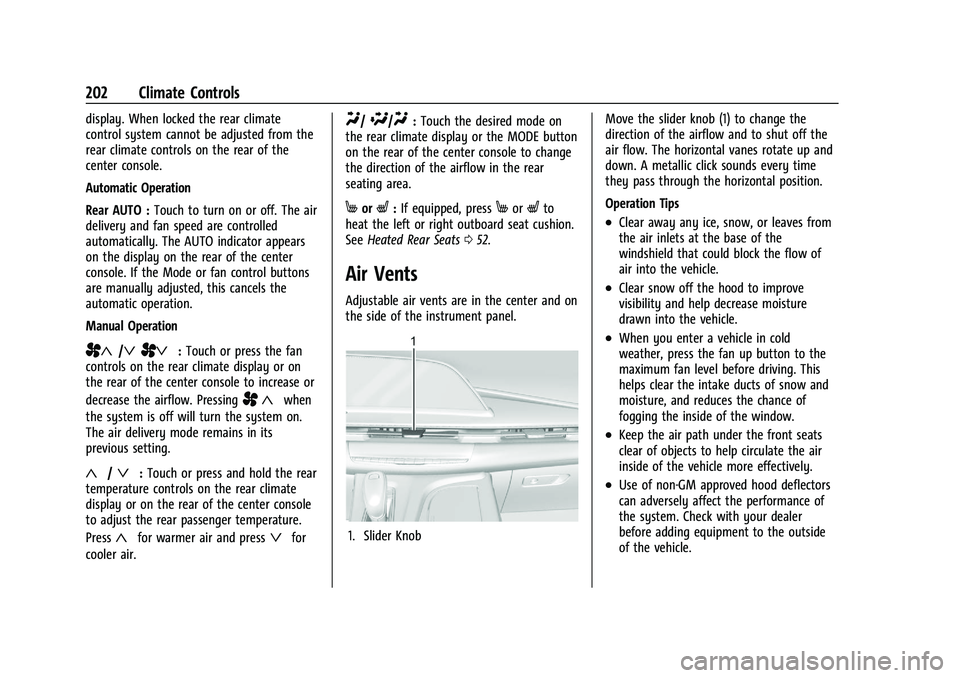
Adjustable air vents are in the center and on
the side of the instrument panel.
1. Slider Knob Move the slider knob (1) to change the
direction of the airflow and to shut off the
air flow. The horizontal vanes rotate up and
down. A metallic click sounds every time
they pass through the horizontal position.
Operation Tips
.Clear away any ice, snow, or leaves from
the air inlets at the base of the
windshield that could block the flow of
air into the vehicle.
.Clear snow off the hood to improve
visibility and help decrease moisture
drawn into the vehicle.
.When you enter a vehicle in cold
weather, press the fan up button to the
maximum fan level before driving. This
helps clear the intake ducts of snow and
moisture, and reduces the chance of
fogging the inside of the window.
.Keep the air path under the front seats
clear of objects to help circulate the air
inside of the vehicle more effectively.
.Use of non-GM approved hood deflectors
can adversely affect the performance of
the system. Check with your dealer
before adding equipment to the outside
of the vehicle.
Page 205 of 461
Cadillac Escalade Owner Manual (GMNA-Localizing-U.S./Canada/Mexico-
16417396) - 2023 - CRC - 5/9/22
Climate Controls 203
Rear System Air Vents
This vehicle has four round or rectangular
air vents in the headliner above the second
and third row seats.
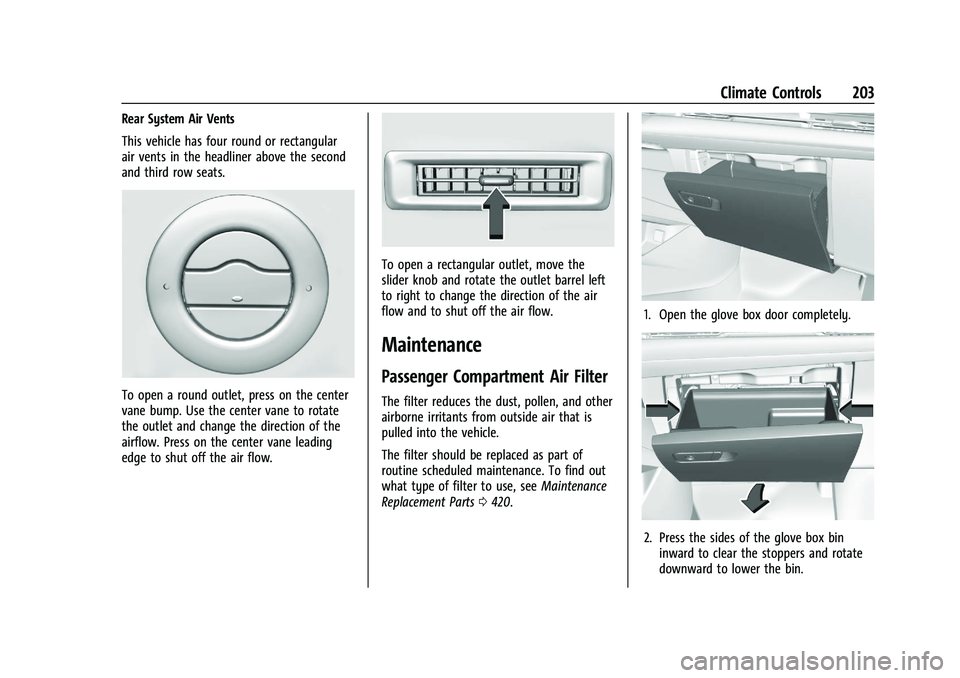
To open a round outlet, press on the center
vane bump. Use the center vane to rotate
the outlet and change the direction of the
airflow. Press on the center vane leading
edge to shut off the air flow.
To open a rectangular outlet, move the
slider knob and rotate the outlet barrel left
to right to change the direction of the air
flow and to shut off the air flow.
Maintenance
Passenger Compartment Air Filter
The filter reduces the dust, pollen, and other
airborne irritants from outside air that is
pulled into the vehicle.
The filter should be replaced as part of
routine scheduled maintenance. To find out
what type of filter to use, seeMaintenance
Replacement Parts 0420.
1. Open the glove box door completely.
2. Press the sides of the glove box bin
inward to clear the stoppers and rotate
downward to lower the bin.
Page 207 of 461

Cadillac Escalade Owner Manual (GMNA-Localizing-U.S./Canada/Mexico-
16417396) - 2023 - CRC - 5/11/22
Driving and Operating 205
Driving and Operating
Driving Information
Driving for Better Fuel Economy . . . . . . 206
Distracted Driving . . . . . . . . . . . . . . . . . . . . . 206
Defensive Driving . . . . . . . . . . . . . . . . . . . . . 207
Impaired Driving . . . . . . . . . . . . . . . . . . . . . . 207
Control of a Vehicle . . . . . . . . . . . . . . . . . . . 207
Braking . . . . . . . . . . . . . . . . . . . . . . . . . . . . . . . . 207
Steering . . . . . . . . . . . . . . . . . . . . . . . . . . . . . . . 208
Off-Road Recovery . . . . . . . . . . . . . . . . . . . . 208
Loss of Control . . . . . . . . . . . . . . . . . . . . . . . . 209
Off-Road Driving . . . . . . . . . . . . . . . . . . . . . . 209
Driving on Wet Roads . . . . . . . . . . . . . . . . . 212
Hill and Mountain Roads . . . . . . . . . . . . . . 213
Winter Driving . . . . . . . . . . . . . . . . . . . . . . . . . 214
If the Vehicle Is Stuck . . . . . . . . . . . . . . . . . . 215
Vehicle Load Limits . . . . . . . . . . . . . . . . . . . . 215
Starting and Operating
New Vehicle Break-In . . . . . . . . . . . . . . . . . . 219
Ignition Positions . . . . . . . . . . . . . . . . . . . . . . 219
Starting the Engine . . . . . . . . . . . . . . . . . . . . 221
Stop/Start System . . . . . . . . . . . . . . . . . . . . . 222
Retained Accessory Power (RAP) . . . . . . . 222
Shifting Into Park . . . . . . . . . . . . . . . . . . . . . . 223
Shifting out of Park . . . . . . . . . . . . . . . . . . . 224
Parking over Things That Burn . . . . . . . . 224
Dynamic Fuel Management . . . . . . . . . . . 224
Extended Parking . . . . . . . . . . . . . . . . . . . . . . 224
Engine Exhaust
Engine Exhaust . . . . . . . . . . . . . . . . . . . . . . . . 225
Running the Vehicle While Parked . . . . . 225
Automatic Transmission
Automatic Transmission . . . . . . . . . . . . . . . 225
Manual Mode . . . . . . . . . . . . . . . . . . . . . . . . . 229
Manual Mode (V-Series) . . . . . . . . . . . . . . . 230
Drive Systems
Four-Wheel Drive . . . . . . . . . . . . . . . . . . . . . . 231
Brakes
Electric Brake Boost . . . . . . . . . . . . . . . . . . . . 235
Antilock Brake System (ABS) . . . . . . . . . . . 235
Electric Parking Brake . . . . . . . . . . . . . . . . . 236
Brake Assist . . . . . . . . . . . . . . . . . . . . . . . . . . . 237
Hill Start Assist (HSA) . . . . . . . . . . . . . . . . . . 237
Automatic Vehicle Hold (AVH) . . . . . . . . . 237
Ride Control Systems
Traction Control/Electronic StabilityControl . . . . . . . . . . . . . . . . . . . . . . . . . . . . . . 238
Driver Mode Control . . . . . . . . . . . . . . . . . . 240
Magnetic Ride Control . . . . . . . . . . . . . . . . . 243
Locking Rear Axle . . . . . . . . . . . . . . . . . . . . . 243
Four Corner Air Suspension System . . . 243
Cruise Control
Cruise Control . . . . . . . . . . . . . . . . . . . . . . . . . 246
Adaptive Cruise Control (Advanced) . . . 248
Super Cruise . . . . . . . . . . . . . . . . . . . . . . . . . . . 258
Driver Assistance Systems
Driver Assistance Systems . . . . . . . . . . . . . 272
Assistance Systems for Parking or Backing . . . . . . . . . . . . . . . . . . . . . . . . . . . . . . 274
Rear Vision Camera (RVC) . . . . . . . . . . . . . 274
Surround Vision System . . . . . . . . . . . . . . . 275
Park Assist . . . . . . . . . . . . . . . . . . . . . . . . . . . . 280
Automatic Parking Assist (APA) . . . . . . . . 282
Reverse Automatic Braking (RAB) . . . . . . 284
Rear Pedestrian Alert . . . . . . . . . . . . . . . . . . 285
Rear Cross Traffic Alert (RCTA) System . . . . . . . . . . . . . . . . . . . . . . . . . . . . . . 286
Assistance Systems for Driving . . . . . . . . 287
Forward Collision Alert (FCA) System . . . . . . . . . . . . . . . . . . . . . . . . . . . . . . 287
Automatic Emergency Braking (AEB) . . . . . . . . . . . . . . . . . . . . . . . . 289
Front Pedestrian Braking (FPB) System . . . . . . . . . . . . . . . . . . . . . . . . . . . . . . 290
Night Vision System . . . . . . . . . . . . . . . . . . . 292
Side Blind Zone Alert (SBZA) . . . . . . . . . . 294
Lane Change Alert (LCA) . . . . . . . . . . . . . . . 294
Traffic Sign Assistant . . . . . . . . . . . . . . . . . . 297
Lane Keep Assist (LKA) . . . . . . . . . . . . . . . . 298
Surround Vision Recorder . . . . . . . . . . . . . 300
Fuel
Top Tier Fuel . . . . . . . . . . . . . . . . . . . . . . . . . . 302
Recommended Fuel . . . . . . . . . . . . . . . . . . . 302
Prohibited Fuels . . . . . . . . . . . . . . . . . . . . . . . 302
Page 211 of 461
Cadillac Escalade Owner Manual (GMNA-Localizing-U.S./Canada/Mexico-
16417396) - 2023 - CRC - 5/11/22
Driving and Operating 209
2. Turn the steering wheel aboutone-eighth of a turn, until the right front
tire contacts the pavement edge.
3. Turn the steering wheel to go straight down the roadway.
Loss of Control
Skidding
There are three types of skids that
correspond to the vehicle's three control
systems:
.Braking Skid —wheels are not rolling.
.Steering or Cornering Skid —too much
speed or steering in a curve causes tires
to slip and lose cornering force.
.Acceleration Skid —too much throttle
causes the driving wheels to spin.
Defensive drivers avoid most skids by taking
reasonable care suited to existing conditions,
and by not overdriving those conditions. But
skids are always possible.
If the vehicle starts to slide, follow these
suggestions:
.Ease your foot off the accelerator pedal
and steer the way you want the vehicle
to go. The vehicle may straighten out. Be
ready for a second skid if it occurs.
.Slow down and adjust your driving
according to weather conditions. Stopping
distance can be longer and vehicle control
can be affected when traction is reduced
by water, snow, ice, gravel, or other
material on the road. Learn to recognize
warning clues —such as enough water,
ice, or packed snow on the road to make
a mirrored surface —and slow down
when you have any doubt.
.Try to avoid sudden steering, acceleration,
or braking, including reducing vehicle
speed by shifting to a lower gear. Any
sudden changes could cause the tires to
slide.
Remember: Antilock brakes help avoid only
the braking skid.
Off-Road Driving
Four-wheel-drive vehicles can be used for
off-road driving. Vehicles without four-wheel
drive and vehicles not equipped with All
Terrain (AT) or On-Off Road (OOR) tires must
not be driven off-road except on a level,
solid surface. For contact information about
the original equipment tires, see the
warranty manual.
One of the best ways for successful off-road
driving is to control the speed.
{Warning
When driving off-road, bouncing and
quick changes in direction can easily
throw you out of position. This could
cause you to lose control and crash. You
and your passengers should always wear
seat belts.
Before Driving Off-Road
.Have all necessary maintenance and
service work completed.
.Fuel the vehicle, fill fluid levels, and check
inflation pressure in all tires, including the
spare, if equipped.
.Read all the information about
four-wheel-drive vehicles in this manual.
.Know the local laws that apply to off-road
driving.
Loading the Vehicle for Off-Road Driving
{Warning
.Unsecured cargo on the load floor can
be tossed about when driving over
rough terrain. You or your passengers
can be struck by flying objects. Secure
the cargo properly. (Continued)
Page 214 of 461

Cadillac Escalade Owner Manual (GMNA-Localizing-U.S./Canada/Mexico-
16417396) - 2023 - CRC - 5/11/22
212 Driving and Operating
Driving in Mud, Sand, Snow, or Ice
Use a low gear when driving in mud—the
deeper the mud, the lower the gear. Keep
the vehicle moving to avoid getting stuck.
Traction changes when driving on sand. On
loose sand, such as on beaches or sand
dunes, the tires tend to sink into the sand.
This affects steering, accelerating, and
braking. Drive at a reduced speed and avoid
sharp turns or abrupt maneuvers.
Traction is reduced on hard packed snow
and ice and it is easy to lose control. Reduce
vehicle speed when driving on hard packed
snow and ice.
{Warning
Driving on frozen lakes, ponds, or rivers
can be dangerous. Ice conditions vary
greatly and the vehicle could fall through
the ice; you and your passengers could
drown. Drive your vehicle on safe
surfaces only.
Driving in Water
{Warning
Driving through rushing water can be
dangerous. Deep water can sweep your
vehicle downstream and you and your
passengers could drown. If it is only
shallow water, it can still wash away the
ground from under your tires. Traction
could be lost, and the vehicle could roll
over. Do not drive through rushing water.
Caution
Do not drive through standing water if it
is deep enough to cover the wheel hubs,
axles, or exhaust pipe. Deep water can
damage the axle and other vehicle parts.
If the standing water is not too deep, drive
through it slowly. At faster speeds, water
can get into the engine and cause it to stall.
Stalling can occur if the exhaust pipe is
under water. Do not turn off the ignition
when driving through water. If the exhaust
pipe is under water, the engine will not
start. When going through water, the brakes
get wet and it may take longer to stop. See
“Driving on Wet Roads” later in this section.
After Off-Road Driving
Remove any brush or debris that has
collected on the underbody or chassis,
or under the hood. These accumulations can
be a fire hazard.
After operation in mud or sand, have the
brake linings cleaned and checked. These
substances can cause glazing and uneven
braking. Check the body structure, driveline,
steering, suspension, wheels, tires, and
exhaust system for damage and check the
fuel lines and cooling system for any
leakage.
More frequent maintenance service is
required. See theMaintenance Schedule
0 415.
Driving on Wet Roads
Rain and wet roads can reduce vehicle
traction and affect your ability to stop and
accelerate. Always drive slower in these
types of driving conditions and avoid driving
through large puddles and deep-standing or
flowing water.
Page 217 of 461

Cadillac Escalade Owner Manual (GMNA-Localizing-U.S./Canada/Mexico-
16417396) - 2023 - CRC - 5/11/22
Driving and Operating 215
To save fuel, run the engine for short
periods to warm the vehicle and then shut
the engine off and partially close the
window. Moving about to keep warm also
helps.
If it takes time for help to arrive, when
running the engine, push the accelerator
pedal slightly so the engine runs faster than
the idle speed. This keeps the battery
charged to restart the vehicle and to signal
for help with the headlamps. Do this as
little as possible, to save fuel.
If the Vehicle Is Stuck
Slowly and cautiously spin the wheels to
free the vehicle when stuck in sand, mud,
ice, or snow.
The Traction Control System (TCS) can often
help to free a stuck vehicle. SeeTraction
Control/Electronic Stability Control 0238.
If TCS cannot free the vehicle, turn TCS off
and use the rocking method. See “Rocking
the Vehicle to Get it Out” following.
{Warning
If the vehicle's tires spin at high speed,
they can explode, and you or others
could be injured. The vehicle can
overheat, causing an engine compartment
fire or other damage. Spin the wheels as
little as possible and avoid going above
56 km/h (35 mph).
Rocking the Vehicle to Get it Out
Turn the steering wheel left and right to
clear the area around the front wheels. Turn
off any traction system. Shift back and forth
between R (Reverse) and a low forward gear,
spinning the wheels as little as possible. To
prevent transmission wear, wait until the
wheels stop spinning before shifting gears.
Release the accelerator pedal while shifting,
and press lightly on the accelerator pedal
when the transmission is in gear. Slowly
spinning the wheels in the forward and
reverse directions causes a rocking motion
that could free the vehicle. If that does not
get the vehicle out after a few tries, it
might need to be towed out. If the vehicle
does need to be towed out, see Transporting
a Disabled Vehicle 0401.
Vehicle Load Limits
It is very important to know how much
weight the vehicle can carry. This
weight is called the vehicle capacity
weight and includes the weight of all
occupants, cargo, and all
nonfactory-installed options. Two labels
on the vehicle may show how much
weight it was designed to carry, the
Tire and Loading Information label and
the Certification/Tire label.
{Warning
Do not load the vehicle any heavier
than the Gross Vehicle Weight Rating
(GVWR), or either the maximum
front or rear Gross Axle Weight
Rating (GAWR). This can cause
systems to break and change the
way the vehicle handles. This could
cause loss of control and a crash.
Overloading can also reduce stopping
performance, damage the tires, and
shorten the life of the vehicle.
Page 220 of 461
Cadillac Escalade Owner Manual (GMNA-Localizing-U.S./Canada/Mexico-
16417396) - 2023 - CRC - 5/11/22
218 Driving and Operating
Certification/Tire Label
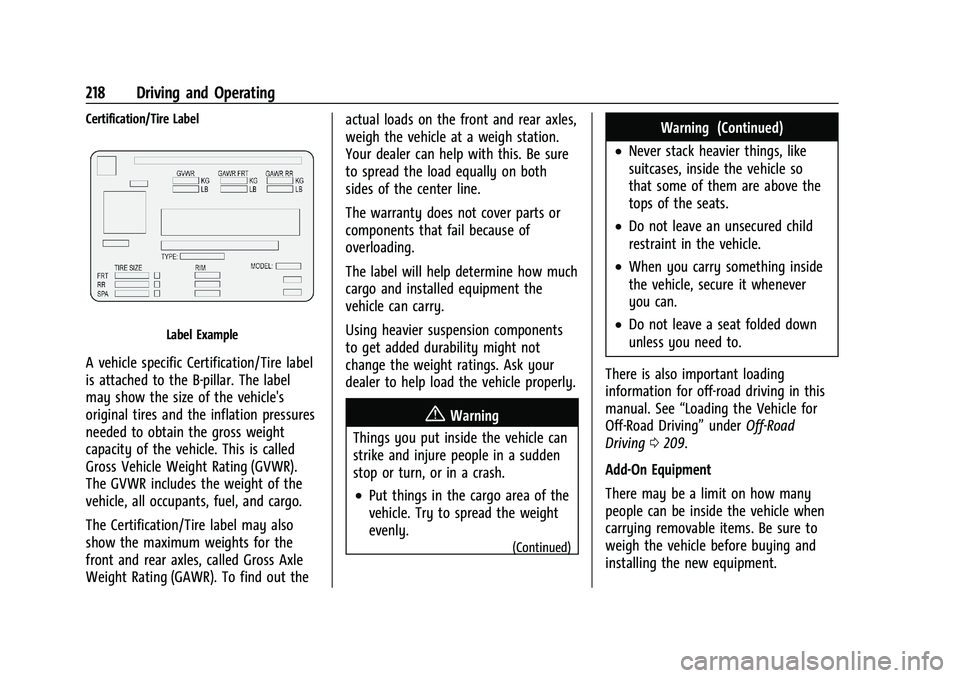
Label Example
A vehicle specific Certification/Tire label
is attached to the B-pillar. The label
may show the size of the vehicle's
original tires and the inflation pressures
needed to obtain the gross weight
capacity of the vehicle. This is called
Gross Vehicle Weight Rating (GVWR).
The GVWR includes the weight of the
vehicle, all occupants, fuel, and cargo.
The Certification/Tire label may also
show the maximum weights for the
front and rear axles, called Gross Axle
Weight Rating (GAWR). To find out theactual loads on the front and rear axles,
weigh the vehicle at a weigh station.
Your dealer can help with this. Be sure
to spread the load equally on both
sides of the center line.
The warranty does not cover parts or
components that fail because of
overloading.
The label will help determine how much
cargo and installed equipment the
vehicle can carry.
Using heavier suspension components
to get added durability might not
change the weight ratings. Ask your
dealer to help load the vehicle properly.
{Warning
Things you put inside the vehicle can
strike and injure people in a sudden
stop or turn, or in a crash.
.Put things in the cargo area of the
vehicle. Try to spread the weight
evenly.
(Continued)
Warning (Continued)
.Never stack heavier things, like
suitcases, inside the vehicle so
that some of them are above the
tops of the seats.
.Do not leave an unsecured child
restraint in the vehicle.
.When you carry something inside
the vehicle, secure it whenever
you can.
.Do not leave a seat folded down
unless you need to.
There is also important loading
information for off-road driving in this
manual. See “Loading the Vehicle for
Off-Road Driving” underOff-Road
Driving 0209.
Add-On Equipment
There may be a limit on how many
people can be inside the vehicle when
carrying removable items. Be sure to
weigh the vehicle before buying and
installing the new equipment.
Page 223 of 461
Cadillac Escalade Owner Manual (GMNA-Localizing-U.S./Canada/Mexico-
16417396) - 2023 - CRC - 5/11/22
Driving and Operating 221
brake pedal not applied, pressing and
holding the button for more than
five seconds will place the vehicle in Service
Mode. The instruments and audio systems
will operate as they do when the ignition is
on, but the vehicle will not be able to be
driven. The engine will not start in Service
Mode. Press the button again to turn the
ignition off.
Starting the Engine
If the vehicle has a diesel engine, see the
Duramax diesel supplement.
Caution
If you add electrical parts or accessories,
you could change the way the engine
operates. Any resulting damage would
not be covered by the vehicle warranty.
SeeAdd-On Electrical Equipment 0334.
Shift the vehicle into P (Park) or N (Neutral).
To restart the engine when the vehicle is
already moving, use N (Neutral) only.
Caution
Do not try to shift to P (Park) if the
vehicle is moving. If you do, you could
damage the transmission. Shift to P (Park)
only when the vehicle is stopped.
Starting Procedure
1. The remote key must be in the vehicle. Press ENGINE START/STOP with the brake
pedal applied. When the engine begins
cranking, let go of the button.
The idle speed will go down as the
engine gets warm. Do not race the
engine immediately after starting it.
Operate the engine and transmission
gently to allow the oil to warm up and
lubricate all moving parts.
When the low fuel warning light is on
and the FUEL LEVEL LOW message is
displayed in the Driver Information
Center (DIC), press the ENGINE START/
STOP position to continue engine
cranking.
Caution
Cranking the engine for long periods of
time, by trying to start the engine
immediately after cranking has ended,
can overheat and damage the cranking
motor, and drain the battery. Wait at
least 15 seconds between each try, to let
the cranking motor cool down.
2. If the engine does not start after five to 10 seconds, especially in very cold
weather (below −18 °C or 0 °F), it could
be flooded with too much gasoline. Try
pushing the accelerator pedal all the way
to the floor and holding it there while
pressing ENGINE START/STOP for up to a
maximum of 15 seconds. Wait at least
15 seconds between each try, to allow
the cranking motor to cool down. When
the engine starts, let go of the button
and accelerator. If the vehicle starts
briefly but then stops again, do the
same thing. This clears the extra gasoline
from the engine. Do not race the engine
immediately after starting it. Operate
the engine and transmission gently until
the oil warms up and lubricates all
moving parts.
Page 234 of 461

Cadillac Escalade Owner Manual (GMNA-Localizing-U.S./Canada/Mexico-
16417396) - 2023 - CRC - 5/11/22
232 Driving and Operating
Automatic Transfer Case
Two-Speed Transfer Case
If equipped, the transfer case controls are
used to shift into and out of four-wheel
drive.
To shift the transfer case, press the desired
button. The graphic in the instrument
cluster will flash while a shift is in progress.
The graphic displayed will change to indicate
the setting requested.
When the shift is complete the graphic will
stop flashing. The DIC message turns off
once the shift is complete. If the transfer
case cannot complete a shift request, it will
go back to its last chosen setting.The settings are:
N (Neutral) :
Use only when the vehicle
needs to be towed. See Recreational Vehicle
Towing 0402 and
Transporting a Disabled Vehicle 0401.
2
m(Two-Wheel Drive High) : Use for driving
on most streets and highways. The front
axle is not engaged. This setting provides
the best fuel economy.
AUTO (Automatic Four-Wheel Drive) : Use
when road surface conditions are variable.
When driving in AUTO, the front axle is
engaged, and the vehicle's power is sent to
the front and rear wheels automatically
based on driving conditions. This setting
provides slightly lower fuel economy than
2
m.
4
m(Four-Wheel Drive High) : Use this
position when extra traction is needed, such
as when driving on snowy or icy roads,
when off-roading, or when plowing snow.
4
n(Four-Wheel Drive Low) : This setting
engages the front axle and delivers extra
torque. Choose 4
nwhen driving off-road in
deep sand, deep mud, or deep snow, and while climbing or descending steep hills.
While driving in 4
n, keep vehicle speed
below 72 km/h (45 mph).
Shifting into 4
nwill turn Traction Control
and StabiliTrak/ESC off. See Traction Control/
Electronic Stability Control 0238.
Shifts between 2
m, 4m, and AUTO
Any of these shifts can be made at normal
driving speed.
The actual 4x4 shift request is only made
after the button is released. The 4x4 graphic
will remain flashing until the shift request
has completed. A DIC message displays to
indicate that the 4x4 transfer case has been
requested to shift to the new desired state.
Once the 4x4 shift has completed, the DIC
message disappears, the 4x4 graphic stops
flashing, and the current setting is indicated.
When a shift to 2
mis completed
successfully while in P (Park), the parking
brake will engage. To resume driving, shift
the transmission to the desired gear and
manually release the parking bake or press
the accelerator pedal to begin driving. See
Electric Parking Brake 0236.