roof CADILLAC ESCALADE ESV 2010 User Guide
[x] Cancel search | Manufacturer: CADILLAC, Model Year: 2010, Model line: ESCALADE ESV, Model: CADILLAC ESCALADE ESV 2010Pages: 620, PDF Size: 7.4 MB
Page 126 of 620
Black plate (2,1)Cadillac Escalade/Escalade ESV Owner Manual - 2010
Section 3 Features and ControlsMirrors . . . . . . . . . . . . . . . . . . . . . . . . . . . . . . . . . . . . . . . . . . . . 3-43
Manual Rearview Mirror . . . . . . . . . . . . . . . . . . . . . . . . 3-43
Automatic Dimming Rearview Mirror . . . . . . . . . . . 3-43
Outside Power Foldaway Mirrors . . . . . . . . . . . . . . 3-43
Park Tilt Mirrors . . . . . . . . . . . . . . . . . . . . . . . . . . . . . . . . 3-44
Outside Convex Mirror . . . . . . . . . . . . . . . . . . . . . . . . . 3-45
Outside Heated Mirrors . . . . . . . . . . . . . . . . . . . . . . . . 3-45
Object Detection Systems . . . . . . . . . . . . . . . . . . . . . . . 3-46
Ultrasonic Rear Parking Assist (URPA) . . . . . . . . 3-46
Side Blind Zone Alert (SBZA) . . . . . . . . . . . . . . . . . . 3-48
Rear Vision Camera (RVC) . . . . . . . . . . . . . . . . . . . . 3-51 Universal Home Remote System . . . . . . . . . . . . . . . . 3-55
Universal Home Remote System Operation
(With Three Round LED) . . . . . . . . . . . . . . . . . . . . 3-55
Storage Areas . . . . . . . . . . . . . . . . . . . . . . . . . . . . . . . . . . . . 3-62
Glove Box . . . . . . . . . . . . . . . . . . . . . . . . . . . . . . . . . . . . . 3-62
Cupholders . . . . . . . . . . . . . . . . . . . . . . . . . . . . . . . . . . . . 3-62
Center Console Storage . . . . . . . . . . . . . . . . . . . . . . 3-64
Assist Handles . . . . . . . . . . . . . . . . . . . . . . . . . . . . . . . . . 3-64
Garment Hooks . . . . . . . . . . . . . . . . . . . . . . . . . . . . . . . . 3-64
Roof Rack System . . . . . . . . . . . . . . . . . . . . . . . . . . . . . 3-64
Rear Storage Area . . . . . . . . . . . . . . . . . . . . . . . . . . . . . 3-66
Rear Seat Armrest . . . . . . . . . . . . . . . . . . . . . . . . . . . . . 3-66
Sunroof . . . . . . . . . . . . . . . . . . . . . . . . . . . . . . . . . . . . . . . . . . . 3-66
3-2
Page 152 of 620

Black plate (28,1)Cadillac Escalade/Escalade ESV Owner Manual - 2010
The steering may bind with the wheels turned off center.
If this happens, move the steering wheel from right to
left while turning the key to ACC/ACCESSORY. If this
doesn't work, then the vehicle needs service.
Notice: Using a tool to force the key to turn in the
ignition could cause damage to the switch or break
the key. Use the correct key, make sure it is all the
way in, and turn it only with your hand. If the key
cannot be turned by hand, see your dealer.
B (ACC/ACCESSORY): This position lets things like
the radio and the windshield wipers operate while the
engine is off. Use this position if the vehicle must be
pushed or towed.
C (ON/RUN): This position can be used to operate the
electrical accessories and to display some instrument
panel cluster warning and indicator lights. The switch
stays in this position when the engine is running. The
transmission is also unlocked in this position on
automatic transmission vehicles.
If you leave the key in the ACC/ACCESSORY or
ON/RUN position with the engine off, the battery could
be drained. You may not be able to start the vehicle if
the battery is allowed to drain for an extended period
of time. D (START): This is the position that starts the engine.
When the engine starts, release the key. The ignition
switch returns to ON/RUN for driving.
A warning tone will sound when the driver door is
opened, the ignition is in ACC/ACCESSORY or
LOCK/OFF and the key is in the ignition.
Retained Accessory Power (RAP) The following vehicle accessories can be used for up to
10 minutes after the engine is turned off: .
Audio System .
Power Windows .
OnStar ®
System (if equipped) .
Sunroof (if equipped)
These features work when the key is in ON/RUN or
ACC/ACCESSORY. Once the key is turned from
ON/RUN to LOCK/OFF, the windows and sunroof
continue to work up to 10 minutes until any door is
opened. The radio continues to work for up to
10 minutes or until the driver door is opened.
3-28
Page 188 of 620

Black plate (64,1)Cadillac Escalade/Escalade ESV Owner Manual - 2010
Center Console Storage A console compartment is located between the bucket
seats.
The console has both an upper and lower storage bin
accessed by lifting up on the latches located at the front
of the console lid.
The console may have an accessory power outlet
inside. See Accessory Power Outlet(s) on page 4 ‑ 19 .
The rear of the console also has a cupholder that
swings down for the rear seat passengers to use.
Assist Handles Assist handles located above the rear passenger doors
can be used when getting out of the vehicle. Pull the
handles downward to use them.
Garment Hooks There are garment hooks located on the assist handles. Roof Rack System
{ WARNING: If something is carried on top of the vehicle that is
longer or wider than the roof rack — like paneling,
plywood, or a mattress — the wind can catch it
while the vehicle is being driven. The item being
carried could be violently torn off, and this could
cause a collision, and damage the vehicle. Never
carry something longer or wider than the roof rack
on top of the vehicle unless using a GM Certified
accessory carrier.
For vehicles with a roof rack, the rack can be used to
load items. For roof racks that do not have crossrails
included, GM Certified crossrails can be purchased as
an accessory. See your dealer for additional
information.
For vehicles with crossrails, they can be moved back
and forth to help secure cargo. To adjust them,
turn the knob located at each end of the crossrail
counterclockwise until the crossrail can move freely. To
secure the crossrail, turn the knob located at each end
of the crossrail clockwise until tightened. Tie the load to
the siderails or siderail supports.
3-64
Page 189 of 620
Black plate (65,1)Cadillac Escalade/Escalade ESV Owner Manual - 2010
Notice: Loading cargo on the roof rack that weighs
more than 91 kg (200 lbs) or hangs over the rear or
sides of the vehicle may damage the vehicle. Load
cargo so that it rests evenly between the crossrails,
making sure to fasten cargo securely.
To prevent damage or loss of cargo when driving, check
to make sure crossrails and cargo are securely
fastened. Loading cargo on the roof rack will make the
vehicle ’ s center of gravity higher. Avoid high speeds,
sudden starts, sharp turns, sudden braking or abrupt
maneuvers, otherwise it may result in loss of control.
If driving for a long distance, on rough roads, or at high
speeds, occasionally stop the vehicle to make sure the
cargo remains in its place.
Do not exceed the maximum vehicle capacity when
loading the vehicle. For more information on vehicle
capacity and loading, see Loading the Vehicle
on
page 6 ‑ 32 .
To prevent damage or loss of cargo, check now and
then to make sure the luggage and cargo are still
securely fastened.
Be sure the cargo is properly loaded. .
If small heavy objects are placed on the roof, place
the load in the area over the rear wheels (behind
the rear side door on extended models). If needed,
cut a piece of 3/8 inch plywood to fit inside the
crossrails and siderails to spread the load.
If plywood is used, tie it to the siderail supports. .
Tie the load to the crossrails or the siderail
supports. Use the crossrails only to keep the load
from sliding. To move the crossrails, pull out on the
latch release handle at each end. Slide the
crossrail to the desired position balancing the force
side to side. Push the release handle back into the
latched position and slide the crossrail back and
forth slightly to be sure the latch snaps securely
into place. .
If needed to carry long items, move the crossrails
as far apart as they will go. Tie the load to the
crossrails and the siderails or siderail supports.
Also tie the load to the bumpers. Do not tie the
load so tightly that the crossrails or siderails are
damaged. .
After moving a crossrail, be sure it is securely
locked into the siderail.
A Center High-Mounted Stoplamp (CHMSL) is located
above the glass or above the rear load doors.
If items are loaded on the roof of the vehicle, care
should be taken not to block or damage the
CHMSL unit.
3-65
Page 190 of 620
Black plate (66,1)Cadillac Escalade/Escalade ESV Owner Manual - 2010
Rear Storage Area For vehicles with a rear storage area, it is located in the
rear cargo area of the vehicle on the driver's side trim
panel.
Turn the knobs and swing the storage door to access
the storage compartment. The door can be removed.
Rear Seat Armrest For vehicle with an armrest/storage compartment
located by the second row seat, pull the loop at the top
of the armrest out to lower the armrest.
Push the button on the front of the armrest and pull
the top up to open the compartment.
Sunroof Your vehicle may be equipped with a power sliding
sunroof. To open or close the sunroof, the ignition
needs to be turned to ON/RUN, or Retained Accessory
Power (RAP) must be active. When RAP is active, the
sunroof will work for 10 minutes after the ignition is
turned off, or until a front door is opened. See Retained
Accessory Power (RAP)
on page 3 ‑ 28 for more
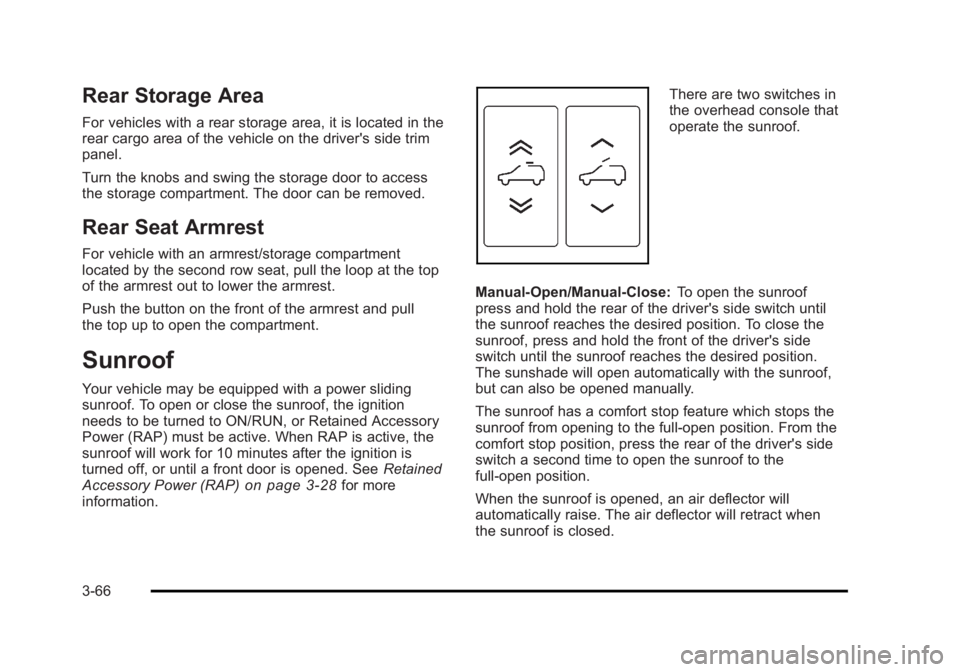
information. There are two switches in
the overhead console that
operate the sunroof.
Manual-Open/Manual-Close: To open the sunroof
press and hold the rear of the driver's side switch until
the sunroof reaches the desired position. To close the
sunroof, press and hold the front of the driver's side
switch until the sunroof reaches the desired position.
The sunshade will open automatically with the sunroof,
but can also be opened manually.
The sunroof has a comfort stop feature which stops the
sunroof from opening to the full-open position. From the
comfort stop position, press the rear of the driver's side
switch a second time to open the sunroof to the
full-open position.
When the sunroof is opened, an air deflector will
automatically raise. The air deflector will retract when
the sunroof is closed.
3-66
Page 191 of 620
Black plate (67,1)Cadillac Escalade/Escalade ESV Owner Manual - 2010
Express-Open/Express-Close: To express-open the
sunroof, fully press and release the rear of the driver's
side switch. The sunroof will open automatically. To stop
the sunroof partway, press the switch a second time. To
express-close the sunroof, fully press and release the
front of the driver's side switch. The sunroof will close
automatically. To stop the sunroof partway, press the
switch a second time. The sunshade will open
automatically with the sunroof, but can also be opened
manually.
The sunroof has a comfort stop feature which stops the
sunroof from opening to the full-open position. From the
comfort stop position, press the rear of the driver's side
switch a second time to open the sunroof to the
full-open position.
When the sunroof is opened, an air deflector will
automatically raise. The air deflector will retract when
the sunroof is closed.
Vent: The sunroof has an express-vent open feature.
From the closed position, press the rear of the
passenger's side switch to vent the sunroof. To stop
the sunroof partway, press the switch a second time.
To close the sunroof, press and hold the front of the
passenger's side switch. To stop the sunroof partway,
release the switch. Anti-Pinch Feature: If an object is in the path of the
sunroof while it is closing, the anti-pinch feature will
detect the object and stop the sunroof from closing
at the point of the obstruction. The sunroof will then
open halfway, and the air deflector will raise. To close
the sunroof once it has re-opened, refer to the
“ Express-Close ” or “ Manual-Close ” functions described
previously. If the sunroof is in the vent position, and
there is an object in the path of the sunroof when it
closing, the anti-pinch feature will detect the object and
stop the sunroof. To close the sunroof once it has
re-opened, refer to the “ Manual-Close ” or
“ Express-Close ” functions described previously.
Dirt and debris may collect on the sunroof seal or in the
tracks that could cause an issue with sunroof operation,
noise or plug the water drainage system. Periodically
open the sunroof and remove any obstacles or loose
debris. Wipe the sunroof seal and roof sealing area
using a clean cloth, mild soap, and water. Do not
remove grease from sunroof.
3-67
Page 241 of 620

Black plate (49,1)Cadillac Escalade/Escalade ESV Owner Manual - 2010
Compass Calibration The compass can be manually calibrated. Only calibrate
the compass in a magnetically clean and safe location,
such as an open parking lot, where driving the vehicle
in circles is not a danger. It is suggested to calibrate
away from tall buildings, utility wires, manhole covers,
or other industrial structures, if possible.
If CAL should ever appear in the DIC display, the
compass should be calibrated.
If the DIC display does not show a heading, for
example, N for North, or the heading does not change
after making turns, there may be a strong magnetic field
interfering with the compass. Such interference may be
caused by a magnetic CB or cell phone antenna mount,
a magnetic emergency light, magnetic note pad holder,
or any other magnetic item. Turn off the vehicle, move
the magnetic item, then turn on the vehicle and calibrate
the compass.
To calibrate the compass, use the following procedure:
Compass Calibration Procedure 1. Before calibrating the compass, make sure the
compass zone is set to the variance zone in which
the vehicle is located. See “ Compass Variance
(Zone) Procedure ” earlier in this section.
Do not operate any switches such as window,
sunroof, climate controls, seats, etc. during the
calibration procedure. 2. Press the vehicle information button until
PRESS
V TO CALIBRATE COMPASS displays.
3. Press the set/reset button to start the compass
calibration.
4. The DIC will display CALIBRATING: DRIVE IN
CIRCLES. Drive the vehicle in tight circles at less
than 5 mph (8 km/h) to complete the calibration.
The DIC will display CALIBRATION COMPLETE
for a few seconds when the calibration is complete.
The DIC display will then return to the
previous menu.
DIC Warnings and Messages Messages are displayed on the DIC to notify the driver
that the status of the vehicle has changed and that
some action may be needed by the driver to correct the
condition. Multiple messages may appear one after
another.
Some messages may not require immediate action, but
you can press any of the DIC buttons on the instrument
panel to acknowledge that you received the messages
and to clear them from the display.
Some messages cannot be cleared from the DIC
display because they are more urgent. These
messages require action before they can be cleared.
4-49
Page 301 of 620
Black plate (109,1)Cadillac Escalade/Escalade ESV Owner Manual - 2010
Cellular Phone Usage Cellular phone usage may cause interference with
the vehicle's radio. This interference may occur
when making or receiving phone calls, charging the
phone's battery, or simply having the phone on. This
interference causes an increased level of static while
listening to the radio. If static is received while listening
to the radio, unplug the cellular phone and turn it off.
Rear Side Window Antenna The AM-FM antenna is located in the passenger rear
side windows. Make sure the inside surfaces of the rear
side windows are not scratched and that the lines on
the glass are not damaged. If the inside surfaces are
damaged, they could interfere with radio reception.
If a cellular telephone antenna needs to be attached to
the glass, make sure that the grid lines for the AM-FM
antenna are not damaged. There is enough space
between the grid lines to attach a cellular telephone
antenna without interfering with radio reception. Notice: Using a razor blade or sharp object to clear
the inside of the rear side windows may affect radio
reception or damage the rear side window antenna.
Repairs would not be covered by the warranty. Do
not clear the inside of the rear side windows with
sharp objects.
Notice: Do not apply aftermarket glass tinting with
metallic film. The metallic film in some tinting
materials will interfere with or distort the incoming
radio reception. Any damage caused to the antenna
due to metallic tinting materials will not be covered
by the warranty.
XM ™ Satellite Radio Antenna
System The XM Satellite Radio antenna is located on the roof of
the vehicle. Keep the antenna clear of obstructions for
clear radio reception.
If the vehicle has a sunroof, the performance of the XM
system may be affected if the sunroof is open.
4-109
Page 360 of 620
Black plate (58,1)Cadillac Escalade/Escalade ESV Owner Manual - 2010 .
Vehicle is traveling at high speed. .
Vehicle changes directions more than once,
or when the vehicle is turning on a turn table in a
parking lot. .
Vehicle is entering and/or exiting a parking lot or a
garage. .
GPS signal is not received. .
Roof carrier is installed on the vehicle. .
Vehicle is being driven with tire chains. .
Tires are replaced. .
Tire pressure for the tires is incorrect. .
Tires are worn. .
First time the map DVD is inserted. .
Battery is disconnected for several days. .
Vehicle is driving in heavy traffic where driving is at
low speeds, and the vehicle is stopped and started
repeatedly.
See your dealer if other problems occur. Problems with Route Guidance Inappropriate route guidance may occur under one or
more of the following conditions: .
You have not turned onto the road indicated. .
Route guidance may not be available when using
automatic rerouting for the next right or left turn. .
The route may not be changed when using
automatic rerouting. .
There is no route guidance when turning at an
intersection. .
Plural names of places may be announced
occasionally. .
It may take a long time to operate automatic
rerouting during high-speed driving. .
Automatic rerouting may display a route returning
to the set stopover if you are heading for a
destination without passing through a set stopover. .
The route prohibits the entry of a vehicle due
to a regulation by time or season or any other
regulation which may be given. .
Some routes may not be searched. .
The route to the destination may not be shown if
there are new roads, if roads have recently
changed, or if certain roads are not listed on the
map DVD. See Ordering Map DVDs on page 5 ‑ 59 .
5-58
Page 407 of 620
Black plate (15,1)Cadillac Escalade/Escalade ESV Owner Manual - 2010
Loading Your Vehicle for Off-Road
Driving
{ WARNING: .
Cargo on the load floor piled higher than the
seatbacks can be thrown forward during a
sudden stop. You or your passengers could
be injured. Keep cargo below the top of the
seatbacks. .
Unsecured cargo on the load floor can be
tossed about when driving over rough terrain.
You or your passengers can be struck by
flying objects. Secure the cargo properly. .
Heavy loads on the roof raise the vehicle's
center of gravity, making it more likely to roll
over. You can be seriously or fatally injured if
the vehicle rolls over. Put heavy loads inside
the cargo area, not on the roof. Keep cargo in
the cargo area as far forward and low as
possible. There are some important things to remember about
how to load your vehicle. .
The heaviest things should be on the floor, forward
of the rear axle. Put heavier items as far forward
as you can. .
Be sure the load is properly secured, so things are
not tossed around.
You will find other important information under Loading
the Vehicle
on page 6 ‑ 32 and Tires on page 7 ‑ 58 .
Environmental Concerns Off-road driving can provide wholesome and satisfying
recreation. However, it also raises environmental
concerns. We recognize these concerns and urge every
off-roader to follow these basic rules for protecting the
environment: .
Always use established trails, roads, and areas
that have been specially set aside for public
off-road recreational driving and obey all posted
regulations. .
Avoid any driving practice that could damage
shrubs, flowers, trees, or grasses or disturb
wildlife. This includes wheel-spinning, breaking
down trees, or unnecessary driving through
streams or over soft ground.
6-15