brake CADILLAC ESCALADE EXT 2010 3.G User Guide
[x] Cancel search | Manufacturer: CADILLAC, Model Year: 2010, Model line: ESCALADE EXT, Model: CADILLAC ESCALADE EXT 2010 3.GPages: 580, PDF Size: 6.23 MB
Page 138 of 580

When parked on a hill, especially when the vehicle has
a heavy load, you may notice an increase in the effort
to shift out of P (Park). See Torque Lock (Automatic
Transmission) underShifting Into Park
on page 3‑41for more information.
{WARNING:
It is dangerous to get out of the vehicle if the shift
lever is not fully in P (Park) with the parking brake
firmly set. The vehicle can roll.
Do not leave the vehicle when the engine is
running unless you have to. If you have left the
engine running, the vehicle can move suddenly.
You or others could be injured. To be sure the
vehicle will not move, even when you are on fairly
level ground, always set the parking brake and
move the shift lever to P (Park). See Shifting Into
Park
on page 3‑41. If you are pulling a trailer,
see Towing a Trailer on page 6‑42.
R (Reverse) : Use this gear to back up.
Notice: Shifting to R (Reverse) while the vehicle is
moving forward could damage the transmission.
The repairs would not be covered by the vehicle
warranty. Shift to R (Reverse) only after the vehicle
is stopped. To rock the vehicle back and forth to get out of snow,
ice, or sand without damaging the transmission, see
If
Your Vehicle is Stuck in Sand, Mud, Ice, or Snow
on
page 6‑30.
N (Neutral) : In this position, the engine does not
connect with the wheels. To restart when you are
already moving, use N (Neutral) only. Also, use
N (Neutral) when the vehicle is being towed.
{WARNING:
Shifting into a drive gear while the engine is
running at high speed is dangerous. Unless your
foot is firmly on the brake pedal, the vehicle could
move very rapidly. You could lose control and hit
people or objects. Do not shift into a drive gear
while the engine is running at high speed.
Notice: Shifting out of P (Park) or N (Neutral) with
the engine running at high speed may damage the
transmission. The repairs would not be covered
by the vehicle warranty. Be sure the engine is not
running at high speed when shifting the vehicle.
3-36
Page 139 of 580

D (Drive) :This position is for normal driving. It provides
the best fuel economy. If you need more power for
passing, and you are:
.Going less than about 35 mph (55 km/h), push the
accelerator pedal about halfway down.
.Going about 35 mph (55 km/h) or more, push the
accelerator all the way down.
By doing this, the vehicle shifts down to the next gear
and has more power.
D (Drive) can be used when towing a trailer, carrying a
heavy load, driving on steep hills, or for off-road driving.
You may want to shift the transmission to a lower gear
selection if the transmission shifts too often.
Downshifting the transmission in slippery road
conditions could result in skidding, see Skidding under
Loss of Control on page 6‑12.
M (Manual Mode) : This position lets drivers select
the range of gears appropriate for current driving
conditions. See Driver Shift Control (DSC) later in this
section.
Notice: Spinning the tires or holding the vehicle in
one place on a hill using only the accelerator pedal
may damage the transmission. The repair will not be
covered by the vehicle warranty. If you are stuck, do
not spin the tires. When stopping on a hill, use the
brakes to hold the vehicle in place. The vehicle has a shift stabilization feature that
adjusts the transmission shifting to the current driving
conditions in order to reduce rapid upshifts and
downshifts. This shift stabilization feature is designed to
determine, before making an upshift, if the engine will
be able to maintain vehicle speed by analyzing things
such as vehicle speed, throttle position and vehicle
load. If the shift stabilization feature determines that a
current vehicle speed cannot be maintained, the
transmission does not upshift and instead holds the
current gear. In some cases, this may appear to be a
delayed shift, however the transmission is operating
normally.
The vehicle's transmission uses adaptive shift controls
that compares key shift parameters to pre-programmed
ideal shifts stored in the transmissions computer. The
transmission constantly makes adjustments to improve
vehicle performance according to how the vehicle is
being used, such as with a heavy load or when
temperature changes. During this adaptive shift controls
process, shifting may feel different as the transmission
determines the best settings.
When temperatures are very cold, the Hydra-Matic
®
6L80 automatic transmission's gear shifting may be
delayed providing more stable shifts until the engine
warms up. Shifts may be more noticeable with a cold
transmission. This difference in shifting is normal.
3-37
Page 142 of 580

This reduces wear on the braking system and increases
control of the vehicle. Grade Braking monitors vehicle
speed, acceleration, engine torque and brake pedal
usage. Using this information, it detects when the
vehicle is on a downhill grade and the driver desires
to slow the vehicle by pressing the brake.
Also seeTowing a Trailer
on page 6‑42for more
information.
Cruise Grade Braking
Cruise Grade Braking assists when driving on a
downhill grade. It maintains vehicle speed by
automatically implementing a shift schedule that uses
the engine and the transmission to slow the vehicle.
Cruise Grade Braking operates while Cruise Control is
engaged in Tow/Haul mode to assist in maintaining
vehicle speed under loaded vehicle conditions.
It utilizes vehicle acceleration and deviation from
desired speed to determine the correct gear for the
operating condition. If vehicle speed is above the
desired speed the transmission will downshift to slow
the vehicle. If vehicle speed is near or below desired
speed the trans will upshift, allowing vehicle speed to
increase.
While in the Range Select Mode (RSM) mode, cruise
grade braking is not available.
See Automatic Transmission Operation on page 3‑35.
Parking Brake
Set the parking brake by holding the regular brake
pedal down, then pushing down the parking brake
pedal.
If the ignition is on, the brake system warning light
will come on. See Brake System Warning Light
on
page 4‑31.
3-40
Page 143 of 580

Notice:Driving with the parking brake on can
overheat the brake system and cause premature
wear or damage to brake system parts. Make sure
that the parking brake is fully released and the
brake warning light is off before driving.
To release the parking brake, hold the regular brake
pedal down, then push down momentarily on the
parking brake pedal until you feel the pedal release.
Slowly pull your foot up off the park brake pedal. If the
parking brake is not released when you begin to drive,
the brake system warning light will flash and a chime
will sound warning you that the parking brake is still on.
If you are towing a trailer and are parking on a hill, see
Towing a Trailer on page 6‑42.Shifting Into Park
{WARNING:
It can be dangerous to get out of the vehicle if the
shift lever is not fully in P (Park) with the parking
brake firmly set. The vehicle can roll. If you have
left the engine running, the vehicle can move
suddenly. You or others could be injured. To be
sure the vehicle will not move, even when you are
on fairly level ground, use the steps that follow.
If you are pulling a trailer, see Towing a Trailer
on
page 6‑42
.
1. Hold the brake pedal down, then set the parking brake.
2. Move the shift lever into the P (Park) position by pulling the shift lever toward you and moving it up
as far as it will go.
3. Turn the ignition key to LOCK/OFF.
4. Remove the key and take it with you. If you can leave the vehicle with the ignition key in your hand,
the vehicle is in P (Park).
3-41
Page 144 of 580

Leaving the Vehicle With the Engine
Running
{WARNING:
It can be dangerous to leave the vehicle with the
engine running. The vehicle could move suddenly
if the shift lever is not fully in P (Park) with the
parking brake firmly set. And, if you leave the
vehicle with the engine running, it could overheat
and even catch fire. You or others could be
injured. Do not leave the vehicle with the engine
running.
If you have to leave the vehicle with the engine running,
be sure the vehicle is in P (Park) and the parking brake
is firmly set. After the shift lever is moved into P (Park),
hold the regular brake pedal down. Then, see if you can
move the shift lever away from P (Park) without first
pulling it toward you. If you can, it means that the shift
lever was not fully locked into P (Park).
Torque Lock
If you are parking on a hill and you do not shift the
transmission into P (Park) properly, the weight of the
vehicle can put too much force on the parking pawl
in the transmission. It might be difficult to pull the
shift lever out of P (Park). This is called torque lock.
To prevent torque lock, set the parking brake and then
shift into P (Park) properly before you leave the driver
seat. To find out how, see Shifting Into Park
on
page 3‑41.
When you are ready to drive, move the shift lever out of
P (Park) before releasing the parking brake.
If torque lock does occur, you might need to have
another vehicle push yours a little uphill to take some of
the pressure from the parking pawl in the transmission.
Then you should be able to pull the shift lever out of
P (Park).
3-42
Page 145 of 580

Shifting Out of Park
This vehicle is equipped with an electronic shift lock
release system. The shift lock release is designed to:
.Prevent ignition key removal unless the shift lever
is in P (Park) with the shift lever button fully
released, and
.Prevent movement of the shift lever out of P (Park),
unless the ignition is in ON/RUN or ACC/
ACCESSORY and the regular brake pedal is
applied.
The shift lock release is always functional except in the
case of an uncharged or low voltage (less than 9 volt)
battery.
If the vehicle has an uncharged battery or a battery with
low voltage, try charging or jump starting the battery.
See Jump Starting
on page 7‑42for more information.
To shift out of P (Park) use the following: 1. Apply the brake pedal.
2. Move the shift lever to the desired position. If you still are unable to shift out of P (Park):
1. Ease the pressure on the shift lever.
2. While holding down the brake pedal, press the shift lever all the way into P (Park).
3. Move the shift lever to the desired position.
If you are still having a problem shifting, then have the
vehicle serviced soon.
Parking Over Things That Burn
{WARNING:
Things that can burn could touch hot exhaust
parts under the vehicle and ignite. Do not park
over papers, leaves, dry grass, or other things that
can burn.
3-43
Page 147 of 580

WARNING: (Continued)
even death. Never run the engine in an enclosed
area that has no fresh air ventilation. For more
information, seeEngine Exhaust on page 3‑44.
{WARNING:
It can be dangerous to get out of the vehicle if the
automatic transmission shift lever is not fully in
P (Park) with the parking brake firmly set. The
vehicle can roll. Do not leave the vehicle when the
engine is running unless you have to. If you have
left the engine running, the vehicle can move
suddenly. You or others could be injured. To be
sure the vehicle will not move, even when you are
on fairly level ground, always set the parking
brake and move the shift lever to P (Park).
Follow the proper steps to be sure the vehicle will not
move. See Shifting Into Park on page 3‑41.
If parking on a hill and pulling a trailer, see Towing a
Trailer on page 6‑42.
Mirrors
Manual Rearview Mirror
Hold the inside rearview mirror in the center to move it
for a clearer view behind your vehicle. Adjust the mirror
to avoid glare from the headlamps behind you. Push the
tab forward for daytime use and pull it for nighttime use.
Automatic Dimming Rearview Mirror
This vehicle may have an automatic dimming inside
rearview mirror with OnStar®. It may also have
Intellibeam®. For more information on Intellibeam™, see
“Intellibeam™ Intelligent High‐Beam Headlamp Control
System” underExterior Lamps
on page 4‑10. For more
information on OnStar®, see the OnStar®owner's guide.
Automatic Dimming Mirror Operation
Automatic dimming reduces the glare of lights from
behind the vehicle. The dimming feature comes on and
the indicator light illuminates each time the vehicle is
started.
O(On/Off): Press to turn the dimming feature on or off.
Cleaning the Mirror
Do not spray glass cleaner directly on the mirror. Use a
soft towel dampened with water.
3-45
Page 152 of 580
.A trailer was attached to the vehicle, or a bicycle
or an object was hanging out of the tailgate during
the last drive cycle. Once the attached object is
removed and the tailgate is raised, URPA will
return to normal operation.
.A tow bar is attached to the vehicle.
.The vehicle's bumper is damaged. Take the vehicle
to your dealer/retailer to repair the system.
.Other conditions may affect system performance,
such as vibrations from a jackhammer or the
compression of air brakes on a very large truck.
If the system is still disabled, after driving forward at
least 40 km/h (25 mph), take the vehicle to your dealer/
retailer.
Rear Vision Camera (RVC)
This vehicle may have a Rear Vision Camera system.
Read this entire section before using it.
The rear vision camera system is designed to help
the driver when backing up by displaying a view of the
area behind the vehicle. When the driver shifts the
vehicle into R (Reverse), the video image automatically
appears on the navigation screen. Once the driver shifts
out of R (Reverse), the navigation screen will go back to
the last screen that had been displayed, after a delay.
Turning the Rear Vision Camera System On
or Off
To turn the rear vision camera system on or off: 1. Shift into P (Park).
2. Press the CONFIG hard key to enter the configure menu options, then press the CONFIG hard key to
select Display or touch the Display screen button.
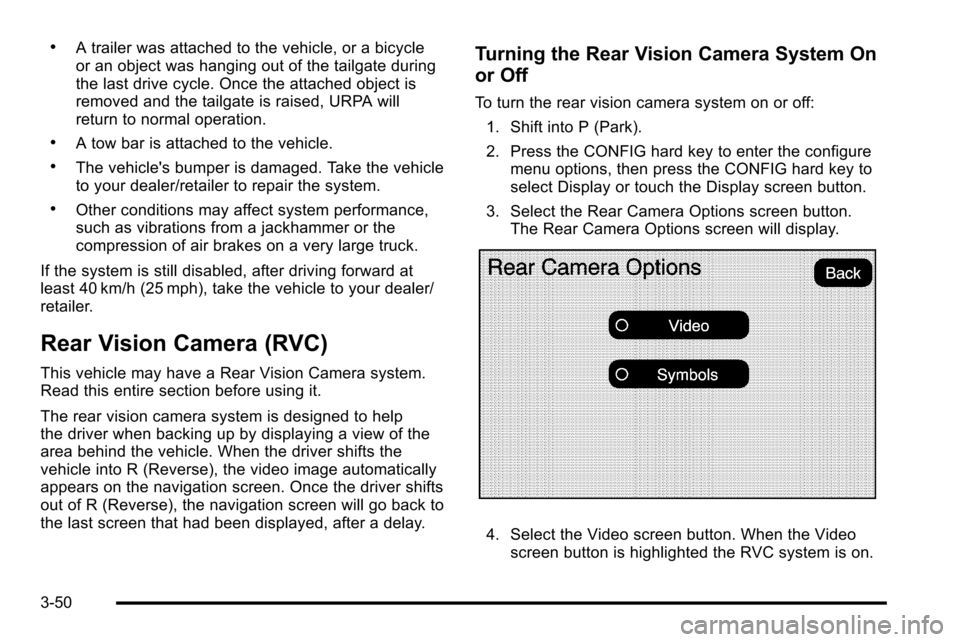
3. Select the Rear Camera Options screen button. The Rear Camera Options screen will display.
4. Select the Video screen button. When the Videoscreen button is highlighted the RVC system is on.
3-50
Page 181 of 580

Section 4 Instrument Panel
Instrument Panel Overview. . . . . . . . . . . . . . . . . . . . . . . .4-3
Hazard Warning Flashers . . . . . . . . . . . . . . . . . . . . . . . 4-3
Horn . . . . . . . . . . . . . . . . . . . . . . . . . . . . . . . . . . . . . . . . . . . . 4-3
Tilt Wheel . . . . . . . . . . . . . . . . . . . . . . . . . . . . . . . . . . . . . . . 4-3
Heated Steering Wheel . . . . . . . . . . . . . . . . . . . . . . . . . 4-3
Turn Signal/Multifunction Lever . . . . . . . . . . . . . . . . . . 4-4
Turn and Lane-Change Signals . . . . . . . . . . . . . . . . . 4-4
Headlamp High/Low-Beam Changer . . . . . . . . . . . . 4-5
Flash-to-Pass . . . . . . . . . . . . . . . . . . . . . . . . . . . . . . . . . . . 4-5
Windshield Wipers . . . . . . . . . . . . . . . . . . . . . . . . . . . . . . 4-6
Windshield Washer . . . . . . . . . . . . . . . . . . . . . . . . . . . . . 4-6
Cruise Control . . . . . . . . . . . . . . . . . . . . . . . . . . . . . . . . . . 4-7
Exterior Lamps . . . . . . . . . . . . . . . . . . . . . . . . . . . . . . . . 4-10
Headlamps on Reminder . . . . . . . . . . . . . . . . . . . . . . 4-14
Daytime Running Lamps (DRL) . . . . . . . . . . . . . . . . 4-14
Automatic Headlamp System . . . . . . . . . . . . . . . . . . 4-15
Fog Lamps . . . . . . . . . . . . . . . . . . . . . . . . . . . . . . . . . . . . 4-16
Exterior Cargo Lamps . . . . . . . . . . . . . . . . . . . . . . . . . 4-16
Instrument Panel Brightness . . . . . . . . . . . . . . . . . . . 4-16
Dome Lamps . . . . . . . . . . . . . . . . . . . . . . . . . . . . . . . . . . 4-17
Dome Lamp Override . . . . . . . . . . . . . . . . . . . . . . . . . . 4-17 Entry/Exit Lighting . . . . . . . . . . . . . . . . . . . . . . . . . . . . . 4-17
Reading Lamps . . . . . . . . . . . . . . . . . . . . . . . . . . . . . . . . 4-17
Electric Power Management . . . . . . . . . . . . . . . . . . . 4-17
Battery Run-Down Protection . . . . . . . . . . . . . . . . . . 4-18
Accessory Power Outlet(s) . . . . . . . . . . . . . . . . . . . . . 4-18
Ashtray(s) and Cigarette Lighter . . . . . . . . . . . . . . . 4-19
Analog Clock . . . . . . . . . . . . . . . . . . . . . . . . . . . . . . . . . . 4-20
Climate Controls . . . . . . . . . . . . . . . . . . . . . . . . . . . . . . . . . . 4-20
Dual Automatic Climate Control System . . . . . . . 4-20
Outlet Adjustment . . . . . . . . . . . . . . . . . . . . . . . . . . . . . . 4-24
Warning Lights, Gages, and Indicators . . . . . . . . . .4-25
Instrument Panel Cluster . . . . . . . . . . . . . . . . . . . . . . . 4-26
Speedometer and Odometer . . . . . . . . . . . . . . . . . . . 4-27
Trip Odometer . . . . . . . . . . . . . . . . . . . . . . . . . . . . . . . . . 4-27
Tachometer . . . . . . . . . . . . . . . . . . . . . . . . . . . . . . . . . . . . 4-27
Safety Belt Reminders . . . . . . . . . . . . . . . . . . . . . . . . . 4-27
Airbag Readiness Light . . . . . . . . . . . . . . . . . . . . . . . . 4-28
Passenger Airbag Status Indicator . . . . . . . . . . . . . 4-29
Charging System Light . . . . . . . . . . . . . . . . . . . . . . . . 4-30
Brake System Warning Light . . . . . . . . . . . . . . . . . . . 4-31
4-1
Page 182 of 580
Section 4 Instrument Panel
Antilock Brake System (ABS) Warning Light . . . 4-32
StabiliTrak®Indicator Light . . . . . . . . . . . . . . . . . . . . . 4-32
Engine Coolant Temperature Gage . . . . . . . . . . . . 4-33
Tire Pressure Light . . . . . . . . . . . . . . . . . . . . . . . . . . . . 4-33
Malfunction Indicator Lamp . . . . . . . . . . . . . . . . . . . . 4-34
Oil Pressure Light . . . . . . . . . . . . . . . . . . . . . . . . . . . . . 4-37
Security Light . . . . . . . . . . . . . . . . . . . . . . . . . . . . . . . . . . 4-37
Fog Lamp Light . . . . . . . . . . . . . . . . . . . . . . . . . . . . . . . . 4-38
Lights On Reminder . . . . . . . . . . . . . . . . . . . . . . . . . . . 4-38
Cruise Control Light . . . . . . . . . . . . . . . . . . . . . . . . . . . 4-38
Highbeam On Light . . . . . . . . . . . . . . . . . . . . . . . . . . . . 4-38
Tow/Haul Mode Light . . . . . . . . . . . . . . . . . . . . . . . . . . 4-39
Fuel Gage . . . . . . . . . . . . . . . . . . . . . . . . . . . . . . . . . . . . . 4-39 Driver Information Center (DIC)
. . . . . . . . . . . . . . . . . .4-39
DIC Operation and Displays . . . . . . . . . . . . . . . . . . . 4-40
DIC Compass . . . . . . . . . . . . . . . . . . . . . . . . . . . . . . . . . . 4-46
DIC Warnings and Messages . . . . . . . . . . . . . . . . . . 4-48
DIC Vehicle Customization . . . . . . . . . . . . . . . . . . . . 4-56
Audio System(s) . . . . . . . . . . . . . . . . . . . . . . . . . . . . . . . . . . 4-66
Bluetooth
®. . . . . . . . . . . . . . . . . . . . . . . . . . . . . . . . . . . . . 4-66
Rear Seat Entertainment (RSE) System . . . . . . . 4-77
Rear Seat Audio (RSA) . . . . . . . . . . . . . . . . . . . . . . . . 4-85
Theft-Deterrent Feature . . . . . . . . . . . . . . . . . . . . . . . . 4-87
Audio Steering Wheel Controls . . . . . . . . . . . . . . . . 4-88
Radio Reception . . . . . . . . . . . . . . . . . . . . . . . . . . . . . . . 4-89
Fixed Mast Antenna . . . . . . . . . . . . . . . . . . . . . . . . . . . 4-90
XM™ Satellite Radio Antenna System . . . . . . . . . 4-90
4-2