lock CADILLAC ESCALADE EXT 2012 3.G Workshop Manual
[x] Cancel search | Manufacturer: CADILLAC, Model Year: 2012, Model line: ESCALADE EXT, Model: CADILLAC ESCALADE EXT 2012 3.GPages: 494, PDF Size: 7.71 MB
Page 116 of 494
Black plate (10,1)Cadillac Escalade EXT Owner Manual - 2012
4-10 Storage
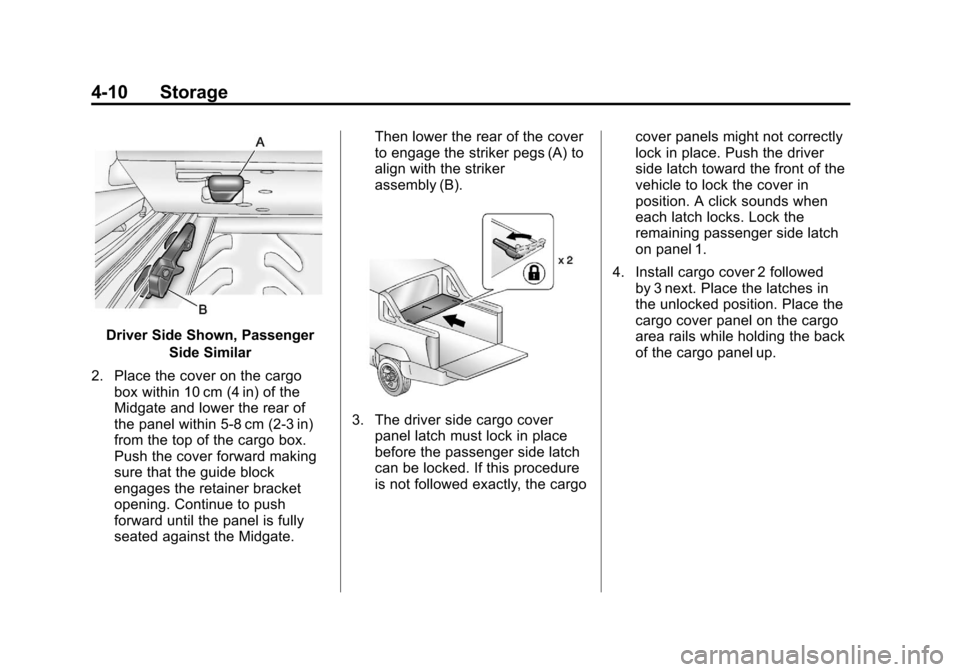
Driver Side Shown, PassengerSide Similar
2. Place the cover on the cargo box within 10 cm (4 in) of the
Midgate and lower the rear of
the panel within 5‐8 cm (2‐3 in)
from the top of the cargo box.
Push the cover forward making
sure that the guide block
engages the retainer bracket
opening. Continue to push
forward until the panel is fully
seated against the Midgate. Then lower the rear of the cover
to engage the striker pegs (A) to
align with the striker
assembly (B).
3. The driver side cargo cover
panel latch must lock in place
before the passenger side latch
can be locked. If this procedure
is not followed exactly, the cargo cover panels might not correctly
lock in place. Push the driver
side latch toward the front of the
vehicle to lock the cover in
position. A click sounds when
each latch locks. Lock the
remaining passenger side latch
on panel 1.
4. Install cargo cover 2 followed by 3 next. Place the latches in
the unlocked position. Place the
cargo cover panel on the cargo
area rails while holding the back
of the cargo panel up.
Page 117 of 494
Black plate (11,1)Cadillac Escalade EXT Owner Manual - 2012
Storage 4-11
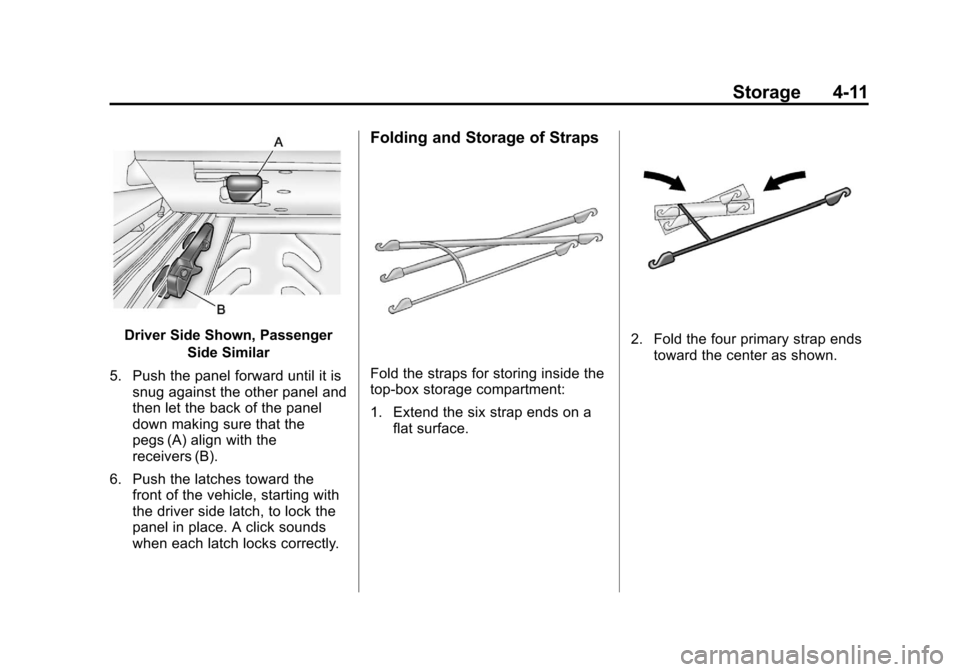
Driver Side Shown, PassengerSide Similar
5. Push the panel forward until it is snug against the other panel and
then let the back of the panel
down making sure that the
pegs (A) align with the
receivers (B).
6. Push the latches toward the front of the vehicle, starting with
the driver side latch, to lock the
panel in place. A click sounds
when each latch locks correctly.
Folding and Storage of Straps
Fold the straps for storing inside the
top-box storage compartment:
1. Extend the six strap ends on aflat surface.
2. Fold the four primary strap endstoward the center as shown.
Page 119 of 494

Black plate (13,1)Cadillac Escalade EXT Owner Manual - 2012
Storage 4-13
Notice:Loading cargo on the
roof rack that weighs more than
91 kg (200 lbs) or hangs over the
rear or sides of the vehicle may
damage the vehicle. Load cargo
so that it rests evenly between
the crossrails, making sure to
fasten cargo securely.
To prevent damage or loss of cargo
when driving, check to make sure
crossrails and cargo are securely
fastened. Loading cargo on the roof
rack will make the vehicle’ s center
of gravity higher. Avoid high speeds,
sudden starts, sharp turns, sudden
braking or abrupt maneuvers,
otherwise it may result in loss of
control. If driving for a long distance,
on rough roads, or at high speeds,
occasionally stop the vehicle to
make sure the cargo remains in its
place. Do not exceed the maximum vehicle
capacity when loading the vehicle.
For more information on vehicle
capacity and loading, see
Vehicle
Load Limits on page 9‑16.
.If small heavy objects are placed
on the roof, cut a piece of 9 mm
or 3/8 inch plywood to fit inside
the crossrails and siderails to
spread the load. Tie the plywood
to the siderail supports.
.Tie the load and secure it to the
crossrails or the siderail
supports. Use the crossrails only
to keep the load from sliding. To
move a crossrail, lift the release
lever up, on both sides of the
rail. Then slide the crossrail to
the desired position balancing
the force side to side. Press the
release lever down on both
sides of the rail, down to tighten
it. Try to slide the crossrail back
and forth slightly to make sure it
is tight.
.To carry long items, move the
crossrails as far apart as
possible. Tie the load to the
crossrails and the siderails or
siderail supports. Also tie the
load to the bumpers, but do not
tie the load so tightly that the
crossrails or siderails are
damaged.
.After moving a crossrail, be sure
it is securely locked into the
siderail.
A Center High-Mounted Stoplamp
(CHMSL) is located above the rear
window glass.
Make sure items loaded on the roof
of the vehicle do not block or
damage the CHMSL.
Page 121 of 494
Black plate (1,1)Cadillac Escalade EXT Owner Manual - 2012
Instruments and Controls 5-1
Instruments and
Controls
Controls
Steering Wheel Adjustment . . . 5-2
Steering Wheel Controls . . . . . . 5-2
Heated Steering Wheel . . . . . . . 5-4
Horn . . . . . . . . . . . . . . . . . . . . . . . . . . 5-4
Windshield Wiper/Washer . . . . . 5-4
Compass . . . . . . . . . . . . . . . . . . . . . 5-5
Clock . . . . . . . . . . . . . . . . . . . . . . . . . 5-7
Power Outlets . . . . . . . . . . . . . . . . . 5-7
Cigarette Lighter . . . . . . . . . . . . . . 5-8
Ashtrays . . . . . . . . . . . . . . . . . . . . . . 5-9
Warning Lights, Gauges, and
Indicators
Warning Lights, Gauges, andIndicators . . . . . . . . . . . . . . . . . . . . 5-9
Instrument Cluster . . . . . . . . . . . 5-10
Speedometer . . . . . . . . . . . . . . . . 5-11
Odometer . . . . . . . . . . . . . . . . . . . . 5-11
Trip Odometer . . . . . . . . . . . . . . . 5-11
Tachometer . . . . . . . . . . . . . . . . . . 5-11
Fuel Gauge . . . . . . . . . . . . . . . . . . 5-11 Engine Coolant Temperature
Gauge . . . . . . . . . . . . . . . . . . . . . . 5-12
Safety Belt Reminders . . . . . . . 5-12
Airbag Readiness Light . . . . . . 5-13
Passenger Airbag Status Indicator . . . . . . . . . . . . . . . . . . . . 5-14
Charging System Light . . . . . . 5-15
Malfunction Indicator Lamp . . . . . . . . . . . . . 5-15
Brake System Warning Light . . . . . . . . . . . . . . . . . . . . . . . 5-18
Antilock Brake System (ABS) Warning Light . . . . . . . . . . . . . . 5-19
Tow/Haul Mode Light . . . . . . . . 5-19
StabiliTrak
®OFF Light . . . . . . . 5-20
Traction Control System (TCS)/StabiliTrak
®Light . . . . 5-20
Tire Pressure Light . . . . . . . . . . 5-20
Engine Oil Pressure Light . . . . 5-21
Security Light . . . . . . . . . . . . . . . . 5-21
High-Beam On Light . . . . . . . . . 5-22
Front Fog Lamp Light . . . . . . . . 5-22
Lamps On Reminder . . . . . . . . . 5-22
Cruise Control Light . . . . . . . . . 5-23
Information Displays
Driver Information Center (DIC) . . . . . . . . . . . . . . . 5-23
Vehicle Messages
Vehicle Messages . . . . . . . . . . . 5-28
Battery Voltage and ChargingMessages . . . . . . . . . . . . . . . . . . 5-28
Brake System Messages . . . . 5-28
Door Ajar Messages . . . . . . . . . 5-29
Engine Cooling System Messages . . . . . . . . . . . . . . . . . . 5-29
Engine Oil Messages . . . . . . . . 5-30
Engine Power Messages . . . . 5-31
Fuel System Messages . . . . . . 5-31
Key and Lock Messages . . . . . 5-32
Lamp Messages . . . . . . . . . . . . . 5-32
Object Detection System Messages . . . . . . . . . . . . . . . . . . 5-32
Ride Control System Messages . . . . . . . . . . . . . . . . . . 5-32
Page 125 of 494
Black plate (5,1)Cadillac Escalade EXT Owner Manual - 2012
Instruments and Controls 5-5
6(Adjustable Interval Wipes):
Turn the band up for more frequent
wipes or down for less frequent
wipes.
6(Low Speed): Slow wipes.
1(High Speed): Fast wipes.
9(Off):Turns the windshield
wipers off.
Clear ice and snow from the wiper
blades before using them. If frozen
to the windshield, carefully loosen or
thaw them. Damaged blades should
be replaced.
Windshield Washer
{WARNING
In freezing weather, do not use
the washer until the windshield is
warmed. Otherwise the washer
fluid can form ice on the
windshield, blocking your vision.
L(Washer Fluid): Push the
paddle at the top of the lever
to spray washer fluid on the
windshield. The wipers clear the
window and then either stop or
return to the preset speed.
Compass
Your vehicle may have a compass
in the Driver Information
Center (DIC).
Compass Zone
The zone is set to zone eight upon
leaving the factory. Your dealer will
set the correct zone for your
location.
Under certain circumstances,
such as during a long distance
cross-country trip or moving to a
new state or province, it will be
necessary to compensate for
compass variance by resetting the
zone through the DIC if the zone is
not set correctly.
Compass variance is the difference
between the earth's magnetic north
and true geographic north. If the
compass is not set to the zone
where you live, the compass may
give false readings. The compass
must be set to the variance zone in
which the vehicle is traveling.
Page 127 of 494

Black plate (7,1)Cadillac Escalade EXT Owner Manual - 2012
Instruments and Controls 5-7
cell phone antenna mount, a
magnetic emergency light, magnetic
note pad holder, or any other
magnetic item. Turn off the vehicle,
move the magnetic item, then turn
on the vehicle and calibrate the
compass.
To calibrate the compass, use the
following procedure:
Compass Calibration Procedure
1. Before calibrating the compass,make sure the compass zone is
set to the variance zone in which
the vehicle is located. See
“Compass Variance (Zone)
Procedure” earlier in this
section.
Do not operate any switches
such as window, sunroof,
climate controls, seats, etc.
during the calibration procedure.
2. Press the vehicle information button until PRESS
VTO
CALIBRATE COMPASS
displays. 3. Press the set/reset button to
start the compass calibration.
4. The DIC will display CALIBRATING: DRIVE IN
CIRCLES. Drive the vehicle in
tight circles at less than 8 km/h
(5 mph) to complete the
calibration. The DIC will display
CALIBRATION COMPLETE for a
few seconds when the
calibration is complete. The DIC
display will then return to the
previous menu.
Clock
The analog clock is located on the
instrument panel above the radio.
The clock is not connected with any
other vehicle system and runs by
itself. To adjust the clock:
1. The adjustment button is locatedin the lower left corner of the
clock.
2. Push and hold the adjustment button to advance the clock
hands. Holding the button down will cause the clock to advance
faster. Release the button before
reaching the desired time.
3. Push and release the button to increase the time by one minute
increments until the desired time
is reached.
Power Outlets
Accessory power outlets can be
used to plug in electrical equipment,
such as a cell phone or MP3 player.
One accessory power outlet is
located inside the center floor
console. Lift up on the lower latch
located at the front of the console lid
to access the accessory power
outlet.
There may also be an accessory
power outlet located on the rear of
the center floor console above the
cupholder.
Remove the cover to access and
replace when not in use.
Page 128 of 494
Black plate (8,1)Cadillac Escalade EXT Owner Manual - 2012
5-8 Instruments and Controls
The accessory power outlets are
powered, even when the ignition is
in LOCK/OFF. Continuing to use
power outlets while the ignition is in
LOCK/OFF may cause the vehicle's
battery to run down.
Do not try to put the cigarette lighter
in any of the accessory power
outlets.
{WARNING
Power is always supplied to the
outlets. Do not leave electrical
equipment plugged in when the
vehicle is not in use because the
vehicle could catch fire and cause
injury or death.
Notice: Leaving electrical
equipment plugged in for an
extended period of time while
the vehicle is off will drain the battery. Always unplug electrical
equipment when not in use and
do not plug in equipment that
exceeds the maximum 20 ampere
rating.
Certain electrical accessories
may not be compatible with the
accessory power outlet and could
overload vehicle or adapter fuses.
If a problem is experienced, see
your dealer.
When adding electrical equipment,
be sure to follow the proper
installation instructions included
with the electrical equipment. See
Add-On Electrical Equipment on
page 9‑67.
Notice:
Hanging heavy
equipment from the power outlet
can cause damage not covered
by the vehicle warranty. The
power outlets are designed for
accessory power plugs only, such
as cell phone charge cords.
Cigarette Lighter
The cigarette lighter is located in the
center console near the cupholders.
Press on the access door to open it
and use the lighter.
To use the cigarette lighter, push it
in all the way, and let go. When it is
ready, it will pop back out by itself.
Notice: Holding a cigarette lighter
in while it is heating does not let
the lighter back away from the
heating element when it is hot.
Damage from overheating can
occur to the lighter or heating
element, or a fuse could be
blown. Do not hold a cigarette
lighter in while it is heating.
Page 139 of 494

Black plate (19,1)Cadillac Escalade EXT Owner Manual - 2012
Instruments and Controls 5-19
{WARNING
The brake system might not be
working properly if the brake
system warning light is on.
Driving with the brake system
warning light on can lead to a
crash. If the light is still on after
the vehicle has been pulled off
the road and carefully stopped,
have the vehicle towed for
service.
Antilock Brake System
(ABS) Warning Light
For vehicles with the Antilock Brake
System (ABS), this light comes on
briefly when the engine is started.If it does not, have the vehicle
serviced by your dealer. If the
system is working normally, the
indicator light then goes off.
If the ABS light stays on, turn the
ignition off. If the light comes on
while driving, stop as soon as it is
safely possible and turn the ignition
off. Then start the engine again to
reset the system. If the ABS light
stays on, or comes on again while
driving, the vehicle needs service.
If the regular brake system warning
light is not on, the vehicle still has
brakes, but not antilock brakes.
If the regular brake system warning
light is also on, the vehicle does not
have antilock brakes and there is a
problem with the regular brakes.
See
Brake System Warning Light on
page 5‑18. For vehicles with a Driver
Information Center (DIC), see
Brake
System Messages on page 5‑28 for
all brake-related DIC messages.
Tow/Haul Mode Light
For vehicles with the Tow/Haul
Mode feature, this light comes on
when the Tow/Haul Mode has been
activated.
For more information, see Tow/Haul
Mode on page 9‑35.
Page 152 of 494

Black plate (32,1)Cadillac Escalade EXT Owner Manual - 2012
5-32 Instruments and Controls
Key and Lock Messages
REPLACE BATTERY IN
REMOTE KEY
This message displays if a Remote
Keyless Entry (RKE) transmitter
battery is low. The battery needs to
be replaced in the transmitter. See
“Battery Replacement”under
Remote Keyless Entry (RKE)
System Operation on page 2‑3.
Lamp Messages
TURN SIGNAL ON
This message displays and a chime
sounds if a turn signal is left on for
1.2 km (0.75 mile). Move the turn
signal/multifunction lever to the off
position.
Object Detection System
Messages
PARKING ASSIST BLOCKED
SEE OWNERS MANUAL
This message displays if there is
something interfering with the park
assist system. See Ultrasonic
Parking Assist on page 9‑45 for
more information.
PARKING ASSIST OFF
After the vehicle has been started,
this message displays to remind the
driver that the Ultrasonic Rear
Parking Assist (URPA) system has
been turned off. Press the set/reset
button to acknowledge this message
and clear it from the DIC display. To
turn the URPA system back on, see
Ultrasonic Parking Assist on
page 9‑45.
SERVICE PARKING ASSIST
This message displays if there is a
problem with the Ultrasonic Rear
Parking Assist (URPA) system. Do
not use this system to help you
park. See Ultrasonic Parking Assist
on page 9‑45 for more information.
See your dealer for service.
Ride Control System
Messages
SERVICE STABILITRAK
If your vehicle has StabiliTrak and
this message displays, it means
there may be a problem with the
StabiliTrak system. If you see this
message, try to reset the system.
Stop; turn off the engine for at least
15 seconds; then start the engine
again. If this message still comes
on, it means there is a problem. You
should see your dealer for service.
The vehicle is safe to drive,
however, you do not have the
benefit of StabiliTrak, so reduce
your speed and drive accordingly.
Page 157 of 494

Black plate (37,1)Cadillac Escalade EXT Owner Manual - 2012
Instruments and Controls 5-37
ITALIANO:All messages will
appear in Italian.
FRANCAIS: All messages will
appear in French.
ESPANOL: All messages will
appear in Spanish.
ARABIC: All messages will appear
in Arabic.
CHINESE: All messages will
appear in Chinese.
NO CHANGE: No change will be
made to this feature. The current
setting will remain.
To select a setting, press the set/
reset button while the desired
setting is displayed on the DIC.
AUTO DOOR LOCK
This feature allows you to select
when the vehicle's doors will
automatically lock. See Automatic
Door Locks on page 2‑8 for more
information. Press the customization button until
AUTO DOOR LOCK appears on the
DIC display. Press the set/reset
button once to access the settings
for this feature. Then press the
customization button to scroll
through the following settings:
SHIFT OUT OF PARK (default):
The doors, including the tailgate, will
automatically lock when the vehicle
is shifted out of P (Park).
AT VEHICLE SPEED:
The
doors, including the tailgate, will
automatically lock when the vehicle
speed is above 8 mph (13 km/h) for
three seconds.
NO CHANGE: No change will be
made to this feature. The current
setting will remain.
To select a setting, press the set/
reset button while the desired
setting is displayed on the DIC. AUTO DOOR UNLOCK
This feature allows you to select
whether or not to turn off the
automatic door unlocking feature.
It also allows you to select which
doors and when the doors will
automatically unlock. See
Automatic
Door Locks on page 2‑8 for more
information.
Press the customization button until
AUTO DOOR UNLOCK appears on
the DIC display. Press the set/reset
button once to access the settings
for this feature. Then press the
customization button to scroll
through the following settings:
OFF: None of the doors will
automatically unlock.
DRIVER AT KEY OUT: Only the
driver door will unlock when the key
is taken out of the ignition.
DRIVER IN PARK: Only the driver
door will unlock when the vehicle is
shifted into P (Park).