mirror CADILLAC LYRIC 2023 User Guide
[x] Cancel search | Manufacturer: CADILLAC, Model Year: 2023, Model line: LYRIC, Model: CADILLAC LYRIC 2023Pages: 424, PDF Size: 4.76 MB
Page 138 of 424

Cadillac Lyriq Owner Manual (GMNA-Localizing-U.S./Canada-15644413) -
2023 - CRC - 2/23/22
Instruments and Controls 137
procedure to be repeated.
Read these instructions
completely before
programming the Universal
Remote system. It may help to
have another person assist
with the programming
process.1. On the infotainment home screen, navigate to the
Universal Remote controls.
2. Hold the end of the hand-held transmitter about
3 to 8 cm (1 to 3 in) away
from the rear-view mirror.
The hand-held transmitter
was supplied by the
manufacturer of the garage
door opener.
3. Select the “Add Remotes”
option on the infotainment
screen.
4. Press and hold the hand-held transmitter
button. Do not release the
hand-held transmitter
button until “Signal Found”
appears on the infotainment
screen. 5. Once the signal is found,
test the Universal Remote
System by pressing the
Test button. If your garage
door moves, then
programming was
successful. You may need to
press the Test button
several times. Indicate the
successful programming of
a remote by pressing the It
Worked button. After
successfully programming a
remote, there is no need to
complete Steps 6–10.
6. If your garage door does not react during testing,
press the It Didn’t Work
button and proceed to
Step 7.
The following steps require
the location and pressing of
the Learn or Smart button
on the garage door opener
receiver inside the garage.
These steps may require a
ladder and are time
sensitive. 7. Locate the Learn or Smart
button on the garage door
opener receiver in the
garage. The name and color
may vary by manufacturer
but is usually located near
the antenna wire.
8. Press and release the Learn or Smart button on the
garage door opener
receiver. Step 9 must be
completed within
30 seconds of pressing this
button.
9. Press the Test button on the infotainment screen.
If your garage door moves,
then programming was
successful. You may need to
press the Test button
several times. Indicate
successful programming by
pressing the It Worked
button.
10. If programming is not successful, press It Didn’t
Work button and repeat
Page 189 of 424
Cadillac Lyriq Owner Manual (GMNA-Localizing-U.S./Canada-15644413) -
2023 - CRC - 2/23/22
188 Climate Controls
Press AUTO to return to
automatic operation and the
air conditioner runs as needed.
@:Press to alternate
between recirculating air
inside the vehicle or pulling in
outside air. The indicator light
on the button is lit when
recirculation mode is active.
This helps to quickly cool the
air inside the vehicle and
reduce the entry of outside air
and odors.
Pressing this button cancels
automatic recirculation. Press
AUTO to return to automatic
operation; recirculation runs
automatically as needed.
Manual recirculation mode is
not available when in Defrost.
The climate control system
uses a sensor to automatically
detect high humidity inside the
vehicle. When high humidity is
detected, the climate control
system may adjust to outside
air supply, turn on the heater
and air conditioner, increase fan and temperature, and
direct more air to the
windshield. When the climate
control system does not
detect possible window
fogging, it returns to normal
operation. To turn Auto Defog
off or on, select Settings >
Climate and Air Quality > Auto
Defog > Select ON or OFF.
If Auto Defog is turned off,
or fogging does not clear
quickly enough, select
dto
more quickly clear the
windshield.
Rear Window Defogger
K: Press to turn the rear
window defogger on or off. An
indicator light on the button
comes on to show that the
rear window defogger is on.
The rear window defogger
only works when the vehicle is
on. If the outside temperature
is below 7°C (45°F), and the
rear window defogger is on,
the area of the windshield beneath the windshield wipers
will warm up to melt
accumulated snow or ice.
The rear window defogger can
be set to automatic operation.
When Auto Rear Defog is
selected, the rear window
defogger turns on
automatically when the vehicle
is first started in cold weather
and turns off when the vehicle
is warmed. To turn Auto Rear
Defog off or on, select
Settings > Climate and Air
Quality > Auto Rear Defog >
Select ON or OFF.
The heated outside rearview
mirrors turn on when the rear
window defogger button is on
and help to clear fog or frost
from the surface of the
mirrors.
Caution
Do not try to clear frost or
other material from the
inside of the front
windshield and rear window
(Continued)
Page 200 of 424
Cadillac Lyriq Owner Manual (GMNA-Localizing-U.S./Canada-15644413) -
2023 - CRC - 2/23/22
Driving and Operating 199
the road. Learn to recognize
warning clues—such as
enough water, ice, or packed
snow on the road to make a
mirrored surface —and slow
down when you have any
doubt.
.Try to avoid sudden
steering, acceleration,
or braking, including
reducing vehicle speed by
shifting to a lower gear. Any
sudden changes could cause
the tires to slide.
Remember: Antilock brakes
help avoid only the
braking skid.
Driving on Wet Roads
Rain and wet roads can
reduce vehicle traction and
affect your ability to stop and
accelerate. Always drive
slower in these types of
driving conditions and avoid
driving through large puddles
and deep-standing or flowing
water.
{Warning
Wet brakes can cause
crashes. They might not
work as well in a quick stop
and could cause pulling to
one side. You could lose
control of the vehicle.
After driving through a large
puddle of water or a car/
vehicle wash, lightly apply
the brake pedal until the
brakes work normally.
Flowing or rushing water
creates strong forces.
Driving through flowing
water could cause the
vehicle to be carried away.
If this happens, you and
other vehicle occupants
could drown. Do not ignore
police warnings and be very
cautious about trying to
drive through flowing water.
Hydroplaning
Hydroplaning is dangerous.
Water can build up under the
vehicle's tires so they actually
ride on the water. This can
happen if the road is wet
enough and you are going fast
enough. When the vehicle is
hydroplaning, it has little or no
contact with the road.
There is no hard and fast rule
about hydroplaning. The best
advice is to slow down when
the road is wet.
Other Rainy Weather Tips
Besides slowing down, other
wet weather driving tips
include:
.Allow extra following
distance.
.Pass with caution.
.Keep windshield wiping
equipment in good shape.
.Keep the windshield washer
fluid reservoir filled.
.Have good tires with proper
tread depth. See Tires 0334.
Page 202 of 424
Cadillac Lyriq Owner Manual (GMNA-Localizing-U.S./Canada-15644413) -
2023 - CRC - 2/23/22
Driving and Operating 201
Winter Driving
Driving on Snow or IceCaution
To avoid damage to the
wheels and brake
components, always clear
snow and ice from inside the
wheels and underneath the
vehicle before driving.
Snow or ice between the tires
and the road creates less
traction or grip, so drive
carefully. Wet ice can occur at
about 0°C (32°F) when
freezing rain begins to fall.
Avoid driving on wet ice or in
freezing rain until roads can be
treated.
For Slippery Road Driving:
.Turn off cruise control.
.If enabled, turn off
One-Pedal Driving. See
One-Pedal Driving 0214
.If turned off, turn on the
Traction Control and the
Electronic Stability Control systems. See Traction
Control/Electronic Stability
Control
0221.
.Select the Snow/Ice driver
mode. See Driver Mode
Control 0223.
.Accelerate gently.
Accelerating too quickly
causes the wheels to spin
and makes the surface under
the tires slick.
.Allow greater following
distance and watch for
slippery spots. Icy patches
can occur on otherwise clear
roads in shaded areas. The
surface of a curve or an
overpass can remain icy
when the surrounding roads
are clear. Avoid sudden
steering maneuvers and
braking while on ice.
.Antilock Brake System (ABS)
improves vehicle stability
during hard stops, but the
brakes should be applied
sooner than when on dry
pavement. See Antilock
Brake System (ABS) 0216.
Blizzard Conditions
If you become stranded or
cannot continue driving due to
winter storm conditions, stop
the vehicle in a safe place and
signal for help. Stay with the
vehicle unless there is help
nearby.
If you stay in your vehicle
while waiting, signal for help
and keep everyone in the
vehicle safe by turning on the
hazard warning flashers and
tying a red cloth to an outside
mirror.
To conserve battery energy
while waiting for help, run the
vehicle for only short periods
as needed to warm the vehicle
and then shut the vehicle off
and partially close the window.
Moving about to keep warm
also helps. For additional tips
to help conserve battery
energy in cold weather, see
Driving for Better Energy
Efficiency 0193.
Page 237 of 424
Cadillac Lyriq Owner Manual (GMNA-Localizing-U.S./Canada-15644413) -
2023 - CRC - 2/23/22
236 Driving and Operating
.Press*.
.PressJ.
.Press the Regen On Demand
paddle.
Erasing Speed Memory
The ACC set speed is erased
from memory if
Jis pressed
or if the vehice is turned off.
Weather Conditions
Affecting ACC
System operation may be
limited under snow, heavy rain,
or road spray conditions.
Accessory Installations and
Vehicle Modifications
Do not install or place any
object around the front
camera windshield area that
would obstruct the front
camera view.
Do not install objects on top of
the vehicle that overhang and
obstruct the front camera,
such as a canoe, kayak,
or other items that can be
transported. Do not modify the hood,
headlamps, or fog lamps, as
this may limit the camera’s
ability to detect an object.
{Warning
Stickers or accessories
attached on or around the
front or rear fascia of your
vehicle can impair the radar
sensors resulting in vehicle
damage or personal injury.
Your vehicle could brake
suddenly. Do not attach
anything on or around the
front or rear fascia, including
the license plate, the
bumper, or the grille. Use
only GM genuine
accessories.
Do not attach anything to the
front or rear fascia as this may
interfere with the radar
sensor operation. Cleaning the Sensing System
The camera sensor on the
windshield behind the
rearview mirror, and the
sensors on the front of the
vehicle can become blocked by
snow, ice, dirt, mud, or debris.
This area needs to be cleaned
for ACC to operate properly.
If ACC will not operate, regular
cruise control may be
available. See
“Switching
Between ACC and Regular
Cruise Control” previously in
this section. Always consider
driving conditions before using
either cruise control system.
For cleaning instructions, see
“Washing the Vehicle” under
Exterior Care 0364.
Super Cruise
If equipped, Super Cruise can
steer to maintain lane position
under certain conditions on
Super Cruise-enabled roads
that are separated from
opposing traffic.
Page 242 of 424
Cadillac Lyriq Owner Manual (GMNA-Localizing-U.S./Canada-15644413) -
2023 - CRC - 2/23/22
Driving and Operating 241
When engaged and not
steering the vehicle, the
steering wheel light bar
flashes blue, and
Zwill be
blue. The driver is in control of
steering and Super Cruise is
not steering the vehicle.
When the vehicle is positioned
in the center of the lane, the
steering wheel light bar and
Z
display will turn green,
indicating Super Cruise is
steering the vehicle.
When Super Cruise controls
the steering, traffic and other
conditions and laws permit,
and it is safe to do so, your
hands can be taken off the
steering wheel.
Always pay attention to the
road and the operation of the
vehicle. Always monitor and be
attentive of surrounding
traffic, including vehicles that
may cross the road in front of
your vehicle. Super Cruise steering can be
overridden with manual
steering at any time. When
Super Cruise is engaged,
always be prepared to take
immediate action
—including
steering, accelerating, and
braking quickly, if necessary.
Super Cruise, when engaged,
will enable Forward Collision
System to Alert and Brake.
Steering Manually and
Changing Lanes
The vehicle can always be
manually steered, even with
Super Cruise engaged; for
example, when changing lanes.
When the steering wheel is
moved manually, the steering
wheel light bar pulses blue and
Zon the instrument cluster
turns blue to indicate Super
Cruise is not steering the
vehicle.
When ready to allow Super
Cruise to resume steering
again, position the vehicle in
the center of the lane, hold the steering wheel until the
steering wheel light bar turns
green, and then release the
steering wheel when it is safe
to do so.
{Warning
To help prevent crashes
before making a lane
change:
.Always check mirrors.
.Glance over your shoulder.
.Use the turn signals.
Super Cruise Lane Change
On Demand Lane Changes
Super Cruise can steer to
perform a single lane change
under certain conditions when
requested by the driver or
initiated by the Super Cruise
System.
To request a lane change: 1. Verify the lane next to your vehicle is clear and
conditions are safe to make
a lane change.
Page 258 of 424
Cadillac Lyriq Owner Manual (GMNA-Localizing-U.S./Canada-15644413) -
2023 - CRC - 2/23/22
Driving and Operating 257
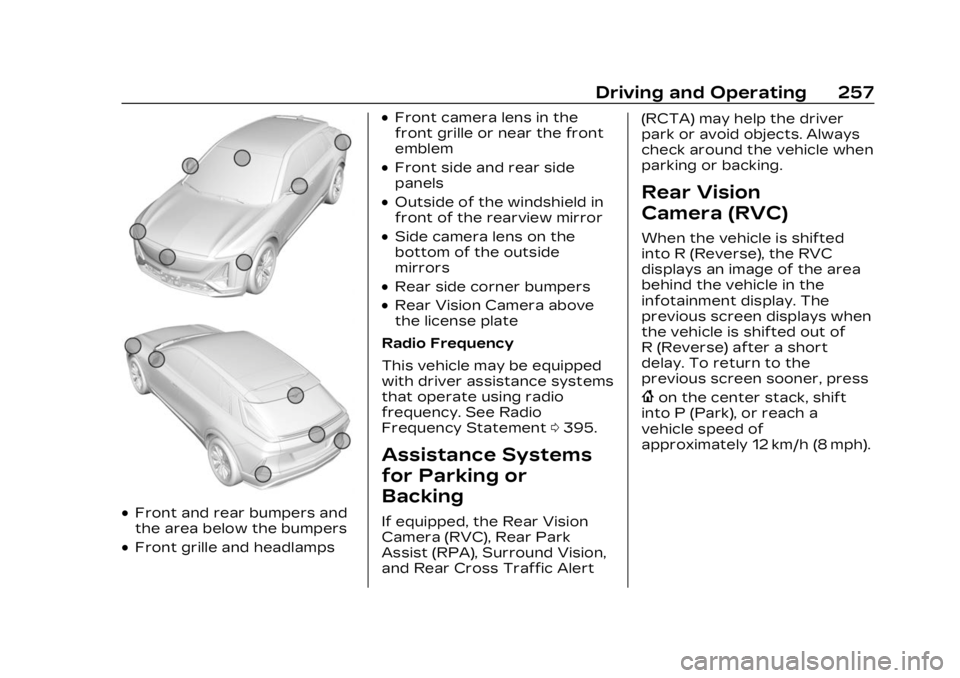
.Front and rear bumpers and
the area below the bumpers
.Front grille and headlamps
.Front camera lens in the
front grille or near the front
emblem
.Front side and rear side
panels
.Outside of the windshield in
front of the rearview mirror
.Side camera lens on the
bottom of the outside
mirrors
.Rear side corner bumpers
.Rear Vision Camera above
the license plate
Radio Frequency
This vehicle may be equipped
with driver assistance systems
that operate using radio
frequency. See Radio
Frequency Statement 0395.
Assistance Systems
for Parking or
Backing
If equipped, the Rear Vision
Camera (RVC), Rear Park
Assist (RPA), Surround Vision,
and Rear Cross Traffic Alert (RCTA) may help the driver
park or avoid objects. Always
check around the vehicle when
parking or backing.
Rear Vision
Camera (RVC)
When the vehicle is shifted
into R (Reverse), the RVC
displays an image of the area
behind the vehicle in the
infotainment display. The
previous screen displays when
the vehicle is shifted out of
R (Reverse) after a short
delay. To return to the
previous screen sooner, press
{on the center stack, shift
into P (Park), or reach a
vehicle speed of
approximately 12 km/h (8 mph).
Page 259 of 424
Cadillac Lyriq Owner Manual (GMNA-Localizing-U.S./Canada-15644413) -
2023 - CRC - 2/23/22
258 Driving and Operating
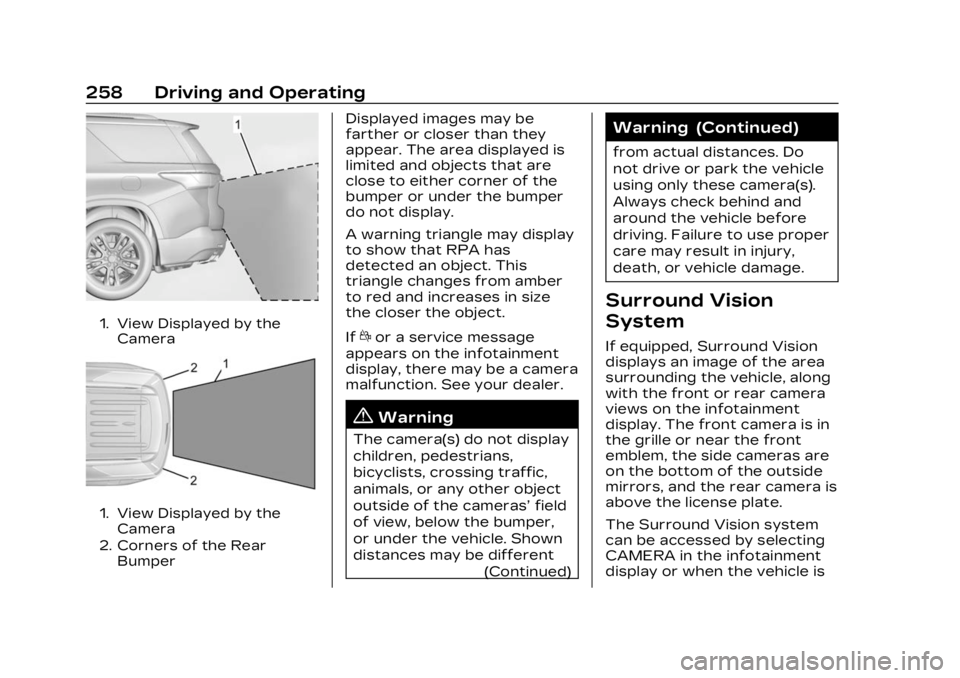
1. View Displayed by theCamera
1. View Displayed by theCamera
2. Corners of the Rear Bumper
Displayed images may be
farther or closer than they
appear. The area displayed is
limited and objects that are
close to either corner of the
bumper or under the bumper
do not display.
A warning triangle may display
to show that RPA has
detected an object. This
triangle changes from amber
to red and increases in size
the closer the object.
If
dor a service message
appears on the infotainment
display, there may be a camera
malfunction. See your dealer.
{Warning
The camera(s) do not display
children, pedestrians,
bicyclists, crossing traffic,
animals, or any other object
outside of the cameras’ field
of view, below the bumper,
or under the vehicle. Shown
distances may be different
(Continued)
Warning (Continued)
from actual distances. Do
not drive or park the vehicle
using only these camera(s).
Always check behind and
around the vehicle before
driving. Failure to use proper
care may result in injury,
death, or vehicle damage.
Surround Vision
System
If equipped, Surround Vision
displays an image of the area
surrounding the vehicle, along
with the front or rear camera
views on the infotainment
display. The front camera is in
the grille or near the front
emblem, the side cameras are
on the bottom of the outside
mirrors, and the rear camera is
above the license plate.
The Surround Vision system
can be accessed by selecting
CAMERA in the infotainment
display or when the vehicle is
Page 260 of 424
Cadillac Lyriq Owner Manual (GMNA-Localizing-U.S./Canada-15644413) -
2023 - CRC - 2/23/22
Driving and Operating 259
shifted into R (Reverse). To
return to the previous screen
sooner, when not in
R (Reverse) press Home or
Back on the infotainment
system, shift into P (Park),
or reach a vehicle speed of
approximately 12 km/h (8 mph)
while in D (Drive).
{Warning
The Surround Vision
Cameras have blind spots
and will not display all
objects near the corners of
the vehicle. Folding side
mirrors that are out of
position will not display
surround view correctly.
Always check around the
vehicle when parking or
backing.
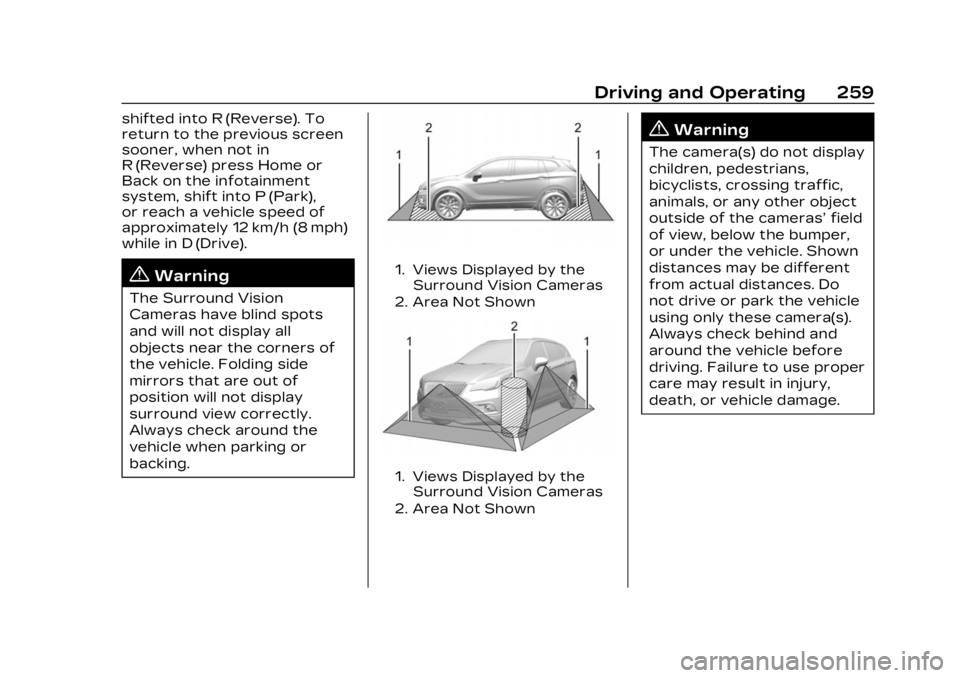
1. Views Displayed by theSurround Vision Cameras
2. Area Not Shown
1. Views Displayed by the Surround Vision Cameras
2. Area Not Shown
{Warning
The camera(s) do not display
children, pedestrians,
bicyclists, crossing traffic,
animals, or any other object
outside of the cameras’ field
of view, below the bumper,
or under the vehicle. Shown
distances may be different
from actual distances. Do
not drive or park the vehicle
using only these camera(s).
Always check behind and
around the vehicle before
driving. Failure to use proper
care may result in injury,
death, or vehicle damage.
Page 262 of 424
Cadillac Lyriq Owner Manual (GMNA-Localizing-U.S./Canada-15644413) -
2023 - CRC - 2/23/22
Driving and Operating 261
Sensors located in the
bumpers measure the
distance between the vehicle
and objects using sonar
technology. These sensors are
designed to detect certain
objects up to 2.5 m (8 ft)
behind and 1.2 m (4 ft) in front
of your vehicle that are taller
than 25 cm (10 in).
Different environmental
conditions may affect whether
and how far the Park Assist
system can detect objects.
Keep the sensors clean of
mud, dirt, snow, ice, and slush;
and clean sensors after a car
wash in freezing
temperatures. Sensors that
are not clean may not detect
objects or may cause the
system to alert when not
required.
{Warning
The Park Assist System is
no substitute for careful and
attentive driving. The Park(Continued)
Warning (Continued)
Assist system does not
detect children, pedestrians,
bicyclists, animals, or objects
located below the bumper or
that are too close or too far
from the vehicle. It is not
available at speeds greater
than 9 km/h (6 mph). To
prevent injury, death,
or vehicle damage, even with
Park Assist, always check
the area around the vehicle
and check all mirrors before
moving forward or backing.
How the System Works
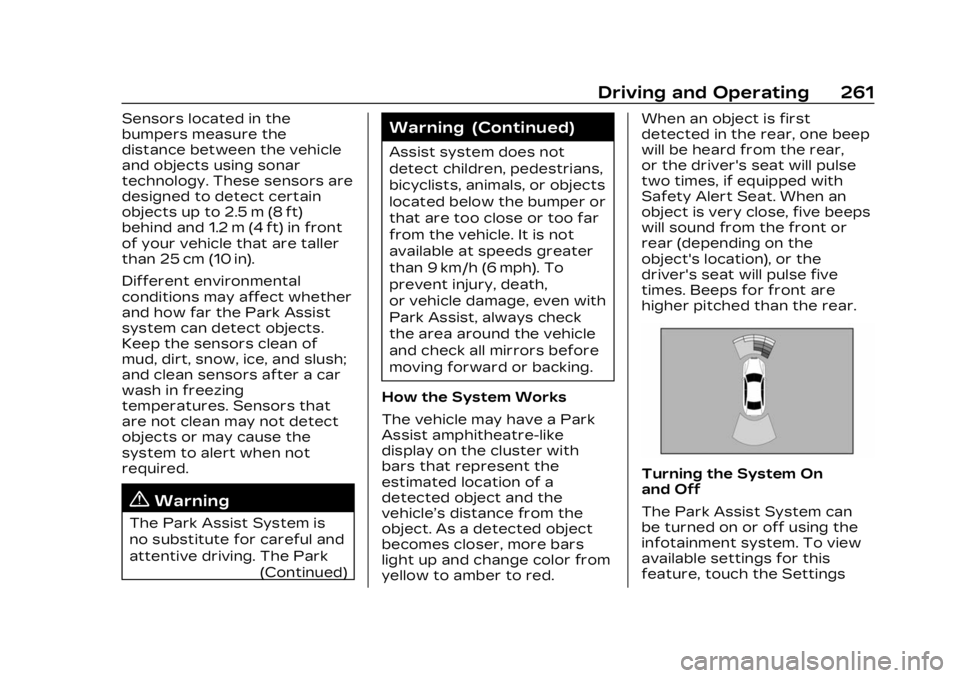
The vehicle may have a Park
Assist amphitheatre-like
display on the cluster with
bars that represent the
estimated location of a
detected object and the
vehicle’s distance from the
object. As a detected object
becomes closer, more bars
light up and change color from
yellow to amber to red. When an object is first
detected in the rear, one beep
will be heard from the rear,
or the driver's seat will pulse
two times, if equipped with
Safety Alert Seat. When an
object is very close, five beeps
will sound from the front or
rear (depending on the
object's location), or the
driver's seat will pulse five
times. Beeps for front are
higher pitched than the rear.
Turning the System On
and Off
The Park Assist System can
be turned on or off using the
infotainment system. To view
available settings for this
feature, touch the Settings