steering CADILLAC LYRIC 2023 Workshop Manual
[x] Cancel search | Manufacturer: CADILLAC, Model Year: 2023, Model line: LYRIC, Model: CADILLAC LYRIC 2023Pages: 424, PDF Size: 4.76 MB
Page 249 of 424
Cadillac Lyriq Owner Manual (GMNA-Localizing-U.S./Canada-15644413) -
2023 - CRC - 2/23/22
248 Driving and Operating
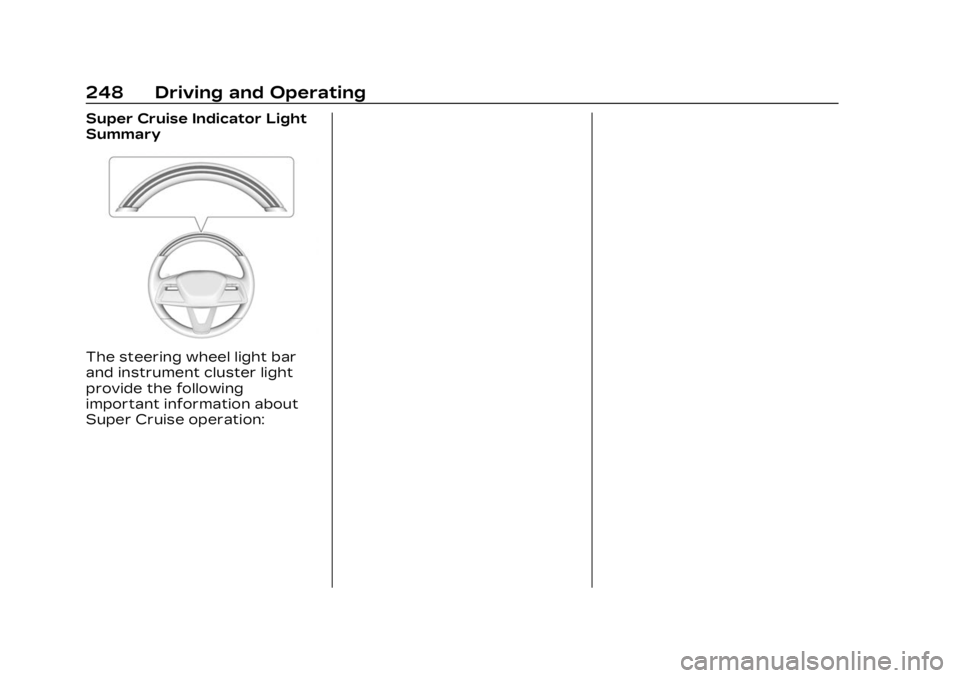
Super Cruise Indicator Light
Summary
The steering wheel light bar
and instrument cluster light
provide the following
important information about
Super Cruise operation:
Page 250 of 424
Cadillac Lyriq Owner Manual (GMNA-Localizing-U.S./Canada-15644413) -
2023 - CRC - 2/23/22
Driving and Operating 249
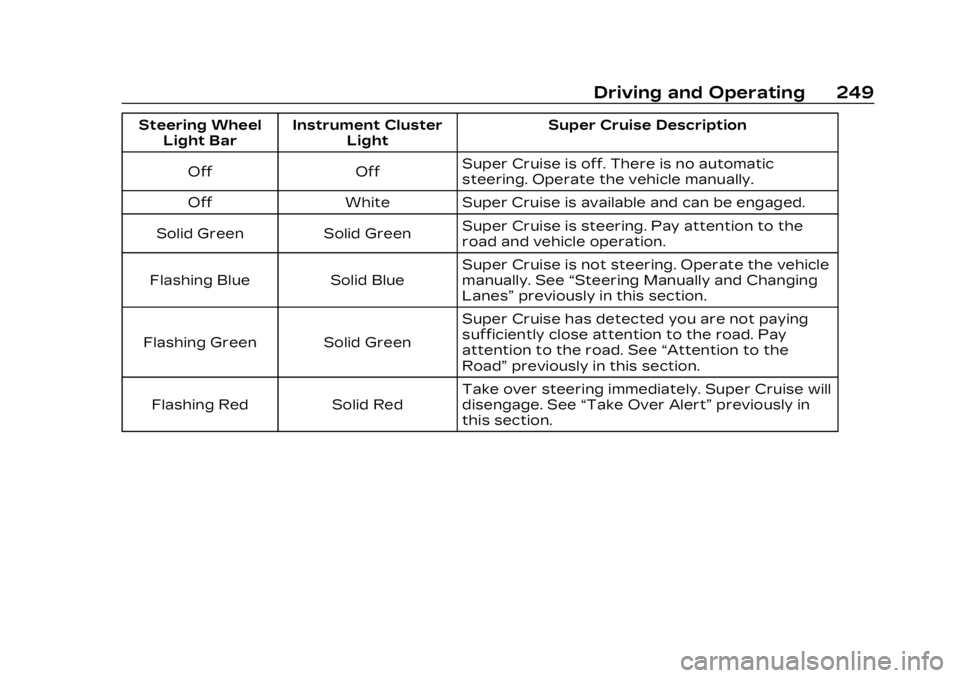
Steering WheelLight Bar Instrument Cluster
Light Super Cruise Description
Off Off Super Cruise is off. There is no automatic
steering. Operate the vehicle manually.
Off White Super Cruise is available and can be engaged.
Solid Green Solid Green Super Cruise is steering. Pay attention to the
road and vehicle operation.
Flashing Blue Solid Blue Super Cruise is not steering. Operate the vehicle
manually. See
“Steering Manually and Changing
Lanes” previously in this section.
Flashing Green Solid Green Super Cruise has detected you are not paying
sufficiently close attention to the road. Pay
attention to the road. See
“Attention to the
Road” previously in this section.
Flashing Red Solid Red Take over steering immediately. Super Cruise will
disengage. See
“Take Over Alert” previously in
this section.
Page 251 of 424
![CADILLAC LYRIC 2023 Workshop Manual Cadillac Lyriq Owner Manual (GMNA-Localizing-U.S./Canada-15644413) -
2023 - CRC - 2/23/22
250 Driving and Operating
Disengaging Super Cruise
There are two ways to
disengage Super Cruise:
.Press]while](/img/23/58688/w960_58688-250.png "CADILLAC LYRIC 2023 Workshop Manual Cadillac Lyriq Owner Manual (GMNA-Localizing-U.S./Canada-15644413) -
2023 - CRC - 2/23/22
250 Driving and Operating
Disengaging Super Cruise
There are two ways to
disengage Super Cruise:
.Press]while")
Cadillac Lyriq Owner Manual (GMNA-Localizing-U.S./Canada-15644413) -
2023 - CRC - 2/23/22
250 Driving and Operating
Disengaging Super Cruise
There are two ways to
disengage Super Cruise:
.Press]while your hands
are on the steering wheel.
The Super Cruise steering
will disengage.
.Press the brake pedal or the
regen on demand paddle
while your hands are on the
steering wheel. Both Super
Cruise steering and Adaptive
Cruise Control will
disengage. Super Cruise Messages
If
Zdoes not appear,]can
be pressed to display a DIC
message as to why the system
is unavailable.
Immediately after a
disengagement, pressing the
]within 10 seconds will
display a DIC message with
the reason for Super Cruise
disengagement.
Page 254 of 424
Cadillac Lyriq Owner Manual (GMNA-Localizing-U.S./Canada-15644413) -
2023 - CRC - 2/23/22
Driving and Operating 253
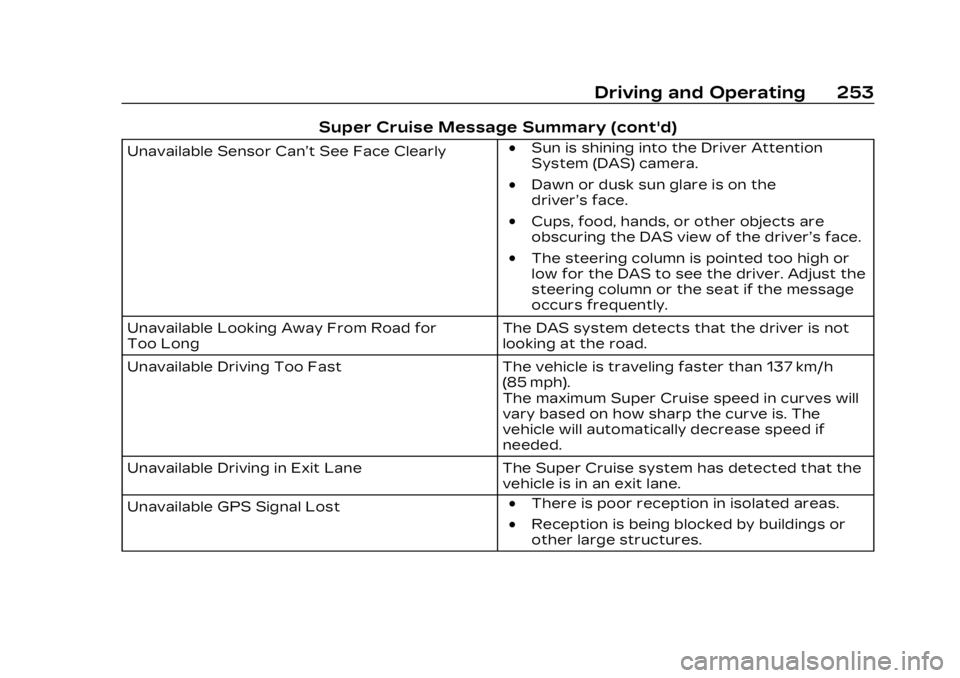
Super Cruise Message Summary (cont'd)
Unavailable Sensor Can’t See Face Clearly.Sun is shining into the Driver Attention
System (DAS) camera.
.Dawn or dusk sun glare is on the
driver’s face.
.Cups, food, hands, or other objects are
obscuring the DAS view of the driver’s face.
.The steering column is pointed too high or
low for the DAS to see the driver. Adjust the
steering column or the seat if the message
occurs frequently.
Unavailable Looking Away From Road for
Too Long The DAS system detects that the driver is not
looking at the road.
Unavailable Driving Too Fast The vehicle is traveling faster than 137 km/h
(85 mph).
The maximum Super Cruise speed in curves will
vary based on how sharp the curve is. The
vehicle will automatically decrease speed if
needed.
Unavailable Driving in Exit Lane The Super Cruise system has detected that the
vehicle is in an exit lane.
Unavailable GPS Signal Lost
.There is poor reception in isolated areas.
.Reception is being blocked by buildings or
other large structures.
Page 256 of 424
Cadillac Lyriq Owner Manual (GMNA-Localizing-U.S./Canada-15644413) -
2023 - CRC - 2/23/22
Driving and Operating 255
Conditions and Privacy
Statement on the OnStar
website.
Location Services
This setting enables or
disables sharing of vehicle
location outside the vehicle for
certain purposes. Even if the
Location Services setting is
disabled, vehicle location
information will continue to be
shared for emergency
services and Super Cruise,
if equipped.
System Care
The camera on the steering
column has a lens cover that
may become dirty over time
and affect camera
performance. Clean the lens
cover with a soft cloth
sprayed with glass cleaner.
Wipe the lens gently, then dry
it. Never use abrasive cloths/
cleaners or corrosive
chemicals of any kind on the
lens cover.Super Cruise uses the front
radar, front camera, and
360 degree cameras for its
operation. Clean surfaces are
required for Super Cruise
operation. See Adaptive
Cruise Control (Advanced)
0
225, “Surround Vision
Camera” under Assistance
Systems for Parking or
Backing 0257, and Lane Keep
Assist (LKA) 0280 for care
information.
Caution
The Super Cruise system is
a highly sophisticated
system and should only be
serviced by technicians with
the proper training, tools,
and safety instructions,
which your dealer has.
Without proper training and
tools the vehicle may
become damaged.
Driver Assistance
Systems
This vehicle may have features
that work together to help
avoid crashes or reduce crash
damage while driving, backing,
and parking. Read this entire
section before using these
systems.
{Warning
Do not rely on the Driver
Assistance Systems. These
systems do not replace the
need for paying attention
and driving safely. You may
not hear or see alerts or
warnings provided by these
systems. Failure to use
proper care when driving
may result in injury, death,
or vehicle damage. See
Defensive Driving 0196.
(Continued)
Page 264 of 424
Cadillac Lyriq Owner Manual (GMNA-Localizing-U.S./Canada-15644413) -
2023 - CRC - 2/23/22
Driving and Operating 263
detected spot moving at or
near idle speed. It does this by
automatically steering,
braking, accelerating, and gear
shifting. The driver must
always be prepared to apply
braking or additional
acceleration, as needed.
A display and audible beeps
help to guide the parking
maneuvers.
{Warning
APA may not always detect
objects in the parking space,
objects that are not rigid
(e.g. shrubs and chain-link
fences), objects below the
bumper, objects high off the
ground (e.g. flatbed trucks),
hanging objects, objects
below ground level (e.g. large
potholes), or moving objects
(e.g. pedestrians, cyclists,
vehicles). Always verify that
the parking space is
appropriate for parking a
vehicle. APA may not(Continued)
Warning (Continued)
respond to changes in the
parking space, such as
movement of an adjacent
vehicle, or a person or
object entering the parking
space. APA does not detect
or avoid traffic that is
behind or alongside of the
vehicle. Always be prepared
to stop the vehicle during
the parking maneuver.
How to Activate Automatic
Parking
To activate APA, press
Oon
the infotainment screen for
the system to begin searching
for a parking space while
driving forward at no greater
than 30 km/h (18 mph). APA
searches for parking spaces,
to the left or right of the
vehicle, up to the sensors’
ranges of 1.5 m (5 ft). To
search for a parking space to
the left, turn on the left turn
signal or, if available, change the side selection in the
infotainment display. To
choose or change the parking
mode, make a selection on the
infotainment display.
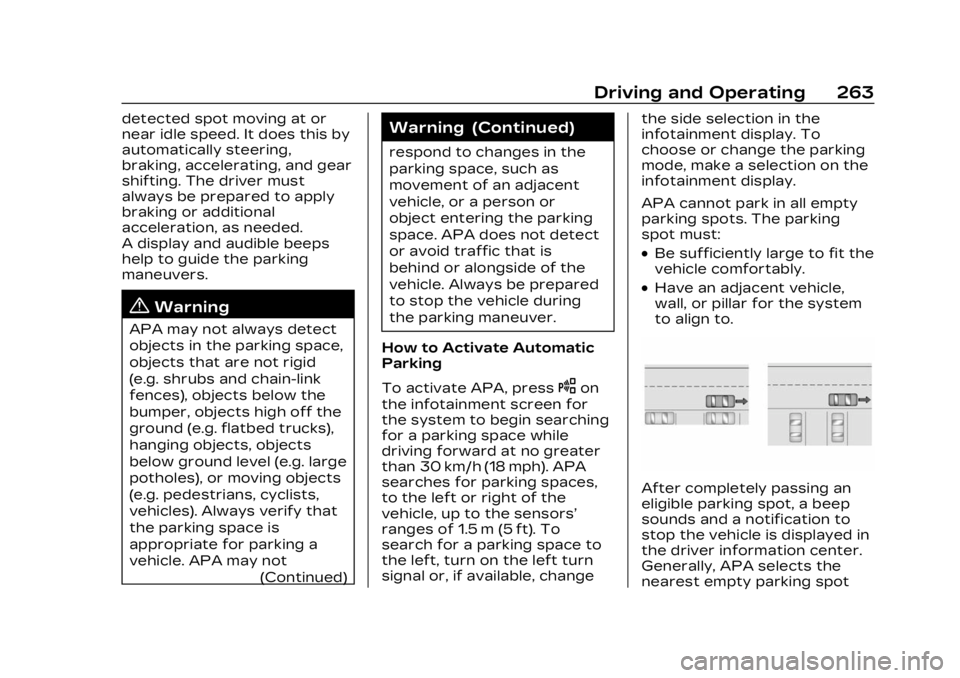
APA cannot park in all empty
parking spots. The parking
spot must:
.Be sufficiently large to fit the
vehicle comfortably.
.Have an adjacent vehicle,
wall, or pillar for the system
to align to.
After completely passing an
eligible parking spot, a beep
sounds and a notification to
stop the vehicle is displayed in
the driver information center.
Generally, APA selects the
nearest empty parking spot
Page 265 of 424
Cadillac Lyriq Owner Manual (GMNA-Localizing-U.S./Canada-15644413) -
2023 - CRC - 2/23/22
264 Driving and Operating
behind the vehicle, but under
some conditions may select a
space that is further back.
Slow down and bring the
vehicle to a complete stop to
begin.
Follow the displayed
instructions. When the vehicle
is ready to begin the
maneuver, the steering wheel
will vibrate briefly as a
reminder to remove hands
from the steering wheel. After
the vibration stops, check your
surroundings and release the
brakes to begin automatic
parking. As the vehicle
automatically steers, brakes,
accelerates, and shifts gears
into the parking spot, continue
to check your surroundings.
Be prepared to stop to avoid
vehicles, pedestrians,
or objects.
A progress bar displays the
status of the parking
maneuver. Once automatic
parking is finished and the
vehicle has come to a full stop,APA will beep and display a
message indicating parking is
complete.
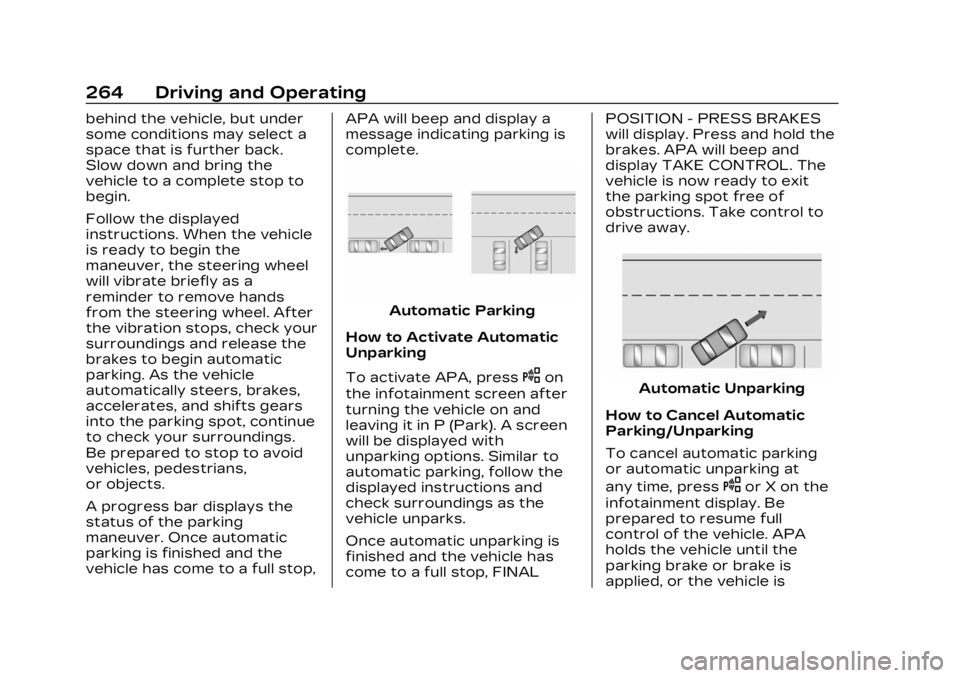
Automatic Parking
How to Activate Automatic
Unparking
To activate APA, press
Oon
the infotainment screen after
turning the vehicle on and
leaving it in P (Park). A screen
will be displayed with
unparking options. Similar to
automatic parking, follow the
displayed instructions and
check surroundings as the
vehicle unparks.
Once automatic unparking is
finished and the vehicle has
come to a full stop, FINAL POSITION - PRESS BRAKES
will display. Press and hold the
brakes. APA will beep and
display TAKE CONTROL. The
vehicle is now ready to exit
the parking spot free of
obstructions. Take control to
drive away.Automatic Unparking
How to Cancel Automatic
Parking/Unparking
To cancel automatic parking
or automatic unparking at
any time, press
Oor X on the
infotainment display. Be
prepared to resume full
control of the vehicle. APA
holds the vehicle until the
parking brake or brake is
applied, or the vehicle is
Page 273 of 424
Cadillac Lyriq Owner Manual (GMNA-Localizing-U.S./Canada-15644413) -
2023 - CRC - 2/23/22
272 Driving and Operating
Tailgating Alert
The vehicle ahead indicator
will display amber when you
are following a vehicle ahead
much too closely.
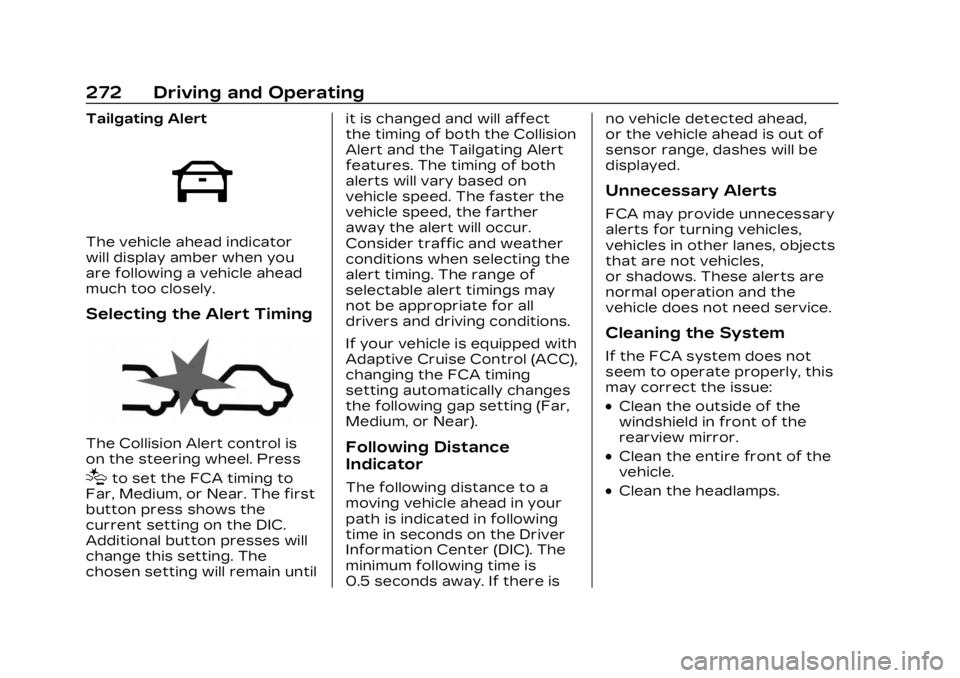
Selecting the Alert Timing
The Collision Alert control is
on the steering wheel. Press
[to set the FCA timing to
Far, Medium, or Near. The first
button press shows the
current setting on the DIC.
Additional button presses will
change this setting. The
chosen setting will remain until it is changed and will affect
the timing of both the Collision
Alert and the Tailgating Alert
features. The timing of both
alerts will vary based on
vehicle speed. The faster the
vehicle speed, the farther
away the alert will occur.
Consider traffic and weather
conditions when selecting the
alert timing. The range of
selectable alert timings may
not be appropriate for all
drivers and driving conditions.
If your vehicle is equipped with
Adaptive Cruise Control (ACC),
changing the FCA timing
setting automatically changes
the following gap setting (Far,
Medium, or Near).
Following Distance
Indicator
The following distance to a
moving vehicle ahead in your
path is indicated in following
time in seconds on the Driver
Information Center (DIC). The
minimum following time is
0.5 seconds away. If there isno vehicle detected ahead,
or the vehicle ahead is out of
sensor range, dashes will be
displayed.
Unnecessary Alerts
FCA may provide unnecessary
alerts for turning vehicles,
vehicles in other lanes, objects
that are not vehicles,
or shadows. These alerts are
normal operation and the
vehicle does not need service.
Cleaning the System
If the FCA system does not
seem to operate properly, this
may correct the issue:
.Clean the outside of the
windshield in front of the
rearview mirror.
.Clean the entire front of the
vehicle.
.Clean the headlamps.
Page 280 of 424
Cadillac Lyriq Owner Manual (GMNA-Localizing-U.S./Canada-15644413) -
2023 - CRC - 2/23/22
Driving and Operating 279
does not need to be serviced.
The system may light up due
to guardrails, signs, trees,
shrubs, and other non-moving
objects. This is normal system
operation; the vehicle does not
need service.
LCA may not operate when
the LCA sensors in the left or
right corners of the rear
bumper are covered with mud,
dirt, snow, ice, or slush, or in
heavy rainstorms. For cleaning
instructions, see "Washing the
Vehicle" under Exterior Care
0364. If the DIC still displays
the system unavailable
message after cleaning both
sides of the vehicle toward the
rear corners of the vehicle,
see your dealer.
If the LCA displays do not light
up when moving vehicles are
in the side blind zone or rapidly
approaching this zone and the
system is clean, the system
may need service. Take the
vehicle to your dealer.Blind Zone Steering
Assist (BZSA)
If equipped, the Blind Zone
Steering Assist (BZSA) system
can detect a potential crash
with a moving vehicle in the
lane you are entering.
It provides a brief, urgent turn
of the steering wheel to alert
you to take action to avoid a
collision.
BZSA works with the Lane
Keep Assist (LKA). BZSA
operates when the vehicle is in
a forward gear, and only when
LKA is enabled and able to
assist. See Lane Keep Assist
(LKA) 0280.
BZSA will provide a steering
correction when your vehicle
is about to leave the current
lane of travel, with the
possibility of a collision with a
vehicle in the adjacent lane.
This steering correction
happens closer to the center
of the lane and has a stronger
steering correction than LKA. Unlike LKA, the steering
correction with BSZA will
happen even if your turn signal
is on in the direction of lane
departure.
In addition to the BZSA
steering intervention, the
A
will turn amber, six beeps or
six seat pulses will occur,
if equipped with Safety Alert
Seat, and
8or|will
flash on the outside rear view
mirror.
{Warning
Do not rely on Blind Zone
Steering Assist (BZSA) to
prevent crashes. This
system does not replace
the need to pay attention
and drive safely. Failure to
use proper care when
driving may result in
vehicle damage, injury,
or death.
(Continued)
Page 281 of 424
Cadillac Lyriq Owner Manual (GMNA-Localizing-U.S./Canada-15644413) -
2023 - CRC - 2/23/22
280 Driving and Operating
Warning (Continued)
.BZSA performance may
be affected by weather
and road conditions.
.BZSA does not provide
steering assistance to
avoid a vehicle that is in,
or has entered, your lane
of travel.
.BZSA will not prevent a
towed trailer from
crossing into the adjacent
lane. Always monitor the
trailer position while
towing to ensure it is in
the same lane as your
vehicle. BZSA is only
designed to detect when
your vehicle
unintentionally crosses
detected lane lines.
Lane Keep
Assist (LKA)
If equipped, LKA may help
avoid crashes due to
unintentional lane departures.
This system uses a camera todetect lane markings. The LKA
may be ready to assist at
speeds between
80 km/h (50 mph) and 180
km/h (112 mph). LKA may assist
by gently turning the steering
wheel if the vehicle
approaches a detected lane
marking. It may also provide a
Lane Departure Warning
(LDW) alert if the vehicle
crosses a detected lane
marking. This system is not
intended to keep the vehicle
centered in the lane. LKA will
not assist and alert if the turn
signal is active in the direction
of lane departure, or if it
detects that you are
accelerating, braking or
actively steering. LKA can be
overridden by turning the
steering wheel. If the system
detects you are steering
intentionally across a lane
marker, the LDW will not be
given. Do not expect the LDW
to occur when you are
intentionally crossing a lane
marker.
{Warning
The LKA system does not
continuously steer the
vehicle. It may not keep the
vehicle in the lane or give a
Lane Departure Warning
(LDW) alert, even if a lane
marking is detected.
The LKA and LDW systems
may not:
.Provide an alert or enough
steering assist to avoid a
lane departure or crash.
.Detect lane markings
under poor weather or
visibility conditions. This
can occur if the windshield
or headlamps are blocked
by dirt, snow, or ice; if they
are not in proper
condition; or if the sun
shines directly into the
camera.
.Detect road edges.
.Detect lanes on winding or
hilly roads.
(Continued)