service CADILLAC LYRIC 2023 Repair Manual
[x] Cancel search | Manufacturer: CADILLAC, Model Year: 2023, Model line: LYRIC, Model: CADILLAC LYRIC 2023Pages: 424, PDF Size: 4.76 MB
Page 288 of 424
Cadillac Lyriq Owner Manual (GMNA-Localizing-U.S./Canada-15644413) -
2023 - CRC - 2/23/22
Driving and Operating 287
5. Plug in the AC charge cordinto the vehicle charge port.
Make sure the AC vehicle
plug is fully connected to
the AC charge port. If it is
not properly connected, the
vehicle may not be charged.
6. Verify that the charge status light turns on and an
audible chirp occurs. See
Charging Status Feedback
0289.
To End AC Charging 1. Unlock the charge cord from the vehicle by pressing
the button on the top of the
charge cord plug. Unplug
the charge cord from the
vehicle.
2. Close the charge port door by pressing firmly in the
center until it latches.
3. Unplug the charge cord from the electrical outlet.
4. Place the charge cord into the storage compartment.DC Charging
DC Charging Station
Hardware
The vehicle can be charged
using DC charging equipment
typically found at service
stations and other public
locations.
Check the charging station DC
vehicle plug for compatibility
with the DC charge port on
this vehicle. This vehicle is
compatible with a Combined
Charging System 1 (CCS1)
connector.
When recharging at a DC
charge station, the charging
cable connected to the vehicle
must be less than 10 m (33 ft)
in length to meet functionality
and regulatory requirements.
Follow the steps listed on the
charging station to perform a
DC vehicle charge.
If for any reason DC charging
does not begin or is
interrupted, check the DC
charging station display for messages. Unplug the cord to
restart the DC charging
process.
To Start DC Charging
1. Put the vehicle in P (Park).
2. Press the Electric Parking brake (EPB) switch. See
Electric Parking Brake 0217.
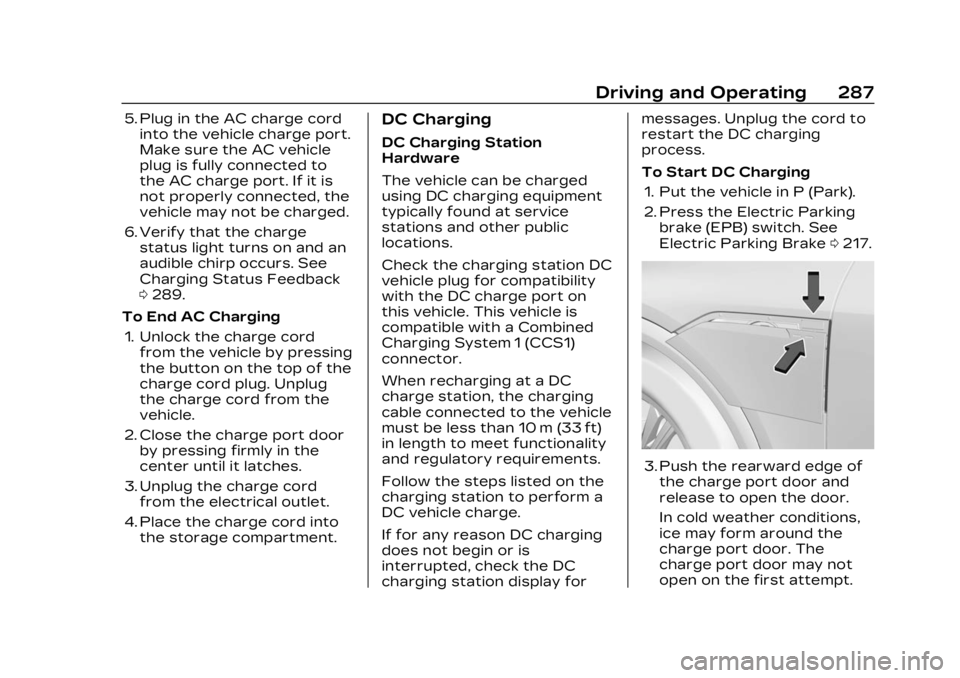
3. Push the rearward edge of
the charge port door and
release to open the door.
In cold weather conditions,
ice may form around the
charge port door. The
charge port door may not
open on the first attempt.
Page 289 of 424
Cadillac Lyriq Owner Manual (GMNA-Localizing-U.S./Canada-15644413) -
2023 - CRC - 2/23/22
288 Driving and Operating
Remove ice from the area
and repeat attempting to
open the charge port door.
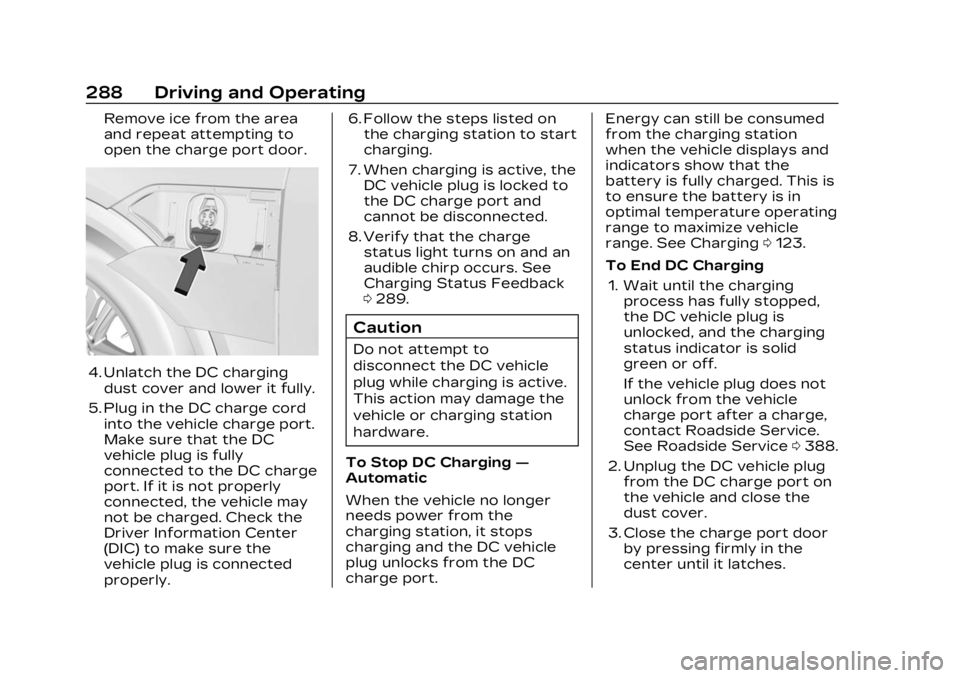
4. Unlatch the DC chargingdust cover and lower it fully.
5. Plug in the DC charge cord into the vehicle charge port.
Make sure that the DC
vehicle plug is fully
connected to the DC charge
port. If it is not properly
connected, the vehicle may
not be charged. Check the
Driver Information Center
(DIC) to make sure the
vehicle plug is connected
properly. 6. Follow the steps listed on
the charging station to start
charging.
7. When charging is active, the DC vehicle plug is locked to
the DC charge port and
cannot be disconnected.
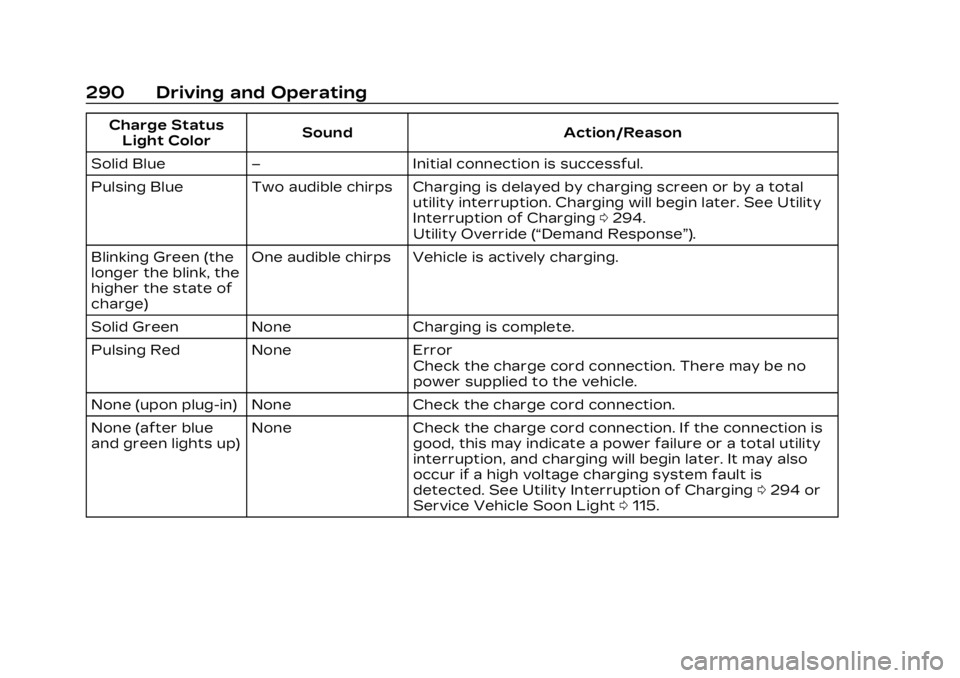
8. Verify that the charge status light turns on and an
audible chirp occurs. See
Charging Status Feedback
0289.
Caution
Do not attempt to
disconnect the DC vehicle
plug while charging is active.
This action may damage the
vehicle or charging station
hardware.
To Stop DC Charging —
Automatic
When the vehicle no longer
needs power from the
charging station, it stops
charging and the DC vehicle
plug unlocks from the DC
charge port. Energy can still be consumed
from the charging station
when the vehicle displays and
indicators show that the
battery is fully charged. This is
to ensure the battery is in
optimal temperature operating
range to maximize vehicle
range. See Charging
0123.
To End DC Charging 1. Wait until the charging process has fully stopped,
the DC vehicle plug is
unlocked, and the charging
status indicator is solid
green or off.
If the vehicle plug does not
unlock from the vehicle
charge port after a charge,
contact Roadside Service.
See Roadside Service 0388.
2. Unplug the DC vehicle plug from the DC charge port on
the vehicle and close the
dust cover.
3. Close the charge port door by pressing firmly in the
center until it latches.
Page 291 of 424
Cadillac Lyriq Owner Manual (GMNA-Localizing-U.S./Canada-15644413) -
2023 - CRC - 2/23/22
290 Driving and Operating
Charge StatusLight Color Sound Action/Reason
Solid Blue – Initial connection is successful.
Pulsing Blue Two audible chirps Charging is delayed by charging screen or by a total utility interruption. Charging will begin later. See Utility
Interruption of Charging0294.
Utility Override (“Demand Response”).
Blinking Green (the
longer the blink, the
higher the state of
charge) One audible chirps Vehicle is actively charging.
Solid Green None Charging is complete.
Pulsing Red None Error Check the charge cord connection. There may be no
power supplied to the vehicle.
None (upon plug-in) None Check the charge cord connection.
None (after blue
and green lights up) None Check the charge cord connection. If the connection is
good, this may indicate a power failure or a total utility
interruption, and charging will begin later. It may also
occur if a high voltage charging system fault is
detected. See Utility Interruption of Charging 0294 or
Service Vehicle Soon Light 0115.
Page 293 of 424
Cadillac Lyriq Owner Manual (GMNA-Localizing-U.S./Canada-15644413) -
2023 - CRC - 2/23/22
292 Driving and Operating
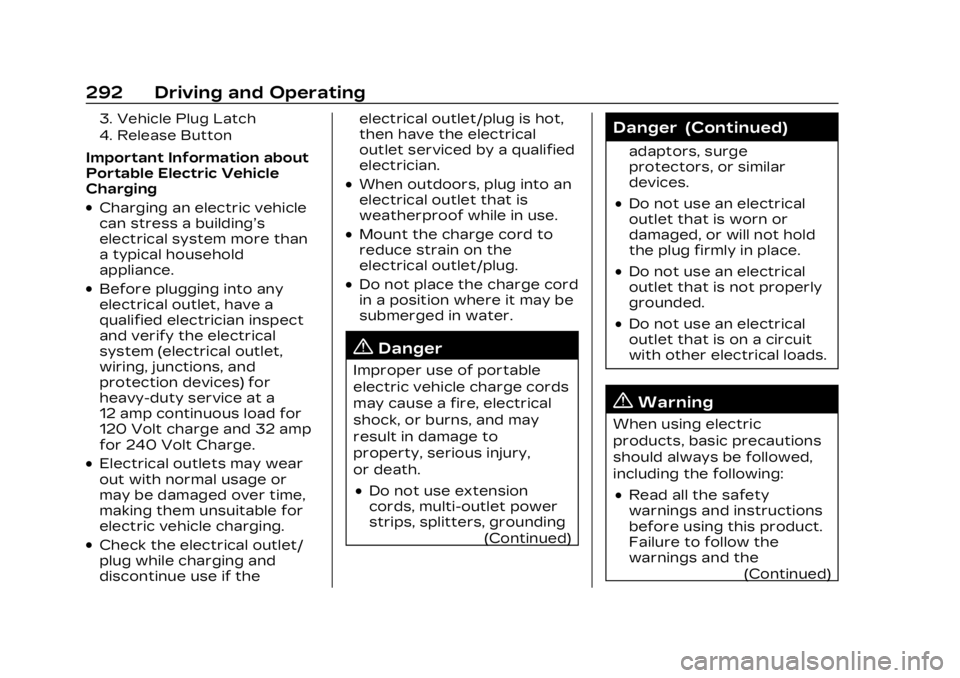
3. Vehicle Plug Latch
4. Release Button
Important Information about
Portable Electric Vehicle
Charging
.Charging an electric vehicle
can stress a building’s
electrical system more than
a typical household
appliance.
.Before plugging into any
electrical outlet, have a
qualified electrician inspect
and verify the electrical
system (electrical outlet,
wiring, junctions, and
protection devices) for
heavy-duty service at a
12 amp continuous load for
120 Volt charge and 32 amp
for 240 Volt Charge.
.Electrical outlets may wear
out with normal usage or
may be damaged over time,
making them unsuitable for
electric vehicle charging.
.Check the electrical outlet/
plug while charging and
discontinue use if theelectrical outlet/plug is hot,
then have the electrical
outlet serviced by a qualified
electrician.
.When outdoors, plug into an
electrical outlet that is
weatherproof while in use.
.Mount the charge cord to
reduce strain on the
electrical outlet/plug.
.Do not place the charge cord
in a position where it may be
submerged in water.
{Danger
Improper use of portable
electric vehicle charge cords
may cause a fire, electrical
shock, or burns, and may
result in damage to
property, serious injury,
or death.
.Do not use extension
cords, multi-outlet power
strips, splitters, grounding
(Continued)
Danger (Continued)
adaptors, surge
protectors, or similar
devices.
.Do not use an electrical
outlet that is worn or
damaged, or will not hold
the plug firmly in place.
.Do not use an electrical
outlet that is not properly
grounded.
.Do not use an electrical
outlet that is on a circuit
with other electrical loads.
{Warning
When using electric
products, basic precautions
should always be followed,
including the following:
.Read all the safety
warnings and instructions
before using this product.
Failure to follow the
warnings and the(Continued)
Page 300 of 424
Cadillac Lyriq Owner Manual (GMNA-Localizing-U.S./Canada-15644413) -
2023 - CRC - 2/23/22
Driving and Operating 299
3. Drive slowly until the traileris clear of the chocks.
4. Stop and have someone pick up and store the
chocks.
Maintenance when Trailer
Towing
The vehicle needs service
more often when used to tow
trailers. See Maintenance
Schedule 0376. It is especially
important to check the cooling
system and brake system
before and during each trip.
Check periodically that all nuts
and bolts on the trailer hitch
are tight.
Cooling the Vehicle when
Trailer Towing
The cooling system may
temporarily overheat during
severe operating conditions.
See Cooling System 0313.
Trailer Towing
Caution
Towing a trailer improperly
can damage the vehicle and
result in costly repairs not
covered by the vehicle
warranty. To tow a trailer
correctly, follow the
directions in this section and
see your dealer for
important information about
towing a trailer with the
vehicle.
Trailering is different than just
driving the vehicle by itself.
Trailering means changes in
handling, acceleration, braking,
and durability. Successful, safe
trailering takes correct
equipment, and it has to be
used properly. The following information has
many time-tested, important
trailering tips and safety rules.
Many of these are important
for your safety and that of
your passengers. Read this
section carefully before pulling
a trailer.
Trailer Weight
{Warning
Never exceed the towing
capacity for your vehicle.
Safe trailering requires
monitoring the weight, speed,
altitude, road grades, outside
temperature, dimensions of
the front of the trailer, and
how frequently the vehicle is
used to tow a trailer.
Page 307 of 424
Cadillac Lyriq Owner Manual (GMNA-Localizing-U.S./Canada-15644413) -
2023 - CRC - 2/23/22
306 Driving and Operating
Conversions and
Add-Ons
Add-On Electrical
Equipment
{Warning
The Data Link Connector
(DLC) is used for vehicle
service and Emission
Inspection/Maintenance
testing. See Service Vehicle
Soon Light0115. A device
connected to the DLC —
such as an aftermarket fleet
or driver-behavior tracking
device —may interfere with
vehicle systems. This could
affect vehicle operation and
cause a crash. Such devices
may also access information
stored in the vehicle’s
systems.
Caution
Some electrical equipment
can damage the vehicle or
cause components to not
work and would not be
covered by the vehicle
warranty. Always check with
your dealer before adding
electrical equipment.
Add-on equipment can drain
the vehicle's 12-volt battery,
even if the vehicle is not
operating.
When adding electrical
equipment, it should only be
connected using the
accessory power outlets. The
maximum power that can be
supplied by one accessory
power outlet or spread across
all three is 200 watts or
15 amps. Exceeding 200 watts
or 15 amps may cause erratic
vehicle operation. The vehicle has an airbag
system. Before attempting to
add anything electrical to the
vehicle, see Servicing the
Airbag-Equipped Vehicle
071
and Adding Equipment to the
Airbag-Equipped Vehicle 071.
Page 308 of 424
Cadillac Lyriq Owner Manual (GMNA-Localizing-U.S./Canada-15644413) -
2023 - CRC - 2/23/22
Vehicle Care 307
Vehicle Care
General Information
General Information . . . . . . 308
California PerchlorateMaterials
Requirements . . . . . . . . . . . . . 308
Accessories and Modifications . . . . . . . . . . . . . 308
Vehicle Checks
Doing Your OwnService Work . . . . . . . . . . . . . 309
Hood . . . . . . . . . . . . . . . . . . . . . . . . . . . 310
Underhood Compartment Overview . . . . . . . . . . . . . . . . . . . . 312
Cooling System . . . . . . . . . . . . . 313
Washer Fluid . . . . . . . . . . . . . . . . 314
Brakes . . . . . . . . . . . . . . . . . . . . . . . . . 315
Brake Fluid . . . . . . . . . . . . . . . . . . . 316
Battery - North America . . . . . . . . . . . . . . . . . . . . . . 317
Park Brake and P (Park) Mechanism Check . . . . . . . 320
Wiper Blade Replacement . . . . . . . . . . . . . . 320
Windshield Replacement . . . . . . . . . . . . . . . 321
Gas Strut(s) . . . . . . . . . . . . . . . . . . 321
Headlamp Aiming
Front Headlamp Aiming . . . . . . . . . . . . . . . . . . . . . . . 322
Bulb Replacement
Bulb Replacement . . . . . . . . . 323
LED Lighting . . . . . . . . . . . . . . . . 323
Electrical System
High Voltage Devices andWiring . . . . . . . . . . . . . . . . . . . . . . . 323
Electrical System Overload . . . . . . . . . . . . . . . . . . . . 323
Fuses and Circuit Breakers . . . . . . . . . . . . . . . . . . . . 325
Underhood Compartment Fuse Block . . . . . . . . . . . . . . . . . 326
Instrument Panel Fuse Block . . . . . . . . . . . . . . . . . . . . . . . . . 331
Wheels and Tires
Tires . . . . . . . . . . . . . . . . . . . . . . . . . . . 334
All-Season Tires . . . . . . . . . . . 335
Winter Tires . . . . . . . . . . . . . . . . 336
Self-Sealing Tires . . . . . . . . . 336
Low-Profile Tires . . . . . . . . . . 337
Tire Sidewall Labeling . . . . 337
Tire Designations . . . . . . . . . . 338
Tire Terminology andDefinitions . . . . . . . . . . . . . . . . . 339
Tire Pressure . . . . . . . . . . . . . . . 342 Tire Pressure Monitor
System . . . . . . . . . . . . . . . . . . . . . . 343
Tire Pressure Monitor Operation . . . . . . . . . . . . . . . . . . 344
Tire Inspection . . . . . . . . . . . . . 347
Tire Rotation . . . . . . . . . . . . . . . 348
When It Is Time for New
Tires . . . . . . . . . . . . . . . . . . . . . . . . . 349
Buying New Tires . . . . . . . . . 350
Different Size Tires and Wheels . . . . . . . . . . . . . . . . . . . . . . 352
Uniform Tire Quality Grading . . . . . . . . . . . . . . . . . . . . . 352
Wheel Alignment and Tire Balance . . . . . . . . . . . . . . . 354
Wheel Replacement . . . . . . 354
Tire Chains . . . . . . . . . . . . . . . . . . 355
If a Tire Goes Flat . . . . . . . . . 355
Jump Starting
Jump Starting - North America . . . . . . . . . . . . . . . . . . . . . 356
Towing the Vehicle
Transporting a DisabledVehicle . . . . . . . . . . . . . . . . . . . . . . 359
Recreational Vehicle Towing . . . . . . . . . . . . . . . . . . . . . . 362
Page 309 of 424
Cadillac Lyriq Owner Manual (GMNA-Localizing-U.S./Canada-15644413) -
2023 - CRC - 2/23/22
308 Vehicle Care
Appearance Care
Exterior Care . . . . . . . . . . . . . . . 364
Interior Care . . . . . . . . . . . . . . . . 369
Floor Mats . . . . . . . . . . . . . . . . . . . 373General
Information
For service and parts needs,
visit your dealer. You will
receive genuine GM parts and
GM-trained and supported
service people.
Genuine GM parts have one of
these marks:
California Perchlorate
Materials
Requirements
Certain types of automotive
applications, such as airbag
initiators, seat belt
pretensioners, and lithium
batteries contained in
electronic keys, may contain
perchlorate materials.
Perchlorate Material–special
handling may apply. See
www.dtsc.ca.gov/
hazardouswaste/perchlorate.
Accessories and
Modifications
Adding non-dealer accessories
or making modifications to the
vehicle can affect vehicle
performance and safety,
including such things as
airbags, braking, stability, ride
and handling, emissions
systems, aerodynamics,
durability, Driver Assistance
Systems, and electronic
systems like antilock brakes,
Page 310 of 424
Cadillac Lyriq Owner Manual (GMNA-Localizing-U.S./Canada-15644413) -
2023 - CRC - 2/23/22
Vehicle Care 309
traction control, and stability
control. These accessories or
modifications could even
cause malfunction or damage
not covered by the vehicle
warranty.
Damage to suspension
components caused by
modifying vehicle height
outside of factory settings will
not be covered by the vehicle
warranty.
Damage to vehicle
components resulting from
modifications or the
installation or use of non-GM
certified parts, including
control module or software
modifications, is not covered
under the terms of the vehicle
warranty and may affect
remaining warranty coverage
for affected parts.
GM Accessories are designed
to complement and function
with other systems on the
vehicle. See your dealer to
accessorize the vehicle usinggenuine GM Accessories
installed by a dealer
technician.
Also, see Adding Equipment to
the Airbag-Equipped Vehicle
0
71.
Vehicle Checks
Doing Your Own
Service Work
{Warning
Never try to do your own
service on high voltage
battery components. You
can be injured and the
vehicle can be damaged if
you try to do your own
service work. Service and
repair of these high voltage
battery components should
only be performed by a
trained dealer technician
with the proper knowledge
and tools.
(Continued)
Warning (Continued)
Exposure to high voltage
can cause shock, burns, and
even death. The high voltage
components in the vehicle
can only be serviced by
technicians with special
training.
High voltage components
are identified by labels. Do
not remove, open, take
apart, or modify these
components. High voltage
cable or wiring has orange
covering. Do not probe,
tamper with, cut, or modify
high voltage cable or wiring.
{Warning
Unexpected wheel motion
and/or direction when one
or more wheels are off the
ground for service work may
result in injury. The
vehicle may:(Continued)
Page 311 of 424
Cadillac Lyriq Owner Manual (GMNA-Localizing-U.S./Canada-15644413) -
2023 - CRC - 2/23/22
310 Vehicle Care
Warning (Continued)
.Allow the wheels to rotate
unexpectedly in either
direction regardless of
mode selection.
.Allow the wheels to rotate
in reaction to attempts to
rotate the tire(s) manually.
.Resist attempts to rotate
the wheels manually.
Before lifting the vehicle to
do your own service work,
turn the vehicle off or place
the vehicle in the Service
Mode. To place the vehicle in
Service Mode, with the
vehicle off and the brake
pedal not applied, press and
hold POWER for more than
five seconds.
{Warning
It can be dangerous to work
on your vehicle if you do not
have the proper knowledge, (Continued)
Warning (Continued)
service manual, tools,
or parts. Always follow
owner’s manual procedures
and consult the service
manual for your vehicle
before doing any
service work.
If doing some of your own
service work, use the proper
service manual. It tells you
much more about how to
service the vehicle than this
manual can. To order the
proper service manual, see
Publication Ordering
Information 0394.
This vehicle has an airbag
system. Before attempting to
do your own service work, see
Servicing the Airbag-Equipped
Vehicle 071.
Keep a record with all parts
receipts and list the mileage
and the date of any service
work performed. See
Maintenance Records 0381.
Hood
{Warning
Components under the hood
can get hot. To help avoid
the risk of burning
unprotected skin, never
touch these components
until they have cooled, and
always use a glove or towel
to avoid direct skin contact.
To open the hood: 1. Pull the hood release handle on the lower left side of the
instrument panel.