service CADILLAC LYRIC 2023 Owner's Guide
[x] Cancel search | Manufacturer: CADILLAC, Model Year: 2023, Model line: LYRIC, Model: CADILLAC LYRIC 2023Pages: 424, PDF Size: 4.76 MB
Page 154 of 424
Cadillac Lyriq Owner Manual (GMNA-Localizing-U.S./Canada-15644413) -
2023 - CRC - 2/23/22
Infotainment System 153
CorB:Press to go to the
next or previous favorite when
listening to the radio. Press to
go to the next or previous
track when listening to a
media source.
c: Press to reject an
incoming phone call, end an
active phone call, end a voice
recognition session, or mute
the audio when there is no
phone call.
g: Press initiate voice
assistant.
Using the System
Audio
Touch the Audio icon on the
infotainment display or
eon
the Multifunction Controler
(MFC) to display the active
audio source page. Examples
of available sources may
include AM, FM, SXM (if
equipped), USB, and
Bluetooth.
Phone
Touch the Phone icon on the
infotainment display or
6on
the MFC to display the Phone
menu. See Bluetooth
(Overview) 0168 or
Bluetooth (Pairing and Using a
Phone) 0170.
Maps
Touch the Maps icon to
display the Google Maps
screen. See Using the
Navigation System 0162.
Google Assistant
Touch the Google Assistant
icon to open the Google
Assistant app. See Voice
Recognition 0166.
Google Play
Touch to download some of
your favorite apps in your
vehicle. Downloading apps on
Google Play require you to
sign into a Google Account
with an active service plan
with data. Some third-party apps require a separate
account and, in some cases, a
paid subscription for in-vehicle
access.
Apple CarPlay
Touch the Apple CarPlay icon
to activate Apple CarPlay (if
equipped) after a supported
device is connected. See
Apple CarPlay and Android
Auto
0174.
Android Auto
Touch the Android Auto icon
to activate Android Auto (if
equipped) after a supported
device is connected. See
Apple CarPlay and Android
Auto 0174.
Settings
Touch the Settings icon to
display the Settings menu. See
Settings 0176.
Virtual Controls
Touch the Virtual Controls
icon to display the Virtual
Controls menu.
Page 158 of 424
Cadillac Lyriq Owner Manual (GMNA-Localizing-U.S./Canada-15644413) -
2023 - CRC - 2/23/22
Infotainment System 157
Fade/Balance :Touch to
adjust by using the controls on
the infotainment display.
Sound Mode : Touch to
selectFront or Rear to provide
the best sound for the front or
rear seating positions.
Adjust the Surround controls
to change from Stereo to
Surround mode.
Manage Radio Favorites :
Touch to display a list of Audio
favorites.
Favorites can be moved or
deleted.
To move, touch and hold the
move icon, and then drag up or
down to rearrange the
position.
Radio Text : This allows the
Radio Data System (RDS) to
be turned on or off.
Touch Off or On.Radio Data
System (RDS)
If equipped, RDS features are
available for use only on FM
stations that broadcast RDS
information. When supported,
the radio may:
.Display Category (Program
Type) such as Rock, Jazz,
Classical, etc. from radio
stations.
.Display text from radio
stations that include station
name and messages.
This system relies on receiving
specific information from
these stations and only works
when the information is
available. It is possible that a
radio station could broadcast
incorrect information that
causes the radio features to
work improperly. If this
happens, contact the radio
station.
When information is broadcast
from a RDS station, the
station name or call letters display on the audio screen.
Radio text supporting the
currently playing broadcast
may also appear.
Satellite Radio
SiriusXM Radio Service
If equipped, vehicles with a
valid SiriusXM radio
subscription can receive
SiriusXM programming.
SiriusXM radio has a wide
variety of programming and
commercial-free music, coast
to coast, in digital-quality
sound. In the U.S., see
www.siriusxm.com or call
1-888-601-6296. In Canada,
see www.siriusxm.ca or call
1-877-438-9677.
When SiriusXM is active, the
channel name, number, song
title, and artist appear on the
display.
Page 159 of 424
Cadillac Lyriq Owner Manual (GMNA-Localizing-U.S./Canada-15644413) -
2023 - CRC - 2/23/22
158 Infotainment System
SiriusXM with 360L
SiriusXM with 360L interface
has enhanced in-vehicle
listening experience for
subscribers. The experience
now offers more categories
and system learned
recommendations toward
discovering more personalized
content.
To use the full SiriusXM 360L
program, including streaming
content and listening
recommendations, OnStar
Connected Access is required.
Connected vehicle services
vary by model and require a
complete working electrical
system, cell reception, and
GPS signal. An active
connected plan is required.
Reference the SiriusXM user
guide for use and subscription
information.
Finding a Channel
Seeking a Channel
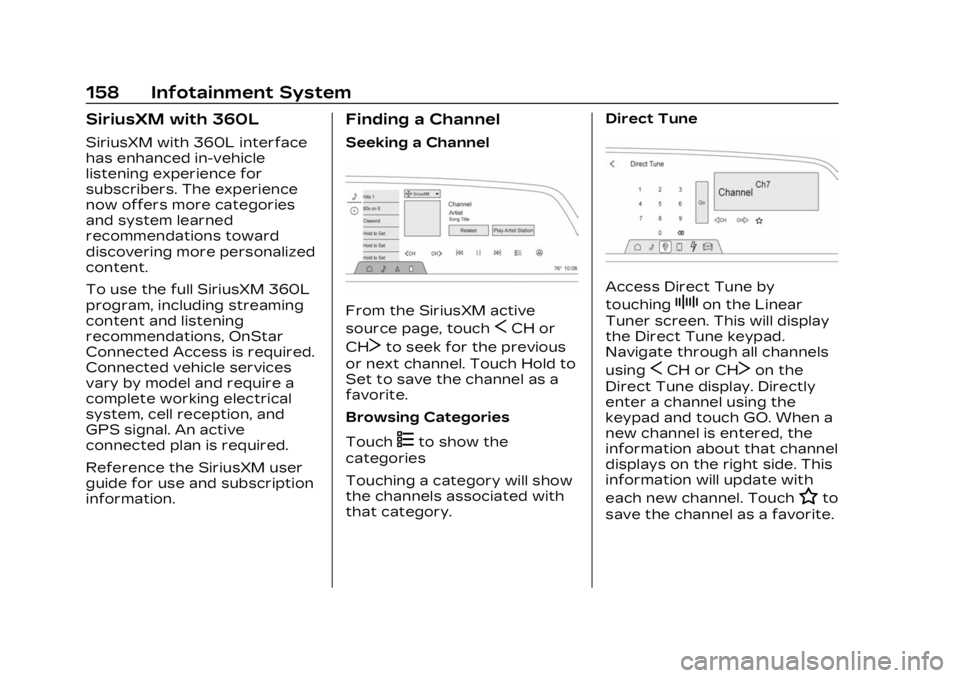
From the SiriusXM active
source page, touch
SCH or
CH
Tto seek for the previous
or next channel. Touch Hold to
Set to save the channel as a
favorite.
Browsing Categories
Touch
(to show the
categories
Touching a category will show
the channels associated with
that category. Direct Tune
Access Direct Tune by
touching
Zon the Linear
Tuner screen. This will display
the Direct Tune keypad.
Navigate through all channels
using
SCH or CHTon the
Direct Tune display. Directly
enter a channel using the
keypad and touch GO. When a
new channel is entered, the
information about that channel
displays on the right side. This
information will update with
each new channel. Touch
Hto
save the channel as a favorite.
Page 160 of 424
Cadillac Lyriq Owner Manual (GMNA-Localizing-U.S./Canada-15644413) -
2023 - CRC - 2/23/22
Infotainment System 159
Favorites
Audio favorites are displayed
on the left side of the active
audio source page.
Favorites are stored by
touching Hold to Set at the
left side of the active audio
source page.
User Settings
From the SiriusXM source
main page, touch
zto display
the following:
.Tune Start
.Location Services
.Help and Support
Tune Start
Select on or of to have songs
play from the start when
tuning.
Location Services
Select on or of to allow
SiriusXM to see your location.
Help and Support
Select to show the SiriusXM
help website.
Radio Reception
Unplug electronic devices
from the accessory power
outlets if there is interference
or static in the radio.
FM
FM signals only reach about 16
to 65 km (10 to 40 mi).
Although the radio has a
built-in electronic circuit that
automatically works to reduce
interference, some static can
occur, especially around tall
buildings or hills, causing the
sound to fade in and out.
AM
The range for most AM
stations is greater than for
FM, especially at night. The
longer range can cause station
frequencies to interfere with
each other. Static can also
occur when things like storms
and power lines interfere with
radio reception. When this
happens, try reducing the
treble on the radio.
SiriusXM Satellite Radio
Service
If equipped, SiriusXM Satellite
Radio Service provides digital
radio reception. Tall buildings
or hills can interfere with
satellite radio signals, causing
the sound to fade in and out.
In addition, traveling or
standing under heavy foliage,
bridges, garages, or tunnels
may cause loss of the
SiriusXM signal for a period of
time. Some cellular services
may interfere with SXM
reception causing loss of
signal.
Mobile Device Usage
Mobile device usage, such as
making or receiving calls,
charging, or just having the
mobile device on may cause
static interference in the radio.
Unplug the mobile device or
turn it off if this happens.
Page 163 of 424
Cadillac Lyriq Owner Manual (GMNA-Localizing-U.S./Canada-15644413) -
2023 - CRC - 2/23/22
162 Infotainment System
Bluetooth Sound Menu
See“Infotainment System
Sound Menu” under AM-FM
Radio 0156.
FCC Radiation Exposure
Statement
This equipment has been
evaluated to be installed and
operated at a minimum
distance of 6 cm between the
device and your body. The
vehicle design ensures this
distance is maintained during
normal use. Changes or
modifications to any of these
systems by other than an
authorized service facility
could void authorization to use
this equipment.
ISED Radiation Exposure
Statement
This equipment complies with
RSS-102 radiation exposure
limits set forth for an
uncontrolled environment. This
equipment should be installed
and operated with a minimum
distance of 6 cm between the radiator and any part of your
body. The vehicle design
ensures this distance is
maintained during normal use.
Changes or modifications to
any of these systems by other
than an authorized service
facility could void
authorization to use this
equipment.
See Radio Frequency
Statement
0395.
Navigation
Using the Navigation
System
The Navigation software is
provided by Google Maps. The
information provided in this
section is a general overview
and is subject to change. For
the latest functional
information, see g.co/
mapsincar.
Accept the Terms and
Conditions to use. Internet Connectivity
Google Maps relies on a
subscription data plan for full
functionality, including
availability of offline maps.
Google Maps can be used
offline when driving through
connectivity dead zones by
auto-downloading offline maps
prior to going offline.
Profiles
Sign in to a Google Account
for personalized service.
Information available in the
Google Account will be shown.
To log into a profile, see
Accounts under Settings
0
176.
Voice Assistant
If equipped, Google Maps can
be controlled by voice
commands, see Google
Assistant under Voice
Recognition 0166.
Language and Units
To change the language, see
Settings 0176.
Page 175 of 424
Cadillac Lyriq Owner Manual (GMNA-Localizing-U.S./Canada-15644413) -
2023 - CRC - 2/23/22
174 Infotainment System
Call Waiting
Call waiting must be
supported on the Bluetooth
cell phone and enabled by the
wireless service carrier
to work.
Accepting a Call
Press
6on steering wheel
controls to answer.
Declining a Call
Press
con the steering
wheel controls to decline.
Switching Between Calls (Call
Waiting Calls Only)
To switch between calls, touch
Phone on the Home Page to
display Call View. While in Call
View, touch the call
information of the call on hold
to change calls.
Ending a Call
.Presscon the steering
wheel controls.
.Touch#on the infotainment
display, next to a call, to end
only that call.
Dual Tone
Multi-Frequency (DTMF)
Tones
The in-vehicle Bluetooth
system can send numbers
during a call. This is used when
calling a menu-driven phone
system. Use the Keypad to
enter the number.
Apple CarPlay and
Android Auto
If equipped, Android Auto and/
or Apple CarPlay capability
may be available through a
compatible smartphone.
If available and connected, the
Android Auto and Apple
CarPlay icons will change from
gray to white on the Home
Page of the infotainment
display.
To use Android Auto and/or
Apple CarPlay: For Wired Phone Projection
1. Download the Android Auto app to your smartphone
from Google Play for
phones running Android
9 and below. There is no
app required for Apple
CarPlay or newer versions
of Android.
2. Connect your Android phone or Apple iPhone by
using the factory-provided
phone USB cable and
plugging into a front USB
data port. For best
performance, it is highly
recommended to use the
device’s factory-provided
USB cable, which should be
replaced after significant
wear to maintain connection
quality. Aftermarket or
third-party cables may
not work.
Page 183 of 424
Cadillac Lyriq Owner Manual (GMNA-Localizing-U.S./Canada-15644413) -
2023 - CRC - 2/23/22
182 Infotainment System
.Touch Clear PIN and All
Teen Driver Keys from the
Teen Driver menu. This will
also unregister any Teen
Driver keys and delete
the PIN.
Forgotten PIN
See your dealer to reset
the PIN.
Trademarks and
License
Agreements
FCC Information
See Radio Frequency
Statement 0395.
If you decide to continue
service after your trial, your
selected subscription plan will
automatically renew thereafter. You will be
charged at then-current rates.
Fees and taxes apply. Please
see the SiriusXM Customer
Agreement at siriusxm.com for
complete terms and how to
cancel, which includes calling
SiriusXM at 1-866-635-2349.
All fees and programming are
subject to change.
Fees and Taxes: Subscription
fee, taxes, one time activation
fee, and other fees may apply.
Subscription fee is consumer
only. All fees and programming
subject to change.
Subscriptions subject to
Customer Agreement available
at www.siriusxm.com. SiriusXM
service is only available in the
48 contiguous United States
and Canada.
In Canada: Some deterioration
of service may occur in
extreme northern latitudes.
This is beyond the control of
SiriusXM Satellite Radio.
Explicit Language Notice:
Channels with frequent
explicit language are indicated
with an
“XL”preceding the
channel name. Channel
blocking is available for
SiriusXM Satellite Radio
receivers by notifying
SiriusXM:
.USA Customers —See
www.siriusxm.com or call
1-888-601–6296.
.Canada Customers —See
www.siriusxm.ca or call
1-877-438-9677.
It is prohibited to copy,
decompile, disassemble,
reverse engineer, hack,
manipulate, or otherwise make
available any technology or
software incorporated in
receivers compatible with the
SiriusXM Satellite Radio
System or that support the
SiriusXM website, the Online
Service or any of its content.
Furthermore, the AMBER
voice compression software
included in this product is
Page 184 of 424
Cadillac Lyriq Owner Manual (GMNA-Localizing-U.S./Canada-15644413) -
2023 - CRC - 2/23/22
Infotainment System 183
protected by intellectual
property rights including
patent rights, copyrights, and
trade secrets of Digital Voice
Systems, Inc.
General Requirements:1. A License Agreement from SiriusXM is required for any
product that incorporates
SiriusXM Technology and/or
for use of any of the
SiriusXM marks to be
manufactured, distributed,
or marketed in the SiriusXM
Service Area.
2. For products to be distributed, marketed, and/
or sold in Canada, a
separate agreement is
required with Canadian
Satellite Radio Inc.
(operating as SiriusXM
Canada).
TouchSense Technology and
TouchSense System 1000
Series Licensed from
Immersion Corporation.
TouchSense System 1000
protected under one or more
of the U.S. Patents at the
following address
www.immersion.com/
patent-marking.html and other
patents pending.
Bluetooth
The Bluetooth word mark and
logos are owned by the
Bluetooth SIG, Inc. and any use
of such marks by General
Motors is under license. Other
trademarks and trade names
are those of their respective
owners. Java
Java is a registered trademark
of Oracle and/or its affiliates.
MPEG4–AVC (H.264)
THIS PRODUCT IS LICENSED
UNDER THE AVC PATENT
PORTFOLIO LICENSE FOR
THE PERSONAL AND
NON-COMMERCIAL USE OF
A CONSUMER TO (i) ENCODE
VIDEO IN COMPLIANCE WITH
THE AVC STANDARD (“AVC
VIDEO”) AND/OR (ii) DECODE
AVC VIDEO THAT WAS
ENCODED BY A CONSUMER
ENGAGED IN A PERSONAL
AND NON-COMMERCIAL
ACTIVITY AND/OR WAS
OBTAINED FROM A VIDEO
PROVIDER LICENSED TO
PROVIDE AVC VIDEO. NO
LICENSE IS GRANTED OR
SHALL BE IMPLIED FOR ANY
OTHER USE. ADDITIONAL
INFORMATION MAY BE
OBTAINED FROM MPEG LA,
LLC. SEE HTTPS://
WWW.MPEGLA.COM.
Page 186 of 424
Cadillac Lyriq Owner Manual (GMNA-Localizing-U.S./Canada-15644413) -
2023 - CRC - 2/23/22
Climate Controls 185
Climate Controls
Climate Control Systems
Dual Automatic ClimateControl System . . . . . . . . . . . 185
Air Vents
Air Vents . . . . . . . . . . . . . . . . . . . . . 189
Maintenance
Passenger CompartmentAir Filter . . . . . . . . . . . . . . . . . . . . . 190
Service . . . . . . . . . . . . . . . . . . . . . . . . . 191
Climate Control Systems
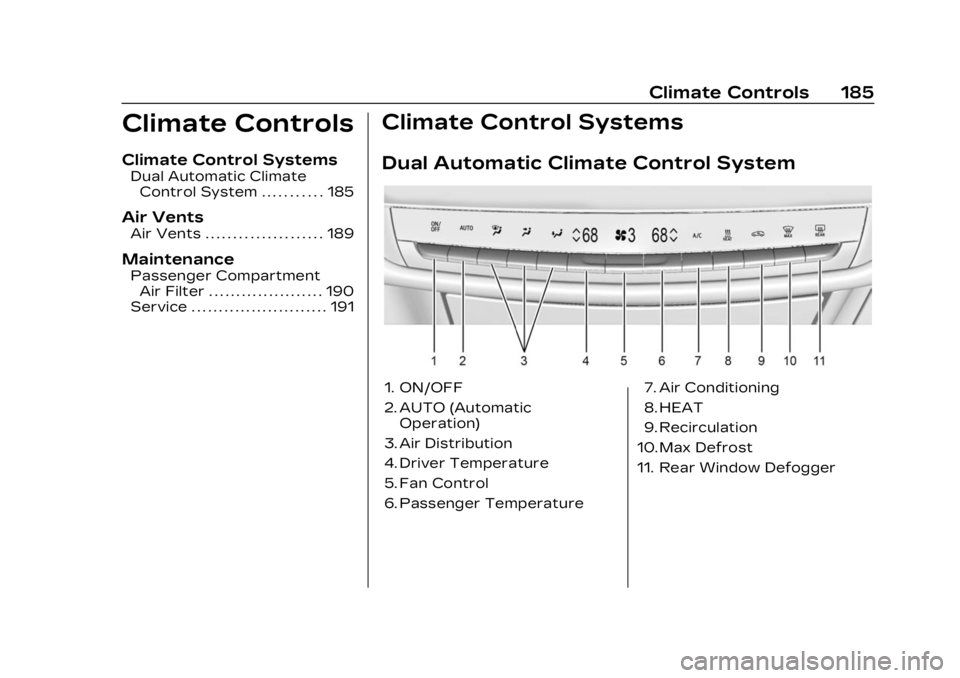
Dual Automatic Climate Control System
1. ON/OFF
2. AUTO (Automatic Operation)
3. Air Distribution
4. Driver Temperature
5. Fan Control
6. Passenger Temperature 7. Air Conditioning
8. HEAT
9. Recirculation
10. Max Defrost
11. Rear Window Defogger
Page 192 of 424
Cadillac Lyriq Owner Manual (GMNA-Localizing-U.S./Canada-15644413) -
2023 - CRC - 2/23/22
Climate Controls 191
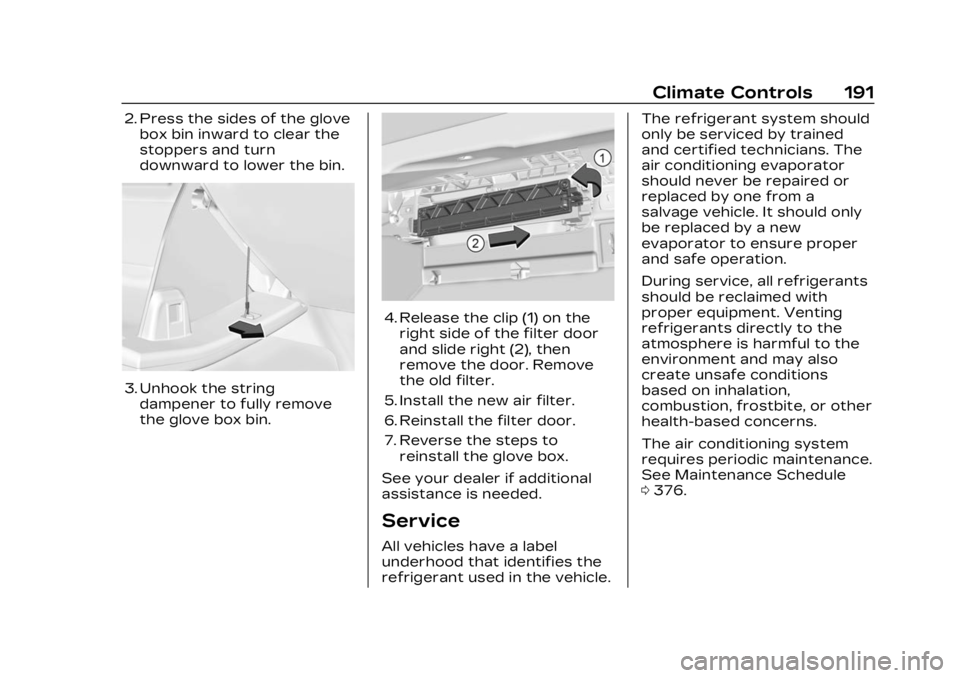
2. Press the sides of the glovebox bin inward to clear the
stoppers and turn
downward to lower the bin.
3. Unhook the stringdampener to fully remove
the glove box bin.
4. Release the clip (1) on theright side of the filter door
and slide right (2), then
remove the door. Remove
the old filter.
5. Install the new air filter.
6. Reinstall the filter door.
7. Reverse the steps to reinstall the glove box.
See your dealer if additional
assistance is needed.
Service
All vehicles have a label
underhood that identifies the
refrigerant used in the vehicle. The refrigerant system should
only be serviced by trained
and certified technicians. The
air conditioning evaporator
should never be repaired or
replaced by one from a
salvage vehicle. It should only
be replaced by a new
evaporator to ensure proper
and safe operation.
During service, all refrigerants
should be reclaimed with
proper equipment. Venting
refrigerants directly to the
atmosphere is harmful to the
environment and may also
create unsafe conditions
based on inhalation,
combustion, frostbite, or other
health-based concerns.
The air conditioning system
requires periodic maintenance.
See Maintenance Schedule
0
376.