service CADILLAC LYRIC 2023 Service Manual
[x] Cancel search | Manufacturer: CADILLAC, Model Year: 2023, Model line: LYRIC, Model: CADILLAC LYRIC 2023Pages: 424, PDF Size: 4.76 MB
Page 201 of 424
Cadillac Lyriq Owner Manual (GMNA-Localizing-U.S./Canada-15644413) -
2023 - CRC - 2/23/22
200 Driving and Operating
.Turn off cruise control.
Hill and Mountain
Roads
{Warning
Do not charge your vehicle’s
battery above an 80%
charge if you are going to
drive down long, steep
grades such as mountain
passes. This provides room
in the battery for
regenerative braking to
supplement your
conventional brakes during
the descent. This is
especially important when
towing a trailer, which puts
additional stress on your
vehicle’s braking system.
If the battery becomes full,
regenerative braking will be
limited or unavailable. The
brakes will have to do all the
work of slowing down the
vehicle and could become(Continued)
Warning (Continued)
too hot. Hot brakes may not
be able to slow the vehicle
enough to maintain speed
and control. To help avoid
the risk of a crash, limit the
battery’s charge and, if you
experience brake fade or
receive a brake warning,
stop the vehicle and allow
the brakes to cool.
See“Charge Now” under
Charging 0123 for
information on setting
charge limits.
Driving on steep hills or
through mountains is different
than driving on flat or rolling
terrain. Be sure to:
.Use regenerative braking to
help slow the vehicle or
maintain speed by keeping
the vehicle in gear and
limiting the initial battery
charge to 80% or less.
.When braking is necessary,
use frequent, light taps of
the brake pedal. This
maximizes regenerative
braking and minimizes the
load on the vehicle brake
system.
.Keep the vehicle serviced
and in good shape.
.Check all fluid levels, brakes,
tires and cooling system.
.Drive at speeds that keep
the vehicle in its own lane.
Do not swing wide or cross
the center line.
.Be alert on top of hills;
something could be in your
lane (e.g., stalled car, crash).
.Pay attention to special road
signs (e.g., falling rocks area,
winding roads, long grades,
passing or no-passing zones)
and take appropriate action.
Page 208 of 424

Cadillac Lyriq Owner Manual (GMNA-Localizing-U.S./Canada-15644413) -
2023 - CRC - 2/23/22
Driving and Operating 207
ON/RUN :This position is for
starting and driving. With the
vehicle off, and the brake
pedal applied, pressing
POWER
Oonce will place the
vehicle in ON/RUN. When the
vehicle ready light is on in the
instrument cluster, the vehicle
is ready to be driven. This
could take up to 15 seconds at
extremely cold temperatures.
Service Mode
This power mode is available
for service and diagnostics,
and to verify the proper
operation of the service
vehicle soon light as may be
required for inspection or
maintenance purposes. With
the vehicle off, and the brake
pedal not applied, pressing
and holding POWER
Ofor
more than five seconds will
place the vehicle in Service
Mode. The instruments and
audio systems will operate as
they do in ON/RUN, but the
vehicle will not be able to be
driven. The propulsion system will not start in Service Mode.
Press POWER
Oagain to turn
the vehicle off.
Caution
Placing the vehicle in
Service Mode will use the
12-volt battery. Do not use
Service Mode for an
extended period, or the
vehicle may not start.
STOPPING THE VEHICLE/
OFF : To turn the vehicle off,
apply the brakes, press the
button on top of the shift lever
to shift to P (Park) and press
POWER
O.
Alternatively, apply the brakes
and press POWER
O. The
electric drive unit will shift to
P (Park) then shut off
automatically.
Retained Accessory
Power (RAP) will remain active
until the driver door is opened.
If the vehicle must be shut off
in an emergency: 1. Brake using a firm and
steady pressure. Do not
pump the brakes
repeatedly. This may
deplete power assist,
requiring increased brake
pedal force.
2. Shift the vehicle to N (Neutral). This can be
done while the vehicle is
moving. After shifting to
N (Neutral), firmly apply the
brakes and steer the vehicle
to a safe location.
3. Come to a complete stop, shift to P (Park), and turn
the vehicle off by pressing
POWER
O.
4. Set the parking brake.
{Warning
Turning off the vehicle while
moving may disable the
airbags. While driving, only
shut the propulsion system
off in an emergency.
Page 211 of 424
Cadillac Lyriq Owner Manual (GMNA-Localizing-U.S./Canada-15644413) -
2023 - CRC - 2/23/22
210 Driving and Operating
After pressing the P (Park)
button, hold down the regular
brake pedal. If you cannot see
the P (Park) indicator in the
instrument cluster, it means
that the vehicle has not
shifted to P (Park).
Shifting out of Park
This vehicle is equipped with
an electric drive unit. To shift
out of P (Park) the vehicle
must be on, the brake pedal
applied, and the charge cord
unplugged.
Parking the vehicle in extreme
cold for several days without
the charge cord connected
may cause the vehicle not to
start. Plug the vehicle in to
allow the high voltage battery
to be warmed sufficiently.
To shift out of P (Park):1. Apply the brake pedal.
2. Press POWER
Oto turn the
vehicle on. 3. Verify that the vehicle is
unplugged and the vehicle
ready light is on.
4. Move the shift lever to the desired position.
After releasing the shift lever,
it will return to the center
position.
The P indicator will turn white
and the gear indicator on the
shift lever will turn red when
the vehicle is no longer in
P (Park).
If the vehicle cannot shift from
P (Park), a Driver Information
Center (DIC) message may be
displayed. Check that the
vehicle is on, the vehicle ready
light is on, and the brake pedal
is applied when you are
attempting to shift out of
P (Park). If all of these are met
but the vehicle will not shift
out of P (Park), see your dealer
for service. If equipped, the Buckle to
Drive feature may prevent
shifting from P (Park). See
Buckle To Drive
051.
Extended Parking
It is best not to park with the
propulsion system on. If the
vehicle is left on, be sure it will
not move.
See Shifting Into Park 0209.
If the vehicle is left parked and
on with the remote key
outside the vehicle, it will
remain on for up to one hour.
If the vehicle is left parked and
on with the remote key inside
the vehicle, it will remain on for
up to two hours.
The timer will reset if the
vehicle is taken out of P (Park)
while it is on.
See Remote Key Operation 08
and Digital Key 020.
Page 218 of 424
Cadillac Lyriq Owner Manual (GMNA-Localizing-U.S./Canada-15644413) -
2023 - CRC - 2/23/22
Driving and Operating 217
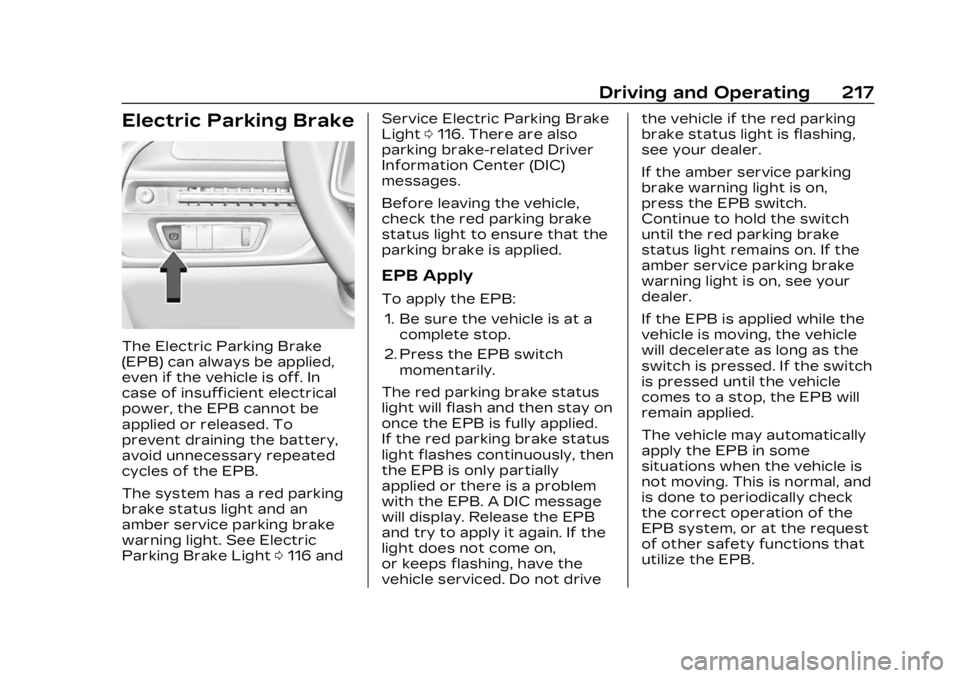
Electric Parking Brake
The Electric Parking Brake
(EPB) can always be applied,
even if the vehicle is off. In
case of insufficient electrical
power, the EPB cannot be
applied or released. To
prevent draining the battery,
avoid unnecessary repeated
cycles of the EPB.
The system has a red parking
brake status light and an
amber service parking brake
warning light. See Electric
Parking Brake Light0116 and Service Electric Parking Brake
Light
0116. There are also
parking brake-related Driver
Information Center (DIC)
messages.
Before leaving the vehicle,
check the red parking brake
status light to ensure that the
parking brake is applied.
EPB Apply
To apply the EPB:
1. Be sure the vehicle is at a complete stop.
2. Press the EPB switch momentarily.
The red parking brake status
light will flash and then stay on
once the EPB is fully applied.
If the red parking brake status
light flashes continuously, then
the EPB is only partially
applied or there is a problem
with the EPB. A DIC message
will display. Release the EPB
and try to apply it again. If the
light does not come on,
or keeps flashing, have the
vehicle serviced. Do not drive the vehicle if the red parking
brake status light is flashing,
see your dealer.
If the amber service parking
brake warning light is on,
press the EPB switch.
Continue to hold the switch
until the red parking brake
status light remains on. If the
amber service parking brake
warning light is on, see your
dealer.
If the EPB is applied while the
vehicle is moving, the vehicle
will decelerate as long as the
switch is pressed. If the switch
is pressed until the vehicle
comes to a stop, the EPB will
remain applied.
The vehicle may automatically
apply the EPB in some
situations when the vehicle is
not moving. This is normal, and
is done to periodically check
the correct operation of the
EPB system, or at the request
of other safety functions that
utilize the EPB.
Page 219 of 424
Cadillac Lyriq Owner Manual (GMNA-Localizing-U.S./Canada-15644413) -
2023 - CRC - 2/23/22
218 Driving and Operating
If the EPB fails to apply, block
the rear wheels to prevent
vehicle movement.
EPB Release
To release the EPB:1. Turn the vehicle on.
2. Apply and hold the brake pedal.
3. Press the EPB switch momentarily.
The EPB is released when the
red parking brake status light
is off.
If the amber service parking
brake warning light is on,
release the EPB by pressing
and holding the EPB switch.
Continue to hold the switch
until the red parking brake
status light is off. If either light
stays on after release is
attempted, see your dealer.
Caution
Driving with the parking
brake on can overheat the
brake system and cause
premature wear or damage
to brake system parts. Make
sure that the parking brake
is fully released and the
brake warning light is off
before driving.
Automatic EPB Release
The EPB will automatically
release if the vehicle is
running, placed into gear, and
an attempt is made to drive
away. Avoid rapid acceleration
when the EPB is applied, to
preserve parking brake
lining life.
Brake Assist
Brake Assist detects rapid
brake pedal applications due
to emergency braking
situations and provides
additional braking to activate
the Antilock Brake System (ABS) if the brake pedal is not
pushed hard enough to
activate ABS normally. Minor
noise, brake pedal pulsation,
and/or pedal movement during
this time may occur. Continue
to apply the brake pedal as
the driving situation dictates.
Brake Assist disengages when
the brake pedal is released.
Hill Start Assist (HSA)
{Warning
Do not rely on the HSA
feature. HSA does not
replace the need to pay
attention and drive safely.
You may not hear or feel
alerts or warnings provided
by this system. Failure to
use proper care when
driving may result in injury,
death, or vehicle damage.
See Defensive Driving
0196.
When the vehicle is stopped
on a grade, Hill Start Assist
(HSA) prevents the vehicle
Page 236 of 424
Cadillac Lyriq Owner Manual (GMNA-Localizing-U.S./Canada-15644413) -
2023 - CRC - 2/23/22
Driving and Operating 235
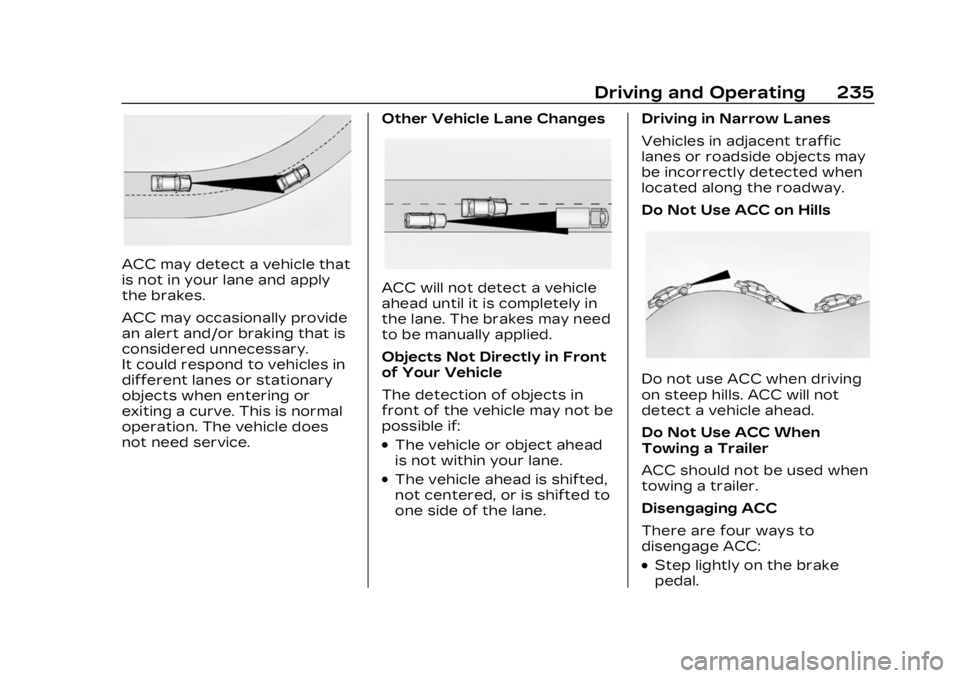
ACC may detect a vehicle that
is not in your lane and apply
the brakes.
ACC may occasionally provide
an alert and/or braking that is
considered unnecessary.
It could respond to vehicles in
different lanes or stationary
objects when entering or
exiting a curve. This is normal
operation. The vehicle does
not need service.Other Vehicle Lane Changes
ACC will not detect a vehicle
ahead until it is completely in
the lane. The brakes may need
to be manually applied.
Objects Not Directly in Front
of Your Vehicle
The detection of objects in
front of the vehicle may not be
possible if:
.The vehicle or object ahead
is not within your lane.
.The vehicle ahead is shifted,
not centered, or is shifted to
one side of the lane.Driving in Narrow Lanes
Vehicles in adjacent traffic
lanes or roadside objects may
be incorrectly detected when
located along the roadway.
Do Not Use ACC on Hills
Do not use ACC when driving
on steep hills. ACC will not
detect a vehicle ahead.
Do Not Use ACC When
Towing a Trailer
ACC should not be used when
towing a trailer.
Disengaging ACC
There are four ways to
disengage ACC:
.Step lightly on the brake
pedal.
Page 238 of 424
Cadillac Lyriq Owner Manual (GMNA-Localizing-U.S./Canada-15644413) -
2023 - CRC - 2/23/22
Driving and Operating 237
Super Cruise can also steer to
perform a lane change under
certain conditions on Super
Cruise-enabled roads. A lane
change can be initiated by the
driver using the turn signal
lever.
The Super Cruise System may
initiate a lane change
maneuver in following
scenarios:
.To pass slower traffic
.When the current lane is
ending ahead
.To return to the initial lane
See “Super Cruise Lane
Change” later in this section
and Turn and Lane-Change
Signals 0146.
{Warning
Super Cruise can only assist
to maintain lane position,
or steer to change lanes,
when driving on compatible
roads. You must supervise
the driving task and monitor
(Continued)
Warning (Continued)
the road conditions. You
may need to respond to
traffic events by steering,
braking, or accelerating. See
Defensive Driving.
Super Cruise is:
.Not a self-driving system
.Not a crash avoidance or
warning system
.Not a substitute for
proper supervision of the
driving task.
Super Cruise uses the
following to detect the current
lane position and lane
markings ahead on compatible
roads under certain
conditions:
.Cameras
.Global Positioning System
(GPS) sensing
.A high-precision map
.GPS-enhancement data
downloaded through OnStar Super Cruise works with
Adaptive Cruise Control (ACC),
which controls acceleration
and braking while Super
Cruise is enabled and
operating. Review and
understand both this section
and the ACC section before
using Super Cruise. See
Adaptive Cruise Control
(Advanced)
0225.
An active Connected Service
plan that includes Super
Cruise Services is required to
use Super Cruise.
{Warning
Super Cruise does not
perform all aspects of
driving, nor does it do
everything a driver can do.
Super Cruise only steers to
maintain vehicle position in
the current lane or, under
some circumstances, to
change lanes. Super Cruise
can only be used with
Adaptive Cruise Control. (Continued)
Page 240 of 424
Cadillac Lyriq Owner Manual (GMNA-Localizing-U.S./Canada-15644413) -
2023 - CRC - 2/23/22
Driving and Operating 239
Warning (Continued)
.Never remove your hands
from the steering wheel
when Super Cruise is not
operating.
.Always make sure traffic
conditions are safe before
using Super Cruise.
.Always keep the entire
vehicle and the sensors
clean. Sensors are on the
front, sides, and rear of
the vehicle.
.Always observe posted
speed limits. Only use
Super Cruise at or below
the posted speed limit.
Super Cruise should not be
used in complex or uncertain
driving conditions, including:
.Not in construction zones.
.Not when approaching or
exiting toll plazas. (Continued)
Warning (Continued)
.Not when approaching an
intersection that is
controlled with a traffic
light, stop sign, or other
traffic control device.
.Not when lane markings
are not present or cannot
be detected. For example,
there is too much glare,
weather conditions are
poor, or lanes are poorly
marked.
.Not on slippery or icy
roads.
.Not in adverse weather
conditions, including rain,
sleet, fog, ice, or snow.
.Not on winding or hilly
roads.
.Not for city driving.
.Not during heavy or
emergency braking.
.Not on surface streets.(Continued)
Warning (Continued)
.Not on a road shoulder,
service drive, or under an
elevated freeway.
.Not when towing a trailer.
.Not in a highway exit lane.
When Super Cruise is
Available
Super Cruise Indicator
Super Cruise is designed to
operate only when:
.ACC is on. See Adaptive
Cruise Control (Advanced)
0 225.
.Teen Driver is not active.
.The GPS detects the vehicle
is on a compatible highway.
Page 248 of 424
Cadillac Lyriq Owner Manual (GMNA-Localizing-U.S./Canada-15644413) -
2023 - CRC - 2/23/22
Driving and Operating 247
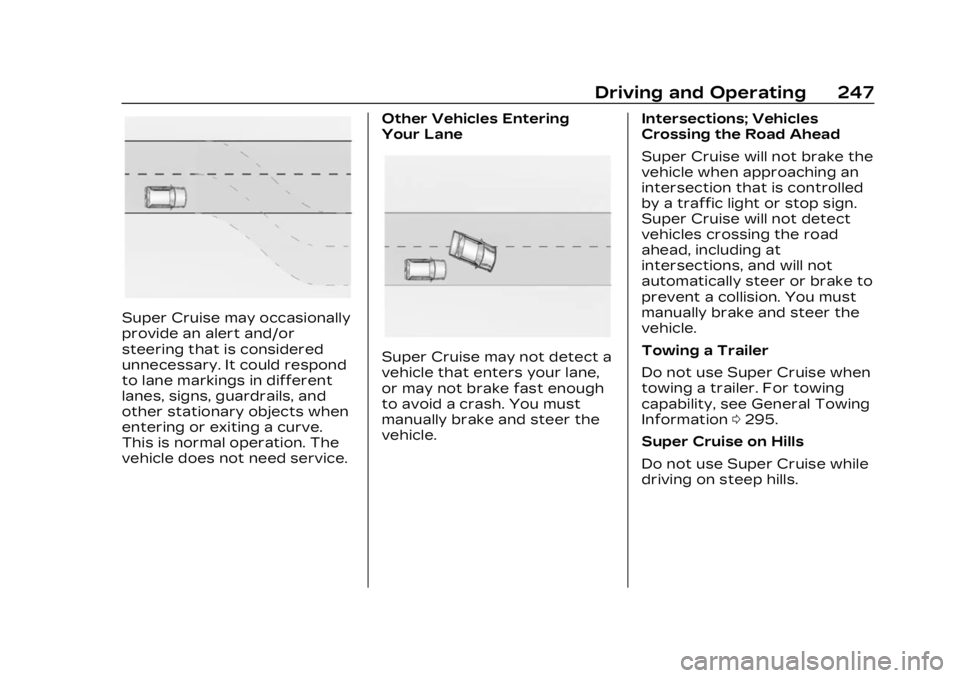
Super Cruise may occasionally
provide an alert and/or
steering that is considered
unnecessary. It could respond
to lane markings in different
lanes, signs, guardrails, and
other stationary objects when
entering or exiting a curve.
This is normal operation. The
vehicle does not need service.Other Vehicles Entering
Your Lane
Super Cruise may not detect a
vehicle that enters your lane,
or may not brake fast enough
to avoid a crash. You must
manually brake and steer the
vehicle.
Intersections; Vehicles
Crossing the Road Ahead
Super Cruise will not brake the
vehicle when approaching an
intersection that is controlled
by a traffic light or stop sign.
Super Cruise will not detect
vehicles crossing the road
ahead, including at
intersections, and will not
automatically steer or brake to
prevent a collision. You must
manually brake and steer the
vehicle.
Towing a Trailer
Do not use Super Cruise when
towing a trailer. For towing
capability, see General Towing
Information
0295.
Super Cruise on Hills
Do not use Super Cruise while
driving on steep hills.
Page 252 of 424
Cadillac Lyriq Owner Manual (GMNA-Localizing-U.S./Canada-15644413) -
2023 - CRC - 2/23/22
Driving and Operating 251
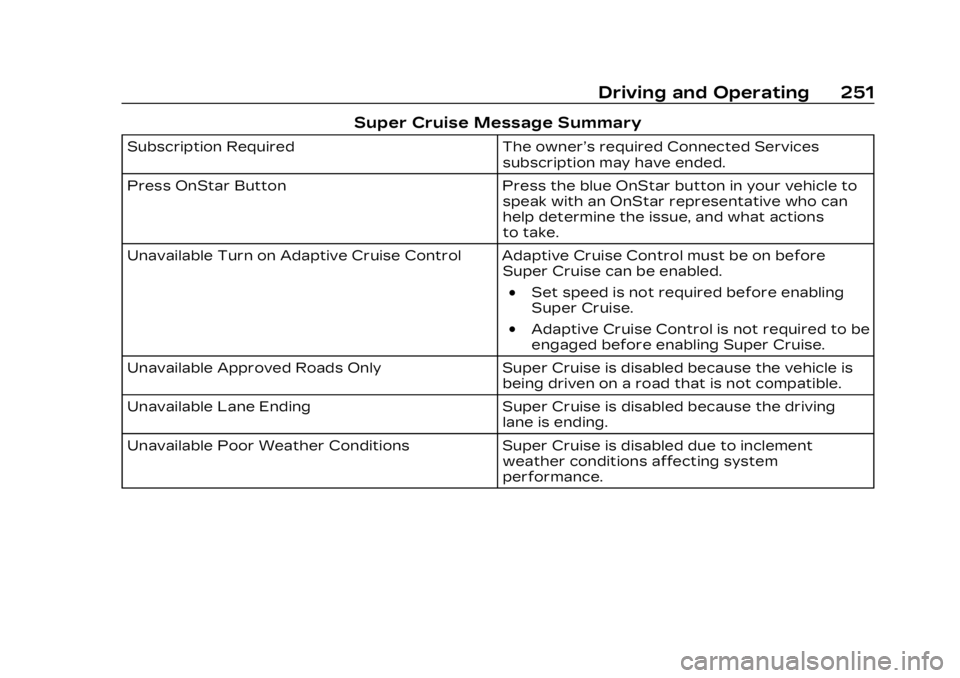
Super Cruise Message Summary
Subscription RequiredThe owner’s required Connected Services
subscription may have ended.
Press OnStar Button Press the blue OnStar button in your vehicle to
speak with an OnStar representative who can
help determine the issue, and what actions
to take.
Unavailable Turn on Adaptive Cruise Control Adaptive Cruise Control must be on before Super Cruise can be enabled.
.Set speed is not required before enabling
Super Cruise.
.Adaptive Cruise Control is not required to be
engaged before enabling Super Cruise.
Unavailable Approved Roads Only Super Cruise is disabled because the vehicle is
being driven on a road that is not compatible.
Unavailable Lane Ending Super Cruise is disabled because the driving
lane is ending.
Unavailable Poor Weather Conditions Super Cruise is disabled due to inclement
weather conditions affecting system
performance.