rear view mirror CADILLAC LYRIC 2023 Owners Manual
[x] Cancel search | Manufacturer: CADILLAC, Model Year: 2023, Model line: LYRIC, Model: CADILLAC LYRIC 2023Pages: 424, PDF Size: 4.76 MB
Page 8 of 424
Cadillac Lyriq Owner Manual (GMNA-Localizing-U.S./Canada-15644413) -
2023 - CRC - 2/23/22
Keys, Doors, and Windows 7
Keys, Doors, and
Windows
Keys and Locks
Keys . . . . . . . . . . . . . . . . . . . . . . . . . . . . . . . 7
Remote Key . . . . . . . . . . . . . . . . . . . . . 8
Remote Key Operation . . . . . . 8
Remote Start . . . . . . . . . . . . . . . . . 15
Door Locks . . . . . . . . . . . . . . . . . . . . . 17
Power Door Locks . . . . . . . . . . . 18
Delayed Locking . . . . . . . . . . . . . . 18
Automatic Door Locks . . . . . 19
Lockout Protection . . . . . . . . . 19
Safety Locks . . . . . . . . . . . . . . . . . 20
Digital Key . . . . . . . . . . . . . . . . . . . . . 20
Doors
Liftgate . . . . . . . . . . . . . . . . . . . . . . . . . 21
Vehicle Security
Vehicle Security . . . . . . . . . . . . . 26
Vehicle Alarm System . . . . . . 26
Immobilizer . . . . . . . . . . . . . . . . . . . . 27
Immobilizer Operation . . . . . . 27
Exterior Mirrors
Convex Mirrors . . . . . . . . . . . . . . 28
Power Mirrors . . . . . . . . . . . . . . . . 28
Folding Mirrors . . . . . . . . . . . . . . . 28
Heated Mirrors . . . . . . . . . . . . . . 30
Interior Mirrors
Interior RearviewMirrors . . . . . . . . . . . . . . . . . . . . . . . 30
Manual Rearview Mirror . . . . . . . . . . . . . . . . . . . . . . . . . 30
Automatic Dimming
Rearview Mirror . . . . . . . . . . . 30
Rear Camera Mirror . . . . . . . . 30
Windows
Windows . . . . . . . . . . . . . . . . . . . . . . . 33
Power Windows . . . . . . . . . . . . . 33
Sun Visors . . . . . . . . . . . . . . . . . . . . . 35
Roof
Sunroof . . . . . . . . . . . . . . . . . . . . . . . . 35
Keys and Locks
Keys
{Warning
Leaving children in a vehicle
with a remote key is
dangerous and children or
others could be seriously
injured or killed. They could
operate the power windows
or other controls or make
the vehicle move. The
windows will function with
the remote key in the
vehicle, and children or
others could be caught in
the path of a closing
window. Do not leave
children in a vehicle with a
remote key.
Page 11 of 424

Cadillac Lyriq Owner Manual (GMNA-Localizing-U.S./Canada-15644413) -
2023 - CRC - 2/23/22
10 Keys, Doors, and Windows
list of available options and
select“Remote Lock, Unlock,
Start”.
If equipped with auto mirror
unfolding, double press and
hold
Kuntil the mirrors fully
open. To view available
settings for this feature, touch
the Settings icon on the
infotainment home page.
Select “Vehicle” to display the
list of available options and
select “Comfort and
Convenience”.
Pressing
Kwill disarm the
alarm system. See Vehicle
Alarm System 026.
b:Press twice to open or
close the liftgate. Press once
to stop the liftgate from
moving. The vehicle must be in
P (Park).
7: Press and release one time
to initiate vehicle locator. The
exterior lamps flash and the
horn chirps three times. Press and hold
7for at least
three seconds to sound the
panic alarm. The horn sounds
and the turn signals flash for
about 30 seconds or until
7is
pressed again or the vehicle is
started.
/: Press and releaseQand
then immediately press and
hold
/for at least
four seconds to start the
vehicle's heating or air
conditioning systems and rear
window defogger from outside
the vehicle using the remote
key. See Remote Start 015.
Keyless Access Operation
The Keyless Access system
allows the doors and liftgate
to be unlocked without
pressing the remote key
button. The remote key must
be within 1 m (3 ft) of the
liftgate or door being opened.
Doors can be programmed to
the lock after exiting the
vehicle through Passive locking or delayed locking. The
remote key can also be used
to lock the doors
Keyless Access can be
programmed to unlock all
doors on the first unlock
button press from the driver
door. To view available
settings for this feature, touch
the Settings icon on the
infotainment home page.
Select
“Vehicle” to display the
list of available options and
select “Remote Lock, Unlock,
Start”.
Keyless Unlocking from
the Driver Door
When the doors are locked
and the remote key is within
1 m (3 ft) of the driver door
handle, pressing the large end
of the unlock button on the
driver door handle will unlock
and unlatch the driver door.
Page 31 of 424
Cadillac Lyriq Owner Manual (GMNA-Localizing-U.S./Canada-15644413) -
2023 - CRC - 2/23/22
30 Keys, Doors, and Windows
Lane Change Alert (LCA)
The vehicle may have LCA.
See Lane Change Alert (LCA)
0277.
Side Blind Zone Alert
The vehicle may have Side
Blind Zone Alert. See Side
Blind Zone Alert (SBZA) 0277.
Turn Signal Indicator
The vehicle may have a turn
signal indicator on the mirror
housings. The indicator will
flash when a turn signal or the
hazard warning flashers
are used.
Heated Mirrors
If equipped with heated
mirrors,
0will be present on
both side mirrors. The symbol
does not illuminate when the
heated mirrors are active.
The rear window defogger
also heats the outside mirrors.
K: Press to heat the outside
rearview mirrors. See “Rear
Window Defogger” under Dual
Automatic Climate Control
System 0185.
Interior Mirrors
Interior Rearview
Mirrors
Adjust the rearview mirror for
a clear view of the area behind
your vehicle.
Do not spray glass cleaner
directly on the mirror. Use a
soft towel dampened with
water.
Manual Rearview
Mirror
If equipped, push the tab
forward for daytime use and
pull it for nighttime use to
avoid glare from the
headlamps from behind.
Automatic Dimming
Rearview Mirror
If equipped, automatic
dimming reduces the glare of
headlamps from behind. The
dimming feature comes on
when the vehicle is started.
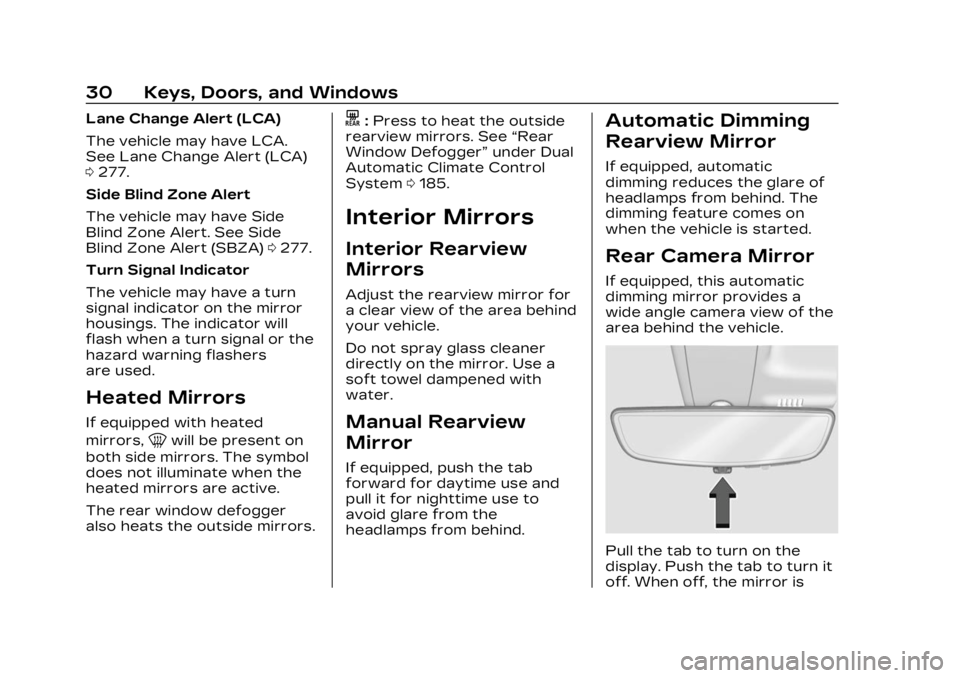
Rear Camera Mirror
If equipped, this automatic
dimming mirror provides a
wide angle camera view of the
area behind the vehicle.
Pull the tab to turn on the
display. Push the tab to turn it
off. When off, the mirror is
Page 33 of 424
Cadillac Lyriq Owner Manual (GMNA-Localizing-U.S./Canada-15644413) -
2023 - CRC - 2/23/22
32 Keys, Doors, and Windows
{Warning
The Rear Camera Mirror
(RCM) has a limited view.
Portions of the road,
vehicles, and other objects
may not be seen. Do not
drive or park the vehicle
using only this camera.
Objects may appear closer
than they are. Check the
outside mirrors or glance
over your shoulder when
making lane changes or
merging. Failure to use
proper care may result in
injury, death, or vehicle
damage.
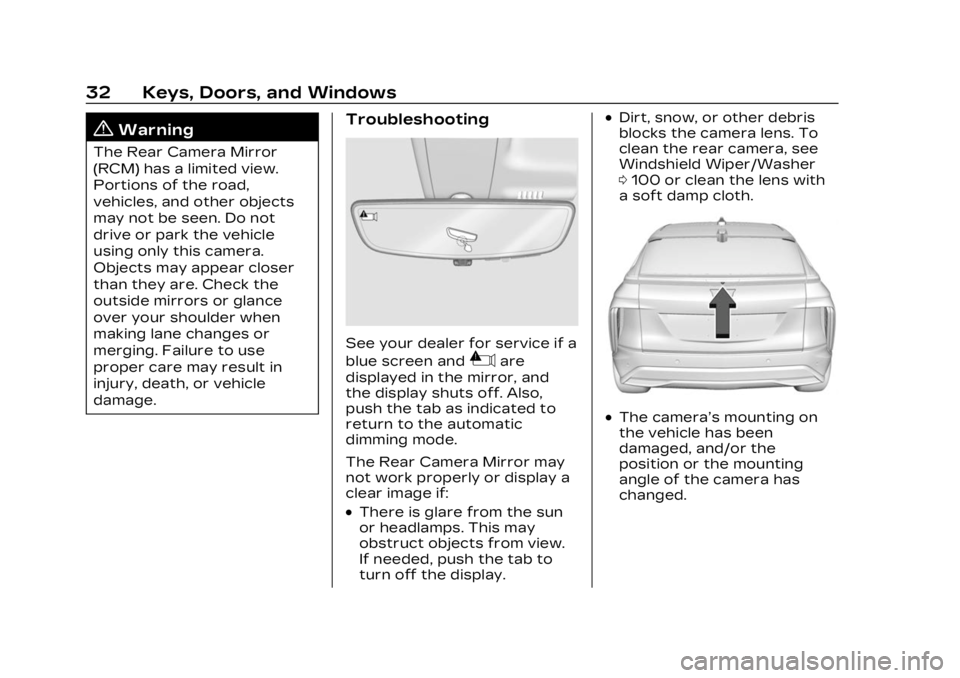
Troubleshooting
See your dealer for service if a
blue screen and
3are
displayed in the mirror, and
the display shuts off. Also,
push the tab as indicated to
return to the automatic
dimming mode.
The Rear Camera Mirror may
not work properly or display a
clear image if:
.There is glare from the sun
or headlamps. This may
obstruct objects from view.
If needed, push the tab to
turn off the display.
.Dirt, snow, or other debris
blocks the camera lens. To
clean the rear camera, see
Windshield Wiper/Washer
0 100 or clean the lens with
a soft damp cloth.
.The camera’s mounting on
the vehicle has been
damaged, and/or the
position or the mounting
angle of the camera has
changed.
Page 138 of 424

Cadillac Lyriq Owner Manual (GMNA-Localizing-U.S./Canada-15644413) -
2023 - CRC - 2/23/22
Instruments and Controls 137
procedure to be repeated.
Read these instructions
completely before
programming the Universal
Remote system. It may help to
have another person assist
with the programming
process.1. On the infotainment home screen, navigate to the
Universal Remote controls.
2. Hold the end of the hand-held transmitter about
3 to 8 cm (1 to 3 in) away
from the rear-view mirror.
The hand-held transmitter
was supplied by the
manufacturer of the garage
door opener.
3. Select the “Add Remotes”
option on the infotainment
screen.
4. Press and hold the hand-held transmitter
button. Do not release the
hand-held transmitter
button until “Signal Found”
appears on the infotainment
screen. 5. Once the signal is found,
test the Universal Remote
System by pressing the
Test button. If your garage
door moves, then
programming was
successful. You may need to
press the Test button
several times. Indicate the
successful programming of
a remote by pressing the It
Worked button. After
successfully programming a
remote, there is no need to
complete Steps 6–10.
6. If your garage door does not react during testing,
press the It Didn’t Work
button and proceed to
Step 7.
The following steps require
the location and pressing of
the Learn or Smart button
on the garage door opener
receiver inside the garage.
These steps may require a
ladder and are time
sensitive. 7. Locate the Learn or Smart
button on the garage door
opener receiver in the
garage. The name and color
may vary by manufacturer
but is usually located near
the antenna wire.
8. Press and release the Learn or Smart button on the
garage door opener
receiver. Step 9 must be
completed within
30 seconds of pressing this
button.
9. Press the Test button on the infotainment screen.
If your garage door moves,
then programming was
successful. You may need to
press the Test button
several times. Indicate
successful programming by
pressing the It Worked
button.
10. If programming is not successful, press It Didn’t
Work button and repeat
Page 189 of 424
Cadillac Lyriq Owner Manual (GMNA-Localizing-U.S./Canada-15644413) -
2023 - CRC - 2/23/22
188 Climate Controls
Press AUTO to return to
automatic operation and the
air conditioner runs as needed.
@:Press to alternate
between recirculating air
inside the vehicle or pulling in
outside air. The indicator light
on the button is lit when
recirculation mode is active.
This helps to quickly cool the
air inside the vehicle and
reduce the entry of outside air
and odors.
Pressing this button cancels
automatic recirculation. Press
AUTO to return to automatic
operation; recirculation runs
automatically as needed.
Manual recirculation mode is
not available when in Defrost.
The climate control system
uses a sensor to automatically
detect high humidity inside the
vehicle. When high humidity is
detected, the climate control
system may adjust to outside
air supply, turn on the heater
and air conditioner, increase fan and temperature, and
direct more air to the
windshield. When the climate
control system does not
detect possible window
fogging, it returns to normal
operation. To turn Auto Defog
off or on, select Settings >
Climate and Air Quality > Auto
Defog > Select ON or OFF.
If Auto Defog is turned off,
or fogging does not clear
quickly enough, select
dto
more quickly clear the
windshield.
Rear Window Defogger
K: Press to turn the rear
window defogger on or off. An
indicator light on the button
comes on to show that the
rear window defogger is on.
The rear window defogger
only works when the vehicle is
on. If the outside temperature
is below 7°C (45°F), and the
rear window defogger is on,
the area of the windshield beneath the windshield wipers
will warm up to melt
accumulated snow or ice.
The rear window defogger can
be set to automatic operation.
When Auto Rear Defog is
selected, the rear window
defogger turns on
automatically when the vehicle
is first started in cold weather
and turns off when the vehicle
is warmed. To turn Auto Rear
Defog off or on, select
Settings > Climate and Air
Quality > Auto Rear Defog >
Select ON or OFF.
The heated outside rearview
mirrors turn on when the rear
window defogger button is on
and help to clear fog or frost
from the surface of the
mirrors.
Caution
Do not try to clear frost or
other material from the
inside of the front
windshield and rear window
(Continued)
Page 237 of 424
Cadillac Lyriq Owner Manual (GMNA-Localizing-U.S./Canada-15644413) -
2023 - CRC - 2/23/22
236 Driving and Operating
.Press*.
.PressJ.
.Press the Regen On Demand
paddle.
Erasing Speed Memory
The ACC set speed is erased
from memory if
Jis pressed
or if the vehice is turned off.
Weather Conditions
Affecting ACC
System operation may be
limited under snow, heavy rain,
or road spray conditions.
Accessory Installations and
Vehicle Modifications
Do not install or place any
object around the front
camera windshield area that
would obstruct the front
camera view.
Do not install objects on top of
the vehicle that overhang and
obstruct the front camera,
such as a canoe, kayak,
or other items that can be
transported. Do not modify the hood,
headlamps, or fog lamps, as
this may limit the camera’s
ability to detect an object.
{Warning
Stickers or accessories
attached on or around the
front or rear fascia of your
vehicle can impair the radar
sensors resulting in vehicle
damage or personal injury.
Your vehicle could brake
suddenly. Do not attach
anything on or around the
front or rear fascia, including
the license plate, the
bumper, or the grille. Use
only GM genuine
accessories.
Do not attach anything to the
front or rear fascia as this may
interfere with the radar
sensor operation. Cleaning the Sensing System
The camera sensor on the
windshield behind the
rearview mirror, and the
sensors on the front of the
vehicle can become blocked by
snow, ice, dirt, mud, or debris.
This area needs to be cleaned
for ACC to operate properly.
If ACC will not operate, regular
cruise control may be
available. See
“Switching
Between ACC and Regular
Cruise Control” previously in
this section. Always consider
driving conditions before using
either cruise control system.
For cleaning instructions, see
“Washing the Vehicle” under
Exterior Care 0364.
Super Cruise
If equipped, Super Cruise can
steer to maintain lane position
under certain conditions on
Super Cruise-enabled roads
that are separated from
opposing traffic.
Page 258 of 424
Cadillac Lyriq Owner Manual (GMNA-Localizing-U.S./Canada-15644413) -
2023 - CRC - 2/23/22
Driving and Operating 257
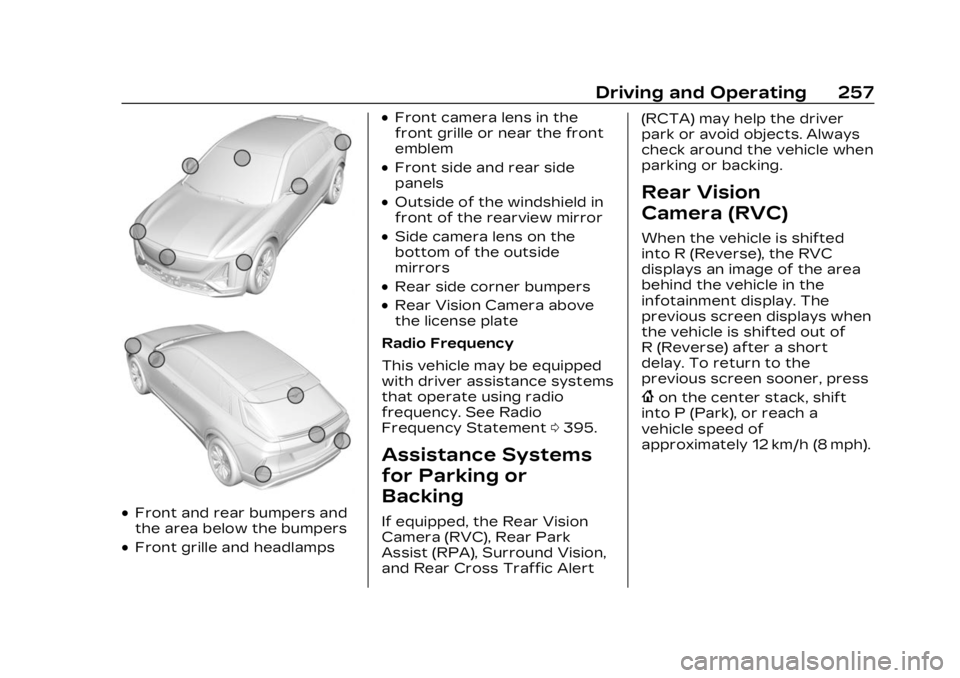
.Front and rear bumpers and
the area below the bumpers
.Front grille and headlamps
.Front camera lens in the
front grille or near the front
emblem
.Front side and rear side
panels
.Outside of the windshield in
front of the rearview mirror
.Side camera lens on the
bottom of the outside
mirrors
.Rear side corner bumpers
.Rear Vision Camera above
the license plate
Radio Frequency
This vehicle may be equipped
with driver assistance systems
that operate using radio
frequency. See Radio
Frequency Statement 0395.
Assistance Systems
for Parking or
Backing
If equipped, the Rear Vision
Camera (RVC), Rear Park
Assist (RPA), Surround Vision,
and Rear Cross Traffic Alert (RCTA) may help the driver
park or avoid objects. Always
check around the vehicle when
parking or backing.
Rear Vision
Camera (RVC)
When the vehicle is shifted
into R (Reverse), the RVC
displays an image of the area
behind the vehicle in the
infotainment display. The
previous screen displays when
the vehicle is shifted out of
R (Reverse) after a short
delay. To return to the
previous screen sooner, press
{on the center stack, shift
into P (Park), or reach a
vehicle speed of
approximately 12 km/h (8 mph).
Page 259 of 424
Cadillac Lyriq Owner Manual (GMNA-Localizing-U.S./Canada-15644413) -
2023 - CRC - 2/23/22
258 Driving and Operating
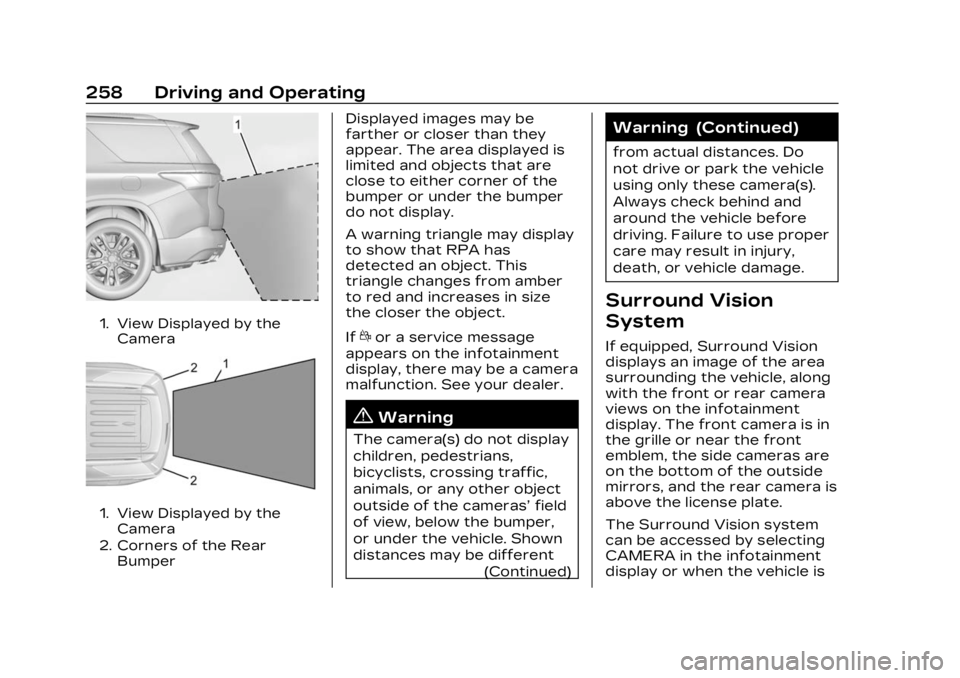
1. View Displayed by theCamera
1. View Displayed by theCamera
2. Corners of the Rear Bumper
Displayed images may be
farther or closer than they
appear. The area displayed is
limited and objects that are
close to either corner of the
bumper or under the bumper
do not display.
A warning triangle may display
to show that RPA has
detected an object. This
triangle changes from amber
to red and increases in size
the closer the object.
If
dor a service message
appears on the infotainment
display, there may be a camera
malfunction. See your dealer.
{Warning
The camera(s) do not display
children, pedestrians,
bicyclists, crossing traffic,
animals, or any other object
outside of the cameras’ field
of view, below the bumper,
or under the vehicle. Shown
distances may be different
(Continued)
Warning (Continued)
from actual distances. Do
not drive or park the vehicle
using only these camera(s).
Always check behind and
around the vehicle before
driving. Failure to use proper
care may result in injury,
death, or vehicle damage.
Surround Vision
System
If equipped, Surround Vision
displays an image of the area
surrounding the vehicle, along
with the front or rear camera
views on the infotainment
display. The front camera is in
the grille or near the front
emblem, the side cameras are
on the bottom of the outside
mirrors, and the rear camera is
above the license plate.
The Surround Vision system
can be accessed by selecting
CAMERA in the infotainment
display or when the vehicle is
Page 262 of 424
Cadillac Lyriq Owner Manual (GMNA-Localizing-U.S./Canada-15644413) -
2023 - CRC - 2/23/22
Driving and Operating 261
Sensors located in the
bumpers measure the
distance between the vehicle
and objects using sonar
technology. These sensors are
designed to detect certain
objects up to 2.5 m (8 ft)
behind and 1.2 m (4 ft) in front
of your vehicle that are taller
than 25 cm (10 in).
Different environmental
conditions may affect whether
and how far the Park Assist
system can detect objects.
Keep the sensors clean of
mud, dirt, snow, ice, and slush;
and clean sensors after a car
wash in freezing
temperatures. Sensors that
are not clean may not detect
objects or may cause the
system to alert when not
required.
{Warning
The Park Assist System is
no substitute for careful and
attentive driving. The Park(Continued)
Warning (Continued)
Assist system does not
detect children, pedestrians,
bicyclists, animals, or objects
located below the bumper or
that are too close or too far
from the vehicle. It is not
available at speeds greater
than 9 km/h (6 mph). To
prevent injury, death,
or vehicle damage, even with
Park Assist, always check
the area around the vehicle
and check all mirrors before
moving forward or backing.
How the System Works
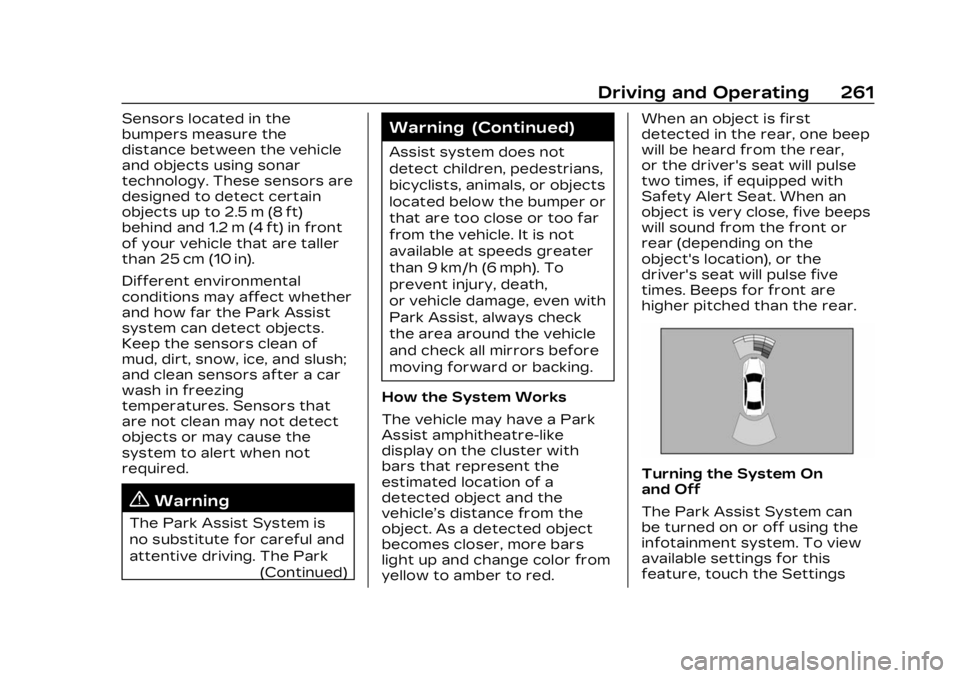
The vehicle may have a Park
Assist amphitheatre-like
display on the cluster with
bars that represent the
estimated location of a
detected object and the
vehicle’s distance from the
object. As a detected object
becomes closer, more bars
light up and change color from
yellow to amber to red. When an object is first
detected in the rear, one beep
will be heard from the rear,
or the driver's seat will pulse
two times, if equipped with
Safety Alert Seat. When an
object is very close, five beeps
will sound from the front or
rear (depending on the
object's location), or the
driver's seat will pulse five
times. Beeps for front are
higher pitched than the rear.
Turning the System On
and Off
The Park Assist System can
be turned on or off using the
infotainment system. To view
available settings for this
feature, touch the Settings