air condition CADILLAC SRX 2011 2.G User Guide
[x] Cancel search | Manufacturer: CADILLAC, Model Year: 2011, Model line: SRX, Model: CADILLAC SRX 2011 2.GPages: 498, PDF Size: 7.62 MB
Page 184 of 498
Black plate (38,1)Cadillac SRX Owner Manual - 2011
5-38 Instruments and Controls
SERVICE TRACTION
CONTROL
This message displays when
there is a problem with the
Traction Control System (TCS).
SeeTraction Control System (TCS)
on page 9‑34.
SPORT MODE ON
This message displays when
Sport Mode has been activated.
See Selective Ride Control on
page 9‑37 andManual Mode on
page 9‑28 for more information.
Airbag System Messages
SERVICE AIRBAG
This message displays if there is
a problem with the airbag system.
Take the vehicle to your dealer for
service.
Safety Belt Messages
BUCKLE SEATBELT
This message displays as a
reminder when the safety belt
is not buckled.
Anti-Theft Alarm System
Messages
THEFT ATTEMPTED
This message displays if the vehicle
detects a tamper condition.
Service Vehicle Messages
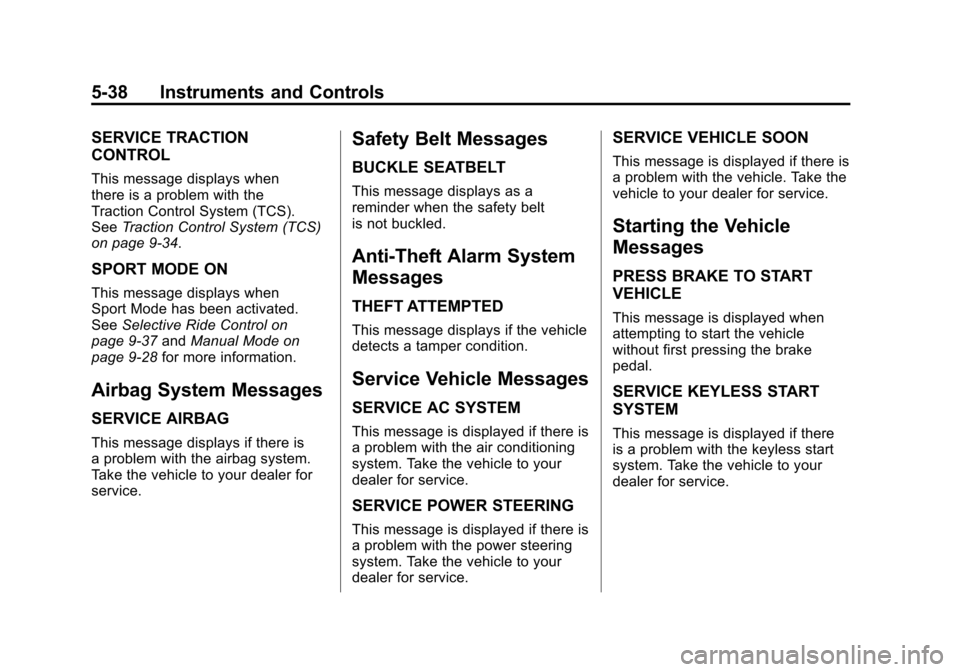
SERVICE AC SYSTEM
This message is displayed if there is
a problem with the air conditioning
system. Take the vehicle to your
dealer for service.
SERVICE POWER STEERING
This message is displayed if there is
a problem with the power steering
system. Take the vehicle to your
dealer for service.
SERVICE VEHICLE SOON
This message is displayed if there is
a problem with the vehicle. Take the
vehicle to your dealer for service.
Starting the Vehicle
Messages
PRESS BRAKE TO START
VEHICLE
This message is displayed when
attempting to start the vehicle
without first pressing the brake
pedal.
SERVICE KEYLESS START
SYSTEM
This message is displayed if there
is a problem with the keyless start
system. Take the vehicle to your
dealer for service.
Page 186 of 498
Black plate (40,1)Cadillac SRX Owner Manual - 2011
5-40 Instruments and Controls
Vehicle Reminder
Messages
ICE POSSIBLE DRIVE
WITH CARE
This message is displayed when ice
conditions are possible.
TURN WIPER CONTROL TO
INTERMITTENT FIRST
This message is displayed when
attempting to adjust the intermittent
wiper speed without intermittent
selected on the wiper control.
SeeWindshield Wiper/Washer on
page 5‑3.
Washer Fluid Messages
WASHER FLUID LOW ADD
FLUID
This message will be displayed
when the washer fluid level is
low. For information on filling the
washer fluid, see Washer Fluid on
page 10‑24.
Vehicle
Personalization
The audio system controls are
used to access the personalization
menus for customizing vehicle
features. Not all features are
available on every vehicle. Only the
features available on a particular
vehicle will be displayed on that
vehicle.
CONFIG (Configuration): Press
to access the Configuration
Settings Menu.
MENU / SELECT Knob: Press
the center of this knob to enter
the menus and select menu items.
Turn the knob to scroll through the
menus.
0BACK: Press to exit or move
backwards in a menu. Entering the Personalization
Menus
1. Press CONFIG to access the
Configuration Settings menu.
2. Turn the MENU / SELECT knob to highlight Vehicle Settings.
3. Press the center of the MENU / SELECT knob to select
the Vehicle Settings menu.
The following list of menu items will
be available:
.Climate and Air Quality
.Comfort and Convenience
.Language
.Lighting
.Power Door Locks
.Remote Locking, Unlocking,
Starting
.Return to Factory Settings
Turn the MENU / SELECT knob to
highlight the menu. Press the knob
to select it. Each of the menus is
detailed in the following information.
Page 269 of 498
Black plate (1,1)Cadillac SRX Owner Manual - 2011
Climate Controls 8-1
Climate Controls
Climate Control Systems
Dual Automatic Climate ControlSystem . . . . . . . . . . . . . . . . . . . . . . 8-1
Rear Climate Control System . . . . . . . . . . . . . . . . . . . . . . 8-5
Air Vents
Air Vents . . . . . . . . . . . . . . . . . . . . . . 8-6
Maintenance
Passenger Compartment AirFilter . . . . . . . . . . . . . . . . . . . . . . . . . 8-6
Climate Control Systems
Dual Automatic Climate Control System
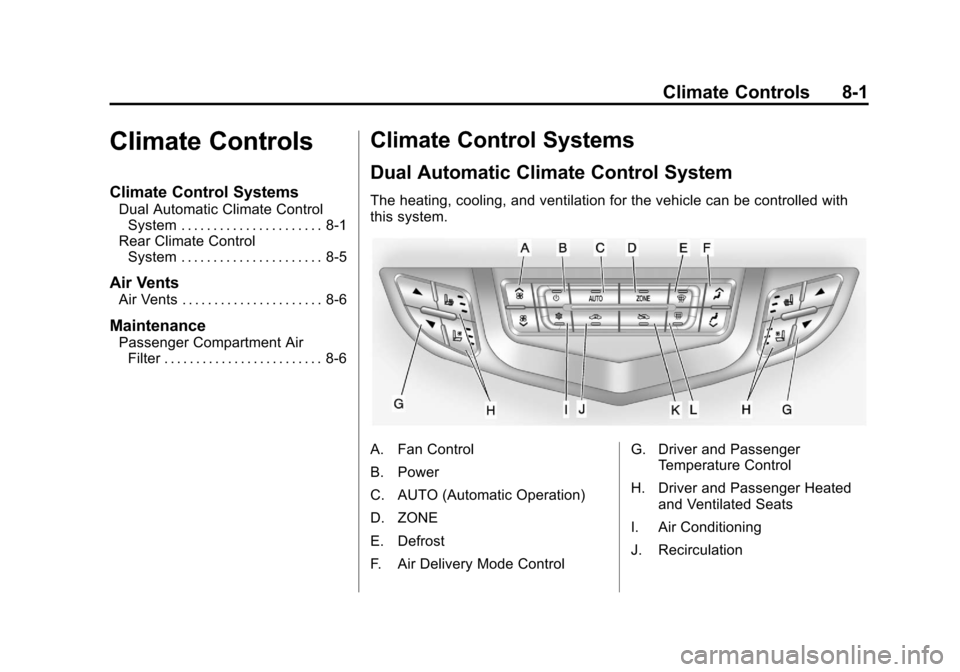
The heating, cooling, and ventilation for the vehicle can be controlled with
this system.
A. Fan Control
B. Power
C. AUTO (Automatic Operation)
D. ZONE
E. Defrost
F. Air Delivery Mode Control G. Driver and Passenger
Temperature Control
H. Driver and Passenger Heated and Ventilated Seats
I. Air Conditioning
J. Recirculation
Page 270 of 498
Black plate (2,1)Cadillac SRX Owner Manual - 2011
8-2 Climate Controls
K. Outside Air
L. Rear Window Defogger
Automatic Operation
The system automatically controls
the fan speed, air delivery, air
conditioning and recirculation in
order to heat or cool the vehicle
to the desired temperature.
When the indicator light is on, the
system is in full automatic operation.
If the air delivery mode or fan
setting is manually adjusted, the
auto indicator turns off and displays
will show the selected settings.
To place the system in automatic
mode do the following:
1. Press AUTO.
2. Set the temperature. Allowthe system time to stabilize.
Then adjust the temperature
as needed for best comfort. English units can be changed
to metric units through the
Driver Information Center (DIC).
See
Vehicle Personalization on
page 5‑40.
Q/R(Driver and Passenger
Temperature Control): The
temperature can be adjusted
separately for the driver and the
passenger. Press to increase or
decrease the temperature.
ZONE: Press to link all climate
zone settings to the driver settings.
The ZONE indicator light turns off.
When the passenger settings are
adjusted, the ZONE indicator light
is on. Manual Operation
O(Power):
Press to turn the
climate control system on or off.
D C(Fan Control): Press to
increase or decrease the fan speed.
Pressing either button cancels
automatic operation and the system
goes into manual mode. Press
AUTO to return to automatic
operation.
H G(Air Delivery Mode Control):
Press to change the direction of the
airflow. The current mode appears
in the display screen. Changing
the mode cancels the automatic
operation and the system goes into
manual mode. Press AUTO to
return to automatic operation.
Page 271 of 498

Black plate (3,1)Cadillac SRX Owner Manual - 2011
Climate Controls 8-3
To change the current mode, select
one of the following:
Y(Vent):Air is directed to the
instrument panel outlets.
\(Bi-Level): Air is divided
between the instrument panel
outlets and the floor outlets.
C(Tri‐Level): Air is divided
between the windshield, instrument
panel, and floor outlets.
[(Floor): Air is directed to the
floor outlets.
-(Defog): Clears the windows of
fog or moisture. Air is directed to the
windshield and floor outlets.
8(Upper): Air is directed to the
windshield outlets.
7(Hi-Level): Air is divided
between the windshield and
instrument panel outlets.
0(Defrost): Clears the
windshield of fog or frost more
quickly. Air is directed to the
windshield.
#(Air Conditioning): Press to
turn the automatic air conditioning
on or off. If the fan is turned off or
the outside temperature falls below
freezing, the air conditioner will
not run.
Press AUTO to return to automatic
operation and the air conditioner
runs as needed. When the indicator
light is on, the air conditioner runs
automatically to cool the air inside
the vehicle or to dry the air needed
to defog the windshield faster.
h(Recirculation): Press to turn
on recirculation. An indicator light
comes on. Air is recirculated to
quickly cool the inside of the vehicle
or prevent outside air and odors
from entering.
Automatic Air Recirculation:
When the AUTO indicator light
is on, the air is automatically
recirculated as needed to help
quickly cool the inside of the
vehicle. The climate control system may
have a sensor to detect air pollution.
In auto recirculation control, the Air
Quality Control system may operate.
To adjust the sensitivity of the
Air Quality Control, see Climate
and Air Quality under
Vehicle
Personalization on page 5‑40.
Auto Defog: The climate control
system may have a sensor to
automatically detect high humidity
inside the vehicle. When high
humidity is detected, the climate
control system may adjust to
outside air supply and turn on the
air conditioner. If the climate control
system does not detect possible
window fogging, it returns to normal
operation. To turn Auto Defog off
or on, see Climate and Air Quality
under Vehicle Personalization on
page 5‑40.
%(Outside Air): Press to turn
on outside air. An indicator light
comes on. Outside air is circulated
through the vehicle.
Page 273 of 498
Black plate (5,1)Cadillac SRX Owner Manual - 2011
Climate Controls 8-5
Rear Climate Control System
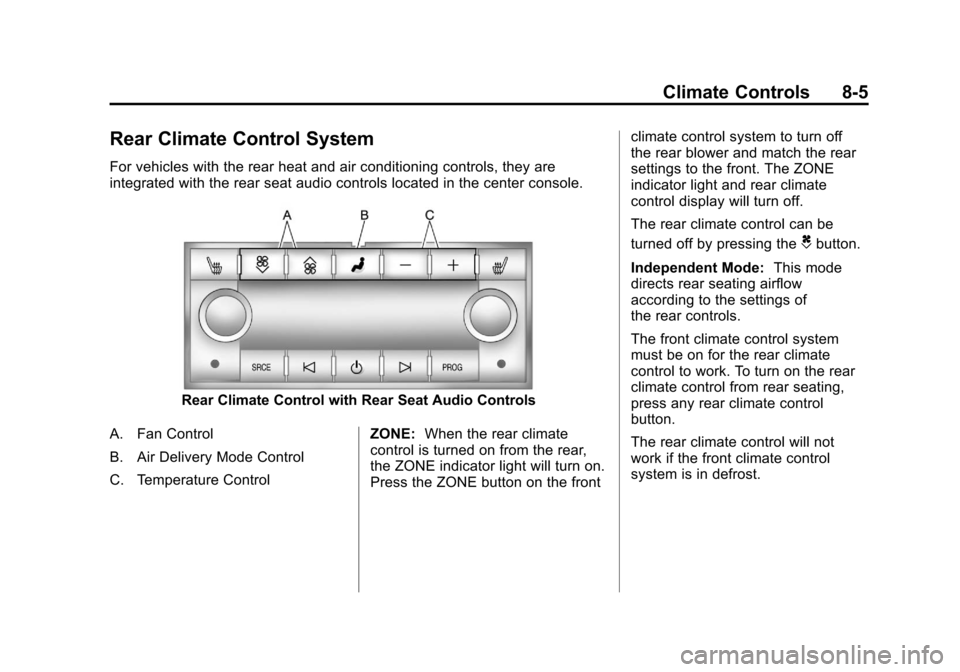
For vehicles with the rear heat and air conditioning controls, they are
integrated with the rear seat audio controls located in the center console.
Rear Climate Control with Rear Seat Audio Controls
A. Fan Control
B. Air Delivery Mode Control
C. Temperature Control ZONE:
When the rear climate
control is turned on from the rear,
the ZONE indicator light will turn on.
Press the ZONE button on the front climate control system to turn off
the rear blower and match the rear
settings to the front. The ZONE
indicator light and rear climate
control display will turn off.
The rear climate control can be
turned off by pressing the
Cbutton.
Independent Mode: This mode
directs rear seating airflow
according to the settings of
the rear controls.
The front climate control system
must be on for the rear climate
control to work. To turn on the rear
climate control from rear seating,
press any rear climate control
button.
The rear climate control will not
work if the front climate control
system is in defrost.
Page 282 of 498
Black plate (6,1)Cadillac SRX Owner Manual - 2011
9-6 Driving and Operating
Off-Road Recovery
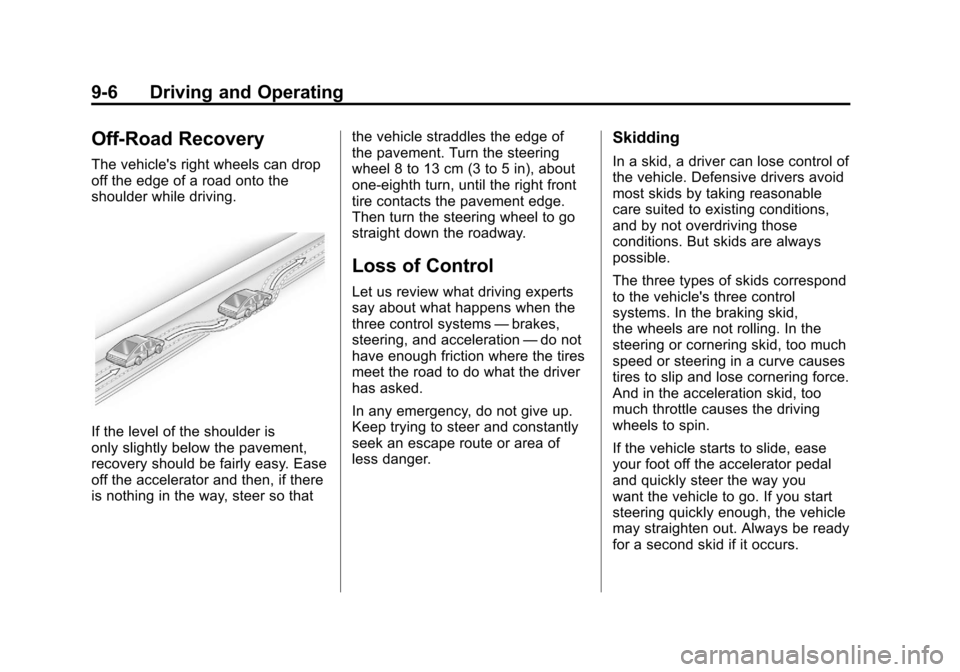
The vehicle's right wheels can drop
off the edge of a road onto the
shoulder while driving.
If the level of the shoulder is
only slightly below the pavement,
recovery should be fairly easy. Ease
off the accelerator and then, if there
is nothing in the way, steer so thatthe vehicle straddles the edge of
the pavement. Turn the steering
wheel 8 to 13 cm (3 to 5 in), about
one-eighth turn, until the right front
tire contacts the pavement edge.
Then turn the steering wheel to go
straight down the roadway.
Loss of Control
Let us review what driving experts
say about what happens when the
three control systems
—brakes,
steering, and acceleration —do not
have enough friction where the tires
meet the road to do what the driver
has asked.
In any emergency, do not give up.
Keep trying to steer and constantly
seek an escape route or area of
less danger.
Skidding
In a skid, a driver can lose control of
the vehicle. Defensive drivers avoid
most skids by taking reasonable
care suited to existing conditions,
and by not overdriving those
conditions. But skids are always
possible.
The three types of skids correspond
to the vehicle's three control
systems. In the braking skid,
the wheels are not rolling. In the
steering or cornering skid, too much
speed or steering in a curve causes
tires to slip and lose cornering force.
And in the acceleration skid, too
much throttle causes the driving
wheels to spin.
If the vehicle starts to slide, ease
your foot off the accelerator pedal
and quickly steer the way you
want the vehicle to go. If you start
steering quickly enough, the vehicle
may straighten out. Always be ready
for a second skid if it occurs.
Page 286 of 498
Black plate (10,1)Cadillac SRX Owner Manual - 2011
9-10 Driving and Operating
Blizzard Conditions
Being stuck in snow can be a
serious situation. Stay with the
vehicle unless there is help nearby.
If possible, use theRoadside
Service (U.S. and Canada) on
page 13‑8 orRoadside Service
(Mexico) on page 13‑10. To get
help and keep everyone in the
vehicle safe:
.Turn on the hazard warning
flashers.
.Tie a red cloth to an outside
mirror.
{WARNING
Snow can trap engine exhaust
under the vehicle. This may
cause exhaust gases to get
inside. Engine exhaust contains
Carbon Monoxide (CO) which
cannot be seen or smelled. It can
cause unconsciousness and even
death.
(Continued)
WARNING (Continued)
If the vehicle is stuck in the snow:
.Clear away snow from around
the base of your vehicle,
especially any that is blocking
the exhaust pipe.
.Check again from time to
time to be sure snow does
not collect there.
.Open a window about
5 cm (2 in) on the side of
the vehicle that is away from
the wind to bring in fresh air.
.Fully open the air outlets
on or under the instrument
panel.
.Adjust the climate control
system to a setting that
circulates the air inside
the vehicle and set the fan
speed to the highest setting.
See Climate Control System
in the Index.(Continued)
WARNING (Continued)
For more information about
carbon monoxide, see Engine
Exhaust on page 9‑24.
Snow can trap exhaust gases
under your vehicle. This can
cause deadly CO (Carbon
Monoxide) gas to get inside.
CO could overcome you and kill
you. You cannot see it or smell it,
so you might not know it is in your
vehicle. Clear away snow from
around the base of your vehicle,
especially any that is blocking the
exhaust.
Run the engine for short periods
only as needed to keep warm, but
be careful.
Page 297 of 498
Black plate (21,1)Cadillac SRX Owner Manual - 2011
Driving and Operating 9-21
Notice:The engine is designed
to work with the electronics in
the vehicle. If you add electrical
parts or accessories, you could
change the way the engine
operates. Before adding electrical
equipment, check with your
dealer. If you do not, the engine
might not perform properly. Any
resulting damage would not be
covered by the vehicle warranty.
Engine Heater
The engine coolant heater,
if available, can help in cold weather
conditions at or below −18°C (0°F)
for easier starting and better fuel
economy during engine warm-up.
Plug in the coolant heater at least
four hours before starting the
vehicle. An internal thermostat in
the plug-end of the cord will prevent
engine coolant heater operation at
temperatures above −18°C (0°F).
To Use The Engine Coolant
Heater
1. Turn off the engine.
2. Open the hood and unwrap
the electrical cord. The cord is
located near the air cleaner.
3. Plug it into a normal, grounded 110-volt AC outlet.
{WARNING
Plugging the cord into an
ungrounded outlet could cause
an electrical shock. Also, the
wrong kind of extension cord
could overheat and cause a fire.
You could be seriously injured.
(Continued)
WARNING (Continued)
Plug the cord into a properly
grounded three-prong 110-volt AC
outlet. If the cord will not reach,
use a heavy-duty three-prong
extension cord rated for at least
15 amps.
4. Before starting the engine, be sure to unplug and store the
cord as it was before to keep
it away from moving engine
parts. If you do not it could be
damaged.
The length of time the heater should
remain plugged in depends on
several factors. Ask a dealer in the
area where you will be parking the
vehicle for the best advice on this.
Page 303 of 498
Black plate (27,1)Cadillac SRX Owner Manual - 2011
Driving and Operating 9-27
Notice:Shifting to R (Reverse)
while the vehicle is moving
forward could damage the
transmission. The repairs would
not be covered by the vehicle
warranty. Shift to R (Reverse)
only after the vehicle is stopped.
R (Reverse): Use this gear to
back up.
At low vehicle speeds, R (Reverse)
can be used to rock the vehicle
back and forth to get out of snow,
ice, or sand without damaging your
transmission. See If the Vehicle is
Stuck on page 9‑11 for additional
information.
N (Neutral): In this position, the
engine does not connect with the
wheels. To restart when the vehicle
is already moving, use N (Neutral)
only. You can also use N (Neutral)
when the vehicle is being towed.{WARNING
Shifting into a drive gear while the
engine is running at high speed
is dangerous. Unless your foot
is firmly on the brake pedal, the
vehicle could move very rapidly.
You could lose control and hit
people or objects. Do not shift
into a drive gear while the engine
is running at high speed.
Notice: Shifting out of P (Park)
or N (Neutral) with the engine
running at high speed may
damage the transmission.
The repairs would not be covered
by the vehicle warranty. Be sure
the engine is not running at high
speed when shifting the vehicle. D (Drive):
This position is for
normal driving. It provides the best
fuel economy. If you need more
power for passing, and you are:
.Going less than 35 mph
(55 km/h), push the accelerator
pedal about halfway down.
.Going about 35 mph (55 km/h)
or more, push the accelerator all
the way down.
The transmission will shift down
to a lower gear and have more
power.
Downshifting the transmission in
slippery road conditions could result
in skidding, see Skidding under
Loss of Control on page 9‑6
Notice: Spinning the tires or
holding the vehicle in one
place on a hill using only the
accelerator pedal may damage
the transmission. If you are
stuck, do not spin the tires.
When stopping on a hill, use
the brakes to hold the vehicle
in place.