power CADILLAC SRX 2011 2.G Workshop Manual
[x] Cancel search | Manufacturer: CADILLAC, Model Year: 2011, Model line: SRX, Model: CADILLAC SRX 2011 2.GPages: 498, PDF Size: 7.62 MB
Page 206 of 498
Black plate (2,1)Cadillac SRX Owner Manual - 2011
7-2 Infotainment System
To minimize taking your eyes off the
road while driving, do the following
while the vehicle is parked:
.Become familiar with the
operation and controls of the
audio system.
.Set up the tone, speaker
adjustments, and preset radio
stations.
For more information, see Defensive
Driving on page 9‑2.
This vehicle's infotainment system
may be equipped with a noise
reduction system which can work
improperly if the audio amplifier,
engine calibrations, exhaust system,
microphones, radio, or speakers are
modified or replaced. This could
result in more noticeable engine
noise at certain speeds. Notice:
Contact your dealer
before adding any equipment.
Adding audio or communication
equipment could interfere with
the operation of the vehicle's
engine, radio, or other systems,
and could damage them. Follow
federal rules covering mobile
radio and telephone equipment.
The vehicle has Retained
Accessory Power (RAP). With RAP,
the audio system can be played
even after the ignition is turned off.
See Retained Accessory Power
(RAP) on page 9‑22 for more
information.
Navigation System
For vehicles with a navigation
system, see the separate Navigation
System Manual.
Theft-Deterrent Feature
The theft-deterrent feature works
by learning a portion of the Vehicle
Identification Number (VIN)
to the infotainment system.
The infotainment system does
not operate if it is stolen or moved
to a different vehicle.
Page 211 of 498
Black plate (7,1)Cadillac SRX Owner Manual - 2011
Infotainment System 7-7
P. DEL
.MEM: Delete the current
track from MEM.
Q.
OREC
.CD/DVD: Records content
from audio CDs and
MP3/WMA CDs.
.AUX: Records content
from USB mass storage
devices.
R. PHONE
.Opens the phone
main menu.
.Mutes the audio system.
Operation
Controls
The infotainment system is
operated by using the pushbuttons,
multifunction knobs, menus that are
shown on the display, and steering
wheel controls, if equipped.
Turning the System On or Off
VOL/O(Volume/Power): Press to
turn the system on and off.
Automatic Switch‐Off
If the infotainment system has
been turned on after the ignition is
turned off, the system will turn off
automatically after ten minutes.
Volume Control
VOL/O(Volume/Power): Turn to
adjust the volume.
PHONE: For vehicles with
OnStar
®, press and hold PHONE
to mute the infotainment system.
Press and hold PHONE again,
or turn the VOL/
Oknob to
cancel mute.
For vehicles without OnStar
®, press
PHONE to mute the infotainment
system. Press PHONE again,
or turn the VOL/
Oknob to
cancel mute.
Page 223 of 498
Black plate (19,1)Cadillac SRX Owner Manual - 2011
Infotainment System 7-19
Radio Reception
Frequency interference and static
can occur during normal radio
reception if items such as cell phone
chargers, vehicle convenience
accessories, and external electronic
devices are plugged into the
accessory power outlet. If there is
interference or static, unplug the
item from the accessory power
outlet.
FM
FM signals only reach about 16 to
65 km (10 to 40 miles). Although the
radio has a built-in electronic circuit
that automatically works to reduce
interference, some static can occur,
especially around tall buildings or
hills, causing the sound to fade in
and out.
AM
The range for most AM stations is
greater than for FM, especially at
night. The longer range can cause
station frequencies to interfere with
each other. Static can occur when
things like storms and power lines
interfere with radio reception. When
this happens, try reducing the treble
on the radio.
XM™Satellite Radio Service
XM Satellite Radio Service gives
digital radio reception from coast
to coast in the 48 contiguous
United States, and in Canada.
Just as with FM, tall buildings or
hills can interfere with satellite radio
signals, causing the sound to fade
in and out. In addition, traveling
or standing under heavy foliage,
bridges, garages, or tunnels may
cause loss of the XM signal for a
period of time.
Cellular Phone Usage
Cellular phone usage can cause
interference with the vehicle's radio.
Multi-Band Antenna
The multi-band antenna is on the
roof of the vehicle. The antenna
is used for the AM/FM radio,
OnStar, the XM Satellite Radio
Service System, and GPS (Global
Positioning System), if the vehicle
has these features. Keep the
antenna clear of obstructions
for clear reception.
Page 243 of 498
Black plate (39,1)Cadillac SRX Owner Manual - 2011
Infotainment System 7-39
Global Off
Depending on the infotainment
system, the RSE system may
have a Global Off feature.
The Global Off feature disables
all RSE system features. Press
and hold the radio power button for
more than three seconds for Global
Off to disable the RSE features.
A padlock icon may display on
the infotainment screen when the
Global Off feature is on. On some
infotainment systems, the Global
Off feature can be turned off by
performing one of the following:
.Press and hold the radio
power button for more than
three seconds.
.Insert or eject any disc.
.Insert a DVD video disc.
.Press the Remote Control power
button.
.Press the MEM/DVD/AUX button
or the
kbutton when a DVD
video disc is in the player.
.Press the SRC button on the
steering wheel when a DVD
video disc is in the player.
.Cycle the ignition.
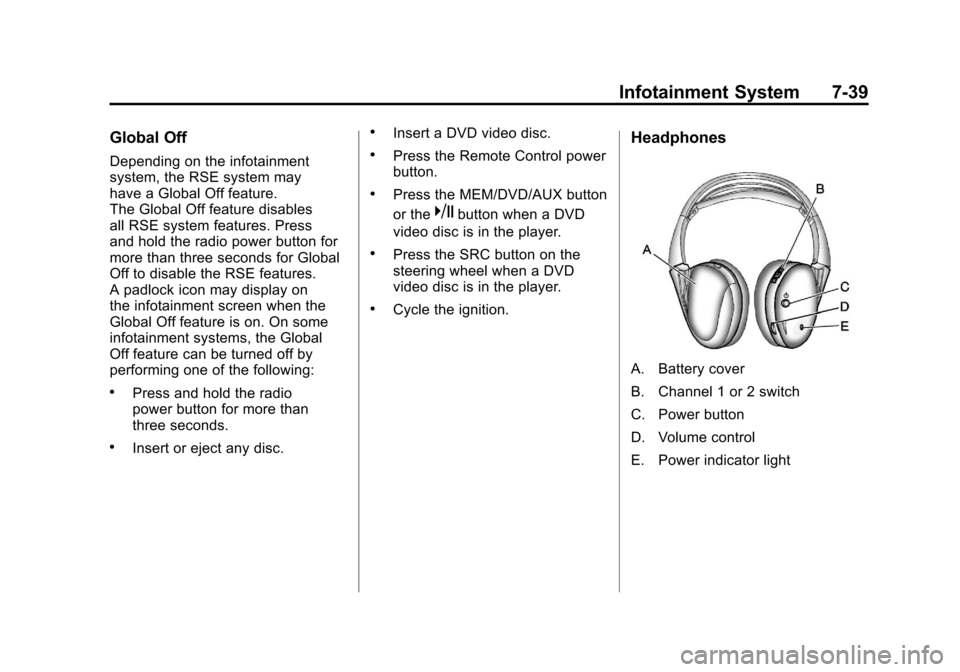
Headphones
A. Battery cover
B. Channel 1 or 2 switch
C. Power button
D. Volume control
E. Power indicator light
Page 244 of 498
Black plate (40,1)Cadillac SRX Owner Manual - 2011
7-40 Infotainment System
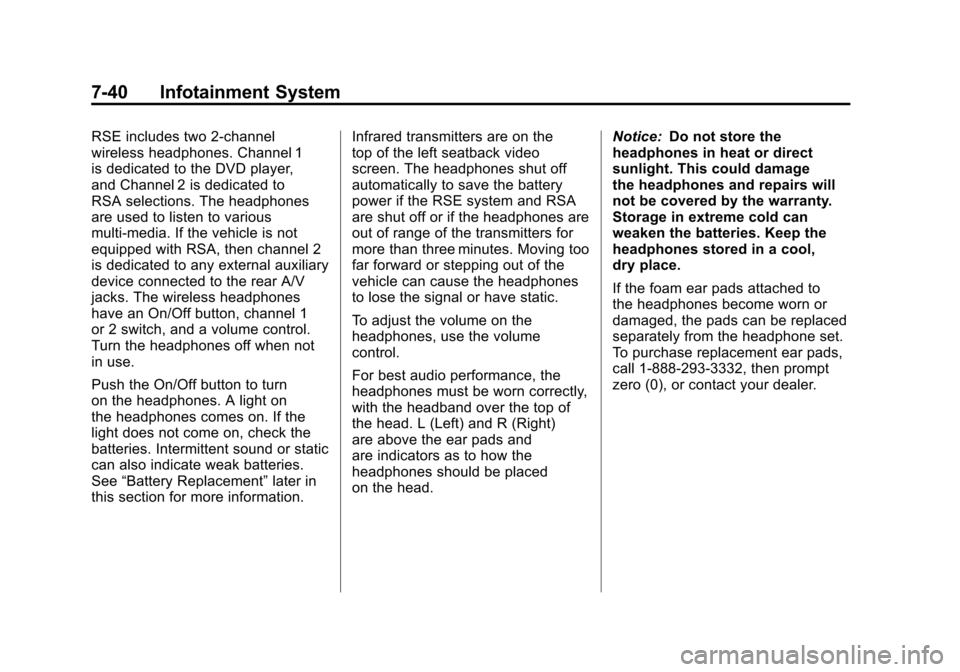
RSE includes two 2-channel
wireless headphones. Channel 1
is dedicated to the DVD player,
and Channel 2 is dedicated to
RSA selections. The headphones
are used to listen to various
multi‐media. If the vehicle is not
equipped with RSA, then channel 2
is dedicated to any external auxiliary
device connected to the rear A/V
jacks. The wireless headphones
have an On/Off button, channel 1
or 2 switch, and a volume control.
Turn the headphones off when not
in use.
Push the On/Off button to turn
on the headphones. A light on
the headphones comes on. If the
light does not come on, check the
batteries. Intermittent sound or static
can also indicate weak batteries.
See“Battery Replacement” later in
this section for more information. Infrared transmitters are on the
top of the left seatback video
screen. The headphones shut off
automatically to save the battery
power if the RSE system and RSA
are shut off or if the headphones are
out of range of the transmitters for
more than three minutes. Moving too
far forward or stepping out of the
vehicle can cause the headphones
to lose the signal or have static.
To adjust the volume on the
headphones, use the volume
control.
For best audio performance, the
headphones must be worn correctly,
with the headband over the top of
the head. L (Left) and R (Right)
are above the ear pads and
are indicators as to how the
headphones should be placed
on the head.
Notice:
Do not store the
headphones in heat or direct
sunlight. This could damage
the headphones and repairs will
not be covered by the warranty.
Storage in extreme cold can
weaken the batteries. Keep the
headphones stored in a cool,
dry place.
If the foam ear pads attached to
the headphones become worn or
damaged, the pads can be replaced
separately from the headphone set.
To purchase replacement ear pads,
call 1‐888‐293‐3332, then prompt
zero (0), or contact your dealer.
Page 245 of 498
Black plate (41,1)Cadillac SRX Owner Manual - 2011
Infotainment System 7-41
Battery Replacement
To change the batteries:
1. Loosen the screw to the batterydoor located on the left side of
the headphones.
2. Slide the battery door open.
3. Replace the two AAA batteries.
4. Replace the battery door and tighten the screw.
Remove the batteries if the
headphones are not going to be
used for a long period of time.Audio/Video (A/V) Jacks
The A/V jacks may be located
on the rear of the floor console.
They allow audio or video cables
to be connected from an auxiliary
device such as a camcorder or a
video game system.
The A/V jacks are color coded:
.Yellow for video input.
.White for left audio input.
.Red for right audio input.
Power for auxiliary devices is not
supplied by the radio system.
To use the auxiliary inputs of the
RSE system:
1. Connect the auxiliary device cables to the A/V jacks.
2. Power on both the auxiliary device and the RSE video
screen. Changing the Source on the Video
Display Screens
The image from the auxiliary device
can be switched between the video
display screens.
To change the display:
1. Press the AUX button on the
remote control to change the
source of both video screens
from the DVD player to the
auxiliary device.
2. Press the AUX button a second time to change the left video
screen source to the DVD player
and the right video screen to the
auxiliary device.
Page 248 of 498
Black plate (44,1)Cadillac SRX Owner Manual - 2011
7-44 Infotainment System
See“Battery Replacement” later in
this section. Objects blocking the
line of sight could also affect the
function of the remote control.
If a CD, DVD, or MP3 disc is in the
Radio DVD slot, the remote control
Obutton can be used to turn on
the video screen display and start
the disc. The infotainment system
can also turn on the video screen
display. See CD/DVD Player on
page 7‑22 or the separate
navigation system manual for
more information.
Notice: Storing the remote
control in a hot area or in direct
sunlight can damage it, and the
repairs will not be covered by the
warranty. Storage in extreme cold
can weaken the batteries. Keep
the remote control stored in a
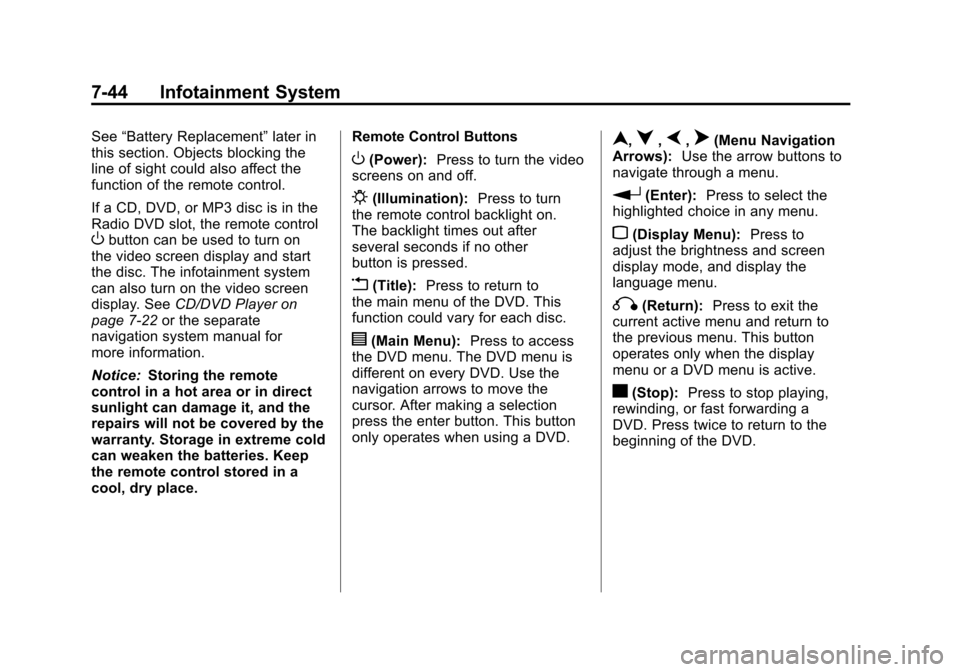
cool, dry place. Remote Control Buttons
O(Power):
Press to turn the video
screens on and off.
P(Illumination): Press to turn
the remote control backlight on.
The backlight times out after
several seconds if no other
button is pressed.
v(Title): Press to return to
the main menu of the DVD. This
function could vary for each disc.
y(Main Menu): Press to access
the DVD menu. The DVD menu is
different on every DVD. Use the
navigation arrows to move the
cursor. After making a selection
press the enter button. This button
only operates when using a DVD.
n,q,p,o(Menu Navigation
Arrows): Use the arrow buttons to
navigate through a menu.
r(Enter): Press to select the
highlighted choice in any menu.
z(Display Menu): Press to
adjust the brightness and screen
display mode, and display the
language menu.
q(Return): Press to exit the
current active menu and return to
the previous menu. This button
operates only when the display
menu or a DVD menu is active.
c(Stop): Press to stop playing,
rewinding, or fast forwarding a
DVD. Press twice to return to the
beginning of the DVD.
Page 251 of 498
Black plate (47,1)Cadillac SRX Owner Manual - 2011
Infotainment System 7-47
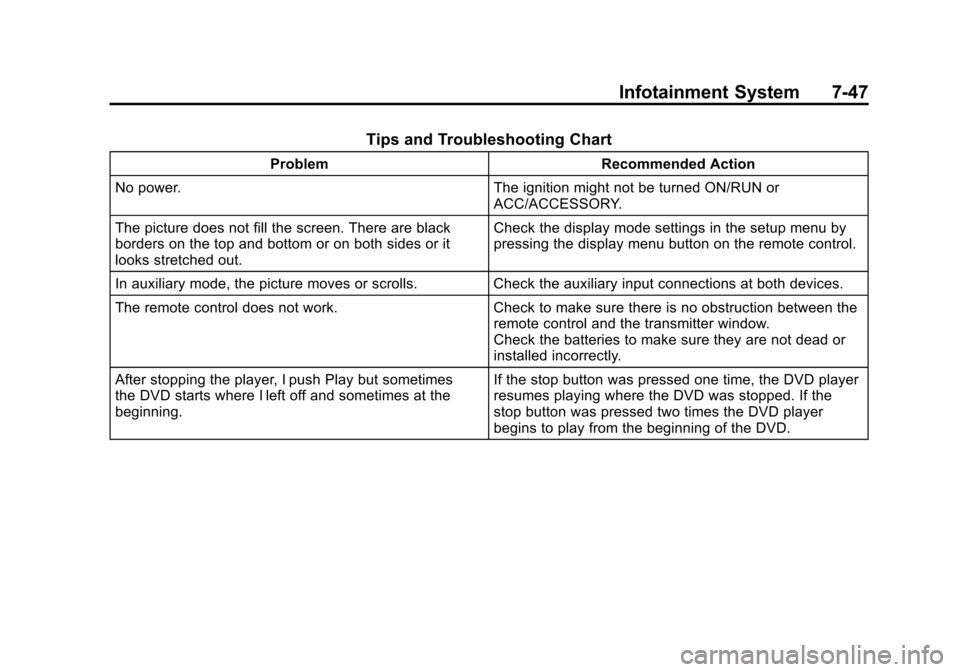
Tips and Troubleshooting Chart
ProblemRecommended Action
No power. The ignition might not be turned ON/RUN or
ACC/ACCESSORY.
The picture does not fill the screen. There are black
borders on the top and bottom or on both sides or it
looks stretched out. Check the display mode settings in the setup menu by
pressing the display menu button on the remote control.
In auxiliary mode, the picture moves or scrolls. Check the auxiliary input connections at both devices.
The remote control does not work. Check to make sure there is no obstruction between the
remote control and the transmitter window.
Check the batteries to make sure they are not dead or
installed incorrectly.
After stopping the player, I push Play but sometimes
the DVD starts where I left off and sometimes at the
beginning. If the stop button was pressed one time, the DVD player
resumes playing where the DVD was stopped. If the
stop button was pressed two times the DVD player
begins to play from the beginning of the DVD.
Page 254 of 498
Black plate (50,1)Cadillac SRX Owner Manual - 2011
7-50 Infotainment System
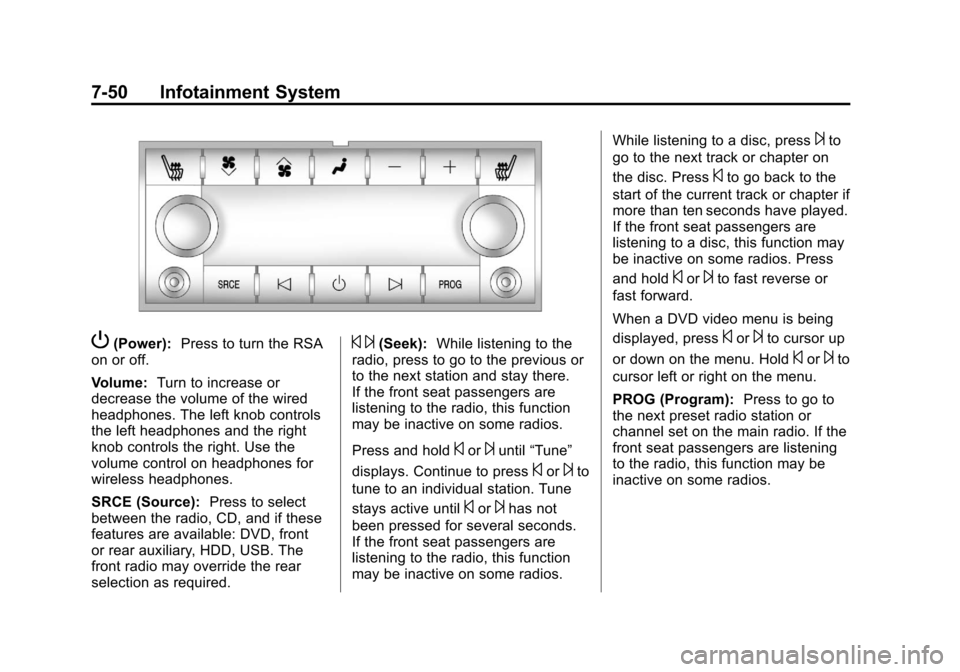
P(Power):Press to turn the RSA
on or off.
Volume: Turn to increase or
decrease the volume of the wired
headphones. The left knob controls
the left headphones and the right
knob controls the right. Use the
volume control on headphones for
wireless headphones.
SRCE (Source): Press to select
between the radio, CD, and if these
features are available: DVD, front
or rear auxiliary, HDD, USB. The
front radio may override the rear
selection as required.© ¨(Seek): While listening to the
radio, press to go to the previous or
to the next station and stay there.
If the front seat passengers are
listening to the radio, this function
may be inactive on some radios.
Press and hold
©or¨until “Tune”
displays. Continue to press
©or¨to
tune to an individual station. Tune
stays active until
©or¨has not
been pressed for several seconds.
If the front seat passengers are
listening to the radio, this function
may be inactive on some radios. While listening to a disc, press
¨to
go to the next track or chapter on
the disc. Press
©to go back to the
start of the current track or chapter if
more than ten seconds have played.
If the front seat passengers are
listening to a disc, this function may
be inactive on some radios. Press
and hold
©or¨to fast reverse or
fast forward.
When a DVD video menu is being
displayed, press
©or¨to cursor up
or down on the menu. Hold
©or¨to
cursor left or right on the menu.
PROG (Program): Press to go to
the next preset radio station or
channel set on the main radio. If the
front seat passengers are listening
to the radio, this function may be
inactive on some radios.
Page 269 of 498
Black plate (1,1)Cadillac SRX Owner Manual - 2011
Climate Controls 8-1
Climate Controls
Climate Control Systems
Dual Automatic Climate ControlSystem . . . . . . . . . . . . . . . . . . . . . . 8-1
Rear Climate Control System . . . . . . . . . . . . . . . . . . . . . . 8-5
Air Vents
Air Vents . . . . . . . . . . . . . . . . . . . . . . 8-6
Maintenance
Passenger Compartment AirFilter . . . . . . . . . . . . . . . . . . . . . . . . . 8-6
Climate Control Systems
Dual Automatic Climate Control System
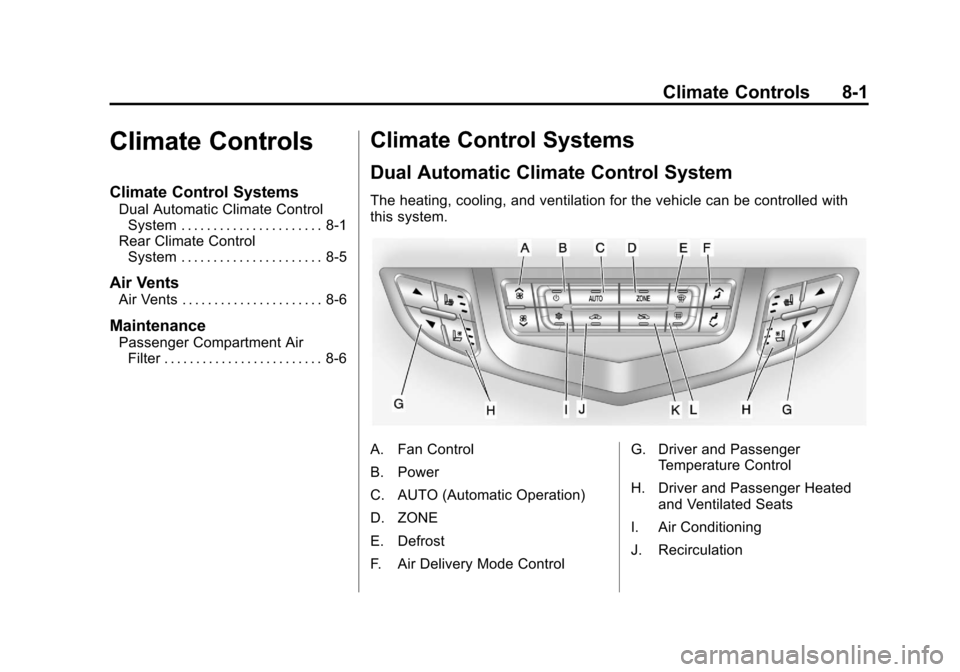
The heating, cooling, and ventilation for the vehicle can be controlled with
this system.
A. Fan Control
B. Power
C. AUTO (Automatic Operation)
D. ZONE
E. Defrost
F. Air Delivery Mode Control G. Driver and Passenger
Temperature Control
H. Driver and Passenger Heated and Ventilated Seats
I. Air Conditioning
J. Recirculation