lock CADILLAC SRX 2013 2.G Repair Manual
[x] Cancel search | Manufacturer: CADILLAC, Model Year: 2013, Model line: SRX, Model: CADILLAC SRX 2013 2.GPages: 432, PDF Size: 7.13 MB
Page 159 of 432
Black plate (35,1)Cadillac SRX Owner Manual - 2013 - CRC - 11/9/12
Instruments and Controls 5-35
Object Detection System
Messages
24 GHz RADARS OFF
This message displays when driving
in certain areas where there may be
radar interference. Adaptive Cruise
Control (ACC), Forward Collision
Alert (FCA), and the Active
Emergency Braking System may not
work or may not work as well. The
vehicle does not need service.
AUTOMATIC COLLISION
PREP OFF
This message displays when the
Active Emergency Braking System
has been turned off. SeeActive
Emergency Braking System on
page 9‑53.
AUTOMATIC COLLISION PREP
REDUCED
This message displays when the
Active Emergency Braking System
has been set to the "Alert" setting.
This setting disables most automatic braking functions of the Auto
Collision Preparation feature. Some
last-second automatic braking
capability is still provided with the
"Alert" setting, but braking is less
likely to occur. See
Active
Emergency Braking System on
page 9‑53.
AUTOMATIC COLLISION PREP
UNAVAILABLE
This message displays when the
Active Emergency Braking System
has been unavailable for some time.
The Active Emergency Braking
System does not need service.
This can occur under the following
conditions:
.The radar is not clean. Keep the
radar sensors free of mud, dirt,
snow, ice, and slush. Clean the
entire front and/or rear of the
vehicle. For cleaning
instructions, see Exterior Care
on page 10‑89.
.Heavy rain or snow is interfering
with the radar object detection or
camera performance.
This message may also be
displayed if there is a problem with
the StabiliTrak system.
FORWARD COLLISION
ALERT OFF
This message displays when the
Forward Collision Alert has been
turned off.
FRONT CAMERA BLOCKED
CLEAN WINDSHIELD
This message displays when the
camera is blocked. Cleaning the
outside of the windshield behind the
rearview mirror may correct the
issue. The Lane Departure Warning
system will not operate. Adaptive
Cruise Control (ACC), Forward
Collision Alert (FCA), and the Active
Emergency Braking System may not
work or may not work as well.
Page 160 of 432
Black plate (36,1)Cadillac SRX Owner Manual - 2013 - CRC - 11/9/12
5-36 Instruments and Controls
LANE DEPARTURE WARNING
UNAVAILABLE
This message displays when
attempting to activate the Lane
Departure Warning (LDW) system
when it is temporarily unavailable.
The LDW system does not need
service.
This message could be due to the
camera being blocked. Cleaning the
outside of the windshield behind the
rearview mirror may correct the
issue.
PARK ASSIST OFF
This message displays when the
Parking Assist system has been
turned off or when there is a
temporary condition causing the
system to be disabled.
REAR AUTO BRAKE AND
PARK ASSIST UNAVAILABLE
This message displays when
attempting to activate the parking
and backing features of the DriverAssistance System when they are
temporarily unavailable. The system
does not need service.
This can occur under the following
conditions:
.The radar is not clean. Keep the
radar sensors free of mud, dirt,
snow, ice, and slush. Clean
the entire front and/or rear
of the vehicle. For cleaning
instructions, see
Exterior Care
on page 10‑89.
.Heavy rain or snow is interfering
with the radar object detection or
camera performance.
See Driver Assistance Systems on
page 9‑46.
SERVICE AUTOMATIC
COLLISION PREP
If this message displays, take the
vehicle to your dealer to repair the
system.
SERVICE DRIVER ASSIST
SYSTEM
If this message displays, take the
vehicle to your dealer to repair the
system.
Adaptive Cruise Control (ACC),
Forward Collision Alert (FCA),
Active Emergency Braking System,
Assistance Systems for Parking or
Backing, and/or Lane Departure
Warning (LDW) system may not
work. Do not use these systems
until the vehicle has been repaired.
SERVICE FRONT CAMERA
If this message remains on after
continued driving, the vehicle needs
service. Do not use the Lane
Departure Warning (LDW) and
Forward Collision Alert (FCA)
features. Take the vehicle to your
dealer.
Page 161 of 432
Black plate (37,1)Cadillac SRX Owner Manual - 2013 - CRC - 11/9/12
Instruments and Controls 5-37
SERVICE PARK ASSIST
This message displays if there is a
problem with the Parking Assist
system. Do not use this system to
help you park. See your dealer for
service.
SERVICE REAR AUTO BRAKE
AND PARK ASSIST
This message displays if there is a
problem with the parking and
backing features of the Driver
Assistance System. Do not use this
system to help park or back the
vehicle. See your dealer for service.
SIDE BLIND ZONE ALERT OFF
This message indicates that the
driver has turned the Side Blind
Zone Alert (SBZA) system off.
SERVICE SIDE DETECTION
SYSTEM
If this message remains on after
continued driving, the vehicle needs
service. Side Blind Zone Alert
(SBZA) and Rear Cross Traffic Alert
(RCTA) features will not work. Take
the vehicle to your dealer.
SIDE DETECTION SYSTEM
UNAVAILABLE
This message indicates that Side
Blind Zone Alert (SBZA) and Rear
Cross Traffic Alert (RCTA) are
disabled either because the sensor
is blocked and cannot detect
vehicles in the blind zone, or the
vehicle is passing through an open
area, such as the desert, where
there is insufficient data for
operation. This message may also
activate during heavy rain or due to
road spray. The vehicle does not
need service. For cleaning, see
"Washing the Vehicle" under
Exterior Care on page 10‑89.
Ride Control System
Messages
SERVICE REAR AXLE
This message displays when there
is a problem with the All-Wheel
Drive (AWD) System. See your
dealer for service.
SERVICE STABILITRAK
This message displays if there is a
problem with the StabiliTrak system.
SeeStabiliTrak
®System on
page 9‑33.
SERVICE SUSPENSION
SYSTEM
This message displays if there is a
problem with the selective ride
control. See Selective Ride Control
on page 9‑34.
Page 164 of 432
Black plate (40,1)Cadillac SRX Owner Manual - 2013 - CRC - 11/9/12
5-40 Instruments and Controls
Vehicle Reminder
Messages
ICE POSSIBLE DRIVE
WITH CARE
This message is displayed when ice
conditions are possible.
TURN WIPER CONTROL TO
INTERMITTENT FIRST
This message is displayed when
attempting to adjust the intermittent
wiper speed without intermittent
selected on the wiper control. See
Windshield Wiper/Washer on
page 5‑3.
Vehicle Speed Messages
SELECTED SPEED LIMIT
EXCEEDED
This message is displayed when the
vehicle speed is greater than the set
speed. See "Speed Warning" under
Driver Information Center (DIC) on
page 5‑27.
Washer Fluid Messages
WASHER FLUID LOW ADD
FLUID
This message may display when
the washer fluid level is low. See
Washer Fluid on page 10‑20.
Vehicle
Personalization
The audio system controls are used
to access the personalization
menus for customizing vehicle
features.
Personalization Menus
1. Press SETTINGS on theHome page.
2. Press Vehicle Settings.
The following list of menu items may
be available:
.Climate and Air Quality
.Collision/Detection Systems
.Comfort and Convenience
.Lighting
.Power Door Locks
.Remote Lock, Unlock, Start
Page 167 of 432
Black plate (43,1)Cadillac SRX Owner Manual - 2013 - CRC - 11/9/12
Instruments and Controls 5-43
Easy Exit Options
This allows the Easy Exit Options
feature to be turned on or off.
Press Easy Exit Options. Press to
select Off or On. Press
SBack to
go back to the last menu.
Chime Volume
This allows the selection of the
chime volume level.
Press Chime Volume. Press + or −
to adjust the volume between 0 and
63. Press
SBack to go back to the
last menu.
Reverse Tilt Mirror
When on, both the driver and
passenger mirrors will tilt downward
when the vehicle is shifted to
R (Reverse) to improve visibility of
the ground near the rear wheels.
They will return to their previous
driving position when the vehicle is
shifted out of R (Reverse) or the
ignition is turned to OFF. Press Reverse Tilt Mirror. Press
to select Off or On, On - Driver
and Passenger, On - Driver or
On - Passenger. Press
SBack to
go back to the last menu.
Language
Select the Language menu and the
following will be displayed:
.English
.French
.Spanish
Press to select the language.
Press
SBack to go back to the
last menu.
Lighting
Select the Lighting menu and the
following will be displayed:
.Vehicle Locator Lights
.Exit Lighting Vehicle Locator Lights
This feature will flash the exterior
lights when
Kon the RKE
transmitter is pressed to locate the
vehicle.
Press Vehicle Locator Lights. Press
to select Off or On. Press
SBack to
go back to the last menu.
Exit Lighting
This allows the selection of how
long the exterior lamps stay on
when leaving the vehicle when it is
dark outside.
Press Exit Lighting. Press to select
Off, 30 Seconds, 60 Seconds,
or 120 Seconds. Press
SBack to
go back to the last menu.
Power Door Locks
Select Power Door Locks and the
following will be displayed:
.Unlocked Door Anti Lock Out
.Auto Door Unlock
.Delayed Door Lock
Page 168 of 432
Black plate (44,1)Cadillac SRX Owner Manual - 2013 - CRC - 11/9/12
5-44 Instruments and Controls
Unlocked Door Anti Lock Out
When on, this feature will keep the
driver door from locking when the
door is open. If Off is selected, the
Delayed Door Lock menu will be
available.
Press Unlocked Door Anti Lock
Out. Press to select Off or On.
Press
SBack to go back to the
last menu.
Auto Door Unlock
This allows selection of which of the
doors will automatically unlock when
the vehicle is shifted into P (Park).
Press Auto Door Unlock. Press to
select Off, All Doors, or Driver Door.
Press
SBack to go back to the
last menu.
Delayed Door Lock
When on, this feature will delay the
locking of the doors. To override the
delay, press the power door lock
switch on the door. Press Delayed Door Lock. Press to
select Off or On. Press
SBack to
go back to the last menu.
Remote Lock, Unlock, Start
Select Remote Lock, Unlock, Start
and the following may be displayed:
.Remote Unlock Light Feedback
.Remote Lock Feedback
.Remote Door Unlock
.Remote Start Auto Cool Seats
.Remote Start Auto Heat Seats
.Passive Door Unlock
.Passive Door Lock
.Remote Left in Vehicle Reminder
Remote Unlock Light Feedback
When on, the exterior lamps will
flash when unlocking the vehicle
with the RKE transmitter.
Press Remote Unlock Light
Feedback. Press to select Off or
Flash Lights. Press
SBack to go
back to the last menu. Remote Lock Feedback
This allows selection of what type of
feedback is given when locking the
vehicle with the RKE transmitter.
Press Remote Lock Feedback.
Press to select Off, Lights and
Horn, Lights Only, or Horn Only.
Press
SBack to go back to the
last menu.
Remote Door Unlock
This allows selection of which doors
will unlock when pressing
Kon the
RKE transmitter.
Press Remote Door Unlock. Press
to select All Doors or Driver Door
Only. Press
SBack to go back to
the last menu.
Remote Start Auto Cool Seats
If equipped and turned on, this
feature will turn the cooled seats on
when using remote start on
warm days.
Page 169 of 432
Black plate (45,1)Cadillac SRX Owner Manual - 2013 - CRC - 11/9/12
Instruments and Controls 5-45
Press Remote Start Auto Cool
Seats. Press to select Off or On.
On some vehicles select Off,
On - Driver and Passenger, or
On - Driver. Press
SBack to go
back to the last menu.
Remote Start Auto Heat Seats
If equipped and turned on, this
feature will turn the heated seats on
when using remote start on
cold days.
Press Remote Start Auto Heat
Seats. Press to select Off or On.
On some vehicles select Off,
On - Driver and Passenger, or
On - Driver. Press
SBack to go
back to the last menu.
Passive Door Unlock
This allows the selection of what
doors will unlock when using the
button on the driver door to unlock
the vehicle. Press Passive Door Unlock. Press
to select All Doors or Driver Door
Only. Press
SBack to go back to
the last menu.
Passive Door Lock
This feature can be turned on or off
or to select feedback when using
the button on the driver door to lock
the vehicle. See Remote Keyless
Entry (RKE) System Operation on
page 2‑3.
Press Passive Door Lock. Press to
select On, On with Horn Chirp,
or Off. Press
SBack to go back to
the last menu.
Remote Left in Vehicle Reminder
This feature will alert the driver if the
remote is left in the vehicle.
Press Remote Left in Vehicle
Reminder. Press to select Off or On.
Press
SBack to go back to the
last menu.
Universal Remote
System
See Radio Frequency Statement on
page 13‑21 for information
regarding Part 15 of the Federal
Communications Commission (FCC)
rules and Industry Canada
Standards RSS-GEN/210/220/310.
Universal Remote System
Programming
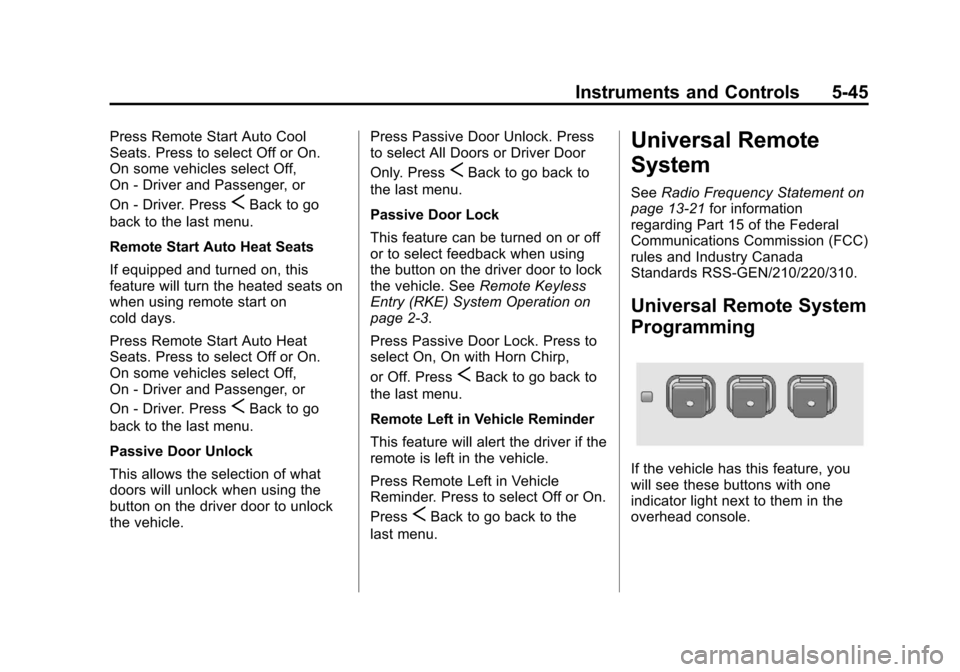
If the vehicle has this feature, you
will see these buttons with one
indicator light next to them in the
overhead console.
Page 193 of 432
Black plate (7,1)Cadillac SRX Owner Manual - 2013 - CRC - 11/9/12
Climate Controls 8-7
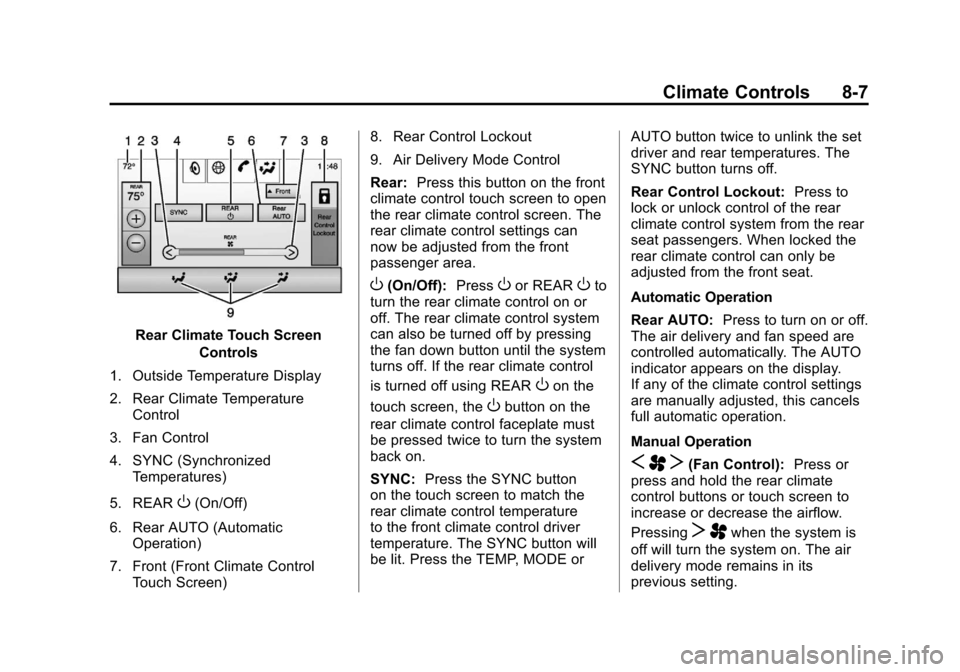
Rear Climate Touch ScreenControls
1. Outside Temperature Display
2. Rear Climate Temperature Control
3. Fan Control
4. SYNC (Synchronized Temperatures)
5. REAR
O(On/Off)
6. Rear AUTO (Automatic Operation)
7. Front (Front Climate Control Touch Screen) 8. Rear Control Lockout
9. Air Delivery Mode Control
Rear:
Press this button on the front
climate control touch screen to open
the rear climate control screen. The
rear climate control settings can
now be adjusted from the front
passenger area.
O(On/Off): PressOor REAROto
turn the rear climate control on or
off. The rear climate control system
can also be turned off by pressing
the fan down button until the system
turns off. If the rear climate control
is turned off using REAR
Oon the
touch screen, the
Obutton on the
rear climate control faceplate must
be pressed twice to turn the system
back on.
SYNC: Press the SYNC button
on the touch screen to match the
rear climate control temperature
to the front climate control driver
temperature. The SYNC button will
be lit. Press the TEMP, MODE or AUTO button twice to unlink the set
driver and rear temperatures. The
SYNC button turns off.
Rear Control Lockout:
Press to
lock or unlock control of the rear
climate control system from the rear
seat passengers. When locked the
rear climate control can only be
adjusted from the front seat.
Automatic Operation
Rear AUTO: Press to turn on or off.
The air delivery and fan speed are
controlled automatically. The AUTO
indicator appears on the display.
If any of the climate control settings
are manually adjusted, this cancels
full automatic operation.
Manual Operation
S A T(Fan Control): Press or
press and hold the rear climate
control buttons or touch screen to
increase or decrease the airflow.
Pressing
T Awhen the system is
off will turn the system on. The air
delivery mode remains in its
previous setting.
Page 194 of 432
Black plate (8,1)Cadillac SRX Owner Manual - 2013 - CRC - 11/9/12
8-8 Climate Controls
+/−(Temperature Control): Press
or press and hold the rear
temperature control buttons or touch
screen to adjust the rear passenger
temperature. Press + for warmer air
and press −for cooler air.
Y/\/Y(Air Delivery Mode
Control): Press the desired mode
button on the touch screen or the
mode button on the rear faceplate to
change the direction of the airflow in
the rear seating area.
MorL(Heated Rear Seats, If
Equipped): Press
MorLto heat
the left or right outboard seat
cushion and seatback. See Heated
Rear Seats on page 3‑12.
Air Vents
Move the sliding knob on the air
outlets up and down or left and
right to direct the airflow. Use the
thumbwheels near the air outlets to
open or close off the airflow.
Operation Tips
.Clear away any ice, snow,
or leaves from air inlets at the
base of the windshield that could
block the flow of air into the
vehicle.
.Keep the path under the front
seats clear of objects to help
circulate the air inside the
vehicle more effectively.
.Use of non‐GM approved hood
deflectors can adversely affect
the performance of the system.
Check with your dealer before
adding equipment to the outside
of the vehicle.
.Do not insert any objects in
the outlets, as failure of the
mechanism may occur.
Maintenance
Passenger Compartment
Air Filter
The filter removes dust, pollen, and
other airborne irritants from outside
air that is pulled into the vehicle.
The filter should be replaced as part
of routine scheduled maintenance,
see Maintenance Schedule on
page 11‑4. To find out what type of
filter to use, see Maintenance
Replacement Parts on page 11‑15.
1. Open the glove box completely
and remove the four screws
along the upper portion of the
glove box.
2. When released, lower the upper portion of the glove box.
3. Locate the service door for the passenger compartment air filter.
Page 197 of 432
Black plate (1,1)Cadillac SRX Owner Manual - 2013 - CRC - 11/9/12
Driving and Operating 9-1
Driving and
Operating
Driving Information
Distracted Driving . . . . . . . . . . . . . 9-2
Defensive Driving . . . . . . . . . . . . . 9-3
Drunk Driving . . . . . . . . . . . . . . . . . 9-3
Control of a Vehicle . . . . . . . . . . . 9-3
Braking . . . . . . . . . . . . . . . . . . . . . . . 9-3
Steering . . . . . . . . . . . . . . . . . . . . . . . 9-4
Off-Road Recovery . . . . . . . . . . . . 9-4
Loss of Control . . . . . . . . . . . . . . . . 9-5
Driving on Wet Roads . . . . . . . . . 9-6
Highway Hypnosis . . . . . . . . . . . . 9-7
Hill and Mountain Roads . . . . . . 9-7
Winter Driving . . . . . . . . . . . . . . . . . 9-8
If the Vehicle Is Stuck . . . . . . . . . 9-9
Vehicle Load Limits . . . . . . . . . . 9-10
Starting and Operating
New Vehicle Break-In . . . . . . . . 9-14
Adjustable Throttle and BrakePedal . . . . . . . . . . . . . . . . . . . . . . . 9-15
Ignition Positions . . . . . . . . . . . . 9-16 Starting the Gasoline
Engine . . . . . . . . . . . . . . . . . . . . . 9-17
Engine Heater . . . . . . . . . . . . . . . 9-19
Retained Accessory Power (RAP) . . . . . . . . . . . . . . . 9-19
Shifting Into Park . . . . . . . . . . . . 9-20
Shifting out of Park . . . . . . . . . . 9-21
Parking over Things That Burn . . . . . . . . . . . . . . . . . . 9-21
Engine Exhaust
Engine Exhaust . . . . . . . . . . . . . . 9-22
Running the Vehicle WhileParked . . . . . . . . . . . . . . . . . . . . . 9-22
Automatic Transmission
Automatic Transmission . . . . . 9-23
Manual Mode . . . . . . . . . . . . . . . . 9-24
Fuel Economy Mode . . . . . . . . . 9-26
Drive Systems
All-Wheel Drive . . . . . . . . . . . . . . 9-27
Brakes
Antilock BrakeSystem (ABS) . . . . . . . . . . . . . . 9-27
Parking Brake . . . . . . . . . . . . . . . 9-28
Brake Assist . . . . . . . . . . . . . . . . . 9-30
Hill Start Assist (HSA) . . . . . . . 9-31
Ride Control Systems
Traction Control System (TCS) . . . . . . . . . . . . . . 9-31
StabiliTrak
®System . . . . . . . . . 9-33
Limited-Slip Rear Axle . . . . . . . 9-34
Selective Ride Control . . . . . . . 9-34
Cruise Control
Cruise Control . . . . . . . . . . . . . . . 9-35
Adaptive Cruise Control . . . . . 9-37
Driver Assistance Systems
Driver Assistance Systems . . . . . . . . . . . . . . . . . . . . 9-46
Assistance Systems for Parking or Backing . . . . . . . . . 9-46
Assistance Systems for Driving . . . . . . . . . . . . . . . . . . . . . 9-50
Forward Collision Alert (FCA) System . . . . . . . . . . . . . . . . . . . . . 9-50
Active Emergency Braking System . . . . . . . . . . . . . . . . . . . . . 9-53
Side Blind Zone Alert (SBZA) . . . . . . . . . . . . . . . 9-55
Lane Departure Warning (LDW) . . . . . . . . . . . . . 9-57