radio CADILLAC STS 2006 1.G Owner's Guide
[x] Cancel search | Manufacturer: CADILLAC, Model Year: 2006, Model line: STS, Model: CADILLAC STS 2006 1.GPages: 480, PDF Size: 2.74 MB
Page 247 of 480
MSG (Message):If the current RDS station has a
message, MSG will appear on the display. The message
may display the artist, song title, call in phone numbers,
etc. If the entire message does not appear on the
display, parts of the message will appear every
three seconds until the message is completed. Once the
completed message has been displayed, MSG will
disappear from the display until another new message
is received.
To display the last message, perform the
following steps:
1. Press the tune/select knob to enter the main menu.
2. Turn the tune/select knob until RECALL RDS
MESSAGE appears on the display.
3. Press the tune/select knob. The message will
appear on the display.
Once the message has been displayed, MSG will
disappear from the display until another new message
is received.
TP (Traffic Program):TP will appear on the display
when the radio detects a signal from an RDS station that
has traffic announcement broadcast capability.TA (Traffic Announcement):If TA appears on the
display, the tuned radio station broadcasts traffic
announcements and when a traffic announcement
comes on the tuned station you will hear it.
If the station does not broadcast traffic announcements,
when TA is turned on it will seek to a station that
does. When a station that broadcasts traffic
announcements is found, the radio will stop seeking and
TA will appear on the display. If no station is found
that broadcasts traffic announcements, No Traffic will
appear on the display.
The radio will play traffic announcements if the volume
is low. The radio will interrupt the play of a CD if the
last tuned station broadcasts traffic announcements.
To turn TA on or off, perform the following steps:
1. Press the tune/select knob to enter the main menu.
2. Turn the tune/select knob until TRAFFIC
ANNOUNCE appears on the display.
3. Press the tune/select knob to select ON or OFF.
An X will appear in the box when TA is
selected on.
4. Press the BACK (F6) button to exit the display. To
return to the original display, repeatedly press the
BACK (F6) button or wait for the display to time out.
3-101
Page 248 of 480
Activating Program Type (PTY)
Stations (RDS and XM™)
PTY allows you to search for stations with specic types
of music. The selectable PTYs are POP, EASY,
TALK, CNTRY (Country), CLASS (Classical), and JAZZ.
To activate program types, perform the
following steps:
1. Press the tune/select knob to enter the main menu.
2. Turn the tune/select knob until PROGRAM TYPE
MODE appears on the display.
3. Press the tune/select knob to select ON or OFF.
An X will appear in the box when PTY is
selected on.
4. Press the BACK (F6) button to exit the display. To
return to the original display, repeatedly press the
BACK (F6) button or wait for the display to time out.
Once program type is activated the PTYs will appear on
the display above the pushbuttons, in place of the
preset stations (if programmed). Press the pushbutton
for the PTY that you would like to listen to. Not all
stations support PTYs. The radio may not go to all of
the stations with that music type when pressing the
pushbutton.AF (Alternate Frequency):Alternate frequency allows
the radio to switch to a stronger station with the
same program type.
To turn AF on or off, perform the following steps:
1. Press the tune/select knob to enter the main menu.
2. Turn the tune/select knob until ALTERNATE
FREQ. appears on the display.
3. Press the tune/select knob to select AF OFF,
AF ON, or AF REG. An X will appear in the box
when AF is selected on.
4. Press the BACK (F6) button to exit the display. To
return to the original display, repeatedly press the
BACK (F6) button or wait for the display to time out.
Radio Message
THEFTLOCK:This message is displayed when the
THEFTLOCK®system has been activated. Take
the vehicle to the dealer for service.
3-102
Page 249 of 480
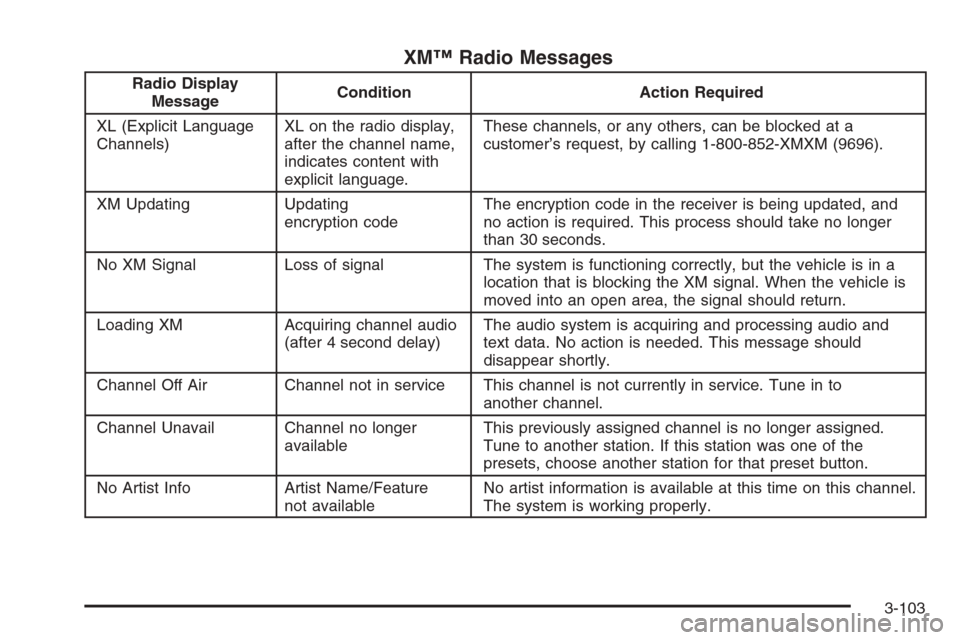
XM™ Radio Messages
Radio Display
MessageCondition Action Required
XL (Explicit Language
Channels)XL on the radio display,
after the channel name,
indicates content with
explicit language.These channels, or any others, can be blocked at a
customer’s request, by calling 1-800-852-XMXM (9696).
XM Updating Updating
encryption codeThe encryption code in the receiver is being updated, and
no action is required. This process should take no longer
than 30 seconds.
No XM Signal Loss of signal The system is functioning correctly, but the vehicle is in a
location that is blocking the XM signal. When the vehicle is
moved into an open area, the signal should return.
Loading XM Acquiring channel audio
(after 4 second delay)The audio system is acquiring and processing audio and
text data. No action is needed. This message should
disappear shortly.
Channel Off Air Channel not in service This channel is not currently in service. Tune in to
another channel.
Channel Unavail Channel no longer
availableThis previously assigned channel is no longer assigned.
Tune to another station. If this station was one of the
presets, choose another station for that preset button.
No Artist Info Artist Name/Feature
not availableNo artist information is available at this time on this channel.
The system is working properly.
3-103
Page 250 of 480
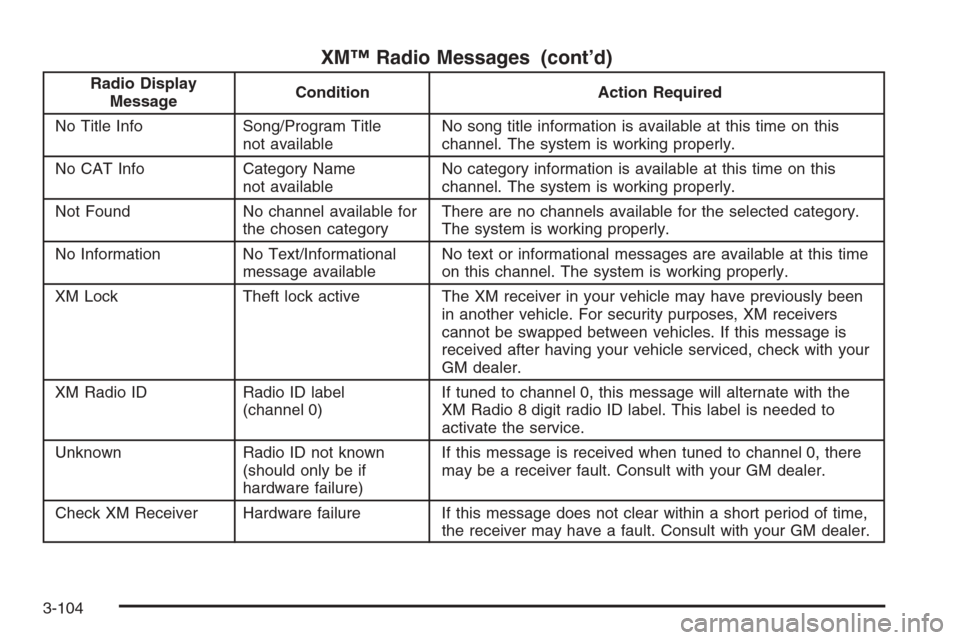
XM™ Radio Messages (cont’d)
Radio Display
MessageCondition Action Required
No Title Info Song/Program Title
not availableNo song title information is available at this time on this
channel. The system is working properly.
No CAT Info Category Name
not availableNo category information is available at this time on this
channel. The system is working properly.
Not Found No channel available for
the chosen categoryThere are no channels available for the selected category.
The system is working properly.
No Information No Text/Informational
message availableNo text or informational messages are available at this time
on this channel. The system is working properly.
XM Lock Theft lock active The XM receiver in your vehicle may have previously been
in another vehicle. For security purposes, XM receivers
cannot be swapped between vehicles. If this message is
received after having your vehicle serviced, check with your
GM dealer.
XM Radio ID Radio ID label
(channel 0)If tuned to channel 0, this message will alternate with the
XM Radio 8 digit radio ID label. This label is needed to
activate the service.
Unknown Radio ID not known
(should only be if
hardware failure)If this message is received when tuned to channel 0, there
may be a receiver fault. Consult with your GM dealer.
Check XM Receiver Hardware failure If this message does not clear within a short period of time,
the receiver may have a fault. Consult with your GM dealer.
3-104
Page 251 of 480
Using the Single CD Player
Insert a CD partway into the slot, label side up. The
player will pull it in. If the ignition and the radio are on, the
CD will begin playing. A CD may be loaded with the radio
off, but it will not start playing until the radio is on.
If the ignition or radio is turned off with a CD in the
player, it will stay in the player. When the ignition
or radio is turned on, the CD will start to play where it
stopped, if it was the last selected audio source.
When the CD is inserted, CD will appear on the display.
As each new track starts to play, the track number
will appear on the display.
The CD player can play the smaller 3 inch (8 cm) single
CDs with an adapter ring. Full-size CDs and the
smaller CDs are loaded in the same manner.
If playing a CD-R, the sound quality may be reduced due
to CD-R quality, the method of recording, the quality of
the music that has been recorded, and the way the CD-R
has been handled. There may be an increase in skipping,
difficulty in nding tracks, and/or difficulty in loading and
ejecting. If these problems occur, check the bottom
surface of the CD. If the surface of the CD is damaged,
such as cracked, broken, or scratched, the CD will not
play properly. If the surface of the CD is soiled, seeCare
of Your CDs on page 3-121for more information.
If there is no apparent damage, try a known good CD.Do not add any label to a CD, it could get caught in the
CD player. If a CD is recorded on a personal computer
and a description label is needed, try labeling the top of
the recorded CD with a marking pen instead.
Notice:If you add any label to a CD, insert more
than one CD into the slot at a time, or attempt to play
scratched or damaged CDs, you could damage the
CD player. When using the CD player, use only CDs
in good condition without any label, load one CD at a
time, and keep the CD player and the loading slot free
of foreign materials, liquids, and debris.
If an error appears on the display, see “CD Messages”
later in this section.
When a CD is inserted, the CD functions will appear on
the display above the pushbuttons, in place of the
preset stations (if programmed).
F1
{(Reverse):Press this pushbutton to go to the
previous track. Press and hold this pushbutton to
reverse quickly within a track. Release the pushbutton
to play the passage. The elapsed time of the track
will appear on the display.
F2
|(Forward):Press this pushbutton to go to the
next track. Press and hold this pushbutton to advance
quickly within a track. Release the pushbutton to
play the passage. The elapsed time of the track will
appear on the display.
3-105
Page 252 of 480
F3 RDM (Random):Press this pushbutton to listen to
the tracks in random, rather than sequential, order.
RANDOM will appear on the display. Press RDM again
to turn off random play. RANDOM will disappear
from the display.
F4 RPT (Repeat):Press this pushbutton to hear a track
over again. REPEAT will appear on the display. Press
RPT again to turn off repeat play. REPEAT will
disappear from the display.
F6 DISP (Display):Press this pushbutton to display the
time of the track. Press this pushbutton again to
remove the time of the track from the display.
©¨(Seek):Press the left single arrow button to go
to the previous or press the right single arrow button
to go to the next track on the CD.
©¨(Scan):Press the double arrow button to listen to
each track for 10 seconds. The CD will go to a track,
play for 10 seconds, then go on to the next track. Press
this button again to stop scanning.
SRCE (Source):Press this button to select a source,
either radio or CD. The CD must be loaded to select the
source and to play. CD will appear on the display if a
CD is loaded. If a CD is not loaded, the display will not
change from the radio source.
Z(Eject):Press this button to stop a CD when it is
playing or to eject a CD when it is not playing. Eject may
be activated with the ignition and the radio off.
Using the Six-Disc CD Changer
The CD player can play the smaller 3 inch (8 cm) single
CDs with an adapter ring. Full-size CDs and the
smaller CDs are loaded in the same manner.
If playing a CD-R, the sound quality may be reduced
due to CD-R quality, the method of recording, the quality
of the music that has been recorded, and the way the
CD-R has been handled. There may be an increase
in skipping, difficulty in nding tracks, and/or difficulty in
loading and ejecting. If these problems occur, check
the bottom surface of the CD. If the surface of the CD is
damaged, such as cracked, broken, or scratched, the
CD will not play properly. If the surface of the CD
is soiled, seeCare of Your CDs on page 3-121for more
information.
If there is no apparent damage, try a known good CD.
Do not add any label to a CD, it could get caught in the
CD player. If a CD is recorded on a personal computer
and a description label is needed, try labeling the top of
the recorded CD with a marking pen instead.
Notice:If you add any label to a CD, insert more
than one CD into the slot at a time, or attempt
to play scratched or damaged CDs, you could
damage the CD player. When using the CD player,
use only CDs in good condition without any
label, load one CD at a time, and keep the CD player
and the loading slot free of foreign materials,
liquids, and debris.
3-106
Page 253 of 480

If an error appears on the display, see “CD Messages”
later in this section.
When a CD is inserted, the CD functions will appear on
the display above the pushbuttons, in place of the
preset stations (if programmed).
M(Load):Press this button to load CDs into the CD
player. This CD player will hold up to six CDs.
To insert one CD, do the following:
1. The ignition and the radio can be on or off.
2. Press and release the load button. Please Wait will
appear on the display.
3. Load the CD, when INSERT appears on the
display, insert a CD partway into the slot, label side
up. The player will pull the CD in.
When a CD is inserted, CD will appear on the display,
the number of the CD and the track number will
appear on the display if the radio is on.
If the radio is on, the CD will begin to play automatically.
To insert multiple CDs, do the following:
1. The ignition and the radio can be on or off.
2. Press and hold the load button for two seconds.
Please Wait will appear on the display and you
will hear a beep.3. Load the CD, when INSERT appears on the
display, insert a CD partway into the slot, label side
up. The player will pull the CD in.
Do not load a CD until INSERT appears on the
display. The CD player will take up to six CDs. Do
not try to load more than six. If you want to load
less than six CDs, load the desired amount. The CD
player will time out when it does not receive any
more CDs and the last CD loaded will begin to play.
If the radio is on, the last CD loaded will begin to play
automatically.
F1 DISC
n(Down):Press this pushbutton to go to the
previous CD.
F2 DISC
m(Up):Press this pushbutton to go to the
next CD.
F3 CD REV
{(Reverse):Press this pushbutton to go
to the previous track. Press and hold this pushbutton
to reverse quickly within the track. Release this
pushbutton to play the passage. The elapsed time of
the track will appear on the display.
F4 CD FWD
|(Forward):Press this pushbutton to go
to the next track. Press and hold this pushbutton to
advance quickly within the track. Release this
pushbutton to play the passage. The elapsed time of
the track will appear on the display.
3-107
Page 254 of 480
F5 MODE:Press this pushbutton to select from
NORMAL, RPT TRCK (Repeat Track), RPT DISC
(Repeat CD), RDM TRCK (Random Track), and RDM
ALL (Random All CDs).
NORMAL:Sets the system for normal play of the
CD(s). NORMAL will not appear on the display
when in this mode.
RPT TRCK (Repeat Track):Repeats the track over
again. RPT TRCK will appear on the display. Press
the MODE pushbutton again to turn off repeat
play. RPT TRCK will disappear from the display.
RPT DISC (Repeat CD):Repeats the CD over
again. RPT DISC will appear on the display.
Press the MODE pushbutton again to turn off repeat
play. RPT DISC will disappear from the display.
RDM TRCK (Random Track):Plays the tracks on
the current CD in random, rather than sequential,
order. RDM TRCK will appear on the display. Press
the MODE pushbutton again to turn off random
play. RDM TRCK will disappear from the display.
RDM ALL (Random All CDs):Plays all of the CDs
loaded in random, rather than sequential, order.
RDM ALL will appear on the display. Press
the MODE pushbutton again to turn off random
play. RDM ALL will disappear from the display.F6 DISP (Display):Press this pushbutton to display the
time of the track. Press this pushbutton again to
display CD PLAY MODE.
©¨(Seek):Press the left single arrow button to go
to the previous or press the right single arrow button
to go to the next track on the CD.
©¨(Scan):Press this double arrow button to listen
to each track for 10 seconds. The CD will go to a
track, play for 10 seconds, then go on to the next track.
Press this button again to stop scanning.
SRCE (Source):Press this button to select a source,
either radio or CD. The CD must be loaded to select the
source and to play. CD will appear on the display if a
CD is loaded. If a CD is not loaded, the display will not
change from the radio source.
Z(Eject):Press this button to eject the CD that is
currently playing, or press and hold this button to eject
all of the CDs loaded. You will hear a beep. Eject
may be activated with the ignition or radio off.
3-108
Page 255 of 480

Using an MP3 CD
MP3 Format
If you burn your own MP3 disc on a personal computer:
Make sure the MP3 les are recorded on a
CD-R disc.
Do not mix standard audio and MP3 les on
one disc.
Make sure playlists have a.m3u or.wpl extension,
other le extensions may not work.
Files can be recorded with a variety of xed or
variable bit rates. Song title, artist name, and album
will be available for display by the radio when
recorded using ID3 tags version 1 and 2.
Create a folder structure that makes it easy to nd
songs while driving. Organize songs by albums
using one folder for each album. Each folder
or album should contain 18 songs or less.
Make sure to nalize the disc when burning an MP3
disc, using multiple sessions. It is usually better to
burn the disc all at once.
The player will be able to read and play a maximum of
50 folders, 50 playlists, 10 sessions, and 255 les.
Long le names, folder names, or playlist names may
use more disc memory space than necessary.To conserve space on the disc, minimize the length of
the le, folder or playlist names. You can also play
an MP3 CD that was recorded using no le folders. The
system can support up to 11 folders in depth, though,
keep the depth of the folders to a minimum in order
to keep down the complexity and confusion in trying to
locate a particular folder during playback. If a CD
contains more than the maximum of 50 folders,
50 playlists, 10 sessions, and 255 les the player will let
you access and navigate up to the maximum, but all
items over the maximum will be ignored.
Root Directory
The root directory will be treated as a folder. If the root
directory has compressed audio les, the directory
will be displayed as F1 ROOT. All les contained directly
under the root directory will be accessed prior to any
root directory folders. However, playlists (Px) will always
be accessed before root folders or les.
Empty Directory or Folder
If a root directory or a folder exists somewhere in the
le structure that contains only folders/subfolders and no
compressed les directly beneath them, the player will
advance to the next folder in the le structure that
contains compressed audio les and the empty folder
will not be displayed or numbered.
3-109
Page 256 of 480
No Folder
When the CD contains only compressed les, the les
will be located under the root folder. The next and
previous folder functions will have no function on a CD
that was recorded without folders or playlists. When
displaying the name of the folder the radio will
display ROOT.
When the CD contains only playlists and compressed
audio les, but no folders, all les will be located under
the root folder. The folder down and the folder up
buttons will search playlists (Px) rst and then go to the
root folder. When the radio displays the name of the
folder the radio will display ROOT.
Order of Play
Tracks will be played in the following order:
Play will begin from the rst track in the rst playlist
and will continue sequentially through all tracks in
each playlist. When the last track of the last playlist
has been played, play will continue from the rst
track of the rst playlist.
If the CD does not contain any playlists, then play
will begin from the rst track under the root
directory. When all tracks from the root directory
have been played, play will continue from les
according to their numerical listing. After playing the
last track from the last folder, play will begin
again at the rst track of the rst folder or root
directory.
When play enters a new folder, the display will not
automatically show the new folder name. The new track
name will appear on the display.
File System and Naming
The song name that will be displayed will be the song
name that is contained in the ID3 tag. If the song name
is not present in the ID3 tag, then the radio will
display the le name without the extension
(such as .mp3) as the track name.
Track names longer than 32 characters or 4 pages will
be shortened. The display will not show parts of
words on the last page of text and the extension of the
lename will not be displayed.
3-110