radio CADILLAC STS 2006 1.G Workshop Manual
[x] Cancel search | Manufacturer: CADILLAC, Model Year: 2006, Model line: STS, Model: CADILLAC STS 2006 1.GPages: 480, PDF Size: 2.74 MB
Page 268 of 480
Care of the CD Player
The use of CD lens cleaners for CD players is not
advised, due to the risk of contaminating the internal
lens of the CD optics with lubricants.
Diversity Antenna System
The AM-FM antenna is integrated with the rear window
defogger, located in the rear window. Make sure that
the inside surface of the rear window is not scratched
and that the grid lines on the glass are not damaged.
If the inside surface is damaged, it could interfere
with radio reception.
Notice:Do not apply aftermarket glass tinting with
metallic lm. The metallic lm in some tinting
materials will interfere with or distort the incoming
radio reception. Any damage caused to your
antenna due to metallic tinting materials will not be
covered by your warranty.
Notice:Do not try to clear frost or other material
from the inside of the rear window with a razor blade
or anything else that is sharp, as this may damage
the rear window defogger grid and affect your
radio’s ability to pick up stations clearly. The repairs
would not be covered by your warranty.If static is heard on the radio, when the rear window
defogger is turned on, it could mean that a defogger grid
line has been damaged. If this is true, the grid line
must be repaired.
If adding an aftermarket cellular telephone to your
vehicle, and the antenna needs to be attached to the
glass, make sure that the grid lines for the AM-FM
antennas are not damaged. Make sure the cellular
telephone antenna does not touch a grid line.
XM™ Satellite Radio Antenna
System
The XM™ Satellite Radio antenna is located on the roof
of your vehicle. Keep this antenna clear of snow and
ice build up for clear radio reception.
If your vehicle has a sunroof, the performance of the
XM™ system may be affected if the sunroof is open.
Loading items onto the roof of your vehicle can interfere
with the performance of the XM™ system. Make sure
the XM™ Satellite Radio antenna is not obstructed.
3-122
Page 360 of 480
Notice:If you leave your radio or other accessories
on during the jump starting procedure, they could
be damaged. The repairs would not be covered
by your warranty. Always turn off your radio and
other accessories when jump starting your vehicle.
3. Turn off the ignition on both vehicles. Unplug
unnecessary accessories plugged into the cigarette
lighter or the accessory power outlets. Turn off
the radio and all lamps that are not needed. This
will avoid sparks and help save both batteries.
And it could save the radio!
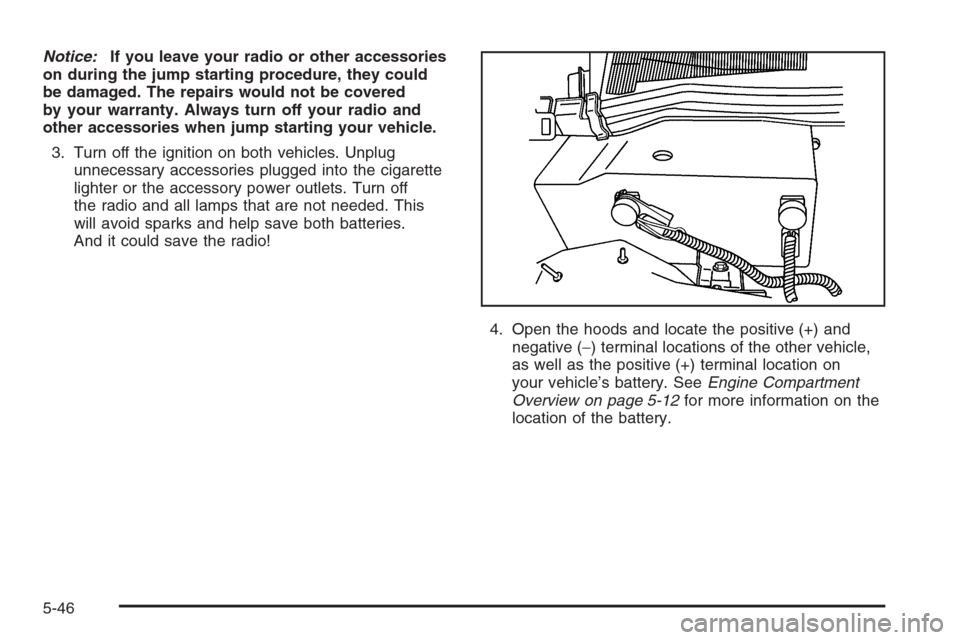
4. Open the hoods and locate the positive (+) and
negative (−) terminal locations of the other vehicle,
as well as the positive (+) terminal location on
your vehicle’s battery. SeeEngine Compartment
Overview on page 5-12for more information on the
location of the battery.
5-46
Page 380 of 480
High Speed Operation
{CAUTION:
Driving at high speeds, 100 mph (160 km/h)
or higher, puts an additional strain on
tires. Sustained high-speed driving causes
excessive heat build up and can cause sudden
tire failure. You could have a crash and you or
others could be killed. Some high-speed rated
tires require ination pressure adjustment for
high speed operation. When speed limits and
road conditions are such that a vehicle can be
driven at high speeds, make sure the tires are
rated for high speed operation, in excellent
condition, and set to the correct cold tire
ination pressure for the vehicle load.
If you will be driving at high speeds, speeds of 100 mph
(160 km/h) or higher, where it is legal, set the cold
ination pressure to the maximum ination pressure
shown on the tire sidewall, or 38 psi (265 kPa),
whichever is lower. See the example following.When you end this high-speed driving, return the tires
to the cold ination pressure shown on the Tire and
Loading Information label. SeeLoading Your Vehicle
on page 4-32.
Example:
You will nd the maximum load and ination pressure
molded on the tire’s sidewall, in small letters, near
the rim ange. It will read something like this: Maximum
load 690 kg (1521 lbs) 300 kPa (44 psi) Max. Press.
For this example, you would set the ination pressure for
high-speed driving at 38 psi (265 kPa).
Tire Pressure Monitor System
The Tire Pressure Monitor System (TPMS) uses radio
and sensor technology to check tire pressure levels.
If your vehicle has this feature, sensors are mounted
onto each tire and wheel assembly, except the compact
spare tire and wheel. Tire pressure readings are sent
to a receiver located in the vehicle once every
60 seconds while the vehicle is being driven, and once
every 60 minutes if the vehicle is stationary for more
than 15 minutes.
Using the Driver Information Center (DIC), tire pressure
levels may be viewed by the driver. For additional
information and details about the DIC operation and
displays seeDIC Controls and Displays on page 3-74
andDIC Warnings and Messages on page 3-79.
5-66
Page 409 of 480
When cleaning your vehicle’s interior, only use cleaners
specically designed for the surfaces being cleaned.
Permanent damage may result from using cleaners on
surfaces for which they were not intended. Use glass
cleaner only on glass. Remove any accidental over-spray
from other surfaces immediately. To prevent over-spray,
apply cleaner directly to the cleaning cloth.
Notice:If you use abrasive cleaners when cleaning
glass surfaces on your vehicle, you could scratch
the glass and/or cause damage to the integrated
radio antenna and the rear window defogger. When
cleaning the glass on your vehicle, use only a
soft cloth and glass cleaner.
Many cleaners contain solvents that may become
concentrated in your vehicle’s breathing space.
Before using cleaners, read and adhere to all safety
instructions on the label. While cleaning your vehicle’s
interior, maintain adequate ventilation by opening
your vehicle’s doors and windows.
Dust may be removed from small buttons and knobs
using a small brush with soft bristles.
Your GM dealer has a product for cleaning your
vehicle’s glass. Should it become necessary, you can
also obtain a product from your GM dealer to remove
odors from your vehicle’s upholstery.Do not clean your vehicle using the following cleaners
or techniques:
Never use a knife or any other sharp object to
remove a soil from any interior surface.
Never use a stiff brush. It can cause damage to
your vehicle’s interior surfaces.
Never apply heavy pressure or rub aggressively with
a cleaning cloth. Use of heavy pressure can damage
your interior and does not improve the effectiveness
of soil removal.
Use only mild, neutral-pH soaps. Avoid laundry
detergents or dishwashing soaps with degreasers.
Using too much soap will leave a residue that leaves
streaks and attracts dirt. For liquid cleaners, about
20 drops per gallon (3.78 L) of water is a good guide.
Do not heavily saturate your upholstery while
cleaning.
Damage to your vehicle’s interior may result from
the use of many organic solvents such as naptha,
alcohol, etc.
5-95
Page 419 of 480
Power Windows and Other
Power Options
Circuit breakers protect the power windows and power
seats. When the current load is too heavy, the circuit
breaker opens and closes, protecting the circuit until the
problem is xed or goes away.
Fuses and Circuit Breakers
The wiring circuits in your vehicle are protected from
short circuits by a combination of fuses, circuit breakers
and fusible thermal links. This greatly reduces the
chance of res caused by electrical problems.Look at the silver-colored band inside the fuse. If the
band is broken or melted, replace the fuse. Be sure you
replace a bad fuse with a new one of the identical
size and rating. If a fuse should blow, see your dealer
for service immediately.
If you ever have a problem on the road and don’t have
a spare fuse, you can borrow one that has the same
amperage. Just pick some feature of your vehicle
that you can get along without — like the radio or
cigarette lighter — and use its fuse, if it is the correct
amperage. Replace it as soon as you can.
The fuses are located in three fuse blocks. One is
located in the engine compartment, on the passenger’s
side of the vehicle, and the other two are located
under the rear seat on both the driver’s and passenger’s
side of the vehicle.
5-105
Page 428 of 480
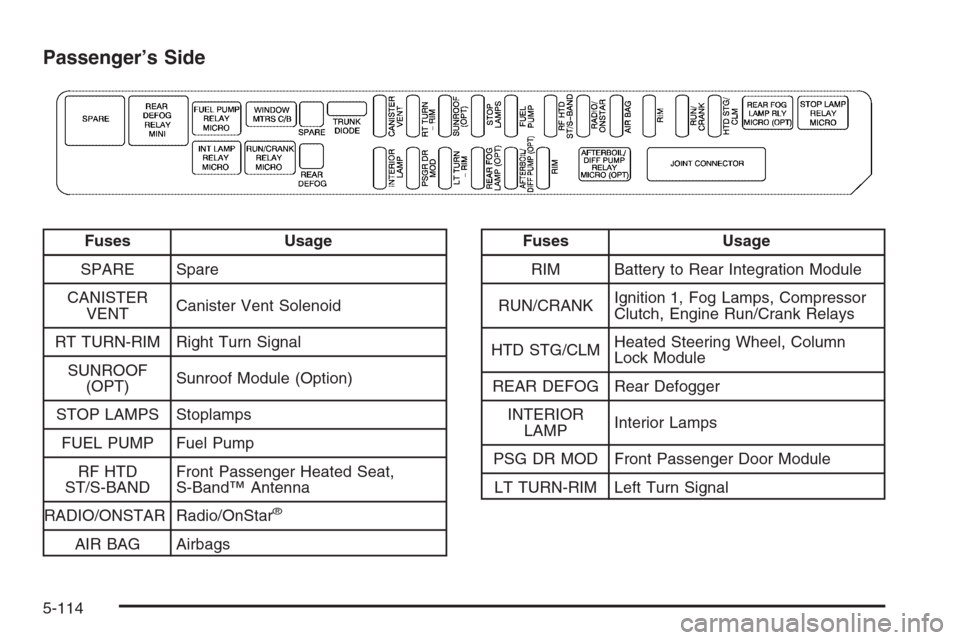
Passenger’s Side
Fuses Usage
SPARE Spare
CANISTER
VENTCanister Vent Solenoid
RT TURN-RIM Right Turn Signal
SUNROOF
(OPT)Sunroof Module (Option)
STOP LAMPS Stoplamps
FUEL PUMP Fuel Pump
RF HTD
ST/S-BANDFront Passenger Heated Seat,
S-Band™ Antenna
RADIO/ONSTAR Radio/OnStar
®
AIR BAG Airbags
Fuses Usage
RIM Battery to Rear Integration Module
RUN/CRANKIgnition 1, Fog Lamps, Compressor
Clutch, Engine Run/Crank Relays
HTD STG/CLMHeated Steering Wheel, Column
Lock Module
REAR DEFOG Rear Defogger
INTERIOR
LAMPInterior Lamps
PSG DR MOD Front Passenger Door Module
LT TURN-RIM Left Turn Signal
5-114
Page 467 of 480
A
Accessories and Modications............................ 5-3
Accessory Power Outlet(s)...............................3-46
Adaptive Cruise Control...................................3-19
Adding Equipment to Your Airbag-Equipped
Vehicle.......................................................1-63
Additives, Fuel................................................. 5-6
Add-On Electrical Equipment...........................5-104
Air Cleaner/Filter, Engine.................................5-24
Air Conditioning..............................................3-48
Airbag
Passenger Status Indicator...........................3-61
Readiness Light..........................................3-60
Airbag Sensing and Diagnostic Module (SDM)...... 7-8
Airbag System................................................1-49
Adding Equipment to Your Airbag-Equipped
Vehicle...................................................1-63
How Does an Airbag Restrain?......................1-57
Passenger Sensing System...........................1-59
Servicing Your Airbag-Equipped Vehicle..........1-63
What Makes an Airbag Inate?......................1-57
What Will You See After an Airbag Inates?....1-57
When Should an Airbag Inate?....................1-55
Where Are the Airbags?...............................1-52
All-Wheel Drive...............................................5-50
All-Wheel-Drive (AWD) System.........................4-12
Antenna, Diversity Antenna System..................3-122Antenna, XM™ Satellite Radio
Antenna System........................................3-122
Anti-Lock Brake System (ABS)........................... 4-7
Anti-Lock Brake, System Warning Light..............3-65
Appearance Care
Aluminum or Chrome-Plated Wheels..............5-99
Care of Safety Belts....................................5-97
Chemical Paint Spotting..............................5-101
Cleaning Exterior Lamps/Lenses....................5-98
Cleaning the Inside of Your Vehicle................5-94
Fabric/Carpet..............................................5-96
Finish Care.................................................5-98
Finish Damage..........................................5-101
Instrument Panel, Vinyl, and Other Plastic
Surfaces.................................................5-97
Leather......................................................5-96
Sheet Metal Damage..................................5-100
Speaker Covers..........................................5-97
Tires........................................................5-100
Underbody Maintenance.............................5-101
Vehicle Care/Appearance Materials...............5-102
Washing Your Vehicle...................................5-98
Weatherstrips..............................................5-97
Windshield and Wiper Blades........................5-99
Wood Panels..............................................5-97
Ashtray(s)......................................................3-47
Audio System(s).............................................3-94
Audio Steering Wheel Controls....................3-119
Care of Your CD Player..............................3-122
1
Page 468 of 480
Audio System(s) (cont.)
Care of Your CDs ......................................3-121
Diversity Antenna System............................3-122
Navigation/Radio System, see Navigation
Manual.................................................3-115
Audio Systems
Radio Personalization.................................3-115
Audio System(s)
Radio with CD............................................3-96
Setting the Time..........................................3-95
Theft-Deterrent Feature...............................3-119
Understanding Radio Reception...................3-120
XM™ Satellite Radio Antenna System...........3-122
Automatic Transmission
Fluid..........................................................5-26
Operation...........................................2-28, 2-32
B
Battery..........................................................5-44
Exterior Lighting Battery Saver......................3-38
Inadvertent Power Saver..............................3-40
Load Management.......................................3-40
Before Leaving on a Long Trip.........................4-24
Brake
Anti-Lock Brake System (ABS)........................ 4-7
Emergencies................................................ 4-9
Panic Assist................................................4-12Brake (cont.)
Parking......................................................2-35
System Warning Light..................................3-64
Brakes..........................................................5-41
Braking........................................................... 4-6
Braking in Emergencies..................................... 4-9
Break-In, New Vehicle.....................................2-24
Bulb Replacement...........................................5-53
Back-Up Lamps...........................................5-54
Halogen Bulbs............................................5-53
High Intensity Discharge (HID) Lighting...........5-53
Replacement Bulbs......................................5-54
Buying New Tires...........................................5-72
C
Calibration...............................................1-7, 2-42
California Fuel.................................................. 5-6
California Proposition 65 Warning....................... 5-3
Canadian Owners................................................ ii
Capacities and Specications..........................5-116
Carbon Monoxide...................2-14, 2-39, 4-27, 4-40
Care of
Safety Belts................................................5-97
Your CD Player.........................................3-122
Your CDs .................................................3-121
Center Console Storage Area...........................2-51
2
Page 474 of 480
M
Magnetic Ride Control.....................................4-11
Maintenance Schedule
Additional Required Services........................... 6-6
At Each Fuel Fill........................................... 6-9
At Least Once a Month.................................. 6-9
At Least Once a Year..................................6-10
Introduction.................................................. 6-2
Maintenance Footnotes.................................. 6-7
Maintenance Record....................................6-16
Maintenance Requirements............................. 6-2
Normal Maintenance Replacement Parts.........6-14
Owner Checks and Services........................... 6-8
Recommended Fluids and Lubricants.............6-12
Scheduled Maintenance................................. 6-4
Using.......................................................... 6-2
Your Vehicle and the Environment................... 6-2
Malfunction Indicator Light................................3-67
Memory Mirrors..............................................2-70
Memory Seat.................................................2-70
Memory Steering Wheel Controls......................2-70
Message
DIC Warnings and Messages........................3-79Mirrors
Automatic Dimming Rearview........................2-41
Automatic Dimming Rearview Mirror with
Intellibeam™ and OnStar®.........................2-41
Automatic Dimming Rearview with OnStar®.....2-41
Automatic Dimming Rearview with OnStar®
and Compass..........................................2-42
Manual Rearview Mirror with Compass and
Temperature.............................................. 1-7
Memory .....................................................2-70
Outside Automatic Dimming Mirror.................2-44
Outside Convex Mirror.................................2-44
Outside Parallel Park Assist Mirror.................2-44
Outside Power Heated Mirrors.......................2-43
MyGMLink.com................................................ 7-3
N
Navigation/Radio System, see Navigation
Manual.....................................................3-115
New Vehicle Break-In......................................2-24
Normal Maintenance Replacement Parts............6-14
8
Page 476 of 480
Q
Questions and Answers About Safety Belts.........1-12
R
Radios..........................................................3-94
Care of Your CD Player..............................3-122
Care of Your CDs ......................................3-121
Navigation/Radio System, see Navigation
Manual.................................................3-115
Radio Personalization.................................3-115
Radio with CD............................................3-96
Setting the Time..........................................3-95
Theft-Deterrent..........................................3-119
Understanding Reception............................3-120
Rainsense™ II Wipers.....................................3-14
Reading Lamps..............................................3-40
Rear Axle......................................................5-51
Limited-Slip.................................................4-11
Rear Climate Control System............................3-54
Rear Door Security Locks................................2-13
Rear Heated Seats........................................... 1-7
Rear Safety Belt Comfort Guides......................1-23
Rear Seat Passengers, Safety Belts..................1-21
Rearview Mirror, Automatic Dimming..................2-41
Rearview Mirror, Automatic Dimming with
OnStar
®.....................................................2-41Rearview Mirror, Automatic Dimming with
OnStar
®and Compass.................................2-42
Rearview Mirror with Compass and
Temperature................................................. 1-7
Reclining Seatbacks, Power............................... 1-4
Recommended Fluids and Lubricants.................6-12
Recreational Vehicle Towing.............................4-38
Removing the Flat Tire and Installing
the Spare Tire.............................................5-86
Removing the Spare Tire and Tools...................5-85
Replacement Bulbs.........................................5-54
Replacement, Windshield.................................5-55
Reporting Safety Defects
Canadian Government..................................7-13
General Motors...........................................7-14
United States Government............................7-13
Restraint System Check
Checking the Restraint Systems....................1-64
Replacing Restraint System Parts
After a Crash..........................................1-65
Retained Accessory Power (RAP)......................2-25
Right Front Passenger Position, Safety Belts......1-21
Roadside
Service........................................................ 7-5
Rocking Your Vehicle to Get it Out....................4-32
Routing, Engine Drive Belt...............................6-15
Run-Flat Tires................................................5-63
Running the Engine While Parked.....................2-40
10