display CADILLAC STS 2008 1.G User Guide
[x] Cancel search | Manufacturer: CADILLAC, Model Year: 2008, Model line: STS, Model: CADILLAC STS 2008 1.GPages: 500, PDF Size: 5.81 MB
Page 106 of 500
Driver Shift Control (DSC)
Notice:If you drive your vehicle at high RPMs
without upshifting while using Driver Shift
Control (DSC), you could damage your vehicle.
Always upshift when necessary while using DSC.
Your automatic transmission has a Driver Shift
Control (DSC) feature that allows you to change
gears similar to a manual transmission.
To use the DSC feature:
1. Slide the shift lever over from DRIVE (D) to the
right into the DSC area.
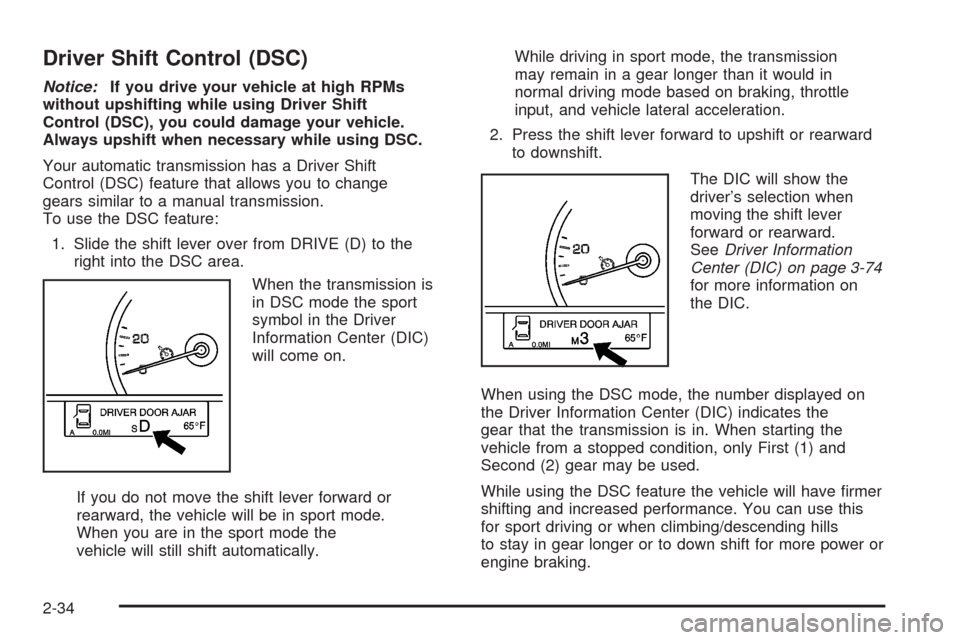
When the transmission is
in DSC mode the sport
symbol in the Driver
Information Center (DIC)
will come on.
If you do not move the shift lever forward or
rearward, the vehicle will be in sport mode.
When you are in the sport mode the
vehicle will still shift automatically.While driving in sport mode, the transmission
may remain in a gear longer than it would in
normal driving mode based on braking, throttle
input, and vehicle lateral acceleration.
2. Press the shift lever forward to upshift or rearward
to downshift.
The DIC will show the
driver’s selection when
moving the shift lever
forward or rearward.
SeeDriver Information
Center (DIC) on page 3-74
for more information on
the DIC.
When using the DSC mode, the number displayed on
the Driver Information Center (DIC) indicates the
gear that the transmission is in. When starting the
vehicle from a stopped condition, only First (1) and
Second (2) gear may be used.
While using the DSC feature the vehicle will have rmer
shifting and increased performance. You can use this
for sport driving or when climbing/descending hills
to stay in gear longer or to down shift for more power or
engine braking.
2-34
Page 113 of 500
Automatic Dimming Rearview Mirror
with OnStar
®and Compass
Your vehicle may have an automatic dimming rearview
mirror with a compass display. The mirror also
contains OnStar
®controls. For more information see
OnStar®System on page 2-48.
The mirror includes an eight-point compass display in
the upper right corner of the mirror face. When on,
the compass automatically calibrates as the vehicle
is driven.
Mirror Operation
O
(On/Off):Press and hold the button, located on
the lower left side of the mirror face, for about
three seconds to turn the automatic dimming feature on
or off. The indicator light will illuminate when this
feature is active. The automatic dimming feature is
active each time the vehicle is started.
Compass Operation
Press the on/off button once to turn the compass
on or off.
When the ignition and the compass feature are on,
the compass will show two character boxes for about
two seconds. After two seconds, the mirror will display
the compass heading.
Compass Calibration
If after two seconds, the display does not show a
compass heading (for example, N for North), there may
be a strong magnetic eld interfering with the compass.
Such interference may be caused by a magnetic
antenna mount, magnetic note pad holder or a similar
magnetic item. If the letter C should ever appear in the
compass window, the compass may need calibration.
The mirror can be calibrated by driving the vehicle in
circles at 5 mph (8 km/h) or less until the display reads
a direction.
The compass can be placed in calibration mode
manually by pressing and holding the on/off button
untilaCisshown in the compass display.
2-41
Page 114 of 500
Compass Variance
The zone is set to zone eight upon leaving the factory.
It will be necessary to adjust the compass to
compensate for compass variance if you live outside
zone eight. Under certain circumstances, as during
a long distance cross-country trip, it will be necessary to
adjust for compass variance. Compass variance is
the difference between earth’s magnetic north and true
geographic north. If not adjusted to account for
compass variance, your compass could give false
readings.
To adjust for compass variance do the following:
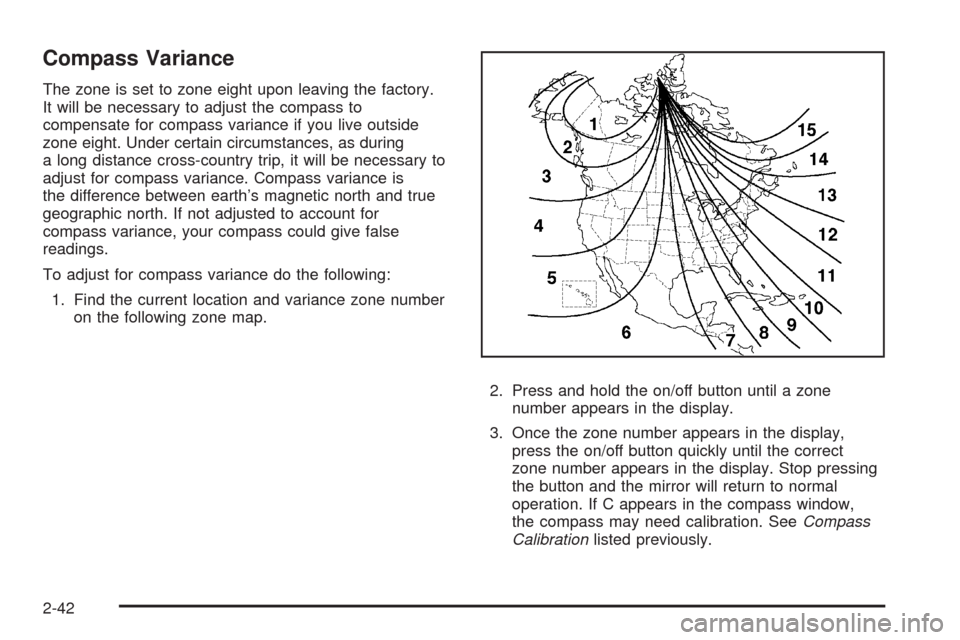
1. Find the current location and variance zone number
on the following zone map.
2. Press and hold the on/off button until a zone
number appears in the display.
3. Once the zone number appears in the display,
press the on/off button quickly until the correct
zone number appears in the display. Stop pressing
the button and the mirror will return to normal
operation. If C appears in the compass window,
the compass may need calibration. SeeCompass
Calibrationlisted previously.
2-42
Page 117 of 500
Object Detection Systems
Ultrasonic Rear Parking Assist
(URPA)
If your vehicle has the Ultrasonic Rear Parking Assist
(URPA) system, it helps you park easier and avoid other
vehicles while in REVERSE (R). It operates at speeds
less than 3 mph (5 km/h). It can determine how close
objects are to the rear bumper, up to 5 feet (1.5 m)
behind your vehicle. The distance sensors are located
on the rear bumper.
{CAUTION:
The Ultrasonic Rear Parking Assist (URPA)
system does not replace driver vision.
It cannot detect:
objects that are below the bumper,
underneath the vehicle, or if they are
too close or far from the vehicle
children, pedestrians, bicyclists, or pets.
CAUTION: (Continued)
CAUTION: (Continued)
If you do not use proper care before and while
backing; vehicle damage, injury, or death
could occur. Even with URPA, always check
behind your vehicle before backing up. While
backing, be sure to look for objects and check
your vehicle’s mirrors.
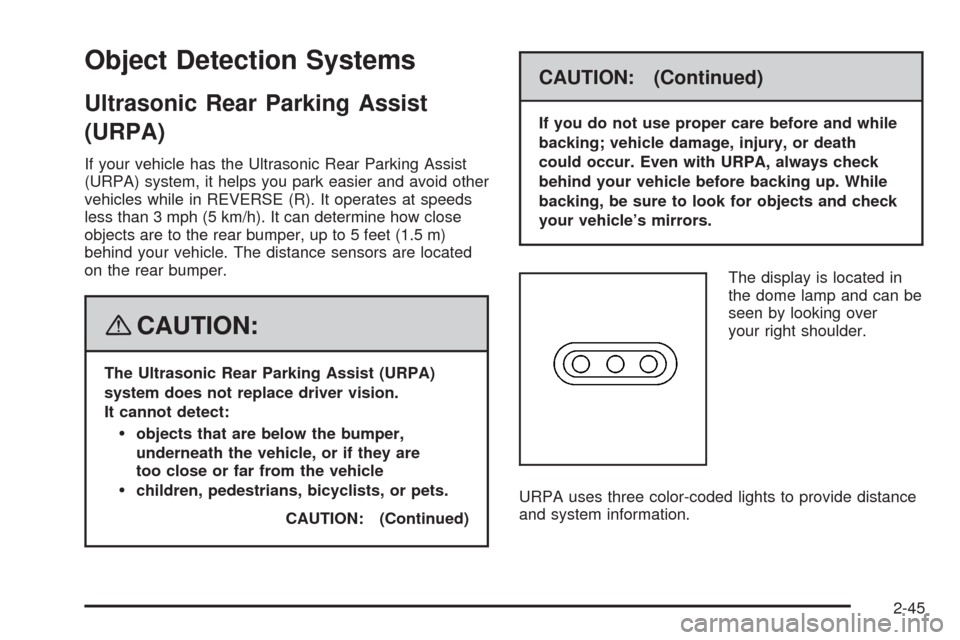
The display is located in
the dome lamp and can be
seen by looking over
your right shoulder.
URPA uses three color-coded lights to provide distance
and system information.
2-45
Page 118 of 500
How the System Works
URPA comes on automatically when the shift lever
is moved into REVERSE (R). The rear display will
then briey illuminate to let you know the system
is working.
URPA operates only at speeds less than 3 mph (5 km/h).
If you are above this speed, the red light on the rear
display will ash.
To be detected, objects must be at least 10 inches
(25.4 cm) off the ground and below trunk level.
Objects must also be within 5 feet (1.5 m) from your
rear bumper. This distance may be less during warmer
or humid weather.
A single beep will sound the rst time an object is
detected between 20 inches (0.5 m) and 5 feet (1.5 m)
away. Repeated beeping will occur when you are
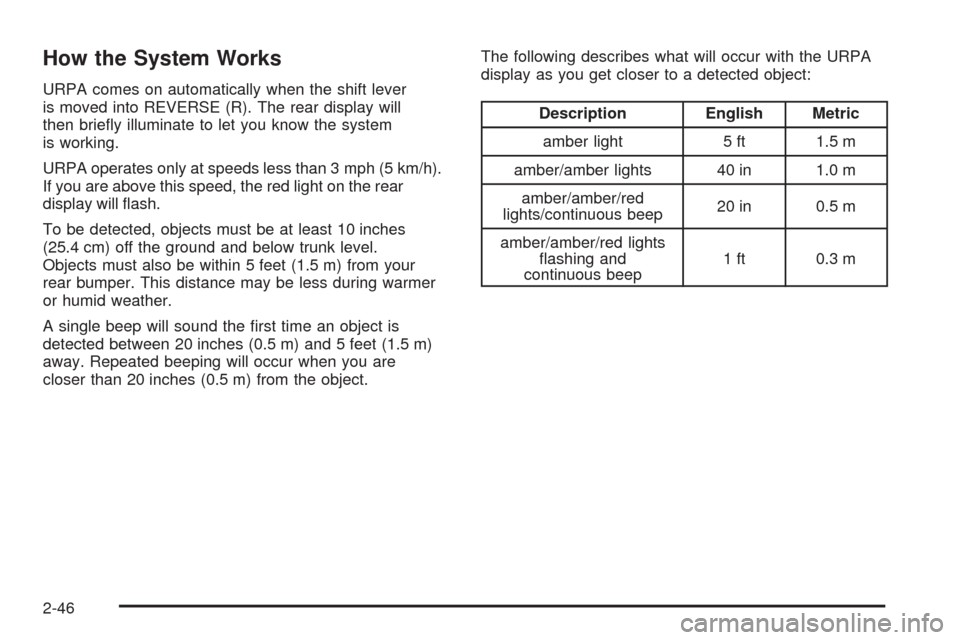
closer than 20 inches (0.5 m) from the object.The following describes what will occur with the URPA
display as you get closer to a detected object:
Description English Metric
amber light 5 ft 1.5 m
amber/amber lights 40 in 1.0 m
amber/amber/red
lights/continuous beep20 in 0.5 m
amber/amber/red lights
ashing and
continuous beep1 ft 0.3 m
2-46
Page 119 of 500
When the System Does Not Seem to
Work Properly
The ultrasonic sensors are not clean, a red URPA
display light may illuminate when the vehicle is in
REVERSE (R). Keep your rear bumper free of mud,
dirt, snow, ice and slush. For cleaning instructions,
seeWashing Your Vehicle on page 5-110.
A trailer was attached to your vehicle, or a bicycle
or an object was hanging out of your trunk during
your last drive cycle, the red light may illuminate.
Once the attached object is removed, URPA
will return to normal operation.
The vehicle’s bumper is damaged. Take the vehicle
to your dealer/retailer to repair the system.
Other conditions may affect system performance,
such as vibrations from a jackhammer or the
compression of air brakes on a very large truck.
If the system is still disabled, after driving forward at
least 15 mph (25 km/h), take your vehicle to your
dealer/retailer.
Side Blind Zone Alert
Your vehicle may have a Side Blind Zone Alert (SBZA)
system. The SBZA system is an aid that may help
you avoid lane change crashes with vehicles in your side
blind spots (zones). Read the entire section before
using the system. See “Side Blind Zone Alert” in
the Index of the navigation manual.
Lane Departure Warning
Your vehicle may have a Lane Departure Warning
(LDW) system. The LDW system does not steer the
vehicle and is only an aid to help you stay in your driving
lane. Read the entire section before using the system.
See “Lane Departure Warning” in the Index of the
navigation manual.
2-47
Page 132 of 500
Vehicle Personalization
Your vehicle has personalization that allows you to
program certain features to a preferred setting for up to
two drivers. The back of the keyless access transmitters
are labelled 1 or 2. Additional keyless access transmitters
programmed to the vehicle, as 3 and/or 4, do not have
a number on the back and are not capable of being
personalized. The number of programmable features
varies depending upon which vehicle options are
purchased.
On all vehicles, features such as climate control settings,
radio and XM™ preset settings, exterior lighting at unlock
and remote lock unlock conrmation, and language have
already been programmed for your convenience. Your
vehicle also has an automatic door locking feature that is
always on. You cannot turn the automatic door locking
feature off. SeeProgrammable Automatic Door Locks on
page 2-15.
Some vehicles have additional features that can be
programmed including the seat, steering column, and
outside rearview mirror position.If your vehicle has the base audio system, the following
information explains the vehicle personalization on
your vehicle.
If your vehicle has the Navigation system, see
“Personalization” in the Index of the Navigation System
manual for information on vehicle personalization.
If your vehicle has the ability to program additional
personalization features, the driver’s preferences
are recalled by pressing any button on the keyless
access transmitter, 1 or 2, by selecting Driver 1 or 2 on
the radio display, or when a valid keyless access
transmitter is detected upon opening the driver’s door.
If more than one valid keyless access transmitter is
detected upon opening the driver’s door, the driver
preferences for the lowest driver number will be recalled.
Certain features can be programmed not to recall until
the ignition is turned off.
The default settings for the personalization features
were set when your vehicle left the factory, but
may have changed from their default state since then.
2-60
Page 134 of 500
Personal Settings Menu Items
The PERSONAL SETTINGS MENU must be selected
with a check mark to program the personalization
features. If it is not selected, press the tune/select knob
until the check mark appears. If it is selected, the
entire list of features will be available to program.
DRIVER GREETING
This feature allows you to type in a customized name or
greeting that will appear on the display whenever the
corresponding keyless access transmitter, 1 or 2, is used
or Driver 1 or Driver 2 is selected on the radio display.
If a customized name or greeting is not programmed, the
system will show Driver 1 or Driver 2 to correspond
with the numbers on the back of the keyless access
transmitters. In this case, the customized driver greeting
feature is factory shipped as off.
To turn the driver greeting feature on and to program a
customized name or greeting:
1. Enter the PERSONAL SETTINGS MENU by
following the instructions listed previously under
“Entering the Personal Settings Menu.”
2. Turn the tune/select knob until DRIVER GREETING
is highlighted.3. Press the tune/select knob to turn on the DRIVER
GREETING feature.
You will see a cursor on the screen.
4. Turn the tune/select knob until you reach the rst
letter you want; the letter will be highlighted.
There is a complete alphabet with both upper and
lower case letters and the numbers zero through
nine. Also included are spaces and other non-letter
characters such as the ampersand (&).
5. Press the tune/select knob once to select the letter.
The letter will then appear on the display and the
cursor will advance to the next letter.
If you make a mistake, press the F5 button, located
on the radio, repeatedly to cycle back through all
of the characters until you reach the character you
wish to change. Then turn the tune/select knob
until the letter you want is highlighted and press the
tune/select knob to select the new letter.
6. Repeat Steps 4 and 5 until the name or greeting
you want is complete. You can program up to
16 characters.
2-62
Page 135 of 500
The name or greeting you programmed is now set.
You can either exit the programming mode by following
the instructions later in this section or program the
next feature available on your vehicle by pressing the
F6 (BACK) button, located on the radio, to return to the
PERSONAL SETTINGS MENU. You will now see a
check mark next to the driver greeting menu item,
which means that the driver greeting feature is on and a
customized driver greeting is being used.
To turn off the customized driver greeting, and go back
to displaying either Driver 1 or Driver 2:
1. Enter the PERSONAL SETTINGS MENU by
following the instructions listed previously under
“Entering the Personal Settings Menu.”
2. Turn the tune/select knob until DRIVER GREETING
is highlighted.
3. Press the tune/select knob to turn on the DRIVER
GREETING feature. The check mark will be cleared
and the customized driver greeting is off.
The only way to correct a customized driver greeting
once you have exited the screen to spell the name, is to
turn the driver greeting feature off, and then turn it
back on.KEY FOB REMINDER
This feature chirps the horn three times when the
driver’s door is closed and there is a keyless access
transmitter left inside of the vehicle. This will only occur
when the vehicle is off.
Programmable Modes
Mode 1:ON (default)
Mode 2:OFF
To program the vehicle to a different mode:
1. Enter the PERSONAL SETTINGS MENU by
following the instructions listed previously under
“Entering the Personal Settings Menu.”
2. Turn the tune/select knob until KEY FOB
REMINDER is highlighted.
3. Press the tune/select knob to switch back and forth
between on and off.
When the mode is turned on, a check mark will
appear next to the feature name.
The mode you selected is now set. You can either exit
the programming mode by following the instructions
later in this section or program the next feature available
on your vehicle.
2-63
Page 149 of 500
3. Press the tune/select knob to enter the
SUSPENSION MODE submenu.
4. Turn the tune/select knob to highlight TOURING or
PERFORMANCE.
5. Press the tune/select knob to select the setting.
The mode you selected is now set. You can either exit
the programming mode by following the instructions
later in this section or program the next feature available
on your vehicle by pressing the F6 (BACK) button,
located on the radio, to return to the PERSONAL
SETTINGS MENU.
Exiting the Personal Settings Menu
Once you have nished making your selections on the
base audio system, you will automatically return to
the main audio screen after 15 seconds. You can also
press the F6 (BACK) button, located on the radio,
to return to the main audio screen.
Memory Seat, Mirrors and
Steering Wheel
If your vehicle has the memory feature, you can
program and recall memory settings for the following
features for up to two drivers:
The driver’s seat position
The outside rearview mirrors position
The power tilt wheel and telescopic steering column
position
The following settings and presets are set automatically:
The language, radio and XM™ presets, tone,
volume, playback mode (AM/FM or CD), last
displayed stations, and compact disc position
The last climate control setting
The Head-Up Display (HUD) position, if your
vehicle has this feature
Other personalization settings, for example,
remote start settings
SeeVehicle Personalization on page 2-60.
2-77