engine CADILLAC STS 2008 1.G Repair Manual
[x] Cancel search | Manufacturer: CADILLAC, Model Year: 2008, Model line: STS, Model: CADILLAC STS 2008 1.GPages: 500, PDF Size: 5.81 MB
Page 283 of 500
Antilock Brake System (ABS)
Your vehicle has the Antilock Brake System (ABS), an
advanced electronic braking system that will help
prevent a braking skid.
When you start the engine and begin to drive away,
ABS will check itself. You might hear a momentary
motor or clicking noise while this test is going on, and
you might even notice that the brake pedal moves
a little. This is normal.
If there is a problem with
ABS, this warning light will
stay on. SeeAntilock
Brake System Warning
Light on page 3-65.
Let us say the road is wet and you are driving safely.
Suddenly, an animal jumps out in front of you. You slam
on the brakes and continue braking. Here is what
happens with ABS:
A computer senses that wheels are slowing down. If
one of the wheels is about to stop rolling, the computer
will separately work the brakes at each wheel.ABS can change the brake pressure faster than any
driver could. The computer is programmed to make the
most of available tire and road conditions. This can
help you steer around the obstacle while braking hard.
As you brake, the computer keeps receiving updates
on wheel speed and controls braking pressure
accordingly.
Remember: ABS does not change the time you need to
get your foot up to the brake pedal or always decrease
stopping distance. If you get too close to the vehicle in
front of you, you will not have time to apply the brakes if
that vehicle suddenly slows or stops. Always leave
enough room up ahead to stop, even though you
have ABS.
Using ABS
Do not pump the brakes. Just hold the brake pedal
down rmly and let antilock work for you. You might hear
the antilock pump or motor operate, and feel the
brake pedal pulsate, but this is normal.
4-5
Page 284 of 500
Braking in Emergencies
With ABS, you can steer and brake at the same time. In
many emergencies, steering can help you more than
even the very best braking.
Traction Control System (TCS)
Your vehicle has a traction control system that limits
wheel spin. This is especially useful in slippery
road conditions. On a rear-wheel-drive vehicle, the
system operates if it senses that one or both of the rear
wheels are spinning or beginning to lose traction. On
an All-Wheel-Drive (AWD) vehicle, the system will
operate if it senses that any of the wheels are spinning
or beginning to lose traction. When this happens,
the system brakes the spinning wheel(s) and/or reduces
engine power to limit wheel spin.
You may feel or hear the system working, but this is
normal.
This warning light will
come on to let you know if
there is a problem with
your traction control
system.SeeTraction Control System (TCS) Warning Light on
page 3-65. When this warning light is on, the system will
not limit wheel spin. Adjust your driving accordingly.
The Traction Control System (TCS) automatically comes
on whenever you start your vehicle. To limit wheel
spin, especially in slippery road conditions, you should
always leave the system on. But you can turn the
TCS off if you ever need to.
Notice:Do not repeatedly brake or accelerate
heavily when the TCS is off. You could damage your
vehicle’s driveline.
When the TCS is switched off on AWD and STS-V
vehicles, you may still feel the system working. This is
normal and necessary with the hardware on your
vehicle.
You should turn the system off if your vehicle ever gets
stuck in sand, mud or snow and rocking the vehicle
is required. SeeRocking Your Vehicle to Get It Out on
page 4-26andIf Your Vehicle is Stuck in Sand,
Mud, Ice, or Snow on page 4-25for more information.
See alsoWinter Driving on page 4-22for information on
using TCS when driving in snowy or icy conditions.
4-6
Page 291 of 500
All-Wheel Drive (AWD) System
If your vehicle has this feature, engine power is sent to
all four wheels all the time. This is like four-wheel
drive, but it is fully automatic.
Steering
Power Steering
If you lose power steering assist because the engine
stops or the system is not functioning, you can steer but
it will take much more effort.
Speed Variable Assist Steering
Your vehicle has a steering system that continuously
adjusts the effort you feel when steering at all vehicle
speeds. It provides ease when parking, yet a rm, solid
feel at highway speeds.
Active Steering
All-wheel-drive vehicles with the Active Steering with
Enhanced StabiliTrak®option have an electronically
controlled active steering system. The active steering
system uses the steering actuator to automatically adjust
the front road wheel turning angle based on vehicle
speed and how much you turn the steering wheel. Thissystem reduces steering effort at low speeds, improves
steering feel at moderate speeds, and reduces
steering sensitivity at higher speeds.
During some operating conditions, the active steering
might deactivate to protect the system from damage.
You might notice that the center position of the steering
wheel is changed. Unless there is a SERVICE
STEERING SYS message, the system will return to
normal operation as soon as the condition ceases,
usually within a very short period of time.
At low speeds, the active steering system requires less
movement of the steering wheel to change vehicle
direction than the normal power steering system. Adjust
your driving accordingly.
When certain steering faults are present, the active
steering deactivates and vehicle speed might be limited.
The SERVICE STEERING SYS and SPEED LIMITED
TO XXX messages will be displayed. SeeDIC Warnings
and Messages on page 3-80. The normal power
steering system is still operational. You might notice that
the center position of the steering wheel is changed
and that more steering effort at low speeds and
less steering effort at high speeds is required. You can
continue to drive your vehicle with normal power
steering but you should have your dealer/retailer inspect
the steering system as soon as possible in order to
have the problem corrected and the steering wheel
position centered.
4-13
Page 296 of 500
Competitive Driving
See your warranty book before using your vehicle for
competitive driving.
Notice:If you use your vehicle for competitive
driving, the engine may use more oil than it would
with normal use. Low oil levels can damage the
engine. Be sure to check the oil level often during
competitive driving and keep the level at or near the
upper mark that shows the proper operating range
on the engine oil dipstick. For information on how to
add oil, seeEngine Oil on page 5-18.
Driving at Night
Night driving is more dangerous than day driving
because some drivers are likely to be impaired — by
alcohol or drugs, with night vision problems, or by
fatigue.Night driving tips include:
Drive defensively.
Do not drink and drive.
Reduce headlamp glare by adjusting the inside
rearview mirror.
Slow down and keep more space between you and
other vehicles because your headlamps can only
light up so much road ahead.
Watch for animals.
When tired, pull off the road.
Do not wear sunglasses.
Avoid staring directly into approaching headlamps.
Keep the windshield and all glass on your vehicle
clean — inside and out.
Keep your eyes moving, especially during turns or
curves.
No one can see as well at night as in the daytime. But,
as we get older, these differences increase. A
50-year-old driver might need at least twice as much
light to see the same thing at night as a 20-year-old.
4-18
Page 298 of 500
Before Leaving on a Long Trip
To prepare your vehicle for a long trip, consider having
it serviced by your dealer/retailer before departing.
Things to check on your own include:
Windshield Washer Fluid:Reservoir full? Windows
clean — inside and outside?
Wiper Blades:In good shape?
Fuel, Engine Oil, Other Fluids:All levels checked?
Lamps:Do they all work and are lenses clean?
Tires:Are treads good? Are tires inated to
recommended pressure?
Weather and Maps:Safe to travel? Have
up-to-date maps?
Highway Hypnosis
Always be alert and pay attention to your surroundings
while driving. If you become tired or sleepy, nd a
safe place to park your vehicle and rest.
Other driving tips include:
Keep the vehicle well ventilated.
Keep interior temperature cool.
Keep your eyes moving — scan the road ahead
and to the sides.
Check the rearview mirror and vehicle instruments
often.
4-20
Page 299 of 500
Hill and Mountain Roads
Driving on steep hills or through mountains is different
than driving on at or rolling terrain. Tips for driving
in these conditions include:
Keep your vehicle serviced and in good shape.
Check all uid levels and brakes, tires, cooling
system, and transmission.
Going down steep or long hills, shift to a lower gear.
{CAUTION:
If you do not shift down, the brakes could get
so hot that they would not work well. You
would then have poor braking or even none
going down a hill. You could crash. Shift down
to let the engine assist the brakes on a steep
downhill slope.
{CAUTION:
Coasting downhill in NEUTRAL (N) or with the
ignition off is dangerous. The brakes will have
to do all the work of slowing down and they
could get so hot that they would not work well.
You would then have poor braking or even
none going down a hill. You could crash.
Always have the engine running and your
vehicle in gear when you go downhill.
Stay in your own lane. Do not swing wide or cut
across the center of the road. Drive at speeds
that let you stay in your own lane.
Top of hills: Be alert — something could be in your
lane (stalled car, accident).
Pay attention to special road signs (falling rocks
area, winding roads, long grades, passing or
no-passing zones) and take appropriate action.
4-21
Page 302 of 500
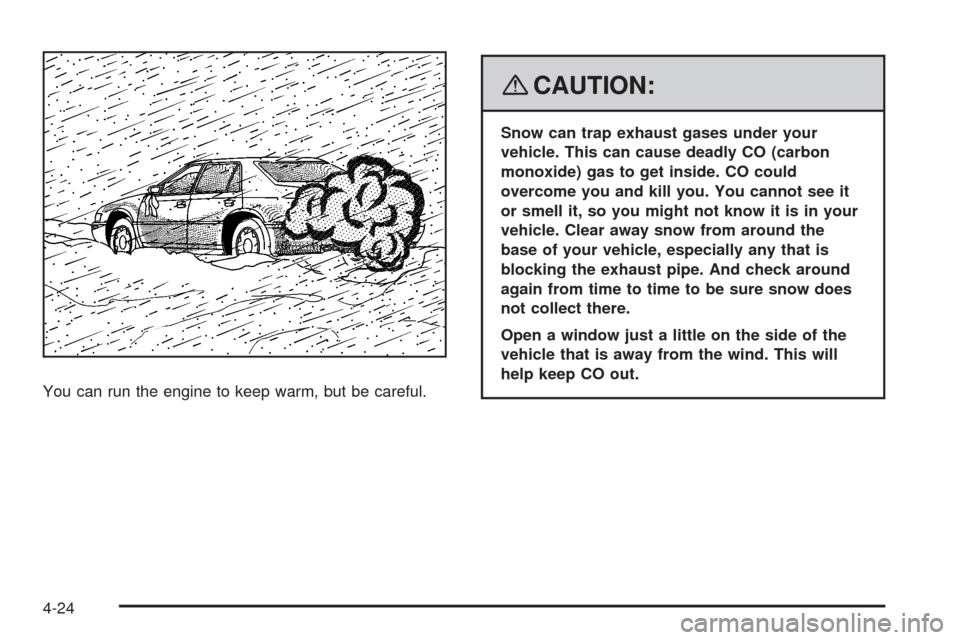
You can run the engine to keep warm, but be careful.
{CAUTION:
Snow can trap exhaust gases under your
vehicle. This can cause deadly CO (carbon
monoxide) gas to get inside. CO could
overcome you and kill you. You cannot see it
or smell it, so you might not know it is in your
vehicle. Clear away snow from around the
base of your vehicle, especially any that is
blocking the exhaust pipe. And check around
again from time to time to be sure snow does
not collect there.
Open a window just a little on the side of the
vehicle that is away from the wind. This will
help keep CO out.
4-24
Page 303 of 500
Run your engine only as long as you must. This saves
fuel. When you run the engine, make it go a little
faster than just idle. That is, push the accelerator
slightly. This uses less fuel for the heat that you get and
it keeps the battery charged. You will need a
well-charged battery to restart the vehicle, and possibly
for signaling later on with the headlamps. Let the
heater run for a while.
Then, shut the engine off and close the window almost all
the way to preserve the heat. Start the engine again and
repeat this only when you feel really uncomfortable from
the cold. But do it as little as possible. Preserve the fuel
as long as you can. To help keep warm, you can get out
of the vehicle and do some fairly vigorous exercises
every half hour or so until help comes.If Your Vehicle is Stuck in Sand,
Mud, Ice, or Snow
Slowly and cautiously spin the wheels to free your
vehicle when stuck in sand, mud, ice, or snow. See
Rocking Your Vehicle to Get It Out on page 4-26.
If your vehicle has a traction system, it can often help to
free a stuck vehicle. Refer to your vehicle’s traction
system in the Index. If the stuck condition is too severe
for the traction system to free the vehicle, turn the
traction system off and use the rocking method.
{CAUTION:
If you let your vehicle’s tires spin at high
speed, they can explode, and you or others
could be injured. The vehicle can overheat,
causing an engine compartment re or other
damage. Spin the wheels as little as possible
and avoid going above 35 mph (55 km/h) as
shown on the speedometer.
For information about using tire chains on your vehicle,
seeTire Chains on page 5-82.
4-25
Page 312 of 500
Towing a Trailer (Vehicles With
Heavy Duty Cooling)
{CAUTION:
If you do not use the correct equipment and
drive properly, you can lose control when you
pull a trailer. For example, if the trailer is too
heavy, the brakes may not work well — or even
at all. You and your passengers could be
seriously injured. You may also damage your
vehicle; the resulting repairs would not be
covered by your warranty. Pull a trailer only if
you have followed all the steps in this section.
Ask your dealer/retailer for advice and
information about towing a trailer with your
vehicle.
Vehicles with heavy duty cooling can tow a trailer if it is
equipped with the proper trailer towing equipment.
To identify the trailering capacity of your vehicle, you
should read the information in “Weight of the Trailer” that
appears later in this section. Trailering is different
than just driving your vehicle by itself. Trailering meanschanges in handling, acceleration, braking, durability
and fuel economy. Successful, safe trailering takes
correct equipment, and it has to be used properly.
That is the reason for this part. In it are many
time-tested, important trailering tips and safety rules.
Many of these are important for your safety and that of
your passengers. So please read this section carefully
before you pull a trailer.
Load-pulling components such as the engine,
transmission, wheel assemblies and tires are forced to
work harder against the drag of the added weight.
The engine is required to operate at relatively higher
speeds and under greater loads, generating extra heat.
Also, the trailer adds considerably to wind resistance,
increasing the pulling requirements.
If You Do Decide To Pull A Trailer
If you do, here are some important points:
There are many different laws, including speed limit
restrictions, having to do with trailering. Make sure
your rig will be legal, not only where you live
but also where you will be driving. A good source
for this information can be state or provincial police.
Consider using a sway control. You can ask a hitch
dealer/retailer about sway controls.
4-34
Page 313 of 500
Do not tow a trailer at all during the rst 1,000 miles
(1 600 km) your new vehicle is driven. Your engine,
axle or other parts could be damaged.
Then, during the rst 500 miles (800 km) that you
tow a trailer, do not drive over 50 mph (80 km/h)
and do not make starts at full throttle. This
helps your engine and other parts of your vehicle
wear in at the heavier loads.
Obey speed limit restrictions when towing a trailer.
Do not drive faster than the maximum posted
speed for trailers, or no more than 55 mph
(90 km/h), to save wear on your vehicle’s parts.
Three important considerations have to do with weight:
The weight of the trailer.
The weight of the trailer tongue.
The total weight on your vehicle’s tires.
Weight of the Trailer
How heavy can a trailer safely be?
It should never weigh more than 1,000 lbs (450 kg). But
even that can be too heavy.
It depends on how you plan to use your rig. For
example, speed, altitude, road grades, outside
temperature and how much your vehicle is used to pull
a trailer are all important. It can also depend on any
special equipment that you have on your vehicle,
and the amount of tongue weight the vehicle can carry.
See “Weight of the Trailer Tongue” later in this
section for more information.
Maximum trailer weight is calculated assuming only the
driver is in the tow vehicle and it has all the required
trailering equipment. The weight of additional optional
equipment, passengers and cargo in the tow vehicle
must be subtracted form the maximum trailer weight.
You can ask your dealer/retailer for our trailering
information or advice, or you can write us at our
Customer Assistance Offices. SeeCustomer Assistance
Offices on page 7-5for more information.
4-35