display CADILLAC STS 2011 1.G Owner's Manual
[x] Cancel search | Manufacturer: CADILLAC, Model Year: 2011, Model line: STS, Model: CADILLAC STS 2011 1.GPages: 528, PDF Size: 4.96 MB
Page 144 of 528

Black plate (38,1)Cadillac STS Owner Manual - 2011
Compass
Compass Operation
PressOto turn the compass on or off.
When the ignition and the compass feature are on, the
mirror displays the compass heading after a few
seconds.
Compass Calibration
If after few seconds, the display does not show a
compass heading (for example, N for North), there may
be a strong magnetic field interfering with the compass.
Interference can be caused by a magnetic antenna
mount, magnetic note pad holder or a similar magnetic
item. If the letter C should ever appear in the compass
window, the compass may need calibration.
The mirror can be calibrated by driving the vehicle in
circles at 5 mph (8 km/h) or less until the display reads a
direction.
The compass can be placed in calibration mode
manually by pressing and holding
Ountil a C is shown
in the compass display.
Compass Variance
The mirror is set to zone eight. If you do not live in zone
eight or drive out of the area, the compass variance
needs to be changed to the appropriate zone.
To adjust for compass variance:
1. Find the current location and variance zone number on the following zone map.
2. Press and holdOuntil a zone number displays.
3-38
Page 145 of 528
Black plate (39,1)Cadillac STS Owner Manual - 2011
3. Once the zone number displays, pressO
repeatedly until the correct zone number displays.
Stop pressing the button and the mirror returns to
normal operation. If C appears in the compass
window, the compass may need calibration. See
“Compass Calibration”listed previously.
Outside Power Mirrors
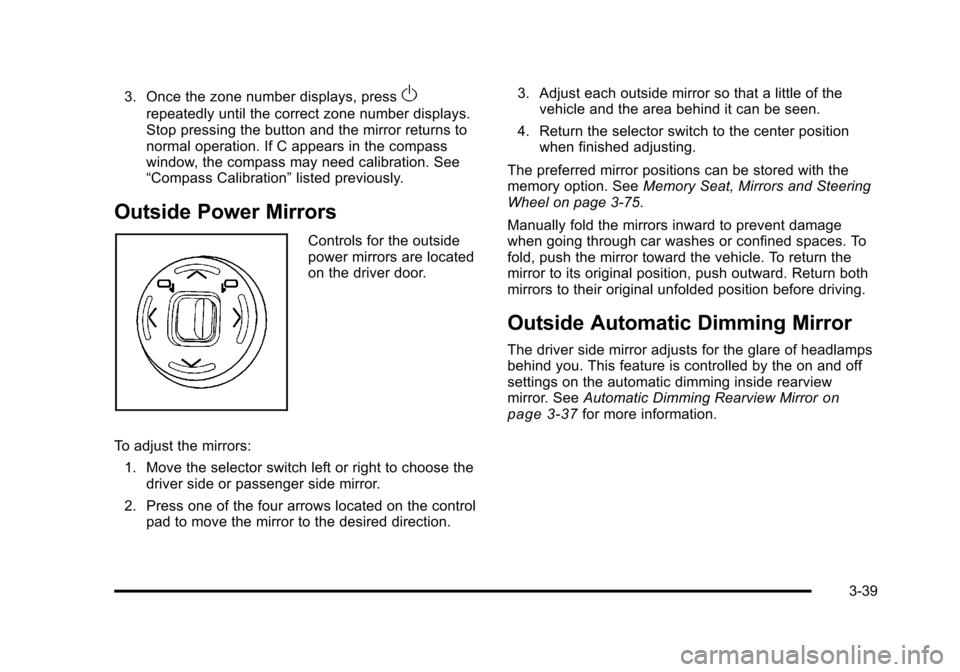
Controls for the outside
power mirrors are located
on the driver door.
To adjust the mirrors: 1. Move the selector switch left or right to choose the driver side or passenger side mirror.
2. Press one of the four arrows located on the control pad to move the mirror to the desired direction. 3. Adjust each outside mirror so that a little of the
vehicle and the area behind it can be seen.
4. Return the selector switch to the center position when finished adjusting.
The preferred mirror positions can be stored with the
memory option. See Memory Seat, Mirrors and Steering
Wheel on page 3‑75.
Manually fold the mirrors inward to prevent damage
when going through car washes or confined spaces. To
fold, push the mirror toward the vehicle. To return the
mirror to its original position, push outward. Return both
mirrors to their original unfolded position before driving.
Outside Automatic Dimming Mirror
The driver side mirror adjusts for the glare of headlamps
behind you. This feature is controlled by the on and off
settings on the automatic dimming inside rearview
mirror. See Automatic Dimming Rearview Mirror
on
page 3‑37for more information.
3-39
Page 147 of 528
Black plate (41,1)Cadillac STS Owner Manual - 2011
Object Detection Systems
Ultrasonic Rear Parking
Assist (URPA)
For vehicles with the URPA system, it operates at
speeds less than 3 mph (5 km/h), and assists the driver
with parking and avoiding objects while in R (Reverse).
The sensors on the rear bumper are used to detect the
distance to an object up to 5 feet (1.5 m) behind the
vehicle and at least 10 inches (25.4 cm) off the ground.
{WARNING:
The Ultrasonic Rear Parking Assist (URPA)
system does not replace driver vision. It cannot
detect:
.Objects that are below the bumper,
underneath the vehicle, or too close or far
from the vehicle
.Children, pedestrians, bicyclists, or pets.(Continued)
WARNING: (Continued)
If you do not use proper care before and while
backing, vehicle damage, injury, or death could
occur. Even with URPA, always check behind the
vehicle before backing up. While backing, be sure
to look for objects and check the vehicle's mirrors.
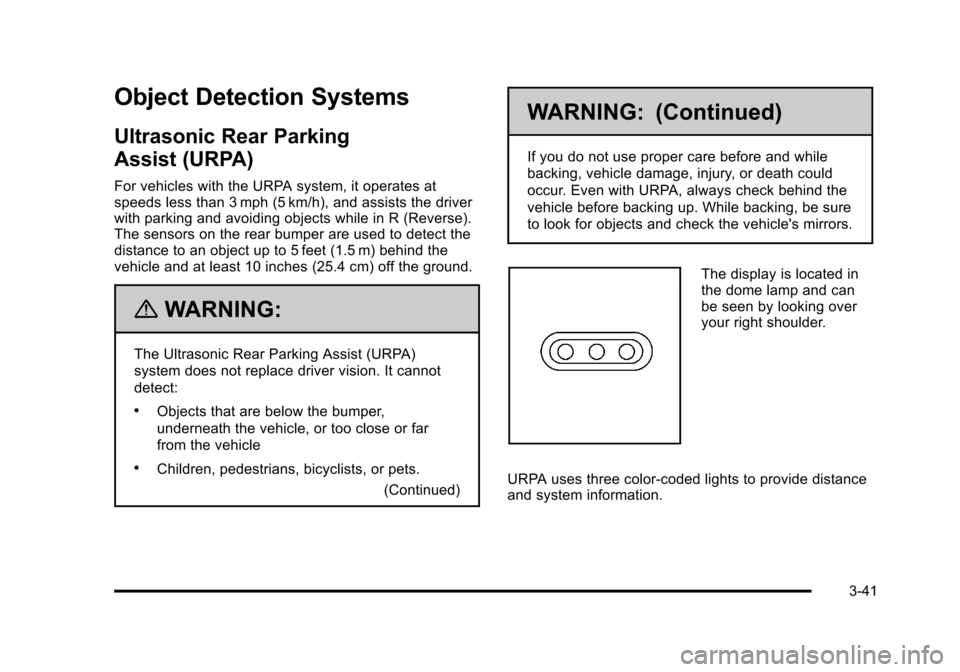
The display is located in
the dome lamp and can
be seen by looking over
your right shoulder.
URPA uses three color-coded lights to provide distance
and system information.
3-41
Page 148 of 528
Black plate (42,1)Cadillac STS Owner Manual - 2011
How the System Works
URPA comes on automatically when the shift lever is
moved into R (Reverse). The rear display briefly
illuminates to indicate the system is working.
URPA operates only at speeds less than 3 mph
(5 km/h). If the vehicle is above this speed, the red light
on the rear display will flash.
To be detected, objects must be at least 10 inches
(25.4 cm) off the ground and below trunk level. Objects
must also be within 5 feet (1.5 m) from the rear bumper.
This distance may be less during warmer or humid
weather.
A single beep will sound the first time an object is
detected between 20 inches (0.5 m) and 5 feet (1.5 m)
away. Beeping will occur when the vehicle is closer than
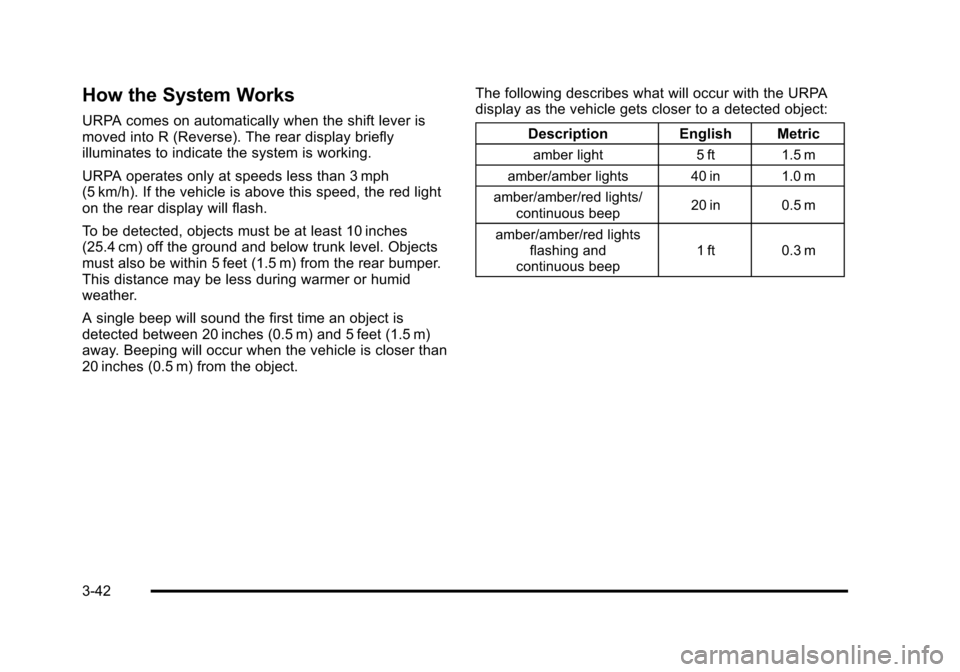
20 inches (0.5 m) from the object.The following describes what will occur with the URPA
display as the vehicle gets closer to a detected object:
Description English Metric
amber light 5 ft 1.5 m
amber/amber lights 40 in 1.0 m
amber/amber/red lights/ continuous beep 20 in 0.5 m
amber/amber/red lights flashing and
continuous beep 1 ft 0.3 m
3-42
Page 149 of 528
Black plate (43,1)Cadillac STS Owner Manual - 2011
When the System Does Not Seem to
Work Properly
If the URPA system will not activate due to a temporary
condition a red light will be shown on the rear URPA
display when the shift lever is moved into R (Reverse).
This occurs under the following conditions:
.The ultrasonic sensors are not clean. Keep the
vehicle's rear bumper free of mud, dirt, snow, ice
and slush. For cleaning instructions, seeWashing
Your Vehicle on page 6‑109.
.A trailer was attached to the vehicle, or a bicycle or
an object was hanging out of the trunk during the
last drive cycle, the red light may illuminate in the
rear display. Once the attached object is removed,
URPA will return to normal operation.
.The vehicle's bumper is damaged. Take the vehicle
to your dealer to repair the system.
.Other conditions may affect system performance,
such as vibrations from a jackhammer or the
compression of air brakes on a very large truck.
If the system is still disabled, after driving forward at
least 15 mph (25 km/h), take the vehicle to your dealer.
3-43
Page 150 of 528
Black plate (44,1)Cadillac STS Owner Manual - 2011
Side Blind Zone Alert (SBZA)
The vehicle may have a Side Blind Zone Alert (SBZA)
system. Read this entire section before using the
system.
{WARNING:
SBZA is only a lane changing aid and does not
replace driver vision. SBZA does not detect:
.Vehicles outside the side blind zones which
may be rapidly approaching.
.Pedestrians, bicyclists, or animals.
Failure to use proper care when changing lanes
may result in damage to the vehicle, injury,
or death. Always check the outside and rearview
mirrors, glance over your shoulder, and use the
turn signal before changing lanes.
The SBZA system is an aid that may help you avoid
lane change crashes with vehicles in the side blind
spots (zones). When the system detects a vehicle in the
side blind zone, amber SBZA displays will light up in the
side mirrors. This indicates that it may be unsafe to
change lanes. Before making a lane change, always check the SBZA display, the outside and rearview
mirrors, look over your shoulder for vehicles and
hazards, and use the turn signal.
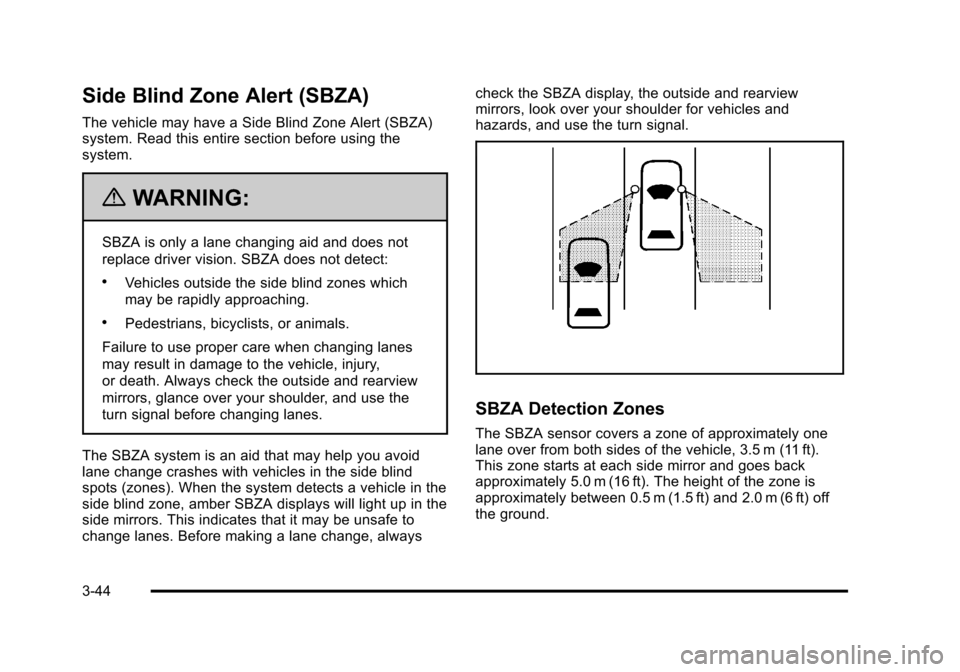
SBZA Detection Zones
The SBZA sensor covers a zone of approximately one
lane over from both sides of the vehicle, 3.5 m (11 ft).
This zone starts at each side mirror and goes back
approximately 5.0 m (16 ft). The height of the zone is
approximately between 0.5 m (1.5 ft) and 2.0 m (6 ft) off
the ground.
3-44
Page 151 of 528
Black plate (45,1)Cadillac STS Owner Manual - 2011
The SBZA detection zones do not change if the vehicle
is towing a trailer. So be extra careful when changing
lanes while towing a trailer.
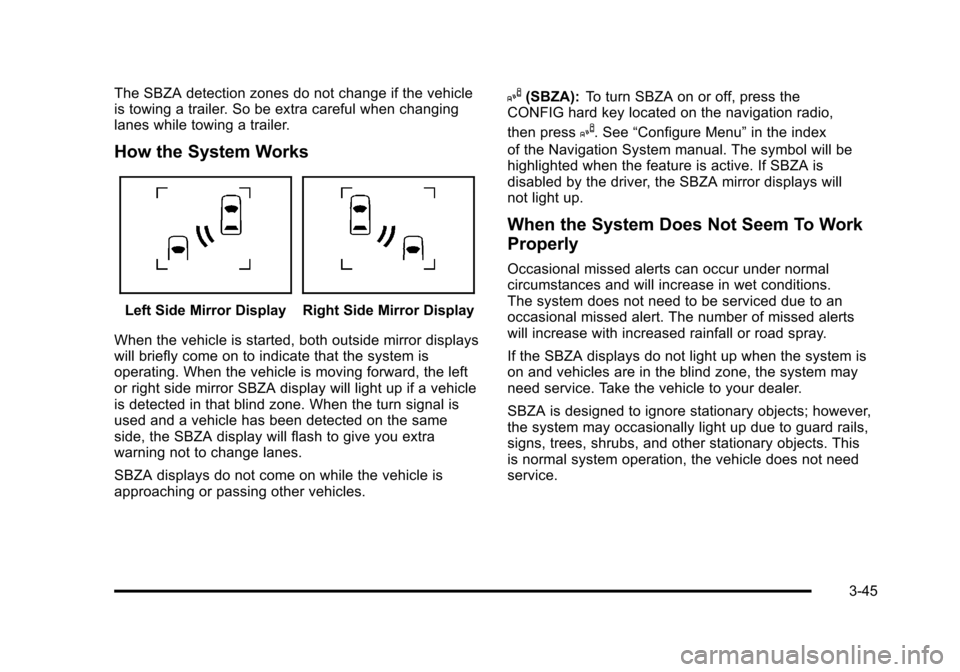
How the System Works
Left Side Mirror DisplayRight Side Mirror Display
When the vehicle is started, both outside mirror displays
will briefly come on to indicate that the system is
operating. When the vehicle is moving forward, the left
or right side mirror SBZA display will light up if a vehicle
is detected in that blind zone. When the turn signal is
used and a vehicle has been detected on the same
side, the SBZA display will flash to give you extra
warning not to change lanes.
SBZA displays do not come on while the vehicle is
approaching or passing other vehicles.
I(SBZA): To turn SBZA on or off, press the
CONFIG hard key located on the navigation radio,
then press
I. See “Configure Menu” in the index
of the Navigation System manual. The symbol will be
highlighted when the feature is active. If SBZA is
disabled by the driver, the SBZA mirror displays will
not light up.
When the System Does Not Seem To Work
Properly
Occasional missed alerts can occur under normal
circumstances and will increase in wet conditions.
The system does not need to be serviced due to an
occasional missed alert. The number of missed alerts
will increase with increased rainfall or road spray.
If the SBZA displays do not light up when the system is
on and vehicles are in the blind zone, the system may
need service. Take the vehicle to your dealer.
SBZA is designed to ignore stationary objects; however,
the system may occasionally light up due to guard rails,
signs, trees, shrubs, and other stationary objects. This
is normal system operation, the vehicle does not need
service.
3-45
Page 152 of 528
Black plate (46,1)Cadillac STS Owner Manual - 2011
SBZA does not operate when the left or right corners of
the rear bumper are covered with mud, dirt, snow, ice,
slush, or in heavy rainstorms. For cleaning instructions,
seeWashing Your Vehicle
on page 6‑109. If the DIC
still displays the SIDE BLIND ZONE SYSTEM
UNAVAILABLE message after cleaning the bumper,
see your dealer.
The SBZA displays may remain on if a trailer is
attached to the vehicle, or a bicycle or object is
extending out to either side of the vehicle.
When SBZA is disabled for any reason other than the
driver turning it off, the driver will not be able to turn
SBZA back on using the DIC. The SIDE BLIND ZONE
ALERT ON option will not be selectable if the conditions
for normal system operation are not met. Until normal
operating conditions for SBZA are met, you should not
rely upon SBZA while driving.
SBZA Error Messages
The following messages may appear in the DIC:
SIDE BLIND ZONE ALERT SYSTEM OFF: This
message indicates that the system has been turned off.
SIDE BLIND ZONE SYSTEM UNAVAILABLE: This
message indicates that the SBZA system is disabled
because the sensor is blocked and cannot detect
vehicles in the blind zone. The sensor may be blocked by mud, dirt, snow, ice, slush, or even heavy
rainstorms. This message may also activate during
heavy rain or due to road spray. The vehicle does not
need service. For cleaning, see
Washing Your Vehicle
on page 6‑109.
SERVICE SIDE BLIND ZONE ALERT SYSTEM: If this
message appears, both SBZA displays will remain on
indicating there is a problem with the SBZA system.
If these displays remain on after continued driving, the
system needs service. Take the vehicle to your dealer.
FCC Information
See Radio Frequency Statementon page 8‑20for
information regarding Part 15 of the Federal
Communications Commission (FCC) rules and
Industry Canada Standards RSS-210/220/310.
Frequency of operation: 24.05GHz –24.25GHz
Field Strength: Not greater than 2.5V/m peak
(0.25V/m average) at a distance of 3m
The manufacturer is not responsible for any radio or TV
interference caused by unauthorized modifications to
this equipment. Such modifications could void the user's
authority to operate the equipment.
3-46
Page 165 of 528
Black plate (59,1)Cadillac STS Owner Manual - 2011
Vehicle Personalization
The vehicle has personalization that allows you to
program certain features to a preferred setting for
up to two drivers. The back of the keyless access
transmitters are labelled 1 or 2. Additional keyless
access transmitters programmed to the vehicle,
as 3 and/or 4, do not have a number on the back and
are not capable of being personalized. The number of
programmable features varies depending upon which
vehicle options are purchased.
On all vehicles, features such as climate control
settings, radio and XM™preset settings, exterior
lighting at unlock and remote lock unlock confirmation,
and language have already been programmed. Your
vehicle also has an automatic door locking feature
that is always on. You cannot turn the automatic door
locking feature off. See Programmable Automatic Door
Locks on page 3‑14.
Some vehicles have additional features that can be
programmed including the seat, steering column, and
outside rearview mirror position.
If your vehicle has the base audio system, the following
information explains the vehicle personalization on your
vehicle.
If your vehicle has the Navigation system, see
“Personalization” in the Index of the Navigation System
manual for information on vehicle personalization. If your vehicle has the ability to program additional
personalization features, the driver's preferences are
recalled by pressing any button on the keyless access
transmitter, 1 or 2, by selecting Driver 1 or 2 on the radio
display, or when a valid keyless access transmitter is
detected upon opening the driver's door.
If more than one valid keyless access transmitter is
detected upon opening the driver's door, the driver
preferences for the lowest driver number will be
recalled.
Certain features can be programmed not to recall until
the ignition is turned off.
The default settings were preset but may have been
changed.
To change feature preferences, use the following
procedure.
Entering the Personal Settings Menu
To enter the feature programming mode:
1. The ignition must be either on, in ACCESSORY, or in RAP and the transmission in P (Park) or the
vehicle speed less than 6 mph (9 km/h).
To avoid excessive drain on the battery, it is
recommended that the headlamps are turned off.
2. Press any button on the appropriate keyless access transmitter to identify yourself as Driver 1 or
Driver 2.
3-59
Page 166 of 528
Black plate (60,1)Cadillac STS Owner Manual - 2011
3. Turn on the radio by pressing the power/volume knob.
4. Press the CNFG radio button or the tune/select knob located on the right side of the radio to enter
the radio's main menu.
5. Turn the tune/select knob and scroll to SETUP.
6. Press the tune/select knob to enter the SETUP menu.
7. Turn the tune/select knob and scroll to PERSONAL SETTINGS MENU, then press the tune/select knob
to turn the feature on. A check mark appears after
this selection when it is turned on and the entire
list of personalization features will appear.
8. Turn the tune/select knob and scroll to the feature you want to change, then press the tune/select
knob to turn the feature on or off. If the feature is
turned on, a check mark will appear next to the
feature name.
Some features have submenus that show
additional features that can be turned on or off.
After entering a submenu, turn the tune/select
knob and scroll to the feature you want to change,
then press the tune/select knob to turn the feature
on or off.Personal Settings Menu Items
The PERSONAL SETTINGS MENU must be selected
with a check mark to program the personalization
features. If it is not selected, press the tune/select knob
until the check mark appears. If it is selected, the entire
list of features will be available to program.
DRIVER GREETING
This feature allows you to type in a customized name or
greeting that will appear on the display whenever the
corresponding keyless access transmitter, 1 or 2, is used
or Driver 1 or Driver 2 is selected on the radio display.
If a customized name or greeting is not programmed,
the system will show Driver 1 or Driver 2 to correspond
with the numbers on the back of the keyless access
transmitters. In this case, the customized driver greeting
feature is factory shipped as off.
To turn the driver greeting feature on and to program a
customized name or greeting:
1. Enter the PERSONAL SETTINGS MENU by following the instructions listed previously under
“Entering the Personal Settings Menu.”
2. Turn the tune/select knob until DRIVER GREETING is highlighted.
3-60