wheel CADILLAC STS 2011 1.G Owner's Manual
[x] Cancel search | Manufacturer: CADILLAC, Model Year: 2011, Model line: STS, Model: CADILLAC STS 2011 1.GPages: 528, PDF Size: 4.96 MB
Page 103 of 528
Black plate (71,1)Cadillac STS Owner Manual - 2011
Adding Equipment to Your
Airbag-Equipped Vehicle
Q: Is there anything I might add to or change aboutthe vehicle that could keep the airbags from
working properly?
A: Yes. If you add things that change your vehicle's
frame, bumper system, height, front end or side
sheet metal, they may keep the airbag system from
working properly. Changing or moving any parts of
the front seats, safety belts, the airbag sensing and
diagnostic module, steering wheel, instrument panel,
roof-rail airbag modules, ceiling headliner or pillar
garnish trim, overhead console, front sensors, side
impact sensors, or airbag wiring can affect the
operation of the airbag system.
In addition, your vehicle has a passenger sensing
system for the right front passenger's position, which
includes sensors that are part of the passenger's
seat. The passenger sensing system may not
operate properly if the original seat trim is replaced
with non-GM covers, upholstery or trim, or with GM
covers, upholstery or trim designed for a different
vehicle. Any object, such as an aftermarket seat
heater or a comfort enhancing pad or device, installed under or on top of the seat fabric, could
also interfere with the operation of the passenger
sensing system. This could either prevent proper
deployment of the passenger airbag(s) or prevent
the passenger sensing system from properly turning
off the passenger airbag(s). See
Passenger Sensing
System on page 2‑66.
If you have any questions about this, you should
contact Customer Assistance before you modify
your vehicle. The phone numbers and addresses
for Customer Assistance are in Step Two of the
Customer Satisfaction Procedure in this manual.
See Customer Satisfaction Procedure on page 8‑2.
Q: Because I have a disability, I have to get my vehicle modified. How can I find out whether this
will affect my airbag system?
A: If you have questions, call Customer Assistance.
The phone numbers and addresses for Customer
Assistance are in Step Two of the Customer
Satisfaction Procedure in this manual. See
Customer Satisfaction Procedure on page 8‑2.
In addition, your dealer and the service manual have
information about the location of the airbag sensors,
sensing and diagnostic module and airbag wiring.
2-71
Page 108 of 528
Black plate (2,1)Cadillac STS Owner Manual - 2011
Section 3 Features and Controls
Object Detection Systems. . . . . . . . . . . . . . . . . . . . . . .3-41
Ultrasonic Rear Parking Assist (URPA) . . . . . . . . 3-41
Side Blind Zone Alert (SBZA) . . . . . . . . . . . . . . . . . . 3-44
Lane Departure Warning (LDW) . . . . . . . . . . . . . . . 3-47
Universal Home Remote System . . . . . . . . . . . . . . . .3-49
Universal Home Remote System Operation (With Three Round LED) . . . . . . . . . . . . . . . . . . . . 3-49 Storage Areas
. . . . . . . . . . . . . . . . . . . . . . . . . . . . . . . . . . . . 3-56
Glove Box . . . . . . . . . . . . . . . . . . . . . . . . . . . . . . . . . . . . . 3-56
Cupholders . . . . . . . . . . . . . . . . . . . . . . . . . . . . . . . . . . . . 3-56
Center Console Storage . . . . . . . . . . . . . . . . . . . . . . 3-56
Floor Mats . . . . . . . . . . . . . . . . . . . . . . . . . . . . . . . . . . . . . 3-56
Convenience Net . . . . . . . . . . . . . . . . . . . . . . . . . . . . . . 3-57
Sunroof . . . . . . . . . . . . . . . . . . . . . . . . . . . . . . . . . . . . . . . . . . . 3-57
Vehicle Personalization . . . . . . . . . . . . . . . . . . . . . . . . . . 3-59
Memory Seat, Mirrors and Steering Wheel . . . . . 3-75
3-2
Page 112 of 528
Black plate (6,1)Cadillac STS Owner Manual - 2011
Other conditions can affect the performance
of the transmitter. SeeKeyless Access Systemon
page 3‑4.
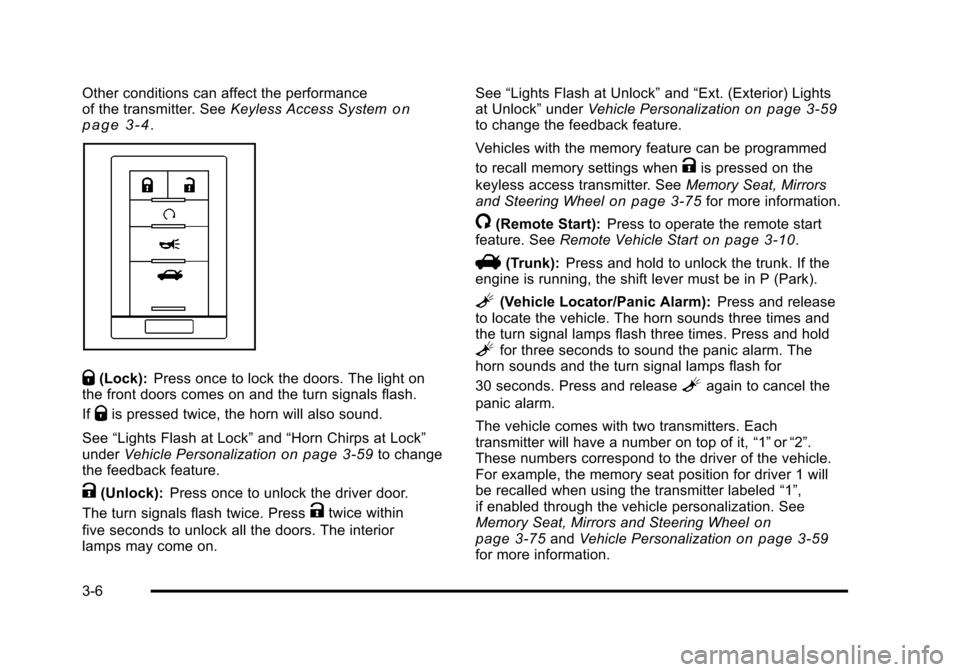
Q(Lock): Press once to lock the doors. The light on
the front doors comes on and the turn signals flash.
If
Qis pressed twice, the horn will also sound.
See “Lights Flash at Lock” and“Horn Chirps at Lock”
under Vehicle Personalization
on page 3‑59to change
the feedback feature.
K(Unlock): Press once to unlock the driver door.
The turn signals flash twice. Press
Ktwice within
five seconds to unlock all the doors. The interior
lamps may come on. See
“Lights Flash at Unlock” and“Ext. (Exterior) Lights
at Unlock” underVehicle Personalization
on page 3‑59to change the feedback feature.
Vehicles with the memory feature can be programmed
to recall memory settings when
Kis pressed on the
keyless access transmitter. See Memory Seat, Mirrors
and Steering Wheel
on page 3‑75for more information.
/(Remote Start): Press to operate the remote start
feature. See Remote Vehicle Starton page 3‑10.
V(Trunk):Press and hold to unlock the trunk. If the
engine is running, the shift lever must be in P (Park).
L(Vehicle Locator/Panic Alarm): Press and release
to locate the vehicle. The horn sounds three times and
the turn signal lamps flash three times. Press and hold
Lfor three seconds to sound the panic alarm. The
horn sounds and the turn signal lamps flash for
30 seconds. Press and release
Lagain to cancel the
panic alarm.
The vehicle comes with two transmitters. Each
transmitter will have a number on top of it, “1”or“2”.
These numbers correspond to the driver of the vehicle.
For example, the memory seat position for driver 1 will
be recalled when using the transmitter labeled “1”,
if enabled through the vehicle personalization. See
Memory Seat, Mirrors and Steering Wheel
on
page 3‑75and Vehicle Personalizationon page 3‑59for more information.
3-6
Page 133 of 528
Black plate (27,1)Cadillac STS Owner Manual - 2011
If the engine is off, press this button to turn on the
accessory mode. ACCESSORY ACTIVE will display on
the Driver Information Center (DIC). Accessory mode
allows use of the audio system and windshield wipers.
Accessory mode must be used if the vehicle must be
towed or in motion when the engine is not running.
After the vehicle has been in accessory mode for more
than 20 minutes, the vehicle will enter RAP or turn off,
depending on if the doors are opened or closed.
Retained Accessory Power (RAP)
These vehicle accessories can be used for up to
20 minutes after the engine is turned off:
.Audio System
.Audio Steering Wheel Controls
.Power Windows
Power to these accessories will work up to 20 minutes
or until one of the front doors is opened. For an
additional 20 minutes of operation, close all the doors
and press Acc. to place the vehicle in accessory mode.
Press the button again to return to RAP.
Starting the Engine
To place the transmission in the proper gear:
Move the shift lever to P (Park) or N (Neutral). To restart
the engine when the vehicle is already moving, use
N (Neutral).
Notice: Do not try to shift to P (Park) if the
vehicle is moving. If you do, you could damage
the transmission. Shift to P (Park) only when the
vehicle is stopped.
The keyless access transmitter must be inside the
vehicle for the ignition to work.
Cell phone chargers can interfere with the operation of
the Keyless Access System. Battery chargers should
not be plugged in when starting or turning off the
engine.
To start the vehicle, do the following:
Starting Procedure
1. With your foot on the brake pedal, press the START button located on the instrument panel.
If there is not a keyless access transmitter
in the vehicle or if there is something causing
interference with it, the DIC will display NO FOBS
DETECTED. See DIC Warnings and Messages
on
page 4‑76for more information.
3-27
Page 136 of 528
Black plate (30,1)Cadillac STS Owner Manual - 2011
The length of time the heater should remain plugged in
depends on several factors. Ask a dealer in the area
where you will be parking the vehicle for the best advice
on this.
Automatic Transmission Operation
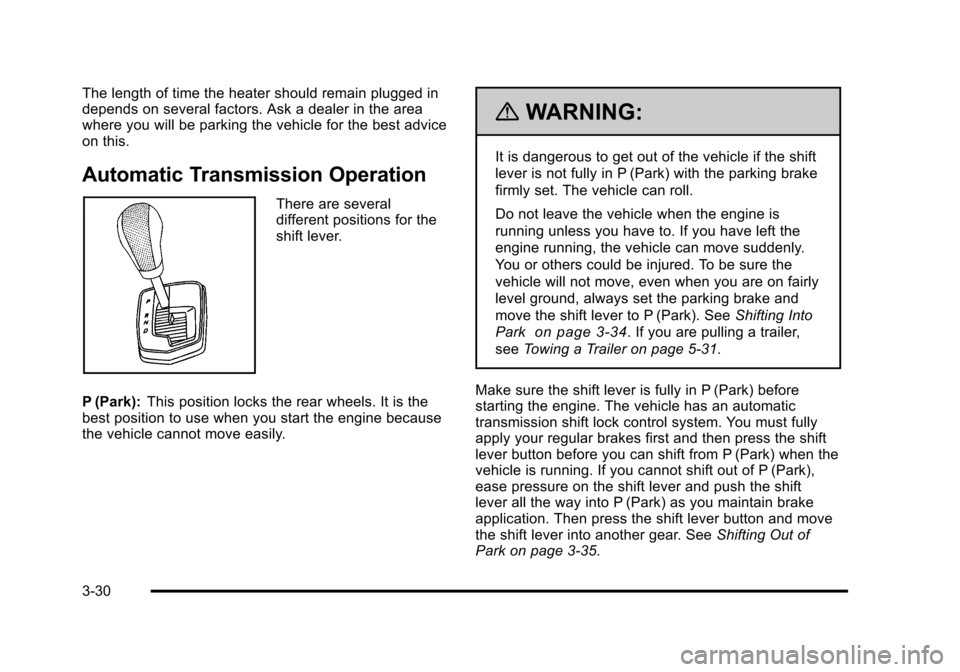
There are several
different positions for the
shift lever.
P (Park): This position locks the rear wheels. It is the
best position to use when you start the engine because
the vehicle cannot move easily.
{WARNING:
It is dangerous to get out of the vehicle if the shift
lever is not fully in P (Park) with the parking brake
firmly set. The vehicle can roll.
Do not leave the vehicle when the engine is
running unless you have to. If you have left the
engine running, the vehicle can move suddenly.
You or others could be injured. To be sure the
vehicle will not move, even when you are on fairly
level ground, always set the parking brake and
move the shift lever to P (Park). See Shifting Into
Park
on page 3‑34. If you are pulling a trailer,
see Towing a Trailer on page 5‑31.
Make sure the shift lever is fully in P (Park) before
starting the engine. The vehicle has an automatic
transmission shift lock control system. You must fully
apply your regular brakes first and then press the shift
lever button before you can shift from P (Park) when the
vehicle is running. If you cannot shift out of P (Park),
ease pressure on the shift lever and push the shift
lever all the way into P (Park) as you maintain brake
application. Then press the shift lever button and move
the shift lever into another gear. See Shifting Out of
Park on page 3‑35.
3-30
Page 137 of 528
Black plate (31,1)Cadillac STS Owner Manual - 2011
Notice:Shifting to R (Reverse) while the vehicle is
moving forward could damage the transmission.
The repairs would not be covered by the vehicle
warranty. Shift to R (Reverse) only after the vehicle
is stopped.
R (Reverse): Use this gear to back up.
At low vehicle speeds, you can also use R (Reverse)
to rock your vehicle back and forth to get out of snow,
ice, or sand without damaging the transmission. See If
Your Vehicle is Stuck in Sand, Mud, Ice, or Snow
on
page 5‑22for additional information.
N (Neutral): In this position, the engine does not
connect with the wheels. To restart the engine when the
vehicle is already moving, use N (Neutral) only. You can
also use N (Neutral) when the vehicle is being towed.
{WARNING:
Shifting into a drive gear while the engine is
running at high speed is dangerous. Unless your
foot is firmly on the brake pedal, the vehicle could
move very rapidly. You could lose control and hit
people or objects. Do not shift into a drive gear
while the engine is running at high speed. Notice:
Shifting out of P (Park) or N (Neutral) with
the engine running at high speed may damage the
transmission. The repairs would not be covered by
the vehicle warranty. Be sure the engine is not
running at high speed when shifting the vehicle.
D (Drive): This position is for normal driving. It provides
the best fuel economy. If you need more power for
passing, and you are:
.Going less than 35 mph (55 km/h), push the
accelerator pedal about halfway down.
.Going about 35 mph (55 km/h) or more, push the
accelerator all the way down.
The transmission will shift down to a lower gear
and have more power.
Downshifting the transmission in slippery road
conditions could result in skidding, see “Skidding”under
Loss of Control on page 5‑14.
3-31
Page 139 of 528
Black plate (33,1)Cadillac STS Owner Manual - 2011
If shifting is prevented for any reason, the selected gear
will flash multiple times, indicating that the transmission
has not shifted gears.
The transmission will allow you to shift to the gear
selected and will automatically downshift when the
vehicle comes to a stop. This will allow for more power
during take-off and passing.
Parking Brake
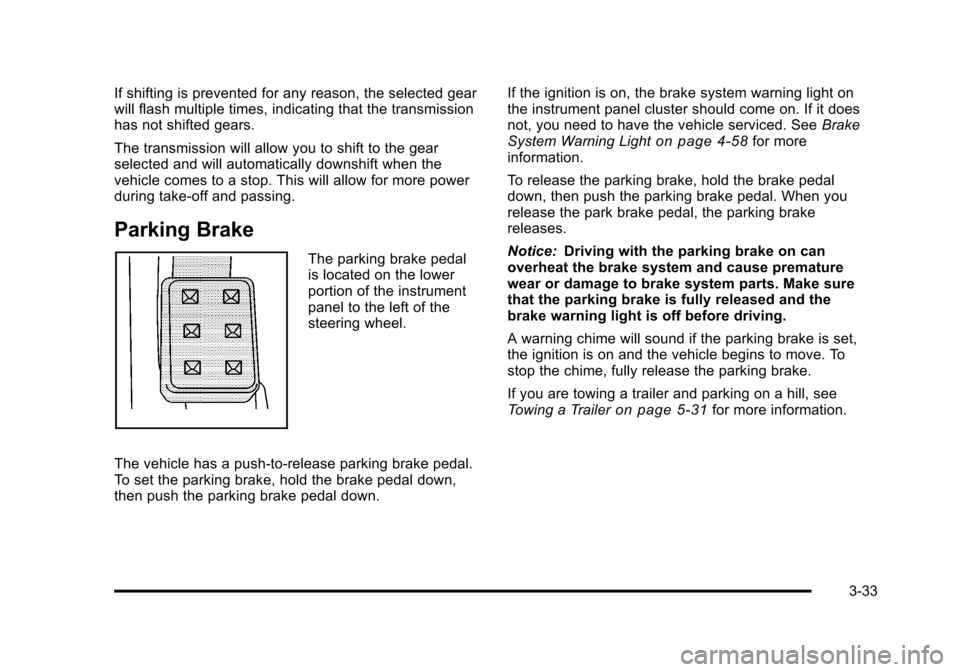
The parking brake pedal
is located on the lower
portion of the instrument
panel to the left of the
steering wheel.
The vehicle has a push-to-release parking brake pedal.
To set the parking brake, hold the brake pedal down,
then push the parking brake pedal down. If the ignition is on, the brake system warning light on
the instrument panel cluster should come on. If it does
not, you need to have the vehicle serviced. See
Brake
System Warning Light
on page 4‑58for more
information.
To release the parking brake, hold the brake pedal
down, then push the parking brake pedal. When you
release the park brake pedal, the parking brake
releases.
Notice: Driving with the parking brake on can
overheat the brake system and cause premature
wear or damage to brake system parts. Make sure
that the parking brake is fully released and the
brake warning light is off before driving.
A warning chime will sound if the parking brake is set,
the ignition is on and the vehicle begins to move. To
stop the chime, fully release the parking brake.
If you are towing a trailer and parking on a hill, see
Towing a Trailer
on page 5‑31for more information.
3-33
Page 145 of 528
Black plate (39,1)Cadillac STS Owner Manual - 2011
3. Once the zone number displays, pressO
repeatedly until the correct zone number displays.
Stop pressing the button and the mirror returns to
normal operation. If C appears in the compass
window, the compass may need calibration. See
“Compass Calibration”listed previously.
Outside Power Mirrors
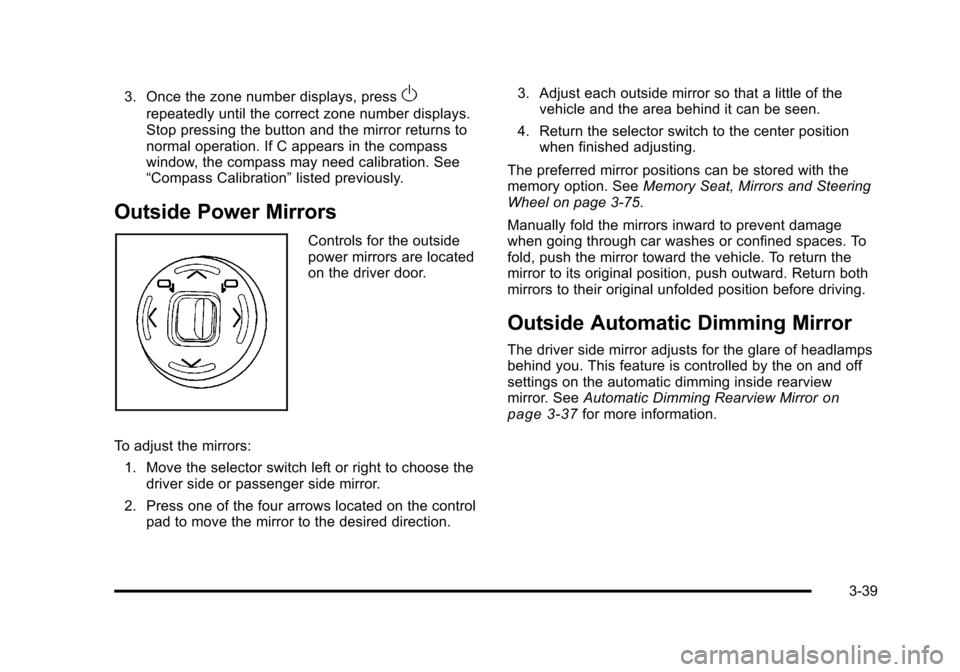
Controls for the outside
power mirrors are located
on the driver door.
To adjust the mirrors: 1. Move the selector switch left or right to choose the driver side or passenger side mirror.
2. Press one of the four arrows located on the control pad to move the mirror to the desired direction. 3. Adjust each outside mirror so that a little of the
vehicle and the area behind it can be seen.
4. Return the selector switch to the center position when finished adjusting.
The preferred mirror positions can be stored with the
memory option. See Memory Seat, Mirrors and Steering
Wheel on page 3‑75.
Manually fold the mirrors inward to prevent damage
when going through car washes or confined spaces. To
fold, push the mirror toward the vehicle. To return the
mirror to its original position, push outward. Return both
mirrors to their original unfolded position before driving.
Outside Automatic Dimming Mirror
The driver side mirror adjusts for the glare of headlamps
behind you. This feature is controlled by the on and off
settings on the automatic dimming inside rearview
mirror. See Automatic Dimming Rearview Mirror
on
page 3‑37for more information.
3-39
Page 181 of 528
Black plate (75,1)Cadillac STS Owner Manual - 2011
The mode you selected is now set. You can either exit
the programming mode by following the instructions
later in this section or program the next feature
available on your vehicle by pressing the F6 (BACK)
button, located on the radio, to return to the
PERSONAL SETTINGS MENU.
Exiting the Personal Settings Menu
Once you have finished making your selections on the
base audio system, you will automatically return to the
main audio screen after 15 seconds. You can also press
the F6 (BACK) button, located on the radio, to return to
the main audio screen.
Memory Seat, Mirrors and Steering
Wheel
If the vehicle has the memory feature, you can program
and recall memory settings for the following features for
up to two drivers:
.The driver seat position
.The outside rearview mirrors position
.The power tilt wheel and telescopic steering
column position
The following settings and presets are set automatically:
.The language, radio and XM™ presets, tone,
volume, playback mode (AM/FM or CD), last
displayed stations, and compact disc position
.The last climate control setting
.The Head-Up Display (HUD) position, if your
vehicle has this feature
.Other personalization settings, for example, remote
start settings
See Vehicle Personalization on page 3‑59.
3-75
Page 187 of 528

Black plate (1,1)Cadillac STS Owner Manual - 2011
Section 4 Instrument Panel
Instrument Panel Overview. . . . . . . . . . . . . . . . . . . . . . . .4-3
Hazard Warning Flashers . . . . . . . . . . . . . . . . . . . . . . . 4-3
Horn . . . . . . . . . . . . . . . . . . . . . . . . . . . . . . . . . . . . . . . . . . . . 4-3
Power Tilt Wheel and Telescopic Steering Column . . . . . . . . . . . . . . . . . . . . . . . . . . . . . . . . . . . . . . . 4-3
Heated Steering Wheel . . . . . . . . . . . . . . . . . . . . . . . . . 4-4
Turn Signal/Multifunction Lever . . . . . . . . . . . . . . . . . . 4-4
Turn and Lane-Change Signals . . . . . . . . . . . . . . . . . 4-4
Headlamp High/Low-Beam Changer . . . . . . . . . . . . 4-5
Forward Collision Alert (FCA) System . . . . . . . . . . . 4-6
Flash-to-Pass . . . . . . . . . . . . . . . . . . . . . . . . . . . . . . . . . . . 4-9
Windshield Wipers . . . . . . . . . . . . . . . . . . . . . . . . . . . . . 4-10
Windshield Washer . . . . . . . . . . . . . . . . . . . . . . . . . . . . 4-11
Headlamp Washer . . . . . . . . . . . . . . . . . . . . . . . . . . . . . 4-11
Cruise Control . . . . . . . . . . . . . . . . . . . . . . . . . . . . . . . . . 4-12
Adaptive Cruise Control . . . . . . . . . . . . . . . . . . . . . . . 4-15
Headlamps . . . . . . . . . . . . . . . . . . . . . . . . . . . . . . . . . . . . 4-27
Wiper Activated Headlamps . . . . . . . . . . . . . . . . . . . 4-31
Headlamps on Reminder . . . . . . . . . . . . . . . . . . . . . . 4-31
Daytime Running Lamps (DRL) . . . . . . . . . . . . . . . . 4-32
Fog Lamps . . . . . . . . . . . . . . . . . . . . . . . . . . . . . . . . . . . . 4-33
Twilight Sentinel
®. . . . . . . . . . . . . . . . . . . . . . . . . . . . . . 4-34
Exterior Lighting Battery Saver . . . . . . . . . . . . . . . . . 4-35
Instrument Panel Brightness . . . . . . . . . . . . . . . . . . . 4-35
Entry Lighting . . . . . . . . . . . . . . . . . . . . . . . . . . . . . . . . . . 4-36
Parade Dimming . . . . . . . . . . . . . . . . . . . . . . . . . . . . . . . 4-36 Reading Lamps . . . . . . . . . . . . . . . . . . . . . . . . . . . . . . . . 4-36
Battery Load Management . . . . . . . . . . . . . . . . . . . . . 4-36
Electric Power Management . . . . . . . . . . . . . . . . . . . 4-37
Inadvertent Power Battery Saver . . . . . . . . . . . . . . . 4-37
Head-Up Display (HUD) . . . . . . . . . . . . . . . . . . . . . . . 4-38
Accessory Power Outlet(s) . . . . . . . . . . . . . . . . . . . . . 4-42
Climate Controls . . . . . . . . . . . . . . . . . . . . . . . . . . . . . . . . . . 4-43
Dual Climate Control System . . . . . . . . . . . . . . . . . . 4-43
Outlet Adjustment . . . . . . . . . . . . . . . . . . . . . . . . . . . . . . 4-48
Rear Climate Control System . . . . . . . . . . . . . . . . . . 4-49
Passenger Compartment Air Filter . . . . . . . . . . . . . 4-50
Warning Lights, Gauges, and Indicators . . . . . . . .4-51
Instrument Panel Cluster . . . . . . . . . . . . . . . . . . . . . . . 4-52
Speedometer and Odometer . . . . . . . . . . . . . . . . . . . 4-53
Tachometer . . . . . . . . . . . . . . . . . . . . . . . . . . . . . . . . . . . . 4-53
Safety Belt Reminders . . . . . . . . . . . . . . . . . . . . . . . . . 4-53
Airbag Readiness Light . . . . . . . . . . . . . . . . . . . . . . . . 4-54
Passenger Airbag Status Indicator . . . . . . . . . . . . . 4-55
Charging System Light . . . . . . . . . . . . . . . . . . . . . . . . 4-57
Brake System Warning Light . . . . . . . . . . . . . . . . . . . 4-58
Antilock Brake System (ABS) Warning Light . . . 4-59
Traction Control System (TCS) Warning Light . . . . . . . . . . . . . . . . . . . . . . . . . . . . . . . . . . . . . . . . . 4-60
Lane Departure Warning (LDW) Light . . . . . . . . . . 4-60
Engine Coolant Temperature Warning Light . . . . 4-61
4-1