remote start CADILLAC STS 2011 1.G Owners Manual
[x] Cancel search | Manufacturer: CADILLAC, Model Year: 2011, Model line: STS, Model: CADILLAC STS 2011 1.GPages: 528, PDF Size: 4.96 MB
Page 1 of 528

Black plate (1,1)Cadillac STS Owner Manual - 2011
2011 Cadillac STS Owner ManualM
In Brief. . . . . . . . . . . . . . . . . . . . . . . . . . . . . . . . . . . . . . . . . . . . 1-1
Instrument Panel . . . . . . . . . . . . . . . . . . . . . . . . . . . . . . . . . 1-2
Initial Drive Information . . . . . . . . . . . . . . . . . . . . . . . . . . . 1-4
Vehicle Features . . . . . . . . . . . . . . . . . . . . . . . . . . . . . . . . 1-16
Performance and Maintenance . . . . . . . . . . . . . . . . . . 1-21
Seats and Restraint System . . . . . . . . . . . . . . . . . . . . . . 2-1
Front Seats . . . . . . . . . . . . . . . . . . . . . . . . . . . . . . . . . . . . . . . 2-2
Rear Seats . . . . . . . . . . . . . . . . . . . . . . . . . . . . . . . . . . . . . . 2-14
Safety Belts . . . . . . . . . . . . . . . . . . . . . . . . . . . . . . . . . . . . . 2-14
Child Restraints . . . . . . . . . . . . . . . . . . . . . . . . . . . . . . . . . 2-34
Airbag System . . . . . . . . . . . . . . . . . . . . . . . . . . . . . . . . . . 2-57
Restraint System Check . . . . . . . . . . . . . . . . . . . . . . . . . 2-72
Features and Controls . . . . . . . . . . . . . . . . . . . . . . . . . . . . 3-1
Keys . . . . . . . . . . . . . . . . . . . . . . . . . . . . . . . . . . . . . . . . . . . . . 3-3
Doors and Locks . . . . . . . . . . . . . . . . . . . . . . . . . . . . . . . . 3-12
Windows . . . . . . . . . . . . . . . . . . . . . . . . . . . . . . . . . . . . . . . . 3-18
Theft-Deterrent Systems . . . . . . . . . . . . . . . . . . . . . . . . 3-22
Starting and Operating Your Vehicle . . . . . . . . . . . . . 3-25
Mirrors . . . . . . . . . . . . . . . . . . . . . . . . . . . . . . . . . . . . . . . . . . 3-37
Object Detection Systems . . . . . . . . . . . . . . . . . . . . . . . 3-41
Universal Home Remote System . . . . . . . . . . . . . . . . 3-49 Storage Areas . . . . . . . . . . . . . . . . . . . . . . . . . . . . . . . . . . . 3-56
Sunroof . . . . . . . . . . . . . . . . . . . . . . . . . . . . . . . . . . . . . . . . . 3-57
Vehicle Personalization . . . . . . . . . . . . . . . . . . . . . . . . . 3-59
Instrument Panel . . . . . . . . . . . . . . . . . . . . . . . . . . . . . . . . . 4-1
Instrument Panel Overview . . . . . . . . . . . . . . . . . . . . . . . 4-3
Climate Controls . . . . . . . . . . . . . . . . . . . . . . . . . . . . . . . . 4-43
Warning Lights, Gauges, and Indicators . . . . . . . . . 4-51
Driver Information Center (DIC) . . . . . . . . . . . . . . . . . 4-69
Audio System(s) . . . . . . . . . . . . . . . . . . . . . . . . . . . . . . . . 4-94
Driving Your Vehicle . . . . . . . . . . . . . . . . . . . . . . . . . . . . . . 5-1
Your Driving, the Road, and the Vehicle . . . . . . . . . . 5-2
Towing . . . . . . . . . . . . . . . . . . . . . . . . . . . . . . . . . . . . . . . . . . 5-29
Service and Appearance Care . . . . . . . . . . . . . . . . . . . 6-1
Service . . . . . . . . . . . . . . . . . . . . . . . . . . . . . . . . . . . . . . . . . . . 6-4
Fuel . . . . . . . . . . . . . . . . . . . . . . . . . . . . . . . . . . . . . . . . . . . . . . 6-6
Checking Things Under the Hood . . . . . . . . . . . . . . . 6-12
All-Wheel Drive . . . . . . . . . . . . . . . . . . . . . . . . . . . . . . . . . 6-43
Rear Axle . . . . . . . . . . . . . . . . . . . . . . . . . . . . . . . . . . . . . . . 6-44
Front Axle . . . . . . . . . . . . . . . . . . . . . . . . . . . . . . . . . . . . . . . 6-45
Headlamp Aiming . . . . . . . . . . . . . . . . . . . . . . . . . . . . . . . 6-46
Page 5 of 528

Black plate (5,1)Cadillac STS Owner Manual - 2011
Vehicle Symbol Chart
Here are some additional symbols that may be found on
the vehicle and what they mean. For more information
on the symbol, refer to the Index.
9:Airbag Readiness Light
#:Air Conditioning
!:Antilock Brake System (ABS)
g:Audio Steering Wheel Controls or OnStar®
$: Brake System Warning Light
":Charging System
I:Cruise Control
B: Engine Coolant Temperature
O:Exterior Lamps
#:Fog Lamps
.: Fuel Gauge
+:Fuses
3: Headlamp High/Low-Beam Changer
j:LATCH System Child Restraints
*: Malfunction Indicator Lamp
::Oil Pressure
}:Power
/:Remote Vehicle Start
>:Safety Belt Reminders
7:Tire Pressure Monitor
F:Traction Control
M:Windshield Washer Fluid
v
Page 7 of 528
Black plate (1,1)Cadillac STS Owner Manual - 2011
Section 1 In Brief
Instrument Panel. . . . . . . . . . . . . . . . . . . . . . . . . . . . . . . . . . . 1-2
Initial Drive Information . . . . . . . . . . . . . . . . . . . . . . . . . . . 1-4
Remote Keyless Entry (RKE) System . . . . . . . . . . . 1-4
Remote Vehicle Start . . . . . . . . . . . . . . . . . . . . . . . . . . . 1-4
Door Locks . . . . . . . . . . . . . . . . . . . . . . . . . . . . . . . . . . . . . 1-5
Trunk . . . . . . . . . . . . . . . . . . . . . . . . . . . . . . . . . . . . . . . . . . . 1-6
Windows . . . . . . . . . . . . . . . . . . . . . . . . . . . . . . . . . . . . . . . . 1-6
Seat Adjustment . . . . . . . . . . . . . . . . . . . . . . . . . . . . . . . . 1-7
Memory Features . . . . . . . . . . . . . . . . . . . . . . . . . . . . . . . 1-8
Heated Seats (Front) . . . . . . . . . . . . . . . . . . . . . . . . . . . . 1-8
Heated Seats (Rear) . . . . . . . . . . . . . . . . . . . . . . . . . . . . 1-9
Heated and Ventilated Seats . . . . . . . . . . . . . . . . . . . . 1-9
Head Restraint Adjustment . . . . . . . . . . . . . . . . . . . . . . 1-9
Safety Belt . . . . . . . . . . . . . . . . . . . . . . . . . . . . . . . . . . . . . 1-10
Sensing System for Passenger Airbag . . . . . . . . . 1-10
Mirror Adjustment . . . . . . . . . . . . . . . . . . . . . . . . . . . . . . 1-11
Steering Wheel Adjustment . . . . . . . . . . . . . . . . . . . . 1-12
Interior Lighting . . . . . . . . . . . . . . . . . . . . . . . . . . . . . . . . 1-12
Exterior Lighting . . . . . . . . . . . . . . . . . . . . . . . . . . . . . . . 1-13
Windshield Wiper/Washer . . . . . . . . . . . . . . . . . . . . . . 1-14
Climate Controls . . . . . . . . . . . . . . . . . . . . . . . . . . . . . . . 1-15
Transmission . . . . . . . . . . . . . . . . . . . . . . . . . . . . . . . . . . 1-15 Vehicle Features
. . . . . . . . . . . . . . . . . . . . . . . . . . . . . . . . . . 1-16
Radio(s) . . . . . . . . . . . . . . . . . . . . . . . . . . . . . . . . . . . . . . . 1-16
Satellite Radio . . . . . . . . . . . . . . . . . . . . . . . . . . . . . . . . . 1-17
Steering Wheel Controls . . . . . . . . . . . . . . . . . . . . . . . 1-18
Bluetooth
®. . . . . . . . . . . . . . . . . . . . . . . . . . . . . . . . . . . . . 1-18
Navigation System . . . . . . . . . . . . . . . . . . . . . . . . . . . . . 1-18
Driver Information Center (DIC) . . . . . . . . . . . . . . . . 1-19
Vehicle Personalization . . . . . . . . . . . . . . . . . . . . . . . . 1-20
Cruise Control . . . . . . . . . . . . . . . . . . . . . . . . . . . . . . . . . 1-20
Power Outlets . . . . . . . . . . . . . . . . . . . . . . . . . . . . . . . . . 1-21
Performance and Maintenance . . . . . . . . . . . . . . . . . .1-21
Traction Control System (TCS) . . . . . . . . . . . . . . . . 1-21
StabiliTrak
®System . . . . . . . . . . . . . . . . . . . . . . . . . . . 1-21
Tire Pressure Monitor . . . . . . . . . . . . . . . . . . . . . . . . . . 1-22
Tire Sealant and Compressor Kit . . . . . . . . . . . . . . 1-22
Engine Oil Life System . . . . . . . . . . . . . . . . . . . . . . . . 1-22
Driving for Better Fuel Economy . . . . . . . . . . . . . . . 1-23
Roadside Service . . . . . . . . . . . . . . . . . . . . . . . . . . . . . . 1-23
OnStar
®. . . . . . . . . . . . . . . . . . . . . . . . . . . . . . . . . . . . . . . 1-24
1-1
Page 10 of 528
Black plate (4,1)Cadillac STS Owner Manual - 2011
Initial Drive Information
This section provides a brief overview about some of
the important features that may or may not be on your
specific vehicle.
For more detailed information, refer to each of the
features which can be found later in this owner manual.
Remote Keyless Entry (RKE) System
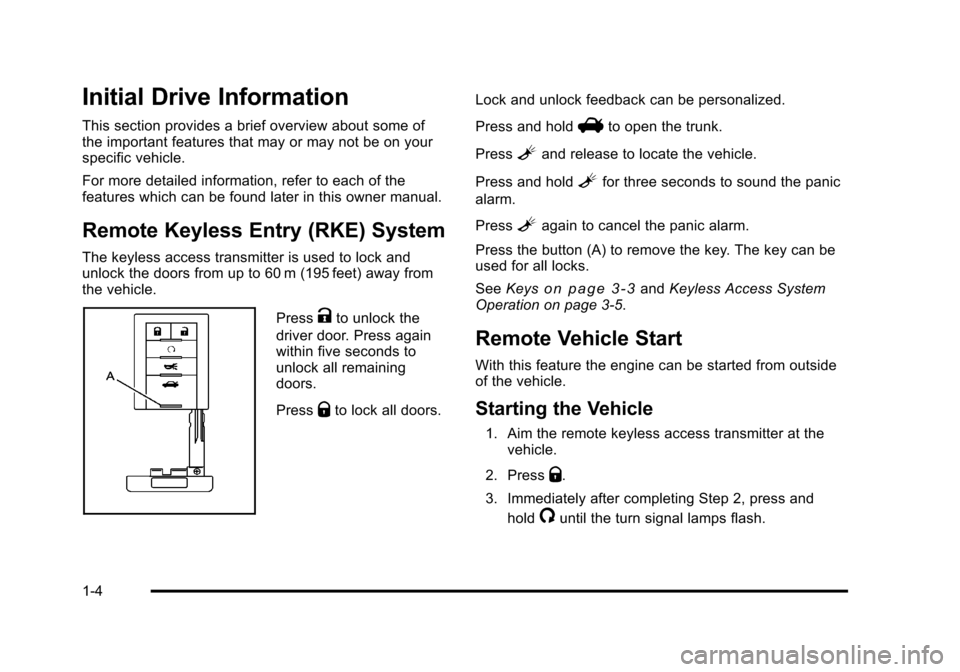
The keyless access transmitter is used to lock and
unlock the doors from up to 60 m (195 feet) away from
the vehicle.
PressKto unlock the
driver door. Press again
within five seconds to
unlock all remaining
doors.
Press
Qto lock all doors. Lock and unlock feedback can be personalized.
Press and hold
Vto open the trunk.
Press
Land release to locate the vehicle.
Press and hold
Lfor three seconds to sound the panic
alarm.
Press
Lagain to cancel the panic alarm.
Press the button (A) to remove the key. The key can be
used for all locks.
See Keys
on page 3‑3andKeyless Access System
Operation on page 3‑5.
Remote Vehicle Start
With this feature the engine can be started from outside
of the vehicle.
Starting the Vehicle
1. Aim the remote keyless access transmitter at the vehicle.
2. Press
Q.
3. Immediately after completing Step 2, press and hold
/until the turn signal lamps flash.
1-4
Page 11 of 528
Black plate (5,1)Cadillac STS Owner Manual - 2011
When the vehicle starts, the parking lamps will turn on
and remain on as long as the engine is running. The
doors will be locked and the climate control system may
come on.
The engine will continue to run for 10 minutes. Repeat
the steps for a 10-minute time extension. Remote start
can be extended only once.
Canceling a Remote Start
To cancel a remote start:
.Aim the RKE transmitter at the vehicle and press
and hold
/until the parking lamps turn off.
.Turn on the hazard warning flashers.
.Press the Acc. button (ignition switch).
.Turn on the valet lockout switch.
See Remote Vehicle Start on page 3‑10.
Door Locks
There are several ways to lock and unlock the vehicle.
From the outside:
.Pull the front door handle. If the vehicle has a
keyless access transmitter, the vehicle recognizes
the transmitter and automatically unlocks the door.
.Another way to lock or unlock the vehicle, is to
press
QorKon the keyless access transmitter.
See Vehicle Personalization
on page 3‑59for
information on how to program the keyless access
feature.
From the inside:
.Press the power door lock switch located on each
front door. See Power Door Lockson page 3‑13for more information.
.Push down or pull up on the manual door lock
knob for the rear door. The knob is located at the
top of the door panel near the window.
Power Door Locks
On vehicles with power door locks, the switches are
located on the front doors.
":Press to unlock the doors.
Q:Remove the key from the ignition and press to lock
the doors.
1-5
Page 14 of 528
Black plate (8,1)Cadillac STS Owner Manual - 2011
Memory Features
If the vehicle has the memory feature, you can program
and recall memory settings for the following features for
up to two drivers:
.The driver seat
.The outside rearview mirrors
.The power tilt wheel and telescopic steering
column
The following settings and presets are set automatically:
.The language, radio and XM™ presets, tone,
volume, playback mode (AM/FM or CD), last
displayed stations, and compact disc position
.The last climate control setting
.The Head-Up Display (HUD) position, if your
vehicle has this feature
.Other personalization settings, for example, remote
start settings
See Memory Seat, Mirrors and Steering Wheel
on
page 2‑5and Vehicle Personalizationon
page 3‑59for more information.
For vehicles with the base audio system, memory
features are programmed and recalled using the
radio menu. For vehicles with the Navigation system, memory
features are programmed and recalled using the
navigation display or voice commands. See
“Personalization”
and“Voice Recognition” in the Index
of the Navigation System manual for more information.
Heated Seats (Front)
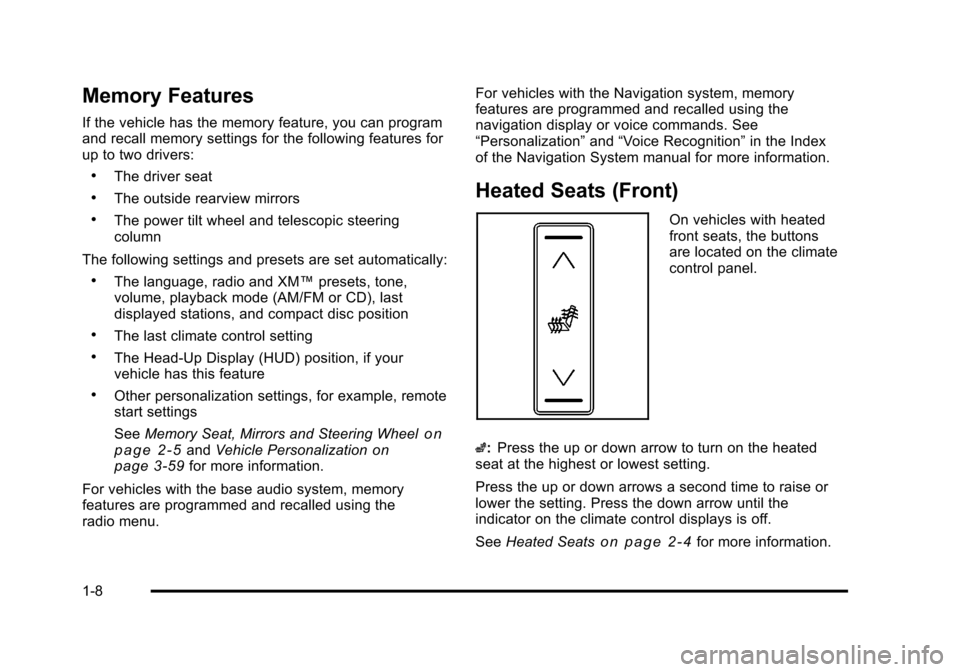
On vehicles with heated
front seats, the buttons
are located on the climate
control panel.
z: Press the up or down arrow to turn on the heated
seat at the highest or lowest setting.
Press the up or down arrows a second time to raise or
lower the setting. Press the down arrow until the
indicator on the climate control displays is off.
See Heated Seats
on page 2‑4for more information.
1-8
Page 26 of 528
Black plate (20,1)Cadillac STS Owner Manual - 2011
Vehicle Personalization
Some vehicle features can be programmed by using the
buttons on the remote keyless access transmitter and
the buttons on the audio system. The features that can
be programmed include:
.Driver Greeting
.Key Fob Reminder
.Remote Start
.Memory Features
.Lock and Unlock Feedback
.Lighting Features
.Door Lock and Unlock Settings
.Window Lock
.Chime Volume
.Suspension Mode
See Vehicle Personalization on page 3‑59.
Cruise Control
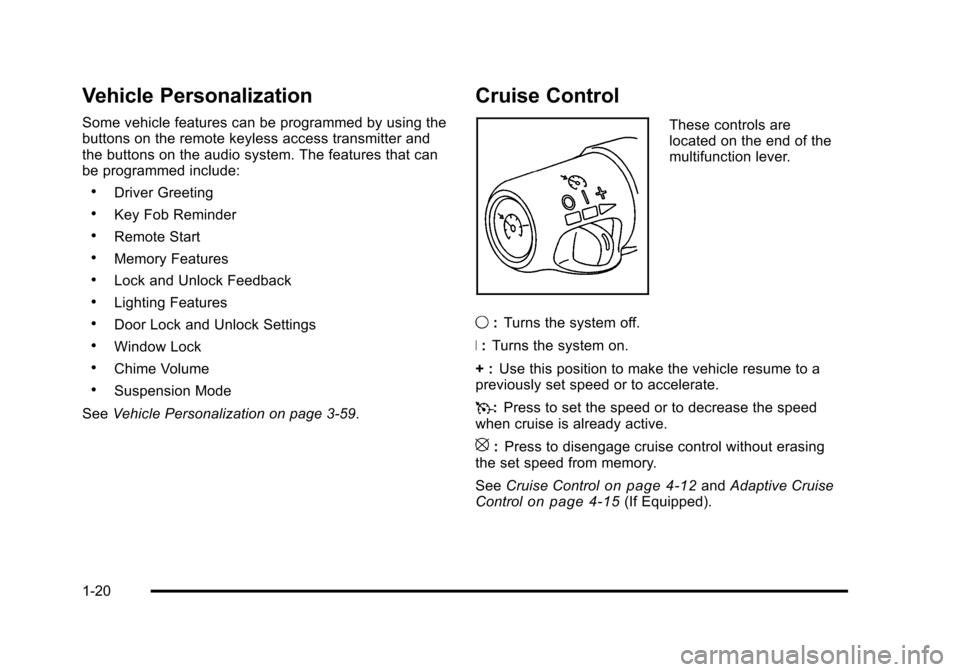
These controls are
located on the end of the
multifunction lever.
9 :Turns the system off.
R : Turns the system on.
+ : Use this position to make the vehicle resume to a
previously set speed or to accelerate.
T :Press to set the speed or to decrease the speed
when cruise is already active.
[: Press to disengage cruise control without erasing
the set speed from memory.
See Cruise Control
on page 4‑12andAdaptive Cruise
Controlon page 4‑15(If Equipped).
1-20
Page 37 of 528
Black plate (5,1)Cadillac STS Owner Manual - 2011
Heated and Ventilated Seats
{WARNING:
If you cannot feel temperature change or pain to
the skin, the seat heater may cause burns even at
low temperatures. See the Warning underHeated
Seats on page 2‑4.
On vehicles with this feature, the buttons are on the
climate control panel.
z(Heated Seat and Seatback): Press to heat the seat
and seatback.
{(Ventilated Seat): Press to ventilate the seat.
Press the button once for the highest setting. With each
press of the button, the setting will change to the next
lower setting, and then to the off setting.
A light bar in the climate control display shows the
setting: high, medium, or low.
The heated or ventilated seats shut off when the vehicle
is turned off.
Memory Seat, Mirrors and Steering
Wheel
If the vehicle has the memory feature, you can program
and recall memory settings for the following features for
up to two drivers:
.The driver seat position
.The outside rearview mirrors position
.The power tilt wheel and telescopic steering
column position
The following settings and presets are set automatically:
.The language, radio and XM™ presets, tone,
volume, playback mode (AM/FM or CD), last
displayed stations, and compact disc position
.The last climate control setting
.The Head-Up Display (HUD) position, if your
vehicle has this feature
.Other personalization settings, for example, remote
start settings
See Vehicle Personalization on page 3‑59.
2-5
Page 39 of 528
Black plate (7,1)Cadillac STS Owner Manual - 2011
Driver Selection Submenu Items
DRIVER 1/DRIVER 2
The numbers on the back of each keyless access
transmitter correspond to DRIVER 1 and DRIVER 2.
If you would like to recall or store driver settings for the
driver that does not correspond to the number on the
back of the keyless access transmitter that you are
using:1. Enter the memory programming mode for your driver settings by following the instructions listed
previously under “Entering the Driver Selection
Submenu.”
2. From the DRIVER SELECTION submenu, turn the tune/select knob to highlight the driver number that
you want, either DRIVER 1 or DRIVER 2.
3. Set your choice by pressing in the tune/ select knob.
If you would like to recall or store driver settings for the
selected driver, see “RECALL DRIVER SETTINGS” or
“STORE DRIVER SETTINGS” later in this section.
If you would like to recall or store exit settings for the
selected driver, see “RECALL EXIT SETTINGS” or
“STORE EXIT SETTINGS” later in this section.
RECALL DRIVER SETTINGS
To recall driver settings:
1. Enter the memory programming mode for your driver settings by following the instructions listed
previously under “Entering the Driver Selection
Submenu.”
2. From the DRIVER SELECTION submenu, turn the tune/select knob to scroll to RECALL DRIVER
SETTINGS and press in the knob.
If the vehicle is in P (Park), one beep will sound
and your previously saved driving position will then
be recalled.
If the vehicle is not in P (Park), three beeps will
sound and your previously saved driving position
will not be recalled.
A memory recall can be stopped by pressing any
memory seat or mirror position button.
If you would like the stored driving positions to be
recalled when unlocking your vehicle with the keyless
access transmitter or when starting your vehicle, see
“REMOTE RECALL MEMORY” or“START BUTTON
RECALL” underVehicle Personalization on page 3‑59.
2-7
Page 98 of 528
Black plate (66,1)Cadillac STS Owner Manual - 2011
Passenger Sensing System
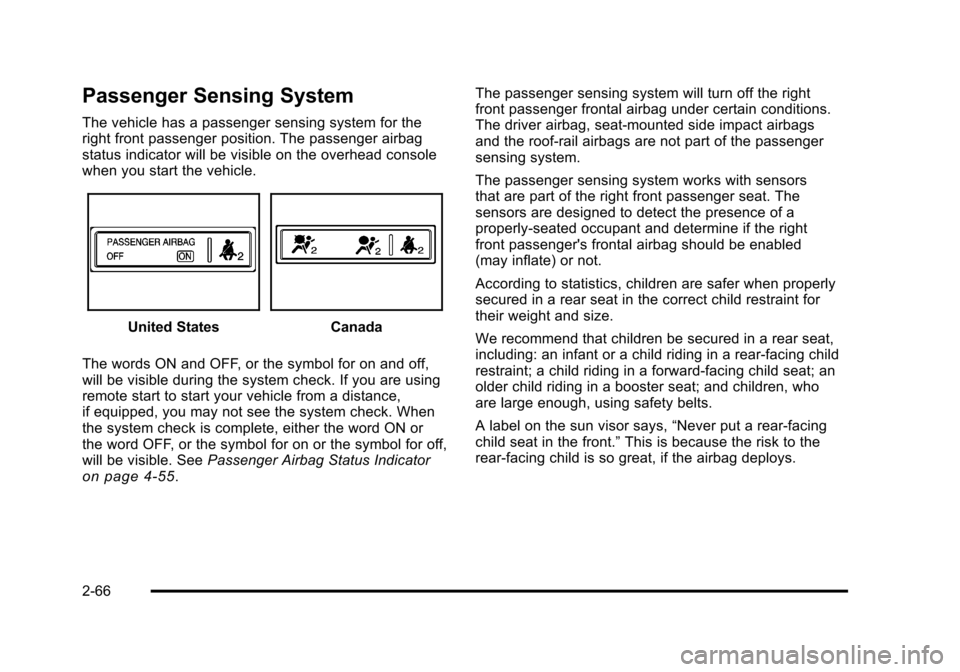
The vehicle has a passenger sensing system for the
right front passenger position. The passenger airbag
status indicator will be visible on the overhead console
when you start the vehicle.
United StatesCanada
The words ON and OFF, or the symbol for on and off,
will be visible during the system check. If you are using
remote start to start your vehicle from a distance,
if equipped, you may not see the system check. When
the system check is complete, either the word ON or
the word OFF, or the symbol for on or the symbol for off,
will be visible. See Passenger Airbag Status Indicator
on page 4‑55. The passenger sensing system will turn off the right
front passenger frontal airbag under certain conditions.
The driver airbag, seat‐mounted side impact airbags
and the roof‐rail airbags are not part of the passenger
sensing system.
The passenger sensing system works with sensors
that are part of the right front passenger seat. The
sensors are designed to detect the presence of a
properly-seated occupant and determine if the right
front passenger's frontal airbag should be enabled
(may inflate) or not.
According to statistics, children are safer when properly
secured in a rear seat in the correct child restraint for
their weight and size.
We recommend that children be secured in a rear seat,
including: an infant or a child riding in a rear-facing child
restraint; a child riding in a forward-facing child seat; an
older child riding in a booster seat; and children, who
are large enough, using safety belts.
A label on the sun visor says,
“Never put a rear-facing
child seat in the front.” This is because the risk to the
rear-facing child is so great, if the airbag deploys.
2-66