steering CADILLAC XLR 2004 1.G User Guide
[x] Cancel search | Manufacturer: CADILLAC, Model Year: 2004, Model line: XLR, Model: CADILLAC XLR 2004 1.GPages: 356, PDF Size: 2.36 MB
Page 110 of 356

Use the following steps to program each button:
1. Adjust the driver's seat including the seatback
recliner, lumbar and head restraint, both outside
mirrors and the steering wheel to a comfortable
position.
2. Press and hold button 1 until two beeps are heard,
then release the button.
A second mirror, seating and steering wheel position
can be programmed by repeating the above steps and
pressing button 2 (for driver 2). Each time a memory
button is pressed and released, a single beep will sound.
Each time button 1 or 2 is pressed and released while
the vehicle is in PARK (P), the memory positions will be
recalled after a brief delay. If the vehicle is not in
PARK (P), the memory buttons must be pressed and
held to recall the stored positions.
When the engine is started, the seat, mirrors, and
steering wheel may automatically adjust to their
programmed positions.To stop recall movement of the memory feature at any
time, press one of the power seat controls, power
mirror control buttons, memory buttons, or power
steering column control.
Two personalized exit positions can be set by ®rst
recalling the driving position (by pressing 1 or 2), then
positioning the steering wheel and seat in the desired
exit positions and then pressing and holding the
exit button until two beeps are heard. With the vehicle in
PARK (P), the exit position for the previously set
driver can be recalled by pressing the EXIT button.
When you use the keyless access transmitter to unlock
you vehicle, automatic seat and steering wheel
movement to the exit position may occur. The numbers
on the back of the transmitter, 1 and 2, corresponds
to the numbers on the memory buttons.
Further programming for automatic seat and mirror
movement can be done using the Driver Information
Center (DIC).
For programming information, see
DIC Vehicle
Personalization on page 3-66.
2-54
Page 111 of 356

Instrument Panel Overview...............................3-2
Hazard Warning Flashers................................3-4
Other Warning Devices...................................3-4
Horn.............................................................3-5
Power Tilt Wheel and Telescopic Steering
Column......................................................3-5
Turn Signal/Multifunction Lever.........................3-5
Exterior Lamps.............................................3-22
Interior Lamps..............................................3-25
Head-Up Display (HUD).................................3-27
Ultrasonic Rear Parking Assist (URPA)............3-30
Accessory Power Outlets...............................3-32
Ashtrays and Cigarette Lighter........................3-33
Climate Controls............................................3-33
Dual Climate Control System..........................3-33
Outlet Adjustment.........................................3-38
Passenger Compartment Air Filter...................3-38
Warning Lights, Gages, and Indicators............3-39
Instrument Panel Cluster................................3-40
Speedometer and Odometer...........................3-41
Trip Odometer..............................................3-41
Tachometer.................................................3-41
Safety Belt Reminder Light.............................3-41
Air Bag Readiness Light................................3-42
Air Bag Off Light..........................................3-43
Voltmeter Gage............................................3-44
Brake System Warning Light..........................3-45
Anti-Lock Brake System Warning Light.............3-46Traction Control System (TCS) Warning Light . . .3-46
Engine Coolant Temperature Gage..................3-47
Tire Pressure Light.......................................3-48
Malfunction Indicator Lamp.............................3-48
Engine Oil Pressure Gage.............................3-52
Security Light...............................................3-52
Fog Lamp Light............................................3-53
Lights On Reminder......................................3-53
Fuel Gage...................................................3-54
Driver Information Center (DIC).......................3-55
DIC Controls and Displays.............................3-55
DIC Warnings and Messages.........................3-57
Other Messages...........................................3-65
DIC Vehicle Personalization............................3-66
Trip Computer................................................3-70
Oil Life Indicator...........................................3-70
Audio System(s).............................................3-70
Navigation/Radio System...............................3-71
Theft-Deterrent Feature..................................3-71
Audio Steering Wheel Controls.......................3-71
Radio Reception...........................................3-72
Care of Your CDs.........................................3-72
Care of Your CD Player................................3-72
Diversity Antenna System..............................3-73
XMŸ Satellite Radio Antenna System.............3-73
Section 3 Instrument Panel
3-1
Page 113 of 356

The main components of the instrument panel are the following:
A. Head-Up Display (HUD) Controls/Instrument Panel
Brightness Controls. See
Head-Up Display (HUD) on
page 3-27or ªInstrument Panel Brightnessº underInterior Lamps on page 3-25.
B. Turn Signal/Multifunction Lever. See
Turn
Signal/Multifunction Lever on page 3-5.
C. Instrument Panel Cluster. See
Instrument Panel
Cluster on page 3-40.
D. Windshield Wiper/Washer Lever. See ªWindshield
Wipersº under
Turn Signal/Multifunction Lever
on page 3-5.
E. Driver Information Center (DIC) Controls/Interior
Lamps. See
DIC Controls and Displays on
page 3-55.
F. Air Outlets. See
Outlet Adjustment on page 3-38.
G. Hazard Warning Flasher Button. See
Hazard
Warning Flashers on page 3-4.
H. Voice Commands/Audio Controls. See
OnStarž
System on page 2-35orAudio Steering Wheel
Controls on page 3-71.
I. Adaptive Cruise Controls. See ªAdaptive Cruise
Control (ACC)º under
Turn Signal/Multifunction Lever
on page 3-5.J. Horn. See
Horn on page 3-5.
K. Audio Steering Wheel Controls. See
Audio Steering
Wheel Controls on page 3-71.
L. Ignition Switch. See
Ignition Positions on page 2-19.
M. Shift Lever. See
Automatic Transmission Operation
on page 2-23.
N. Traction Control Button. See
Traction Control
System (TCS) on page 4-9.
O. Passenger Air Bag Off Indicator. See
Air Bag Off
Light on page 3-43.
P. Retractable Hardtop Button. See
Retractable
Hardtop on page 2-44.
Q. Cupholders. See
Cupholder(s) on page 2-41.
R. Cigarette Lighter. See
Ashtrays and Cigarette Lighter
on page 3-33.
S. Climate Controls. See
Dual Climate Control System
on page 3-33.
T. Audio/Navigation System. See
Navigation/Radio
System on page 3-71.
U. Glove Box. See
Glove Box on page 2-41.
3-3
Page 115 of 356
Horn
The horn can be sounded by pressing on the center of
the steering wheel pad.
Power Tilt Wheel and Telescopic
Steering Column
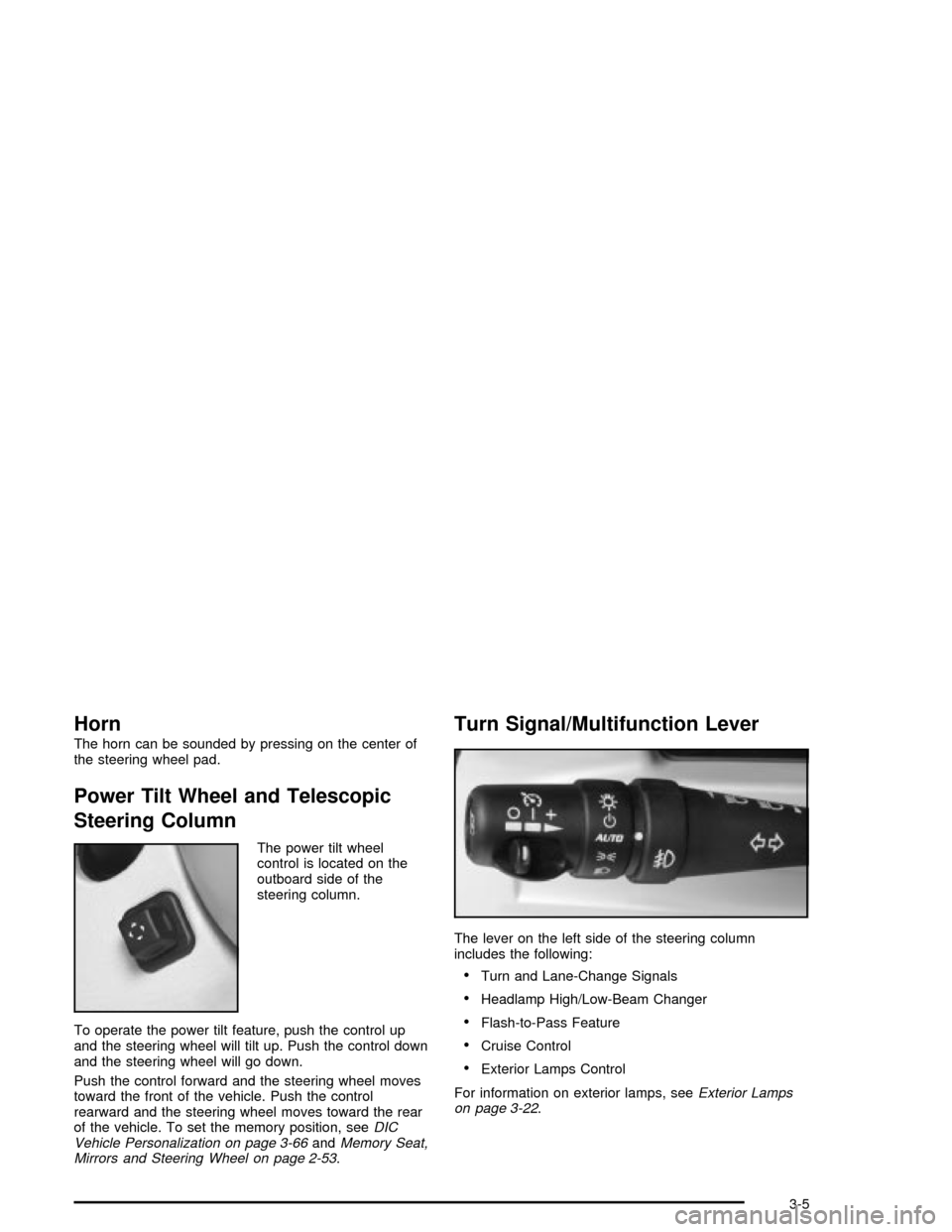
The power tilt wheel
control is located on the
outboard side of the
steering column.
To operate the power tilt feature, push the control up
and the steering wheel will tilt up. Push the control down
and the steering wheel will go down.
Push the control forward and the steering wheel moves
toward the front of the vehicle. Push the control
rearward and the steering wheel moves toward the rear
of the vehicle. To set the memory position, see
DIC
Vehicle Personalization on page 3-66andMemory Seat,
Mirrors and Steering Wheel on page 2-53.
Turn Signal/Multifunction Lever
The lever on the left side of the steering column
includes the following:
·Turn and Lane-Change Signals
·Headlamp High/Low-Beam Changer
·Flash-to-Pass Feature
·Cruise Control
·Exterior Lamps Control
For information on exterior lamps, see
Exterior Lamps
on page 3-22.
3-5
Page 117 of 356

Flash-to-Pass
This feature lets you use the high-beam headlamps to
signal the driver in front of you that you want to
pass. Pull and hold the turn signal lever toward you to
use. When you do, the following will occur:
·If the low-beam headlamps are on, the high-beam
headlamps will turn on. They will stay on as long
as you hold the lever there. Release the lever
to turn them off.
·If the headlamps are on high-beam, they will switch
to low-beam. To return to high beam, push the
lever away from you.
Windshield Wipers
Use the lever located on the right side of the steering
column to operate the windshield wipers.
1(High Speed):Move the lever to this position for
steady wiping at high speed.
6(Low Speed):Move the lever to this position for
steady wiping at low speed.
&(Delay):Move the lever to this position to activate
the RainsenseŸ function. Adjustments in this region
change the sensitivity of the RainsenseŸ system.
9(Off):Move the lever to this position to turn off the
windshield wipers.
8(Mist):Move the lever all the way down to mist and
release for a single wiping cycle. The windshield
wipers will stop after one wipe. If you want more wipes,
hold the band on mist longer.
Heavy snow or ice can overload the wipers. If this
occurs, a circuit breaker will stop the wipers until the
motor cools. So, be sure to clear any ice and snow from
the windshield wiper blades before using them. If the
wiper blades are frozen to the windshield, carefully
loosen them or warm the windshield before turning the
wipers on. If your blades do become worn or
damaged, get new blades or blade inserts.
3-7
Page 119 of 356

Windshield Washer
K
(Washer Fluid):The lever on the right side of the
steering column also controls the windshield washer.
There is a button at the end of the lever. To spray
washer ¯uid on the windshield, press the button and
hold it. The washer will spray until you release the
button. The wipers will continue to clear the window for
about six seconds after the button is released and
then stop or return to your preset speed.
Your vehicle also has headlamp washers. Every fourth
time the washer ¯uid button is pressed, washer ¯uid
will clean the headlamps.
{CAUTION:
In freezing weather, do not use your washer
until the windshield is warmed. Otherwise the
washer ¯uid can form ice on the windshield,
blocking your vision.If the ¯uid in the windshield washer ¯uid reservoir is
low, the message LOW WASHER FLUID will appear on
the Driver Information Center (DIC) display. It will
take 60 seconds after the bottle is re®lled for this
message to turn off. For information on the correct
washer ¯uid mixture to use, see
Windshield Washer
Fluid on page 5-33andRecommended Fluids and
Lubricants on page 6-11.
Adaptive Cruise Control (ACC)
Be sure to read this entire section before using this
feature.
The system operates on a radio frequency subject to
Federal Communications Commission (FCC) Rules and
with Industry Canada.
This device complies with Part 15 of the FCC Rules.
Operation is subject to the following two conditions:
1. This device may not cause interference, and
2. This device must accept any interference received,
including interference that may cause undesired
operation of the device.
3-9
Page 124 of 356
Selecting the Follow Distance (GAP)
When ACC detects a slower moving vehicle, it will
adjust your vehicle's speed and maintain the follow
distance (gap) you select.
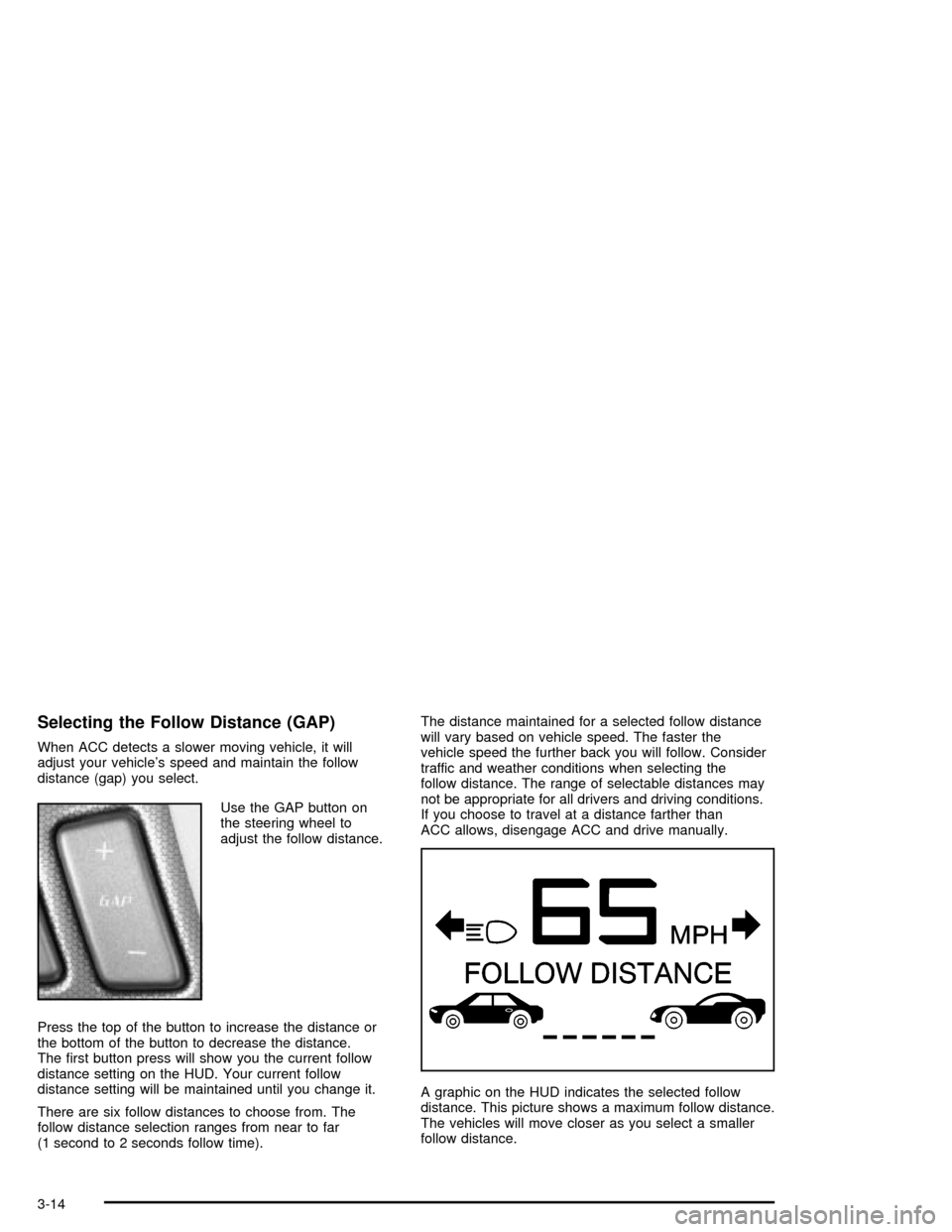
Use the GAP button on
the steering wheel to
adjust the follow distance.
Press the top of the button to increase the distance or
the bottom of the button to decrease the distance.
The ®rst button press will show you the current follow
distance setting on the HUD. Your current follow
distance setting will be maintained until you change it.
There are six follow distances to choose from. The
follow distance selection ranges from near to far
(1 second to 2 seconds follow time).The distance maintained for a selected follow distance
will vary based on vehicle speed. The faster the
vehicle speed the further back you will follow. Consider
traffic and weather conditions when selecting the
follow distance. The range of selectable distances may
not be appropriate for all drivers and driving conditions.
If you choose to travel at a distance farther than
ACC allows, disengage ACC and drive manually.
A graphic on the HUD indicates the selected follow
distance. This picture shows a maximum follow distance.
The vehicles will move closer as you select a smaller
follow distance.
3-14
Page 132 of 356
Exterior Lamps
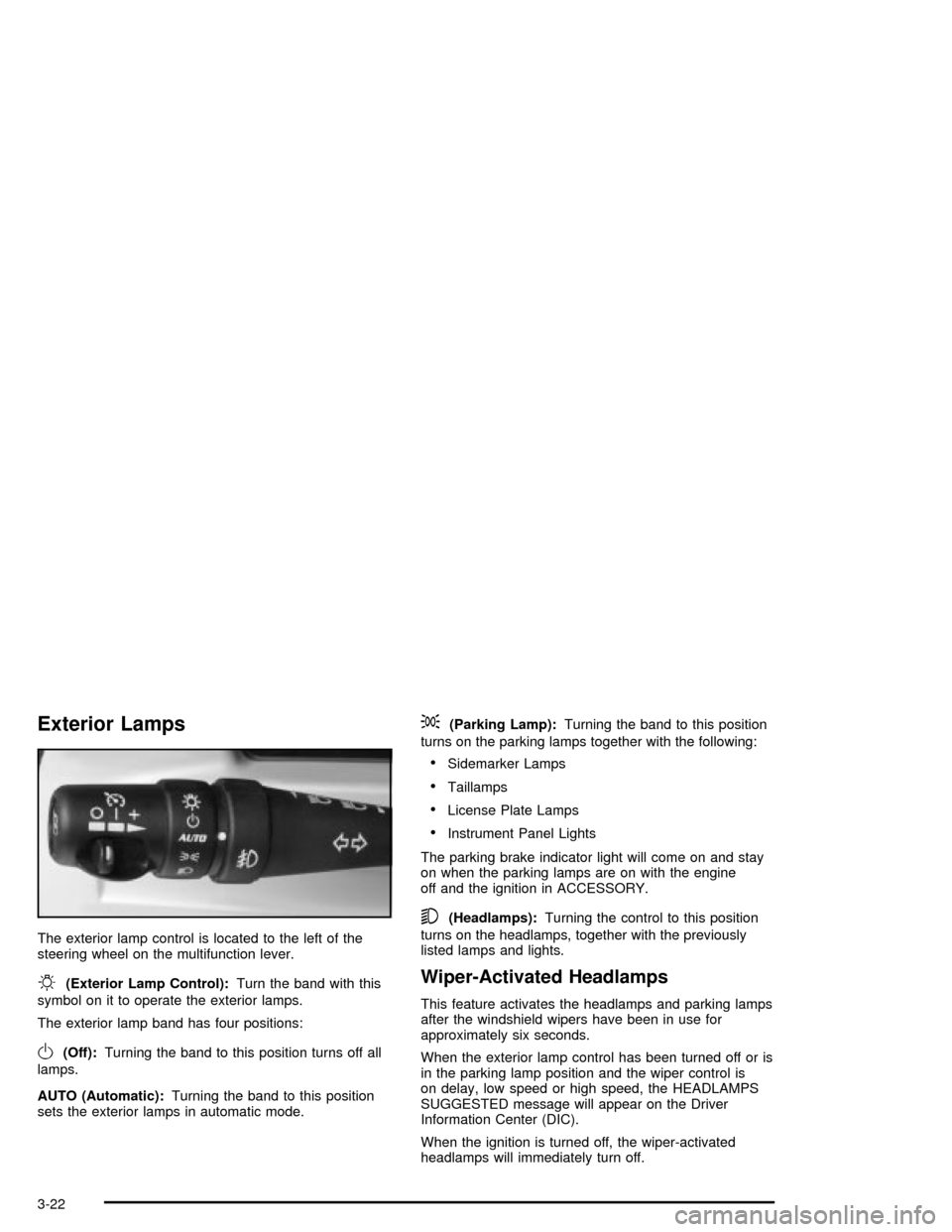
The exterior lamp control is located to the left of the
steering wheel on the multifunction lever.
O(Exterior Lamp Control):Turn the band with this
symbol on it to operate the exterior lamps.
The exterior lamp band has four positions:
O(Off):Turning the band to this position turns off all
lamps.
AUTO (Automatic):Turning the band to this position
sets the exterior lamps in automatic mode.
;(Parking Lamp):Turning the band to this position
turns on the parking lamps together with the following:
·Sidemarker Lamps
·Taillamps
·License Plate Lamps
·Instrument Panel Lights
The parking brake indicator light will come on and stay
on when the parking lamps are on with the engine
off and the ignition in ACCESSORY.
5(Headlamps):Turning the control to this position
turns on the headlamps, together with the previously
listed lamps and lights.
Wiper-Activated Headlamps
This feature activates the headlamps and parking lamps
after the windshield wipers have been in use for
approximately six seconds.
When the exterior lamp control has been turned off or is
in the parking lamp position and the wiper control is
on delay, low speed or high speed, the HEADLAMPS
SUGGESTED message will appear on the Driver
Information Center (DIC).
When the ignition is turned off, the wiper-activated
headlamps will immediately turn off.
3-22
Page 135 of 356

Twilight Sentinelžalso provides exterior illumination as
you leave the vehicle. If Twilight Sentinelžhas turned
on the lamps when you turn off the ignition, your lamps
will remain on until:
·The exterior lamp switch is moved from OFF to the
parking lamp position, or
·a delay time that you select has elapsed.
See
Driver Information Center (DIC) on page 3-55to
select the delay time that you want. You can also select
no delay time.
If you turn off the ignition with the exterior lamp switch
in the parking lamp or headlamp position, the Twilight
Sentinel
ždelay will not occur. The lamps will turn off as
soon as the switch is turned off.
As with any vehicle, you should turn on the regular
headlamp system when you need it.
Exterior Lighting Battery Saver
If the manual parking lamps or headlamps have been
left on, the exterior lamps will turn off as soon as
the ignition is turned off or RAP is active. This protects
against draining the battery in case you have
accidentally left the headlamps or parking lamps on.
The battery saver does not work if the headlamps are
turned on after the ignition switch is turned to OFF.
If you need to leave the lamps on, use the exterior lamp
control to turn the lamps back on.
Interior Lamps
Instrument Panel Brightness
The button for this feature is located on the instrument
panel to the left of the steering column.
+
!- (Brightness):Press this button to change the
brightness of the instrument panel lights.
Press the DIMMER button until PANEL DIMMING
appears on the Driver Information Center (DIC). Then
use the brightness button to adjust the instrument panel
brightness. Press the top of the button to brighten the
lights or the bottom of the button to dim the lights.
See
Head-Up Display (HUD) on page 3-27for more
information.
Be sure not to have the brightness turned all the way
down with the lamps on during the day. Your DIC
may not be visible.
3-25
Page 138 of 356

The HUD controls are
located to the left of the
steering wheel.
+
!- (Brightness):This button is used to adjust the
brightness of the HUD and the instrument panel cluster.
DIMMER:This button is used to select the HUD or
the instrument panel cluster to adjust the brightness.
HUD:This button is used to adjust the vertical position
of the HUD display.
To adjust the HUD so you can see it properly, do the
following:
1. Adjust the seat to a comfortable driving position. If
you change your seat position later, you may have
to re-adjust your HUD.2. Start your engine and press the top or bottom
of the HUD button to center the HUD image in
your view.
The HUD image can only be adjusted up and down,
not side-to-side.
3. Press the DIMMER button until the DIC reads HUD
DIMMING. Then use the brightness button to adjust
the desired intensity.
The brightness of the HUD image is determined by the
light conditions in the direction your vehicle is facing
and where you have the HUD set. If you are facing a
dark object or a heavily shaded area, your HUD
may anticipate that you are entering a dark area and
may begin to dim.
To turn off the HUD, press the brightness button down
until the image disappears.
Polarized sunglasses could make the HUD image
harder to see.
As light shines out from the HUD, it is possible for light
to shine back in. In rare occurrences, when the sun
is at a speci®c angle and position, the sun's rays can
shine back into the HUD. When this occurs, the display
device within the HUD will be temporarily illuminated.
The event will end when the vehicle's angle to the
sun changes.
3-28