CD player CADILLAC XLR 2005 1.G User Guide
[x] Cancel search | Manufacturer: CADILLAC, Model Year: 2005, Model line: XLR, Model: CADILLAC XLR 2005 1.GPages: 438, PDF Size: 3.69 MB
Page 251 of 438

Once you have stored a PTY for each of your preset
stations, you can recall a PTY preset by touching
the preset station for less than two seconds. Then use
TUNE/SEEK or SCAN to locate a station for that
PTY selection.
ALERT:This type of announcement warns of national or
local emergencies. You will not be able to turn off alert
announcements. Alert announcements will come on even
if RDS mode is turned off. ALERT appears on the display
when an alert announcement plays. The audio system
uses TA volume during these announcements. To
increase volume, touch the VOL button on your steering
wheel or use the VOL up and down buttons during the
announcement. See “Voice Guidance Volume Settings”
underSetup Menu on page 4-7for more information.
When an alert announcement comes on the tuned radio
station or a related network station, you will hear it even if
the volume is muted or a CD is playing. If the audio
system tunes to a related network station for an alert
announcement, it will return to the original station when
the announcement is nished. If the CD player is playing,
the player will stop for the announcement and resume
when the announcement is nished.XM™ Satellite Radio Service
XM™ is a satellite radio service that is based in the 48
contiguous United States. XM™ offers 100 coast to
coast channels including music, news, sports, talk, and
children’s programming. XM™ provides digital quality
audio and text information, including song title and artist
name. A service fee is required in order to receive
the XM™ service. For more information, contact XM™
at www.xmradio.com or call 1-800-852-XMXM (9696).
4-57
Page 255 of 438

Six-Disc CD Changer
With the compact disc changer, you can play up to six
normal size discs continuously.
When the radio is turned on, the changer will begin
checking for discs. This will continue for up to one and
a half minutes, depending on the number of discs
loaded. You may hear noise, but this is normal. The CD
changer is initializing.
Press the CD hard key to access the six-disc CD
changer screen. You can also use the system’s DVD
player for single CD play once the map DVD is removed.
SeeCD/DVD Player on page 4-63for more information.
If no CD is loaded in the CD/DVD Player and you
press the CD hard key, the message “No CD Loaded”
will appear on the display.Once you access the CD changer screen, you can
select one of the numbered buttons to go from
one compact disc to another among those loaded in the
CD changer and use the arrows to rewind or fast
forward through the disc selected.CD Changer Screen
4-61
Page 256 of 438

The following features are also available from this screen:
LOAD
EJECT
SCAN THE DISCS or SCAN THE TRACKS
and RANDOM ALL or RANDOM DISC.
The numbered buttons (1 through 6) represent the order
of the discs loaded in the changer. If there are only
two CDs loaded, buttons 1 and 2 will only be available
to choose from.
LOAD:Touch this button once each time you wish to
load a CD into the changer. It may take up to
10 seconds for the changer to accept the CD into the
slot depending on the changer initializing. Repeat
this procedure for loading up to six discs. Press and
hold the LOAD button until a beep is heard to put
the changer in LOAD ALL mode. Once the Insert CD
message is displayed, you can load all six discs,
one after the other.
r(Play):Touch this button to begin playing a CD.
RANDOM DISC:Touch this button to hear the tracks in
random, rather than sequential, order on the disc
selected. Press the TUNE/SEEK hard key to randomly
seek through the tracks on this disc. Touch RANDOM
DISC again to turn off random play mode.SCAN TRACKS:Touch this button to hear the rst
10 seconds of each track on the selected disc. Touch
this button again to stop scanning. The CD will mute
while scanning.
r(Rewind):Touch this button to rewind quickly
through a track selection.
EJECT:Touch this button once to eject the chosen CD.
The chosen CD may be selected by rst touching one
of the numbered buttons from 1 to 6. Repeat this
procedure for ejecting up to six discs from the changer.
If you press and hold the EJECT button until a beep
is heard, The system will begin to eject all of the discs
from the player. Once the CD is removed the next
will come out until they are all ejected.
j(Pause):Touch this button to pause CD play.
Touch it again to resume play or touch the play button.
RANDOM ALL:Touch this button to hear the tracks
on all of the discs in the CD changer in random, rather
than sequential, order. Press the TUNE/SEEK hard
key while RANDOM ALL is on to randomly seek within
that disc. Touch RANDOM ALL again to turn off
random mode.
SCAN DISCS:Touch this button to hear the rst
10 seconds of rst track on each disc. Touch this button
again to stop scanning. The CD will mute while scanning.
4-62
Page 257 of 438

[(Forward):Touch this button to fast forward quickly
through a track selection.
«TUNE SEEKª:Press the up arrow on the TUNE/
SEEK switch to seek to the next selection on the compact
disc. If playing last track of disc, pressing the up arrow will
seek to the rst track of the next disc. Press the down
arrow to seek to the previous selection on the compact
disc. If playing the rst track of disc, pressing the down
arrow will seek to the last track on the selected disc. The
sound will mute while seeking.
RDS (Radio Data Systems):See “Radio Data Systems
(RDS)” listed previously for information on this button.
SOUND:See “Sound Menu (Tone, DSP, Fade and
Balance)” for information on this button.
DSP (Digital Signal Processing):See “Adjusting the
Speakers” listed previously for information on this button.
CD Changer Errors
CDX ERROR could be displayed for the following:
The road is too rough. The disc should play when
the road is smoother.
The disc is dirty, scratched, wet or not loaded label
side up.
The air is very humid. If so, wait about an hour and
try again.
If any error occurs repeatedly or if an error cannot be
corrected, please contact your dealer dealer. If your
audio system displays an error number, write it down
and provide this information to your dealer when
reporting the problem.
CD/DVD Player
The player that is used for the navigation map DVD can
also be used as a single music CD player or a video
DVD player.
4-63
Page 258 of 438

CD Player
To use the player as a single music CD player, you
must rst remove the navigation map DVD. While
playing a CD in the CD/DVD Player, the navigation
system is not available. The message “The disc installed
is not a map DVD” will appear on the display if any of
the navigation hard keys are pressed.
To remove the navigation map DVD and load a music
CD, use the following steps:
1. Start the vehicle.
2. Press the TILT hard key until you hear a beep. This
will open the faceplate of the system.
3. If one is loaded, the navigation map DVD will eject
from the slot.
4. Gently remove the navigation map DVD from the
slot and return it to its case.
5. Insert the music CD into the slot. The system will
pull the CD into the player.
6. Press and release the TILT hard key to close the
faceplate.Notice:Shifting out of PARK (P) with the system’s
faceplate open will cause the faceplate to close
automatically. This could cause damage to a
CD, DVD or the system if it is partially loaded. Before
shifting out of PARK (P), make sure that the DVD
or CD is loaded properly. The vehicle must be
shifted back into PARK (P) to close the faceplate.
Once a music CD is loaded, the CD player menu will
appear on the display. When using the system as
a single CD player, the CD hard key will alternate
between the CD player and the six-disc CD changer if
CDs are loaded.CD Player Screen
4-64
Page 259 of 438

r(Play):Touch this button to begin playing a CD.
RANDOM:Touch this button to hear the tracks in
random, rather than sequential, order on the disc. Touch
RANDOM again to turn off random mode.
SCAN TRACKS:Touch this button to hear the rst
10 seconds of each track on the disc. Touch this button
again to stop scanning. The CD will mute while scanning.
REPEAT TRACK:Touch this button to repeat the
selected track.
r(Rewind):Touch this button to rewind quickly
through a track selection.
j(Pause):Touch this button to pause CD play.
Touch it again to resume play or touch the play button.
[(Forward):Touch this button to fast forward
quickly through a track selection.
«TUNE SEEKª:Touch the up arrow on the
TUNE/SEEK hard key to seek to the next selection on
the compact disc. If playing the last track of the disc,
touching the up arrow will seek to the rst track of the
disc. Touch the down arrow to seek to the previous
selection on the compact disc. If playing the rst track of
the disc, touching the down arrow will seek to the last
track of the disc. The sound will mute while seeking.
DVD Player
To use the player as a video DVD player, you must rst
remove the navigation map DVD or music CD. While
playing a video DVD, the navigation system is not
available. The message “The disc installed is not a map
DVD” will appear on the display if any of the navigation
hard keys are pressed.
This feature will not operate unless the vehicle is in
PARK (P).
To remove the navigation map DVD and load a video
DVD, use the following steps:
1. With the vehicle in PARK (P) and the vehicle
running, press the TILT hard key until a beep
is heard. The faceplate of the system will open.
2. If a map DVD or a music CD is loaded, the system
will automatically eject it. Gently remove it from the
slot and return it to its case.
4-65
Page 260 of 438
3. Load the video DVD into the slot. The system will
pull the DVD into the player.
4. Press and release the TILT hard key to close the
faceplate.
Notice:Shifting out of PARK (P) with the system’s
faceplate open will cause the faceplate to close
automatically. This could cause damage to a
CD, DVD or the system if it is partially loaded. Before
shifting out of PARK (P), make sure that the DVD
or CD is loaded properly. The vehicle must be
shifted back into PARK (P) to close the faceplate.
Once the faceplate is closed and a video DVD is loaded,
the system will automatically play the DVD.
Playing a DVD
There are three ways to play a DVD depending on
which screen you are on. They are the following:
Once a DVD is inserted, the system will
automatically play the DVD.
If you are on a map screen, touch the DVD source
button.
From the audio screen, press the DVD hard key.
DVD Menu Options
To display the menu choices while a DVD is playing,
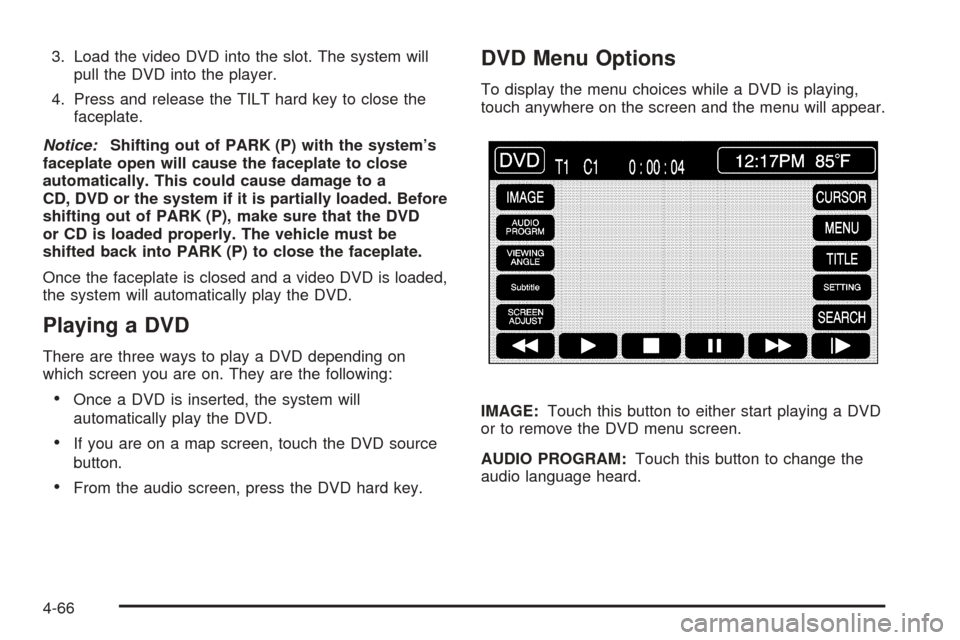
touch anywhere on the screen and the menu will appear.
IMAGE:Touch this button to either start playing a DVD
or to remove the DVD menu screen.
AUDIO PROGRAM:Touch this button to change the
audio language heard.
4-66
Page 425 of 438
A
Accessory Power Outlets.................................3-38
Adaptive Cruise Control...................................3-16
Additives, Fuel................................................. 6-6
Add-On Electrical Equipment............................6-80
Air Cleaner/Filter, Engine.................................6-18
Air Conditioning..............................................3-40
Airbag
Off Light.....................................................3-50
Readiness Light..........................................3-49
Airbag Sensing and Diagnostic Module (SDM)...... 8-9
Airbag System................................................1-36
Airbag Off Switch........................................1-44
How Does an Airbag Restrain?......................1-42
Servicing Your Airbag-Equipped Vehicle..........1-47
What Makes an Airbag Inate?......................1-42
What Will You See After an Airbag Inates?........1-43
When Should an Airbag Inate?....................1-41
Where Are the Airbags?...............................1-38
Antenna, Diversity Antenna System...................3-81
Antenna, XM™ Satellite Radio Antenna System.....3-81
Anti-Lock Brake System (ABS)........................... 5-6
Anti-Lock Brake, System Warning Light..............3-53
Appearance Care............................................6-70
Aluminum or Chrome-Plated Wheels..............6-76
Care of Safety Belts....................................6-73Appearance Care (cont.)
Chemical Paint Spotting...............................6-77
Cleaning Exterior Lamps/Lenses....................6-74
Fabric/Carpet..............................................6-70
Finish Care.................................................6-74
Finish Damage............................................6-77
Glass Surfaces............................................6-73
Instrument Panel.........................................6-72
Interior Plastic Components...........................6-72
Leather......................................................6-72
Sheet Metal Damage...................................6-77
Speaker Covers..........................................6-73
Tires..........................................................6-76
Underbody Maintenance...............................6-77
Vehicle Care/Appearance Materials................6-78
Vinyl..........................................................6-72
Washing Your Vehicle...................................6-74
Weatherstrips..............................................6-73
Windshield and Wiper Blades........................6-75
Wood Panels..............................................6-72
Ashtrays........................................................3-39
Audio System.................................................4-45
Audio System(s).............................................3-78
Audio Steering Wheel Controls......................3-79
Care of Your CD Player...............................3-80
Care of Your CDs........................................3-80
Diversity Antenna System.............................3-81
1
Page 426 of 438
Audio System(s) (cont.)
Theft-Deterrent Feature................................3-78
Understanding Radio Reception.....................3-80
XM™ Satellite Radio Antenna System............3-81
Automatic Transmission
Fluid..........................................................6-20
Operation...................................................2-25
Avoid Point/Area, Edit......................................4-20
B
Battery..........................................................6-36
Exterior Lighting Battery Saver......................3-32
Run-Down Protection...................................3-33
Before Leaving on a Long Trip.........................5-22
Brake
Anti-Lock Brake System (ABS)........................ 5-6
Emergencies................................................ 5-8
Parking......................................................2-28
System Warning Light..................................3-52
Brakes..........................................................6-33
Braking........................................................... 5-5
Braking in Emergencies..................................... 5-8
Break-In, New Vehicle.....................................2-21
Bulb Replacement...........................................6-44
Headlamp Aiming........................................6-42
Buying New Tires...........................................6-58
C
California Fuel.................................................. 6-5
Canadian Owners................................................ ii
Capacities and Specications............................6-85
Carbon Monoxide...................2-13, 2-32, 5-25, 5-35
Care of
Safety Belts................................................6-73
Your CD Player...........................................3-80
Your CDs ...................................................3-80
CD
Six-Disc Changer.........................................4-61
CD/DVD Player..............................................4-63
Center Console Storage Area...........................2-42
Chains, Tire...................................................6-63
Check
Engine Light...............................................3-55
Checking Things Under the Hood......................6-10
Chemical Paint Spotting...................................6-77
Child Restraints
Child Restraint Systems...............................1-24
Infants and Young Children...........................1-21
Lower Anchorages and Top Tethers for
Children (LATCH System)..........................1-28
Older Children.............................................1-19
Securing a Child Restraint Designed for the
LATCH System........................................1-30
2
Page 433 of 438
Outside
Automatic Dimming Mirror.............................2-35
Convex Mirror.............................................2-36
Curb View Assist Mirror................................2-35
Power Heated Mirrors..................................2-34
Overheated Engine Protection Operating Mode.....6-25
Owner Checks and Services.............................. 7-8
Owners, Canadian............................................... ii
P
Park Aid........................................................3-37
Park (P)
Shifting Into................................................2-30
Shifting Out of............................................2-31
Parking
Assist........................................................3-37
Brake........................................................2-28
Over Things That Burn.................................2-32
Passenger Compartment Air Filter.....................3-45
Passenger Position, Safety Belts.......................1-18
Passing.........................................................5-14
Plan Route....................................................4-13Player
CD ............................................................4-63
DVD ..........................................................4-63
Power
Accessory Outlets........................................3-38
Door Locks.................................................2-11
Electrical System.........................................6-80
Lumbar Controls........................................... 1-2
Reclining Seatback........................................ 1-4
Retained Accessory (RAP)............................2-22
Seat............................................................ 1-2
Steering Fluid.............................................6-31
Tilt Wheel and Telescopic Steering Column....... 3-7
Windows....................................................2-17
Pretensioners, Safety Belt................................1-18
Problems with Route Guidance.........................4-44
Programming the HomeLink
®Transmitter...........2-39
Q
Questions and Answers About Safety Belts.......... 1-9
9