lights CADILLAC XLR 2008 1.G User Guide
[x] Cancel search | Manufacturer: CADILLAC, Model Year: 2008, Model line: XLR, Model: CADILLAC XLR 2008 1.GPages: 470, PDF Size: 8.39 MB
Page 154 of 470
Exterior Lighting Battery Saver
If the manual parking lamps or headlamps have been
left on, the exterior lamps will turn off as soon as
the ignition is turned off or Retained Accessory Power
(RAP) is active. This protects against draining the
battery in case you have accidentally left the headlamps
or parking lamps on. The battery saver does not work
if the headlamps are turned on after the ignition switch
is turned to off.
If you need to leave the lamps on, use the exterior
lamp control to turn the lamps back on.
Instrument Panel Brightness
The button for this feature is located on the instrument
panel to the left of the steering column.
+
!- (Brightness):Press this button to change the
brightness of the instrument panel lights.
Press the DIMMER button until PANEL DIMMING
appears on the Driver Information Center (DIC). Then
use the brightness button to adjust the instrument panel
brightness. Press the top of the button to brighten the
lights or the bottom of the button to dim the lights.
SeeHead-Up Display (HUD) on page 3-33for more
information.Be sure not to have the brightness turned all the way
down with the lamps on during the day. Your DIC
may not be visible.
Courtesy Lamps
When any door or the trunk lid is opened, the interior
lamps will go on unless it is bright outside.
Press the interior lamp button on the right side of the
instrument panel, to turn the courtesy lamps on or off.
Entry/Exit Lighting
With entry lighting, the interior lamps will come on when
entering the vehicle. The interior lamps will come on
for about 20 seconds when the engine is turned off.
You can turn exit and entry lighting off by quickly turning
the courtesy lamps on and off.
Reading Lamps
Your inside rearview mirror includes two reading lamps.
The lamps will go on when a door is opened. When
the doors are closed, each lamp can be turned on
individually by pressing the button for that lamp.
3-32
Page 165 of 470

Warning Lights, Gages,
and Indicators
This part describes the warning lights and gages on
your vehicle. The pictures help to locate them.
Warning lights and gages can signal that something is
wrong before it becomes serious enough to cause
an expensive repair or replacement. Paying attention
to the warning lights and gages could also save you
or others from injury.
Warning lights come on when there may be or is a
problem with one of your vehicle’s functions. As the
details show on the next few pages, some warning lights
come on briey when you start the engine just to let
you know they are working. If you are familiar with
this section, you should not be alarmed when this
happens.Gages can indicate when there may be or is a problem
with one of your vehicle’s functions. Often gages
and warning lights work together to let you know when
there is a problem with your vehicle.
When one of the warning lights comes on and stays on
as you are driving, or when one of the gages shows
there may be a problem, check the section that tells
you what to do about it. Please follow this manual’s
advice. Waiting to do repairs can be costly and even
dangerous. So please get to know your vehicle’s
warning lights and gages. They can be a big help.
Your vehicle also has a Driver Information Center (DIC)
that works along with warning lights and gages.
SeeDIC Warnings and Messages on page 3-63for
more information.
3-43
Page 166 of 470

Instrument Panel Cluster
Your instrument panel cluster and Driver Information Center (DIC) are designed to let you know at a glance how the
vehicle is running. You will know how fast you are going, about how much fuel you have left and many other things
you will need to know to drive safely and economically. The instrument panel cluster indicator warning lights, gages
and DIC messages are explained on the following pages.
United States Base Cluster shown, Canada and Uplevel similar
3-44
Page 171 of 470

If, after several seconds, both status indicator lights
remain on, or if there are no lights at all, there may be a
problem with the lights or the passenger sensing system.
See your dealer/retailer for service.
{CAUTION:
If the airbag readiness light in the instrument
panel cluster ever comes on and stays on,
it means that something may be wrong with
the airbag system. If this ever happens, have
the vehicle serviced promptly, because an
adult-size person sitting in the right front
passenger’s seat may not have the protection
of the airbag(s). SeeAirbag Readiness Light
on page 3-46for more on this, including
important safety information.
Charging System Light
This light will come on
briey when you turn
on the ignition, but
the engine is not running,
as a check to show
you it is working.
It should go out once the engine is running. If it stays
on, or comes on while you are driving, you may have a
problem with the charging system. A charging system
Driver Information Center (DIC) message may also
appear. SeeDIC Warnings and Messages on page 3-63
for more information. This light could indicate that you
have problems with a generator drive belt, or another
electrical problem. Have it checked right away.
If you must drive a short distance with the light on,
be certain to turn off all your accessories, such as
the radio and air conditioner.
3-49
Page 180 of 470
Security Light
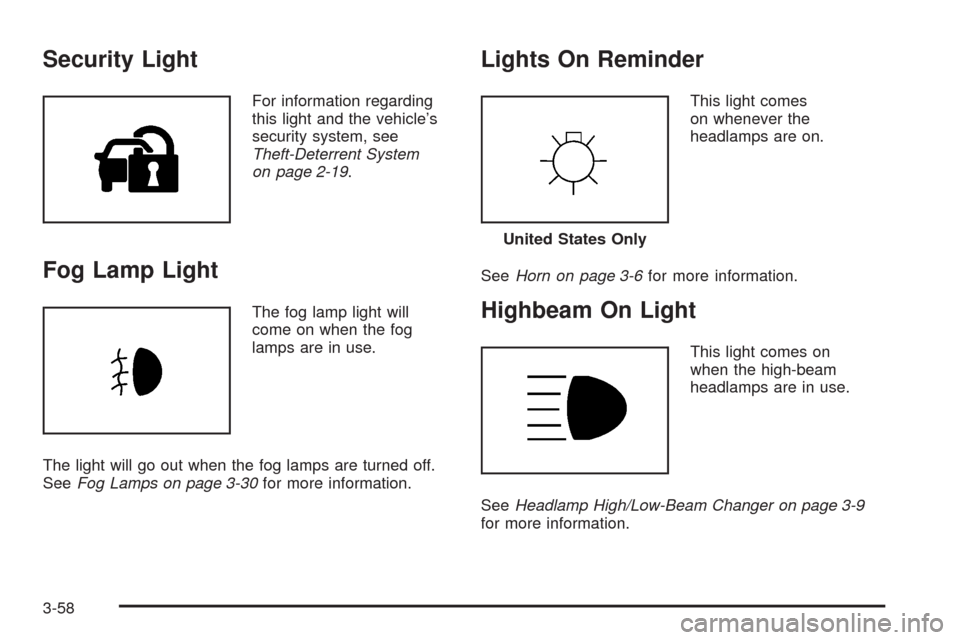
For information regarding
this light and the vehicle’s
security system, see
Theft-Deterrent System
on page 2-19.
Fog Lamp Light
The fog lamp light will
come on when the fog
lamps are in use.
The light will go out when the fog lamps are turned off.
SeeFog Lamps on page 3-30for more information.
Lights On Reminder
This light comes
on whenever the
headlamps are on.
SeeHorn on page 3-6for more information.
Highbeam On Light
This light comes on
when the high-beam
headlamps are in use.
SeeHeadlamp High/Low-Beam Changer on page 3-9
for more information.
United States Only
3-58
Page 192 of 470
REDUCED ENGINE POWER
This message displays when the vehicle is reducing
engine power because the transmission is being placed
in gear under conditions that may cause damage to
the vehicle’s engine, transmission, or ability to
accelerate. Reduced engine power can affect the
vehicle’s ability to accelerate. If this message is on,
but there is no reduction in performance, proceed
to your destination. The performance may be reduced
the next time the vehicle is driven. The vehicle may
be driven at a reduced speed while this message is on,
but acceleration and speed may be reduced. Anytime
this message stays on, the vehicle should be taken
to your dealer/retailer for service as soon as possible.
RIGHT DOOR AJAR
This message displays anytime the engine is running,
the transmission is not in PARK (P), and the passenger
door is open or ajar. A chime sounds if the vehicle’s
speed is greater than 3 mph (5 km/h).
SERVICE A/C
This message displays when the electronic sensors that
control the air conditioning and heating systems are
no longer working. Have the climate control system
serviced by your dealer/retailer if you notice a drop in
heating and air conditioning efficiency.
SERVICE ABS (Antilock Brake System)
If this message displays when you are driving, stop
as soon as possible and turn the ignition off. Then start
the engine again to reset the system. If the message
stays on, or comes back on again while you are driving,
your vehicle is in need of service. See your
dealer/retailer.
If the SERVICE ABS message is being displayed, the
Traction Control System (TCS) and StabiliTrak
®System
will also be disabled. The Driver Information Center
will scroll three messages: SERVICE ABS, SERVICE
TRACTION SYS, and SERVICE STABILITRAK, and the
antilock brake system and traction control warning
lights on the instrument panel cluster will be illuminated.
SeeAntilock Brake System Warning Light on page 3-51
andTraction Control System (TCS) Warning Light on
page 3-52. The driver can acknowledge these messages
by pressing the RESET button three times. When the
service message is displayed, the computer controlled
systems will not assist the driver and you should
have the system repaired by your dealer/retailer as
soon as possible. Adjust your driving accordingly.
3-70
Page 199 of 470
Auto Recall
This feature allows the steering column, outside mirrors
and the driver’s seat to automatically move to the current
driver’s set position when the engine starts. The DIC will
display AUTO RECALL OFF or AUTO RECALL ON.
Press the OPTIONS button to change the setting.
Auto Exit Recall
This feature allows the steering column and driver’s
seat to automatically move to the current driver’s
exit position when one of the following occurs:
The vehicle is turned off or in RAP or accessory
mode and the driver’s door is opened.
The vehicle is turned off or in RAP and the
unlock button on the keyless access transmitter
is pressed.
The DIC will display AUTO EXIT RECALL OFF or
AUTO EXIT RECALL ON. Press the OPTIONS
button to change the setting.
Approach Lights
This feature activates the parking lamps, front fog lamps
and back-up lamps during low light periods when the
unlock button on the keyless access transmitter is
pressed, both doors are closed and the vehicle is off or
in RAP. The lamps remain on for 20 seconds or until
a door is opened, the lock button on the keyless access
transmitter is pressed or the vehicle is no longer off
or in RAP.
The DIC will display APPROACH LIGHTS OFF or
APPROACH LIGHTS ON. Press the OPTIONS button
to change the setting.
Exit Lights
This feature activates the parking lamps and front fog
lamps for 15, 30 or 90 seconds. This will occur when
the vehicle is off or in RAP and the headlamps are on
due to the automatic headlamp system. The parking
lamps and front fog lamps will remain on until the driver
selected time period expires, the exterior lamp control
is activated or the vehicle is no longer off or in RAP.
The DIC will display EXIT LIGHTS OFF, EXIT
LIGHTS - 15 SEC, EXIT LIGHTS - 30 SEC, or
EXIT LIGHTS - 90 SEC. Press the OPTIONS button
to change the setting.
3-77
Page 344 of 470
Automatic Transmission Fluid
How to Check Automatic Transmission
Fluid
It is not necessary to check the transmission uid level.
A transmission uid leak is the only reason for uid
loss. If a leak occurs, take the vehicle to the
dealer/retailer service department and have it repaired
as soon as possible.
There is a special procedure for checking and changing
the transmission uid. Because this procedure is difficult,
you should have this done at the dealer/retailer service
department. Contact your dealer/retailer for additional
information or the procedure can be found in the service
manual. To purchase a service manual, seeService
Publications Ordering Information on page 8-16.
Notice:Use of the incorrect automatic transmission
uid may damage your vehicle, and the damages
may not be covered by your warranty. Always
use the automatic transmission uid listed in
Recommended Fluids and Lubricants on page 7-11.
Change the uid and lter at the intervals listed in
Additional Required Services on page 7-5, and be sure
to use the uid listed inRecommended Fluids and
Lubricants on page 7-11.
Engine Coolant
The cooling system in your vehicle is lled with
DEX-COOL®engine coolant. This coolant is designed
to remain in your vehicle for ve years or 150,000 miles
(240 000 km), whichever occurs rst, if you add only
DEX-COOL
®extended life coolant.
The following explains your cooling system and how to
add coolant when it is low. If you have a problem with
engine overheating, seeEngine Overheating on
page 6-27.
A 50/50 mixture of clean, drinkable water and
DEX-COOL
®coolant will:
Giving freezing protection down to−34°F (−37°C).
Give boiling protection up to 265°F (129°C).
Protect against rust and corrosion.
Help keep the proper engine temperature.
Let the warning lights and gages work as they
should.
Notice:Using coolant other than DEX-COOL
®may
cause premature engine, heater core, or radiator
corrosion. In addition, the engine coolant may
require changing sooner, at the rst maintenance
service after each 30,000 miles (50 000 km) or
24 months, whichever occurs rst. Any repairs
would not be covered by your warranty. Always use
DEX-COOL
®(silicate-free) coolant in your vehicle.
6-24
Page 412 of 470

Fuses Usage
FUSE PULLER Fuse Puller
REVERSE
LAMPReverse Lamp
RUN/CRANK Starter/Crank
PRK/BRK
SOL AParking Brake Solenoid A
REVERSE
LAMPSReverse Lamps
BTSI SOL/
COL LOCKBTSI Solenoid, Column Lock
EMPTY Not Used
EMPTY Not Used
GMLAN
DEVICESGMLAN Devices
RPA/H/C
SEAT/WPR
RELAYSRear Park Aid, Heated/Cooled
Seats, Windshield Wiper Relays
DR LOCKS Door Locks
ECM Engine Control Module
INTERIOR
LIGHTSInterior LightsFuses Usage
SDM/PSIR SW Airbags
EMPTY Not Used
ONSTAR OnStar
®
ACCA/DRIV
DR SWAdaptive Cruise Control (ACC),
Driver Door Switch
TILT/TELE
SW/MEM SEAT
MOD/TOP SWPower Tilt Wheel, Telescopic
Steering Column, Memory Seat,
Driver Seat Switch, Retractable
Hardtop Switch
IGN SW/INTR
SNSRIgnition Switch, Intrusion Sensor
STOP LAMP Stop Lamp
ISRVM/HVACInside Rearview Mirror, Climate
Control System, Column Lock,
Power Sounder
CLSTR/HUDInstrument Panel Cluster, Head-Up
Display (HUD)
RADIO/
S-BAND/VICSRadio, S-Band, CD Changer
TUTD SW/
STRG COL SWTap-Up/Tap-Down Switch
HVAC/PWR
SNDClimate Control System, Power
Sounder
6-92
Page 413 of 470
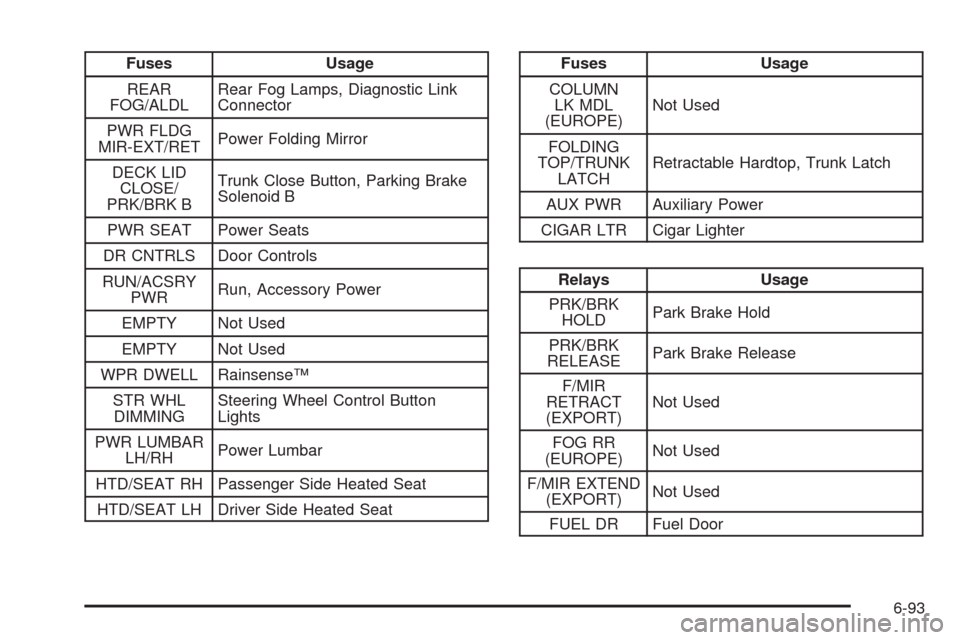
Fuses Usage
REAR
FOG/ALDLRear Fog Lamps, Diagnostic Link
Connector
PWR FLDG
MIR-EXT/RETPower Folding Mirror
DECK LID
CLOSE/
PRK/BRK BTrunk Close Button, Parking Brake
Solenoid B
PWR SEAT Power Seats
DR CNTRLS Door Controls
RUN/ACSRY
PWRRun, Accessory Power
EMPTY Not Used
EMPTY Not Used
WPR DWELL Rainsense™
STR WHL
DIMMINGSteering Wheel Control Button
Lights
PWR LUMBAR
LH/RHPower Lumbar
HTD/SEAT RH Passenger Side Heated Seat
HTD/SEAT LH Driver Side Heated SeatFuses Usage
COLUMN
LK MDL
(EUROPE)Not Used
FOLDING
TOP/TRUNK
LATCHRetractable Hardtop, Trunk Latch
AUX PWR Auxiliary Power
CIGAR LTR Cigar Lighter
Relays Usage
PRK/BRK
HOLDPark Brake Hold
PRK/BRK
RELEASEPark Brake Release
F/MIR
RETRACT
(EXPORT)Not Used
FOG RR
(EUROPE)Not Used
F/MIR EXTEND
(EXPORT)Not Used
FUEL DR Fuel Door
6-93