audio CADILLAC XLR 2009 1.G Owner's Guide
[x] Cancel search | Manufacturer: CADILLAC, Model Year: 2009, Model line: XLR, Model: CADILLAC XLR 2009 1.GPages: 462, PDF Size: 3.72 MB
Page 273 of 462
Adjusting the Speakers
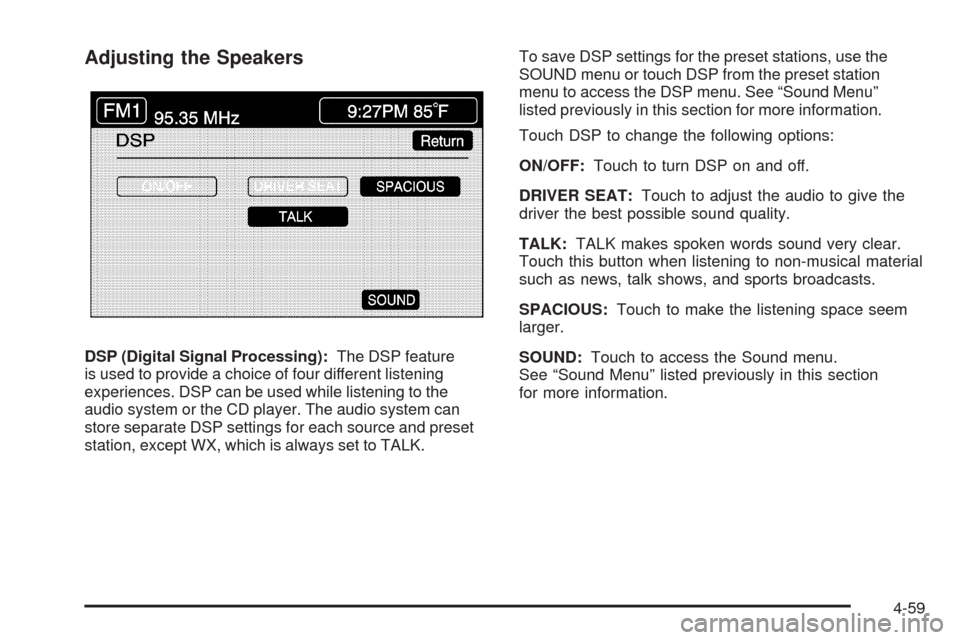
DSP (Digital Signal Processing):The DSP feature
is used to provide a choice of four different listening
experiences. DSP can be used while listening to the
audio system or the CD player. The audio system can
store separate DSP settings for each source and preset
station, except WX, which is always set to TALK.To save DSP settings for the preset stations, use the
SOUND menu or touch DSP from the preset station
menu to access the DSP menu. See “Sound Menu”
listed previously in this section for more information.
Touch DSP to change the following options:
ON/OFF:Touch to turn DSP on and off.
DRIVER SEAT:Touch to adjust the audio to give the
driver the best possible sound quality.
TALK:TALK makes spoken words sound very clear.
Touch this button when listening to non-musical material
such as news, talk shows, and sports broadcasts.
SPACIOUS:Touch to make the listening space seem
larger.
SOUND:Touch to access the Sound menu.
See “Sound Menu” listed previously in this section
for more information.
4-59
Page 274 of 462
Radio Data Systems (RDS)
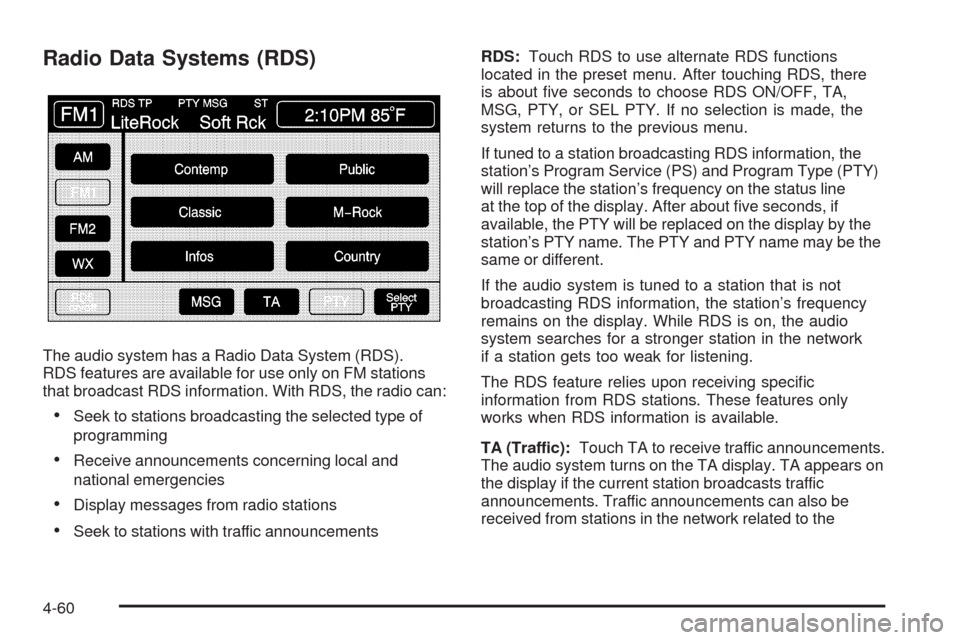
The audio system has a Radio Data System (RDS).
RDS features are available for use only on FM stations
that broadcast RDS information. With RDS, the radio can:
Seek to stations broadcasting the selected type of
programming
Receive announcements concerning local and
national emergencies
Display messages from radio stations
Seek to stations with traffic announcementsRDS:Touch RDS to use alternate RDS functions
located in the preset menu. After touching RDS, there
is about ve seconds to choose RDS ON/OFF, TA,
MSG, PTY, or SEL PTY. If no selection is made, the
system returns to the previous menu.
If tuned to a station broadcasting RDS information, the
station’s Program Service (PS) and Program Type (PTY)
will replace the station’s frequency on the status line
at the top of the display. After about ve seconds, if
available, the PTY will be replaced on the display by the
station’s PTY name. The PTY and PTY name may be the
same or different.
If the audio system is tuned to a station that is not
broadcasting RDS information, the station’s frequency
remains on the display. While RDS is on, the audio
system searches for a stronger station in the network
if a station gets too weak for listening.
The RDS feature relies upon receiving specic
information from RDS stations. These features only
works when RDS information is available.
TA (Traffic):Touch TA to receive traffic announcements.
The audio system turns on the TA display. TA appears on
the display if the current station broadcasts traffic
announcements. Traffic announcements can also be
received from stations in the network related to the
4-60
Page 275 of 462
current station. If the current station does not broadcast
traffic announcements, the audio system seeks to a
station which will. When the audio system nds a station
which broadcasts traffic announcements, it will stop.
If no station is found, TA will turn off.
While a traffic announcement plays, the audio system
uses TA volume. To increase TA volume, touch the VOL
button on the steering wheel or use the VOL up or down
buttons during the announcement. See “Voice Guidance
Volume Settings” underSetup Menu on page 4-12for
more information.
When a traffic announcement comes on the current radio
station or a related network station, it will be heard even
if the volume is muted or a CD is playing. If the audio
system tunes to a related network station for a traffic
announcement, it returns to the original station when the
announcement is nished. If the CD player was being
used, the CD will stay in the player and resume play at
the point where it stopped.
Touch RDS followed by TA again to turn TA off.
SG (Message):When RDS is on, if the current station
has a message, MSG displays. Touch MSG from the
preset menu to view the message. If the whole message
does not appear on the display, parts of the message
appears every three seconds until the message iscompleted. Once the complete message has been
displayed, MSG disappears from the display until another
new message is received. MSG remains available
allowing the entire message to be displayed again.
PTY:PTY seeks only to stations with desired types of
programming. This button is used to turn on and off
Program Type (PTY) features.
With RDS on, touch RDS, followed by PTY. The PTY
display turns on. Touch RDS followed by this button
again to turn the PTY display off.
Select PTY (Select Program Type):With RDS and
PTY on, touch RDS, then SEL PTY. The PTY menu
appears. Use the up and down arrows to select a PTY.
Touch the PTY selection and the system returns to
the screen with the preset stations shown. See Steps 1
through 7 under “Preset Station Menu” to store the
selected PTYs. The selected PTY is then stored on the
preset. Touch the PTY preset to recall your settings.
When the PTY display is on, press TUNE/SEEK
and SCAN to nd radio stations of the PTY selected.
The last PTY selected is used for seek and scan modes.
If a station with the selected PTY is not found, NONE
FOUND appears on the display. If both PTY and TA
are on, the audio system searches for stations with
traffic announcements and the selected PTY.
4-61
Page 276 of 462
PTY (Program Type) Presets:The six presets let you
return to favorite PTYs. These presets have factory
PTY preset stations. See “RDS Program Type (PTY)
Selections” later in this section. Up to 12 PTYs, 6 FM 1
and 6 FM2 can be set. To save a PTY preset:
1. Touch FM1 or FM2.
2. Touch RDS to enter the RDS menu.
3. Touch RDS ON/OFF to turn RDS on.
4. Touch PTY.
5. Touch SEL PTY and select the desired PTY from
the list.
6. Touch and hold one of the six presets for more
than two seconds until a beep is heard. Whenever
that numbered preset is touched for less than
two seconds, the PTY that was set, returns.
7. Repeat the steps for each preset.
Once a PTY is stored for each of the preset stations, a
PTY preset can be recalled by touching the preset station
for less than two seconds. Then use TUNE/SEEK or
SCAN to locate a station for that PTY selection.ALERT:This type of announcement warns of national
or local emergencies. Alert announcements cannot
be turned off. Alert announcements come on even if
RDS mode is turned off. ALERT appears on the display
when an alert announcement plays. The audio system
uses TA volume during these announcements.
To increase volume, touch the VOL button on the
steering wheel or use the VOL up and down buttons
during the announcement. See “Voice Guidance Volume
Settings” underSetup Menu on page 4-12for more
information. When an alert announcement comes on the
tuned radio station or a related network station, it will
be heard even if the volume is muted or a CD is playing.
If the audio system tunes to a related network station
for an alert announcement, it returns to the original
station when the announcement is nished. If the CD
player is playing, the player stops for the announcement
and resume when the announcement is nished.
4-62
Page 278 of 462
Setting Program Type (PTY) Preset
Stations
S
CATT(Category):Press the arrows to select a
category.
Once the desired category is displayed, press
TUNE/SEEK to select the category and go to the
category’s rst station. To go to another station within
that category, press TUNE/SEEK once.
Touch and hold one of the desired P1-P6 presets to
store the selected station as a preset. If PTY times out
and is no longer on the display, start again.
SCAN:Use this button to scan through the channels
within a category or scan through the preset stations.
To scan through the channels in a category:
1. Select a category by using the category arrows.
2. Once the desired category is displayed, touch
SCAN. The radio begins scanning within the
chosen category.
3. Touch SCAN again to stop scanning.
To scan through preset stations, touch and hold SCAN.
Touch SCAN again to stop scanning.
XM™ Radio Messages
XL (Explicit Language Channels):XL on the radio
display, after the channel name, indicates content with
explicit language. These channels, or any others,
can be blocked at a customer’s request by calling
1-800-852-XMXM (9696).
XM Updating:The encryption code in the receiver is
being updated and no action is required.
No XM signal:The vehicle is in a location that is
blocking the XM™ signal. When the vehicle is moved
into an open area, the signal should return.
Loading XM:The audio system is processing audio
and text data received. No action is needed.
Channel Off Air:This channel is not currently in
service.
Channel Unauth:This channel is blocked or cannot be
received with the XM™ subscription package.
Channel Unavail:This previously assigned channel is
no longer assigned.
No Artist Info:No artist information is available.
The system is working properly.
No Title Info:No song title information is available.
The system is working properly.
4-64
Page 281 of 462
EJECT:Touch once to eject the chosen CD. The
chosen CD may be selected by rst touching one of the
numbered buttons from 1 to 6. Repeat this procedure
for ejecting up to six discs from the changer. If the
EJECT button is pressed and held until a beep is heard,
the system begins to eject all of the discs from the
player. Once the CD is removed the next will come out
until they are all ejected.
j(Pause):Touch to pause CD play. Touch it again to
resume play or touch the play button.
RANDOM ALL:Touch to hear the tracks on all of
the discs in the CD changer in random, rather than
sequential, order. Press the TUNE/SEEK hard key while
RANDOM ALL is on to randomly seek within that disc.
Touch RANDOM ALL again to turn off random mode.
SCAN DISCS:Touch to hear the rst 10 seconds of
rst track on each disc. Touch this button again to stop
scanning. The CD mutes while scanning.
[(Forward):Touch to fast forward quickly through
a track selection.
«TUNE SEEKª:Press the up arrow on the
TUNE/SEEK switch to seek to the next selection on the
compact disc. If playing last track of disc, pressing
the up arrow seeks to the rst track of the next disc.Press the down arrow to seek to the previous selection
on the compact disc. If playing the rst track of disc,
pressing the down arrow seeks to the last track on the
selected disc. The sound mutes while seeking.
RDS (Radio Data Systems):See “Radio Data Systems
(RDS)” listed previously for information on this button.
SOUND:See “Sound Menu (Tone, DSP, Fade and
Balance)” for information on this button.
DSP (Digital Signal Processing):See “Adjusting the
Speakers” listed previously for information on this button.
CD Changer Errors
CDX ERROR could be displayed for the following:
The road is too rough. The disc should play when
the road is smoother.
The disc is dirty, scratched, wet or not loaded label
side up.
The air is very humid. If so, wait about an hour and
try again.
If any error occurs repeatedly or if an error cannot be
corrected, please contact your dealer/retailer. If the
audio system displays an error number, write it down
and provide this information to your dealer/retailer when
reporting the error.
4-67
Page 284 of 462

DVD Player
To use the player as a video DVD player, rst remove
the navigation map DVD or music CD. While playing
a video DVD, the navigation system is not available.
The message “The disc installed is not a map DVD”
appears on the display if any of the navigation hard keys
are pressed.
This feature will not operate unless the vehicle is in
P (Park).
To remove the navigation map DVD and load a
video DVD:
1. With the vehicle in P (Park) and the vehicle running,
press the TILT hard key until a beep is heard.
The faceplate of the system will open.
2. If a map DVD or a music CD is loaded, the system
automatically ejects it. Gently remove it from the
slot and return it to its case.
3. Load the video DVD into the slot. The system pulls
the DVD into the player.
4. Press and release the TILT hard key to close the
faceplate.Notice:Shifting out of P (Park) with the system’s
faceplate open will cause the faceplate to close
automatically. This could cause damage to a
CD, DVD or the system if it is partially loaded.
Before shifting out of P (Park), make sure that the
DVD or CD is loaded properly. The vehicle must
be shifted back into P (Park) to close the faceplate.
Once the faceplate is closed and a video DVD is
loaded, the system automatically plays the DVD.
Playing a DVD
There are two ways to play a DVD depending on which
screen is displayed:
From a map screen, touch the DVD source button.
From the audio screen, press the DVD hard key.
Once a DVD is inserted, the system automatically plays
the DVD.
4-70
Page 285 of 462

DVD Menu Options
To display the menu choices while a DVD is playing,
touch anywhere on the screen and the menu appears.
IMAGE:Touch to either start playing a DVD or to
remove the DVD menu screen.
AUDIO PROGRAM:Touch to change the audio
language heard.VIEWING ANGLE:Touch to adjust the viewing angle of
the DVD. Some DVDs allow you to change the camera
angle. This may not be available on all DVDs.
Depending on the type of DVD being used, this button
may or may not be available.
SUBTITLE:Touch to playback the video with subtitles.
This may not be available on all DVDs. Depending
on the type of DVD being used, this button may or may
not be available.
SCREEN ADJUST:Touch to adjust the brightness,
contrast and red/green color adjustments.
CURSOR:Touch to access the left/right and up/down
cursors on the screen. The cursors allow menu
options to be navigated on the screen.
MENU:Touch to access the DVDs menu options.
Depending on the type of DVD being used, this button
may or may not be available. Touch the button
labeled one, two or blank to change the image size
displayed on the screen.
TITLE:Touch this button to display the title of the DVD.
Depending on the type of DVD being used, this button
may or may not be available.
4-71
Page 286 of 462
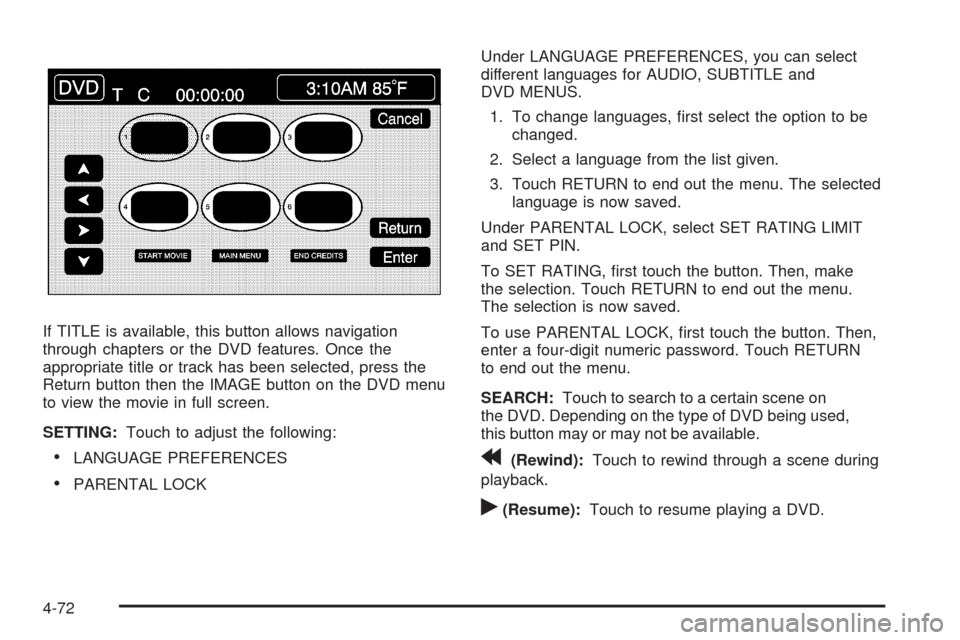
If TITLE is available, this button allows navigation
through chapters or the DVD features. Once the
appropriate title or track has been selected, press the
Return button then the IMAGE button on the DVD menu
to view the movie in full screen.
SETTING:Touch to adjust the following:
LANGUAGE PREFERENCES
PARENTAL LOCKUnder LANGUAGE PREFERENCES, you can select
different languages for AUDIO, SUBTITLE and
DVD MENUS.
1. To change languages, rst select the option to be
changed.
2. Select a language from the list given.
3. Touch RETURN to end out the menu. The selected
language is now saved.
Under PARENTAL LOCK, select SET RATING LIMIT
and SET PIN.
To SET RATING, rst touch the button. Then, make
the selection. Touch RETURN to end out the menu.
The selection is now saved.
To use PARENTAL LOCK, rst touch the button. Then,
enter a four-digit numeric password. Touch RETURN
to end out the menu.
SEARCH:Touch to search to a certain scene on
the DVD. Depending on the type of DVD being used,
this button may or may not be available.
r(Rewind):Touch to rewind through a scene during
playback.
r(Resume):Touch to resume playing a DVD.
4-72
Page 287 of 462
c(Stop):Touch to stop the DVD.
j(Pause):Touch to pause the DVD.
[(Forward):Touch to advance rapidly during
playback.
L(Frame Advance):Touch to advance by chapter
during playback.
Radio Personalization with Home
and Away Feature
With this feature, the latest audio system settings can be
recalled that were adjusted the last time the vehicle was
operated. This feature allows two different drivers to store
and recall their own audio system settings. The settings
recalled by the audio system are determined by which
transmitter (1 or 2) was used to enter the vehicle.
The number on the back of the transmitter corresponds
to driver 1 or to driver 2. The audio system settings will
automatically adjust to where they were last set by the
identied driver. The settings can also be recalled by
briey pressing the MEMORY seat switches 1 or 2
located on the driver door.The audio system can store HOME and AWAY preset
stations. HOME and AWAY preset stations allow use of
one set of preset radio settings in the area where you
live, and another set when you go out of town. That way,
there is no need to reprogram the preset stations
every time you travel.
To select HOME and AWAY preset stations:
1. With the audio system on, touch the Audio hard key
and turn the audio system off.
2. Touch the HOME or AWAY button from the main
audio screen.
The next time the audio system is turned on, the
system recalls the last active preset selection.
When battery power is removed and later applied, the
home audio system preset stations do not have to
be reset because the audio system remembers them.
However, the away radio preset stations have to
be reset.
4-73