Remove CADILLAC XT4 2021 Service Manual
[x] Cancel search | Manufacturer: CADILLAC, Model Year: 2021, Model line: XT4, Model: CADILLAC XT4 2021Pages: 408, PDF Size: 8.33 MB
Page 196 of 408
Cadillac XT4 Owner Manual (GMNA-Localizing-U.S./Canada/Mexico-
14584367) - 2021 - CRC - 10/14/20
INFOTAINMENT SYSTEM 195
Open Source SW
Further information concerning the
OSS licenses is shown in the
infotainment display.
QNX
Portions of this software are copyright
© 2008-2011, QNX Software Systems.
All rights reserved.
Part C–EULA
Copyright © 2011, Software Systems
GmbH & Co. KG. All Rights Reserved.
The product you have purchased
("Product") contains Software
(Runtime Configuration No. 505962;
"Software") which is distributed by or
on behalf of the Product manufacturer
"Manufacturer") under license from
Software Systems Co. ("QSSC"). You
may only use the Software in the
Product and in compliance with the
license terms below.
Subject to the terms and conditions of
this License, QSSC hereby grants you
a limited, non-exclusive,
non-transferable license to use the
Software in the Product for the
purpose intended by the Manufacturer. If permitted by the
Manufacturer, or by applicable law,
you may make one backup copy of the
Software as part of the Product
software. QSSC and its licensors
reserve all license+C31 rights not
expressly granted herein, and retain
all right, title and interest in and to all
copies of the Software, including all
intellectual property rights therein.
Unless required by applicable law you
may not reproduce, distribute or
transfer, or de-compile, disassemble or
otherwise attempt to unbundle,
reverse engineer, modify or create
derivative works of, the Software. You
agree: (1) not to remove, cover or alter
any proprietary notices, labels or
marks in or on the Software, and to
ensure that all copies bear any notice
contained on the original; and (2) not
to export the Product or the Software
in contravention of applicable export
control laws.
EXCEPT TO THE EXTENT
OTHERWISE REQUIRED BY
APPLICABLE LAW, QSSC AND ITS
LICENSORS PROVIDE THE
SOFTWARE ON AN "AS IS" BASIS,
WITHOUT WARRANTIES ORCONDITIONS OF ANY KIND, EITHER
EXPRESS OR IMPLIED INCLUDING,
WITHOUT LIMITATION, ANY
WARRANTIES OR CONDITIONS OF
TITLE, NON-INFRINGEMENT,
MERCHANTABILITY OR FITNESS FOR
A PARTICULAR PURPOSE. ANY
WARRANTIES OR OTHER
PROVISIONS OFFERED BY THE
MANUFACTURER OR ITS
DISTRIBUTOR(S) THAT DIFFER
FROM THIS LICENSE ARE OFFERED
BY THE MANUFACTURER OR ITS
DISTRIBUTOR(S) ALONE AND NOT
BY QSSC, ITS AFFILIATES OR THEIR
LICENSORS. YOU ASSUME ANY
RISKS ASSOCIATED WITH YOUR USE
OF THE SOFTWARE UNDER THIS
LICENSE.
EXCEPT TO THE EXTENT
OTHERWISE REQUIRED BY
APPLICABLE LAW (SUCH AS IN THE
CASE OF DELIBERATE OR GROSSLY
NEGLIGENT ACTS), IN NO EVENT
SHALL QSSC, ITS AFFILIATES OR
THEIR LICENSORS BE LIABLE TO
YOU UNDER ANY LEGAL THEORY,
WHETHER IN TORT (INCLUDING
NEGLIGENCE), CONTRACT OR
OTHERWISE, FOR DAMAGES,
Page 201 of 408

Cadillac XT4 Owner Manual (GMNA-Localizing-U.S./Canada/Mexico-
14584367) - 2021 - CRC - 10/14/20
200 CLIMATE CONTROLS
@:Press to turn on recirculation.
An indicator light comes on. Air is
recirculated to quickly cool the inside
of the vehicle or to reduce the entry of
outside air and odors.
Auto Defog : The climate control
system may have a sensor to
automatically detect high humidity
inside the vehicle. When high
humidity is detected, the climate
control system may adjust to outside
air supply and turn on the air
conditioner. The fan speed may
slightly increase to help prevent
fogging. If the climate control system
does not detect possible window
fogging, it returns to normal
operation.
Ionizer : If equipped with an ionizer,
this feature helps to clean the air
inside the vehicle and remove
contaminants such as pollen, odors,
and dust. If the climate control
system is on and the ionizer is
enabled, the ionizer status indicator
will be lit on the climate control
display.Rear Window Defogger
K: Press to turn the rear window
defogger on or off. An indicator light
on the button comes on to show that
the rear window defogger is on.
The defogger can be turned off by
turning the ignition to off or ACC/
ACCESSORY.
The rear window defogger can be set
to automatic operation. When auto
rear defog is selected, the rear window
defogger turns on automatically when
the interior temperature is cold and
the outside temperature is about 7 °C
(44 °F) and below. The auto rear
defogger turns off automatically.
If equipped, the heated outside
mirrors turn on when the rear window
defogger button is on and help to
clear fog or frost from the surface of
the mirror. See Heated Mirrors029.
Caution
Do not try to clear frost or other
material from the inside of the
front windshield and rear window
with a razor blade or anything else
(Continued)
Caution (Continued)
that is sharp. This may damage the
rear window defogger grid and
affect the radio's ability to pick up
stations clearly. The repairs would
not be covered by the vehicle
warranty.
Remote Start Climate Control
Operation : If equipped with remote
start, the climate control system may
run when the vehicle is started
remotely. If equipped with heated or
ventilated seats or a heated steering
wheel, these features may come on
during a remote start. See Remote
Vehicle Start 014, Heated and
Ventilated Front Seats 043, and Heated
Steering Wheel 091.
Page 210 of 408
Cadillac XT4 Owner Manual (GMNA-Localizing-U.S./Canada/Mexico-
14584367) - 2021 - CRC - 10/14/20
DRIVING AND OPERATING 209
.Fuel the vehicle, fill fluid levels, and
check inflation pressure in all tires,
including the spare, if equipped.
.Read all the information about
all-wheel-drive vehicles in this
manual.
.Make sure all underbody shields,
if equipped, are properly attached.
.Know the local laws that apply to
off-road driving.
To gain more ground clearance if
needed, it may be necessary to remove
the front fascia lower air dam.
However, driving without the air dam
reduces fuel economy.
Caution
Operating the vehicle for extended
periods without the front fascia
lower air dam installed can cause
improper airf low to the engine.
Reattach the front fascia air dam
after off-road driving.
Loading the Vehicle for Off-Road
Driving
{Warning
.Unsecured cargo on the load
floor can be tossed about when
driving over rough terrain. You or
your passengers can be struck by
flying objects. Secure the cargo
properly.
.Keep cargo in the cargo area as
far forward and as low as
possible. The heaviest things
should be on the floor, forward
of the rear axle.
.Heavy loads on the roof raise the
vehicle's center of gravity,
making it more likely to roll over.
You can be seriously or fatally
injured if the vehicle rolls over.
Put heavy loads inside the cargo
area, not on the roof.
For more information about loading
the vehicle, see Vehicle Load Limits
0 215.
Environmental Concerns
.Always use established trails, roads,
and areas that have been set aside
for public off-road recreational
driving and obey all posted
regulations.
.Do not damage shrubs, flowers,
trees, or grasses or disturb wildlife.
.Do not park over things that burn.
See Parking over Things That Burn
0 225.
Driving on Hills
Driving safely on hills requires good
judgment and an understanding of
what the vehicle can and cannot do.
{Warning
Many hills are simply too steep for
any vehicle. Driving up hills can
cause the vehicle to stall. Driving
down hills can cause loss of control.
Driving across hills can cause a
rollover. You could be injured or
killed. Do not drive on steep hills.
Page 213 of 408
Cadillac XT4 Owner Manual (GMNA-Localizing-U.S./Canada/Mexico-
14584367) - 2021 - CRC - 10/14/20
212 DRIVING AND OPERATING
Caution
Do not drive through standing
water if it is deep enough to cover
the wheel hubs, axles, or exhaust
pipe. Deep water can damage the
axle and other vehicle parts.
If the standing water is not too deep,
drive through it slowly. At faster
speeds, water can get into the engine
and cause it to stall. Stalling can
occur if the exhaust pipe is under
water. Do not turn off the ignition
when driving through water. If the
exhaust pipe is under water, the
engine will not start. When going
through water, the brakes get wet and
it may take longer to stop. See Driving
on Wet Roads 0212.
After Off-Road Driving
Remove any brush or debris that has
collected on the underbody or chassis,
or under the hood. These
accumulations can be a fire hazard.
After operation in mud or sand, have
the brake linings cleaned and checked.
These substances can cause glazing
and uneven braking. Check the body structure, steering, suspension,
wheels, tires, and exhaust system for
damage and check the fuel lines and
cooling system for any leakage.
More frequent maintenance service is
required. See
Maintenance Schedule
0 358.
Driving on Wet Roads
Rain and wet roads can reduce vehicle
traction and affect your ability to stop
and accelerate. Always drive slower in
these types of driving conditions and
avoid driving through large puddles
and deep-standing or flowing water.
{Warning
Wet brakes can cause crashes. They
might not work as well in a quick
stop and could cause pulling to one
side. You could lose control of the
vehicle.
After driving through a large puddle
of water or a car/vehicle wash,
lightly apply the brake pedal until
the brakes work normally.
(Continued)
Warning (Continued)
Flowing or rushing water creates
strong forces. Driving through
flowing water could cause the
vehicle to be carried away. If this
happens, you and other vehicle
occupants could drown. Do not
ignore police warnings and be very
cautious about trying to drive
through flowing water.
Hydroplaning
Hydroplaning is dangerous. Water can
build up under the vehicle's tires so
they actually ride on the water. This
can happen if the road is wet enough
and you are going fast enough. When
the vehicle is hydroplaning, it has
little or no contact with the road.
There is no hard and fast rule about
hydroplaning. The best advice is to
slow down when the road is wet.
Other Rainy Weather Tips
Besides slowing down, other wet
weather driving tips include:
.Allow extra following distance.
Page 240 of 408

Cadillac XT4 Owner Manual (GMNA-Localizing-U.S./Canada/Mexico-
14584367) - 2021 - CRC - 10/14/20
DRIVING AND OPERATING 239
3. Move the thumbwheel down to SET−. The desired set speed briefly
appears in the instrument cluster.
4. Remove your foot from the accelerator.
When the cruise control has been set
to the desired speed, a green cruise
control indicator appears on the
instrument cluster and a cruise set
speed message appears on the
Head-Up Display (HUD), if equipped.
Resuming a Set Speed
If the cruise control is set at a desired
speed and then the brakes are applied
or
*is pressed, the cruise control is
disengaged without erasing the set
speed from memory.
Once the vehicle speed reaches about
40 km/h (25 mph) or more, move the
thumbwheel up toward RES+ briefly.
The vehicle returns to the previous set
speed.
Increasing Speed While Using
Cruise Control
If the cruise control system is already
activated:
.Move the thumbwheel up toward
RES+ until the desired speed is
reached, then release it.
.To increase vehicle speed in small
increments, move the thumbwheel
up toward RES+ briefly. For each
press, the vehicle goes about 1 km/h
(1 mph) faster.
.To increase vehicle speed in larger
increments, move the thumbwheel
up toward RES+ to the second
detent. For each press, the vehicle
speed increases to the next 5 km/h
(5 mph) mark on the speedometer.
The speedometer reading can be
displayed in either English or metric
units. See Instrument Cluster 099. The
increment value used depends on the
units displayed.
Reducing Speed While Using Cruise
Control
If the cruise control system is already
activated:
.Move the thumbwheel down toward
SET− until the desired lower speed
is reached, then release it.
.To decrease the vehicle speed in
small increments, move the
thumbwheel down toward SET−
briefly. For each press, the vehicle
goes about 1 km/h (1 mph) slower.
.To decrease the vehicle speed in
larger increments, move the
thumbwheel down toward SET− to
the second detent. For each press,
the vehicle speed decreases to the
next 5 km/h (5 mph) mark on the
speedometer.
The cruise control system may
automatically brake to slow the
vehicle down.
The speedometer reading can be
displayed in either English or metric
units. See Instrument Cluster 099. The
increment value used depends on the
units displayed.
Passing Another Vehicle While
Using Cruise Control
Use the accelerator pedal to increase
the vehicle speed. When you take your
foot off the pedal, the vehicle will slow
down to the previous set cruise speed.
Page 243 of 408

Cadillac XT4 Owner Manual (GMNA-Localizing-U.S./Canada/Mexico-
14584367) - 2021 - CRC - 10/14/20
242 DRIVING AND OPERATING
displayed. When the regular cruise
control is engaged, a green
J
indicator will be lit on the instrument
cluster; the following gap will not
display.
When the vehicle is turned on, the
cruise control mode will be set to the
last mode used before the vehicle was
turned off.
{Warning
Always check the cruise control
indicator on the instrument cluster
to determine which mode cruise
control is in before using the
feature. If ACC is not active, the
vehicle will not automatically brake
for other vehicles, which could
cause a crash if the brakes are not
applied manually. You and others
could be seriously injured or killed.
Setting Adaptive Cruise Control
If
Jis on when not in use, it could
get pressed and go into cruise when
not desired. Keep
Joff when cruise
is not being used. Select the set speed desired for cruise.
This is the vehicle speed when no
vehicle is detected in its path.
ACC will not set at a speed less than
25 km/h (15 mph), although it can be
resumed when driving at lower
speeds.
To set ACC while moving:
1. Press
J.
2. Get up to the desired speed.
3. Move the thumbwheel down toward SET–.
4. Remove your foot from the accelerator.
After ACC is set, it may immediately
apply the brakes if a vehicle ahead is
detected closer than the selected
following gap.
ACC can also be set while the vehicle
is stopped if ACC is on and the brake
pedal is applied. The ACC indicator displays on the
instrument cluster and Head-Up
Display (HUD), if equipped. When ACC
is turned on, the indicator will be lit
white. When ACC is engaged, the
indicator will turn green.
Be mindful of speed limits,
surrounding traffic speeds, and
weather conditions when selecting the
set speed.
Resuming a Set Speed
If the ACC is set at a desired speed
and then the brakes are applied, ACC
is disengaged without erasing the set
speed from memory.
To begin using ACC again, press RES+
up briefly.
.If the vehicle is moving more than
5 km/h (3 mph), it returns to the
previous set speed.
.If the vehicle is stopped with the
brake pedal applied, press RES+ and
release the brake pedal. ACC will
hold the vehicle until RES+ or the
accelerator pedal is pressed.
A green ACC indicator and the set
speed display on the instrument
cluster. The vehicle ahead indicator
Page 257 of 408
Cadillac XT4 Owner Manual (GMNA-Localizing-U.S./Canada/Mexico-
14584367) - 2021 - CRC - 10/14/20
256 DRIVING AND OPERATING
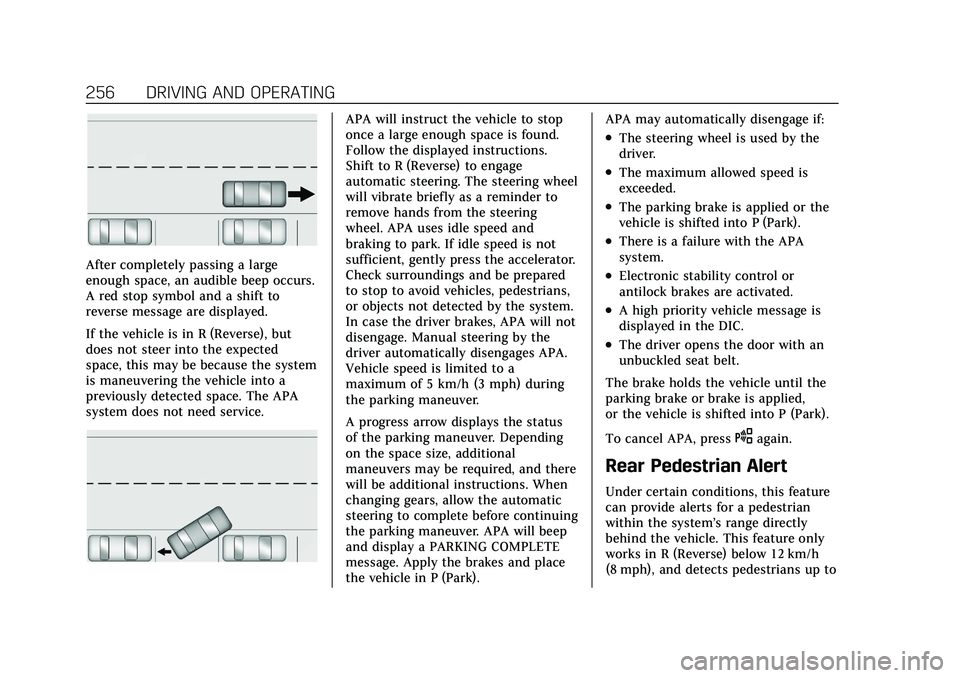
After completely passing a large
enough space, an audible beep occurs.
A red stop symbol and a shift to
reverse message are displayed.
If the vehicle is in R (Reverse), but
does not steer into the expected
space, this may be because the system
is maneuvering the vehicle into a
previously detected space. The APA
system does not need service.
APA will instruct the vehicle to stop
once a large enough space is found.
Follow the displayed instructions.
Shift to R (Reverse) to engage
automatic steering. The steering wheel
will vibrate briefly as a reminder to
remove hands from the steering
wheel. APA uses idle speed and
braking to park. If idle speed is not
sufficient, gently press the accelerator.
Check surroundings and be prepared
to stop to avoid vehicles, pedestrians,
or objects not detected by the system.
In case the driver brakes, APA will not
disengage. Manual steering by the
driver automatically disengages APA.
Vehicle speed is limited to a
maximum of 5 km/h (3 mph) during
the parking maneuver.
A progress arrow displays the status
of the parking maneuver. Depending
on the space size, additional
maneuvers may be required, and there
will be additional instructions. When
changing gears, allow the automatic
steering to complete before continuing
the parking maneuver. APA will beep
and display a PARKING COMPLETE
message. Apply the brakes and place
the vehicle in P (Park).APA may automatically disengage if:
.The steering wheel is used by the
driver.
.The maximum allowed speed is
exceeded.
.The parking brake is applied or the
vehicle is shifted into P (Park).
.There is a failure with the APA
system.
.Electronic stability control or
antilock brakes are activated.
.A high priority vehicle message is
displayed in the DIC.
.The driver opens the door with an
unbuckled seat belt.
The brake holds the vehicle until the
parking brake or brake is applied,
or the vehicle is shifted into P (Park).
To cancel APA, press
Oagain.
Rear Pedestrian Alert
Under certain conditions, this feature
can provide alerts for a pedestrian
within the system’s range directly
behind the vehicle. This feature only
works in R (Reverse) below 12 km/h
(8 mph), and detects pedestrians up to
Page 270 of 408

Cadillac XT4 Owner Manual (GMNA-Localizing-U.S./Canada/Mexico-
14584367) - 2021 - CRC - 10/14/20
DRIVING AND OPERATING 269
Warning (Continued)
.Read and follow all the
instructions on the fuel pump
island.
.Turn off the engine when
refueling.
.Keep sparks, flames, and
smoking materials away
from fuel.
.Do not leave the fuel pump
unattended.
.Avoid using electronic devices
while refueling.
.Do not re-enter the vehicle while
pumping fuel.
.Keep children away from the fuel
pump and never let children
pump fuel.
.Before touching the fill nozzle,
touch a metallic object to
discharge static electricity from
your body.
.Fuel can spray out if the fill
nozzle is inserted too quickly.
This spray can happen if the(Continued)
Warning (Continued)
tank is nearly full, and is more
likely in hot weather. Insert the
fill nozzle slowly and wait for any
hiss noise to stop before
beginning to flow fuel.
To open the fuel door, push and
release the rearward center edge of
the door.
The capless refueling system does not
have a fuel cap. Fully insert and latch
the fill nozzle, begin fueling.
{Warning
Overfilling the fuel tank by more
than three clicks of a standard fill
nozzle may cause:
.Vehicle performance issues,
including engine stalling and
damage to the fuel system.
.Fuel spills.
.Under certain conditions, fuel
fires.
Be careful not to spill fuel. Wait
five seconds after you have finished
pumping before removing the fill
nozzle. Clean fuel from painted
surfaces as soon as possible. See
Exterior Care 0348. Push the fuel door
closed until it latches.
{Warning
If a fire starts while you are
refueling, do not remove the fill
nozzle. Shut off the flow of fuel by
shutting off the pump or by
notifying the station attendant.
Leave the area immediately.
Page 271 of 408
Cadillac XT4 Owner Manual (GMNA-Localizing-U.S./Canada/Mexico-
14584367) - 2021 - CRC - 10/14/20
270 DRIVING AND OPERATING
Filling the Tank with a Portable Fuel
Container
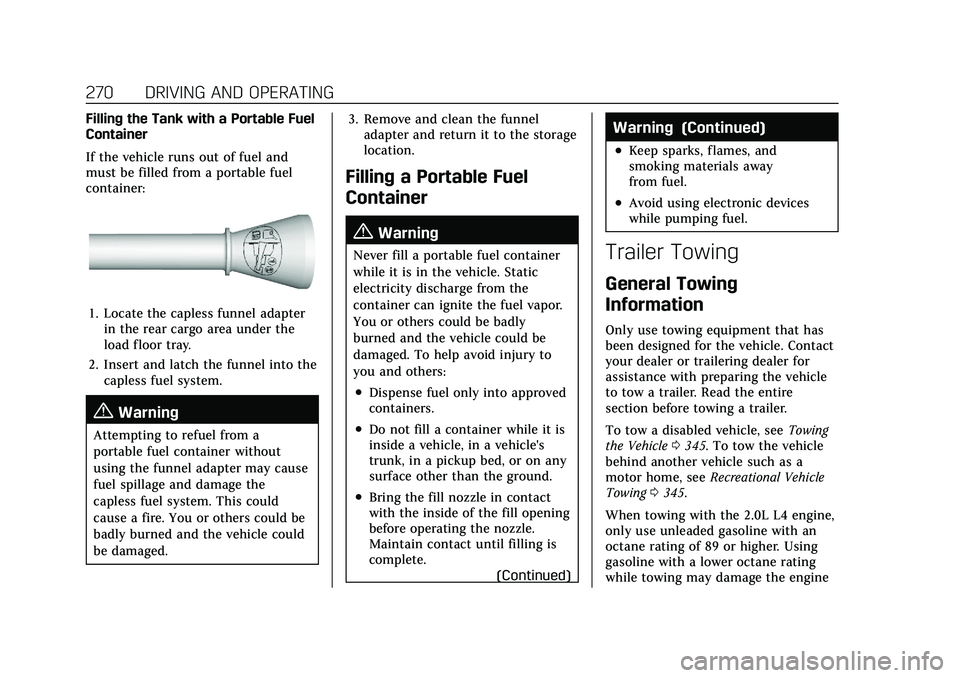
If the vehicle runs out of fuel and
must be filled from a portable fuel
container:
1. Locate the capless funnel adapterin the rear cargo area under the
load floor tray.
2. Insert and latch the funnel into the capless fuel system.
{Warning
Attempting to refuel from a
portable fuel container without
using the funnel adapter may cause
fuel spillage and damage the
capless fuel system. This could
cause a fire. You or others could be
badly burned and the vehicle could
be damaged. 3. Remove and clean the funnel
adapter and return it to the storage
location.
Filling a Portable Fuel
Container
{Warning
Never fill a portable fuel container
while it is in the vehicle. Static
electricity discharge from the
container can ignite the fuel vapor.
You or others could be badly
burned and the vehicle could be
damaged. To help avoid injury to
you and others:
.Dispense fuel only into approved
containers.
.Do not fill a container while it is
inside a vehicle, in a vehicle's
trunk, in a pickup bed, or on any
surface other than the ground.
.Bring the fill nozzle in contact
with the inside of the fill opening
before operating the nozzle.
Maintain contact until filling is
complete.
(Continued)
Warning (Continued)
.Keep sparks, flames, and
smoking materials away
from fuel.
.Avoid using electronic devices
while pumping fuel.
Trailer Towing
General Towing
Information
Only use towing equipment that has
been designed for the vehicle. Contact
your dealer or trailering dealer for
assistance with preparing the vehicle
to tow a trailer. Read the entire
section before towing a trailer.
To tow a disabled vehicle, see Towing
the Vehicle 0345. To tow the vehicle
behind another vehicle such as a
motor home, see Recreational Vehicle
Towing 0345.
When towing with the 2.0L L4 engine,
only use unleaded gasoline with an
octane rating of 89 or higher. Using
gasoline with a lower octane rating
while towing may damage the engine
Page 279 of 408
Cadillac XT4 Owner Manual (GMNA-Localizing-U.S./Canada/Mexico-
14584367) - 2021 - CRC - 10/14/20
278 DRIVING AND OPERATING
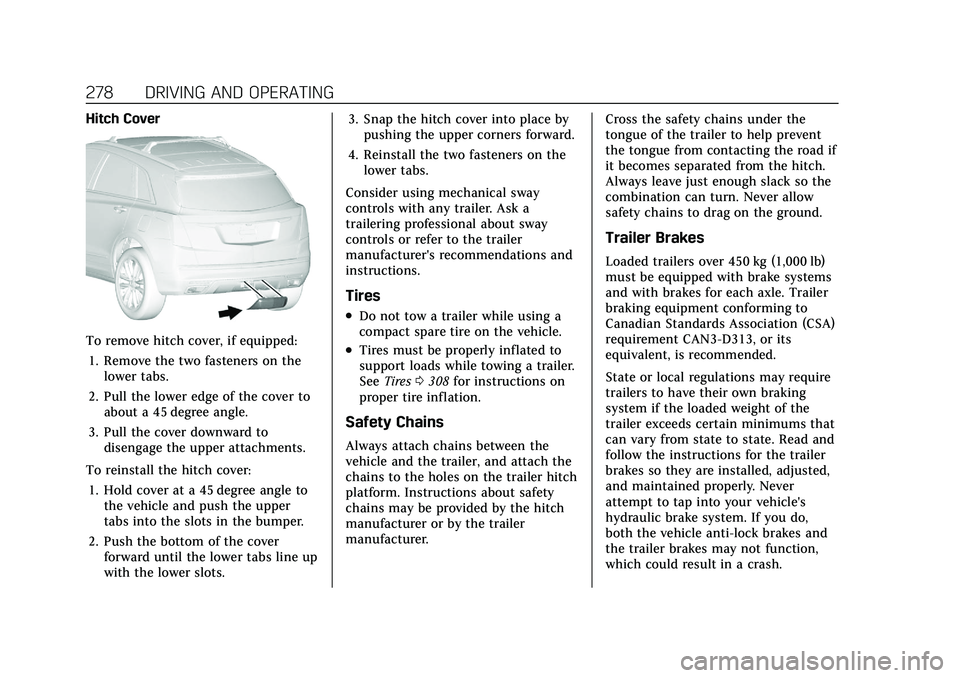
Hitch Cover
To remove hitch cover, if equipped:1. Remove the two fasteners on the lower tabs.
2. Pull the lower edge of the cover to about a 45 degree angle.
3. Pull the cover downward to disengage the upper attachments.
To reinstall the hitch cover: 1. Hold cover at a 45 degree angle to the vehicle and push the upper
tabs into the slots in the bumper.
2. Push the bottom of the cover forward until the lower tabs line up
with the lower slots. 3. Snap the hitch cover into place by
pushing the upper corners forward.
4. Reinstall the two fasteners on the lower tabs.
Consider using mechanical sway
controls with any trailer. Ask a
trailering professional about sway
controls or refer to the trailer
manufacturer's recommendations and
instructions.
Tires
.Do not tow a trailer while using a
compact spare tire on the vehicle.
.Tires must be properly inflated to
support loads while towing a trailer.
See Tires 0308 for instructions on
proper tire inflation.
Safety Chains
Always attach chains between the
vehicle and the trailer, and attach the
chains to the holes on the trailer hitch
platform. Instructions about safety
chains may be provided by the hitch
manufacturer or by the trailer
manufacturer. Cross the safety chains under the
tongue of the trailer to help prevent
the tongue from contacting the road if
it becomes separated from the hitch.
Always leave just enough slack so the
combination can turn. Never allow
safety chains to drag on the ground.
Trailer Brakes
Loaded trailers over 450 kg (1,000 lb)
must be equipped with brake systems
and with brakes for each axle. Trailer
braking equipment conforming to
Canadian Standards Association (CSA)
requirement CAN3-D313, or its
equivalent, is recommended.
State or local regulations may require
trailers to have their own braking
system if the loaded weight of the
trailer exceeds certain minimums that
can vary from state to state. Read and
follow the instructions for the trailer
brakes so they are installed, adjusted,
and maintained properly. Never
attempt to tap into your vehicle's
hydraulic brake system. If you do,
both the vehicle anti-lock brakes and
the trailer brakes may not function,
which could result in a crash.