service CADILLAC XT5 2019 Workshop Manual
[x] Cancel search | Manufacturer: CADILLAC, Model Year: 2019, Model line: XT5, Model: CADILLAC XT5 2019Pages: 388, PDF Size: 6.29 MB
Page 235 of 388
Cadillac XT5 Owner Manual (GMNA-Localizing-U.S./Canada/Mexico-
12146119) - 2019 - crc - 7/27/18
234 DRIVING AND OPERATING
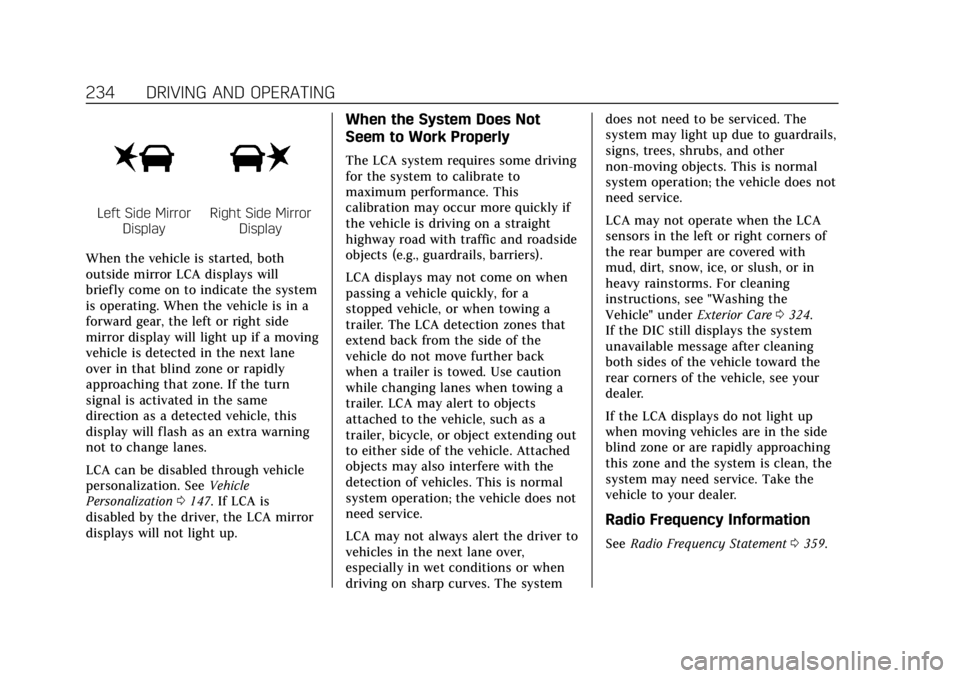
Left Side MirrorDisplayRight Side Mirror Display
When the vehicle is started, both
outside mirror LCA displays will
briefly come on to indicate the system
is operating. When the vehicle is in a
forward gear, the left or right side
mirror display will light up if a moving
vehicle is detected in the next lane
over in that blind zone or rapidly
approaching that zone. If the turn
signal is activated in the same
direction as a detected vehicle, this
display will flash as an extra warning
not to change lanes.
LCA can be disabled through vehicle
personalization. See Vehicle
Personalization 0147. If LCA is
disabled by the driver, the LCA mirror
displays will not light up.
When the System Does Not
Seem to Work Properly
The LCA system requires some driving
for the system to calibrate to
maximum performance. This
calibration may occur more quickly if
the vehicle is driving on a straight
highway road with traffic and roadside
objects (e.g., guardrails, barriers).
LCA displays may not come on when
passing a vehicle quickly, for a
stopped vehicle, or when towing a
trailer. The LCA detection zones that
extend back from the side of the
vehicle do not move further back
when a trailer is towed. Use caution
while changing lanes when towing a
trailer. LCA may alert to objects
attached to the vehicle, such as a
trailer, bicycle, or object extending out
to either side of the vehicle. Attached
objects may also interfere with the
detection of vehicles. This is normal
system operation; the vehicle does not
need service.
LCA may not always alert the driver to
vehicles in the next lane over,
especially in wet conditions or when
driving on sharp curves. The system does not need to be serviced. The
system may light up due to guardrails,
signs, trees, shrubs, and other
non-moving objects. This is normal
system operation; the vehicle does not
need service.
LCA may not operate when the LCA
sensors in the left or right corners of
the rear bumper are covered with
mud, dirt, snow, ice, or slush, or in
heavy rainstorms. For cleaning
instructions, see "Washing the
Vehicle" under
Exterior Care0324.
If the DIC still displays the system
unavailable message after cleaning
both sides of the vehicle toward the
rear corners of the vehicle, see your
dealer.
If the LCA displays do not light up
when moving vehicles are in the side
blind zone or are rapidly approaching
this zone and the system is clean, the
system may need service. Take the
vehicle to your dealer.
Radio Frequency Information
See Radio Frequency Statement 0359.
Page 237 of 388
Cadillac XT5 Owner Manual (GMNA-Localizing-U.S./Canada/Mexico-
12146119) - 2019 - crc - 7/27/18
236 DRIVING AND OPERATING
{Warning
Using LKA while towing a trailer or
on slippery roads could cause loss
of control of the vehicle and a
crash. Turn the system off.
How the System Works
The LKA camera sensor is on the
windshield ahead of the rearview
mirror.
To turn LKA on and off, press
A
on the steering wheel.
When on,
Ais green if LKA is
available to assist and provide LDW
alerts. It may assist by gently turning
the steering wheel and display
A
as amber if the vehicle approaches a
detected lane marking without using a
turn signal in that direction. It may
also provide an LDW alert by flashing
Aamber as the lane marking is
crossed. Additionally, there may be
three beeps, or the driver seat may pulse three times, on the right or left,
depending on the lane departure
direction.
Take Steering
The LKA system does not
continuously steer the vehicle. If LKA
does not detect active driver steering,
an alert, chime, or DIC message may
be provided. Move the steering wheel
to dismiss.
When the System Does Not
Seem to Work Properly
The system performance may be
affected by:
.
Close vehicles ahead.
. Sudden lighting changes, such as
when driving through tunnels.
. Banked roads.
. Roads with poor lane markings,
such as two-lane roads.
If the LKA system is not functioning
properly when lane markings are
clearly visible, cleaning the windshield
may help. A system unavailable message may
display if the camera is blocked. The
LKA system does not need service.
LKA assistance and/or LDW alerts
may occur due to tar marks, shadows,
cracks in the road, temporary or
construction lane markings, or other
road imperfections. This is normal
system operation; the vehicle does not
need service. Turn LKA off if these
conditions continue.
Page 244 of 388
Cadillac XT5 Owner Manual (GMNA-Localizing-U.S./Canada/Mexico-
12146119) - 2019 - crc - 7/27/18
DRIVING AND OPERATING 243
signs, trees, or other objects. Always
signal turns well in advance. Do not
steer or brake suddenly.
Driving on Grades
Reduce speed and shift to a lower gear
before starting down a long or steep
downhill grade. If the transmission is
not shifted down, the brakes may
overheat and result in reduced braking
efficiency.
The vehicle can tow in D (Drive). Shift
the transmission to a lower gear if the
transmission shifts too often under
heavy loads and/or hilly conditions.
When towing at higher altitudes,
engine coolant will boil at a lower
temperature than at lower altitudes.
If the engine is turned off immediately
after towing at high altitude on steep
uphill grades, the vehicle could show
signs similar to engine overheating. To
avoid this, let the engine run,
preferably on level ground, with the
transmission in P (Park) for a few
minutes before turning the engine off.
If the overheat warning comes on, see
Engine Overheating0265.
Parking on Hills
{Warning
To prevent serious injury or death,
always park your vehicle and trailer
on a level surface when possible.
When parking your vehicle and your
trailer on a hill: 1. Press the brake pedal, but do not shift into P (Park) yet. Turn the
wheels into the curb if facing
downhill or into traffic if facing
uphill.
2. Have someone place chocks under the trailer wheels.
3. When the wheel chocks are in place, gradually release the brake
pedal to allow the chocks to
absorb the load of the trailer.
4. Reapply the brake pedal. Then apply the parking brake and shift
into P (Park).
5. Release the brake pedal.
Leaving After Parking on a Hill
1. Apply and hold the brake pedal. .Start the engine.
. Shift into a gear.
. Release the parking brake.
2. Let up on the brake pedal.
3. Drive slowly until the trailer is clear of the chocks.
4. Stop and have someone pick up and store the chocks.
Maintenance When Trailer
Towing
The vehicle needs service more often
when used to tow trailers. See
Maintenance Schedule 0334. It is
especially important to check the
automatic transmission fluid, engine
oil, axle lubricant, belts, cooling
system, and brake system before and
during each trip.
Check periodically that all nuts and
bolts on the trailer hitch are tight.
Page 251 of 388
Cadillac XT5 Owner Manual (GMNA-Localizing-U.S./Canada/Mexico-
12146119) - 2019 - crc - 7/27/18
250 DRIVING AND OPERATING
The seven-wire harness contains the
following trailer circuits:Stop/Turn
Signal Left Yellow/Blue
Stop/Turn Signal
Right Green/Brown
Tail/Parking
Lamps Gray/Brown
Reverse Lamps White/Green
Battery Feed Red/Green
Ground Black
Electric Trailer
Brake* Blue
* Circuit powered by electric trailer
brake control wiring provisions.
Electric Trailer Brake Control
Wiring Provisions
Wiring provisions for an aftermarket
electric trailer brake controller are
included with the vehicle as part of
the trailer wiring package. The
harness contains the following
circuits: Electric Trailer
Brakes
Blue
Battery Feed Red/Green or
Red/Blue
Brake Apply
Signal White/Blue
Ground Black
Refer to the aftermarket electric trailer
brake controller owner's manual to
determine wire color coding of the
electric trailer brake controller. The
wire colors on the brake controller
may be different from the vehicle. The
electric trailer brake controller should
be installed by your dealer or a
qualified service center.
If equipped, there are four blunt cut
wires inside the front driver side
instrument panel. It will be necessary
to have a technician connect the
12-volt power to the engine
compartment fuse block.
Trailer Lamps
Always check all trailer lamps are
working at the beginning of each trip,
and periodically on longer trips.
Turn Signals When Towing a
Trailer
When properly connected, the trailer
turn signals will illuminate to indicate
the vehicle is turning, changing lanes,
or stopping. When towing a trailer,
the arrows on the instrument cluster
will illuminate even if the trailer is not
properly connected or the bulbs are
burned out.
Always check all trailer lamps are
working at the beginning of each trip,
and periodically on longer trips.
Trailer Sway Control (TSC)
Vehicles with StabiliTrak/Electronic
Stability Control (ESC) have a Trailer
Sway Control (TSC) feature. Trailer
sway is unintended side-to-side
motion of a trailer while towing. If the
vehicle is towing a trailer and the TSC
detects that sway is increasing, the
vehicle brakes are selectively applied
at each wheel, to help reduce
excessive trailer sway. If equipped with
the Integrated Trailer Brake Control
Page 253 of 388
Cadillac XT5 Owner Manual (GMNA-Localizing-U.S./Canada/Mexico-
12146119) - 2019 - crc - 7/27/18
252 DRIVING AND OPERATING
Conversions and
Add-Ons
Add-On Electrical
Equipment
{Warning
The Data Link Connector (DLC) is
used for vehicle service and
Emission Inspection/Maintenance
testing. SeeMalfunction Indicator
Lamp (Check Engine Light) 0132.
A device connected to the DLC —
such as an aftermarket fleet or
driver-behavior tracking device —
may interfere with vehicle systems.
This could affect vehicle operation
and cause a crash. Such devices
may also access information stored
in the vehicle’s systems.
Caution
Some electrical equipment can
damage the vehicle or cause
components to not work and would
not be covered by the vehicle
warranty. Always check with your
dealer before adding electrical
equipment.
Add-on equipment can drain the
vehicle's 12-volt battery, even if the
vehicle is not operating.
The vehicle has an airbag system.
Before attempting to add anything
electrical to the vehicle, see Servicing
the Airbag-Equipped Vehicle 086 and
Adding Equipment to the
Airbag-Equipped Vehicle 086.
Page 254 of 388
Cadillac XT5 Owner Manual (GMNA-Localizing-U.S./Canada/Mexico-
12146119) - 2019 - crc - 7/27/18
VEHICLE CARE 253
Vehicle Care
General Information
General Information . . . . . . . . . . . . . 254
California Proposition65 Warning . . . . . . . . . . . . . . . . . . . . . 254
California Perchlorate Materials Requirements . . . . . . . . . . . . . . . . . . . 255
Accessories and Modifications . . . . . . . . . . . . . . . . . . . 255
Vehicle Checks
Doing Your OwnService Work . . . . . . . . . . . . . . . . . . . . 255
Hood . . . . . . . . . . . . . . . . . . . . . . . . . . . . . . 256
Engine Compartment Overview . . . . . . . . . . . . . . . . . . . . . . . . . 257
Engine Oil . . . . . . . . . . . . . . . . . . . . . . . . . 258
Engine Oil Life System . . . . . . . . . . . 260
Automatic Transmission Fluid . . . . . . . . . . . . . . . . . . . . . . . . . . . . . 261
Engine Air Cleaner/Filter . . . . . . . . . 262
Cooling System . . . . . . . . . . . . . . . . . . . 262
Engine Overheating . . . . . . . . . . . . . . 265
Washer Fluid . . . . . . . . . . . . . . . . . . . . . 267
Brakes . . . . . . . . . . . . . . . . . . . . . . . . . . . . . 267
Brake Fluid . . . . . . . . . . . . . . . . . . . . . . . 268
Battery - North America . . . . . . . . . 269
All-Wheel Drive . . . . . . . . . . . . . . . . . . 270 Starter Switch Check . . . . . . . . . . . . . 270
Park Brake and P (Park)
Mechanism Check . . . . . . . . . . . . . . 270
Wiper Blade Replacement . . . . . . . 271
Windshield Replacement . . . . . . . . 272
Gas Strut(s) . . . . . . . . . . . . . . . . . . . . . . . 272
Headlamp Aiming
Headlamp Aiming . . . . . . . . . . . . . . . . 273
Bulb Replacement
Bulb Replacement . . . . . . . . . . . . . . . . 274
Halogen Bulbs . . . . . . . . . . . . . . . . . . . . 274
LED Lighting . . . . . . . . . . . . . . . . . . . . . 274
Headlamps and Front Turn Signal . . . . . . . . . . . . . . . . . . . . . . . . . . . . 274
Electrical System
Electrical System Overload . . . . . . 275
Fuses and Circuit Breakers . . . . . . 275
Engine Compartment FuseBlock . . . . . . . . . . . . . . . . . . . . . . . . . . . . 276
Instrument Panel Fuse Block . . . . 279
Rear Compartment Fuse Block . . . . . . . . . . . . . . . . . . . . . . . . . . . . 282
Wheels and Tires
Tires . . . . . . . . . . . . . . . . . . . . . . . . . . . . . . . 284
All-Season Tires . . . . . . . . . . . . . . . . . . 285
Winter Tires . . . . . . . . . . . . . . . . . . . . . . 285
Summer Tires . . . . . . . . . . . . . . . . . . . . 285
Tire Sidewall Labeling . . . . . . . . . . . 286 Tire Designations . . . . . . . . . . . . . . . . . 288
Tire Terminology and
Definitions . . . . . . . . . . . . . . . . . . . . . . 288
Tire Pressure . . . . . . . . . . . . . . . . . . . . . . 291
Tire Pressure for High-Speed Operation . . . . . . . . . . . . . . . . . . . . . . . . 292
Tire Pressure Monitor System . . . 293
Tire Pressure Monitor Operation . . . . . . . . . . . . . . . . . . . . . . . . 294
Tire Inspection . . . . . . . . . . . . . . . . . . . 297
Tire Rotation . . . . . . . . . . . . . . . . . . . . . 298
When It Is Time for New Tires . . . . . . . . . . . . . . . . . . . . . . . . . . . . . 299
Buying New Tires . . . . . . . . . . . . . . . . 299
Different Size Tires and Wheels . . . . . . . . . . . . . . . . . . . . . . . . . . 301
Uniform Tire Quality Grading . . . 301
Wheel Alignment and Tire Balance . . . . . . . . . . . . . . . . . . . . . . . . . . 302
Wheel Replacement . . . . . . . . . . . . . . 303
Tire Chains . . . . . . . . . . . . . . . . . . . . . . . 304
If a Tire Goes Flat . . . . . . . . . . . . . . . . 304
Tire Sealant and Compressor Kit . . . . . . . . . . . . . . . . . 306
Storing the Tire Sealant and Compressor Kit . . . . . . . . . . . . . . . . . 312
Tire Changing . . . . . . . . . . . . . . . . . . . . . 313
Compact Spare Tire . . . . . . . . . . . . . . 318
Page 255 of 388

Cadillac XT5 Owner Manual (GMNA-Localizing-U.S./Canada/Mexico-
12146119) - 2019 - crc - 7/27/18
254 VEHICLE CARE
Jump Starting
Jump Starting - NorthAmerica . . . . . . . . . . . . . . . . . . . . . . . . . 319
Towing the Vehicle
Towing the Vehicle . . . . . . . . . . . . . . . 321
Recreational Vehicle Towing . . . . 322
Appearance Care
Exterior Care . . . . . . . . . . . . . . . . . . . . . . 324
Interior Care . . . . . . . . . . . . . . . . . . . . . . 329
Floor Mats . . . . . . . . . . . . . . . . . . . . . . . . 331
General Information
For service and parts needs, visit your
dealer. You will receive genuine GM
parts and GM-trained and supported
service people.
Genuine GM parts have one of these
marks:
California Proposition
65 Warning
{Warning
Most motor vehicles, including this
one, as well as many of its service
parts and fluids, contain and/or
emit chemicals known to the State
of California to cause cancer and
birth defects or other reproductive
harm. Engine exhaust, many parts
and systems, many fluids, and
some component wear by-products
contain and/or emit these
chemicals. For more information go
to www.P65Warnings.ca.gov/
passenger-vehicle.
See Battery - North America 0269 and
Jump Starting - North America 0319
and the back cover.
Page 256 of 388
Cadillac XT5 Owner Manual (GMNA-Localizing-U.S./Canada/Mexico-
12146119) - 2019 - crc - 7/27/18
VEHICLE CARE 255
California Perchlorate
Materials Requirements
Certain types of automotive
applications, such as airbag initiators,
seat belt pretensioners, and lithium
batteries contained in Remote Keyless
Entry transmitters, may contain
perchlorate materials. Special
handling may be necessary. For
additional information, see
www.dtsc.ca.gov/hazardouswaste/
perchlorate.
Accessories and
Modifications
Adding non-dealer accessories or
making modifications to the vehicle
can affect vehicle performance and
safety, including such things as
airbags, braking, stability, ride and
handling, emissions systems,
aerodynamics, durability, and
electronic systems like antilock
brakes, traction control, and stability
control. These accessories or
modifications could even cause
malfunction or damage not covered by
the vehicle warranty.Damage to suspension components
caused by modifying vehicle height
outside of factory settings will not be
covered by the vehicle warranty.
Damage to vehicle components
resulting from modifications or the
installation or use of non-GM certified
parts, including control module or
software modifications, is not covered
under the terms of the vehicle
warranty and may affect remaining
warranty coverage for affected parts.
GM Accessories are designed to
complement and function with other
systems on the vehicle. See your
dealer to accessorize the vehicle using
genuine GM Accessories installed by a
dealer technician.
Also, see
Adding Equipment to the
Airbag-Equipped Vehicle 086.
Vehicle Checks
Doing Your Own
Service Work
{Warning
It can be dangerous to work on
your vehicle if you do not have the
proper knowledge, service manual,
tools, or parts. Always follow
owner’s manual procedures and
consult the service manual for your
vehicle before doing any
service work.
If doing some of your own service
work, use the proper service manual.
It tells you much more about how to
service the vehicle than this manual
can. To order the proper service
manual, see Publication Ordering
Information 0359.
This vehicle has an airbag system.
Before attempting to do your own
service work, see Servicing the
Airbag-Equipped Vehicle 086.
Page 257 of 388
Cadillac XT5 Owner Manual (GMNA-Localizing-U.S./Canada/Mexico-
12146119) - 2019 - crc - 7/27/18
256 VEHICLE CARE
If equipped with remote vehicle start,
open the hood before performing any
service work to prevent remote
starting the vehicle accidentally. See
Remote Vehicle Start033.
Keep a record with all parts receipts
and list the mileage and the date of
any service work performed. See
Maintenance Records 0345.
Caution
Even small amounts of
contamination can cause damage to
vehicle systems. Do not allow
contaminants to contact the fluids,
reservoir caps, or dipsticks.
Hood
To open the hood:
1. Pull the hood release lever with
this symbol on it. It is inside the
vehicle on the lower side of the
instrument panel.
2. Go to the front of the vehicle tofind the secondary hood release
handle. The handle is under the
front edge of the hood near the
center. Push the handle to the
right, then raise the hood.
To close the hood: 1. Before closing the hood, be sure all the filler caps are on properly.
2. Lower the hood from full open to within 15 cm (6 in) from the
closed position, pause, then push
the front center of the hood with
a swift, firm motion to fully close
the hood. Check to make sure
the hood is closed and repeat the
process if necessary.
Page 260 of 388
Cadillac XT5 Owner Manual (GMNA-Localizing-U.S./Canada/Mexico-
12146119) - 2019 - crc - 7/27/18
VEHICLE CARE 259
.If unable to wait two hours, the
engine must be off for at least
15 minutes if the engine is warm,
or at least 30 minutes if the
engine is not warm. Pull out the
dipstick, wipe it with a clean paper
towel or cloth, then push it back
in all the way. Remove it again,
keeping the tip down, and check
the level.
When to Add Engine Oil
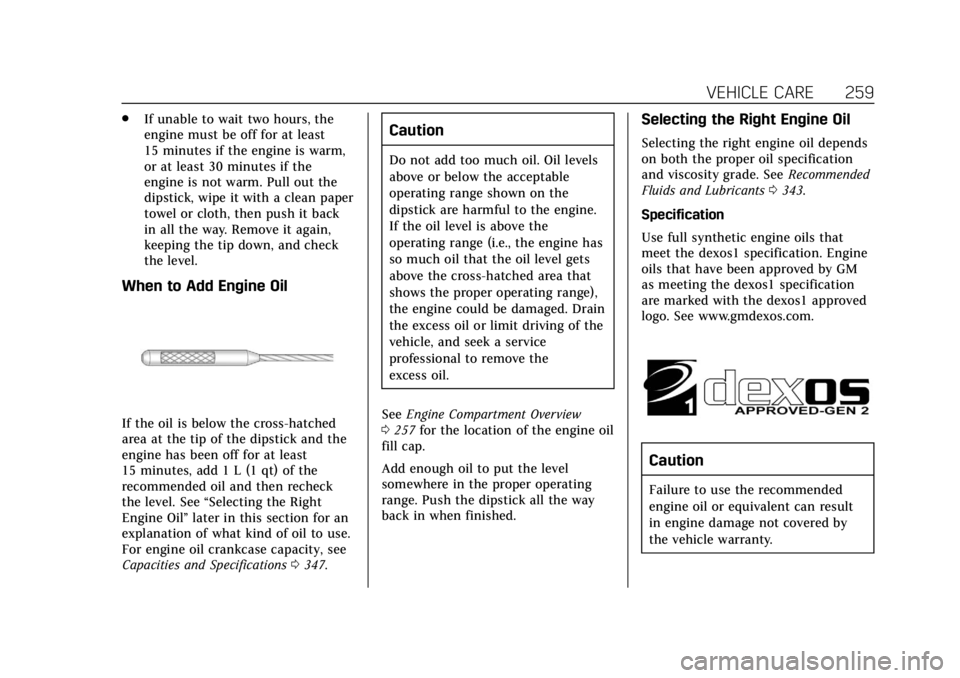
If the oil is below the cross-hatched
area at the tip of the dipstick and the
engine has been off for at least
15 minutes, add 1 L (1 qt) of the
recommended oil and then recheck
the level. See “Selecting the Right
Engine Oil” later in this section for an
explanation of what kind of oil to use.
For engine oil crankcase capacity, see
Capacities and Specifications 0347.
Caution
Do not add too much oil. Oil levels
above or below the acceptable
operating range shown on the
dipstick are harmful to the engine.
If the oil level is above the
operating range (i.e., the engine has
so much oil that the oil level gets
above the cross-hatched area that
shows the proper operating range),
the engine could be damaged. Drain
the excess oil or limit driving of the
vehicle, and seek a service
professional to remove the
excess oil.
See Engine Compartment Overview
0 257 for the location of the engine oil
fill cap.
Add enough oil to put the level
somewhere in the proper operating
range. Push the dipstick all the way
back in when finished.
Selecting the Right Engine Oil
Selecting the right engine oil depends
on both the proper oil specification
and viscosity grade. See Recommended
Fluids and Lubricants 0343.
Specification
Use full synthetic engine oils that
meet the dexos1 specification. Engine
oils that have been approved by GM
as meeting the dexos1 specification
are marked with the dexos1 approved
logo. See www.gmdexos.com.
Caution
Failure to use the recommended
engine oil or equivalent can result
in engine damage not covered by
the vehicle warranty.