lock CADILLAC XT5 2023 Workshop Manual
[x] Cancel search | Manufacturer: CADILLAC, Model Year: 2023, Model line: XT5, Model: CADILLAC XT5 2023Pages: 482, PDF Size: 7.1 MB
Page 106 of 482

Cadillac XT5 Owner Manual (GMNA-Localizing-U.S./Canada/Mexico-
16406251) - 2023 - CRC - 3/25/22
Storage 105
Remove the load floor hook
from the holder and hook to
the weatherstrip above.
When done, return the load
floor hook to the holder.To install the load floor hook
into the holder:
1. Insert one side of the loadfloor hook into the holder.
2. Push down on the otherside of the load floor hook
to lock into place.
Page 109 of 482

Cadillac XT5 Owner Manual (GMNA-Localizing-U.S./Canada/Mexico-
16406251) - 2023 - CRC - 3/25/22
108 Storage
Cargo Management
System
Cargo Management System
Cargo Management SystemUnlock
Cargo Management System
Installation 1. Turn both knobs to the unlock position.
2. Slide the divider along the rail to the desired position
until it clicks into place.
3. Make sure the divider is locked into place in the rail
grooves.
4. Turn both knobs to the lock position. Cargo Management System
Removal
1. Turn both knobs to the unlock position.
2. Press the buttons and pull up to remove the divider.
3. Remove the knobs prior to storing the divider. Failure
to do so will cause
interference.
4. Store the dividerappropriately.
Page 110 of 482

Cadillac XT5 Owner Manual (GMNA-Localizing-U.S./Canada/Mexico-
16406251) - 2023 - CRC - 3/25/22
Storage 109
Convenience Net
This vehicle may have a
convenience net in the rear of
the vehicle. Attach it to the
cargo tie-downs for storing
small loads.
Do not use the net to store
heavy loads.
Roof Rack System
The vehicle may be equipped
with side-rails for a roof rack
system. Cargo must be
secured with properly installed
cross rails and other
accessories designed to carry
cargo. These can be
purchased from your dealer.
{Warning
Before driving and
occasionally during a trip,
check that cargo is securely
fastened, rests evenly
between the cross rails and
does not block the vehicle's(Continued)
Warning (Continued)
lamps or windows. Never
load cargo directly on the
roof of the vehicle or allow
cargo to hang over the rear
or sides of the vehicle.
Never load cargo without
first properly installing cross
rails and other accessories
designed to carry cargo.
Personal injury, death or
damage to the vehicle or
other property may occur.
If driving for a long distance,
on rough roads, or at high
speeds, occasionally stop the
vehicle to make sure the cargo
remains in its place.
Cargo Weight Limits
Do not exceed the maximum
cargo weight for the roof rack
system, including the weight
of the cross rails and any
other accessories used to
carry the cargo such as bike
racks or roof boxes. The maximum cargo weight that
can be loaded onto the roof
rack system is 100 kg (220 lb)
or the weight designated in
the instructions that came
with the cross rails or other
roof rack accessories,
whichever is less.
{Warning
Never load the roof rack
with more weight than
specified in this section.
Loading cargo on the roof
rack will make the vehicle's
center of gravity higher. To
avoid losing control of the
vehicle, avoid overloading,
high speeds, sudden starts,
sharp turns, sudden braking,
or abrupt maneuvers when
carrying cargo on the
roof rack.
The weight of any cargo
carried on the roof rack
system must be included in
calculating the loaded weight
of the vehicle. Do not exceed
Page 112 of 482
Cadillac XT5 Owner Manual (GMNA-Localizing-U.S./Canada/Mexico-
16406251) - 2023 - CRC - 3/25/22
Instruments and Controls 111
Instruments and
Controls
Controls
Steering WheelAdjustment . . . . . . . . . . . . . . . . . 112
Heated Steering Wheel . . . 113
Horn . . . . . . . . . . . . . . . . . . . . . . . . . . . . 113
Windshield Wiper/ Washer . . . . . . . . . . . . . . . . . . . . . . 113
Rear Window Wiper/ Washer . . . . . . . . . . . . . . . . . . . . . . 116
Compass . . . . . . . . . . . . . . . . . . . . . . 117
Clock . . . . . . . . . . . . . . . . . . . . . . . . . . . 118
Power Outlets . . . . . . . . . . . . . . . 118
Wireless Charging . . . . . . . . . . 118
Warning Lights, Gauges,
and Indicators
Warning Lights, Gauges, and Indicators . . . . . . . . . . . . . . 121
Instrument Cluster . . . . . . . . 122
Speedometer . . . . . . . . . . . . . . . 125
Odometer . . . . . . . . . . . . . . . . . . . . 125
Trip Odometer . . . . . . . . . . . . . . 125
Tachometer . . . . . . . . . . . . . . . . . . 125
Fuel Gauge . . . . . . . . . . . . . . . . . . . 125
Engine Coolant Temperature Gauge . . . . . 126 Seat Belt Reminders . . . . . . 126
Airbag Readiness
Light . . . . . . . . . . . . . . . . . . . . . . . . . . 127
Passenger Airbag Status Indicator . . . . . . . . . . . . . . . . . . . . . 128
Charging System Light . . . 128
Malfunction Indicator Lamp (Check Engine
Light) . . . . . . . . . . . . . . . . . . . . . . . . . 129
Brake System Warning Light . . . . . . . . . . . . . . . . . . . . . . . . . . 131
Electric Parking Brake Light . . . . . . . . . . . . . . . . . . . . . . . . . . 132
Service Electric Parking Brake Light . . . . . . . . . . . . . . . . . 132
Antilock Brake System (ABS) Warning Light . . . . . 132
Performance Shifting Light . . . . . . . . . . . . . . . . . . . . . . . . . 133
All-Wheel-Drive Light . . . . . 133
Lane Keep Assist (LKA) Light . . . . . . . . . . . . . . . . . . . . . . . . . 133
Vehicle Ahead Indicator . . . . . . . . . . . . . . . . . . . . 134
Pedestrian Ahead Indicator . . . . . . . . . . . . . . . . . . . . 134
Traction Off Light . . . . . . . . . 134
StabiliTrak OFF Light . . . . . 135 Traction Control System
(TCS)/StabiliTrak
Light . . . . . . . . . . . . . . . . . . . . . . . . . 135
Engine Coolant Temperature Warning
Light (Uplevel Only) . . . . . . 135
Driver Mode Control Light . . . . . . . . . . . . . . . . . . . . . . . . . 136
Tire Pressure Light . . . . . . . 136
Engine Oil Pressure Light . . . . . . . . . . . . . . . . . . . . . . . . . . 137
Low Fuel Warning Light . . . . . . . . . . . . . . . . . . . . . . . . . . 137
Security Light . . . . . . . . . . . . . . . 138
High-Beam On Light . . . . . . 138
Lamps On Reminder . . . . . . 138
Cruise Control Light . . . . . . 138
Door Ajar Light . . . . . . . . . . . . . 139
Information Displays
Driver Information Center (DIC) . . . . . . . . . . . . . . . . 139
Head-Up Display (HUD) . . . 142
Vehicle Messages
Vehicle Messages . . . . . . . . . 146
Engine Power Messages . . . . . . . . . . . . . . . . . . . 146
Vehicle Speed
Messages . . . . . . . . . . . . . . . . . . . 147
Page 113 of 482

Cadillac XT5 Owner Manual (GMNA-Localizing-U.S./Canada/Mexico-
16406251) - 2023 - CRC - 3/25/22
112 Instruments and Controls
Universal Remote System
Universal RemoteSystem . . . . . . . . . . . . . . . . . . . . . . 147
Universal Remote System Programming . . . . . . . . . . . . . . 147
Universal Remote System
Operation . . . . . . . . . . . . . . . . . . . 150Controls
Steering Wheel
Adjustment
Manual Steering Wheel
To adjust the steering wheel,
if equipped: 1. Pull the lever down.
2. Move the steering wheel up or down.
3. Pull or push the steering wheel closer or away
from you.
4. Pull the lever up to lock the steering wheel in place. Do not adjust the steering
wheel while driving.
Power Tilt and Telescoping
Steering Wheel
To adjust the steering wheel,
if equipped: 1. Press the control up or down to tilt the steering
wheel up or down.
2. Press the control forward or rearward to move the
steering wheel closer or
away from you.
Do not adjust the steering
wheel while driving.
Page 115 of 482
Cadillac XT5 Owner Manual (GMNA-Localizing-U.S./Canada/Mexico-
16406251) - 2023 - CRC - 3/25/22
114 Instruments and Controls
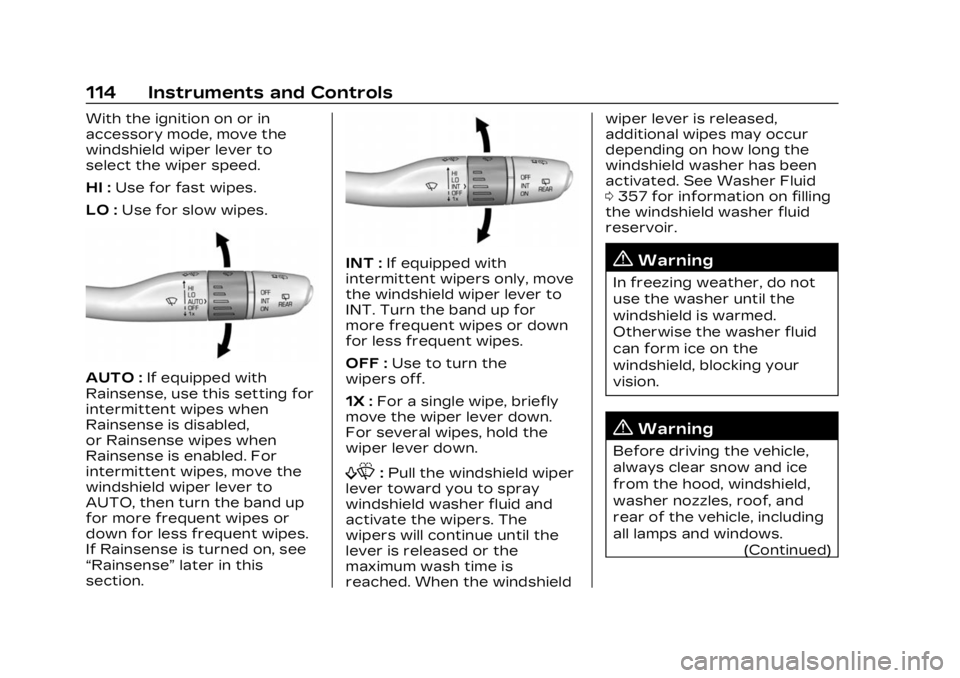
With the ignition on or in
accessory mode, move the
windshield wiper lever to
select the wiper speed.
HI :Use for fast wipes.
LO : Use for slow wipes.
AUTO : If equipped with
Rainsense, use this setting for
intermittent wipes when
Rainsense is disabled,
or Rainsense wipes when
Rainsense is enabled. For
intermittent wipes, move the
windshield wiper lever to
AUTO, then turn the band up
for more frequent wipes or
down for less frequent wipes.
If Rainsense is turned on, see
“Rainsense” later in this
section.
INT : If equipped with
intermittent wipers only, move
the windshield wiper lever to
INT. Turn the band up for
more frequent wipes or down
for less frequent wipes.
OFF : Use to turn the
wipers off.
1X : For a single wipe, briefly
move the wiper lever down.
For several wipes, hold the
wiper lever down.
f: Pull the windshield wiper
lever toward you to spray
windshield washer fluid and
activate the wipers. The
wipers will continue until the
lever is released or the
maximum wash time is
reached. When the windshield wiper lever is released,
additional wipes may occur
depending on how long the
windshield washer has been
activated. See Washer Fluid
0
357 for information on filling
the windshield washer fluid
reservoir.
{Warning
In freezing weather, do not
use the washer until the
windshield is warmed.
Otherwise the washer fluid
can form ice on the
windshield, blocking your
vision.
{Warning
Before driving the vehicle,
always clear snow and ice
from the hood, windshield,
washer nozzles, roof, and
rear of the vehicle, including
all lamps and windows.
(Continued)
Page 119 of 482
Cadillac XT5 Owner Manual (GMNA-Localizing-U.S./Canada/Mexico-
16406251) - 2023 - CRC - 3/25/22
118 Instruments and Controls
Clock
Set the time and date using
the infotainment system. See
"Time/Date" under Settings
0205.
Power Outlets
The accessory power outlet
can be used to plug in
electrical equipment, such as a
cell phone or MP3 player.
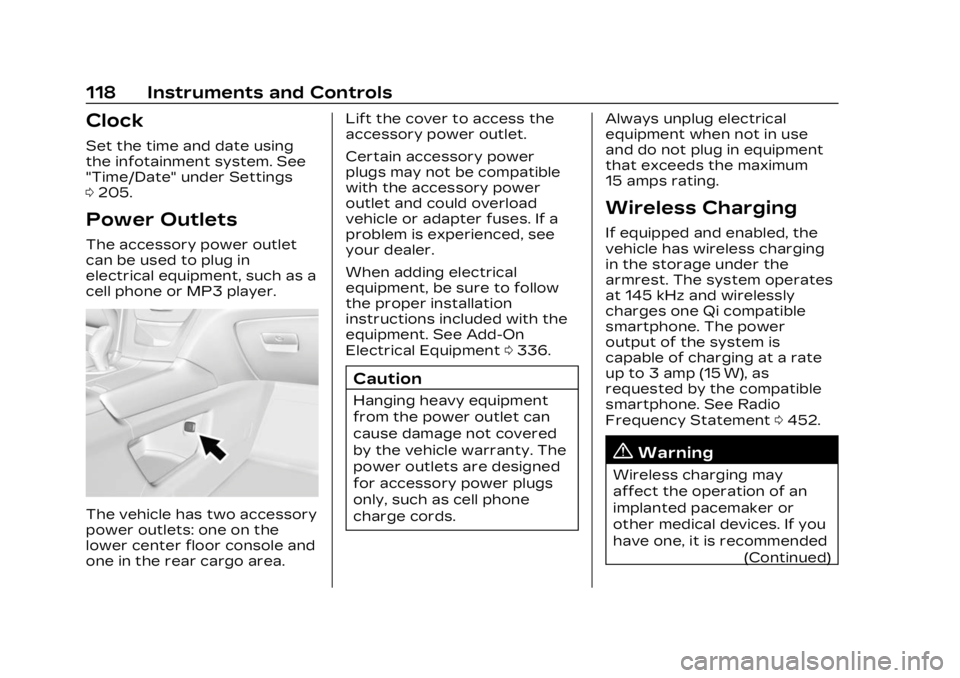
The vehicle has two accessory
power outlets: one on the
lower center floor console and
one in the rear cargo area. Lift the cover to access the
accessory power outlet.
Certain accessory power
plugs may not be compatible
with the accessory power
outlet and could overload
vehicle or adapter fuses. If a
problem is experienced, see
your dealer.
When adding electrical
equipment, be sure to follow
the proper installation
instructions included with the
equipment. See Add-On
Electrical Equipment
0336.
Caution
Hanging heavy equipment
from the power outlet can
cause damage not covered
by the vehicle warranty. The
power outlets are designed
for accessory power plugs
only, such as cell phone
charge cords. Always unplug electrical
equipment when not in use
and do not plug in equipment
that exceeds the maximum
15 amps rating.
Wireless Charging
If equipped and enabled, the
vehicle has wireless charging
in the storage under the
armrest. The system operates
at 145 kHz and wirelessly
charges one Qi compatible
smartphone. The power
output of the system is
capable of charging at a rate
up to 3 amp (15 W), as
requested by the compatible
smartphone. See Radio
Frequency Statement
0452.
{Warning
Wireless charging may
affect the operation of an
implanted pacemaker or
other medical devices. If you
have one, it is recommended
(Continued)
Page 133 of 482

Cadillac XT5 Owner Manual (GMNA-Localizing-U.S./Canada/Mexico-
16406251) - 2023 - CRC - 3/25/22
132 Instruments and Controls
Electric Parking Brake
Light
MetricEnglish BaseLevel
English Uplevel
This light comes on when the
parking brake is applied. If the
light continues flashing after
the parking brake is released,
or while driving, there is a
problem with the Electric
Parking Brake system. A message may also display in
the Driver Information
Center (DIC).
If the light does not come on,
or remains flashing, see your
dealer.
Service Electric
Parking Brake Light
This light should come on
briefly when the vehicle is
turned on. If it does not come
on, have it fixed so it will be
ready to warn if there is a
problem. For vehicles with the
reconfigurable cluster, this
light may not come on when
the vehicle is started.
If this light stays on or comes
on while driving, there is a
problem with the Electric
Parking Brake (EPB). Take thevehicle to a dealer as soon as
possible. In addition to the
parking brake, other safety
functions that utilize the EPB
may also be degraded.
A message may also display in
the Driver Information Center
(DIC). See Electric Parking
Brake
0269.
Antilock Brake
System (ABS)
Warning Light
This light comes on briefly
when the vehicle is turned on
to show that the light is
working. If it does not come on
then, have it fixed so it will be
ready to warn you if there is a
problem.
Page 154 of 482

Cadillac XT5 Owner Manual (GMNA-Localizing-U.S./Canada/Mexico-
16406251) - 2023 - CRC - 3/25/22
Lighting 153
instrument cluster light will
come on to indicate the
IntelliBeam is reactivated.
The high beams may not turn
off automatically if the system
cannot detect another
vehicle's lamps because of any
of the following:
.The other vehicle's lamps
are missing, damaged,
obstructed from view,
or otherwise undetected.
.The other vehicle's lamps
are covered with dirt, snow,
and/or road spray.
.The other vehicle's lamps
cannot be detected due to
dense exhaust, smoke, fog,
snow, road spray, mist,
or other airborne
obstructions.
.The vehicle's windshield is
dirty, cracked, or obstructed
by something that blocks the
view of the light sensor.
.The vehicle is loaded such
that the front end points
upward, causing the light sensor to aim high and not
detect headlamps and
taillamps.
.The vehicle is being driven
on winding or hilly roads.
The automatic high-beam
headlamps may need to be
disabled if any of the above
conditions exist.
Exterior Lamps Off
Reminder
A warning chime sounds if the
driver door is opened while
the ignition is off and the
exterior lamps are on.
Headlamp High/
Low-Beam Changer
3: Push the turn signal lever
away from you and release, to
turn the high beams on. To
return to low beams, push the
lever again or pull it toward
you and release.
This indicator light turns on in
the instrument cluster when
the high-beam headlamps
are on.
Flash-to-Pass
To flash the high beams, pull
the turn signal lever toward
you, and release.
Daytime Running
Lamps (DRL)
DRL can make it easier for
others to see the front of your
vehicle during the day. Fully
functional DRL are required on
all vehicles first sold in
Canada.
The dedicated DRL will come
on when all of the following
conditions are met:
.The ignition is on.
Page 206 of 482
Cadillac XT5 Owner Manual (GMNA-Localizing-U.S./Canada/Mexico-
16406251) - 2023 - CRC - 3/25/22
Infotainment System 205
apply. For Android Auto
support and to see if your
phone is compatible, see
https://support.google.com/
androidauto. For Apple
CarPlay support and to see if
your phone is compatible, see
www.apple.com/ios/carplay/.
Apple or Google may change
or suspend availability at any
time. Android Auto, Android,
Google, Google Play, and other
marks are trademarks of
Google Inc.; Apple CarPlay is a
trademark of Apple Inc.
Press
{on the center stack to
exit Android Auto or Apple
CarPlay. To enter back into
Android Auto or Apple
CarPlay, press and hold
{on
the center stack.
Apple CarPlay and Android
Auto can be disabled from the
infotainment system. To do
this, touch Home, Settings,
and then touch the Apps tab
along the top of the display. Use the On/Off toggled to
turn off Apple CarPlay or
Android Auto.
Settings
Certain settings can be
managed in the Online
Account sites when an
account is established, and
may be modified if other users
have accessed the vehicle or
created accounts. This may
result in changes to the
security or functionality of the
infotainment system. Some
settings may also be
transferred to a new vehicle,
if equipped. For instructions,
visit your brand website.
Refer to the User Terms and
Privacy Statement for
important details. To view,
touch the Settings icon on the
Home Page of the
infotainment display.
The settings menu may be
organized into four categories.
Select the desired category by
touching System, Apps,
Vehicle, or Personal.
To access the personalization
menus:
1. Touch Settings on the Home Page on the
infotainment display.
2. Touch the desired category to display a list of
available options.
3. Touch to select the desired feature setting.
4. Touch the options on the infotainment display to
disable or enable a feature.
5. Touch
zto go to the top
level of the Settings menu.
System
The menu may contain the
following:
Time / Date
Allows setting of the clock.