check CADILLAC XT6 2021 Service Manual
[x] Cancel search | Manufacturer: CADILLAC, Model Year: 2021, Model line: XT6, Model: CADILLAC XT6 2021Pages: 431, PDF Size: 8.29 MB
Page 237 of 431

Cadillac XT6 Owner Manual (GMNA-Localizing-U.S./Canada-14574701) -
2021 - CRC - 2/8/21
236 DRIVING AND OPERATING
starting the vehicle. An internal
thermostat in the plug end of the cord
will prevent engine heater operation
at temperatures above−18 °C (0 °F).
{Warning
Do not plug in the engine block
heater while the vehicle is parked in
a garage or under a carport.
Property damage or personal injury
may result. Always park the vehicle
in a clear open area away from
buildings or structures.
To Use the Engine Heater
1. Turn off the engine.
2. Remove the engine heater
connector cover by gently prying
with a flat-bladed tool at the
location of the notch along the top
edge of the cover.
3. Check the heater cord for damage.If it is damaged, do not use it. See
your dealer for a replacement.
Inspect the cord for damage yearly.
4. Plug the heater cord into theconnector in the front fascia.
5. Plug it into a normal, grounded 110-volt AC outlet.
{Warning
Improper use of the heater cord or
an extension cord can damage the
cord and may result in overheating
and fire.
.Plug the cord into a three-prong
electrical utility receptacle that is
protected by a ground fault
(Continued)
Page 239 of 431
Cadillac XT6 Owner Manual (GMNA-Localizing-U.S./Canada-14574701) -
2021 - CRC - 2/8/21
238 DRIVING AND OPERATING
Warning (Continued)
move suddenly. You or others could
be injured. To be sure the vehicle
will not move, even when you are
on fairly level ground, always set
the parking brake and shift to
P (Park). SeeShifting Into Park 0237
. If you are towing a trailer, see
Driving Characteristics and Towing
Tips 0290.
If you have to leave the vehicle with
the engine running, be sure the
vehicle is in P (Park) and the parking
brake is set before you leave it.
If you are towing a trailer and parking
on a hill, see Driving Characteristics
and Towing Tips 0290.
Shifting out of Park
This vehicle is equipped with an
electronic transmission. The shift lock
release button is designed to prevent
inadvertent shifting out of P (Park).
To shift out of P (Park):
1. Ensure the engine is running.
2. Apply the brake pedal. 3. Press and hold the shift lock
release button on the shift lever.
4. Move the shift lever to the desired position. For N (Neutral) hold the
lever in the N (Neutral) position
until the N indicator
illuminates red.
5. The P indicator will turn white and the gear indicator will turn red
when the vehicle is no longer in
P (Park).
After releasing the shift lever, it will
return to the center position.
If the vehicle cannot shift from
P (Park), a Driver Information Center
(DIC) message may be displayed.
Check that the ignition is on, the
engine is running, the brake pedal is
applied, and the shift lock release
button is pressed when you are
attempting to shift out of P (park).
If all of these are met but the vehicle
will not shift out of P (Park), see your
dealer for service.
Parking over Things
That Burn
{Warning
Things that can burn could touch
hot exhaust parts under the vehicle
and ignite. Do not park over papers,
leaves, dry grass, or other things
that can burn.
Active Fuel Management
This vehicle's engine may be equipped
with Active Fuel Management, which
allows the engine to operate on either
all of its cylinders, or in reduced
cylinder operation mode, depending
on the driving conditions.
When less power is required, such as
cruising at a constant vehicle speed,
the system will operate in reduced
cylinder operation mode, allowing the
vehicle to achieve better fuel economy.
When greater power demands are
required, such as accelerating from a
stop, passing, or merging onto a
freeway, the system will maintain
full-cylinder operation.
Page 242 of 431

Cadillac XT6 Owner Manual (GMNA-Localizing-U.S./Canada-14574701) -
2021 - CRC - 2/8/21
DRIVING AND OPERATING 241
This vehicle is equipped with an
electronically controlled transmission.
The shift lock release button is
designed to prevent inadvertent
shifting out of P (Park) unless the
ignition is on, the brake pedal is
applied, and the shift lock release
button is pressed.
When the vehicle is stopped, press
ENGINE START/STOP to turn off the
vehicle. The transmission will shift to
P (Park) automatically unless the
vehicle is in N (Neutral), See“Car
Wash Mode ”later in this section.
The vehicle will not shift into P (Park)
if it is moving too fast. Stop the
vehicle and shift into P (Park). To shift into and out of P (Park), see
Shifting Into Park
0237 and
Shifting out of Park 0238.
Service Shift Lever Message
If the message SERVICE SHIFTER SEE
OWNER’S MANUAL appears in the
Driver Information Center (DIC), the
shift lever needs service. Have the
vehicle serviced as soon as possible.
If the vehicle is automatically shifting
into P (Park), check to see if the
P (Park) button on top of the shift
lever is stuck. To operate the vehicle,
hold the shift lever in the desired gear,
R (Reverse) or D (Drive), until vehicle
speed exceeds 15 km/h (10 mph), then
release the shift lever.
R : Use this gear to back up.
If the vehicle is shifted from either
R (Reverse) to D (Drive) or M (Manual
Mode), or M (Manual Mode) or
D (Drive) to R (Reverse) while the
speed is too high, the vehicle will shift
to N (Neutral). Reduce the vehicle
speed and try the shift again.
To shift into R (Reverse): 1. Bring the vehicle to a complete stop. 2. Press and hold the shift lock
release button on the side of the
shift lever.
3. From the center position, move the shift lever forward through the first
detent to the end of travel. R is
illuminated in red.
4. After releasing the shift lever, it will return to the center position.
To shift out of R (Reverse): 1. Bring the vehicle to a complete stop.
2. Shift to the desired gear.
3. After releasing the shift lever, it will return to the center position.
At low vehicle speeds, R (Reverse) can
be used to rock the vehicle back and
forth to get out of snow, ice, or sand
without damaging the transmission.
See If the Vehicle Is Stuck 0228.
N : In this position, the engine does
not connect with the wheels. To
restart the engine when the vehicle is
already moving, use N (Neutral) only.
Page 247 of 431

Cadillac XT6 Owner Manual (GMNA-Localizing-U.S./Canada-14574701) -
2021 - CRC - 2/8/21
246 DRIVING AND OPERATING
If Tour Mode is selected seeDriver
Mode Control 0250.
Brakes
Electric Brake Boost
Vehicles equipped with electric brake
boost have hydraulic brake circuits
that are electronically controlled when
the brake pedal is applied during
normal operation. The system
performs routine tests and turns off
within a few minutes after the vehicle
is turned off. Noise may be heard
during this time. If the brake pedal is
pressed during the tests or when the
electric brake boost system is off, a
noticeable change in pedal force and
travel may be felt. This is normal.
Antilock Brake
System (ABS)
The Antilock Brake System (ABS)
helps prevent a braking skid and
maintain steering while braking hard.
ABS performs a system check when
the vehicle is first driven.
A momentary motor or clicking noise may be heard while this test is going
on, and the brake pedal may move
slightly. This is normal.
If there is a problem with ABS, this
warning light stays on. See
Antilock
Brake System (ABS) Warning Light
0 118.
ABS does not change the time needed
to get a foot on the brake pedal and
does not always decrease stopping
distance. If you get too close to the
vehicle ahead, there will not be
enough time to apply the brakes if
that vehicle suddenly slows or stops.
Always leave enough room ahead to
stop, even with ABS.
Using ABS
Do not pump the brakes. Just hold the
brake pedal down firmly. Hearing or
feeling ABS operate is normal.
Braking in Emergencies
ABS allows steering and braking at the
same time. In many emergencies,
steering can help even more than
braking.
Electric Parking Brake
The Electric Parking Brake (EPB) can
always be applied, even if the vehicle
is off. In case of insufficient electrical
power, the EPB cannot be applied or
released. To prevent draining the
battery, avoid unnecessary repeated
cycles of the EPB.
Page 248 of 431
Cadillac XT6 Owner Manual (GMNA-Localizing-U.S./Canada-14574701) -
2021 - CRC - 2/8/21
DRIVING AND OPERATING 247
The system has a red parking brake
status light and an amber service
parking brake warning light. See
Electric Parking Brake Light0117 and
Service Electric Parking Brake Light
0 118. There are also parking
brake-related Driver Information
Center (DIC) messages.
Before leaving the vehicle, check the
red parking brake status light to
ensure that the parking brake is
applied.
EPB Apply
To apply the EPB:
1. Be sure the vehicle is at a complete stop.
2. Press the EPB switch momentarily.
The red parking brake status light will
flash and then stay on once the EPB is
fully applied. If the red parking brake
status light flashes continuously, then
the EPB is only partially applied or
there is a problem with the EPB.
A DIC message will display. Release
the EPB and try to apply it again.
If the light does not come on, or keeps
flashing, have the vehicle serviced. Do not drive the vehicle if the red parking
brake status light is flashing. See your
dealer.
If the amber service parking brake
warning light is on, press the EPB
switch. Continue to hold the switch
until the red parking brake status light
remains on. If the amber service
parking brake warning light is on, see
your dealer.
If the EPB is applied while the vehicle
is moving, the vehicle will decelerate
as long as the switch is pressed. If the
switch is pressed until the vehicle
comes to a stop, the EPB will remain
applied.
The vehicle may automatically apply
the EPB in some situations when the
vehicle is not moving. This is normal,
and is done to periodically check the
correct operation of the EPB system,
or at the request of other safety
functions that utilize the EPB.
If the EPB fails to apply, block the rear
wheels to prevent vehicle movement.
EPB Release
To release the EPB:
1. Turn the ignition on or to ACC/ ACCESSORY.
2. Apply and hold the brake pedal.
3. Press the EPB switch momentarily.
The EPB is released when the red
parking brake status light is off.
If the amber service parking brake
warning light is on, release the EPB by
pressing and holding the EPB switch.
Continue to hold the switch until the
red parking brake status light is off.
If either light stays on after release is
attempted, see your dealer.
Caution
Driving with the parking brake on
can overheat the brake system and
cause premature wear or damage to
brake system parts. Make sure that
the parking brake is fully released
and the brake warning light is off
before driving.
Page 250 of 431
Cadillac XT6 Owner Manual (GMNA-Localizing-U.S./Canada-14574701) -
2021 - CRC - 2/8/21
DRIVING AND OPERATING 249
StabiliTrak/ESC activates when the
system senses a discrepancy between
the intended path and the direction
the vehicle is actually traveling.
StabiliTrak/ESC selectively applies
braking pressure at any one of the
vehicle's brakes to help steer the
vehicle in the direction which you are
steering.
If cruise control is being used and TCS
or StabiliTrak/ESC begins to limit
wheel spin, cruise control will
disengage. Cruise control may be
turned back on when road conditions
allow. TCS and StabiliTrak/ESC will
automatically turn on when cruise
control is set.
Both systems come on automatically
when the vehicle is started and begins
to move. The systems may be heard or
felt while they are operating or while
performing diagnostic checks. This is
normal and does not mean there is a
problem with the vehicle.
It is recommended to leave both
systems on for normal driving
conditions, but it may be necessary to
turn TCS off if the vehicle gets stuckin sand, mud, ice, or snow. See
If the
Vehicle Is Stuck 0228 and “Turning
the Systems Off and On ”later in this
section.
The indicator light for both systems is
in the instrument cluster. This
light will:
.Flash when TCS is limiting
wheel spin.
.Flash when StabiliTrak/ESC is
activated.
.Turn on and stay on when either
system is not working.
If either system fails to turn on or to
activate, a message may display in the
Driver Information Center (DIC), and
dcomes on and stays on to indicate
that the system is inactive and is not
assisting the driver in maintaining
control. The vehicle is safe to drive,
but driving should be adjusted
accordingly. If
dcomes on and stays on:
1. Stop the vehicle.
2. Turn the engine off and wait 15 seconds.
3. Start the engine.
Drive the vehicle. If
dcomes on and
stays on, the vehicle may need more
time to diagnose the problem. If the
condition persists, see your dealer.
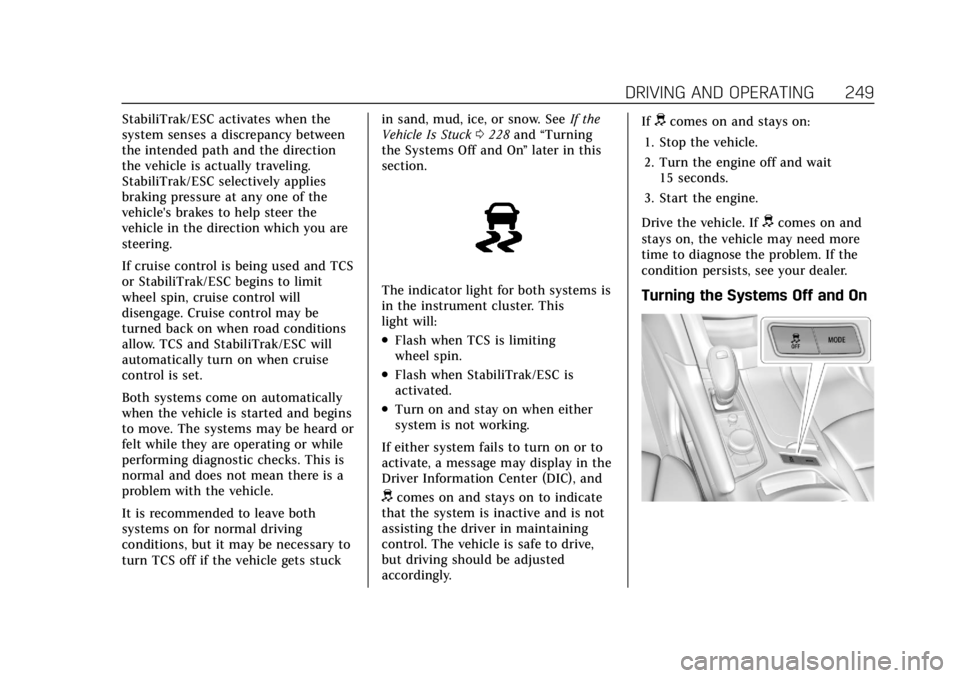
Turning the Systems Off and On
Page 257 of 431
Cadillac XT6 Owner Manual (GMNA-Localizing-U.S./Canada-14574701) -
2021 - CRC - 2/8/21
256 DRIVING AND OPERATING
When the vehicle is turned on, the
cruise control mode will be set to the
last mode used before the vehicle was
turned off.
{Warning
Always check the cruise control
indicator on the instrument cluster
to determine which mode cruise
control is in before using the
feature. If ACC is not active, the
vehicle will not automatically brake
for other vehicles, which could
cause a crash if the brakes are not
applied manually. You and others
could be seriously injured or killed.
Setting Adaptive Cruise Control
If
ois on when not in use, SET-/RES
+ could be pressed by mistake and
engage ACC when not desired. Keep
ooff when cruise is not being used.
Select the set speed desired for ACC.
This is the vehicle speed when no
vehicle is detected in its path.
While the vehicle is moving, ACC will
not set at a speed less than 25 km/h
(15 mph), although it can be resumed when driving at lower speeds. The
minimum allowable set speed is
25 km/h (15 mph).
To set ACC while moving:
1. Press
o.
2. Get up to the desired speed.
3. Press and release SET–.
4. Remove your foot from the accelerator pedal.
After ACC is set, it may immediately
apply the brakes if a vehicle ahead is
detected closer than the selected
following gap.
ACC can also be set while the vehicle
is stopped if ACC is on and the brake
pedal is applied.
The ACC indicator displays on the
instrument cluster and
Head-UpDisplay (HUD), if equipped.
When ACC is turned on, the indicator
will be lit white. When ACC is
engaged, the indicator will turn green.
Be mindful of speed limits,
surrounding traffic speeds, and
weather conditions when selecting the
set speed. Resuming a Set Speed
If ACC is set at a desired speed and
then the brakes are applied, ACC is
disengaged without erasing the set
speed from memory.
To begin using ACC again, press RES+
up briefly while moving more than
5 km/h (3 mph). The vehicle returns to
the previous set speed.
If the vehicle is stopped with the
brake pedal applied, press RES+ and
release the brake pedal. ACC will hold
the vehicle until RES+ or the
accelerator pedal is pressed.
A green ACC indicator and the set
speed display on the instrument
cluster. The vehicle ahead indicator
may be flashing if a vehicle ahead was
present and moved. See
“Approaching
and Following a Vehicle ”later in this
section.
Once ACC has resumed, if there is no
vehicle ahead, if the vehicle ahead is
beyond the selected following gap,
or if the vehicle has exited a sharp
curve, then the vehicle speed will
increase to the set speed.
Page 261 of 431
Cadillac XT6 Owner Manual (GMNA-Localizing-U.S./Canada-14574701) -
2021 - CRC - 2/8/21
260 DRIVING AND OPERATING
.The radar falsely reports blockage
when driving in a desert or remote
area with no other vehicles or
roadside objects. A DIC message
may display to indicate that ACC is
temporarily unavailable.
.A DIC message may display to
indicate that ACC is temporarily
unavailable.
The ACC active symbol will turn white
when ACC is no longer active.
In some cases, when ACC will not
activate, regular cruise control may be
used. See “Switching Between ACC and
Regular Cruise Control ”previously in
this section. Always consider driving
conditions before using either cruise
control system.
Notification to Resume ACC
ACC will maintain a following gap
behind a detected vehicle and slow
your vehicle to a stop behind that
vehicle.
If the stopped vehicle ahead has
driven away and ACC has not
resumed, the vehicle ahead indicator
will flash as a reminder to check
traffic ahead before proceeding. In addition, the left and right sides of the
Safety Alert Seat will pulse three
times, or three beeps will sound. See
“Alert Type
”and “Adaptive Cruise Go
Notifier” in“Collision/Detection
Systems” underVehicle Personalization
0 130.
When the vehicle ahead drives away,
press RES+ or the accelerator pedal to
resume ACC. If stopped for more than
two minutes or if the driver door is
opened and the driver seat belt is
unbuckled, ACC automatically applies
the Electric Parking Brake (EPB) to
hold the vehicle. The Electric Parking
Brake light will turn on. See Electric
Parking Brake 0246.
A DIC warning message may display
indicating to shift to P (Park) before
exiting the vehicle. See Vehicle
Messages 0129.
{Warning
If ACC has stopped the vehicle, and
if ACC is disengaged, turned off,
or canceled, the vehicle will no
longer be held at a stop. The vehicle
can move. When ACC is holding the
(Continued)
Warning (Continued)
vehicle at a stop, always be
prepared to manually apply the
brakes.
{Warning
Leaving the vehicle without placing
it in P (Park) can be dangerous. Do
not leave the vehicle while it is
being held at a stop by ACC. Always
place the vehicle in P (Park) and
turn off the ignition before leaving
the vehicle.
ACC Override
If using the accelerator pedal while
ACC is active, the ACC indicator turns
blue on the instrument cluster and in
the HUD (if equipped) indicating ACC
braking will not occur. ACC will
resume operation when the
accelerator pedal is not being pressed.
Page 265 of 431

Cadillac XT6 Owner Manual (GMNA-Localizing-U.S./Canada-14574701) -
2021 - CRC - 2/8/21
264 DRIVING AND OPERATING
Warning (Continued)
Complete attention is always
required while driving, and you
should be ready to take action and
apply the brakes and/or steer the
vehicle to avoid crashes.
Audible or Safety Alert Seat
Some driver assistance features alert
the driver of obstacles by beeping. To
change the volume of the warning
chime, see “Comfort and Convenience ”
under Vehicle Personalization 0130.
If equipped with the Safety Alert Seat,
the driver seat cushion may provide a
vibrating pulse alert instead of
beeping. To change this, see
“Collision/Detection Systems” under
Vehicle Personalization 0130.
Cleaning
Depending on vehicle options, keep
these areas of the vehicle clean to
ensure the best driver assistance
feature performance. Driver
Information Center (DIC) messages
may display when the systems are
unavailable or blocked.
.Front and rear bumpers and the
area below the bumpers
.Front grille and headlamps
.Front camera lens in the front grille
or near the front emblem
.Front side and rear side panels
.Outside of the windshield in front of
the rearview mirror
.Side camera lens on the bottom of
the outside mirrors
.Rear side corner bumpers
.Rear Vision Camera above the
license plate
Radio Frequency
This vehicle may be equipped with
driver assistance systems that operate
using radio frequency. See Radio
Frequency Statement 0406.
Assistance Systems for
Parking or Backing
If equipped, the Rear Vision Camera
(RVC), Rear Park Assist (RPA), Front
Park Assist (FPA), Surround Vision,
Reverse Automatic Braking (RAB) and
Backing Warning System, Rear Cross
Traffic Alert (RCTA), and Automatic
Parking Assist (APA) may help the
driver park or avoid objects. Always
check around the vehicle when
parking or backing.
Page 266 of 431

Cadillac XT6 Owner Manual (GMNA-Localizing-U.S./Canada-14574701) -
2021 - CRC - 2/8/21
DRIVING AND OPERATING 265
Rear Vision Camera (RVC)
When the vehicle is shifted into
R (Reverse), the RVC displays an
image of the area behind the vehicle
in the infotainment display. The
previous screen displays when the
vehicle is shifted out of R (Reverse)
after a short delay. To return to the
previous screen sooner, press Home or
Back on the infotainment system,
shift into P (Park), or reach a vehicle
speed of approximately 12 km/h
(8 mph) while in D (Drive).
1. View Displayed by the Camera
1. View Displayed by the Camera
2. Corners of the Rear Bumper
Displayed images may be farther or
closer than they appear. The area
displayed is limited and objects that
are close to either corner of the
bumper or under the bumper do not
display.
A warning triangle may appear on the
infotainment display to show that
RPA or RCTA has detected an object.
This triangle changes from amber to
red and increases in size the closer
the object.
{Warning
The camera(s) do not display
children, pedestrians, bicyclists,
crossing traffic, animals, or any
other object outside of the cameras’
field of view, below the bumper,
or under the vehicle. Shown
distances may be different from
actual distances. Do not drive or
park the vehicle using only these
camera(s). Always check behind and
around the vehicle before driving.
Failure to use proper care may
result in injury, death, or vehicle
damage.
Surround Vision
If equipped, Surround Vision shows an
image of the area surrounding the
vehicle, along with the front or rear
camera views on the infotainment
display. The front camera is in the
grille or near the front emblem, the
side cameras are on the bottom of the
outside mirrors, and the rear camera
is above the license plate.