instrument cluster CADILLAC XT6 2023 User Guide
[x] Cancel search | Manufacturer: CADILLAC, Model Year: 2023, Model line: XT6, Model: CADILLAC XT6 2023Pages: 507, PDF Size: 6.49 MB
Page 149 of 507

Cadillac XT6 Owner Manual (GMNA-Localizing-U.S./Canada-16405819) -
2023 - CRC - 3/22/22
148 Instruments and Controls
information appears as an
image focused out toward the
front of the vehicle.
Caution
If you try to use the HUD
image as a parking aid, you
may misjudge the distance
and damage your vehicle. Do
not use the HUD image as a
parking aid.
The HUD information can be
displayed in various languages.
The speedometer reading and
other numerical values can be
displayed in either English or
metric units.
The language selection is
changed through the radio
and the units of measurement
are changed through the
instrument cluster. See
Settings 0210 and “Options”
under Instrument Cluster
0 127.
HUD Display on the
Windshield
The HUD may display some of
the following vehicle
information and vehicle
messages or alerts:
.Speed
.Audio
.Phone
.Navigation
.Performance
.Driver Assistance Features
.Vehicle Messages Some vehicle messages or
alerts displayed in the HUD
may be cleared by using the
steering wheel controls. See
Vehicle Messages
0151.
The HUD control is to the left
of the steering wheel.
To adjust the HUD image:
1. Adjust the driver seat.
2. Start the engine.
3. Use the following settings to adjust the HUD.
$:Press or lift to center the
HUD image. The HUD image
can only be adjusted up and
down, not side to side.
!: Press to select the
display view. Each press will
change the display view.
Page 150 of 507

Cadillac XT6 Owner Manual (GMNA-Localizing-U.S./Canada-16405819) -
2023 - CRC - 3/22/22
Instruments and Controls 149
D:Lift and hold to brighten
the display. Press and hold to
dim the display. Continue to
hold to turn the display off.
The HUD image will
automatically dim and brighten
to compensate for outside
lighting.
The HUD image can
temporarily light up depending
on the angle and position of
sunlight on the HUD display.
This is normal.
Polarized sunglasses could
make the HUD image harder
to see.
Head-Up Display (HUD)
Rotation Option
This feature allows the angle
of the HUD image to be
adjusted.
Press the center of the
thumbwheel while Adjust
Rotation is highlighted to
enter Adjust Mode. Scroll to
adjust the angle of the HUD
display. Press the thumbwheel
to confirm and save the setting. This feature may only
be available in P (Park). See
Instrument Cluster
0127.
HUD Views
There are four views in the
HUD. Some vehicle information
and vehicle messages or alerts
may be displayed in any view.
Metric
English
Speed View : This displays
digital speed in English or
metric units, speed limit, and
indicators such as vehicle
ahead, Lane Departure Warning/Lane Keep Assist,
and Adaptive Cruise Control
and set speed. Some
information only appears on
vehicles that have these
features, and when they are
active.
The speed limit sign can be
disabled in the HUD settings
under Options in the Cluster
Menu. See Instrument Cluster
0
127.
Metric
English
Page 151 of 507
Cadillac XT6 Owner Manual (GMNA-Localizing-U.S./Canada-16405819) -
2023 - CRC - 3/22/22
150 Instruments and Controls
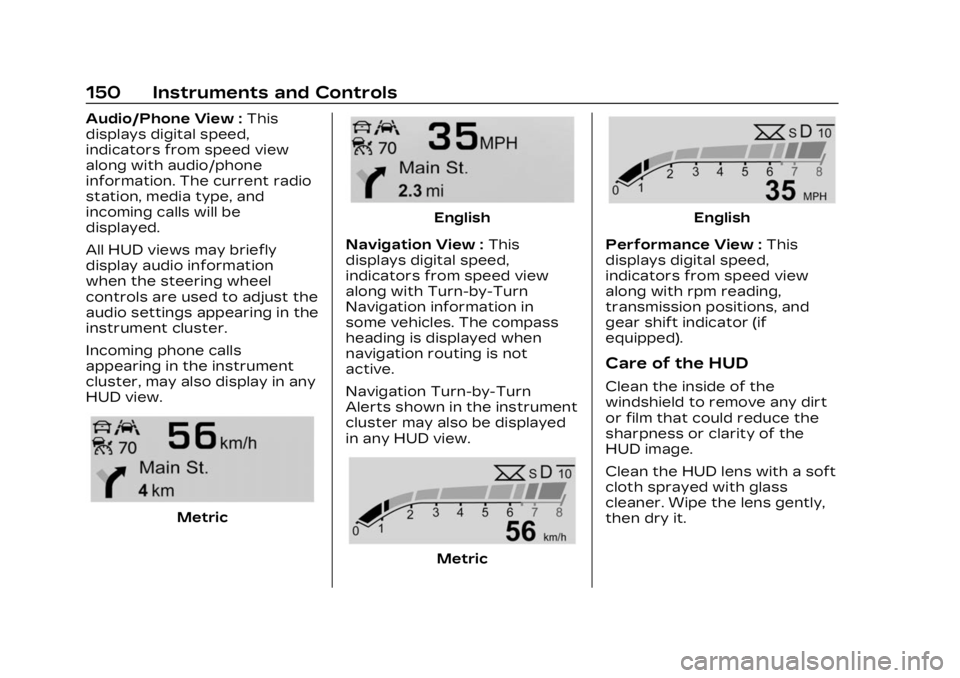
Audio/Phone View :This
displays digital speed,
indicators from speed view
along with audio/phone
information. The current radio
station, media type, and
incoming calls will be
displayed.
All HUD views may briefly
display audio information
when the steering wheel
controls are used to adjust the
audio settings appearing in the
instrument cluster.
Incoming phone calls
appearing in the instrument
cluster, may also display in any
HUD view.
Metric
English
Navigation View : This
displays digital speed,
indicators from speed view
along with Turn-by-Turn
Navigation information in
some vehicles. The compass
heading is displayed when
navigation routing is not
active.
Navigation Turn-by-Turn
Alerts shown in the instrument
cluster may also be displayed
in any HUD view.
Metric
English
Performance View : This
displays digital speed,
indicators from speed view
along with rpm reading,
transmission positions, and
gear shift indicator (if
equipped).
Care of the HUD
Clean the inside of the
windshield to remove any dirt
or film that could reduce the
sharpness or clarity of the
HUD image.
Clean the HUD lens with a soft
cloth sprayed with glass
cleaner. Wipe the lens gently,
then dry it.
Page 158 of 507

Cadillac XT6 Owner Manual (GMNA-Localizing-U.S./Canada-16405819) -
2023 - CRC - 3/22/22
Lighting 157
AUTO :Automatically turns
the exterior lamps on and off,
depending on outside lighting.
;: Turns on the parking
lamps including all lamps,
except the headlamps.
2: Turns on the headlamps
together with the parking
lamps and instrument panel
lights.
IntelliBeam System
If equipped, this system turns
the vehicle's high-beam
headlamps on and off
according to surrounding
traffic conditions. The system turns the
high-beam headlamps on when
it is dark enough and there is
no other traffic present.
This light
bcomes on in the
instrument cluster when the
IntelliBeam system is enabled.
Turning On and Enabling
IntelliBeam
To enable the IntelliBeam
system, press the end of the
turn signal lever when it is
dark outside and the exterior
lamp control is in AUTO or
2.
Driving with IntelliBeam
The system only activates the
high beams when driving over
40 km/h (25 mph). The blue high-beam on light
appears on the instrument
cluster when the high beams
are on.
There is a sensor near the top
center of the windshield that
automatically controls the
system. Keep this area of the
windshield clear of debris to
allow for best system
performance.
The high-beam headlamps
remain on, under the
automatic control, until one of
the following occurs:
.The system detects an
approaching vehicle's
headlamps.
.The system detects a
preceding vehicle's taillamps.
.The outside light is bright
enough that high-beam
headlamps are not required.
.The vehicle's speed drops
below 20 km/h (12 mph).
.The IntelliBeam system is
disabled by the button on
the turn signal lever. If this
Page 159 of 507
Cadillac XT6 Owner Manual (GMNA-Localizing-U.S./Canada-16405819) -
2023 - CRC - 3/22/22
158 Lighting
happens, press the end of
the turn signal lever when
the exterior lamp control is
in the AUTO or
2position to
reactivate the IntelliBeam
system. The instrument
cluster light will come on to
indicate the IntelliBeam
system is reactivated.
The high beams may not turn
off automatically if the system
cannot detect another
vehicle's lamps because of any
of the following:
.The other vehicle's lamps
are missing, damaged,
obstructed from view,
or otherwise undetected.
.The other vehicle's lamps
are covered with dirt, snow,
and/or road spray.
.The other vehicle's lamps
cannot be detected due to
dense exhaust, smoke, fog,
snow, road spray, mist,
or other airborne
obstructions.
.The vehicle's windshield is
dirty, cracked, or obstructed
by something that blocks the
view of the light sensor.
.The vehicle is loaded such
that the front end points
upward, causing the light
sensor to aim high and not
detect headlamps and
taillamps.
.The vehicle is being driven
on winding or hilly roads.
The automatic high-beam
headlamps may need to be
disabled if any of the above
conditions exist.
Exterior Lamps Off
Reminder
A warning chime sounds if the
driver door is opened while
the ignition is off and the
exterior lamps are on.
Headlamp High/
Low-Beam Changer
3: Push the turn signal lever
away from you and release, to
turn the high beams on. To
return to low beams, push the
lever again or pull it toward
you and release.
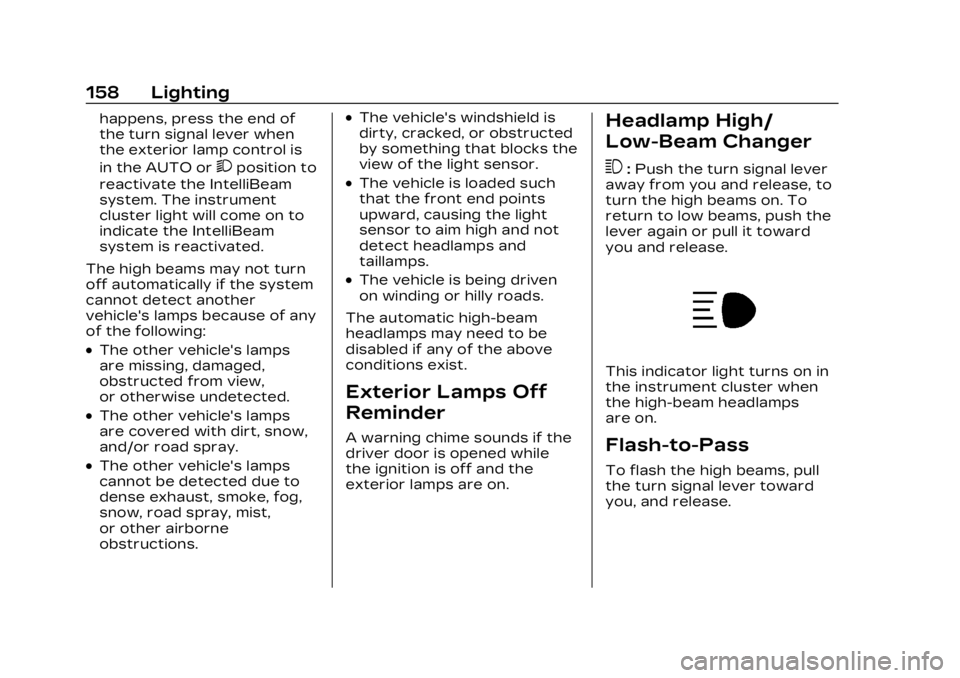
This indicator light turns on in
the instrument cluster when
the high-beam headlamps
are on.
Flash-to-Pass
To flash the high beams, pull
the turn signal lever toward
you, and release.
Page 160 of 507

Cadillac XT6 Owner Manual (GMNA-Localizing-U.S./Canada-16405819) -
2023 - CRC - 3/22/22
Lighting 159
Daytime Running
Lamps (DRL)
DRL can make it easier for
others to see the front of your
vehicle during the day. Fully
functional DRL are required on
all vehicles first sold in
Canada.
The dedicated DRL will come
on when all of the following
conditions are met:
.The ignition is on.
.The exterior lamp control is
in AUTO.
.The light sensor determines
it is daytime.
.The parking brake is
released or the vehicle is not
in P (Park).
When the DRL are on, the
taillamps, sidemarker lamps,
and other lamps will not be on.
The DRL turn off when the
headlamps are turned to
Oor
the ignition is off. For vehicles first sold in Canada, the DRL
can only be turned off when
the vehicle is parked.
Automatic Headlamp
System
When the exterior lamp
control is set to AUTO and it is
dark enough outside, the
headlamps come on
automatically.
There is a light sensor on top
of the instrument panel. Do
not cover the sensor.
The system may also turn on
the headlamps when driving
through a parking garage or
tunnel.
If the vehicle is started in a
dark garage, the automatic
headlamp system comes on
immediately. If it is light
outside when the vehicle
leaves the garage, there is a
slight delay before the
automatic headlamp system
changes to the Daytime
Running Lamps (DRL). During
that delay, the instrument
cluster may not be as bright as
usual. Make sure the
instrument panel brightness
control is in the full bright
position. See Instrument Panel
Illumination Control
0161.
When it is bright enough
outside, the headlamps will
turn off or may change
to DRL.
The automatic headlamp
system turns off when the
exterior lamp control is turned
to
Oor the ignition is off.
Page 161 of 507
Cadillac XT6 Owner Manual (GMNA-Localizing-U.S./Canada-16405819) -
2023 - CRC - 3/22/22
160 Lighting
For vehicles sold in Canada,
this control only works when
the transmission is in P (Park).
Lights On with Wipers
If the windshield wipers are
activated in daylight with the
engine on, and the exterior
lamp control is in AUTO, the
headlamps, parking lamps, and
other exterior lamps come on.
The transition time for the
lamps coming on varies based
on wiper speed. When the
wipers are not operating,
these lamps turn off. Move the
exterior lamp control to
Oor
;to disable this feature.
Hazard Warning
Flashers
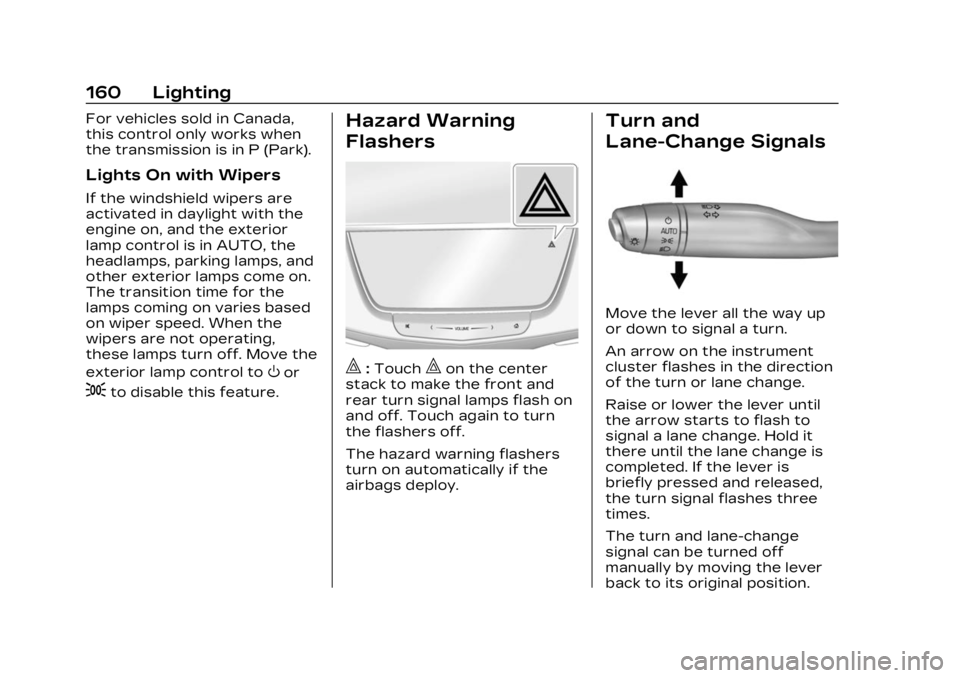
|:Touch|on the center
stack to make the front and
rear turn signal lamps flash on
and off. Touch again to turn
the flashers off.
The hazard warning flashers
turn on automatically if the
airbags deploy.
Turn and
Lane-Change Signals
Move the lever all the way up
or down to signal a turn.
An arrow on the instrument
cluster flashes in the direction
of the turn or lane change.
Raise or lower the lever until
the arrow starts to flash to
signal a lane change. Hold it
there until the lane change is
completed. If the lever is
briefly pressed and released,
the turn signal flashes three
times.
The turn and lane-change
signal can be turned off
manually by moving the lever
back to its original position.
Page 166 of 507
Cadillac XT6 Owner Manual (GMNA-Localizing-U.S./Canada-16405819) -
2023 - CRC - 3/22/22
Infotainment System 165
features are also available
through the instrument cluster
and steering wheel controls.
Before driving:
.Become familiar with the
operation, center stack
controls, steering wheel
controls, and infotainment
display.
.Set up the audio by
presetting favorite stations,
setting the tone, and
adjusting the speakers.
.Set up phone numbers in
advance so they can be
called easily by pressing a
single control or by using a
single voice command.
See Distracted Driving 0240.
Active Noise
Cancellation (ANC)
If equipped, ANC reduces
engine noise in the vehicle’s
interior. ANC requires the
factory-installed audio system,
radio, speakers, amplifier (if
equipped), induction system,
and exhaust system to work properly. Deactivation is
required by your dealer if
related aftermarket equipment
is installed.
Overview
Infotainment System
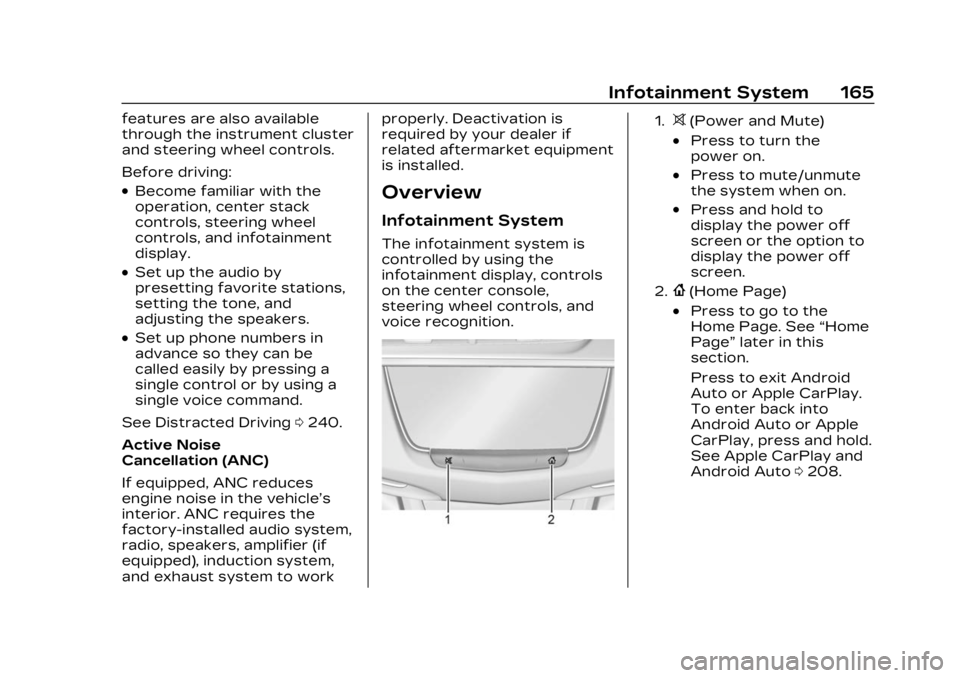
The infotainment system is
controlled by using the
infotainment display, controls
on the center console,
steering wheel controls, and
voice recognition.
1.>(Power and Mute)
.Press to turn the
power on.
.Press to mute/unmute
the system when on.
.Press and hold to
display the power off
screen or the option to
display the power off
screen.
2.{(Home Page)
.Press to go to the
Home Page. See
“Home
Page” later in this
section.
Press to exit Android
Auto or Apple CarPlay.
To enter back into
Android Auto or Apple
CarPlay, press and hold.
See Apple CarPlay and
Android Auto 0208.
Page 169 of 507
Cadillac XT6 Owner Manual (GMNA-Localizing-U.S./Canada-16405819) -
2023 - CRC - 3/22/22
168 Infotainment System
CorB:Press to go to the
next or previous favorite when
listening to the radio. Press to
go to the next or previous
track when listening to a
media source.
SorT: Press to move
between the interactive
displays in the instrument
cluster. Press
Sto go back to
the previous menu.
yorz: Use the thumbwheel
to scroll to the previous or
next selection.
V: Press the thumbwheel to
open a menu or select a menu
item. Press and hold to reset
certain displays.
x+ orx– :Press to increase
or decrease the volume.
Using the System
Audio
Touch the Audio icon to
display the active audio source
page. Examples of available sources may include AM, FM,
SXM (if equipped), MyMedia,
USB, and Bluetooth.
Phone
Touch the Phone icon to
display the Phone main page.
See Bluetooth (Overview)
0
202 or
Bluetooth (Pairing and Using a
Phone) 0203.
Nav
If equipped, touch the Nav
icon to display the navigation
map. See Using the Navigation
System 0180.
Wi-Fi Hotspot
Touch the Wi-Fi Hotspot icon
to display the Wi-Fi Hotspot
information. See Settings
0210.
Climate
Touch the Climate icon to
display the Climate main page.
See Dual Automatic Climate
Control System 0228.
Users
If equipped, touch the Users
icon to sign in or create a new
user profile, and follow the
on-screen instructions.
Only four user profiles can be
active at one time in the
vehicle. It may be necessary to
remove a profile from the
menu before creating or
signing into an existing profile.
The removed profile can be
logged into at a later time.
Settings
Touch the Settings icon to
display the Settings menu. See
Settings 0210.
Apple CarPlay
Touch the Apple CarPlay icon
to activate Apple CarPlay if
equipped after a supported
device is connected. See
Apple CarPlay and Android
Auto 0208.
Page 197 of 507

Cadillac XT6 Owner Manual (GMNA-Localizing-U.S./Canada-16405819) -
2023 - CRC - 3/22/22
196 Infotainment System
Once voice recognition is
started, both the infotainment
display and instrument cluster
show the selections and visual
dialog content. These displays
can be turned on or off in the
Tutorial Mode under Settings
0210.
There are three voice prompt
modes supported:
.Informative verbal prompts:
This type of prompt will
provide more information
regarding the supported
actions.
.Short prompts: This type of
prompt will provide simple
instructions about what can
be stated.
.Auto informative prompts:
This type of prompt plays
during the first few speech
sessions, then automatically
switches to the short
prompt after some
experience has been gained
through using the system. If a command is not spoken,
the voice recognition system
says a help prompt.
Prompts and Infotainment
Displays
While a voice recognition
session is active, there may be
corresponding options
showing on the displays.
A selection can be made by
manually touching the option,
or by speaking the number for
the option to select. Manual
interaction in the voice
recognition session is
permitted. Interaction during a
voice session may be
completed entirely using voice
commands while some manual
commands may expedite a
task. If a selection is made
using a manual control, the
voice recognition dialog will
progress in the same way as if
the selection were made using
a voice command. Once the
system completes the task,
or the session is terminated,
the voice recognition dialog
stops.
An example of this type of
manual intervention is
touching an entry of a
displayed number list instead
of speaking the number
associated with the entry
desired.
Canceling Voice
Recognition
.Touch or say
“Cancel”or
“Exit” to terminate the voice
recognition session and
show the display where
voice recognition was
initiated.
.Pression the steering
wheel controls to terminate
the voice recognition
session and show the display
where voice recognition was
initiated.
Natural Language Commands
Most languages do not
support natural language
commands in sentence form.