lane assist CADILLAC XT6 2023 Owners Manual
[x] Cancel search | Manufacturer: CADILLAC, Model Year: 2023, Model line: XT6, Model: CADILLAC XT6 2023Pages: 507, PDF Size: 6.49 MB
Page 4 of 507
Cadillac XT6 Owner Manual (GMNA-Localizing-U.S./Canada-16405819) -
2023 - CRC - 3/22/22
Introduction 3
{Warning
Warning indicates a hazard
that could result in injury or
death.
Caution
Caution indicates a hazard
that could result in property
or vehicle damage.
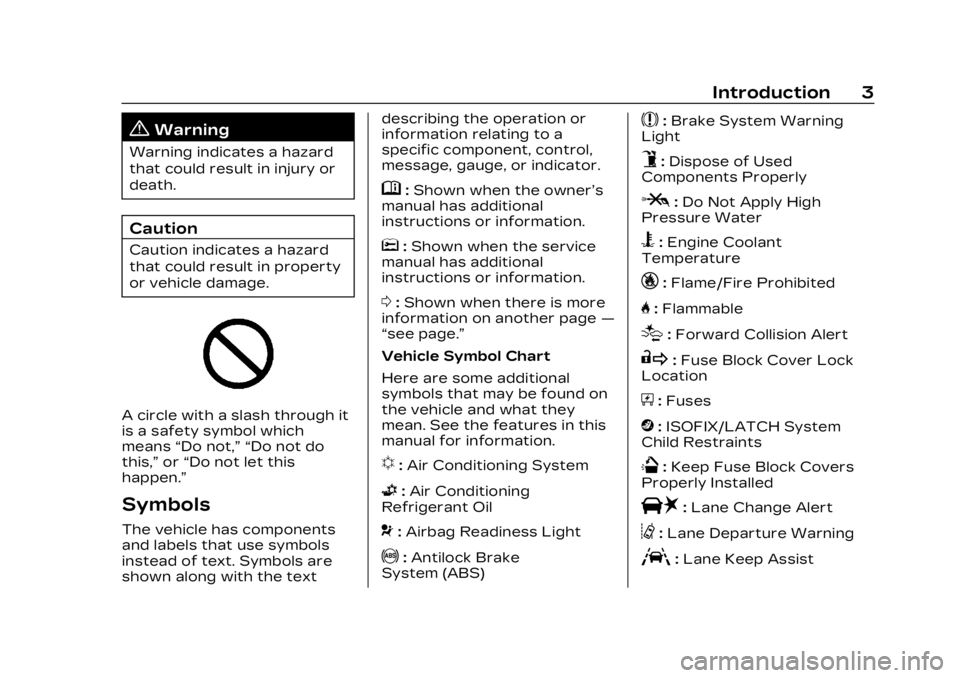
A circle with a slash through it
is a safety symbol which
means“Do not,” “Do not do
this,” or“Do not let this
happen.”
Symbols
The vehicle has components
and labels that use symbols
instead of text. Symbols are
shown along with the text describing the operation or
information relating to a
specific component, control,
message, gauge, or indicator.
M:
Shown when the owner’s
manual has additional
instructions or information.
*: Shown when the service
manual has additional
instructions or information.
0: Shown when there is more
information on another page —
“see page.”
Vehicle Symbol Chart
Here are some additional
symbols that may be found on
the vehicle and what they
mean. See the features in this
manual for information.
u: Air Conditioning System
G:Air Conditioning
Refrigerant Oil
9: Airbag Readiness Light
!:Antilock Brake
System (ABS)
$: Brake System Warning
Light
9: Dispose of Used
Components Properly
P: Do Not Apply High
Pressure Water
B: Engine Coolant
Temperature
_: Flame/Fire Prohibited
H: Flammable
[:Forward Collision Alert
R:Fuse Block Cover Lock
Location
+: Fuses
j:ISOFIX/LATCH System
Child Restraints
Q: Keep Fuse Block Covers
Properly Installed
|: Lane Change Alert
@:Lane Departure Warning
A:Lane Keep Assist
Page 7 of 507

Cadillac XT6 Owner Manual (GMNA-Localizing-U.S./Canada-16405819) -
2023 - CRC - 3/22/22
6 Introduction
1. Air Vents0236.
2. Exterior Lamp Controls 0156.
Turn Signal Lever. See
Turn and Lane-Change
Signals 0160.
IntelliBeam System Button
(If Equipped). See Exterior
Lamp Controls 0156.
3. Instrument Cluster 0127.
Driver Information Center
(DIC) Display. See Driver
Information Center (DIC)
0 144.
4. Windshield Wiper/Washer 0118.
Rear Window Wiper/
Washer 0120.
5. ENGINE START/STOP Button. See Ignition
Positions 0257.
6. Park Assist Button. See Park Assist 0318.
Automatic Parking Assist
(APA) Button. See Park
Assist 0318. 7. Stop/Start Disable Switch.
See Stop/Start System
0259.
8. Light Sensor. See Automatic Headlamp
System 0159.
9. Hazard Warning Flashers 0160.
Lane Keep Assist (LKA)
0 338 (If Equipped).
10. Infotainment Controls. See Overview 0165.
11. Heated and Ventilated Front Seats 054 (If
Equipped).
12. Dual Automatic Climate Control System 0228.
13. MODE Switch. See Driver Mode Control 0278.
Traction Control/
Electronic Stability Control
0 276.
14. Infotainment Controls. See Overview 0165.
15. Shift Lever. See Automatic Transmission 0266. 16. Steering Wheel Controls
0167.
17. Steering Wheel Controls 0167.
Driver Information Center
(DIC) Controls. See Driver
Information Center (DIC)
0 144.
18. Horn 0118.
19. Steering Wheel Adjustment 0117 (Out
of View).
20. Forward Collision Alert (FCA) System 0326 (If
Equipped).
Heated Steering Wheel
0 118 (If Equipped).
21. Cruise Control 0280.
Adaptive Cruise Control
(Advanced) 0283 (If
Equipped).
Phone Button. See
Steering Wheel Controls
0 167.
Page 117 of 507
Cadillac XT6 Owner Manual (GMNA-Localizing-U.S./Canada-16405819) -
2023 - CRC - 3/22/22
116 Instruments and Controls
Instruments and
Controls
Controls
Steering WheelAdjustment . . . . . . . . . . . . . . . . . . 117
Heated Steering Wheel . . . 118
Horn . . . . . . . . . . . . . . . . . . . . . . . . . . . . 118
Windshield Wiper/ Washer . . . . . . . . . . . . . . . . . . . . . . 118
Rear Window Wiper/ Washer . . . . . . . . . . . . . . . . . . . . . . 120
Compass . . . . . . . . . . . . . . . . . . . . . . 122
Clock . . . . . . . . . . . . . . . . . . . . . . . . . . . 122
Power Outlets . . . . . . . . . . . . . . 122
Wireless Charging . . . . . . . . . 123
Warning Lights, Gauges,
and Indicators
Warning Lights, Gauges, and Indicators . . . . . . . . . . . . . 126
Instrument Cluster . . . . . . . . . 127
Speedometer . . . . . . . . . . . . . . . 130
Odometer . . . . . . . . . . . . . . . . . . . . 130
Trip Odometer . . . . . . . . . . . . . . 130
Tachometer . . . . . . . . . . . . . . . . . 130
Fuel Gauge . . . . . . . . . . . . . . . . . . 130
Engine Coolant Temperature Gauge . . . . . 131 Seat Belt Reminders . . . . . . 132
Airbag Readiness
Light . . . . . . . . . . . . . . . . . . . . . . . . . . 132
Passenger Airbag Status Indicator . . . . . . . . . . . . . . . . . . . . 133
Charging System Light . . . 134
Malfunction Indicator Lamp (Check Engine
Light) . . . . . . . . . . . . . . . . . . . . . . . . . 134
Brake System Warning Light . . . . . . . . . . . . . . . . . . . . . . . . . 136
Electric Parking Brake Light . . . . . . . . . . . . . . . . . . . . . . . . . . 137
Service Electric Parking Brake Light . . . . . . . . . . . . . . . . . 137
Antilock Brake System (ABS) Warning Light . . . . . 138
Performance Shifting Light . . . . . . . . . . . . . . . . . . . . . . . . . 138
All-Wheel-Drive Light . . . . . 138
Lane Keep Assist (LKA) Light . . . . . . . . . . . . . . . . . . . . . . . . . 139
Vehicle Ahead Indicator . . . . . . . . . . . . . . . . . . . . 139
Pedestrian Ahead Indicator . . . . . . . . . . . . . . . . . . . . 139
Traction Off Light . . . . . . . . . 140
StabiliTrak OFF Light . . . . . 140 Traction Control System
(TCS)/StabiliTrak
Light . . . . . . . . . . . . . . . . . . . . . . . . . 140
Driver Mode Control Light . . . . . . . . . . . . . . . . . . . . . . . . . . 141
Tire Pressure Light . . . . . . . . 141
Engine Oil Pressure Light . . . . . . . . . . . . . . . . . . . . . . . . . . 142
Low Fuel Warning Light . . . . . . . . . . . . . . . . . . . . . . . . . . 142
Security Light . . . . . . . . . . . . . . . 142
High-Beam On Light . . . . . . 143
Lamps On Reminder . . . . . . 143
Cruise Control Light . . . . . . 143
Door Ajar Light . . . . . . . . . . . . . 144
Information Displays
Driver Information Center (DIC) . . . . . . . . . . . . . . . . 144
Head-Up Display (HUD) . . . 147
Vehicle Messages
Vehicle Messages . . . . . . . . . . 151
Engine Power Messages . . . . . . . . . . . . . . . . . . . 151
Vehicle Speed Messages . . . . . . . . . . . . . . . . . . . 152
Universal Remote System
Universal RemoteSystem . . . . . . . . . . . . . . . . . . . . . . 152
Page 140 of 507

Cadillac XT6 Owner Manual (GMNA-Localizing-U.S./Canada-16405819) -
2023 - CRC - 3/22/22
Instruments and Controls 139
If the light turns amber, there
may be a malfunction. See
your dealer.
Lane Keep Assist
(LKA) Light
Base LevelUplevel
If equipped, the Lane Keep
Assist Light may display the
following colors:
.Blank: LKA is disabled.
.White: Appears when the
vehicle starts. A steady
white light indicates that
LKA is not ready to assist.
.Green: Appears when LKA is
turned on and ready to
assist. LKA will gently turn
the steering wheel if the
vehicle approaches a
detected lane marking.
.Amber: Appears when LKA is
active. The light flashes
amber as a Lane Departure
Warning (LDW) alert to
indicate that the lane
marking has been
unintentionally crossed.
If the system detects you
are steering intentionally (to
pass or change lanes), the
LDW alert may not display.
LKA will not assist or alert if
the turn signal is active in the
direction of lane departure,
or if LKA detects that you are
accelerating, braking,
or actively steering. See Lane
Keep Assist (LKA) 0338.
Vehicle Ahead
Indicator
If equipped, this indicator will
display green when a vehicle is
detected ahead and amber
when you are following a
vehicle ahead much too
closely.
See Forward Collision Alert
(FCA) System 0326.
Pedestrian Ahead
Indicator
If equipped, this indicator will
display amber when a nearby
pedestrian is detected in front
of the vehicle.
See Front Pedestrian Braking
(FPB) System 0330.
Page 148 of 507
Cadillac XT6 Owner Manual (GMNA-Localizing-U.S./Canada-16405819) -
2023 - CRC - 3/22/22
Instruments and Controls 147
of time that has passed since
the timer was last reset. To
stop the timer, press the
thumbwheel briefly while this
display is active and the timer
is running.
Press the thumbwheel while
this display is active to reset
the timer.
Follow Distance/Gap
Setting :When Adaptive
Cruise Control (ACC) is not
engaged, the current follow
time to the vehicle ahead is
displayed as a time value on
this page. When ACC has been
engaged, the display switches
to the gap setting page. This
page shows the current gap
setting along with the vehicle
ahead indicator.
Driver Assistance :
If equipped, shows information
for Lane Keep Assist (LKA)
and Forward Collision
Alert (FCA).
Battery Voltage : Shows the
current battery voltage. Coolant Temperature :
Shows the engine coolant
temperature in either degrees
Celsius (°C) or degrees
Fahrenheit (°F).
Oil Temperature :
Shows the
engine oil temperature in
either degrees Celsius (°C) or
degrees Fahrenheit (°F).
Engine Boost : If equipped,
displays engine manifold
pressure relative to ambient
air pressure. It will display
boost pressure generated by
the turbocharging system.
Transmission Fluid
Temperature : Shows the
temperature of the automatic
transmission fluid in either
degrees Celsius (°C) or
degrees Fahrenheit (°F).
Off Road : Displays vehicle
pitch and roll information, road
wheel angle, and four-wheel
drive (4WD) status. Info Page Options :
Scroll to
choose which info pages
appear on the DIC. Press the
thumbwheel to select or
deselect.
Blank Page : Allows for no
information to be displayed in
the cluster info display areas.
Head-Up
Display (HUD)
{Warning
If the HUD image is too
bright or too high in your
field of view, it may take you
more time to see things you
need to see when it is dark
outside. Be sure to keep the
HUD image dim and placed
low in your field of view.
If equipped with HUD, some
information concerning the
operation of the vehicle is
projected onto the windshield.
The image is projected
through the HUD lens on top
of the instrument panel. The
Page 150 of 507

Cadillac XT6 Owner Manual (GMNA-Localizing-U.S./Canada-16405819) -
2023 - CRC - 3/22/22
Instruments and Controls 149
D:Lift and hold to brighten
the display. Press and hold to
dim the display. Continue to
hold to turn the display off.
The HUD image will
automatically dim and brighten
to compensate for outside
lighting.
The HUD image can
temporarily light up depending
on the angle and position of
sunlight on the HUD display.
This is normal.
Polarized sunglasses could
make the HUD image harder
to see.
Head-Up Display (HUD)
Rotation Option
This feature allows the angle
of the HUD image to be
adjusted.
Press the center of the
thumbwheel while Adjust
Rotation is highlighted to
enter Adjust Mode. Scroll to
adjust the angle of the HUD
display. Press the thumbwheel
to confirm and save the setting. This feature may only
be available in P (Park). See
Instrument Cluster
0127.
HUD Views
There are four views in the
HUD. Some vehicle information
and vehicle messages or alerts
may be displayed in any view.
Metric
English
Speed View : This displays
digital speed in English or
metric units, speed limit, and
indicators such as vehicle
ahead, Lane Departure Warning/Lane Keep Assist,
and Adaptive Cruise Control
and set speed. Some
information only appears on
vehicles that have these
features, and when they are
active.
The speed limit sign can be
disabled in the HUD settings
under Options in the Cluster
Menu. See Instrument Cluster
0
127.
Metric
English
Page 240 of 507

Cadillac XT6 Owner Manual (GMNA-Localizing-U.S./Canada-16405819) -
2023 - CRC - 3/22/22
Driving and Operating 239
Assistance Systems forDriving . . . . . . . . . . . . . . . . . . . . . . 326
Forward Collision Alert (FCA) System . . . . . . . . . . . . . 326
Automatic Emergency
Braking (AEB) . . . . . . . . . . . . . 328
Front Pedestrian Braking (FPB) System . . . . . . . . . . . . . 330
Night Vision System . . . . . . 333
Side Blind Zone Alert (SBZA) . . . . . . . . . . . . . . . 336
Lane Change Alert (LCA) . . . . . . . . . . . . . . . . . 336
Lane Keep Assist (LKA) . . . . . . . . . . . . . . . 338
Surround Vision Recorder . . . . . . . . . . . . . . . . . . . . 341
Fuel
Top Tier Fuel . . . . . . . . . . . . . . . 342
Recommended Fuel (2.0LL4 Turbo Engine) . . . . . . . . 343
Recommended Fuel (3.6L V6 Engine) . . . . . . . . . . . . . . . . . 343
Prohibited Fuels . . . . . . . . . . . 344
Fuels in Foreign Countries . . . . . . . . . . . . . . . . . . 344
Fuel Additives . . . . . . . . . . . . . . 344
Filling the Tank . . . . . . . . . . . . . 344
Filling a Portable Fuel Container . . . . . . . . . . . . . . . . . . 346
Trailer Towing
General TowingInformation . . . . . . . . . . . . . . . . 347
Driving Characteristics and Towing Tips . . . . . . . . . . 347
Trailer Towing . . . . . . . . . . . . . . 351
Towing Equipment . . . . . . . . 356
Trailer Sway
Control (TSC) . . . . . . . . . . . . . 359
Conversions and Add-Ons
Add-On ElectricalEquipment . . . . . . . . . . . . . . . . . 360
Driving
Information
Driving for Better
Fuel Economy
Driving habits can affect fuel
mileage. Here are some driving
tips to get the best fuel
economy possible.
.Set the climate controls to
the desired temperature
after the engine is started,
or turn them off when not
required.
.On AWD vehicles, use Tour
Mode when conditions
permit.
.Avoid fast starts and
accelerate smoothly.
.Brake gradually and avoid
abrupt stops.
.Avoid idling the engine for
long periods of time.
.When road and weather
conditions are appropriate,
use cruise control.
Page 243 of 507

Cadillac XT6 Owner Manual (GMNA-Localizing-U.S./Canada-16405819) -
2023 - CRC - 3/22/22
242 Driving and Operating
is used up, it can take longer
to stop and the brake pedal
will be harder to push.
Steering
Caution
To avoid damage to the
steering system, do not
drive over curbs, parking
barriers, or similar objects at
speeds greater than 3 km/h
(1 mph). Use care when
driving over other objects
such as lane dividers and
speed bumps. Damage
caused by misuse of the
vehicle is not covered by the
vehicle warranty.
Electric Power Steering
The vehicle is equipped with
an electric power steering
system, which reduces the
amount of effort needed to
steer the vehicle. It does not
have power steering fluid.
Regular maintenance is not
required.
If the vehicle experiences a
system malfunction and loses
power steering, greater
steering effort may be
required. Power steering
assist also may be reduced if
you turn the steering wheel asfar as it can turn and hold it
there with force for an
extended period of time.
See your dealer if there is a
problem.
Curve Tips
.Take curves at a reasonable
speed.
.Reduce speed before
entering a curve.
.Maintain a reasonable
steady speed through the
curve.
.Wait until the vehicle is out
of the curve before
accelerating gently into the
straightaway.
Steering in Emergencies
.There are some situations
when steering around a
problem may be more
effective than braking.
.Holding both sides of the
steering wheel allows you to
turn 180 degrees without
removing a hand.
Page 250 of 507
Cadillac XT6 Owner Manual (GMNA-Localizing-U.S./Canada-16405819) -
2023 - CRC - 3/22/22
Driving and Operating 249
Hydroplaning
Hydroplaning is dangerous.
Water can build up under the
vehicle's tires so they actually
ride on the water. This can
happen if the road is wet
enough and you are going fast
enough. When the vehicle is
hydroplaning, it has little or no
contact with the road.
There is no hard and fast rule
about hydroplaning. The best
advice is to slow down when
the road is wet.
Other Rainy Weather Tips
Besides slowing down, other
wet weather driving tips
include:
.Allow extra following
distance.
.Pass with caution.
.Keep windshield wiping
equipment in good shape.
.Keep the windshield washer
fluid reservoir filled.
.Have good tires with proper
tread depth. See Tires
0400.
.Turn off cruise control.
Hill and Mountain
Roads
Driving on steep hills or
through mountains is different
than driving on flat or rolling
terrain. Tips include:
.Keep the vehicle serviced
and in good shape.
.Check all fluid levels and
brakes, tires, and cooling
system.
.Shift to a lower gear when
going down steep or long
hills.
{Warning
Using the brakes to slow the
vehicle on a long downhill
slope can cause brake
overheating, can reduce
brake performance, and
could result in a loss of
(Continued)
Warning (Continued)
braking. Shift the
transmission to a lower gear
to let the engine assist the
brakes on a steep downhill
slope.
{Warning
Coasting downhill in
N (Neutral) or with the
ignition off is dangerous.
This can cause overheating
of the brakes and loss of
steering assist. Always have
the engine running and the
vehicle in gear.
.Drive at speeds that keep
the vehicle in its own lane.
Do not swing wide or cross
the center line.
.Be alert on top of hills;
something could be in your
lane (e.g., stalled car, crash).
Page 290 of 507
Cadillac XT6 Owner Manual (GMNA-Localizing-U.S./Canada-16405819) -
2023 - CRC - 3/22/22
Driving and Operating 289
The vehicle ahead indicator is
in the instrument cluster and
HUD display (if equipped).
It only displays when a vehicle
is detected in your vehicle’s
path moving in the same
direction. If this symbol is not
displaying, ACC will not
respond to or brake for
vehicles ahead.
ACC automatically slows the
vehicle down and adjusts
vehicle speed to follow a
detected vehicle ahead at the
selected follow gap. The
vehicle speed increases or
decreases to follow a
detected vehicle in front of
your vehicle when that vehicle
is traveling slower than your
vehicle set speed. It may apply
limited braking, if necessary.
When braking is active, the
brake lamps will come on. The
automatic braking may feel or
sound different than if the
brakes were applied manually.
This is normal.Passing a Vehicle While
Using ACC
If the set speed is high
enough, and the left turn
signal is used to pass a vehicle
ahead in the selected
following gap, ACC may assist
by gradually accelerating the
vehicle prior to the lane
change.
{Warning
When using ACC to pass a
vehicle or perform a lane
change, the following
distance to the vehicle being
passed may be reduced.
ACC may not apply
sufficient acceleration or
braking when passing a
vehicle or performing a lane
change. Always be ready to
manually accelerate or brake
to complete the pass or lane
change.
Stationary or Very
Slow-Moving Objects
{Warning
ACC may not detect and
react to stopped or
slow-moving vehicles ahead
of you. For example, the
system may not brake for a
vehicle it has never detected
moving. This can occur in
stop-and-go traffic or when
a vehicle suddenly appears
due to a vehicle ahead
changing lanes. Your vehicle
may not stop and could
cause a crash. Use caution
when using ACC. Your
complete attention is always
required while driving and
you should be ready to take
action and apply the brakes.