remote control CHEVROLET AVALANCHE 2012 2.G User Guide
[x] Cancel search | Manufacturer: CHEVROLET, Model Year: 2012, Model line: AVALANCHE, Model: CHEVROLET AVALANCHE 2012 2.GPages: 508, PDF Size: 7.78 MB
Page 50 of 508
Black plate (16,1)Chevrolet Avalanche Owner Manual - 2012
2-16 Keys, Doors, and Windows
Tailgate
{WARNING
It is extremely dangerous to ride
on the tailgate, even when the
vehicle is operated at low speeds.
People riding on the tailgate
can easily lose their balance
and fall in response to vehicle
maneuvers. Falling from a moving
vehicle may result in serious
injuries or death. Do not allow
people to ride on the tailgate.
Be sure everyone in your vehicle
is in a seat and using a safety
belt properly.Use the Remote Keyless
Entry (RKE) transmitter or power
door lock switch to lock and unlock
the tailgate.
Open the tailgate by lifting up on its
handle while pulling the tailgate
toward you.
To close the tailgate, push it firmly
upward until it latches. Push and
pull on the tailgate to be sure it is
latched securely.
Tailgate Removal
The tailgate is not to be removed.
Removing the tailgate may cause
damage to electrical connector
resulting in loss of lock/unlock and
rear vision camera function.
Power Assist Steps
The vehicle may have power assist
steps.
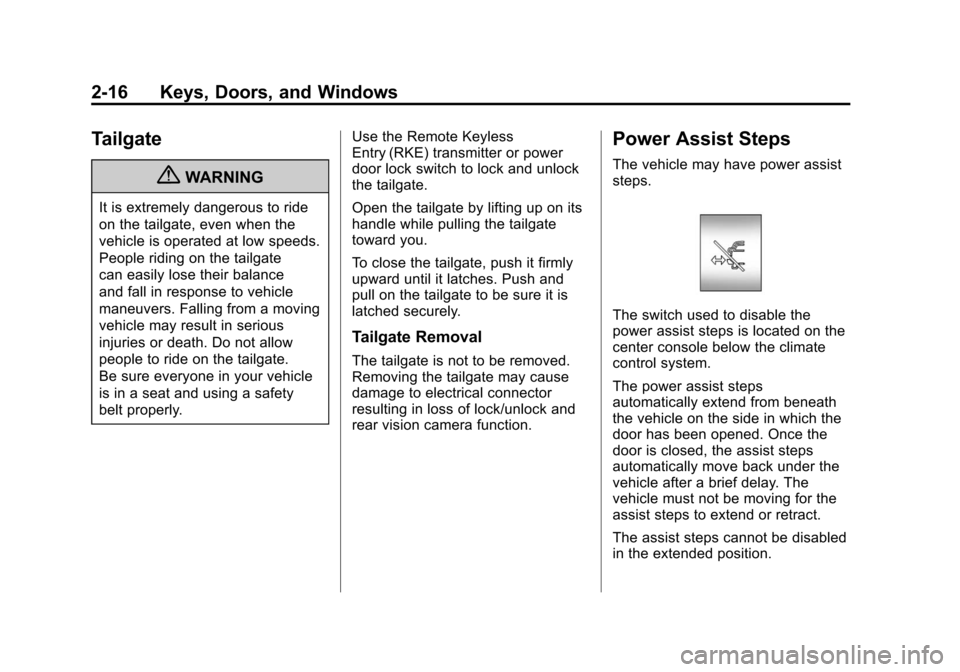
The switch used to disable the
power assist steps is located on the
center console below the climate
control system.
The power assist steps
automatically extend from beneath
the vehicle on the side in which the
door has been opened. Once the
door is closed, the assist steps
automatically move back under the
vehicle after a brief delay. The
vehicle must not be moving for the
assist steps to extend or retract.
The assist steps cannot be disabled
in the extended position.
Page 68 of 508
Black plate (8,1)Chevrolet Avalanche Owner Manual - 2012
3-8 Seats and Restraints
Memory Remote Recall
The memory feature can recall the
driver seat, outside mirrors, and
pedals, if equipped, to stored
positions when entering the vehicle.
To activate, unlock the driver
door with the Remote Keyless
Entry (RKE) transmitter. The driver
seat, outside mirrors, and adjustable
pedals, if equipped, will move to the
memory position associated with the
transmitter used to unlock the
vehicle.
This feature can be turned on or off
using the vehicle personalization
menu. SeeVehicle Personalization
(With DIC Buttons) on page 5‑45 for
more information.
To stop recall movement, press one
of the power seat controls, memory
buttons, or power mirror buttons,
or the adjustable pedal switch. If something has blocked the driver
seat and/or the adjustable pedals
while recalling a memory position,
the recall may stop. Remove the
obstruction; then press and hold the
appropriate manual control for the
memory item that is not recalling
for two seconds. Try recalling the
memory position again by pressing
the appropriate memory button.
If the memory position is still not
recalling, see your dealer for
service.
Easy Exit Driver Seat
This feature can move the seat
rearward to allow extra room to exit
the vehicle.
B(Easy Exit Driver Seat):
Press
to recall the easy exit seat position.
The vehicle must be in P (Park). If the easy exit seat feature is
programmed on in the vehicle
personalization menu, automatic
seat movement occurs when the
ignition key is removed.
A single beep sounds. The driver
seat moves back approximately
8 cm (3 in). To move the seat back
farther, press
Bagain until the
seat is all the way back.
If something has blocked the driver
seat while recalling the exit position,
the recall may stop. Remove the
obstruction; then press and hold
the power seat control rearward for
two seconds. Try recalling the exit
position again. If the exit position is
still not recalling, see your dealer for
service.
See Vehicle Personalization (With
DIC Buttons) on page 5‑45 for more
information.
Page 132 of 508
Black plate (2,1)Chevrolet Avalanche Owner Manual - 2012
5-2 Instruments and Controls
Vehicle Personalization
Vehicle Personalization(With DIC Buttons) . . . . . . . . . 5-45
Universal Remote System
Universal Remote System . . . 5-53
Universal Remote SystemProgramming . . . . . . . . . . . . . . . 5-53
Universal Remote System Operation . . . . . . . . . . . . . . . . . . 5-58
Controls
Steering Wheel
Adjustment
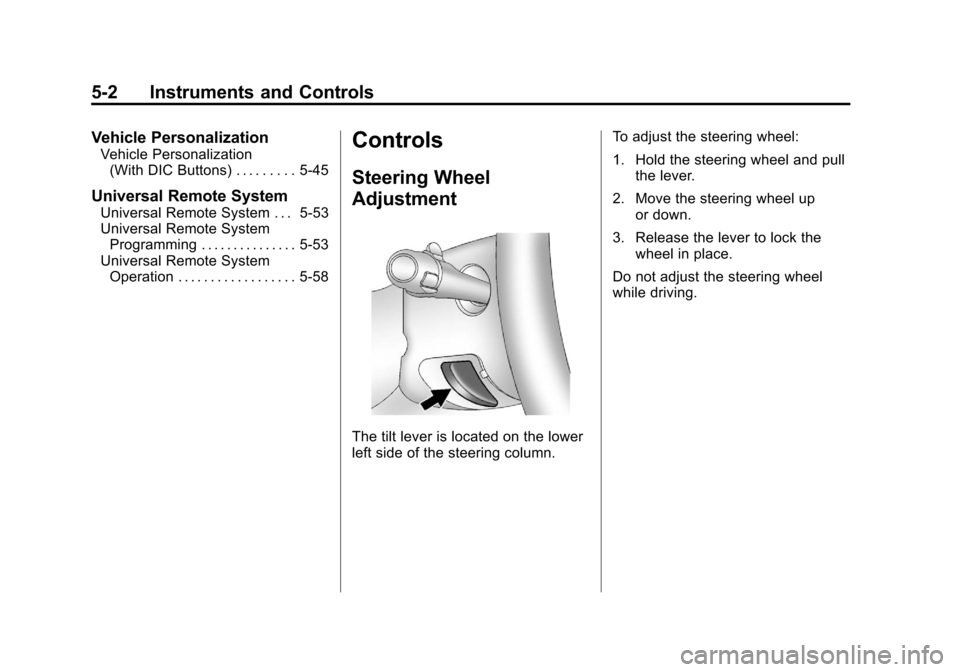
The tilt lever is located on the lower
left side of the steering column. To adjust the steering wheel:
1. Hold the steering wheel and pull
the lever.
2. Move the steering wheel up or down.
3. Release the lever to lock the wheel in place.
Do not adjust the steering wheel
while driving.
Page 147 of 508
Black plate (17,1)Chevrolet Avalanche Owner Manual - 2012
Instruments and Controls 5-17
If there is a problem with the airbag
system, a Driver Information Center
(DIC) message can also come on.
SeeAirbag System Messages on
page 5‑42 for more information.
Passenger Airbag Status
Indicator
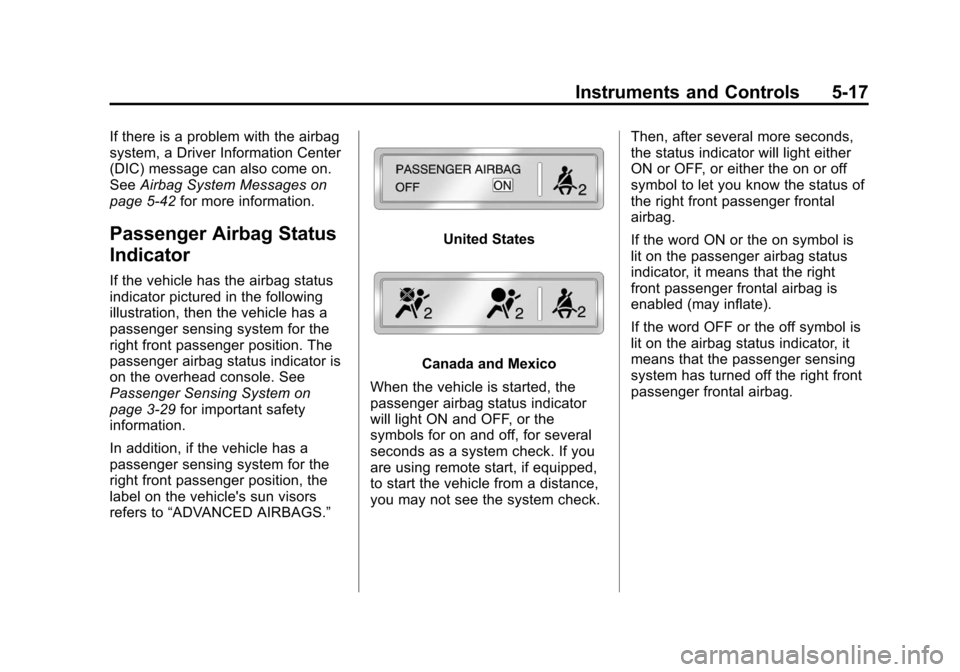
If the vehicle has the airbag status
indicator pictured in the following
illustration, then the vehicle has a
passenger sensing system for the
right front passenger position. The
passenger airbag status indicator is
on the overhead console. See
Passenger Sensing System on
page 3‑29for important safety
information.
In addition, if the vehicle has a
passenger sensing system for the
right front passenger position, the
label on the vehicle's sun visors
refers to “ADVANCED AIRBAGS.”
United States
Canada and Mexico
When the vehicle is started, the
passenger airbag status indicator
will light ON and OFF, or the
symbols for on and off, for several
seconds as a system check. If you
are using remote start, if equipped,
to start the vehicle from a distance,
you may not see the system check. Then, after several more seconds,
the status indicator will light either
ON or OFF, or either the on or off
symbol to let you know the status of
the right front passenger frontal
airbag.
If the word ON or the on symbol is
lit on the passenger airbag status
indicator, it means that the right
front passenger frontal airbag is
enabled (may inflate).
If the word OFF or the off symbol is
lit on the airbag status indicator, it
means that the passenger sensing
system has turned off the right front
passenger frontal airbag.
Page 170 of 508
Black plate (40,1)Chevrolet Avalanche Owner Manual - 2012
5-40 Instruments and Controls
Key and Lock Messages
REPLACE BATTERY IN
REMOTE KEY
This message displays if a Remote
Keyless Entry (RKE) transmitter
battery is low. The battery needs to
be replaced in the transmitter. See
“Battery Replacement”under
Remote Keyless Entry (RKE)
System Operation on page 2‑3.
Lamp Messages
TURN SIGNAL ON
This message displays and a chime
sounds if a turn signal is left on for
1.2 km (0.75 mile). Move the turn
signal/multifunction lever to the off
position.
Object Detection System
Messages
PARK ASST BLOCKED SEE
OWNERS MANUAL
This message displays if there is
something interfering with the park
assist system. See Ultrasonic
Parking Assist on page 9‑54 for
more information.
PARK ASSIST OFF
After the vehicle has been started,
this message displays to remind the
driver that the URPA system has
been turned off. Press the set/reset
button or the trip odometer reset
stem to acknowledge this message
and clear it from the DIC display. To
turn the URPA system back on, see
Ultrasonic Parking Assist on
page 9‑54.
SERVICE PARK ASSIST
This message displays if there is a
problem with the Ultrasonic Rear
Parking Assist (URPA) system. Do
not use this system to help you
park. See Ultrasonic Parking Assist
on page 9‑54 for more information.
See your dealer for service.
Ride Control System
Messages
SERVICE STABILITRAK
If your vehicle has StabiliTrak®and
this message displays, it means
there may be a problem with the
StabiliTrak system. If you see this
message, try to reset the system.
Stop; turn off the engine for at least
15 seconds; then start the engine
again. If this message still comes
on, it means there is a problem. You
should see your dealer for service.
The vehicle is safe to drive,
however, you do not have the
benefit of StabiliTrak, so reduce
your speed and drive accordingly.
Page 177 of 508
Black plate (47,1)Chevrolet Avalanche Owner Manual - 2012
Instruments and Controls 5-47
DRIVER IN PARK:Only the driver
door will unlock when the vehicle is
shifted into P (Park).
ALL AT KEY OUT: All of the doors,
including the tailgate, will unlock
when the key is taken out of the
ignition.
ALL IN PARK (default): All of the
doors, including the tailgate, will
unlock when the vehicle is shifted
into P (Park).
NO CHANGE: No change will be
made to this feature. The current
setting will remain.
To select a setting, press the set/
reset button while the desired
setting is displayed on the DIC.
REMOTE DOOR LOCK
This feature allows you to select the
type of feedback you will receive
when locking the vehicle with the
Remote Keyless Entry (RKE)
transmitter. You will not receive feedback when locking the vehicle
with the RKE transmitter if the doors
are open. See
Remote Keyless
Entry (RKE) System Operation on
page 2‑3 for more information.
Press the customization button until
REMOTE DOOR LOCK appears on
the DIC display. Press the set/reset
button once to access the settings
for this feature. Then press the
customization button to scroll
through the following settings:
OFF: There will be no feedback
when you press the lock button on
the RKE transmitter.
LIGHTS ONLY: The exterior lamps
will flash when you press the lock
button on the RKE transmitter.
HORN ONLY: The horn will sound
on the second press of the lock
button on the RKE transmitter. HORN & LIGHTS (default):
The
exterior lamps will flash when you
press the lock button on the RKE
transmitter, and the horn will sound
when the lock button is pressed
again within five seconds of the
previous command.
NO CHANGE: No change will be
made to this feature. The current
setting will remain.
To select a setting, press the set/
reset button while the desired
setting is displayed on the DIC.
REMOTE DOOR UNLOCK
This feature allows you to select the
type of feedback you will receive
when unlocking the vehicle with the
Remote Keyless Entry (RKE)
transmitter. You will not receive
feedback when unlocking the
vehicle with the RKE transmitter if
the doors are open. See Remote
Keyless Entry (RKE) System
Operation on page 2‑3 for more
information.
Page 178 of 508
Black plate (48,1)Chevrolet Avalanche Owner Manual - 2012
5-48 Instruments and Controls
Press the customization button until
REMOTE DOOR UNLOCK appears
on the DIC display. Press the set/
reset button once to access the
settings for this feature. Then press
the customization button to scroll
through the following settings:
LIGHTS OFF:The exterior lamps
will not flash when you press the
unlock button on the RKE
transmitter.
LIGHTS ON (default): The exterior
lamps will flash when you press the
unlock button on the RKE
transmitter.
NO CHANGE: No change will be
made to this feature. The current
setting will remain.
To select a setting, press the set/
reset button while the desired
setting is displayed on the DIC. DELAY DOOR LOCK
This feature allows you to select
whether or not the locking of the
vehicle's doors and tailgate will be
delayed. When locking the doors
and tailgate with the power door
lock switch and a door or the
tailgate is open, this feature will
delay locking the doors and tailgate
until five seconds after the last door
is closed. You will hear three chimes
to signal that the delayed locking
feature is in use. The key must be
out of the ignition for this feature to
work. You can temporarily override
delayed locking by pressing the
power door lock switch twice. See
Delayed Locking on page 2‑8
for
more information.
Press the customization button until
DELAY DOOR LOCK appears on
the DIC display. Press the set/reset button once to access the settings
for this feature. Then press the
customization button to scroll
through the following settings:
OFF:
There will be no delayed
locking of the vehicle's doors.
ON (default): The doors will not
lock until five seconds after the last
door or the tailgate is closed.
NO CHANGE: No change will be
made to this feature. The current
setting will remain.
To select a setting, press the set/
reset button while the desired
setting is displayed on the DIC.
EXIT LIGHTING
This feature allows you to select the
amount of time you want the
exterior lamps to remain on when it
is dark enough outside. This
happens after the key is turned from
ON/RUN to LOCK/OFF.
Press the customization button until
EXIT LIGHTING appears on the DIC
display. Press the set/reset button
Page 179 of 508
Black plate (49,1)Chevrolet Avalanche Owner Manual - 2012
Instruments and Controls 5-49
once to access the settings for
this feature. Then press the
customization button to scroll
through the following settings:
OFF:The exterior lamps will not
turn on.
30 SECONDS (default): The
exterior lamps will stay on for
30 seconds.
1 MINUTE: The exterior lamps will
stay on for one minute.
2 MINUTES: The exterior lamps will
stay on for two minutes.
NO CHANGE: No change will be
made to this feature. The current
setting will remain.
To select a setting, press the set/
reset button while the desired
setting is displayed on the DIC.
APPROACH LIGHTING
This feature allows you to select
whether or not to have the exterior
lights turn on briefly during low light periods after unlocking the vehicle
using the Remote Keyless
Entry (RKE) transmitter.
Press the customization button until
APPROACH LIGHTING appears on
the DIC display. Press the set/reset
button once to access the settings
for this feature. Then press the
customization button to scroll
through the following settings:
OFF:
The exterior lights will not
turn on when you unlock the vehicle
with the RKE transmitter.
ON (default): If it is dark enough
outside, the exterior lights will turn
on briefly when you unlock the
vehicle with the RKE transmitter.
The lights will remain on for
20 seconds or until the lock button
on the RKE transmitter is pressed,
or the vehicle is no longer off.
See Remote Keyless Entry (RKE)
System Operation on page 2‑3 for
more information. NO CHANGE :
No change will be
made to this feature. The current
setting will remain.
To select a setting, press the set/
reset button while the desired
setting is displayed on the DIC.
CHIME VOLUME
This feature allows you to select the
volume level of the chime.
Press the customization button until
CHIME VOLUME appears on the
DIC display. Press the set/reset
button once to access the settings
for this feature. Then press the
customization button to scroll
through the following settings:
NORMAL: The chime volume will
be set to a normal level.
Page 181 of 508
Black plate (51,1)Chevrolet Avalanche Owner Manual - 2012
Instruments and Controls 5-51
BUTTON & KEY OUT (default):If
the features are enabled through
the EASY EXIT SETUP menu, the
driver seat will move back when the
key is removed from the ignition or
after pressing the easy exit seat
button.
The automatic easy exit seat
movement will only occur one time
after the key is removed from the
ignition. If the automatic movement
has already occurred, and you put
the key back in the ignition and
remove it again, the seat will stay in
the original exit position, unless a
memory recall took place prior to
removing the key again.
NO CHANGE: No change will be
made to this feature. The current
setting will remain.
To select a setting, press the set/
reset button while the desired
setting is displayed on the DIC. EASY EXIT SETUP
If your vehicle has this feature, it
allows you to select which areas will
recall with the automatic easy exit
seat feature. It also allows you to
turn off the automatic easy exit
feature. See
Memory Seats on
page 3‑7 and EASY EXIT RECALL
earlier for more information.
Press the customization button until
EASY EXIT SETUP appears on the
DIC display. Press the set/reset
button once to access the settings
for this feature. Then press the
menu up/down button to scroll
through the following settings:
OFF: No automatic seat exit will
recall.
SEAT ONLY (Default): The driver
seat will recall.
NO CHANGE: No change will be
made to this feature. The current
setting will remain.
To select a setting, press the set/
reset button while the desired
setting is displayed on the DIC. MEMORY SEAT RECALL
If your vehicle has this feature, it
allows you to select your preference
for the remote memory seat recall
feature. See
Memory Seats on
page 3‑7 for more information.
Press the customization button until
MEMORY SEAT RECALL appears
on the DIC display. Press the set/
reset button once to access the
settings for this feature. Then press
the customization button to scroll
through the following settings:
OFF (default): No remote memory
seat recall will occur.
ON: The driver seat and, on some
vehicles, the outside mirrors will
automatically move to the stored
driving position when the unlock
button on the Remote Keyless Entry
(RKE) transmitter is pressed. On
some vehicles with the adjustable
throttle and brake pedal feature, the
pedals will also automatically move.
Page 182 of 508
Black plate (52,1)Chevrolet Avalanche Owner Manual - 2012
5-52 Instruments and Controls
NO CHANGE:No change will be
made to this feature. The current
setting will remain.
To select a setting, press the set/
reset button while the desired
setting is displayed on the DIC.
REMOTE START
If your vehicle has this feature, it
allows you to turn the remote start
off or on. The remote start feature
allows you to start the engine from
outside of the vehicle using the
Remote Keyless Entry (RKE)
transmitter. See Remote Vehicle
Start on page 2‑5 for more
information.
Press the customization button until
REMOTE START appears on the
DIC display. Press the set/reset
button once to access the settings
for this feature. Then press the
customization button to scroll
through the following settings:
OFF : The remote start feature will
be disabled. ON (default):
The remote start
feature will be enabled.
NO CHANGE: No change will be
made to this feature. The current
setting will remain.
To select a setting, press the set/
reset button while the desired
setting is displayed on the DIC.
FACTORY SETTINGS
This feature allows you to set all of
the customization features back to
their factory default settings.
Press the customization button until
FACTORY SETTINGS appears on
the DIC display. Press the set/reset
button once to access the settings
for this feature. Then press the
customization button to scroll
through the following settings:
RESTORE ALL (default): The
customization features will be set to
their factory default settings. DO NOT RESTORE:
The
customization features will not be
set to their factory default settings.
To select a setting, press the set/
reset button while the desired
setting is displayed on the DIC.
EXIT FEATURE SETTINGS
This feature allows you to exit the
feature settings menu.
Press the customization button until
PRESS
VTO EXIT FEATURE
SETTINGS appears in the DIC
display. Press the set/reset button
once to exit the menu.
If you do not exit, pressing the
customization button again will
return you to the beginning of the
feature settings menu.