ignition CHEVROLET AVEO 2007 1.G Workshop Manual
[x] Cancel search | Manufacturer: CHEVROLET, Model Year: 2007, Model line: AVEO, Model: CHEVROLET AVEO 2007 1.GPages: 436, PDF Size: 2.52 MB
Page 198 of 436
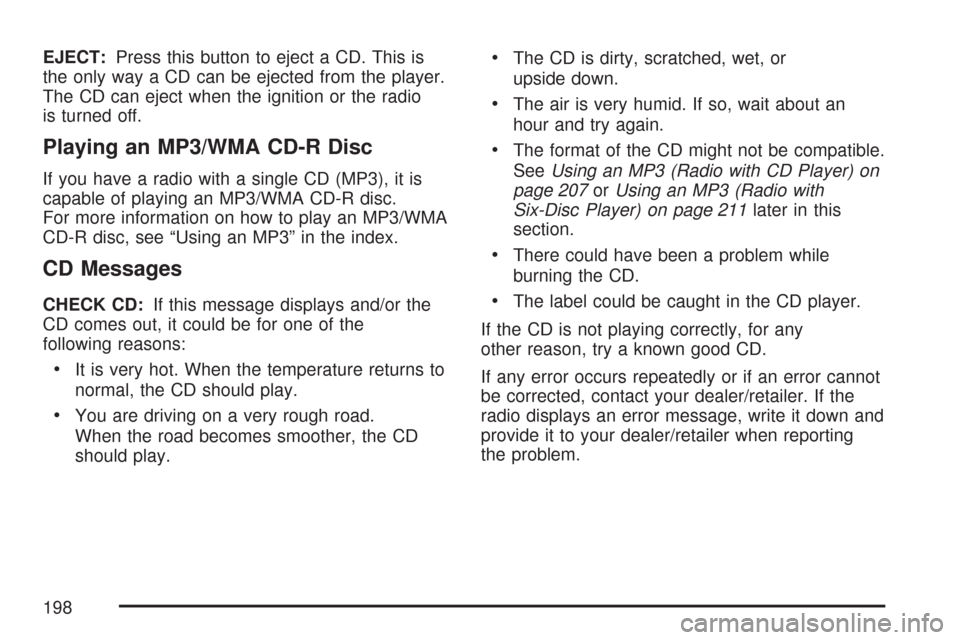
EJECT:Press this button to eject a CD. This is
the only way a CD can be ejected from the player.
The CD can eject when the ignition or the radio
is turned off.
Playing an MP3/WMA CD-R Disc
If you have a radio with a single CD (MP3), it is
capable of playing an MP3/WMA CD-R disc.
For more information on how to play an MP3/WMA
CD-R disc, see “Using an MP3” in the index.
CD Messages
CHECK CD:If this message displays and/or the
CD comes out, it could be for one of the
following reasons:
•It is very hot. When the temperature returns to
normal, the CD should play.
•You are driving on a very rough road.
When the road becomes smoother, the CD
should play.
•The CD is dirty, scratched, wet, or
upside down.
•The air is very humid. If so, wait about an
hour and try again.
•The format of the CD might not be compatible.
SeeUsing an MP3 (Radio with CD Player) on
page 207orUsing an MP3 (Radio with
Six-Disc Player) on page 211later in this
section.
•There could have been a problem while
burning the CD.
•The label could be caught in the CD player.
If the CD is not playing correctly, for any
other reason, try a known good CD.
If any error occurs repeatedly or if an error cannot
be corrected, contact your dealer/retailer. If the
radio displays an error message, write it down and
provide it to your dealer/retailer when reporting
the problem.
198
Page 203 of 436
Playing a CD(s)
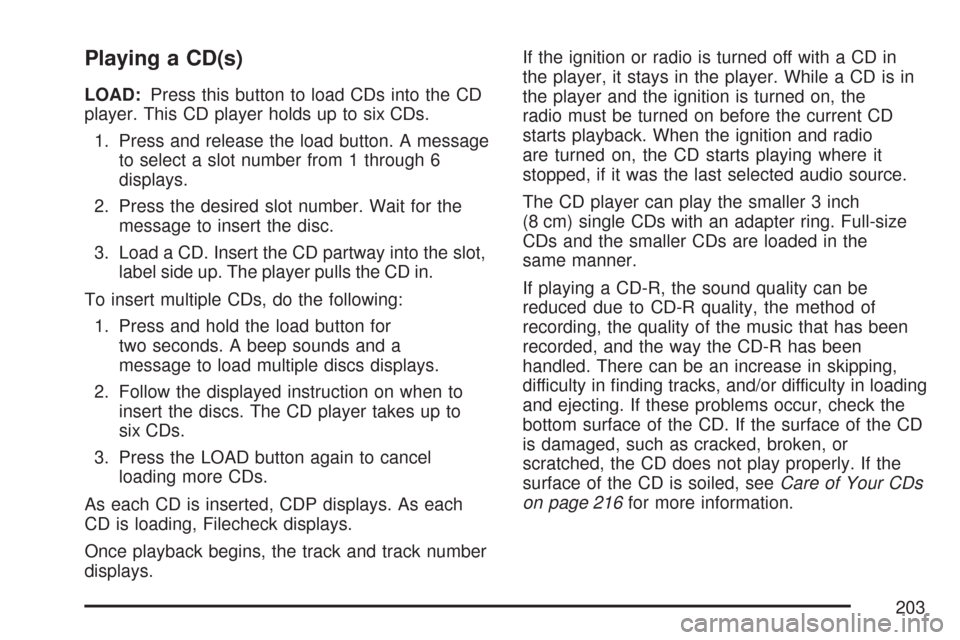
LOAD:Press this button to load CDs into the CD
player. This CD player holds up to six CDs.
1. Press and release the load button. A message
to select a slot number from 1 through 6
displays.
2. Press the desired slot number. Wait for the
message to insert the disc.
3. Load a CD. Insert the CD partway into the slot,
label side up. The player pulls the CD in.
To insert multiple CDs, do the following:
1. Press and hold the load button for
two seconds. A beep sounds and a
message to load multiple discs displays.
2. Follow the displayed instruction on when to
insert the discs. The CD player takes up to
six CDs.
3. Press the LOAD button again to cancel
loading more CDs.
As each CD is inserted, CDP displays. As each
CD is loading, Filecheck displays.
Once playback begins, the track and track number
displays.If the ignition or radio is turned off with a CD in
the player, it stays in the player. While a CD is in
the player and the ignition is turned on, the
radio must be turned on before the current CD
starts playback. When the ignition and radio
are turned on, the CD starts playing where it
stopped, if it was the last selected audio source.
The CD player can play the smaller 3 inch
(8 cm) single CDs with an adapter ring. Full-size
CDs and the smaller CDs are loaded in the
same manner.
If playing a CD-R, the sound quality can be
reduced due to CD-R quality, the method of
recording, the quality of the music that has been
recorded, and the way the CD-R has been
handled. There can be an increase in skipping,
difficulty in finding tracks, and/or difficulty in loading
and ejecting. If these problems occur, check the
bottom surface of the CD. If the surface of the CD
is damaged, such as cracked, broken, or
scratched, the CD does not play properly. If the
surface of the CD is soiled, seeCare of Your CDs
on page 216for more information.
203
Page 205 of 436
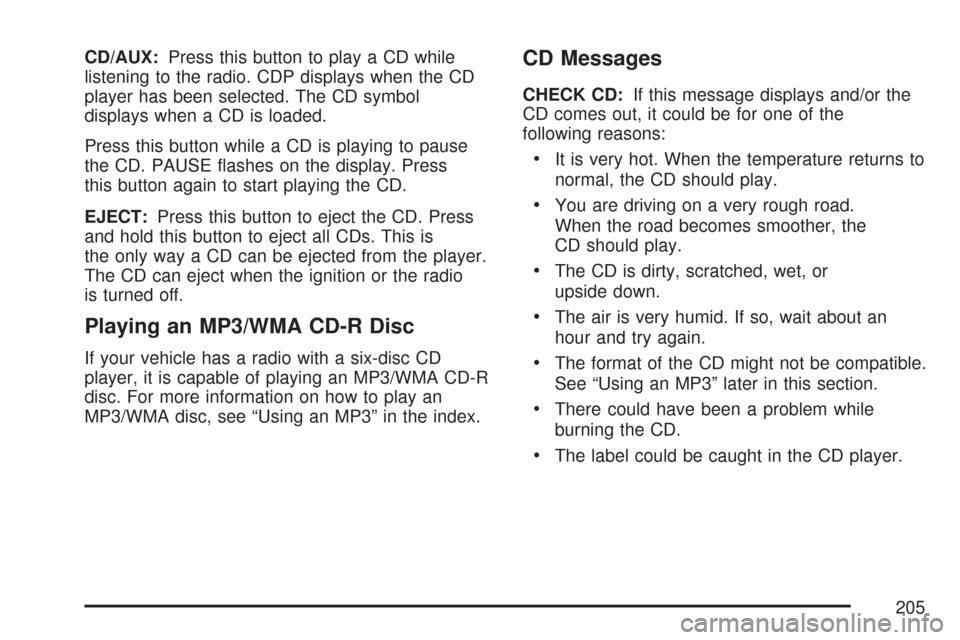
CD/AUX:Press this button to play a CD while
listening to the radio. CDP displays when the CD
player has been selected. The CD symbol
displays when a CD is loaded.
Press this button while a CD is playing to pause
the CD. PAUSE flashes on the display. Press
this button again to start playing the CD.
EJECT:Press this button to eject the CD. Press
and hold this button to eject all CDs. This is
the only way a CD can be ejected from the player.
The CD can eject when the ignition or the radio
is turned off.
Playing an MP3/WMA CD-R Disc
If your vehicle has a radio with a six-disc CD
player, it is capable of playing an MP3/WMA CD-R
disc. For more information on how to play an
MP3/WMA disc, see “Using an MP3” in the index.
CD Messages
CHECK CD:If this message displays and/or the
CD comes out, it could be for one of the
following reasons:
•It is very hot. When the temperature returns to
normal, the CD should play.
•You are driving on a very rough road.
When the road becomes smoother, the
CD should play.
•The CD is dirty, scratched, wet, or
upside down.
•The air is very humid. If so, wait about an
hour and try again.
•The format of the CD might not be compatible.
See “Using an MP3” later in this section.
•There could have been a problem while
burning the CD.
•The label could be caught in the CD player.
205
Page 209 of 436
Playing an MP3/WMA
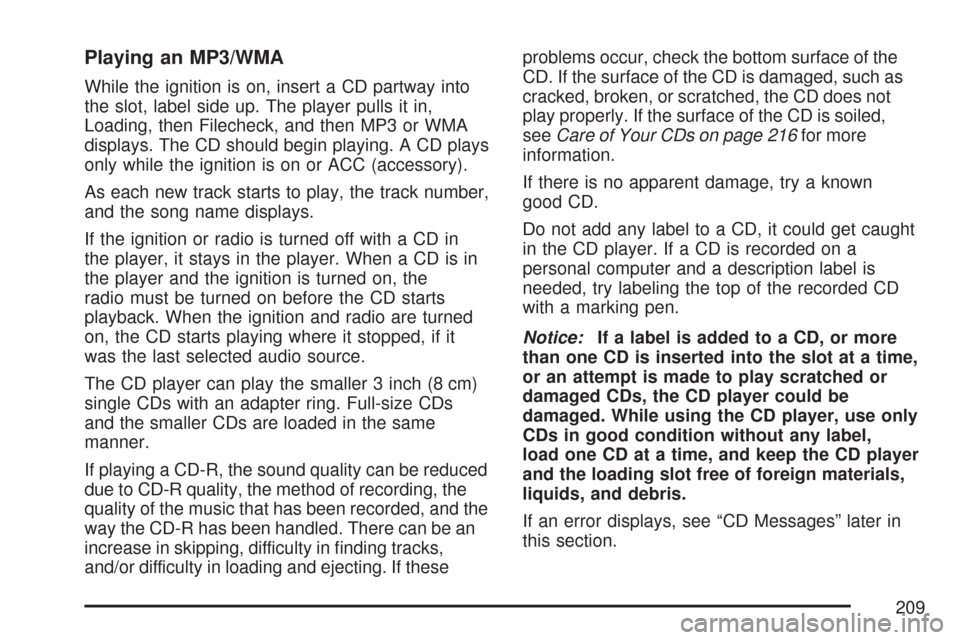
While the ignition is on, insert a CD partway into
the slot, label side up. The player pulls it in,
Loading, then Filecheck, and then MP3 or WMA
displays. The CD should begin playing. A CD plays
only while the ignition is on or ACC (accessory).
As each new track starts to play, the track number,
and the song name displays.
If the ignition or radio is turned off with a CD in
the player, it stays in the player. When a CD is in
the player and the ignition is turned on, the
radio must be turned on before the CD starts
playback. When the ignition and radio are turned
on, the CD starts playing where it stopped, if it
was the last selected audio source.
The CD player can play the smaller 3 inch (8 cm)
single CDs with an adapter ring. Full-size CDs
and the smaller CDs are loaded in the same
manner.
If playing a CD-R, the sound quality can be reduced
due to CD-R quality, the method of recording, the
quality of the music that has been recorded, and the
way the CD-R has been handled. There can be an
increase in skipping, difficulty in finding tracks,
and/or difficulty in loading and ejecting. If theseproblems occur, check the bottom surface of the
CD. If the surface of the CD is damaged, such as
cracked, broken, or scratched, the CD does not
play properly. If the surface of the CD is soiled,
seeCare of Your CDs on page 216for more
information.
If there is no apparent damage, try a known
good CD.
Do not add any label to a CD, it could get caught
in the CD player. If a CD is recorded on a
personal computer and a description label is
needed, try labeling the top of the recorded CD
with a marking pen.
Notice:If a label is added to a CD, or more
than one CD is inserted into the slot at a time,
or an attempt is made to play scratched or
damaged CDs, the CD player could be
damaged. While using the CD player, use only
CDs in good condition without any label,
load one CD at a time, and keep the CD player
and the loading slot free of foreign materials,
liquids, and debris.
If an error displays, see “CD Messages” later in
this section.
209
Page 213 of 436
Playing an MP3/WMA
While the ignition is on, insert a CD partway into
the slot, label side up. The player pulls it in,
Loading, then Filecheck, and then MP3 or WMA
displays. The CD should begin playing. A CD plays
only while the ignition is on or ACC (accessory).
As each new track starts to play, the track number,
and the song name displays.
If the ignition or radio is turned off with a CD in
the player, it stays in the player. When a CD is in
the player and the ignition is turned on, the
radio must be turned on before the CD starts
playback. When the ignition and radio are turned
on, the CD starts playing where it stopped, if it
was the last selected audio source.
The CD player can play the smaller 3 inch (8 cm)
single CDs with an adapter ring. Full-size CDs
and the smaller CDs are loaded in the same
manner.
If playing a CD-R, the sound quality can be
reduced due to CD-R quality, the method of
recording, the quality of the music that has been
recorded, and the way the CD-R has been
handled. There can be an increase in skipping,
difficulty in finding tracks, and/or difficulty in loadingand ejecting. If these problems occur, check the
bottom surface of the CD. If the surface of the CD
is damaged, such as cracked, broken, or
scratched, the CD will not play properly. If the
surface of the CD is soiled, seeCare of Your CDs
on page 216for more information.
If there is no apparent damage, try a known
good CD.
Do not add any label to a CD, it could get caught
in the CD player. If a CD is recorded on a
personal computer and a description label is
needed, try labeling the top of the recorded CD
with a marking pen.
Notice:If a label is added to a CD, or more
than one CD is inserted into the slot at a time,
or an attempt is made to play scratched or
damaged CDs, the CD player could be
damaged. While using the CD player, use only
CDs in good condition without any label,
load one CD at a time, and keep the CD player
and the loading slot free of foreign materials,
liquids, and debris.
If an error displays, see “CD Messages” later in
this section.
213
Page 242 of 436
If you drive regularly in steep country, or if you are
planning to visit there, here are some tips that
can make your trips safer and more enjoyable.
•Keep your vehicle in good shape. Check
all fluid levels and also the brakes, tires,
cooling system, and transaxle. These parts
can work hard on mountain roads.
{CAUTION:
If you do not shift down, the brakes could
get so hot that they would not work well.
You would then have poor braking or
even none going down a hill. You could
crash. Shift down to let the engine assist
the brakes on a steep downhill slope.
{CAUTION:
Coasting downhill in NEUTRAL (N) or with
the ignition off is dangerous. The brakes
will have to do all the work of slowing
down. They could get so hot that they
would not work well. You would then have
poor braking or even none going down a
hill. You could crash. Always have the
engine running and your vehicle in gear
when you go downhill.
•Know how to go down hills. The most important
thing to know is this: let your engine do some of
the slowing down. Shift to a lower gear when
you go down a steep or long hill.
•Know how to go uphill. Drive in the highest gear
possible.
242
Page 305 of 436
To avoid the possibility of the vehicles rolling,
set the parking brake firmly on both vehicles
involved in the jump start procedure. Put
an automatic transaxle in PARK (P) or
a manual transaxle in NEUTRAL before
setting the parking brake.
Notice:If you leave your radio or other
accessories on during the jump starting
procedure, they could be damaged. The repairs
would not be covered by your warranty.
Always turn off your radio and other
accessories when jump starting your vehicle.
3. Turn off the ignition on both vehicles.
Unplug unnecessary accessories plugged into
the cigarette lighter or the accessory power
outlet. Turn off the radio and all lamps that are
not needed. This will avoid sparks and help
save both batteries. And it could save
the radio!4. Open the hoods and locate the batteries. Find
the positive (+) and negative (−) terminal
locations on each vehicle. Your vehicle’s
positive (+) terminal is located under a
red tethered cap on the battery. SeeEngine
Compartment Overview on page 276for more
information on location.
Flip the cap up to access the positive (+)
terminal.
{CAUTION:
An electric fan can start up even when the
engine is not running and can injure you.
Keep hands, clothing and tools away from
any underhood electric fan.
305
Page 363 of 436
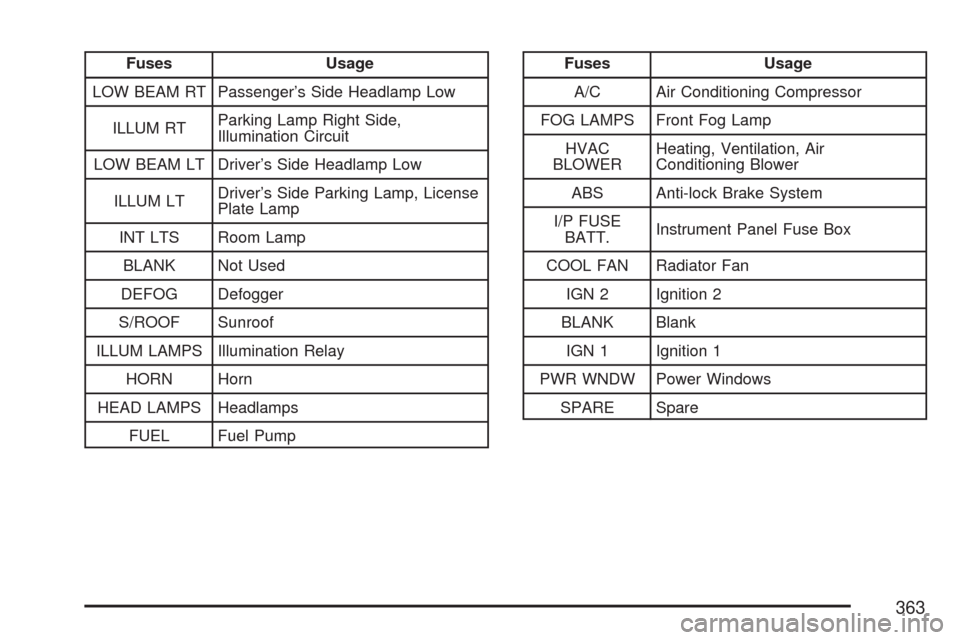
Fuses Usage
LOW BEAM RT Passenger’s Side Headlamp Low
ILLUM RTParking Lamp Right Side,
Illumination Circuit
LOW BEAM LT Driver’s Side Headlamp Low
ILLUM LTDriver’s Side Parking Lamp, License
Plate Lamp
INT LTS Room Lamp
BLANK Not Used
DEFOG Defogger
S/ROOF Sunroof
ILLUM LAMPS Illumination Relay
HORN Horn
HEAD LAMPS Headlamps
FUEL Fuel PumpFuses Usage
A/C Air Conditioning Compressor
FOG LAMPS Front Fog Lamp
HVAC
BLOWERHeating, Ventilation, Air
Conditioning Blower
ABS Anti-lock Brake System
I/P FUSE
BATT.Instrument Panel Fuse Box
COOL FAN Radiator Fan
IGN 2 Ignition 2
BLANK Blank
IGN 1 Ignition 1
PWR WNDW Power Windows
SPARE Spare
363
Page 365 of 436
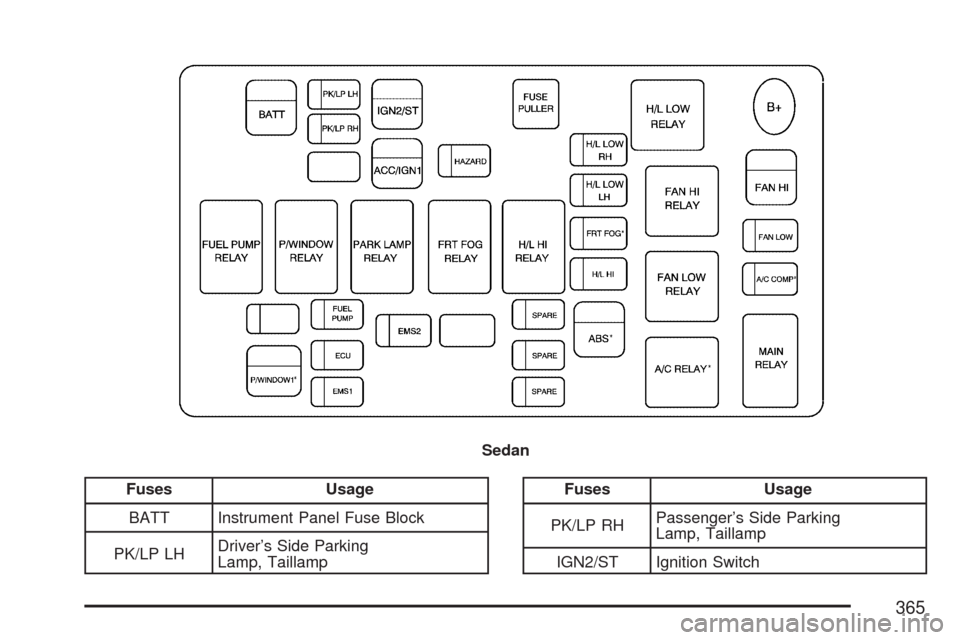
Fuses Usage
BATT Instrument Panel Fuse Block
PK/LP LHDriver’s Side Parking
Lamp, TaillampFuses Usage
PK/LP RHPassenger’s Side Parking
Lamp, Taillamp
IGN2/ST Ignition Switch Sedan
365
Page 366 of 436
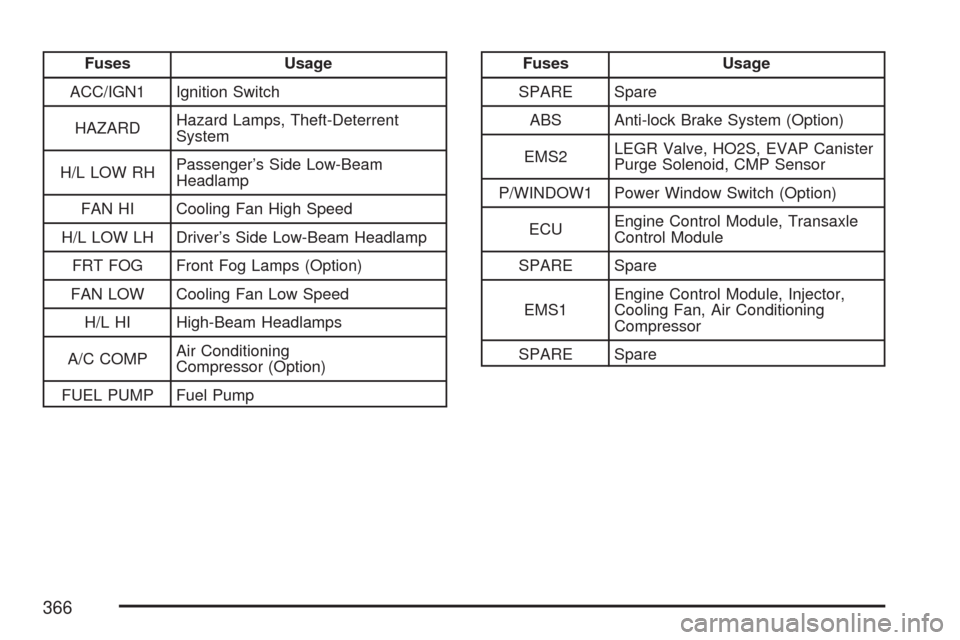
Fuses Usage
ACC/IGN1 Ignition Switch
HAZARDHazard Lamps, Theft-Deterrent
System
H/L LOW RHPassenger’s Side Low-Beam
Headlamp
FAN HI Cooling Fan High Speed
H/L LOW LH Driver’s Side Low-Beam Headlamp
FRT FOG Front Fog Lamps (Option)
FAN LOW Cooling Fan Low Speed
H/L HI High-Beam Headlamps
A/C COMPAir Conditioning
Compressor (Option)
FUEL PUMP Fuel PumpFuses Usage
SPARE Spare
ABS Anti-lock Brake System (Option)
EMS2LEGR Valve, HO2S, EVAP Canister
Purge Solenoid, CMP Sensor
P/WINDOW1 Power Window Switch (Option)
ECUEngine Control Module, Transaxle
Control Module
SPARE Spare
EMS1Engine Control Module, Injector,
Cooling Fan, Air Conditioning
Compressor
SPARE Spare
366