reset CHEVROLET AVEO 2008 1.G User Guide
[x] Cancel search | Manufacturer: CHEVROLET, Model Year: 2008, Model line: AVEO, Model: CHEVROLET AVEO 2008 1.GPages: 384, PDF Size: 6.67 MB
Page 181 of 384
AST (Automatic Store)
Six FM1 preset stations with the strongest reception
in the region can be automatically stored. Press the
AST button for more than one second. The display
shows AUTO SCANNING and then SCANNING flashes
on the display. Once the stations are stored, the
radio switches to FM1 and the first preset station begins
to play. FM-A displays while listening to the automatic
stored stations. Press the AM or FM button to cancel
automatic store.
Setting Preset Stations
Up to 36 stations (six FM1, six FM2, six FM-A, six AM1,
six AM2, and six AM-A), can be programmed on the
six numbered buttons, by performing the following steps:
1. Turn the radio on.
2. Press the AM or FM button to select FM1, FM2,
FM-A, AM1, AM2, or AM-A.
3. Tune in the desired station.
4. Press and hold one of the six numbered
pushbuttons for more than two seconds.
The channel number (CH#1 through CH#6) flashes
on the display when the station has been set.
When that numbered preset button is pressed,
that preset station returns.
5. Repeat the Steps 1 through 4 for each preset
button.
Order of Sound Function
The order for displayed sound function is BASS, TRE,
FAD, BAL, EQ OFF, and VOL (Bass, Treble, Fade,
Balance, Equalization Off, and Volume).
Setting the Tone
(Bass/Midrange/Treble)
SOUND (Bass/Midrange/Treble):Press this button
until BAS (bass) displays. Turn the
Oknob to increase
or to decrease the bass. The display shows the bass
level. After making the selection, press this button
to select the bass level.
Press this button until MID (midrange) displays. Turn
the
Oknob to increase or to decrease the midrange.
The display shows the midrange level. After making
the selection, press this button to select the midrange
level.
Press this button until TRE (treble) displays. Turn
the
Oknob to increase or to decrease the treble.
The display shows the treble level. After making
the selection, press this button to select the treble level.
If a station is weak or has static, decrease the treble.
3-67
Page 192 of 384
When information is not available, No Info (information)
displays.
Press this button for longer than two seconds to change
display mode.
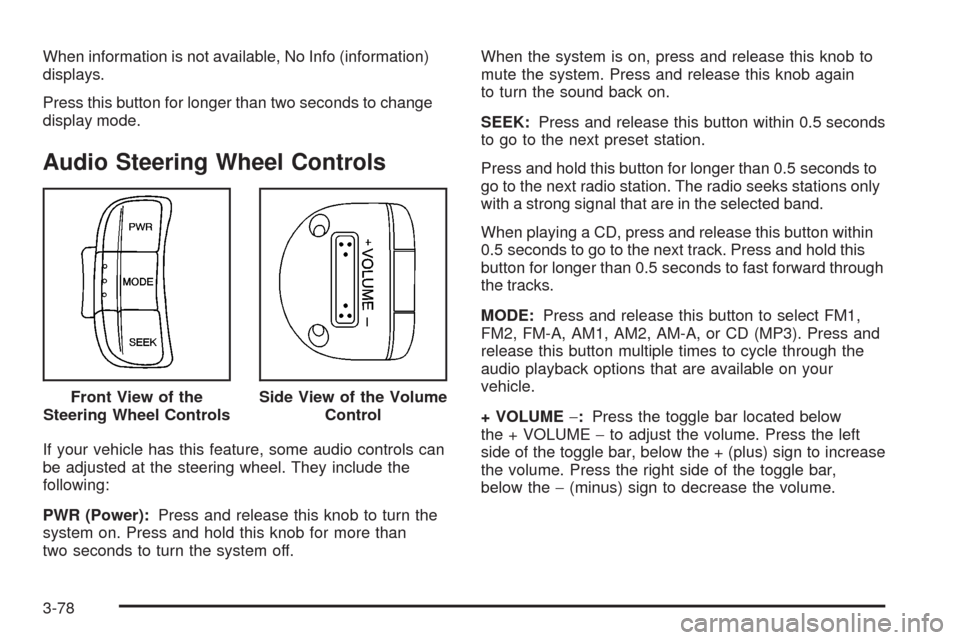
Audio Steering Wheel Controls
If your vehicle has this feature, some audio controls can
be adjusted at the steering wheel. They include the
following:
PWR (Power):Press and release this knob to turn the
system on. Press and hold this knob for more than
two seconds to turn the system off.When the system is on, press and release this knob to
mute the system. Press and release this knob again
to turn the sound back on.
SEEK:Press and release this button within 0.5 seconds
to go to the next preset station.
Press and hold this button for longer than 0.5 seconds to
go to the next radio station. The radio seeks stations only
with a strong signal that are in the selected band.
When playing a CD, press and release this button within
0.5 seconds to go to the next track. Press and hold this
button for longer than 0.5 seconds to fast forward through
the tracks.
MODE:Press and release this button to select FM1,
FM2, FM-A, AM1, AM2, AM-A, or CD (MP3). Press and
release this button multiple times to cycle through the
audio playback options that are available on your
vehicle.
+ VOLUME−:Press the toggle bar located below
the + VOLUME−to adjust the volume. Press the left
side of the toggle bar, below the + (plus) sign to increase
the volume. Press the right side of the toggle bar,
below the−(minus) sign to decrease the volume. Front View of the
Steering Wheel Controls
Side View of the Volume
Control
3-78
Page 262 of 384
Notice:If the jumper cables are connected or
removed in the wrong order, electrical shorting may
occur and damage the vehicle. The repairs would
not be covered by your warranty. Always connect
and remove the jumper cables in the correct
order, making sure that the cables do not touch
each other or other metal.
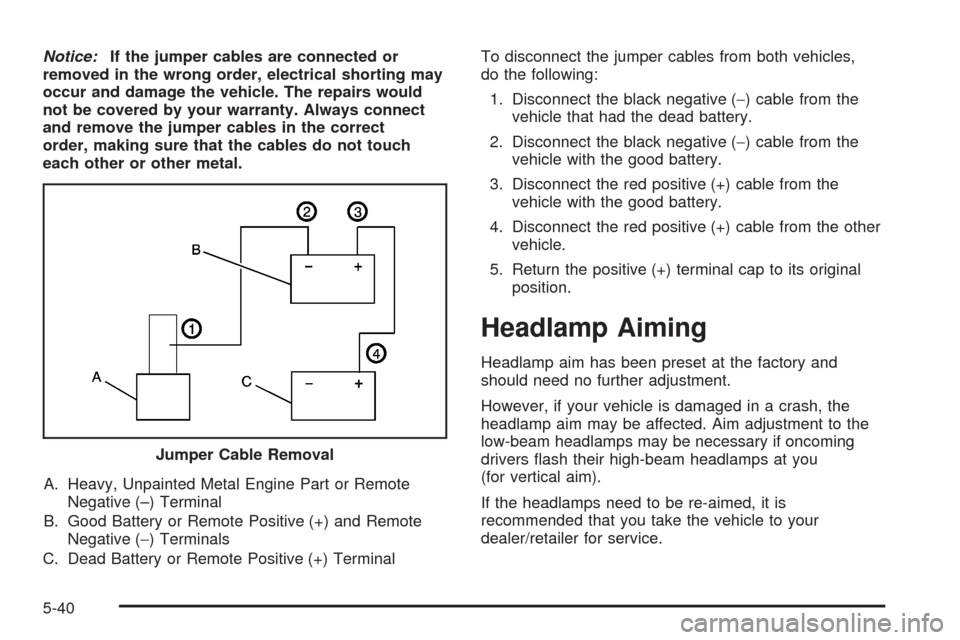
A. Heavy, Unpainted Metal Engine Part or Remote
Negative (–) Terminal
B. Good Battery or Remote Positive (+) and Remote
Negative (−) Terminals
C. Dead Battery or Remote Positive (+) TerminalTo disconnect the jumper cables from both vehicles,
do the following:
1. Disconnect the black negative (−) cable from the
vehicle that had the dead battery.
2. Disconnect the black negative (−) cable from the
vehicle with the good battery.
3. Disconnect the red positive (+) cable from the
vehicle with the good battery.
4. Disconnect the red positive (+) cable from the other
vehicle.
5. Return the positive (+) terminal cap to its original
position.
Headlamp Aiming
Headlamp aim has been preset at the factory and
should need no further adjustment.
However, if your vehicle is damaged in a crash, the
headlamp aim may be affected. Aim adjustment to the
low-beam headlamps may be necessary if oncoming
drivers flash their high-beam headlamps at you
(for vertical aim).
If the headlamps need to be re-aimed, it is
recommended that you take the vehicle to your
dealer/retailer for service. Jumper Cable Removal
5-40