mirror CHEVROLET AVEO 2011 1.G Owners Manual
[x] Cancel search | Manufacturer: CHEVROLET, Model Year: 2011, Model line: AVEO, Model: CHEVROLET AVEO 2011 1.GPages: 328, PDF Size: 5.37 MB
Page 1 of 328

Black plate (1,1)Chevrolet Aveo Owner Manual - 2011
2011 Chevrolet Aveo Owner ManualM
In Brief. . . . . . . . . . . . . . . . . . . . . . . . 1-1
Instrument Panel . . . . . . . . . . . . . . 1-2
Initial Drive Information . . . . . . . . 1-3
Vehicle Features . . . . . . . . . . . . . 1-16
Performance and Maintenance . . . . . . . . . . . . . . . . 1-21
Keys, Doors and Windows . . . 2-1
Keys and Locks . . . . . . . . . . . . . . . 2-2
Doors . . . . . . . . . . . . . . . . . . . . . . . . . . 2-7
Vehicle Security . . . . . . . . . . . . . . 2-10
Exterior Mirrors . . . . . . . . . . . . . . . 2-13
Interior Mirrors . . . . . . . . . . . . . . . . 2-14
Windows . . . . . . . . . . . . . . . . . . . . . 2-14
Roof . . . . . . . . . . . . . . . . . . . . . . . . . . 2-16
Seats and Restraints . . . . . . . . . 3-1
Head Restraints . . . . . . . . . . . . . . . 3-2
Front Seats . . . . . . . . . . . . . . . . . . . . 3-3
Rear Seats . . . . . . . . . . . . . . . . . . . . 3-6
Safety Belts . . . . . . . . . . . . . . . . . . 3-11
Airbag System . . . . . . . . . . . . . . . . 3-24
Child Restraints . . . . . . . . . . . . . . 3-38 Storage
. . . . . . . . . . . . . . . . . . . . . . . 4-1
Storage Compartments . . . . . . . . 4-1
Instruments and Controls . . . . 5-1
Controls . . . . . . . . . . . . . . . . . . . . . . . 5-1
Warning Lights, Gauges, and Indicators . . . . . . . . . . . . . . . . . . . . 5-7
Trip Computer . . . . . . . . . . . . . . . . 5-21
Lighting . . . . . . . . . . . . . . . . . . . . . . . 6-1
Exterior Lighting . . . . . . . . . . . . . . . 6-1
Interior Lighting . . . . . . . . . . . . . . . . 6-4
Lighting Features . . . . . . . . . . . . . . 6-5
Infotainment System . . . . . . . . . 7-1
Introduction . . . . . . . . . . . . . . . . . . . . 7-1
Radio . . . . . . . . . . . . . . . . . . . . . . . . . . 7-3
Audio Players . . . . . . . . . . . . . . . . 7-10
Climate Controls . . . . . . . . . . . . . 8-1
Climate Control Systems . . . . . . 8-1
Air Vents . . . . . . . . . . . . . . . . . . . . . . . 8-4
Maintenance . . . . . . . . . . . . . . . . . . . 8-5 Driving and Operating
. . . . . . . . 9-1
Driving Information . . . . . . . . . . . . . 9-2
Starting and Operating . . . . . . . 9-17
Engine Exhaust . . . . . . . . . . . . . . 9-24
Automatic Transmission . . . . . . 9-25
Manual Transmission . . . . . . . . . 9-29
Brakes . . . . . . . . . . . . . . . . . . . . . . . 9-30
Cruise Control . . . . . . . . . . . . . . . . 9-32
Fuel . . . . . . . . . . . . . . . . . . . . . . . . . . 9-34
Towing . . . . . . . . . . . . . . . . . . . . . . . 9-39
Conversions and Add-Ons . . . 9-40
Vehicle Care . . . . . . . . . . . . . . . . . 10-1
General Information . . . . . . . . . . 10-3
Vehicle Checks . . . . . . . . . . . . . . . 10-5
Headlamp Aiming . . . . . . . . . . . 10-30
Bulb Replacement . . . . . . . . . . 10-31
Electrical System . . . . . . . . . . . . 10-36
Wheels and Tires . . . . . . . . . . . 10-42
Jump Starting . . . . . . . . . . . . . . . 10-70
Towing . . . . . . . . . . . . . . . . . . . . . . 10-74
Appearance Care . . . . . . . . . . . 10-76
Page 7 of 328
Black plate (1,1)Chevrolet Aveo Owner Manual - 2011
In Brief 1-1
In Brief
Instrument Panel
Instrument Panel . . . . . . . . . . . . . . 1-2
Initial Drive Information
Initial Drive Information . . . . . . . . 1-3
Starting the Engine . . . . . . . . . . . 1-4
Remote Keyless Entry (RKE)System . . . . . . . . . . . . . . . . . . . . . . 1-4
Door Locks . . . . . . . . . . . . . . . . . . . 1-5
Liftgate . . . . . . . . . . . . . . . . . . . . . . . . 1-5
Trunk Release . . . . . . . . . . . . . . . . 1-6
Windows . . . . . . . . . . . . . . . . . . . . . . 1-6
Seat Adjustment . . . . . . . . . . . . . . 1-7
Second Row Seats . . . . . . . . . . . 1-8
Head Restraint Adjustment . . . . 1-8
Safety Belts . . . . . . . . . . . . . . . . . . . 1-9 Sensing System for Passenger
Airbag . . . . . . . . . . . . . . . . . . . . . . . 1-9
Mirror Adjustment . . . . . . . . . . . . 1-10
Steering Wheel Adjustment . . . . . . . . . . . . . . . . . 1-11
Interior Lighting . . . . . . . . . . . . . . 1-11
Exterior Lighting . . . . . . . . . . . . . 1-11
Windshield Wiper/Washer . . . . 1-12
Climate Controls . . . . . . . . . . . . . 1-13
Transmission . . . . . . . . . . . . . . . . 1-14
Vehicle Features
Radio(s) . . . . . . . . . . . . . . . . . . . . . 1-16
Satellite Radio . . . . . . . . . . . . . . . 1-17
Portable Audio Devices . . . . . . 1-18
Steering Wheel Controls . . . . . 1-18
Cruise Control . . . . . . . . . . . . . . . 1-19
Trip Computer (US Only) . . . . 1-19
Power Outlets . . . . . . . . . . . . . . . 1-20
Sunroof . . . . . . . . . . . . . . . . . . . . . . 1-20
Performance and Maintenance
Tire Pressure Monitor . . . . . . . . 1-21
Engine Oil Life System . . . . . . 1-21
Hood Release . . . . . . . . . . . . . . . 1-22
Driving for Better Fuel Economy . . . . . . . . . . . . . . . . . . . 1-22
Roadside Assistance Program . . . . . . . . . . . . . . . . . . . . 1-23
OnStar
®. . . . . . . . . . . . . . . . . . . . . 1-24
Page 16 of 328
Black plate (10,1)Chevrolet Aveo Owner Manual - 2011
1-10 In Brief
Mirror Adjustment
Exterior Mirrors
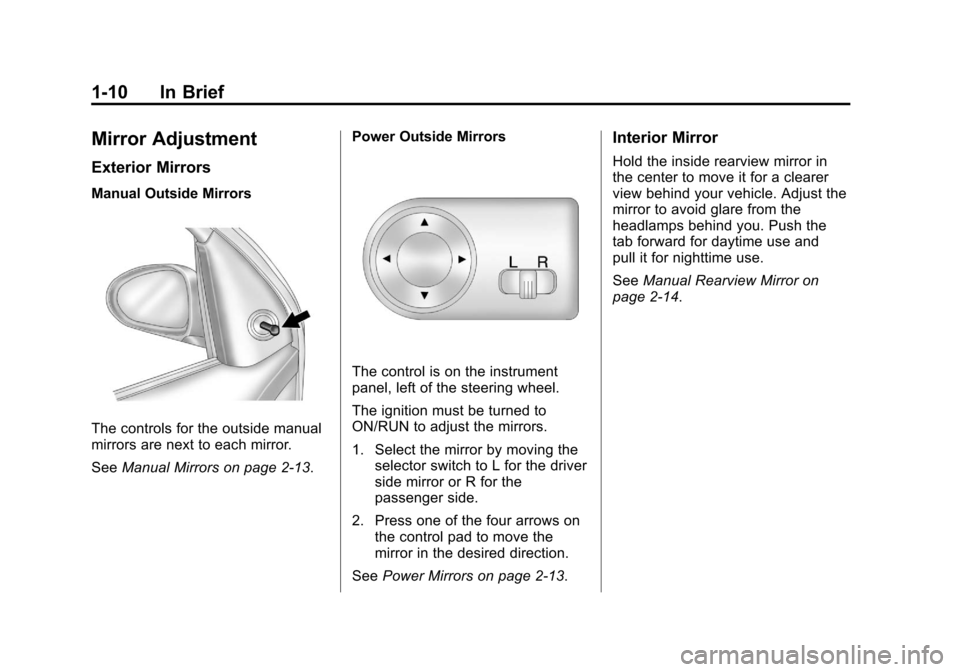
Manual Outside Mirrors
The controls for the outside manual
mirrors are next to each mirror.
SeeManual Mirrors on page 2‑13. Power Outside Mirrors
The control is on the instrument
panel, left of the steering wheel.
The ignition must be turned to
ON/RUN to adjust the mirrors.
1. Select the mirror by moving the
selector switch to L for the driver
side mirror or R for the
passenger side.
2. Press one of the four arrows on the control pad to move the
mirror in the desired direction.
See Power Mirrors on page 2‑13.
Interior Mirror
Hold the inside rearview mirror in
the center to move it for a clearer
view behind your vehicle. Adjust the
mirror to avoid glare from the
headlamps behind you. Push the
tab forward for daytime use and
pull it for nighttime use.
SeeManual Rearview Mirror on
page 2‑14.
Page 33 of 328
Black plate (1,1)Chevrolet Aveo Owner Manual - 2011
Keys, Doors and Windows 2-1
Keys, Doors and
Windows
Keys and Locks
Keys . . . . . . . . . . . . . . . . . . . . . . . . . . 2-2
Remote Keyless Entry (RKE)System . . . . . . . . . . . . . . . . . . . . . . 2-3
Remote Keyless Entry (RKE) System Operation . . . . . . . . . . . 2-3
Door Locks . . . . . . . . . . . . . . . . . . . 2-5
Central Door Unlocking System . . . . . . . . . . . . . . . . . . . . . . 2-6
Door Ajar Reminder . . . . . . . . . . . 2-6
Safety Locks . . . . . . . . . . . . . . . . . . 2-6
Doors
Trunk . . . . . . . . . . . . . . . . . . . . . . . . . 2-7
Liftgate (Hatchback) . . . . . . . . . . 2-9
Vehicle Security
Vehicle Security . . . . . . . . . . . . . . 2-10
Anti-Theft Alarm System . . . . . 2-10
Immobilizer . . . . . . . . . . . . . . . . . . 2-12
Immobilizer Operation . . . . . . . 2-12
Exterior Mirrors
Convex Mirrors . . . . . . . . . . . . . . 2-13
Manual Mirrors . . . . . . . . . . . . . . . 2-13
Power Mirrors . . . . . . . . . . . . . . . . 2-13
Heated Mirrors . . . . . . . . . . . . . . . 2-14
Interior Mirrors
Manual Rearview Mirror . . . . . . 2-14
Windows
Windows . . . . . . . . . . . . . . . . . . . . . 2-14
Manual Windows . . . . . . . . . . . . 2-15
Power Windows . . . . . . . . . . . . . 2-15
Sun Visors . . . . . . . . . . . . . . . . . . . 2-16
Roof
Sunroof . . . . . . . . . . . . . . . . . . . . . . 2-16
Page 45 of 328
Black plate (13,1)Chevrolet Aveo Owner Manual - 2011
Keys, Doors and Windows 2-13
Exterior Mirrors
Convex Mirrors
{WARNING
A convex mirror can make things,
like other vehicles, look farther
away than they really are. If you
cut too sharply into the right lane,
you could hit a vehicle on the
right. Check the inside mirror or
glance over your shoulder before
changing lanes.
The passenger side mirror is convex
shaped. A convex mirror's surface is
curved so more can be seen from
the driver seat.
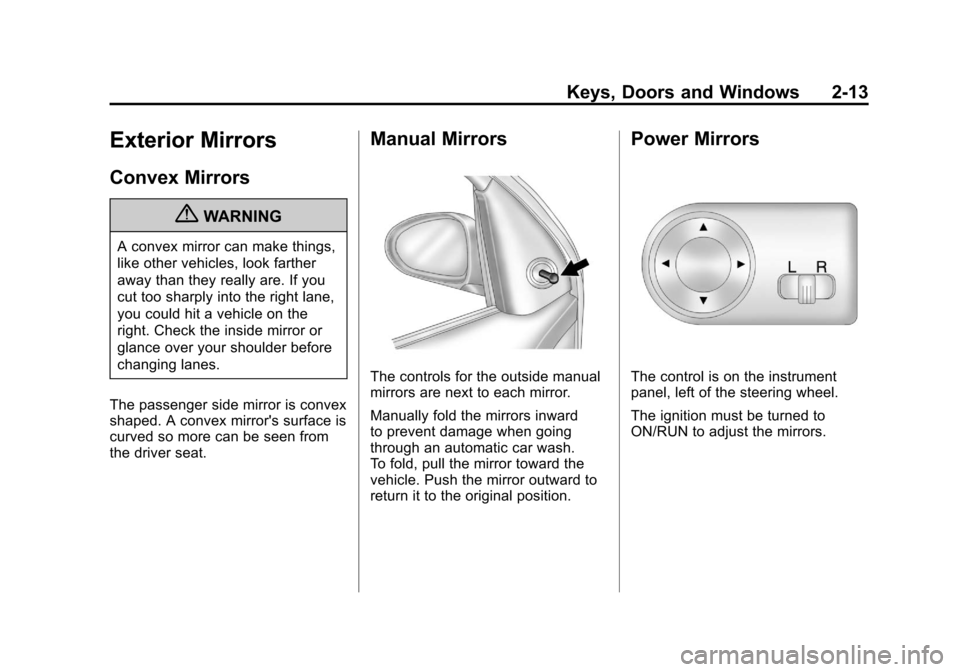
Manual Mirrors
The controls for the outside manual
mirrors are next to each mirror.
Manually fold the mirrors inward
to prevent damage when going
through an automatic car wash.
To fold, pull the mirror toward the
vehicle. Push the mirror outward to
return it to the original position.
Power Mirrors
The control is on the instrument
panel, left of the steering wheel.
The ignition must be turned to
ON/RUN to adjust the mirrors.
Page 46 of 328
Black plate (14,1)Chevrolet Aveo Owner Manual - 2011
2-14 Keys, Doors and Windows
To adjust the mirrors:
1. Select the mirror you want toadjust by moving the selector
switch to L for the driver side
mirror or R for the passenger
side mirror.
2. Press one of the four arrows on the control pad to move the
mirror in the desired direction.
Manually fold the mirrors inward
to prevent damage when going
through an automatic car wash.
To fold, pull the mirror toward the
vehicle. Push the mirror outward, to
return it to its original position.
Heated Mirrors
For vehicles with this feature:
<(Rear Window Defogger):
Press to heat the mirrors. See
“Rear Window and Outside Mirror
Defogger” underClimate Control
Systems on page 8‑1 for more
information.
Interior Mirrors
Manual Rearview Mirror
Hold the inside rearview mirror in
the center to move it for a clearer
view behind your vehicle. Adjust
the mirror to avoid glare from the
headlamps behind you. Push the
tab forward for daytime use and pull
it for nighttime use.
Windows
{WARNING
Leaving children, helpless adults,
or pets in a vehicle with the
windows closed is dangerous.
They can be overcome by
the extreme heat and suffer
permanent injuries or even death
from heat stroke. Never leave a
child, a helpless adult, or a pet
alone in a vehicle, especially with
the windows closed in warm or
hot weather.
Page 48 of 328
Black plate (16,1)Chevrolet Aveo Owner Manual - 2011
2-16 Keys, Doors and Windows
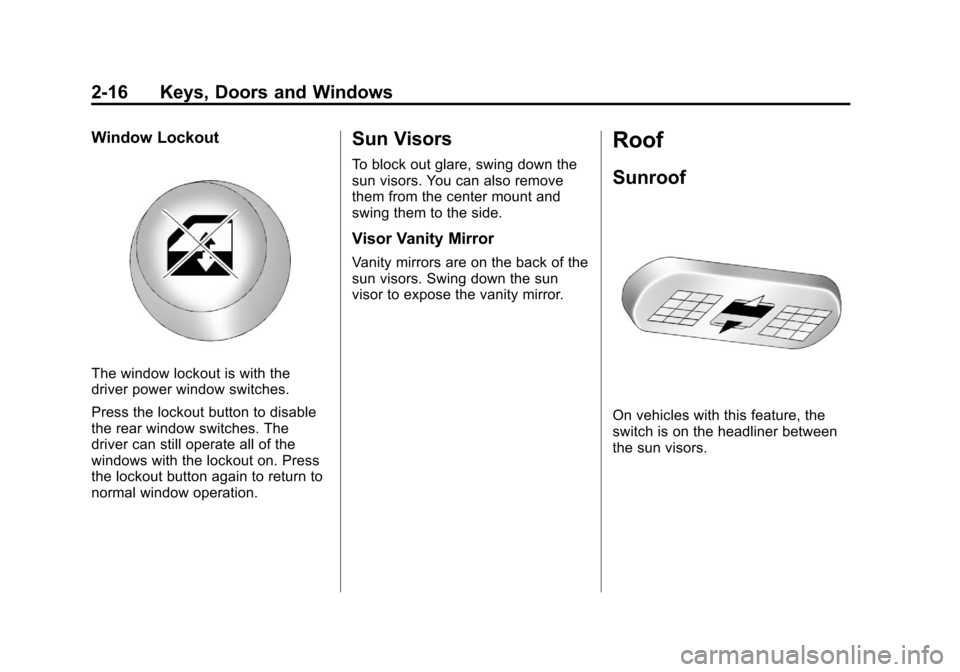
Window Lockout
The window lockout is with the
driver power window switches.
Press the lockout button to disable
the rear window switches. The
driver can still operate all of the
windows with the lockout on. Press
the lockout button again to return to
normal window operation.
Sun Visors
To block out glare, swing down the
sun visors. You can also remove
them from the center mount and
swing them to the side.
Visor Vanity Mirror
Vanity mirrors are on the back of the
sun visors. Swing down the sun
visor to expose the vanity mirror.
Roof
Sunroof
On vehicles with this feature, the
switch is on the headliner between
the sun visors.
Page 160 of 328
Black plate (4,1)Chevrolet Aveo Owner Manual - 2011
8-4 Climate Controls
:(Outside Air):This mode
brings outside air into the vehicle.
For vehicles with a recirculation
button, press the button until the
recirculation mode is turned off. The
vehicle then returns to the outside
air mode.
For vehicles with a lever, move the
lever to choose the outside
air mode.
Rear Window and Outside
Mirror Defogger
For vehicles with a rear window and
outside mirror defogger, they only
work when the ignition is turned to
ON/RUN.
The rear window defogger uses a
warming grid to remove fog or frost
from the rear window.
<(Rear Window Defogger):
Press to turn the rear window and
outside mirror defogger on or off. An
indicator light comes on to show
that the feature is on. If the vehicle does not have air
conditioning, the rear window
defogger may turn off about
10 minutes after the button is
pressed. If it remains on, it can be
turned off by pressing
If the vehicle has air conditioning,
the rear window defogger turns off
about 10 minutes after the button is
pressed. The defogger can also be
turned off by turning the engine off.
Notice: Do not use anything
sharp on the inside of the rear
window. If you do, you could cut
or damage the warming grid, and
the repairs would not be covered
by the vehicle warranty. Do not
attach a temporary vehicle
license, tape, a decal, or anything
similar to the defogger grid.
Air Vents
To open an outlet, press on its
cover. Turn the cover to change the
direction of the airflow.
Operation Tips
.Clear away any ice, snow or
leaves from the air inlets at the
base of the windshield that may
block the flow of air into the
vehicle.
.Use of non-GM approved hood
deflectors may adversely affect
the performance of the system.
.Keep the path under the front
seats clear of objects to help
circulate the air inside of the
vehicle more effectively.
Page 168 of 328
Black plate (6,1)Chevrolet Aveo Owner Manual - 2011
9-6 Driving and Operating
Skidding
In a skid, a driver can lose control of
the vehicle. Defensive drivers avoid
most skids by taking reasonable
care suited to existing conditions,
and by not overdriving those
conditions. But skids are always
possible.
The three types of skids correspond
to the vehicle's three control
systems. In the braking skid, the
wheels are not rolling. In the
steering or cornering skid, too much
speed or steering in a curve causes
tires to slip and lose cornering force.
And in the acceleration skid, too
much throttle causes the driving
wheels to spin.
If the vehicle starts to slide, ease
your foot off the accelerator pedal
and quickly steer the way you want
the vehicle to go. If you start
steering quickly enough, the vehicle
may straighten out. Always be ready
for a second skid if it occurs.Of course, traction is reduced when
water, snow, ice, gravel, or other
material is on the road. For safety,
slow down and adjust your driving to
these conditions. It is important to
slow down on slippery surfaces
because stopping distance will be
longer and vehicle control more
limited.
While driving on a surface with
reduced traction, try to avoid
sudden steering, acceleration,
or braking, including reducing
vehicle speed by shifting to a lower
gear. Any sudden changes could
cause the tires to slide. You may not
realize the surface is slippery until
the vehicle is skidding. Learn to
recognize warning clues
—such as
enough water, ice, or packed snow
on the road to make a mirrored
surface —and slow down when you
have any doubt. If the vehicle has the Antilock Brake
System (ABS), remember: It helps
avoid only the braking skid. If the
vehicle does not have ABS, then in
a braking skid, where the wheels
are no longer rolling, release
enough pressure on the brakes to
get the wheels rolling again. This
restores steering control. Push the
brake pedal down steadily when you
have to stop suddenly. As long as
the wheels are rolling, you will have
steering control.
Page 170 of 328
Black plate (8,1)Chevrolet Aveo Owner Manual - 2011
9-8 Driving and Operating
Highway Hypnosis
Always be alert and pay attention to
your surroundings while driving.
If you become tired or sleepy, find a
safe place to park the vehicle
and rest.
Other driving tips include:
.Keep the vehicle well ventilated.
.Keep interior temperature cool.
.Keep your eyes moving—scan
the road ahead and to the sides.
.Check the rearview mirror and
vehicle instruments often.
Hill and Mountain Roads
Driving on steep hills or through
mountains is different than driving
on flat or rolling terrain. Tips for
driving in these conditions include:
.Keep the vehicle serviced and in
good shape.
.Check all fluid levels and brakes,
tires, cooling system, and
transmission.
.Shift to a lower gear when going
down steep or long hills.
{WARNING
If you do not shift down, the
brakes could get so hot that they
would not work well. You would
then have poor braking or even
none going down a hill. You could
crash. Shift down to let the engine
assist the brakes on a steep
downhill slope.
{WARNING
Coasting downhill in N (Neutral)
or with the ignition off is
dangerous. The brakes will have
to do all the work of slowing down
and they could get so hot that
they would not work well. You
would then have poor braking or
even none going down a hill.
(Continued)