climate control CHEVROLET BLAZER 2003 2.G Owners Manual
[x] Cancel search | Manufacturer: CHEVROLET, Model Year: 2003, Model line: BLAZER, Model: CHEVROLET BLAZER 2003 2.GPages: 420, PDF Size: 2.94 MB
Page 1 of 420

Seats and Restraint Systems........................... 1-1
Front Seats
............................................... 1-2
Rear Seats
............................................... 1-7
Safety Belts
.............................................. 1-9
Child Restraints
.......................................1-32
Air Bag System
.......................................1-52
Restraint System Check
............................1-58
Features and Controls..................................... 2-1
Keys
........................................................ 2-3
Doors and Locks
....................................... 2-7
Windows
.................................................2-11
Theft-Deterrent Systems
............................2-17
Starting and Operating Your Vehicle
...........2-19
Mirrors
....................................................2-41
HomeLink
žTransmitter
.............................2-44
Storage Areas
.........................................2-48
Vehicle Personalization
.............................2-61
Instrument Panel............................................. 3-1
Instrument Panel Overview
.......................... 3-2
Climate Controls
......................................3-17
Warning Lights, Gages and Indicators
.........3-21
Audio System(s)
.......................................3-37Driving Your Vehicle....................................... 4-1
Your Driving, the Road, and Your Vehicle
..... 4-2
Towing
...................................................4-45
Service and Appearance Care.......................... 5-1
Service
..................................................... 5-3
Fuel
......................................................... 5-4
Checking Things Under the Hood
................. 5-8
Rear Axle
...............................................5-45
Four-Wheel Drive
.....................................5-45
Front Axle
...............................................5-46
Bulb Replacement
....................................5-47
Windshield Wiper Blade Replacement
.........5-52
Tires
......................................................5-54
Appearance Care
.....................................5-76
Vehicle Identi®cation
.................................5-83
Electrical System
......................................5-84
Capacities and Speci®cations
.....................5-91
Normal Maintenance Replacement Parts
......5-92
Maintenance Schedule..................................... 6-1
Maintenance Schedule
................................ 6-2
Customer Assistance Information.................... 7-1
Customer Assistance Information
.................. 7-2
Reporting Safety Defects
...........................7-10
INDEX................................................................1
2003 Chevrolet Blazer Owner ManualM
Page 4 of 420

Vehicle Damage Warnings
Also, in this book you will ®nd these notices:
Notice:These mean there is something that could
damage your vehicle.
A notice will tell you about something that can damage
your vehicle. Many times, this damage would not be
covered by your warranty, and it could be costly. But the
notice will tell you what to do to help avoid the
damage.
When you read other manuals, you might see CAUTION
and NOTICE warnings in different colors or in different
words.
You'll also see warning labels on your vehicle. They use
the same words, CAUTION or NOTICE.
Vehicle Symbols
Your vehicle has components and labels that use
symbols instead of text. Symbols, used on your vehicle,
are shown along with the text describing the operation
or information relating to a speci®c component, control,
message, gage or indicator.
If you need help ®guring out a speci®c name of a
component, gage or indicator, reference the following
topics:
·Seats and Restraint Systems in Section 1
·Features and Controls in Section 2
·Instrument Panel Overview in Section 3
·Climate Controls in Section 3
·Warning Lights, Gages and Indicators in Section 3
·Audio System(s) in Section 3
·Engine Compartment Overview in Section 5
iv
Page 79 of 420
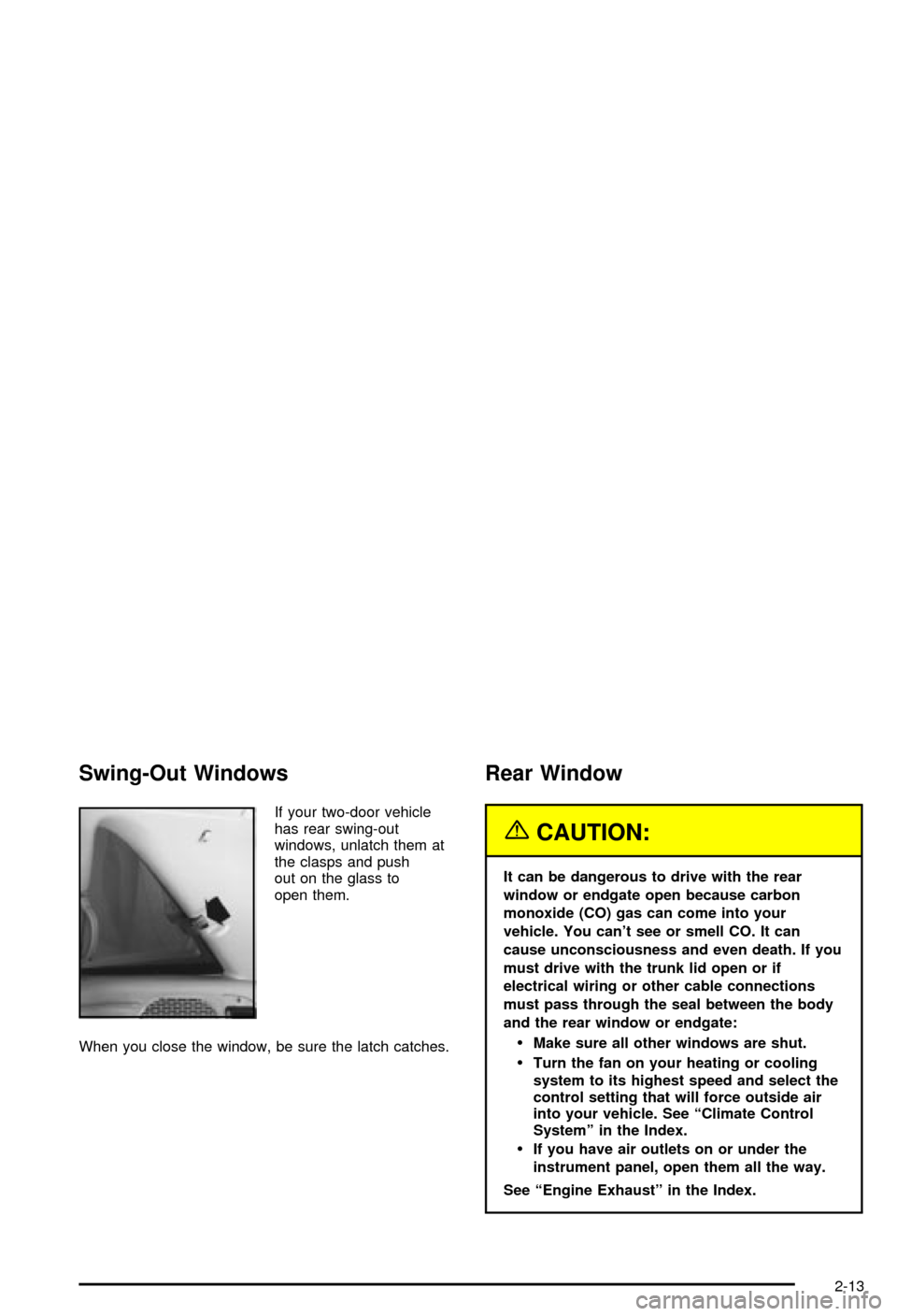
Swing-Out Windows
If your two-door vehicle
has rear swing-out
windows, unlatch them at
the clasps and push
out on the glass to
open them.
When you close the window, be sure the latch catches.
Rear Window
{CAUTION:
It can be dangerous to drive with the rear
window or endgate open because carbon
monoxide (CO) gas can come into your
vehicle. You can't see or smell CO. It can
cause unconsciousness and even death. If you
must drive with the trunk lid open or if
electrical wiring or other cable connections
must pass through the seal between the body
and the rear window or endgate:
·Make sure all other windows are shut.
·Turn the fan on your heating or cooling
system to its highest speed and select the
control setting that will force outside air
into your vehicle. See ªClimate Control
Systemº in the Index.
·If you have air outlets on or under the
instrument panel, open them all the way.
See ªEngine Exhaustº in the Index.
2-13
Page 105 of 420
Engine Exhaust
{CAUTION:
Engine exhaust can kill. It contains the gas
carbon monoxide (CO), which you can't see or
smell. It can cause unconsciousness and
death.
You might have exhaust coming in if:
·Your exhaust system sounds strange or
different.
·Your vehicle gets rusty underneath.
·Your vehicle was damaged in a collision.
·Your vehicle was damaged when driving
over high points on the road or over road
debris.
·Repairs weren't done correctly.
·Your vehicle or exhaust system had been
modi®ed improperly.
If you ever suspect exhaust is coming into
your vehicle:
·Drive it only with all the windows down to
blow out any CO; and
·Have your vehicle ®xed immediately.
Running Your Engine While You
Are Parked
It's better not to park with the engine running. But if you
ever have to, here are some things to know.
{CAUTION:
Idling the engine with the climate control
system off could allow dangerous exhaust into
your vehicle. See the earlier Caution under
ªEngine Exhaust.º
Also, idling in a closed-in place can let deadly
carbon monoxide (CO) into your vehicle even if
the climate control fan is at the highest setting.
One place this can happen is a garage.
Exhaust Ð with CO Ð can come in easily.
NEVER park in a garage with the engine
running.
Another closed-in place can be a blizzard. See
ªWinter Drivingº in the Index.
2-39
Page 109 of 420

Outside Automatic Dimming Mirror
If your vehicle has this feature, the driver's side
outside mirror will adjust for the glare of headlamps
behind you. See
Automatic Dimming Rearview Mirror on
page 2-41.
Outside Convex Mirror
A convex mirror's surface is curved so you can see
more from the driver's seat.
{CAUTION:
A convex mirror can make things (like other
vehicles) look farther away than they really are.
If you cut too sharply into the right lane, you
could hit a vehicle on your right. Check your
inside mirror or glance over your shoulder
before changing lanes.
Outside Heated Mirrors
Your vehicle may be equipped with outside heated
mirrors.
When you operate the rear window defogger, a defogger
also warms the heated outside rearview mirrors to
help clear them of ice, snow and condensation. See
ªRear Window Defoggerº under
Climate Control System
on page 3-17for more information.
2-43
Page 129 of 420

Instrument Panel Overview...............................3-2
Hazard Warning Flashers................................3-3
Other Warning Devices...................................3-4
Horn.............................................................3-4
Tilt Wheel.....................................................3-4
Turn Signal/Multifunction Lever.........................3-5
Exterior Lamps.............................................3-11
Interior Lamps..............................................3-14
Accessory Power Outlets...............................3-15
Ashtrays and Cigarette Lighter........................3-16
Climate Controls............................................3-17
Climate Control System.................................3-17
Outlet Adjustment.........................................3-20
Warning Lights, Gages and Indicators.............3-21
Instrument Panel Cluster................................3-22
Speedometer and Odometer...........................3-24
Trip Odometer..............................................3-24
Tachometer.................................................3-24
Safety Belt Reminder Light.............................3-25
Air Bag Readiness Light................................3-25
Charging System Light..................................3-26
Voltmeter Gage............................................3-27
Up-Shift Light...............................................3-27
Brake System Warning Light..........................3-28
Anti-Lock Brake System Warning Light.............3-29
Engine Coolant Temperature Gage..................3-29Malfunction Indicator Lamp.............................3-30
Oil Pressure Gage........................................3-33
Security Light...............................................3-34
Service Four-Wheel Drive Warning Light..........3-34
Tow/Haul Mode Light....................................3-35
Check Gages Warning Light...........................3-35
Gate Ajar Light.............................................3-35
Fuel Gage...................................................3-35
Low Fuel Warning Light.................................3-36
Audio System(s).............................................3-37
Setting the Time for Radios without Radio
Data Systems (RDS)..................................3-37
Setting the Time for Radios with Radio Data
Systems (RDS).........................................3-38
AM-FM Radio...............................................3-38
Radio with CD..............................................3-41
Radio with Cassette and CD..........................3-48
Radio with Six-Disc CD.................................3-58
Theft-Deterrent Feature (Non-RDS Radios).......3-68
Theft-Deterrent Feature (RDS Radios).............3-68
Understanding Radio Reception......................3-69
Care of Your Cassette Tape Player.................3-69
Care of Your CDs.........................................3-70
Care of Your CD Player................................3-70
Fixed Mast Antenna......................................3-70
Section 3 Instrument Panel
3-1
Page 145 of 420

Climate Controls
Climate Control System
With this system you can control the heating, cooling
and ventilation for your vehicle.
Directing the Air¯ow
Mode Knob:Turn the right knob clockwise or
counterclockwise to direct the air¯ow inside of your
vehicle.
H(Vent):This mode directs air to the instrument
panel outlets, with a little air directed toward the ¯oor
outlets.
)(Bi-Level):This mode directs half of the air to the
instrument panel outlets, then directs most of the
remaining air to the ¯oor outlets. A little air is also
directed toward the windshield and the side window
outlets. Cooler air is directed to the upper outlets and
warmer air to the ¯oor outlets.
6(Floor):This mode directs most of the air to the
¯oor outlets with a little air directed to the windshield and
the side window outlets.
9(Fan):Turn the left knob clockwise or
counterclockwise to increase or decrease the fan speed.
Turn the mode knob to OFF to turn off the fan.
The mode knob can also be used to select defog or
defrost mode. For more information, see ªDefogging and
Defrostingº later in this section.
3-17
Page 147 of 420

Defogging and Defrosting
Fog on the inside of windows is a result of high humidity
(moisture) condensing on the cool window glass. This
can be minimized if the climate control system is
used properly. There are two modes to clear fog or frost
from your windshield and side windows. Use the
defog mode to clear the windows of fog or moisture and
warm the passengers. use the defrost mode to
remove fog or frost from the windshield more quickly.
For best results, clear all snow and ice from the
windshield before defrosting.
-(Defog):Use this mode to direct half the air to the
windshield and half to the ¯oor outlet. Close the
center outlets to help defrost the side windows more
quickly. In this mode, the system will automatically force
outside air into your vehicle and it will also run the
air-conditioning compressor, unless it falls below the
temperature at which air conditioning is effective.
1(Defrost):This mode directs most of the air to the
windshield and the side window vents, with only a
little air directed to the ¯oor vents. When you select this
mode, the system runs the air-conditioning compressor
unless the outside temperature is at or below freezing.
Do not drive the vehicle until all the windows are clear.
Rear Window Defogger
The rear window defogger uses a warming grid to
remove fog from the rear window.
will come on to let your know that the rear window
defogger is activated.
If your vehicle has heated outside rearview mirrors,
when the rear defogger button is pressed the mirrors will
warm to help clear any fog or frost from the surface of
the mirrors.
Notice:Don't use a razor blade or something else
sharp on the inside of the rear window. If you
do, you could cut or damage the defogger and the
repairs would not be covered by your warranty.
Do not attach a temporary vehicle license, tape, a
decal or anything similar to the defogger grid.
3-19
Page 258 of 420

Trailer Brakes
If your trailer weighs more than 1,000 lbs. (450 kg)
loaded, then it needs its own brakes Ð and they must
be adequate. Be sure to read and follow the instructions
for the trailer brakes so you'll be able to install, adjust
and maintain them properly.
Your trailer's brake system can tap into the vehicle's
hydraulic brake system only if:
·The trailer parts can withstand 3,000 psi
(20 650 kPa) of pressure.
·The trailer's brake system will use less than
0.02 cubic inch (0.3 cc) of ¯uid from your vehicle's
master cylinder. Otherwise, both braking systems
won't work well. You could even lose your brakes.
If everything checks out this far, then make the brake
¯uid tap at the port on the master cylinder that
sends ¯uid to the rear brakes. But don't use copper
tubing for this. If you do, it will bend and ®nally break off.
Use steel brake tubing.
Driving with a Trailer
{CAUTION:
If you have a rear-most window open and you
pull a trailer with your vehicle, carbon
monoxide (CO) could come into your vehicle.
You can't see or smell CO. It can cause
unconsciousness or death. See ªEngine
Exhaustº in the Index. To maximize your safety
when towing a trailer:
·Have your exhaust system inspected for
leaks, and make necessary repairs before
starting on your trip.
·Keep the rear-most windows closed.
·If exhaust does come into your vehicle
through a window in the rear or another
opening, drive with your front, main heating
or cooling system on and with the fan on
any speed. This will bring fresh, outside air
into your vehicle. Do not use the climate
control setting for maximum air because it
only recirculates the air inside your vehicle.
See ªClimate Controlsº in the Index.
4-60
Page 323 of 420

Uniform Tire Quality Grading
Quality grades can be found where applicable on the
tire sidewall between tread shoulder and maximum
section width. For example:
Treadwear 200 Traction AA Temperature A
The following information relates to the system
developed by the United States National Highway
Traffic Safety Administration, which grades tires by
treadwear, traction and temperature performance. (This
applies only to vehicles sold in the United States.)
The grades are molded on the sidewalls of most
passenger car tires. The Uniform Tire Quality Grading
system does not apply to deep tread, winter-type
snow tires, space-saver or temporary use spare tires,
tires with nominal rim diameters of 10 to 12 inches
(25 to 30 cm), or to some limited-production tires.
While the tires available on General Motors passenger
cars and light trucks may vary with respect to these
grades, they must also conform to federal safety
requirements and additional General Motors Tire
Performance Criteria (TPC) standards.
Treadwear
The treadwear grade is a comparative rating based on
the wear rate of the tire when tested under controlled
conditions on a speci®ed government test course.
For example, a tire graded 150 would wear one and
a half (1.5) times as well on the government course as
a tire graded 100. The relative performance of tires
depends upon the actual conditions of their use,
however, and may depart signi®cantly from the norm
due to variations in driving habits, service practices and
differences in road characteristics and climate.
Traction ± AA, A, B, C
The traction grades, from highest to lowest, are AA, A,
B, and C. Those grades represent the tire's ability
to stop on wet pavement as measured under controlled
conditions on speci®ed government test surfaces of
asphalt and concrete. A tire marked C may have poor
traction performance. Warning: The traction grade
assigned to this tire is based on straight-ahead braking
traction tests, and does not include acceleration,
cornering, hydroplaning, or peak traction characteristics.
5-59