instrument panel CHEVROLET CAMARO 1982 Repair Guide
[x] Cancel search | Manufacturer: CHEVROLET, Model Year: 1982, Model line: CAMARO, Model: CHEVROLET CAMARO 1982Pages: 875, PDF Size: 88.64 MB
Page 200 of 875

GM – CAMARO 1982-1992 – Repair Guide (Checked by WxMax) 200
9. Lubricate the speedometer cable
with an appropriate lubricant, being
sure to cover the lower thirds of the cable.
10. Insert the cable into the casi ng, then connect the cable and casing
assembly to the speedometer.
11. Install the instrument cluster, then install the cluster attaching screws.
12. Install the instrument cluster trim plate.
13. On models without cruise control, connect the speedometer cable strap
at the power brake booste r. On models with cruise control, connect the
speedometer cable at the cr uise control transducer.
14. Connect the negative battery cable at the battery.
WIPER SWITCH
REMOVAL & INSTALLATION
The wiper switch is part of the multi-function lever, located on the steering
wheel column.
1. Disconnect the electrical connector of the multi-function lever, located
under the instrument panel.
2. Remove the protective cover from the wire.
3. Grasp the lever firmly, twist and pull (the tang on the lever must align
with the socket) the lever straight out.
4. Pull the wire through the steering column.
To install: 5. Slide a music wire tool through the steering column and connect the
lever wire to the tool wire; pull t he wire through the steering column.
6. Push the control lever into the sp ring loaded socket (be sure to align the
tang).
7. Install the protective cover to the wire.
8. Connect the electrical connector of the multi-function lever.
HEADLIGHT SWITCH
REMOVAL & INSTALLATION 1. Disconnect the negative batte ry cable at the battery.
2. Remove the four screws from insi de the defroster duct (instrument panel
pad securing screws).
3. Remove the screws which are under the lip of the instrument panel pad.
4. Remove the instrument panel pad.
5. On models equipped with air condition ing, remove the instrument panel
cluster bezel and the cluster.
6. Remove the radio speaker bracket.
7. Pull the headlamp switch knob to the ON position, depress the locking
button for the knob and shaft (locat ed on the switch), and remove the
knob and shaft.
8. Remove the switch bezel (retainer).
Page 201 of 875
GM – CAMARO 1982-1992 – Repair Guide (Checked by WxMax) 201
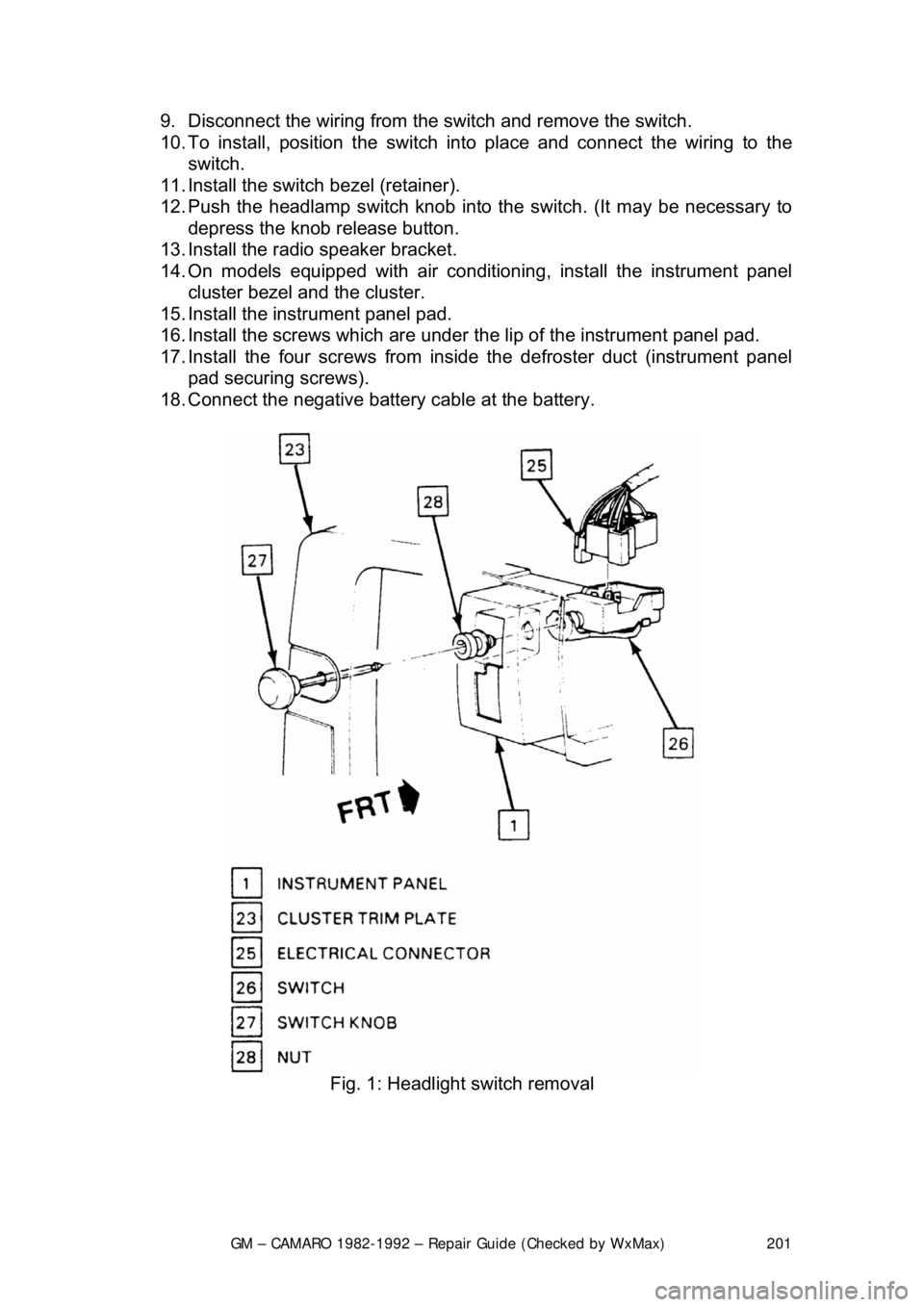
9. Disconnect the wiring from the
switch and remove the switch.
10. To install, position t he switch into place and connect the wiring to the
switch.
11. Install the switch bezel (retainer).
12. Push the headlamp switch knob into the switch. (It may be necessary to
depress the knob release button.
13. Install the radio speaker bracket.
14. On models equipped with air conditioni ng, install the instrument panel
cluster bezel and the cluster.
15. Install the inst rument panel pad.
16. Install the screws which are under t he lip of the instrument panel pad.
17. Install the four screw s from inside the defroster duct (instrument panel
pad securing screws).
18. Connect the negative battery cable at the battery.
Fig. 1: Headlight switch removal
Page 219 of 875
GM – CAMARO 1982-1992 – Repair Guide (Checked by WxMax) 219
FUSE BLOCK
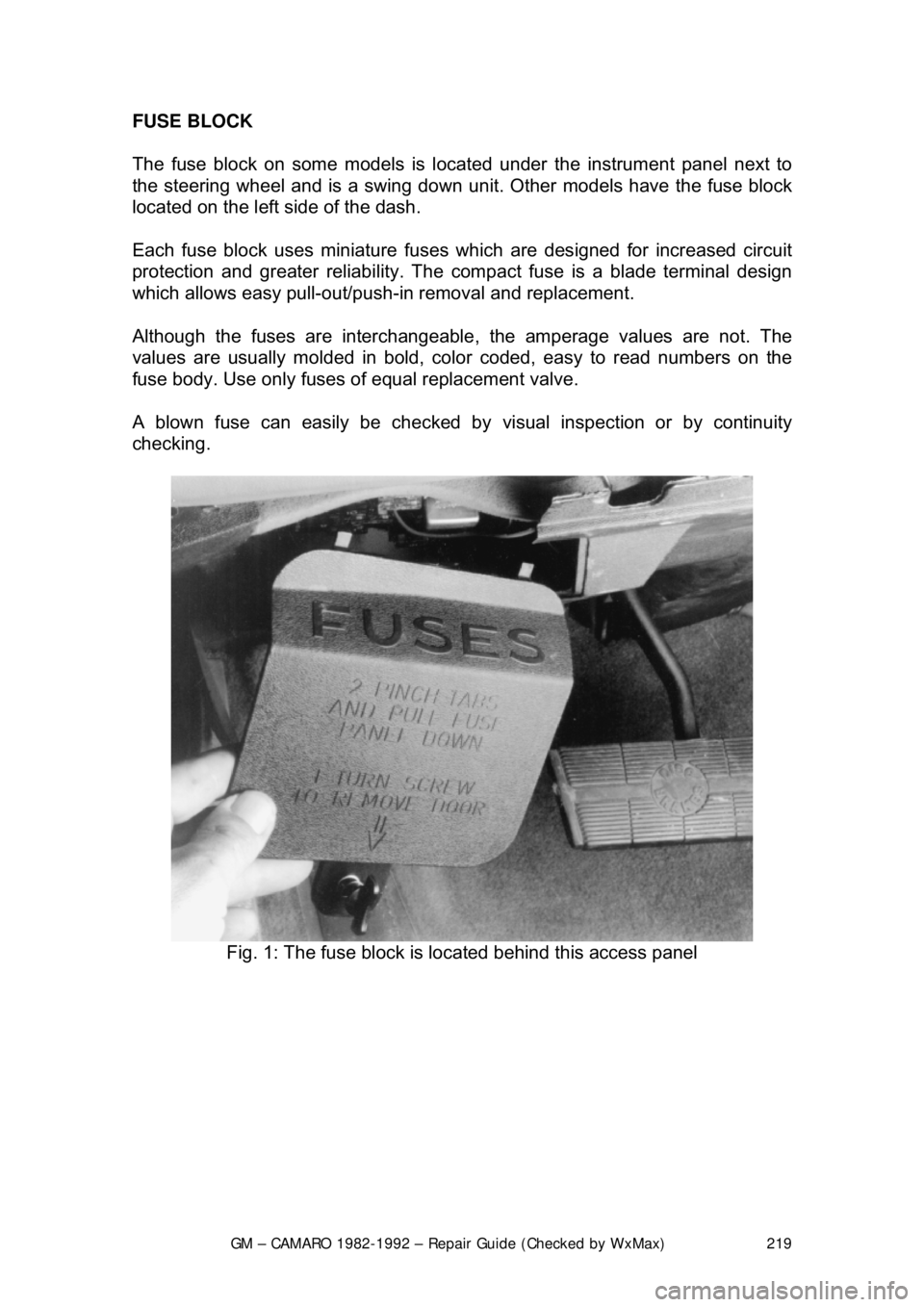
The fuse block on some models is loca
ted under the instrument panel next to
the steering wheel an d is a swing down unit. Other models have the fuse block
located on the left side of the dash.
Each fuse block uses miniature fuse s which are designed for increased circuit
protection and greater reliabi lity. The compact fuse is a blade terminal design
which allows easy pull-out/push- in removal and replacement.
Although the fuses are interchangeable , the amperage values are not. The
values are usually molded in bold, color coded, easy to read numbers on the
fuse body. Use only fuses of equal replacement valve.
A blown fuse can easily be checked by visual inspection or by continuity
checking.
Fig. 1: The fuse block is located behind this access panel
Page 223 of 875

GM – CAMARO 1982-1992 – Repair Guide (Checked by WxMax) 223
FUSIBLE LINKS
In addition to circuit breakers and fuses,
the wiring harness incorporates fusible
links to protect the wiring. Links are used rather than a fuse, in wiring circuits
that are not normally fused, such as th e ignition circuit. The fusible links are
color coded red in the charging and load circuits to match the color coding of
the circuits they protect. Each link is four gauges smaller than the cable it
protects, and is marked on the insulation with the gauge size because the
insulation makes it appear heavier than it really is. The engine compartment
wiring harness has several fusible links. The same size wire with a special
Hypalon insulation must be used w hen replacing a fusible link.
For more details, see the information on fusible links at the beginning of this
section.
The links are located in the following areas:
1. A molded splice at the starter solenoid Bat terminal, a 14 gauge red wire.
2. A 16 gauge red fusible link at the j unction block to protect the unfused
wiring of 12 gauge or larger wire. This link stops at the bulkhead
connector.
3. The alternator warning light and fiel d circuitry is protected by a 20 gauge
red wire fusible link used in the batte ry feed-to-voltage regulator number
3 terminal. The link is installed as a molded splice in the circuit at the
junction block.
4. The ammeter circuit is protected by two 20 gauge fusible links installed
as molded splices in the circuit at t he junction block and battery to starter
circuit.
REPLACEMENT 1. Determine the circuit that is damaged.
2. Disconnect the negative battery terminal.
3. Cut the damaged fuse link from the harness and discard it.
4. Identify and procure the proper fuse link and butt connectors.
5. Strip the wire about
1/2 in. (13mm) on each end.
6. Connect the fusible link and crimp the butt connectors making sure that the wires are secure.
7. Solder each connection with resin core solder, and wrap the connections
with plastic electrical tape.
8. Reinstall the wir e in the harness.
9. Connect the negative battery terminal and test the system for proper
operation.
CIRCUIT BREAKERS
Various circuit breakers are located under the instrument panel. In order to gain
access to these components, it may be ne cessary to first remove the under
dash padding. Most of the circuit breakers are located in the convenience
center or the fuse panel.
Page 317 of 875

GM – CAMARO 1982-1992 – Repair Guide (Checked by WxMax) 317
1. Place the shifter lever in the
P position. Remove the negative battery
cable.
2. Turn the key to RUN.
3. Remove the left side instrument panel sound insulator and kick panels.
4. Remove the floor console.
5. Remove the cable nut and clip. Remove the cable from the bracket, move the button to the UP position and unsnap the cable end from the
lever lock pin.
6. Lower the steering column. Remove the cable clips.
To install: 7. Place the shifter lever into the P position and the ignition key to the RUN
position.
8. After installing the cable ends, push the cable connector nose toward th\
e connector as far as possible and push down the lock button.
9. Complete the installation by reversing the removal procedure.
EXTENSION HOUSING SEAL (IN VEHICLE)
REMOVAL & INSTALLATION
This seal controls transmission oil leakage around the driveshaft. Continued
failure of this seal usually indicates a worn output shaft bushing. If so, there will
be signs of the same wear on the driveshaft where it contacts the seal and
bushing. The seal is available and is fairly simple to install, with the proper tool.
1. Raise and safely support rear of t he vehicle to minimize transmission oil
loss when the driveshaft is removed.
2. Unbolt the driveshaft fr om the differential and center support bearing, if
equipped. Wrap tape around the bearing cu ps to keep them in place on
the universal joint and slide the sh aft out of the transmission.
3. Use a small pry tool to carefully pr y out the old seal. Be careful not to
insert the tool too far into the hous ing or the bushing will be damaged.
4. Use an oil seal installation tool to evenly drive the new seal into the
housing. Make sure the tool only cont acts the outer metal portion of the
seal.
5. Install the driveshaft. Torque the uni versal bearing cup retainer bolts to
15 ft. lbs. (20 Nm). Recheck fluid level.
TRANSMISSION
REMOVAL & INSTALLATION 1. Disconnect the negative batte ry cable at the battery.
2. Remove the air cleaner assembly.
3. Disconnect the throttle valve (TV) control cable at the carburetor.
Page 594 of 875

GM – CAMARO 1982-1992 – Repair Guide (Checked by WxMax) 594
REMOVAL & INSTALLATION
1. Disconnect the negative battery cable.
2. Raise and safely support the vehicle.
3. Disconnect the VSS electrical wiring.
4. Remove the retaining bolt.
5. Have a clean container to catch the transmission fluid and remove the
VSS.
6. Remove and discard the O-ring.
To install: 7. Lubricate a new O-ring with a thin f ilm of transmission fluid. Install the O-
ring and VSS.
8. Install the retaining bolt.
9. Connect the electrical wiring.
10. Lower the vehicle.
11. Connect the negative battery cable.
12. Refill transmission to proper level.
TROUBLE CODES
SELF DIAGNOSTICS
READING CODES
The following procedure applies to mode ls with the 12 pin diagnostic connector
only.
1. Turn the ignition switch OFF. Locate the Assembly Line Diagnostic Link
(ALDL), usually under the instrument panel. It may be within a plastic
cover or housing labeled DIAGNOSTIC CONNECTOR. This link is used
to communicate with the ECM.
2. Use a small jumper wire to connect Terminal B of the ALDL to Terminal
A. As the ALDL connector is viewed from the front, Terminal A is on the
extreme right of the upper row; Terminal B is second from the right on
the upper row.
3. After the terminals are connected, turn the ignition switch to the ON
position but do not start the engine. T he dash warning lamp should begin
to flash Code 12. The code will disp lay as one flash, a pause and two
flashes. Code 12 is not a fault code. It is used as a system
acknowledgment or handshake code; its presence indicates that the
ECM can communicate as requested. Code 12 is used to begin every
diagnostic sequence.
4. After Code 12 has been transmitted 3 times, the fault codes, if any, will
each be flashed in the same manner th ree times. The codes are stored
and transmitted in numeric order from lowest to highest.
The order of codes in the memory does not indicate the order of occurrence.
Page 655 of 875

GM – CAMARO 1982-1992 – Repair Guide (Checked by WxMax) 655
2. Clean off the marks and coat them wit
h white paint or chalk, if necessary,
so that they may be seen.
3. Run the engine until it reaches no rmal operating temperature, then shut
off the engine.
4. With the ignition OFF, connect a ta chometer to the distributor, and a
timing light with an inductive pickup lead to the No. 1 spark plug wire.
WARNING - Never pierce a secondary ignition wire in order to connect a timing
light. A pierced wire may lead to engine misfiring and driveability problems.
5. To properly set the ignition timing , the EST must be placed in the bypass
mode. a. On the 2.5L engine, refer to t he emission control label for the
procedure.
If the label is missing or unreadable, c ontact your Chevrolet dealer for a
replacement.
b. On 2.8L and 5.0L ca rbureted engines, disconnect the 4-wire EST
connector at the distributor. (Fault code 42 may be set in ECM memory,
and must be cleared once the procedur e is completed). Proceed to Step
7.
c. On 2.8L, 5.0L and 5.7L fuel inje cted engines, with the engine RUNNING
and all accessories off, use a jumper wire to connect diagnostic terminal
B and ground terminal A of the 12-terminal Assembly Line Diagnostic
Link (ALDL) usually located under t he left side of the instrument panel.
DO NOT disconnect the 4-wir e EST connector at the distributor. Aim the
timing light at the timing mark; the li ne on the balancer or pulley will line
up with the timing mark. Increase engine speed and check for timing
advance. If the timing still advances with engine speed, perform Step 6. If
timing does not advance with engi ne speed, proceed to Step 7.
If timing advances with engine speed, it will be necessary to disconnect the
single-wire Set Timing connector. (Faul t code 42 may be set in ECM memory,
and must be cleared once the procedure is completed).
6. Remove the jumper wire from t he ALDL, and shut off the ignition.
Disconnect the Set Timing connector, usually located under the plastic
cover above the heater unit, in the engi ne compartment. (The wire in this
connector is normally Tan/Black.)
7. With the engine running and all accessories off, aim the light at the timing
mark. The line on the balancer or pulle y will line up with the timing mark.
If a change in timing is necessary, loosen the hold-down clamp bolt at
the base of the distributor . While observing the timing mark, rotate the
distributor slightly unt il the line indicates the correct timing. Use the
timing specification on the emi ssion control label in the engine
compartment. If this label is missi ng or damaged, refer to the Tune-Up
Specifications chart in this Section.
Page 656 of 875

GM – CAMARO 1982-1992 – Repair Guide (Checked by WxMax) 656
8. Once the timing is set to specific
ation, tighten the distributor hold-down
clamp. Recheck the timing to make su re it did not change while the bolt
was being tightened.
9. Remove the jumper wire from the ALDL connector, if applicable, with the
engine still running. (Usually, if this is performed before the engine is
shut off, no trouble codes will be stored.)
10. Turn the engine OFF, then remove the timing light and tachometer.
Reconnect the number 1 spark plug wire, if disconnected.
11. Attach the 4-wire EST connector at the distributor, or reconnect the Set
Timing connector, if applicable.
12. Check for fault code 42, and clear, if necessary, by disconnecting the
negative battery cable for at least 30 seconds.
To prevent ECM damage, the key must be in the OFF position when
disconnecting or reconnecting battery cables.
1988-90 VEHICLES
When adjusting the timing, refer to the instructions on the emission control
sticker inside the engine compartment. If th e instructions on the label disagree
with the procedure listed below, follo w the instructions on the label.
1. Locate the timing marks on the cran kshaft pulley and the front of the
engine.
2. Clean off the marks and coat them with white paint or chalk, so that they
may be easily seen.
3. Run the engine until it reaches no rmal operating temperature, then shut
off the engine.
4. With the ignition OFF, connect a ta chometer to the distributor, and a
timing light with an inductive pickup lead to the No. 1 spark plug wire.
WARNING - Never pierce a secondary ignition wire in order to connect a timing
light. A pierced wire may lead to engine misfiring and driveability problems.
5. Start the engine. With the engine running and all accessories off, use a
jumper wire to connect diagnostic terminal B and ground terminal A of
the 12-terminal Assembly Line Diagnostic Link (ALDL), located under the
instrument panel.
If jumping the ALDL terminals does not prevent timing advance, the EST
bypass wire will have to be disconnected instead.
6. Aim the timing light at the timing mark. The line on the balancer or pulley
will line up with the timing mark. If a change in timing is necessary,
loosen the hold-down clamp bolt at t he base of the distributor. While
observing the timing mark, rotate the distributor slightly until the line
indicates the correct timing. Use t he timing specification on the emission
control label in the engine compartm ent. If this label is missing or
damaged, refer to the Tune- Up Specifications chart in this Section.
Page 851 of 875
GM – CAMARO 1982-1992 – Repair Guide (Checked by WxMax) 851
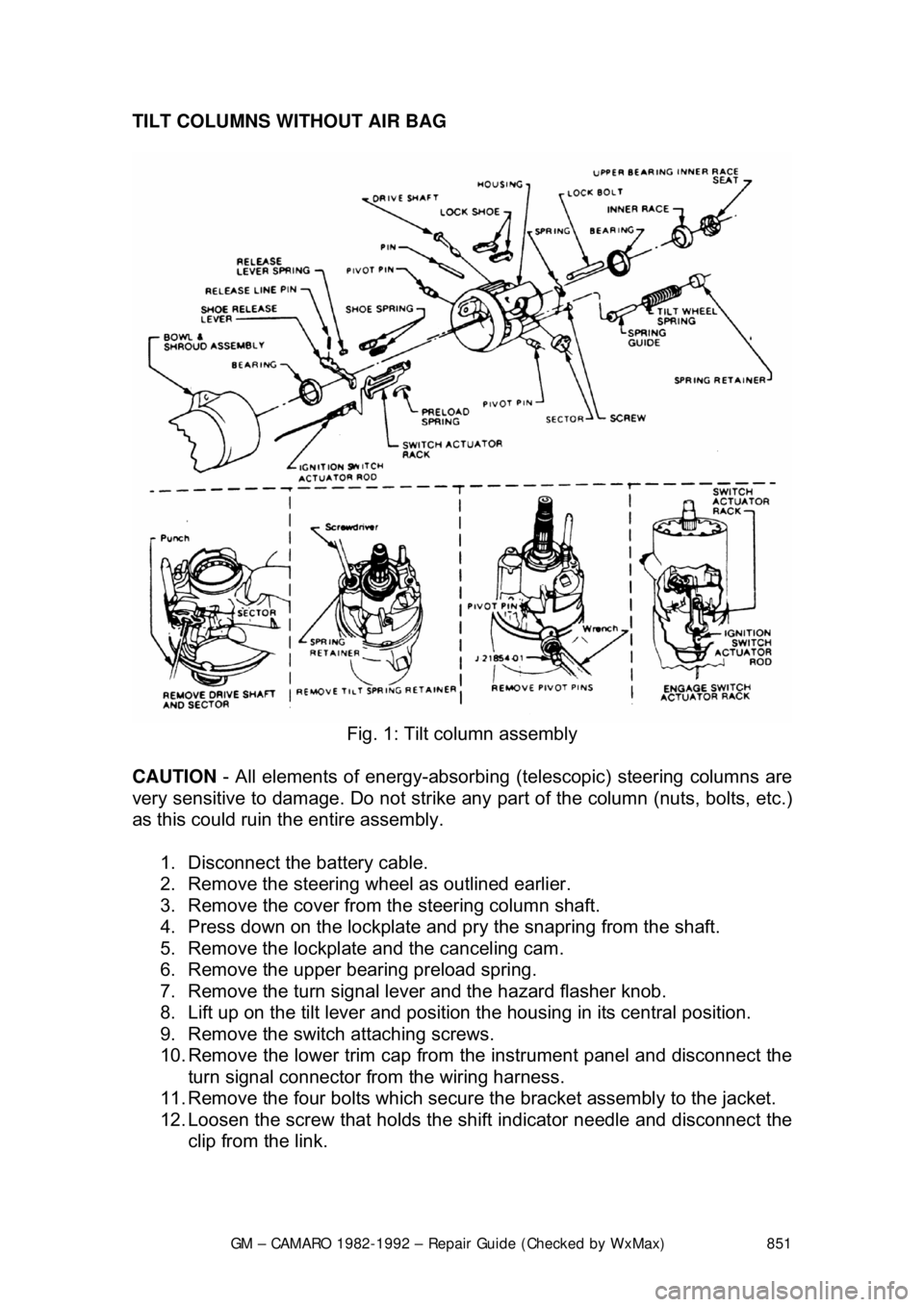
TILT COLUMNS WITHOUT AIR BAG
Fig. 1: Tilt column assembly
CAUTION - All elements of energy -absorbing (telescopic) steering columns are
very sensitive to damage. Do not strike any part of the column (nuts, bolts, etc.)
as this could ruin the entire assembly.
1. Disconnect the battery cable.
2. Remove the steering w heel as outlined earlier.
3. Remove the cover from the steering column shaft.
4. Press down on the lockplate and pr y the snapring from the shaft.
5. Remove the lockplate and the canceling cam.
6. Remove the upper bearing preload spring.
7. Remove the turn signal lever and the hazard flasher knob.
8. Lift up on the tilt lever and position the housing in its central position.
9. Remove the switch attaching screws.
10. Remove the lower trim cap from the instrument panel and disconnect the
turn signal connector from the wiring harness.
11. Remove the four bolts which secure the bracket assembly to the jacket.
12. Loosen the screw that holds the sh ift indicator needle and disconnect the
clip from the link.
Page 852 of 875

GM – CAMARO 1982-1992 – Repair Guide (Checked by WxMax) 852
13. Remove the two nuts fr
om the column support bracket while holding the
column in position. Remove the br acket assembly and wire protector
from the wiring, then l oosely install the support column bracket.
14. Tape the turn signal wires at the c onnector to keep them fit and parallel.
15. Carefully remove the turn signal switch and wiring from the column.
To install: 16. Carefully install the turn signal switch and wiring into the column.
17. Remove the tape from the turn signal wires.
18. Install the wire protecto r and, while holding the colu mn in position, install
the two nuts to the colu mn support bracket.
19. Connect the clip to the link and ti ghten the screw that holds the shift
indicator needle.
20. Install the four bolts which secure the bracket assembly to the jacket.
21. Connect the turn signal connector to the wiring harness and install the
lower trim cap to the instrument panel.
22. Install the switch attaching screws.
23. Install the turn signal lever and the hazard flasher knob.
24. Install the upper bear ing preload spring.
25. Install the lockplate and the canceling cam.
26. Press down on the lockplate and inst all the snapring to the shaft using a
new snapring.
27. Install the cover to t he steering column shaft.
28. Install the steering wheel.
29. Connect the battery cable.