lock CHEVROLET CAMARO SS 2010 Owner's Manual
[x] Cancel search | Manufacturer: CHEVROLET, Model Year: 2010, Model line: CAMARO SS, Model: CHEVROLET CAMARO SS 2010Pages: 372, PDF Size: 1.91 MB
Page 73 of 372
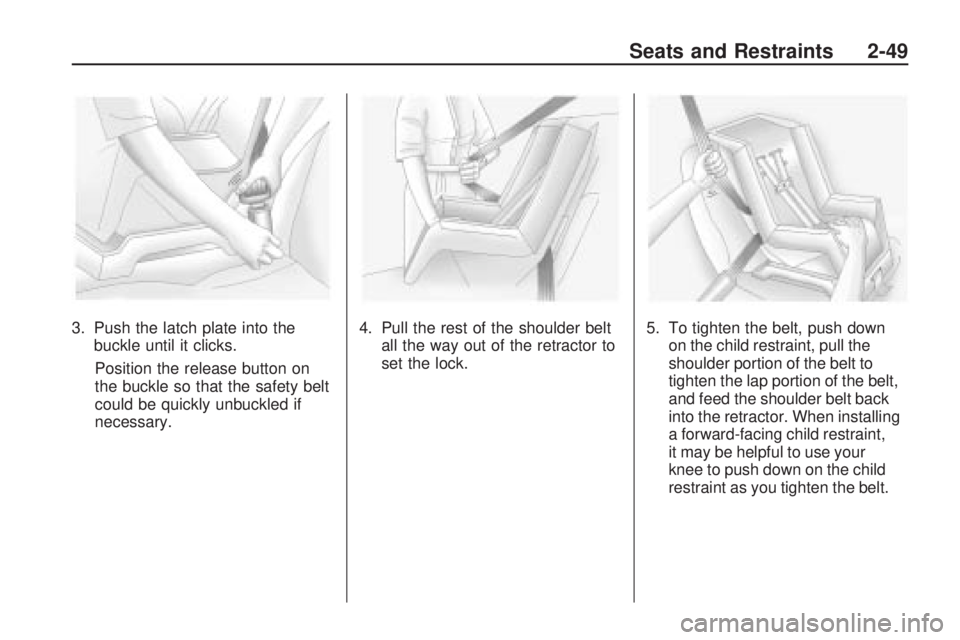
3. Push the latch plate into the
buckle until it clicks.
Position the release button on
the buckle so that the safety belt
could be quickly unbuckled if
necessary.4. Pull the rest of the shoulder belt
all the way out of the retractor to
set the lock.5. To tighten the belt, push down
on the child restraint, pull the
shoulder portion of the belt to
tighten the lap portion of the belt,
and feed the shoulder belt back
into the retractor. When installing
a forward-facing child restraint,
it may be helpful to use your
knee to push down on the child
restraint as you tighten the belt.
Seats and Restraints 2-49
Page 76 of 372
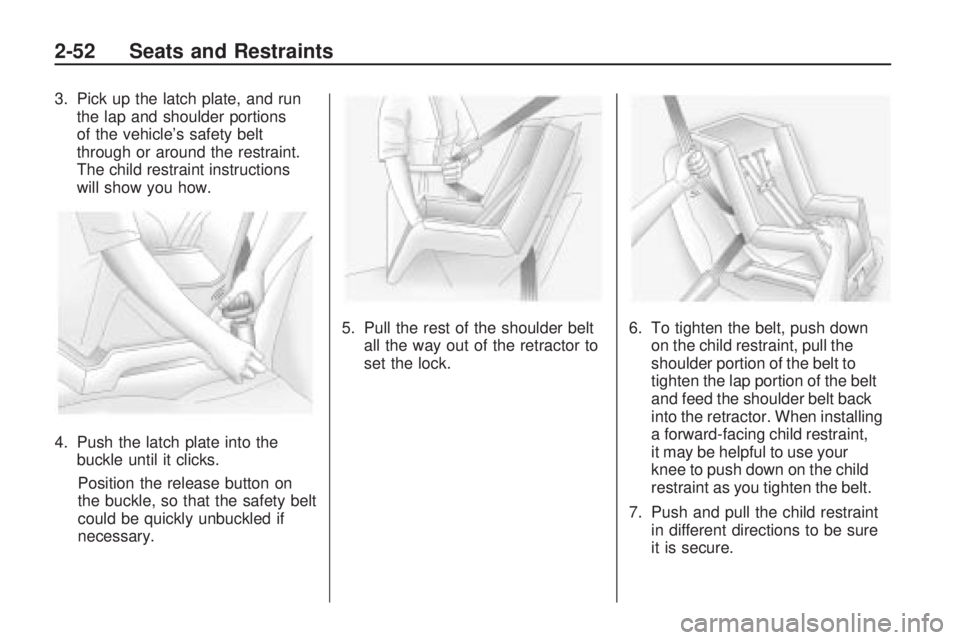
3. Pick up the latch plate, and run
the lap and shoulder portions
of the vehicle’s safety belt
through or around the restraint.
The child restraint instructions
will show you how.
4. Push the latch plate into the
buckle until it clicks.
Position the release button on
the buckle, so that the safety belt
could be quickly unbuckled if
necessary.5. Pull the rest of the shoulder belt
all the way out of the retractor to
set the lock.6. To tighten the belt, push down
on the child restraint, pull the
shoulder portion of the belt to
tighten the lap portion of the belt
and feed the shoulder belt back
into the retractor. When installing
a forward-facing child restraint,
it may be helpful to use your
knee to push down on the child
restraint as you tighten the belt.
7. Push and pull the child restraint
in different directions to be sure
it is secure.
2-52 Seats and Restraints
Page 79 of 372
Storage
Storage CompartmentsGlove Box............................3-1
Center Console Storage.........3-1
Additional Storage
Features
Convenience Net...................3-1
Storage
Compartments
Glove Box
Open the glove box by lifting up
on the lever. Use the key to lock
and unlock the glove box.
Center Console Storage
To open, lift the latch on the
front edge.
There is an Accessory Power Outlet
(APO) and an optional USB/audio
jack located in the storage area.
SeePower Outlets on page 4-9
andAuxiliary Devices on page 6-16
for more information.
Additional Storage
Features
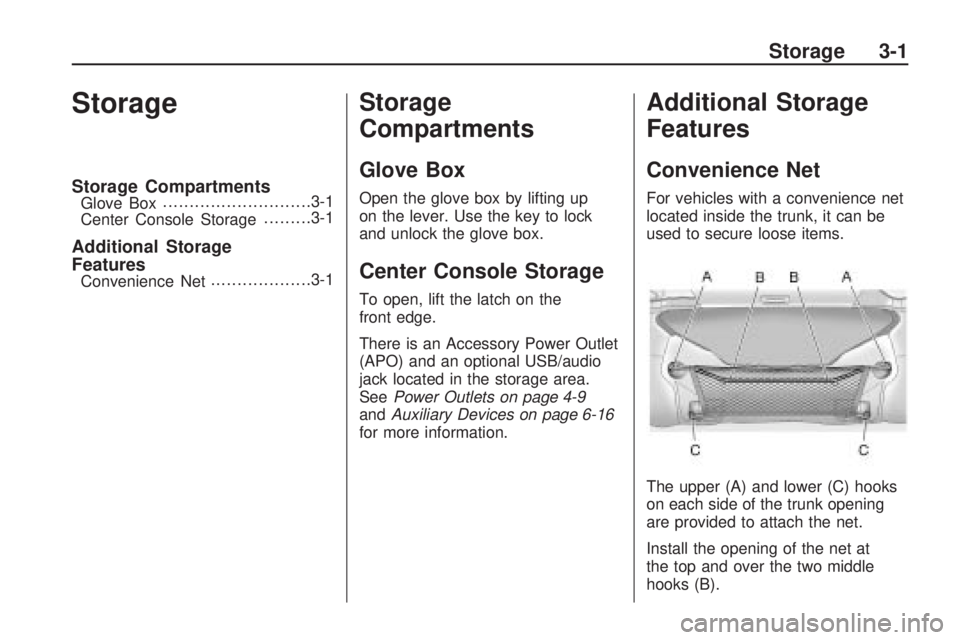
Convenience Net
For vehicles with a convenience net
located inside the trunk, it can be
used to secure loose items.
The upper (A) and lower (C) hooks
on each side of the trunk opening
are provided to attach the net.
Install the opening of the net at
the top and over the two middle
hooks (B).
Storage 3-1
Page 81 of 372
Instruments and
Controls
Instrument Panel OverviewInstrument Panel Overview......4-4
ControlsSteering Wheel Adjustment.....4-6
Steering Wheel Controls.........4-6
Horn....................................4-7
Windshield Wiper/Washer.......4-7
Compass.............................4-8
Clock...................................4-8
Power Outlets.......................4-9
Warning Lights, Gages,
and Indicators
Warning Lights, Gages,
and Indicators.....................4-9
Instrument Cluster...............4-10
Speedometer......................4-11
Odometer...........................4-11
Trip Odometer.....................4-11
Tachometer........................4-11
Fuel Gage..........................4-11
Engine Oil Pressure Gage......4-12Engine Oil
Temperature Gage.............4-13
Engine Coolant
Temperature Gage.............4-14
Transmission
Temperature Gage.............4-14
Voltmeter Gage...................4-15
Safety Belt Reminders..........4-16
Airbag Readiness Light.........4-17
Passenger Airbag Status
Indicator...........................4-18
Charging System Light.........4-19
Malfunction
Indicator Lamp..................4-19
Brake System Warning
Light................................4-22
Antilock Brake System
(ABS) Warning Light...........4-23
Traction Off Light.................4-23
Traction Control System
(TCS)/StabiliTrak
®Light.......4-24
Traction Control System
(TCS) OFF/StabiliTrak
®OFF
Light................................4-24
Tire Pressure Light..............4-24
Engine Oil Pressure Light.....4-25
Immobilizer Light.................4-26
Fog Lamp Light...................4-26
Taillamp Indicator Light.........4-26
Cruise Control Light.............4-26
Information DisplaysDriver Information
Center (DIC).....................4-27
Vehicle MessagesBattery Voltage and
Charging Messages............4-30
Brake System Messages......4-31
Compass Messages.............4-31
Cruise Control Messages......4-31
Door Ajar Messages............4-31
Engine Cooling System
Messages.........................4-32
Engine Oil Messages...........4-32
Engine Power Messages......4-33
Fuel System Messages........4-33
Key and Lock Messages......4-33
Lamp Messages..................4-33
Object Detection System
Messages.........................4-34
Ride Control System
Messages.........................4-34
Airbag System Messages......4-35
Safety Belt Messages...........4-35
Anti-Theft Alarm System
Messages.........................4-35
Service Vehicle Messages.....4-35
Tire Messages....................4-36
Transmission Messages........4-36
Vehicle Reminder
Messages.........................4-37
Instruments and Controls 4-1
Page 85 of 372
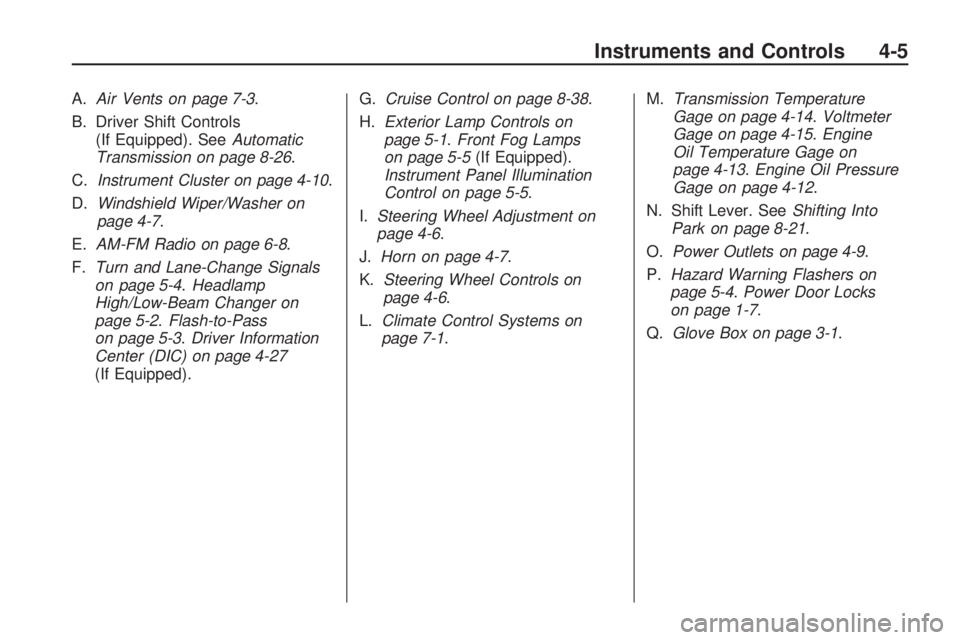
A.Air Vents on page 7-3.
B. Driver Shift Controls
(If Equipped). SeeAutomatic
Transmission on page 8-26.
C.Instrument Cluster on page 4-10.
D.Windshield Wiper/Washer on
page 4-7.
E.AM-FM Radio on page 6-8.
F.Turn and Lane-Change Signals
on page 5-4.Headlamp
High/Low-Beam Changer on
page 5-2.Flash-to-Pass
on page 5-3.Driver Information
Center (DIC) on page 4-27
(If Equipped).G.Cruise Control on page 8-38.
H.Exterior Lamp Controls on
page 5-1.Front Fog Lamps
on page 5-5(If Equipped).
Instrument Panel Illumination
Control on page 5-5.
I.Steering Wheel Adjustment on
page 4-6.
J.Horn on page 4-7.
K.Steering Wheel Controls on
page 4-6.
L.Climate Control Systems on
page 7-1.M.Transmission Temperature
Gage on page 4-14.Voltmeter
Gage on page 4-15.Engine
Oil Temperature Gage on
page 4-13.Engine Oil Pressure
Gage on page 4-12.
N. Shift Lever. SeeShifting Into
Park on page 8-21.
O.Power Outlets on page 4-9.
P.Hazard Warning Flashers on
page 5-4.Power Door Locks
on page 1-7.
Q.Glove Box on page 3-1.
Instruments and Controls 4-5
Page 86 of 372
Controls
Steering Wheel
Adjustment
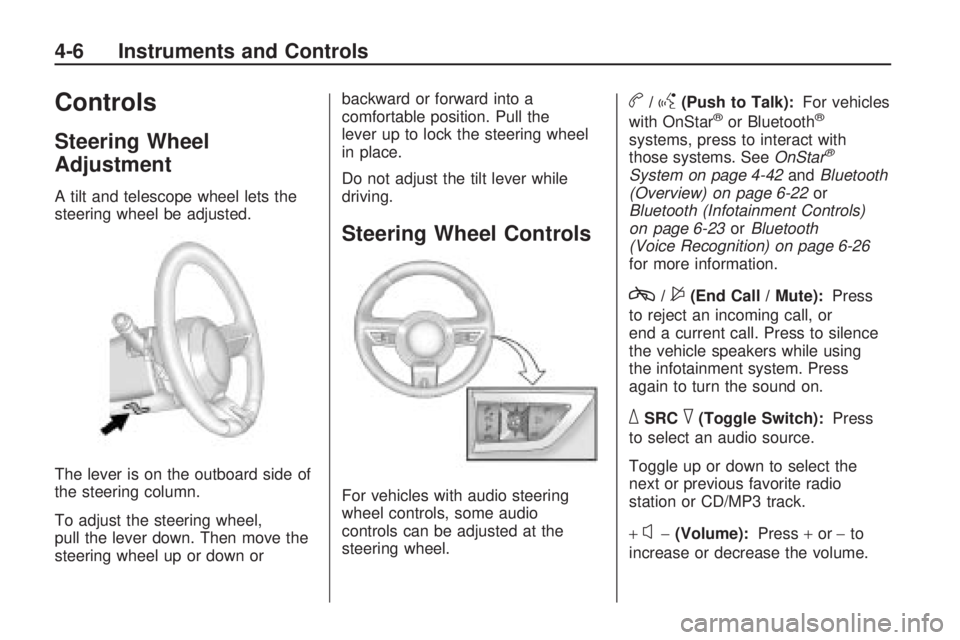
A tilt and telescope wheel lets the
steering wheel be adjusted.
The lever is on the outboard side of
the steering column.
To adjust the steering wheel,
pull the lever down. Then move the
steering wheel up or down orbackward or forward into a
comfortable position. Pull the
lever up to lock the steering wheel
in place.
Do not adjust the tilt lever while
driving.
Steering Wheel Controls
For vehicles with audio steering
wheel controls, some audio
controls can be adjusted at the
steering wheel.
b/g(Push to Talk):For vehicles
with OnStar®or Bluetooth®
systems, press to interact with
those systems. SeeOnStar®
System on page 4-42andBluetooth
(Overview) on page 6-22or
Bluetooth (Infotainment Controls)
on page 6-23orBluetooth
(Voice Recognition) on page 6-26
for more information.
c/$(End Call / Mute):Press
to reject an incoming call, or
end a current call. Press to silence
the vehicle speakers while using
the infotainment system. Press
again to turn the sound on.
_SRC^(Toggle Switch):Press
to select an audio source.
Toggle up or down to select the
next or previous favorite radio
station or CD/MP3 track.
+
x−(Volume):Press+or−to
increase or decrease the volume.
4-6 Instruments and Controls
Page 87 of 372

Horn
Press near or on the horn symbols
on the steering wheel pad to sound
the horn.
Windshield Wiper/Washer
The windshield wiper/washer lever
is located on the inboard side of
the steering column.
Push up or pull down on the lever
to place it in one of the following
positions.
8(Mist):For a single wiping cycle.
The lever returns to its starting
position when released. For more
cycles, hold the lever down before
releasing it.
9(Off):Turns the wipers off.
6(Intermittent):Move the lever to
choose a delayed wiping cycle.
For vehicles with the variable
intermittent feature, the time
between wipes can be adjusted.
Turn the
&band for a longer
or shorter delay interval.
x(Low):Slow wipes.
[(High):Fast wipes.
Windshield Washer:Pull the lever
toward you to spray washer fluid
on the windshield. The spray
continues until the lever is released.
The wipers will run a few times.
SeeWasher Fluid on page 9-26for
information on filling the windshield
washer fluid reservoir.
{WARNING
In freezing weather, do not use
your washer until the windshield is
warmed. Otherwise the washer
fluid can form ice on the
windshield, blocking your vision.
Clear ice and snow from the wiper
blades before using them. If the
wiper blades are frozen to the
windshield, gently loosen or thaw
them. If they become damaged,
install new blades or blade inserts.
SeeWiper Blade Replacement
on page 9-33.
Heavy snow or ice can overload the
wiper motor. A circuit breaker will
stop the motor until it cools down.
Instruments and Controls 4-7
Page 88 of 372
Compass
The vehicle may have a compass
display on the Driver Information
Center (DIC). The compass is
an OnStar compass and receives its
heading and other information
from OnStar. SeeOnStar
®System
on page 4-42for more information
about the OnStar system.
Clock
The infotainment system controls
are used to access the time
and date settings through the
menu system. SeeOperation on
page 6-4for information about
how to use the menu system.
Setting the Time and Date
1. Press the CONFIG button.
2. Select Time and Date Settings.
3. Select Set Time or Set Date.
4. Turn the MENU/SELECT knob to
adjust the highlighted value.
5. Press the MENU/SELECT knob
to select the next value.
6. To save the time or date and
return to the Time and Date
Settings menu, press the
0BACK button at any time or
press MENU/SELECT knob after
adjusting the minutes or year.
Setting the 12/24 Hour Format
1. Press the CONFIG button.
2. Select Time and Date Settings.
3. Highlight 12/24 Hour Format.
4. Press the MENU/SELECT knob
to select the 12 hour or 24 hour
display format.
Setting the Month & Day
Format
1. Press the CONFIG button.
2. Select Time and Date Settings.
3. Highlight Month & Day Format.
4. Press the MENU/SELECT knob
to select MM/DD (month/day) or
DD/MM (day/month).
Setting the Auto Time Adjust
1. Press the CONFIG button.
2. Select Time and Date Settings.
3. Highlight Auto Time Adjust.
4. Press the MENU/SELECT knob
to turn Auto Time Adjust on or off.
4-8 Instruments and Controls
Page 102 of 372
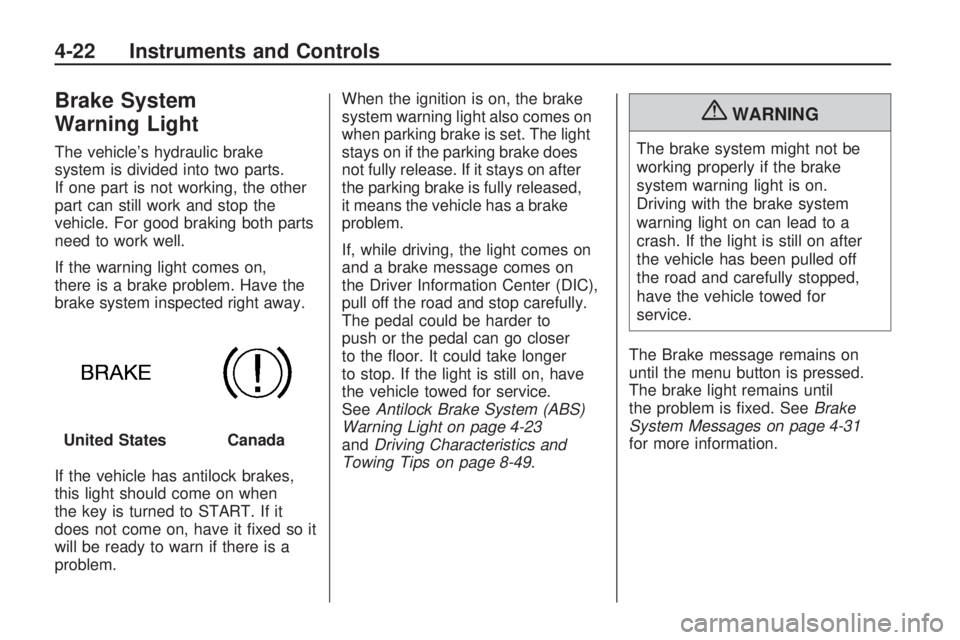
Brake System
Warning Light
The vehicle’s hydraulic brake
system is divided into two parts.
If one part is not working, the other
part can still work and stop the
vehicle. For good braking both parts
need to work well.
If the warning light comes on,
there is a brake problem. Have the
brake system inspected right away.
If the vehicle has antilock brakes,
this light should come on when
the key is turned to START. If it
does not come on, have it fixed so it
will be ready to warn if there is a
problem.When the ignition is on, the brake
system warning light also comes on
when parking brake is set. The light
stays on if the parking brake does
not fully release. If it stays on after
the parking brake is fully released,
it means the vehicle has a brake
problem.
If, while driving, the light comes on
and a brake message comes on
the Driver Information Center (DIC),
pull off the road and stop carefully.
The pedal could be harder to
push or the pedal can go closer
to the floor. It could take longer
to stop. If the light is still on, have
the vehicle towed for service.
SeeAntilock Brake System (ABS)
Warning Light on page 4-23
andDriving Characteristics and
Towing Tips on page 8-49.
{WARNING
The brake system might not be
working properly if the brake
system warning light is on.
Driving with the brake system
warning light on can lead to a
crash. If the light is still on after
the vehicle has been pulled off
the road and carefully stopped,
have the vehicle towed for
service.
The Brake message remains on
until the menu button is pressed.
The brake light remains until
the problem is fixed. SeeBrake
System Messages on page 4-31
for more information. United States
Canada
4-22 Instruments and Controls
Page 103 of 372
Antilock Brake System
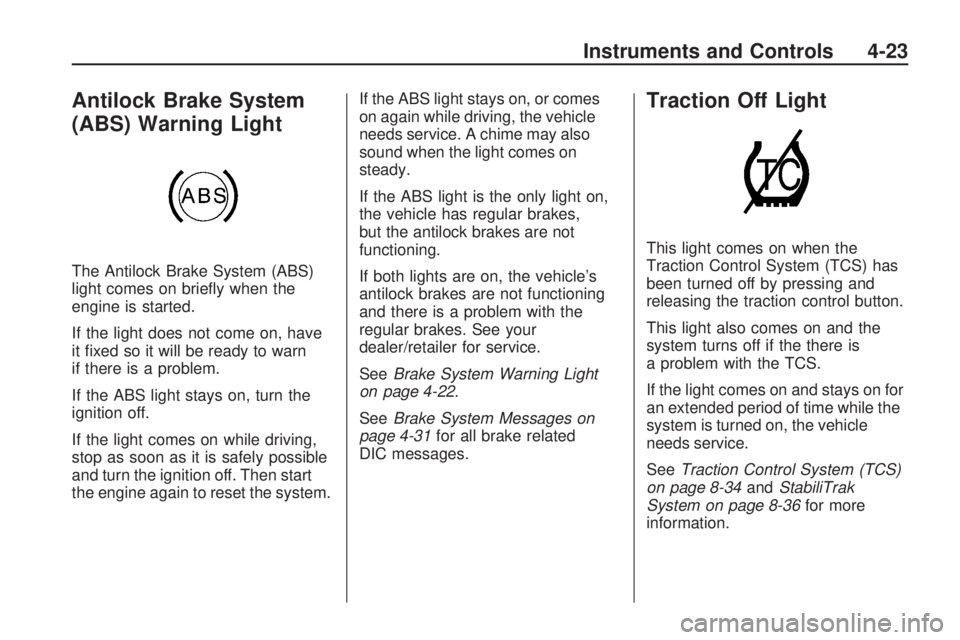
(ABS) Warning Light
The Antilock Brake System (ABS)
light comes on briefly when the
engine is started.
If the light does not come on, have
it fixed so it will be ready to warn
if there is a problem.
If the ABS light stays on, turn the
ignition off.
If the light comes on while driving,
stop as soon as it is safely possible
and turn the ignition off. Then start
the engine again to reset the system.If the ABS light stays on, or comes
on again while driving, the vehicle
needs service. A chime may also
sound when the light comes on
steady.
If the ABS light is the only light on,
the vehicle has regular brakes,
but the antilock brakes are not
functioning.
If both lights are on, the vehicle’s
antilock brakes are not functioning
and there is a problem with the
regular brakes. See your
dealer/retailer for service.
SeeBrake System Warning Light
on page 4-22.
SeeBrake System Messages on
page 4-31for all brake related
DIC messages.
Traction Off Light
This light comes on when the
Traction Control System (TCS) has
been turned off by pressing and
releasing the traction control button.
This light also comes on and the
system turns off if the there is
a problem with the TCS.
If the light comes on and stays on for
an extended period of time while the
system is turned on, the vehicle
needs service.
SeeTraction Control System (TCS)
on page 8-34andStabiliTrak
System on page 8-36for more
information.
Instruments and Controls 4-23