wheel CHEVROLET CAMARO SS 2010 Owner's Manual
[x] Cancel search | Manufacturer: CHEVROLET, Model Year: 2010, Model line: CAMARO SS, Model: CHEVROLET CAMARO SS 2010Pages: 372, PDF Size: 1.91 MB
Page 135 of 372

The lever returns to its starting
position whenever it is released.
If after signaling a turn or lane
change the arrow flashes rapidly or
does not come on, a signal bulb
might be burned out.
Have the bulbs replaced. If the bulb
is not burned out, check the fuse.
SeeElectrical System Overload
on page 9-41.
Front Fog Lamps
For vehicles with front fog lamps,
the button is located on the exterior
lamp control, on the outboard
side of the steering wheel.
The ignition must be turned to
ON/RUN to turn on the fog lamps.
#:Press to turn the fog lamps
on or off. An indicator light on
the instrument panel cluster comes
on when the fog lamps are on.
The fog lamps come on together
with the parking and sidemarker
lamps.
If the high-beam headlamps are
turned on, the fog lamps will turn off.
If the high-beam headlamps are
turned off, the fog lamps will
turn back on again. For vehicles
with High Intensity Discharge (HID)
headlamps, the Daytime Running
Lamps (DRL) replace the fog lamps.
Some localities have laws that
require the headlamps to be
on along with the fog lamps.Interior Lighting
Instrument Panel
Illumination Control
This feature controls the brightness
of the instrument panel lights.
The thumbwheel is located next to
the exterior lamp control.
D(Instrument Panel Brightness):
Turn the thumbwheel up or down
to brighten or dim the instrument
panel lights.
Lighting 5-5
Page 142 of 372
Operation
Controls
The infotainment system is
operated by using the pushbuttons,
multifunction knobs, and menus that
are shown on the display, and
steering wheel controls, if equipped.
Turning the System On or Off
OVOL (Power/Volume):Press to
turn the system on and off.
Automatic Off
If the infotainment system has been
turned on after the ignition is
turned off, the system turns off
automatically after ten minutes.
Volume Control
OVOL (Power/Volume):Turn to
adjust the volume.
PHONE:For vehicles with OnStar
®,
press and hold PHONE to mute
the infotainment system. Press and
hold PHONE again, or turn the
OVOL to cancel mute.
For vehicles without OnStar
®, press
PHONE to mute the infotainment
system. Press PHONE again, or turn
the
OVOL to cancel mute.
Menu System
Controls
The MENU/SELECT knob and the
0BACK button are used to
navigate the menu system.MENU/SELECT:Press to:
•Enter the menu system.
•Select or activate the highlighted
menu option.
•Confirm a set value.
•Switch a system setting on or off.
Turn to:
•Highlight a menu option.
•Select a value.
0BACK:Press to:
•Exit a menu.
•Return from a submenu screen
to the previous menu screen.
•Delete the last character in a
sequence.
6-4 Infotainment System
Page 160 of 372
Controlling a Bluetooth®
Device
Bluetooth devices that support
AVRCP (Audio/Video Remote
Control Profile) version 1.0 may
be able to be controlled by the
Infotainment System.
Press and release
gSEEK /
lSEEK to skip tracks. Press and
hold
gSEEK /lSEEK to fast
forward or fast reverse within
a track.
Other Information
The Bluetooth®word mark and
logos are owned by the Bluetooth®
SIG, Inc. and any use of such
marks by General Motors is under
license. Other trademarks and
trade names are those of their
respective owners.
SeeRadio Frequency Statement
(US, Can) on page 12-15for
FCC information.
Phone
Bluetooth (Overview)
Vehicles with a Bluetooth system
can use a Bluetooth capable
cell phone with a Hands Free Profile
to make and receive phone calls.
The infotainment system and
voice recognition are used to
control the system. The system
can be used while in ON/RUN or
ACC/ACCESSORY. The range
of the Bluetooth system can be up
to 9.1 m (30 ft.). Not all phones
support all functions and not
all phones work with the Bluetooth
system. See www.gm.com/bluetooth
for more information about
compatible phones.
Bluetooth Controls
Use the buttons located on the
infotainment system and the
steering wheel to operate the
Bluetooth system.Steering Wheel Controls
b/g(Push To Talk):Press to
answer incoming calls, to confirm
system information, and to start
voice recognition.
c/$(End Call / Mute):Press
to end a call, reject a call, or to
cancel an operation.
Infotainment System Controls
MENU/SELECT:Press and turn
to navigate the menu screens.
SeeOperation on page 6-4for
more information.
PHONE:Press to enter the Phone
main menu.
CONFIG:Press to enter the
System Configuration menu.
6-22 Infotainment System
Page 175 of 372

Passenger Compartment
Air Filter
The passenger compartment air
filter removes most of the pollen
and dust from the air that enters
the vehicle. The filter will need
to be replaced periodically.
SeeScheduled Maintenance on
page 10-2.
Using the climate control system
without an air filter installed is
not recommended. Water or other
debris could enter the system
and result in leaks or noises.
Always install a new filter when
removing the old filter.
Air Vents
Use the air outlets located in the
center and on the side of the
instrument panel to direct the
airflow. Use the thumbwheels
near the center air outlets to
direct airflow to the left or right.
Operation Tips
•In defog or defrost mode, warm
air flows from the some air
outlets. To improve side window
defogging or defrosting, direct
side air outlets towards the side
windows.
•Clear away any ice, snow, or
leaves from air inlets at the
base of the windshield that
could block the flow of air into
the vehicle.
•Keep the path under the front
seats clear of objects to help
circulate the air inside of
the vehicle more effectively.
•Use of non-GM approved hood
deflectors can adversely affect
the performance of the system.
Check with your dealer/retailer
before adding equipment to
the outside of the vehicle.
Climate Controls 7-3
Page 181 of 372
Steering
Power Steering
If power steering assist is lost
because the engine stops or the
power steering system is not
functioning, the vehicle can be
steered but it will take more effort.
Steering Tips
It is important to take curves at a
reasonable speed.
Traction in a curve depends on the
condition of the tires and the road
surface, the angle at which the curve
is banked, and vehicle speed. While
in a curve, speed is the one factor
that can be controlled.
If there is a need to reduce speed,
do it before entering the curve,
while the front wheels are straight.
Try to adjust the speed so you can
drive through the curve. Maintain a
reasonable, steady speed. Wait to
accelerate until out of the curve,
and then accelerate gently into the
straightaway.
Steering in Emergencies
There are times when steering
can be more effective than braking.
For example, you come over a hill
and find a truck stopped in your lane,
or a car suddenly pulls out from
nowhere, or a child darts out from
between parked cars and stops right
in front of you. These problems can
be avoided by braking — if you can
stop in time. But sometimes you
cannot stop in time because there
is no room. That is the time for
evasive action — steering around
the problem.
The vehicle can perform very well
in emergencies like these. First
apply the brakes. SeeBraking on
page 8-4. It is better to remove as
much speed as possible from a
collision. Then steer around the
problem, to the left or right
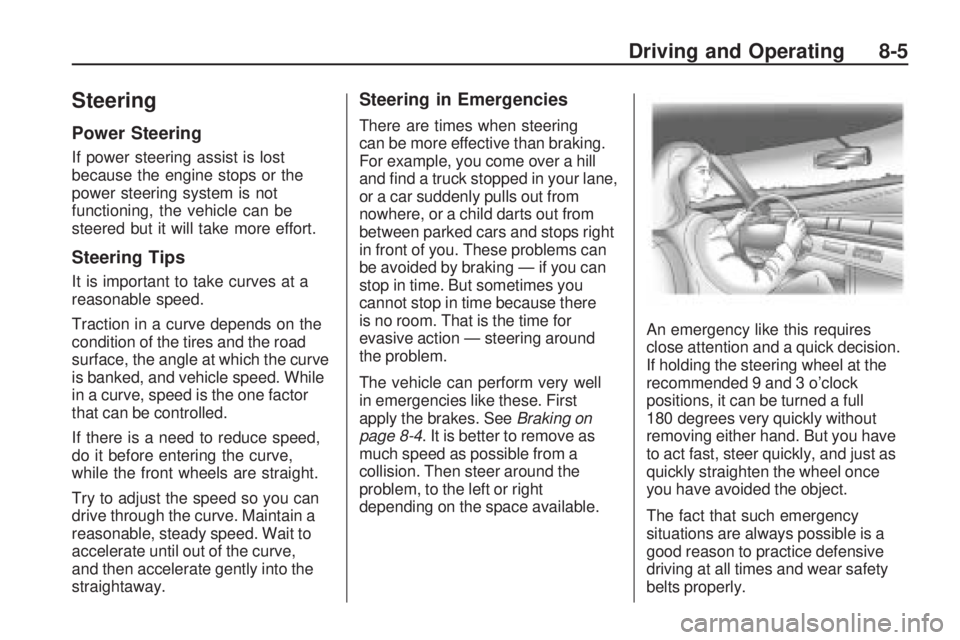
depending on the space available.An emergency like this requires
close attention and a quick decision.
If holding the steering wheel at the
recommended 9 and 3 o’clock
positions, it can be turned a full
180 degrees very quickly without
removing either hand. But you have
to act fast, steer quickly, and just as
quickly straighten the wheel once
you have avoided the object.
The fact that such emergency
situations are always possible is a
good reason to practice defensive
driving at all times and wear safety
belts properly.
Driving and Operating 8-5
Page 182 of 372

Off-Road Recovery
The vehicle’s right wheels can drop
off the edge of a road onto the
shoulder while driving.
If the level of the shoulder is
only slightly below the pavement,
recovery should be fairly easy.
Ease off the accelerator and then,if there is nothing in the way, steer
so that the vehicle straddles the edge
of the pavement. Turn the steering
wheel 8 to 13 cm, 3 to 5 inches,
(about one-eighth turn) until the right
front tire contacts the pavement
edge. Then turn the steering wheel
to go straight down the roadway.
Loss of Control
Let us review what driving experts
say about what happens when the
three control systems — brakes,
steering, and acceleration — do not
have enough friction where the tires
meet the road to do what the driver
has asked.
In any emergency, do not give up.
Keep trying to steer and constantly
seek an escape route or area of
less danger.
Skidding
In a skid, a driver can lose control of
the vehicle. Defensive drivers avoid
most skids by taking reasonable care
suited to existing conditions, and by
not overdriving those conditions.
But skids are always possible.
The three types of skids correspond
to the vehicle’s three control
systems. In the braking skid, the
wheels are not rolling. In the steering
or cornering skid, too much speed or
steering in a curve causes tires to
slip and lose cornering force. And
in the acceleration skid, too much
throttle causes the driving wheels
to spin.
If the vehicle starts to slide, ease
your foot off the accelerator pedal
and quickly steer the way you want
the vehicle to go. If you start steering
quickly enough, the vehicle may
straighten out. Always be ready
for a second skid if it occurs.
8-6 Driving and Operating
Page 183 of 372
Of course, traction is reduced when
water, snow, ice, gravel, or other
material is on the road. For safety,
slow down and adjust your driving
to these conditions. It is important
to slow down on slippery surfaces
because stopping distance is longer
and vehicle control more limited.
While driving on a surface with
reduced traction, try your best to
avoid sudden steering, acceleration,
or braking, including reducing vehicle
speed by shifting to a lower gear.
Any sudden changes could cause
the tires to slide. You might not
realize the surface is slippery until
the vehicle is skidding. Learn to
recognize warning clues — such as
enough water, ice, or packed snow
on the road to make a mirrored
surface — and slow down when
you have any doubt.
Remember: Any Antilock Brake
System (ABS) helps avoid only
the braking skid.Competitive Driving
Competitive driving may affect the
vehicle warranty. See the warranty
book before using the vehicle for
racing or other competitive driving.
The new vehicle break-in must be
performed before the vehicle is used
for competitive driving. SeeNew
Vehicle Break-In on page 8-16.
Notice:If you use your vehicle
for competitive driving, the engine
may use more oil than it would
with normal use. Low oil levels
can damage the engine. Be sure
to check the oil level often during
competitive driving and keep the
level at or near the upper mark
that shows the proper operating
range on the engine oil dipstick.
For information on how to add oil,
seeEngine Oil on page 9-10.For competitive driving, it is
recommended that the brake fluid be
replaced with a high performance
brake fluid that has a dry boiling point
greater than 279°C (534°F). After
conversion to the high performance
brake fluid, follow the brake fluid
service recommendations outlined
by the fluid manufacturer. Do not
use silicone or DOT-5 brake fluids.
If the vehicle is used for racing,
competitive driving, sustained high
speed, or events that generate
excessive wheel slip, the rear axle
fluid temperatures will be higher
than would occur in normal driving.
We recommend that the rear axle
fluid be drained and refilled with
new fluid after every six hours of
racing or competitive driving.
SeeRecommended Fluids and
Lubricants on page 10-7for what
fluid to use.
Driving and Operating 8-7
Page 186 of 372
Winter Driving
Driving on Snow or Ice
Drive carefully when there is snow
or ice between the tires and the road,
creating less traction or grip. Wet ice
can occur at about 0°C (32°F) when
freezing rain begins to fall, resulting
in even less traction. Avoid driving on
wet ice or in freezing rain until roads
can be treated with salt or sand.
Drive with caution, whatever the
condition. Accelerate gently so
traction is not lost. Accelerating too
quickly causes the wheels to spin
and makes the surface under the
tires slick, so there is even less
traction.
Try not to break the fragile traction.
If you accelerate too fast, the drive
wheels will spin and polish the
surface under the tires even more.
TheAntilock Brake System (ABS)
on page 8-31improves vehicle
stability during hard stops on
a slippery roads, but apply the
brakes sooner than when on
dry pavement.Allow greater following distance
on any slippery road and watch for
slippery spots. Icy patches can occur
on otherwise clear roads in shaded
areas. The surface of a curve or an
overpass can remain icy when the
surrounding roads are clear. Avoid
sudden steering maneuvers and
braking while on ice.
Turn off cruise control, if equipped,
on slippery surfaces.
Blizzard Conditions
Being stuck in snow can be in a
serious situation. Stay with the
vehicle unless there is help nearby.
If possible, use theRoadside
Assistance Program on page 12-6.
To get help and keep everyone
in the vehicle safe:
•Turn on the hazard warning
flashers.
•Tie a red cloth to an outside
mirror.
{WARNING
Snow can trap engine exhaust
under the vehicle. This may cause
exhaust gases to get inside.
Engine exhaust contains carbon
monoxide (CO) which cannot be
seen or smelled. It can cause
unconsciousness and even death.
If the vehicle is stuck in the snow:
•Clear away snow from
around the base of your
vehicle, especially any that
is blocking the exhaust pipe.
•Check again from time to
time to be sure snow does
not collect there.
•Open a window about 5 cm
(two inches) on the side of
the vehicle that is away from
the wind to bring in fresh air.
(Continued)
8-10 Driving and Operating
Page 187 of 372
WARNING (Continued)
•Fully open the air outlets on
or under the instrument panel.
•Adjust the Climate Control
system to a setting that
circulates the air inside
the vehicle and set the fan
speed to the highest setting.
See Climate Control System
in the Index.
For more information about carbon
monoxide, seeEngine Exhaust on
page 8-25.
Snow can trap exhaust gases
under your vehicle. This can cause
deadly CO (carbon monoxide) gas
to get inside. CO could overcome
you and kill you. You cannot see it
or smell it, so you might not know
it is in your vehicle. Clear away
snow from around the base of
your vehicle, especially any that
is blocking the exhaust.Run the engine for short periods
only as needed to keep warm,
but be careful.
To save fuel, run the engine for only
short periods as needed to warm the
vehicle and then shut the engine off
and close the window most of the
way to save heat. Repeat this until
help arrives but only when you feel
really uncomfortable from the cold.
Moving about to keep warm also
helps.
If it takes some time for help to
arrive, now and then when you run
the engine, push the accelerator
pedal slightly so the engine runs
faster than the idle speed. This
keeps the battery charged to restart
the vehicle and to signal for help with
the headlamps. Do this as little as
possible to save fuel.
If the Vehicle is Stuck
Slowly and cautiously spin the
wheels to free the vehicle when
stuck in sand, mud, ice, or snow.
If stuck too severely for the traction
system to free the vehicle, turn
the traction system off and use
the rocking method.
{WARNING
If you let your vehicle’s tires spin
at high speed, they can explode,
and you or others could be injured.
The vehicle can overheat, causing
an engine compartment fire or
other damage. Spin the wheels as
little as possible and avoid going
above 55 km/h (35 mph) as shown
on the speedometer.
For information about using tire
chains on the vehicle, seeTire
Chains on page 9-68.
Driving and Operating 8-11
Page 188 of 372

Rocking the Vehicle to
Get it Out
Turn the steering wheel left and
right to clear the area around the
front wheels. Turn off any traction
system. Shift back and forth between
R (Reverse) and a forward gear,
or with a manual transmission,
between 1 (First) or 2 (Second) and
R (Reverse), spinning the wheels
as little as possible. To prevent
transmission wear, wait until the
wheels stop spinning before shifting
gears. Release the accelerator pedal
while shifting, and press lightly on
the accelerator pedal when the
transmission is in gear. Slowly
spinning the wheels in the forward
and reverse directions causes a
rocking motion that could free the
vehicle. If that does not get the
vehicle out after a few tries, it might
need to be towed out. If the vehicle
does need to be towed out, see
Towing the Vehicle on page 9-87.
Vehicle Load Limits
It is very important to know how
much weight the vehicle can
carry. This weight is called the
vehicle capacity weight and
includes the weight of all
occupants, cargo and all
nonfactory-installed options.
Two labels on the vehicle
show how much weight it
may properly carry, the Tire
and Loading Information label
and the Certification label.{WARNING
Do not load the vehicle any
heavier than the Gross Vehicle
Weight Rating (GVWR), or
either the maximum front or
rear Gross Axle Weight Rating
(GAWR). If you do, parts on
the vehicle can break, and
it can change the way your
vehicle handles. These could
cause you to lose control and
crash. Also, overloading can
shorten the life of the vehicle.
8-12 Driving and Operating