service CHEVROLET CAMARO SS 2010 Owner's Guide
[x] Cancel search | Manufacturer: CHEVROLET, Model Year: 2010, Model line: CAMARO SS, Model: CHEVROLET CAMARO SS 2010Pages: 372, PDF Size: 1.91 MB
Page 125 of 372

Some examples are damage to
important parts of the vehicle in a
crash, hills, tall buildings, tunnels,
weather or wireless phone network
congestion.
Your Responsibility
Increase the volume of the radio if
the OnStar advisor cannot be heard.
If the light next to the OnStar buttons
is red, the system may not be
functioning properly. Press the
OnStar button and request a vehicle
diagnostic. If the light appears clear
(no light is appearing), your OnStar
subscription has expired and all
services have been deactivated.
Press the OnStar button to confirm
that the OnStar equipment is active.Universal Remote
System
SeeRadio Frequency Statement
(US, Can) on page 12-15for
information regarding Part 15 of
the Federal Communications
Commission (FCC) Rules and
RSS-210/211 of Industry and
Science Canada.
Universal Remote
System Programming
If there is one square Light Emitting
Diode (LED) indicator light next to
the Universal Home Remote buttons,
follow the instructions below.This system provides a way to
replace up to three remote control
transmitters used to activate devices
such as garage door openers,
security systems, and home
automation devices.
Do not use the Universal Home
Remote with any garage door
opener that does not have the stop
and reverse feature. This includes
any garage door opener model
manufactured before April 1, 1982.
Read the instructions completely
before attempting to program
the Universal Home Remote.
Because of the steps involved,
it may be helpful to have another
person available to assist you
with programming the Universal
Home Remote.
Keep the original hand-held
transmitter for use in other vehicles
as well as for future Universal
Home Remote programming.
Instruments and Controls 4-45
Page 148 of 372

Storing and Retrieving
Favorites
Stations from all bands can be
stored in the favorite lists in
any order.
Up to six stations can be stored in
each favorite page and the
number of available favorite pages
can be set.
Storing a Station as a Favorite
To store the station to a position in
the list, press the corresponding
numeric button 1-6 until the station
can be heard again.
Retrieving Stations
Press the FAV button to open a
favorite page or to switch to another
favorite page. Briefly press one of
the 1-6 buttons to retrieve the
station.
Satellite Radio
Vehicles with an XM™ Satellite
Radio tuner and a valid XM Satellite
Radio subscription can receive
XM programming.
XM Satellite Radio Service
XM is a satellite radio service that
is based in the 48 contiguous
United States and 10 Canadian
provinces. XM Satellite Radio has
a wide variety of programming
and commercial-free music,
coast-to-coast, and in digital-quality
sound. During your trial or when
you subscribe, you will get unlimited
access to XM Radio Online for
when you are not in the vehicle.
A service fee is required to
receive the XM service. For more
information, contact XM at
www.xmradio.com or call
1-800-929-2100 in the U.S. and
www.xmradio.ca or call
1-877-438-9677 in Canada.
Control Buttons
The buttons used to control the
XM radio are:
RADIO/BAND:Press to turn the
radio on and choose between
AM, FM, and XM™, if equipped.
gSEEK /lSEEK:Press to
search for stations.
FAV:Press to open the
favorites list.
1-6:Press to select preset stations.
MENU/SELECT:Turn to search
for stations.
Selecting the XM Band
Press the RADIO/BAND button to
choose between the AM, FM,
and XM bands. The last station
played in that band begins to play
when that band is selected.
6-10 Infotainment System
Page 150 of 372

Retrieving stations
Press the FAV button to open a
favorite page or to switch to another
favorite page. Briefly press one of
the 1-6 buttons to retrieve the
station.
XM Messages
XL (Explicit Language Channels):
These channels, or any others,
can be blocked by request,
by calling 1-800-852-XMXM (9696).
XM Updating:The encryption
code is being updated, no action
is required.
Loading XM:The audio system is
acquiring and processing audio
and text data, no action is needed.
Channel Off Air:This channel
is not currently in service.
Channel Unauth:This channel is
blocked or cannot be received
with the XM Subscription package.Channel Unavail:This previously
assigned channel is no longer
assigned.
No Artist Info:No artist information
is available.
No Title Info:No song title
information is available.
No CAT Info:No category
information is available.
No Information:No text or
informational messages are
available.
No XM Signal:The vehicle may
be in a location that where the
XM signal is being blocked.
When the vehicle is moved,
the signal should return.
CAT Not Found:There are no
channels available for the selected
category.XM Theftlocked:The XM receiver
in the vehicle may have been in
another vehicle. XM receivers
cannot be swapped between
vehicles. If this message is received
after having the vehicle serviced,
check with your dealer/retailer.
XM Radio ID:If tuned to channel 0,
this message alternates with the
XM Radio 8 digit radio ID label.
This label is needed to activate the
service.
Unknown:If this message is
received when tuned to channel 0,
there could be a receiver fault.
Consult with your dealer/retailer.
Check XM Receivr:If this message
does not clear within a short period of
time, the receiver could have a fault.
Consult with your dealer/retailer.
XM Not Available:If this message
does not clear within a short period of
time, the receiver could have a fault.
Consult with your dealer/retailer.
6-12 Infotainment System
Page 151 of 372
Radio Reception
Frequency interference and static
can occur during normal radio
reception if items such as cell phone
chargers, vehicle convenience
accessories, and external electronic
devices are plugged into the
accessory power outlet. If there is
interference or static, unplug the item
from the accessory power outlet.
FM
FM signals only reach about
16 to 65 km (10 to 40 miles).
Although the radio has a built-in
electronic circuit that automatically
works to reduce interference,
some static can occur, especially
around tall buildings or hills, causing
the sound to fade in and out.
AM
The range for most AM stations is
greater than for FM, especially at
night. The longer range can cause
station frequencies to interfere with
each other. For better radio
reception, most AM radio stations
boost the power levels during the
day, and then reduce these levels
during the night. Static can also
occur when things like storms and
power lines interfere with radio
reception. When this happens, try
reducing the treble on the radio.
XM™ Satellite Radio Service
XM Satellite Radio Service gives
digital radio reception from
coast-to-coast in the 48 contiguous
United States, and in Canada.
Just as with FM, tall buildings or hills
can interfere with satellite radio
signals, causing the sound to fade
in and out. In addition, traveling
or standing under heavy foliage,
bridges, garages, or tunnels may
cause loss of the XM signal for
a period of time.
Cellular Phone Usage
Cellular phone usage may cause
interference with the vehicle’s radio.
This interference may occur when
making or receiving phone calls,
charging the phone’s battery,
or simply having the phone on.
This interference can cause
an increased level of static while
listening to the radio. If static
is received while listening to the
radio, unplug the cellular phone and
turn it off.
Backglass Antenna
The AM-FM antenna is integrated
with the rear window defogger,
located in the rear window. Make
sure that the inside surface of
the rear window is not scratched
and that the lines on the glass are
not damaged. If the inside surface
is damaged, it could interfere
with radio reception. For proper
radio reception, the antenna
connector needs to be properly
attached to the post on the glass.
Infotainment System 6-13
Page 152 of 372
If a cellular telephone antenna
needs to be attached to the glass,
make sure that the grid lines for
the AM-FM antenna are not
damaged. There is enough space
between the grid lines to attach
a cellular telephone antenna without
interfering with radio reception.
Notice:Using a razor blade or
sharp object to clear the inside
rear window can damage the rear
window antenna and/or the rear
window defogger. Repairs would
not be covered by the vehicle
warranty. Do not clear the inside
rear window with sharp objects.Notice:Do not apply aftermarket
glass tinting with metallic lm.
The metallic lm in some tinting
materials will interfere with or
distort the incoming radio
reception. Any damage caused to
your backglass antenna due to
metallic tinting materials will
not be covered by the vehicle
warranty.
Satellite Radio Antenna
For vehicles with XM™ Satellite
Radio Service, the antenna is
located on the decklid of the vehicle.
Keep the antenna clear of
obstructions for clear radio
reception.
Audio Players
CD Player
The CD player can play audio CDs
and MP3 CDs.
The CD player will not play
8 cm (3 inches) CDs.
Care of CDs
Sound quality can be reduced due to
disc quality, recording method,
quality of the music recorded, and
how the disc has been handled.
Handle discs carefully and store
them in their original cases or other
protective cases away from direct
sunlight and dust. If the bottom
surface of a disc is damaged, the
disc may not play properly or at all.
Do not touch the bottom surface of a
disc while handling it; this could
damage the surface. Pick up discs by
grasping the outer edges or the edge
of the hole and the outer edge.
6-14 Infotainment System
Page 163 of 372
Accepting or Declining an
Incoming Call
When an incoming call is received,
the infotainment system mutes
and a ring tone is heard in
the vehicle.
Accepting a Call
Turn the MENU/SELECT knob
to “Answer” and press the
MENU/SELECT knob to accept
the incoming call.
Declining a Call
Turn the MENU/SELECT knob
to “Decline” and press the
MENU/SELECT knob to decline
the incoming call.
Call Waiting
Call waiting must be supported on
the Bluetooth phone and enabled by
the wireless service carrier to work.Accepting a Call
Turn the MENU/SELECT knob
to “Answer” and press the
MENU/SELECT knob to accept
the incoming call.
Declining a Call
Turn the MENU/SELECT knob
to “Decline” and press the
MENU/SELECT knob to decline
the incoming call.
Switching Between Calls
To switch between calls:
1. Press the MENU/SELECT knob.
2. Select Switch Call from the menu.
Conference Calling
Conference calling must be
supported on the Bluetooth phone
and enabled by the wireless service
carrier to work.To start a conference while in a
current call:
1. Press the MENU/SELECT knob
and select Enter Number.
2. Enter the character sequence
then select call. See “Entering
a Character Sequence” in
theOperation on page 6-4for
more information.
3. After the call has been placed,
press the MENU/SELECT knob
and choose Merge Calls.
4. To add more callers to the
conference call, repeat steps 1
through 3. The number of callers
that can be added are limited
by your wireless service carrier.Ending a Call
Press the MENU/SELECT knob and
select Hang Up.
Infotainment System 6-25
Page 170 of 372

Once connected, the person called
will be heard through the audio
speakers.
Using the Re-dial Command
1. Press
bg. The system
responds “Ready” followed
by a tone.
2. After the tone, say “Re-dial”.
The system responds “Re-dial
using
dials the last number called from
the connected Bluetooth phone.
Once connected, the person called
will be heard through the audio
speakers.
Receiving a Call
When an incoming call is received,
the audio system mutes and a
ring tone is heard in the vehicle.
•Pressbgto answer the call.
•Pressc$to ignore a call.
Call Waiting
Call waiting must be supported on
the Bluetooth phone and enabled by
the wireless service carrier to work.
•Pressbgto answer an incoming
call when another call is active.
The original call is placed on hold.
•Pressbgagain to return to the
original call.
•To ignore the incoming call,
no action is required.
•Pressc$to disconnect the
current call and switch to the call
on hold.
Three-Way Calling
Three-Way Calling must be
supported on the Bluetooth phone
and enabled by the wireless service
carrier to work.
1. While on a call press
bg.
The system responds “Ready”
followed by a tone.2. Say “Three-way call”. The system
responds “Three-way call, please
say dial or call”.
3. Use the dial or call command to
dial the number of the third party
to be called.
4. Once the call is connected,
press
bgto link all the callers
together.
Ending a Call
Pressc$to end a call.
Muting a Call
During a call, all sounds from inside
the vehicle can be muted so that
the person on the other end of
the call cannot hear them.
To Mute a call
1. Press
bg. The system responds
“Ready” followed by a tone.
2. Say “Mute Call”. The system
responds “Call muted”.
6-32 Infotainment System
Page 183 of 372
Of course, traction is reduced when
water, snow, ice, gravel, or other
material is on the road. For safety,
slow down and adjust your driving
to these conditions. It is important
to slow down on slippery surfaces
because stopping distance is longer
and vehicle control more limited.
While driving on a surface with
reduced traction, try your best to
avoid sudden steering, acceleration,
or braking, including reducing vehicle
speed by shifting to a lower gear.
Any sudden changes could cause
the tires to slide. You might not
realize the surface is slippery until
the vehicle is skidding. Learn to
recognize warning clues — such as
enough water, ice, or packed snow
on the road to make a mirrored
surface — and slow down when
you have any doubt.
Remember: Any Antilock Brake
System (ABS) helps avoid only
the braking skid.Competitive Driving
Competitive driving may affect the
vehicle warranty. See the warranty
book before using the vehicle for
racing or other competitive driving.
The new vehicle break-in must be
performed before the vehicle is used
for competitive driving. SeeNew
Vehicle Break-In on page 8-16.
Notice:If you use your vehicle
for competitive driving, the engine
may use more oil than it would
with normal use. Low oil levels
can damage the engine. Be sure
to check the oil level often during
competitive driving and keep the
level at or near the upper mark
that shows the proper operating
range on the engine oil dipstick.
For information on how to add oil,
seeEngine Oil on page 9-10.For competitive driving, it is
recommended that the brake fluid be
replaced with a high performance
brake fluid that has a dry boiling point
greater than 279°C (534°F). After
conversion to the high performance
brake fluid, follow the brake fluid
service recommendations outlined
by the fluid manufacturer. Do not
use silicone or DOT-5 brake fluids.
If the vehicle is used for racing,
competitive driving, sustained high
speed, or events that generate
excessive wheel slip, the rear axle
fluid temperatures will be higher
than would occur in normal driving.
We recommend that the rear axle
fluid be drained and refilled with
new fluid after every six hours of
racing or competitive driving.
SeeRecommended Fluids and
Lubricants on page 10-7for what
fluid to use.
Driving and Operating 8-7
Page 185 of 372
Highway Hypnosis
Always be alert and pay attention
to your surroundings while driving.
If you become tired or sleepy, find
a safe place to park your vehicle
and rest.
Other driving tips include:
•Keep the vehicle well ventilated.
•Keep interior temperature cool.
•Keep your eyes moving — scan
the road ahead and to the sides.
•Check the rearview mirror and
vehicle instruments often.
Hill and Mountain Roads
Driving on steep hills or through
mountains is different than driving
on flat or rolling terrain. Tips for
driving in these conditions include:
•Keep the vehicle serviced
and in good shape.
•Check all fluid levels and brakes,
tires, cooling system, and
transmission.
•Going down steep or long hills,
shift to a lower gear.
{WARNING
If you do not shift down, the
brakes could get so hot that they
would not work well. You would
then have poor braking or even
none going down a hill. You could
crash. Shift down to let the engine
assist the brakes on a steep
downhill slope.
{WARNING
Coasting downhill in N (Neutral) or
with the ignition off is dangerous.
The brakes will have to do all the
work of slowing down and they
could get so hot that they would
not work well. You would then
have poor braking or even none
going down a hill. You could crash.
Always have the engine running
and the vehicle in gear when going
downhill.
•Stay in your own lane. Do not
swing wide or cut across the
center of the road. Drive at
speeds that let you stay in your
own lane.
•Top of hills: Be alert — something
could be in your lane (stalled car,
accident).
•Pay attention to special road
signs (falling rocks area, winding
roads, long grades, passing or
no-passing zones) and take
appropriate action.
Driving and Operating 8-9
Page 194 of 372
A (LOCK/OFF):This is the only
position from which the key can be
removed. This locks the steering
wheel, ignition and automatic
transmission.
On vehicles with an automatic
transmission, the shift lever must
be in P (Park) to turn the ignition
switch to the LOCK/OFF position.
The ignition switch can bind in the
LOCK/OFF position with the wheels
turned off center. If this happens,
move the steering wheel from right
to left while turning the key to
ACC/ACCESSORY. If this does not
work, then the vehicle needs service.
B (ACC/ACCESSORY):This
position provides power to some of
the electrical accessories. It unlocks
the steering wheel and ignition. The
transmission is also unlocked in this
position on automatic transmission
vehicles. To move the key from
ACC/ACCESSORY to LOCK/OFF,
push in the key and then turn it to
LOCK/OFF.C (ON/RUN):The ignition switch
stays in this position when the engine
is running. This position can be used
to operate the electrical accessories,
including the ventilation fan and
12 volt power outlet, as well as to
display some warning and indicator
lights.
The battery could be drained if the
key is left in the ACC/ACCESSORY
or ON/RUN position with the engine
off. The vehicle might not start if the
battery is allowed to drain for an
extended period of time.
D (START):This position starts
the engine. When the engine starts,
release the key. The ignition switch
will return to ON/RUN for normal
driving.
A warning tone sounds when the
driver door is opened if the ignition
is still in ACC/ACCESSORY and the
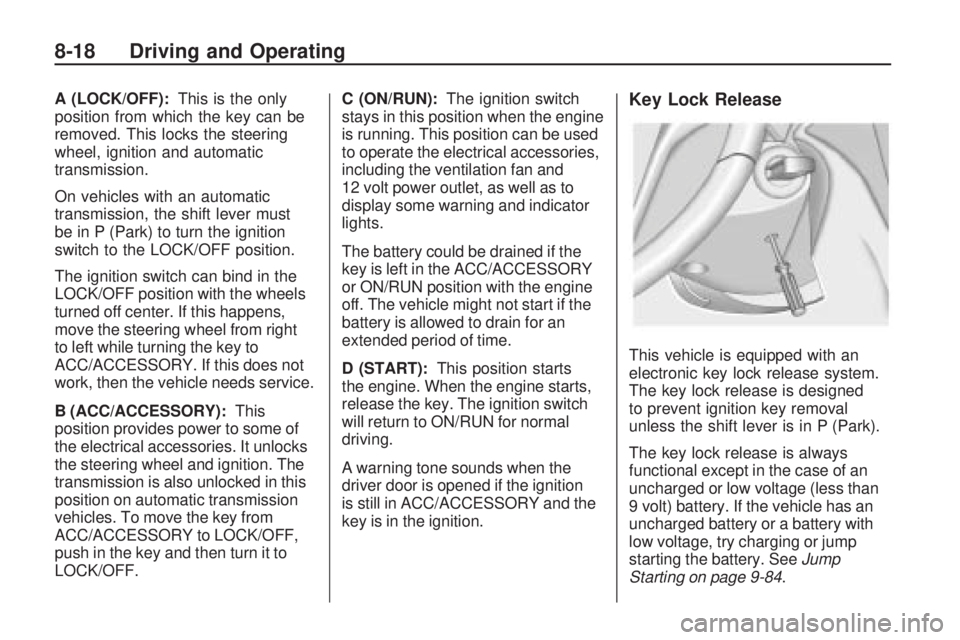
key is in the ignition.Key Lock Release
This vehicle is equipped with an
electronic key lock release system.
The key lock release is designed
to prevent ignition key removal
unless the shift lever is in P (Park).
The key lock release is always
functional except in the case of an
uncharged or low voltage (less than
9 volt) battery. If the vehicle has an
uncharged battery or a battery with
low voltage, try charging or jump
starting the battery. SeeJump
Starting on page 9-84.
8-18 Driving and Operating