automatic transmission CHEVROLET CAMARO SS 2010 Owners Manual
[x] Cancel search | Manufacturer: CHEVROLET, Model Year: 2010, Model line: CAMARO SS, Model: CHEVROLET CAMARO SS 2010Pages: 372, PDF Size: 1.91 MB
Page 1 of 372
Keys, Doors and
Windows............................ 1-1
Keys and Locks
.............. 1-2
Doors
............................ 1-8
Vehicle Security
............1-10
Exterior Mirrors
.............1-12
Interior Mirrors
..............1-13
Windows
......................1-14
Roof
............................1-16
Seats and Restraints......... 2-1
Head Restraints
.............. 2-2
Front Seats
.................... 2-3
Rear Seats
.................... 2-6
Safety Belts
................... 2-6
Airbag System
..............2-21
Child Restraints
.............2-35
Storage.............................. 3-1
Storage Compartments
.... 3-1
Additional Storage
Features
..................... 3-1
Instruments and
Controls............................. 4-1
Instrument Panel
Overview
.................... 4-4
Controls
......................... 4-6
Warning Lights, Gages,
and Indicators
............. 4-9
Information Displays
.......4-27
Vehicle Messages
.........4-30
Vehicle Personalization
. . . 4-38
OnStar System
.............4-42
Universal Remote
System
.....................4-45
Lighting............................. 5-1
Exterior Lighting
.............. 5-1
Interior Lighting
............... 5-5
Lighting Features
............ 5-6
Infotainment System......... 6-1
Introduction
.................... 6-1
Radio
............................ 6-8
Audio Players
...............6-14
Phone
.........................6-22
Climate Controls............... 7-1
Climate Control Systems
... 7-1
Air Vents
....................... 7-3
Driving and Operating....... 8-1
Driving Information
.......... 8-2
Starting and Operating
. . . 8-16
Engine Exhaust
.............8-25
Automatic
Transmission
.............8-26
Manual Transmission
.....8-30
Brakes
.........................8-31
Ride Control Systems
....8-34
Cruise Control
...............8-38
Object Detection
Systems
...................8-41
Fuel
............................8-43
Towing
........................8-48
Conversions and
Add-Ons
...................8-55
Vehicle Care...................... 9-1
General Information
......... 9-2
Vehicle Checks
............... 9-4
Headlamp Aiming
..........9-34
2010 Chevrolet Camaro Owner ManualM
Page 85 of 372
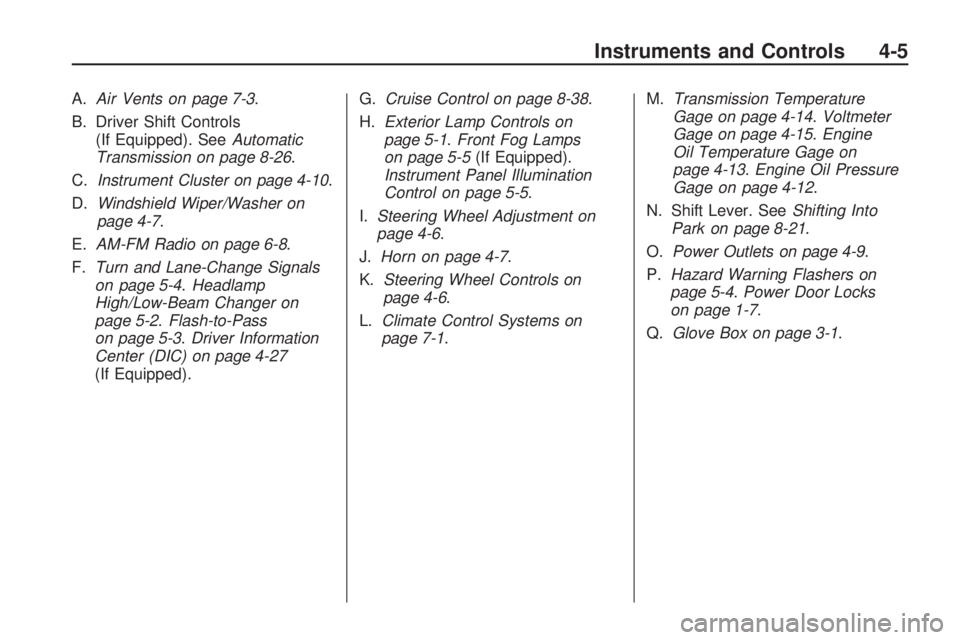
A.Air Vents on page 7-3.
B. Driver Shift Controls
(If Equipped). SeeAutomatic
Transmission on page 8-26.
C.Instrument Cluster on page 4-10.
D.Windshield Wiper/Washer on
page 4-7.
E.AM-FM Radio on page 6-8.
F.Turn and Lane-Change Signals
on page 5-4.Headlamp
High/Low-Beam Changer on
page 5-2.Flash-to-Pass
on page 5-3.Driver Information
Center (DIC) on page 4-27
(If Equipped).G.Cruise Control on page 8-38.
H.Exterior Lamp Controls on
page 5-1.Front Fog Lamps
on page 5-5(If Equipped).
Instrument Panel Illumination
Control on page 5-5.
I.Steering Wheel Adjustment on
page 4-6.
J.Horn on page 4-7.
K.Steering Wheel Controls on
page 4-6.
L.Climate Control Systems on
page 7-1.M.Transmission Temperature
Gage on page 4-14.Voltmeter
Gage on page 4-15.Engine
Oil Temperature Gage on
page 4-13.Engine Oil Pressure
Gage on page 4-12.
N. Shift Lever. SeeShifting Into
Park on page 8-21.
O.Power Outlets on page 4-9.
P.Hazard Warning Flashers on
page 5-4.Power Door Locks
on page 1-7.
Q.Glove Box on page 3-1.
Instruments and Controls 4-5
Page 90 of 372

Instrument Cluster
United States Uplevel Automatic Transmission Shown, Canada and Manual Transmission similar
4-10 Instruments and Controls
Page 107 of 372
Information Displays
Driver Information
Center (DIC)
The vehicle may have a Driver
Information Center (DIC). The DIC
displays information about your
vehicle. It also displays warning
messages if a system problem is
detected. SeeVehicle Messages on
page 4-37for more information.
All messages appear in the
DIC display located in the center
of the instrument panel cluster.
The vehicle may also have features
that can be customized through the
controls on the radio. SeeVehicle
Personalization on page 4-38
for more information.
DIC Operation and Displays
The DIC has different displays
which can be accessed by using
the DIC buttons located on the
turn signal lever located on the
left side of the steering wheel.
The DIC displays trip, fuel, vehicle
system information, and warning
messages if a system problem
is detected.
The bottom of the DIC display shows
what position the shift lever is in
(Automatic Transmission Only),
the odometer, and the direction the
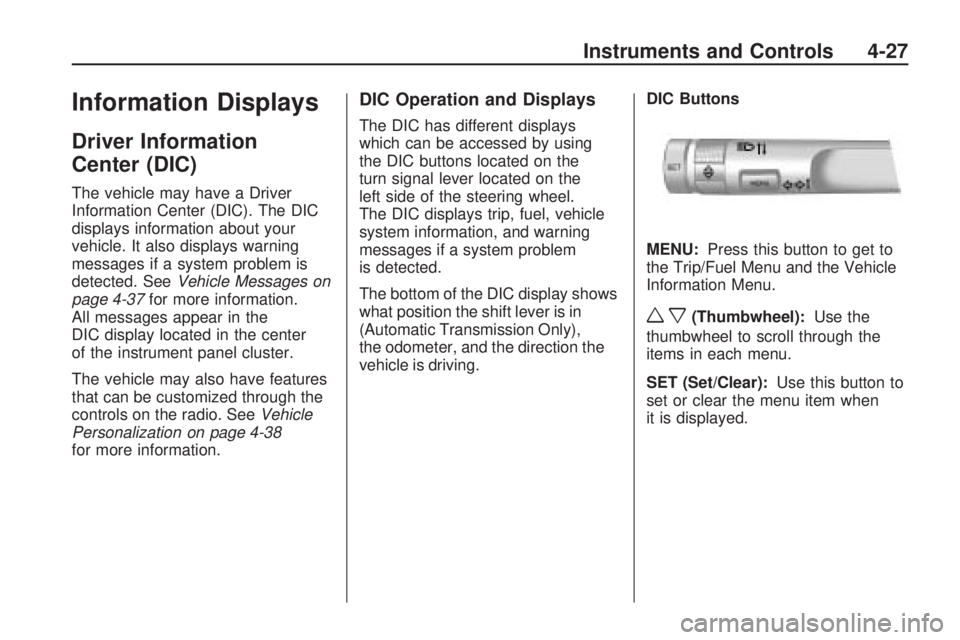
vehicle is driving.DIC Buttons
MENU:Press this button to get to
the Trip/Fuel Menu and the Vehicle
Information Menu.
wx(Thumbwheel):Use the
thumbwheel to scroll through the
items in each menu.
SET (Set/Clear):Use this button to
set or clear the menu item when
it is displayed.
Instruments and Controls 4-27
Page 116 of 372
Tire Messages
Check XXX Tire Pressure
This message displays if the vehicle
detects low pressure in one or
more tires. The tire with the
low pressure will be shown in the
message. Check the tire pressures.
Service Tire Monitor System
This message displays if there
is a problem with the Tire Pressure
Monitor System (TPMS). SeeTire
Pressure Monitor Operation on
page 9-57for more information.
Tire Learning Active
This message displays when the
system is learning new tires. See
Tire Pressure Monitor Operation on
page 9-57for more information.
Tire Pressure System Reset
This message displays when
resetting the TPMS. SeeTire
Pressure Monitor Operation on
page 9-57for more information.
Transmission Messages
1 – 4 Shift
This message displays when you
can only shift from 1 (First) to
4 (Fourth) instead of 1 (First)
to 2 (Second). SeeManual
Transmission on page 8-30for
more information.
Press Clutch To Start
This message displays when
attempting to start a vehicle with
a manual transmission without
pressing on the clutch pedal.
Service Transmission
This message displays if there is
a problem with the transmission.
See your dealer/retailer.
Shift Denied
This message displays when
attempting to use the automatic
transmission manual mode to
shift to too low of a gear.
SeeManual Mode on page 8-29
for more information.
Shift To Park
This message displays when the
transmission needs to be shifted
to park. This may appear when
attempting to remove the key from
the ignition if the vehicle is not
in P (Park).
Transmission Hot – Idle
Engine
This message displays and a chime
sounds if the transmission fluid in the
vehicle gets hot. Driving with the
transmission fluid temperature high
can cause damage to the vehicle.
Stop the vehicle and let it idle to
allow the transmission to cool.
This message clears when the fluid
temperature reaches a safe level.
4-36 Instruments and Controls
Page 120 of 372
Exit Lighting
This allows the selection of how
long the exterior lamps stay on when
leaving the vehicle when it is dark
outside.
Press the MENU / SELECT knob
when Exit Lighting is highlighted.
Turn the knob to select Off,
30 Seconds, 1 Minute, or 2 Minutes.
Press the knob to confirm and go
back to the last menu.
Vehicle Locator Lights
This allows the vehicle locator lights
to be turned on or off.
Press the MENU / SELECT knob
when Vehicle Locator Lights is
highlighted. Turn the knob to select
On or Off. Press the knob to confirm
and go back to the last menu.Power Door Locks
Select Power Door Locks and the
following will be displayed:
•Unlocked Door Anti Lock Out
•Auto Door Unlock
•Delayed Door Lock
Unlocked Door Anti Lock Out
When on, this feature will keep the
driver’s door from locking when
the door is open. If off is selected,
the Delayed Door Lock menu will
be available.
Press the MENU / SELECT knob
when Auto Door Unlock is
highlighted. Turn the knob to select
On or Off. Press the knob to confirm
and go back to the last menu.Auto Door Unlock
This allows selection of which
of the doors will automatically unlock
when the vehicle is shifted into
P (Park) (automatic transmission) or
when the key is removed from
the ignition (manual transmission).
Press the MENU / SELECT knob
when Auto Door Unlock is
highlighted. Turn the knob to select
All Doors, Driver Door, or Off. Press
the knob to confirm and go back to
the last menu.
Delayed Door Lock
When on, this feature will delay the
locking of the doors. If you want to
override the delay you can press the
power door lock on the driver’s door.
Press the MENU / SELECT knob
when Delayed Door Lock is
highlighted. Turn the knob to select
On or Off. Press the knob to confirm
and go back to the last menu.
4-40 Instruments and Controls
Page 133 of 372

Flash-to-Pass
The flash-to-pass feature works with
the low-beams or daytime running
lamps (DRL) on or off.
To flash the high beams, pull the turn
signal/lane change lever all the way
towards you. Then release it.
Daytime Running
Lamps (DRL)
Daytime Running Lamps (DRL) can
make it easier for others to see
the front of your vehicle during
the day. Fully functional daytime
running lamps are required on
all vehicles first sold in Canada.
A light sensor on top of the
instrument panel makes the DRL
work, so be sure it is not covered.
The DRL system will make the
low-beam headlamps come on at a
reduced brightness or for vehicles
with High Intensity Discharge(HID) headlamps, the dedicated
DRL lights will come on when
the following conditions are met:
•The ignition is in the ON/RUN
position.
•The exterior lamps control is
in AUTO, or has been briefly
turned to OFF to turn the
automatic light control on again.
•The engine is running.
When the DRL are on, the
headlamps, taillamps, sidemarker,
instrument panel and other
lamps will not be on.
The headlamps automatically
change from DRL to the regular
headlamps depending on the
darkness of the surroundings.
The other lamps that come on with
the headlamps will also come on.
When it is bright enough outside,
the headlamps will go off and
the DRL will come on.To turn the DRL lamps off or on
again, turn the exterior lamps control
to the off position and then release.
For vehicles first sold in Canada, the
DRL lamps cannot be turned off.
The regular headlamp system should
be turned on when needed.
Automatic Headlamp
System
When it is dark enough outside and
the headlamp switch is in AUTO, the
automatic headlamp system will turn
on the headlamps at the normal
brightness along with other lamps
such as the taillamps, sidemarker,
parking lamps, license plate lamps,
and the instrument panel lights.
The radio lights will also be dim.
To turn off the automatic headlamp
system, turn the exterior lamps
switch to the off position and then
release. For vehicles first sold in
Canada, the transmission must be in
the P (Park) position, before the
automatic headlamp system can be
turned off.
Lighting 5-3
Page 177 of 372
Driving and
Operating
Driving InformationDriving for Better Fuel
Economy............................8-2
Defensive Driving..................8-2
Drunk Driving.......................8-3
Control of a Vehicle...............8-3
Braking................................8-4
Steering...............................8-5
Off-Road Recovery................8-6
Loss of Control.....................8-6
Competitive Driving................8-7
Driving on Wet Roads............8-8
Highway Hypnosis.................8-9
Hill and Mountain Roads........8-9
Winter Driving.....................8-10
If the Vehicle is Stuck..........8-11
Vehicle Load Limits..............8-12
Starting and OperatingNew Vehicle Break-In...........8-16
Ignition Positions.................8-17
Retained Accessory
Power (RAP).....................8-19
Starting the Engine..............8-19Engine Heater.....................8-20
Shifting Into Park.................8-21
Shifting Out of Park.............8-22
Parking..............................8-24
Parking Over Things
That Burn.........................8-24
Active Fuel Management™. . . .8-25
Engine ExhaustEngine Exhaust...................8-25
Running the Vehicle While
Parked.............................8-26
Automatic TransmissionAutomatic Transmission........8-26
Manual Mode......................8-29
Manual TransmissionManual Transmission...........8-30
BrakesAntilock Brake
System (ABS)...................8-31
Parking Brake.....................8-32
Brake Assist.......................8-33
Ride Control SystemsTraction Control
System (TCS)...................8-34
StabiliTrak System...............8-36
Competitive
Driving Mode.....................8-37
Limited-Slip Rear Axle..........8-38
Cruise ControlCruise Control.....................8-38
Object Detection SystemsUltrasonic Parking Assist......8-41
FuelFuel...................................8-43
Recommended Fuel.............8-44
Gasoline Specifications.........8-44
California Fuel
Requirements....................8-45
Fuels in Foreign Countries.....8-45
Fuel Additives.....................8-45
Filling the Tank...................8-46
Filling a Portable Fuel
Container..........................8-48
TowingGeneral Towing Information. . . .8-48
Driving Characteristics and
Towing Tips......................8-49
Trailer Towing.....................8-53
Towing Equipment...............8-55
Conversions and Add-OnsAdd-On Electrical
Equipment........................8-55
Driving and Operating 8-1
Page 194 of 372
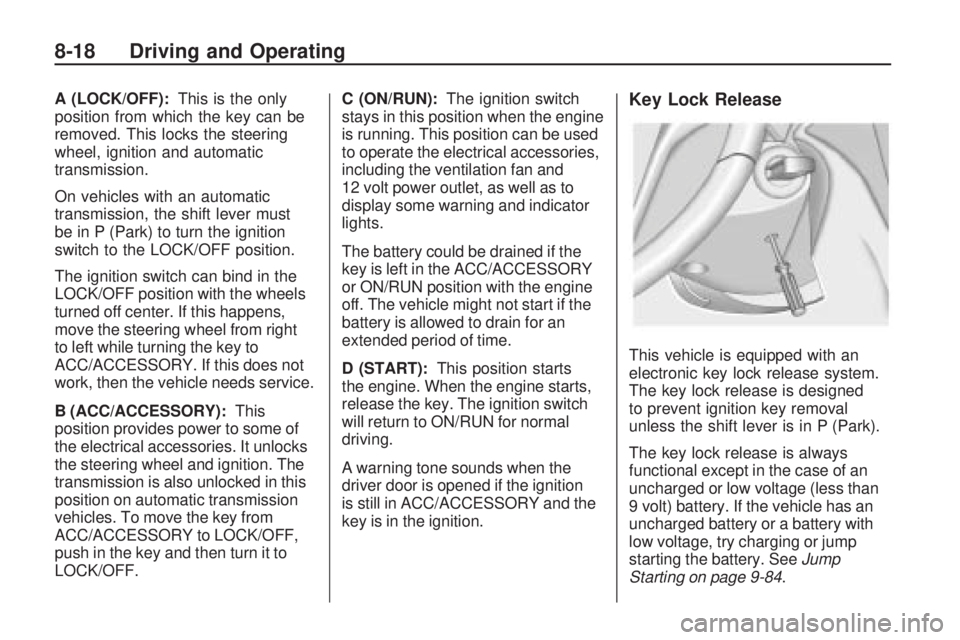
A (LOCK/OFF):This is the only
position from which the key can be
removed. This locks the steering
wheel, ignition and automatic
transmission.
On vehicles with an automatic
transmission, the shift lever must
be in P (Park) to turn the ignition
switch to the LOCK/OFF position.
The ignition switch can bind in the
LOCK/OFF position with the wheels
turned off center. If this happens,
move the steering wheel from right
to left while turning the key to
ACC/ACCESSORY. If this does not
work, then the vehicle needs service.
B (ACC/ACCESSORY):This
position provides power to some of
the electrical accessories. It unlocks
the steering wheel and ignition. The
transmission is also unlocked in this
position on automatic transmission
vehicles. To move the key from
ACC/ACCESSORY to LOCK/OFF,
push in the key and then turn it to
LOCK/OFF.C (ON/RUN):The ignition switch
stays in this position when the engine
is running. This position can be used
to operate the electrical accessories,
including the ventilation fan and
12 volt power outlet, as well as to
display some warning and indicator
lights.
The battery could be drained if the
key is left in the ACC/ACCESSORY
or ON/RUN position with the engine
off. The vehicle might not start if the
battery is allowed to drain for an
extended period of time.
D (START):This position starts
the engine. When the engine starts,
release the key. The ignition switch
will return to ON/RUN for normal
driving.
A warning tone sounds when the
driver door is opened if the ignition
is still in ACC/ACCESSORY and the
key is in the ignition.Key Lock Release
This vehicle is equipped with an
electronic key lock release system.
The key lock release is designed
to prevent ignition key removal
unless the shift lever is in P (Park).
The key lock release is always
functional except in the case of an
uncharged or low voltage (less than
9 volt) battery. If the vehicle has an
uncharged battery or a battery with
low voltage, try charging or jump
starting the battery. SeeJump
Starting on page 9-84.
8-18 Driving and Operating
Page 195 of 372
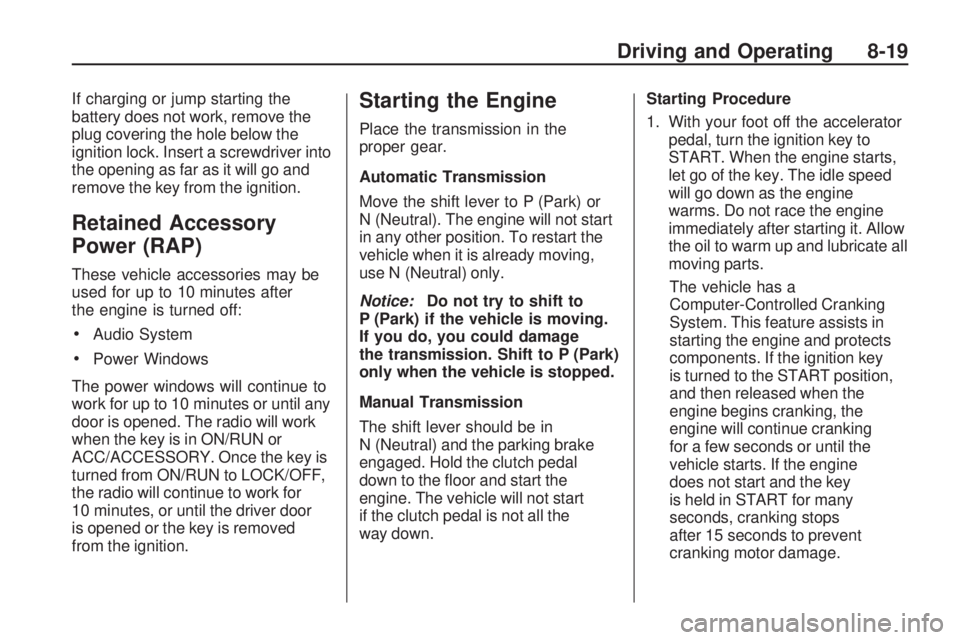
If charging or jump starting the
battery does not work, remove the
plug covering the hole below the
ignition lock. Insert a screwdriver into
the opening as far as it will go and
remove the key from the ignition.
Retained Accessory
Power (RAP)
These vehicle accessories may be
used for up to 10 minutes after
the engine is turned off:
•Audio System
•Power Windows
The power windows will continue to
work for up to 10 minutes or until any
door is opened. The radio will work
when the key is in ON/RUN or
ACC/ACCESSORY. Once the key is
turned from ON/RUN to LOCK/OFF,
the radio will continue to work for
10 minutes, or until the driver door
is opened or the key is removed
from the ignition.
Starting the Engine
Place the transmission in the
proper gear.
Automatic Transmission
Move the shift lever to P (Park) or
N (Neutral). The engine will not start
in any other position. To restart the
vehicle when it is already moving,
use N (Neutral) only.
Notice:Do not try to shift to
P (Park) if the vehicle is moving.
If you do, you could damage
the transmission. Shift to P (Park)
only when the vehicle is stopped.
Manual Transmission
The shift lever should be in
N (Neutral) and the parking brake
engaged. Hold the clutch pedal
down to the floor and start the
engine. The vehicle will not start
if the clutch pedal is not all the
way down.Starting Procedure
1. With your foot off the accelerator
pedal, turn the ignition key to
START. When the engine starts,
let go of the key. The idle speed
will go down as the engine
warms. Do not race the engine
immediately after starting it. Allow
the oil to warm up and lubricate all
moving parts.
The vehicle has a
Computer-Controlled Cranking
System. This feature assists in
starting the engine and protects
components. If the ignition key
is turned to the START position,
and then released when the
engine begins cranking, the
engine will continue cranking
for a few seconds or until the
vehicle starts. If the engine
does not start and the key
is held in START for many
seconds, cranking stops
after 15 seconds to prevent
cranking motor damage.
Driving and Operating 8-19