remote start CHEVROLET CAPTIVA SPORT 2013 User Guide
[x] Cancel search | Manufacturer: CHEVROLET, Model Year: 2013, Model line: CAPTIVA SPORT, Model: CHEVROLET CAPTIVA SPORT 2013Pages: 374, PDF Size: 6.66 MB
Page 29 of 374
Black plate (3,1)Chevrolet Captiva Sport Owner Manual - 2013 - crc - 11/12/12
Keys, Doors, and Windows 2-3
/ (Remote Vehicle Start): For
vehicles with this feature, this button
is used to operate the remote start
feature. See Remote Vehicle Start
on page 2 ‑ 4 .
Q (Lock): Press to lock all the
doors, including the liftgate. The
vehicle's lamps may flash and the
horn may sound. See “ Remote Door
Lock ” under Vehicle Personalization
on page 5 ‑ 36 .
On some models, the fuel door will
also be locked when the doors are
locked.
K (Unlock): Press once to unlock
the driver door. If
K is pressed
again within five seconds, all
remaining doors unlock. The interior
lamps come on and stay on for
20 seconds or until the ignition is
turned on. The exterior lamps may
flash when unlocking the vehicle.
See “ Remote Door Unlock ” under
Vehicle Personalization on
page 5 ‑ 36 for more information. L (Vehicle Locator/Panic
Alarm): Press and release to
locate the vehicle. The turn signal
lamps flash and the horn sounds
three times. Press and hold
L to
activate the panic alarm. The turn
signal lamps flash and the horn
sounds repeatedly for 30 seconds.
The alarm turns off when the
ignition is turned to ON/RUN or
when
L is pressed again. The
ignition must be in LOCK/OFF for
the panic alarm to work.
Programming Transmitters to
the Vehicle Only RKE transmitters programmed
to the vehicle will work. If a
transmitter is lost or stolen, a
replacement can be purchased and
programmed through your dealer. When the replacement transmitter is
programmed to the vehicle, all
remaining transmitters must also be
programmed. Any lost or stolen
transmitters no longer work once the
new transmitter is programmed.
Each vehicle can have up to eight
transmitters programmed to it.
Battery Replacement Replace the battery if the REPLACE
REMOTE KEY FOB BATTERY
message displays on the Driver
Information Center (DIC). See
“ REPLACE REMOTE KEY FOB
BATTERY ” under Key and Lock
Messages on page 5 ‑ 32 .
Notice: When replacing the
battery, do not touch any of the
circuitry on the transmitter. Static
from your body could damage the
transmitter.
Page 30 of 374
Black plate (4,1)Chevrolet Captiva Sport Owner Manual - 2013 - crc - 11/12/12
2-4 Keys, Doors, and Windows
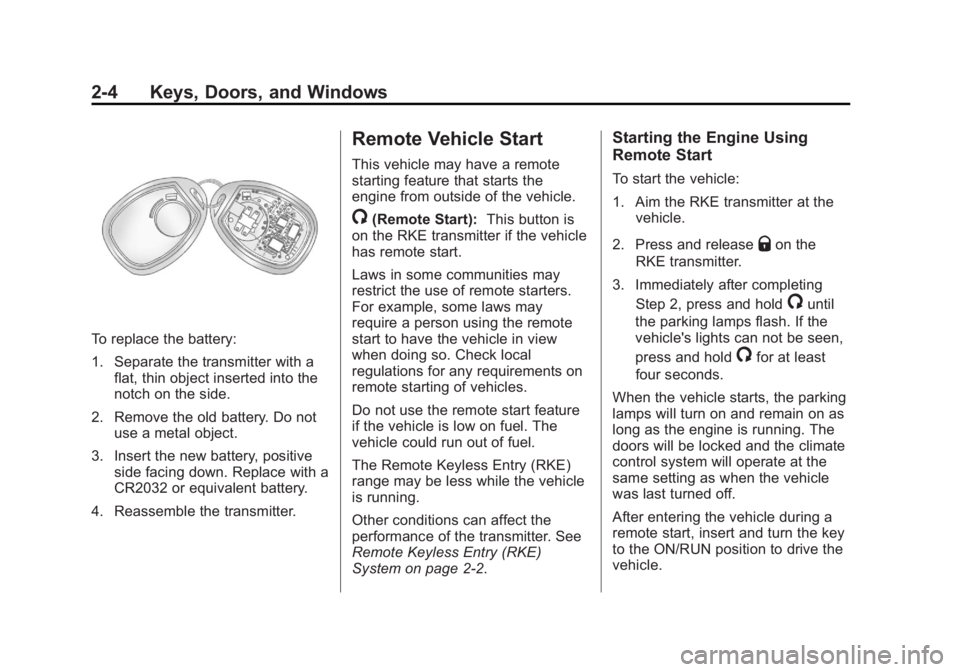
To replace the battery:
1. Separate the transmitter with a
flat, thin object inserted into the
notch on the side.
2. Remove the old battery. Do not
use a metal object.
3. Insert the new battery, positive
side facing down. Replace with a
CR2032 or equivalent battery.
4. Reassemble the transmitter. Remote Vehicle Start This vehicle may have a remote
starting feature that starts the
engine from outside of the vehicle.
/ (Remote Start): This button is
on the RKE transmitter if the vehicle
has remote start.
Laws in some communities may
restrict the use of remote starters.
For example, some laws may
require a person using the remote
start to have the vehicle in view
when doing so. Check local
regulations for any requirements on
remote starting of vehicles.
Do not use the remote start feature
if the vehicle is low on fuel. The
vehicle could run out of fuel.
The Remote Keyless Entry (RKE)
range may be less while the vehicle
is running.
Other conditions can affect the
performance of the transmitter. See
Remote Keyless Entry (RKE)
System on page 2 ‑ 2 . Starting the Engine Using
Remote Start To start the vehicle:
1. Aim the RKE transmitter at the
vehicle.
2. Press and release
Q on the
RKE transmitter.
3. Immediately after completing
Step 2, press and hold
/ until
the parking lamps flash. If the
vehicle's lights can not be seen,
press and hold
/ for at least
four seconds.
When the vehicle starts, the parking
lamps will turn on and remain on as
long as the engine is running. The
doors will be locked and the climate
control system will operate at the
same setting as when the vehicle
was last turned off.
After entering the vehicle during a
remote start, insert and turn the key
to the ON/RUN position to drive the
vehicle.
Page 31 of 374
Black plate (5,1)Chevrolet Captiva Sport Owner Manual - 2013 - crc - 11/12/12
Keys, Doors, and Windows 2-5If the vehicle is left running, it
automatically shuts off after
10 minutes unless a time extension
has been done.
Extending Engine Run Time To extend the engine run time by
10 minutes, repeat Steps 1 – 3 while
the engine is still running. The
engine run time can only be
extended if it is the first remote start
since the vehicle has been driven.
Remote start can be extended
one time.
If the remote start procedure is used
again before the first 10-minute time
frame has ended, the first
10 minutes will immediately expire
and the second 10-minute time
frame will start.
For example, if
Q and then
/ are
pressed again after the vehicle has
been running for five minutes,
10 minutes are added, allowing the
engine to run for a total of
15 minutes. A maximum of two remote starts or
remote start attempts are allowed
between ignition cycles.
After the vehicle's engine has been
started two times using the remote
start button, the ignition must be
turned on and then back off before
the remote start procedure can be
used again.
Shutting the Engine Off After a
Remote Start To manually shut off a remote start: .
Aim the RKE transmitter at the
vehicle and press
/ until the
parking lamps turn off. .
Turn on the hazard warning
flashers. .
Turn the ignition switch on and
then off. Conditions in Which the
Remote Start Will Not Work The vehicle cannot be started using
the remote start feature if the key is
in the ignition, the hood is open, or if
there is an emission control system
malfunction.
The engine turns off during a remote
start if the coolant temperature gets
too high or if the oil pressure
gets low.
Remote Start Ready If the vehicle does not have the
remote vehicle start feature, it may
have the remote start ready feature.
This feature allows your dealer to
add the manufacturer's remote
vehicle start feature.
To add the manufacturer's remote
vehicle start feature to the vehicle,
see your dealer.
Page 35 of 374
Black plate (9,1)Chevrolet Captiva Sport Owner Manual - 2013 - crc - 11/12/12
Keys, Doors, and Windows 2-9Liftgate Operation with Loss of
Power
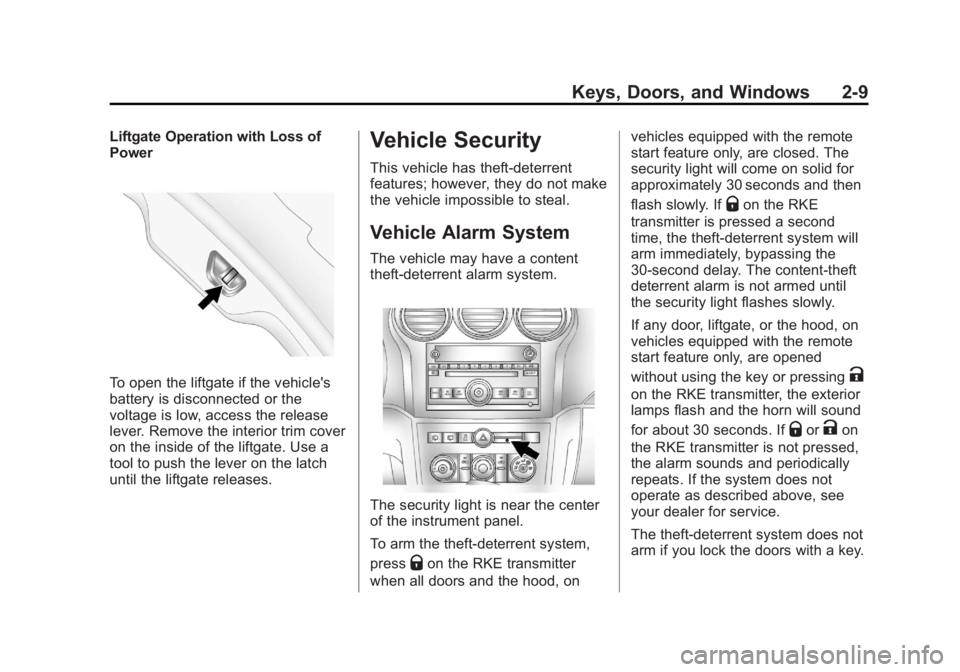
To open the liftgate if the vehicle's
battery is disconnected or the
voltage is low, access the release
lever. Remove the interior trim cover
on the inside of the liftgate. Use a
tool to push the lever on the latch
until the liftgate releases. Vehicle Security This vehicle has theft-deterrent
features; however, they do not make
the vehicle impossible to steal.
Vehicle Alarm System The vehicle may have a content
theft-deterrent alarm system.
The security light is near the center
of the instrument panel.
To arm the theft-deterrent system,
press
Q on the RKE transmitter
when all doors and the hood, on vehicles equipped with the remote
start feature only, are closed. The
security light will come on solid for
approximately 30 seconds and then
flash slowly. If
Q on the RKE
transmitter is pressed a second
time, the theft-deterrent system will
arm immediately, bypassing the
30-second delay. The content-theft
deterrent alarm is not armed until
the security light flashes slowly.
If any door, liftgate, or the hood, on
vehicles equipped with the remote
start feature only, are opened
without using the key or pressing
Kon the RKE transmitter, the exterior
lamps flash and the horn will sound
for about 30 seconds. If
Q or
K on
the RKE transmitter is not pressed,
the alarm sounds and periodically
repeats. If the system does not
operate as described above, see
your dealer for service.
The theft-deterrent system does not
arm if you lock the doors with a key.
Page 67 of 374
Black plate (25,1)Chevrolet Captiva Sport Owner Manual - 2013 - crc - 11/12/12
Seats and Restraints 3-25parts for the airbag system.
If you do not get them, the
airbag system will not be there
to help protect you in another
crash. A new system will include
airbag modules and possibly
other parts. The service manual
for your vehicle covers the need
to replace other parts. .
The vehicle has a crash sensing
and diagnostic module which
records information after a
crash. See Vehicle Data
Recording and Privacy on
page 13 ‑ 19 and Event Data
Recorders on page 13 ‑ 19 ..
Let only qualified technicians
work on the airbag systems.
Improper service can mean that
an airbag system will not work
properly. See your dealer for
service. Passenger Sensing
System (United States) The vehicle has a passenger
sensing system for the right front
passenger position. The passenger
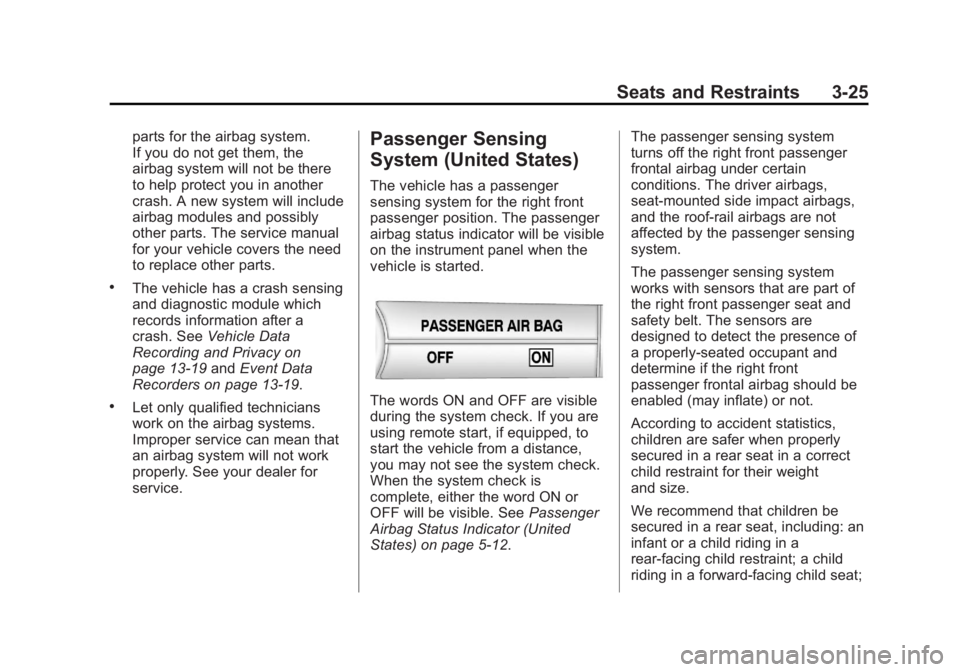
airbag status indicator will be visible
on the instrument panel when the
vehicle is started.
The words ON and OFF are visible
during the system check. If you are
using remote start, if equipped, to
start the vehicle from a distance,
you may not see the system check.
When the system check is
complete, either the word ON or
OFF will be visible. See Passenger
Airbag Status Indicator (United
States) on page 5 ‑ 12 . The passenger sensing system
turns off the right front passenger
frontal airbag under certain
conditions. The driver airbags,
seat-mounted side impact airbags,
and the roof-rail airbags are not
affected by the passenger sensing
system.
The passenger sensing system
works with sensors that are part of
the right front passenger seat and
safety belt. The sensors are
designed to detect the presence of
a properly-seated occupant and
determine if the right front
passenger frontal airbag should be
enabled (may inflate) or not.
According to accident statistics,
children are safer when properly
secured in a rear seat in a correct
child restraint for their weight
and size.
We recommend that children be
secured in a rear seat, including: an
infant or a child riding in a
rear-facing child restraint; a child
riding in a forward-facing child seat;
Page 109 of 374
Black plate (13,1)Chevrolet Captiva Sport Owner Manual - 2013 - crc - 11/12/12
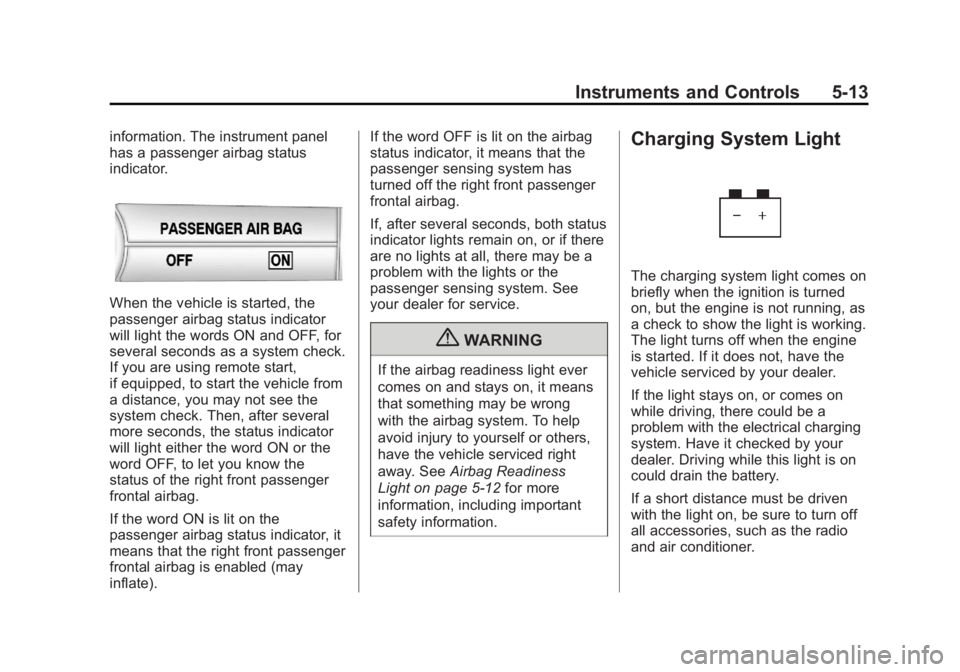
Instruments and Controls 5-13information. The instrument panel
has a passenger airbag status
indicator.
When the vehicle is started, the
passenger airbag status indicator
will light the words ON and OFF, for
several seconds as a system check.
If you are using remote start,
if equipped, to start the vehicle from
a distance, you may not see the
system check. Then, after several
more seconds, the status indicator
will light either the word ON or the
word OFF, to let you know the
status of the right front passenger
frontal airbag.
If the word ON is lit on the
passenger airbag status indicator, it
means that the right front passenger
frontal airbag is enabled (may
inflate). If the word OFF is lit on the airbag
status indicator, it means that the
passenger sensing system has
turned off the right front passenger
frontal airbag.
If, after several seconds, both status
indicator lights remain on, or if there
are no lights at all, there may be a
problem with the lights or the
passenger sensing system. See
your dealer for service.
{ WARNINGIf the airbag readiness light ever
comes on and stays on, it means
that something may be wrong
with the airbag system. To help
avoid injury to yourself or others,
have the vehicle serviced right
away. See Airbag Readiness
Light on page 5 ‑ 12 for more
information, including important
safety information. Charging System Light
The charging system light comes on
briefly when the ignition is turned
on, but the engine is not running, as
a check to show the light is working.
The light turns off when the engine
is started. If it does not, have the
vehicle serviced by your dealer.
If the light stays on, or comes on
while driving, there could be a
problem with the electrical charging
system. Have it checked by your
dealer. Driving while this light is on
could drain the battery.
If a short distance must be driven
with the light on, be sure to turn off
all accessories, such as the radio
and air conditioner.
Page 125 of 374
Black plate (29,1)Chevrolet Captiva Sport Owner Manual - 2013 - crc - 11/12/12
Instruments and Controls 5-29STEP ON BRAKE TO
RELEASE PARK BRAKE For vehicles with the Electric
Parking Brake, this message
displays if you try to release the
parking brake without first pressing
the brake pedal. See Parking Brake
on page 9 ‑ 25 for more information.
Compass Messages CALIBRATING COMPASS:
TURN IN CIRCLES This message displays when
calibrating the compass. Drive the
vehicle in circles at less than
8 km/h (5 mph) to complete the
calibration. See Compass on
page 5 ‑ 4 .
COMPASS CALIBRATION
COMPLETE
This message displays when the
compass calibration is complete.
See Compass on page 5 ‑ 4 .Cruise Control Messages CRUISE SET TO XXX This message will display when the
cruise control is set and it will show
the speed it was set to. See Cruise
Control on page 9 ‑ 29 for more
information.
Door Ajar Messages DRIVER DOOR OPEN This message will display when the
driver door is not closed properly.
Close the door completely.
HOOD OPEN If the vehicle has the remote start
feature, this message displays
along with a chime when the hood is
not closed properly. Make sure that
the hood is closed completely. See
Hood on page 10 ‑ 3 . This message
displays while the ignition is in ON/
RUN. Press any of the DIC buttons
to acknowledge this message and
to clear it from the screen. This message continues to display
for two seconds if it has not been
acknowledged when the engine is
turned off. The message comes
back on for two seconds if it has
been acknowledged, but the
condition still exists when the
engine is turned off. If the condition
still exists, the message reappears
when the engine is turned on.
LIFTGATE OPEN This message will display when the
liftgate is not closed properly. Close
the liftgate completely.
PASSENGER DOOR OPEN This message will display when the
passenger doors are not closed
properly. Close the door completely.
Page 128 of 374
Black plate (32,1)Chevrolet Captiva Sport Owner Manual - 2013 - crc - 11/12/12
5-32 Instruments and Controls cap allows fuel to evaporate into the
atmosphere. A few driving trips with
the cap properly installed should
turn this light and message off.
Key and Lock Messages REPLACE REMOTE KEY FOB
BATTERY This message displays if a Remote
Keyless Entry (RKE) transmitter
battery is low. The battery needs to
be replaced in the transmitter. See
“ Battery Replacement ” under
Remote Keyless Entry (RKE)
System Operation on page 2 ‑ 2 .
Lamp Messages AUTOMATIC LIGHT
CONTROL ON
This message displays when the
automatic headlamp system is
activated by turning the exterior
lamps control to AUTO. AUTOMATIC LIGHT
CONTROL OFF This message displays when the
automatic headlamp system has
been turned off.
Object Detection System
Messages PARK ASST (Assist)
BLOCKED SEE OWNERS
MANUAL This message displays if there is
something interfering with the park
assist system. See Ultrasonic
Parking Assist on page 9 ‑ 31 for
more information.
PARK ASSIST OFF
After the vehicle has been started,
this message displays to remind the
driver that the URPA system has
been turned off. Press the set/reset
button or the trip odometer reset
stem to acknowledge this message and clear it from the DIC display.
For more information see Ultrasonic
Parking Assist on page 9 ‑ 31 .
SERVICE PARK ASSIST This message displays if there is a
problem with the Ultrasonic Rear
Parking Assist (URPA) system. Do
not use this system to help you
park. See Ultrasonic Parking Assist
on page 9 ‑ 31 for more information.
See your dealer for service.
Ride Control System
Messages SERVICE STABILITRAK This message displays if there is a
problem with the StabiliTrak ®
system. A warning light also
appears on the instrument cluster.
See StabiliTrak ®
Indicator Light on
page 5 ‑ 19 . See StabiliTrak ®
System
on page 9 ‑ 28 for more information.
If this message turns on while you
are driving, pull off the road as soon
as possible and stop carefully. Try
Page 136 of 374
Black plate (40,1)Chevrolet Captiva Sport Owner Manual - 2013 - crc - 11/12/12
5-40 Instruments and Controls The lamps will remain on for
20 seconds or until
Q on the RKE
transmitter is pressed, or the vehicle
is no longer off. See Remote
Keyless Entry (RKE) System
Operation on page 2 ‑ 2 .
NO CHANGE: No change will be
made to this feature. The current
setting will remain.
To select a setting, press
V while
the desired setting is displayed on
the DIC.
CHIME VOLUME
This feature allows you to select the
volume level of the chime.
Press
U until PRESS
V TO SET
CHIME VOLUME appears on the
DIC display. Press
V once to
access the settings for this feature.
Then press
U to scroll through the
following settings:
NORMAL: The chime volume will
be set to a normal level. LOUD: The chime volume will be
set to a loud level.
NO CHANGE: No change will be
made to this feature. The current
setting will remain.
There is no default for chime
volume. The volume will stay at the
last known setting.
To select a setting, press
V while
the desired setting is displayed on
the DIC.
REMOTE START
If the vehicle has this feature, it
allows you to turn the remote start
off or on. The remote start feature
allows you to start the engine from
outside of the vehicle using the
Remote Keyless Entry (RKE)
transmitter. See Remote Vehicle
Start on page 2 ‑ 4 . Press
U until PRESS
V TO SET
REMOTE START appears on the
DIC display. Press
V once to
access the settings for this feature.
Then press
U to scroll through the
following settings:
OFF: The remote start feature will
be disabled.
ON (default): The remote start
feature will be enabled.
NO CHANGE: No change will be
made to this feature. The current
setting will remain.
To select a setting, press
V while
the desired setting is displayed on
the DIC.
FACTORY SETTINGS
This feature allows you to set all of
the customization features back to
their factory default settings.
Page 138 of 374
Black plate (42,1)Chevrolet Captiva Sport Owner Manual - 2013 - crc - 11/12/12
5-42 Instruments and Controls devices such as garage door
openers, security systems, and
home automation devices.
Do not use the Universal Remote
system with any garage door opener
that does not have the stop and
reverse feature. This includes any
garage door opener model
manufactured before April 1,1982.
Read the instructions completely
before attempting to program the
Universal Remote system. Because
of the steps involved, it may be
helpful to have another person
available to assist with programming
the Universal Remote system.
Keep the original hand-held
transmitter for use in other vehicles
as well as for future Universal
Remote system programming. It is
also recommended that upon the
sale of the vehicle, the programmed
Universal Remote system buttons
be erased for security purposes.
See “ Erasing Universal Remote
System Buttons ” later in this
section. When programming a garage door,
park outside of the garage. Park
directly in line with and facing the
garage door opener motor-head or
gate motor-head. Be sure that
people and objects are clear of the
garage door or gate being
programmed.
It is recommended that a new
battery be installed in the hand-held
transmitter for quicker and more
accurate transmission of the
radio-frequency signal.
Programming the Universal
Remote System For questions or help programming
the Universal Remote system, call
1-800-355-3515 or go to
www.homelink.com.
Programming a garage door opener
involves time-sensitive actions, so
read the entire procedure before
starting. Otherwise, the device will
time out and the procedure will have
to be repeated. To program up to three devices:
1. Hold the end of the hand-held
transmitter about 3 to 8 cm (1 to
3 in) away from the Universal
Remote system buttons while
keeping the indicator light in
view. The hand-held transmitter
was supplied by the
manufacturer of the garage door
opener receiver
(motor-head unit).
2. At the same time, press and
hold both the hand-held
transmitter button and one of the
three Universal Remote system
buttons to be used to operate
the garage door. Do not release
the Universal Remote system
button or the hand-held
transmitter button until the
indicator light changes from a
slowly to a rapidly flashing light.
You now may release both
buttons.