turn signal CHEVROLET CAPTIVA SPORT 2013 Owners Manual
[x] Cancel search | Manufacturer: CHEVROLET, Model Year: 2013, Model line: CAPTIVA SPORT, Model: CHEVROLET CAPTIVA SPORT 2013Pages: 374, PDF Size: 6.66 MB
Page 7 of 374
Black plate (3,1)Chevrolet Captiva Sport Owner Manual - 2013 - crc - 11/12/12
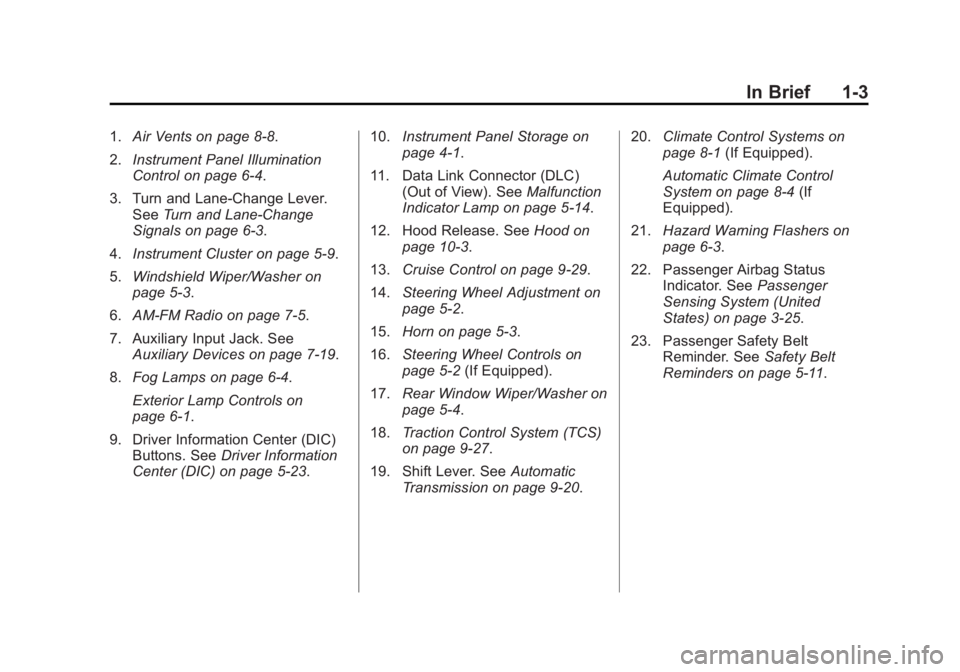
In Brief 1-31. Air Vents on page 8 ‑ 8 .
2. Instrument Panel Illumination
Control on page 6 ‑ 4 .
3. Turn and Lane-Change Lever.
See Turn and Lane-Change
Signals on page 6 ‑ 3 .
4. Instrument Cluster on page 5 ‑ 9 .
5. Windshield Wiper/Washer on
page 5 ‑ 3 .
6. AM-FM Radio on page 7 ‑ 5 .
7. Auxiliary Input Jack. See
Auxiliary Devices on page 7 ‑ 19 .
8. Fog Lamps on page 6 ‑ 4 .
Exterior Lamp Controls on
page 6 ‑ 1 .
9. Driver Information Center (DIC)
Buttons. See Driver Information
Center (DIC) on page 5 ‑ 23 . 10. Instrument Panel Storage on
page 4 ‑ 1 .
11. Data Link Connector (DLC)
(Out of View). See Malfunction
Indicator Lamp on page 5 ‑ 14 .
12. Hood Release. See Hood on
page 10 ‑ 3 .
13. Cruise Control on page 9 ‑ 29 .
14. Steering Wheel Adjustment on
page 5 ‑ 2 .
15. Horn on page 5 ‑ 3 .
16. Steering Wheel Controls on
page 5 ‑ 2 (If Equipped).
17. Rear Window Wiper/Washer on
page 5 ‑ 4 .
18. Traction Control System (TCS)
on page 9 ‑ 27 .
19. Shift Lever. See Automatic
Transmission on page 9 ‑ 20 . 20. Climate Control Systems on
page 8 ‑ 1 (If Equipped).
Automatic Climate Control
System on page 8 ‑ 4 (If
Equipped).
21. Hazard Warning Flashers on
page 6 ‑ 3 .
22. Passenger Airbag Status
Indicator. See Passenger
Sensing System (United
States) on page 3 ‑ 25 .
23. Passenger Safety Belt
Reminder. See Safety Belt
Reminders on page 5 ‑ 11 .
Page 17 of 374
Black plate (13,1)Chevrolet Captiva Sport Owner Manual - 2013 - crc - 11/12/12
In Brief 1-13
The rear reading lamps are in the
headliner.
To turn the reading lamps on or off,
press the button next to each lamp.
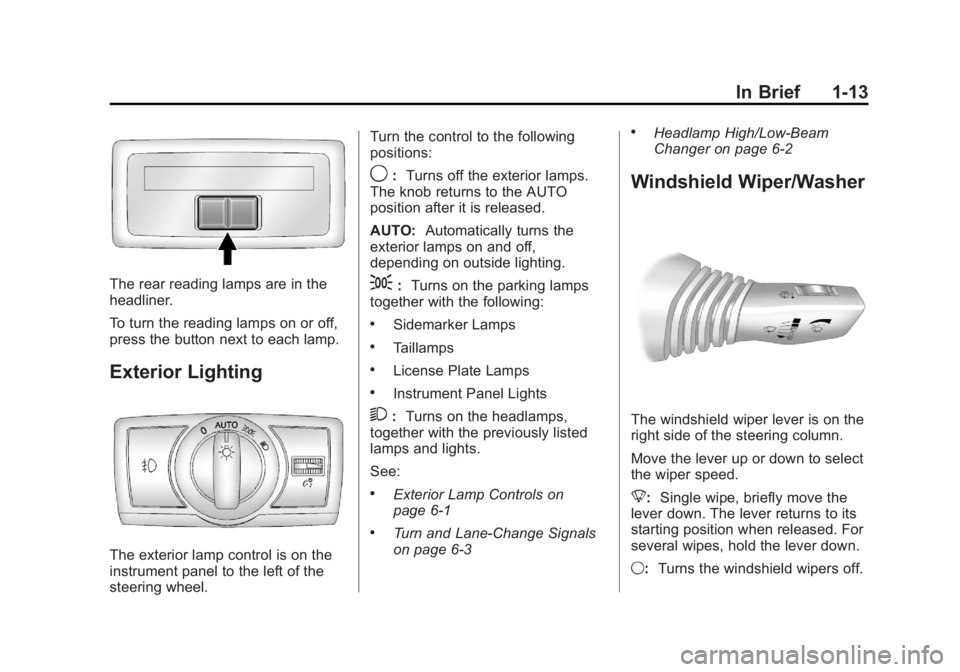
Exterior Lighting
The exterior lamp control is on the
instrument panel to the left of the
steering wheel. Turn the control to the following
positions:
9 : Turns off the exterior lamps.
The knob returns to the AUTO
position after it is released.
AUTO: Automatically turns the
exterior lamps on and off,
depending on outside lighting.
; : Turns on the parking lamps
together with the following: .
Sidemarker Lamps .
Taillamps .
License Plate Lamps .
Instrument Panel Lights
2 : Turns on the headlamps,
together with the previously listed
lamps and lights.
See: .
Exterior Lamp Controls on
page 6 ‑ 1 .
Turn and Lane-Change Signals
on page 6 ‑ 3 .
Headlamp High/Low-Beam
Changer on page 6 ‑ 2
Windshield Wiper/Washer
The windshield wiper lever is on the
right side of the steering column.
Move the lever up or down to select
the wiper speed.
8 : Single wipe, briefly move the
lever down. The lever returns to its
starting position when released. For
several wipes, hold the lever down.
9 : Turns the windshield wipers off.
Page 28 of 374
Black plate (2,1)Chevrolet Captiva Sport Owner Manual - 2013 - crc - 11/12/12
2-2 Keys, Doors, and Windows
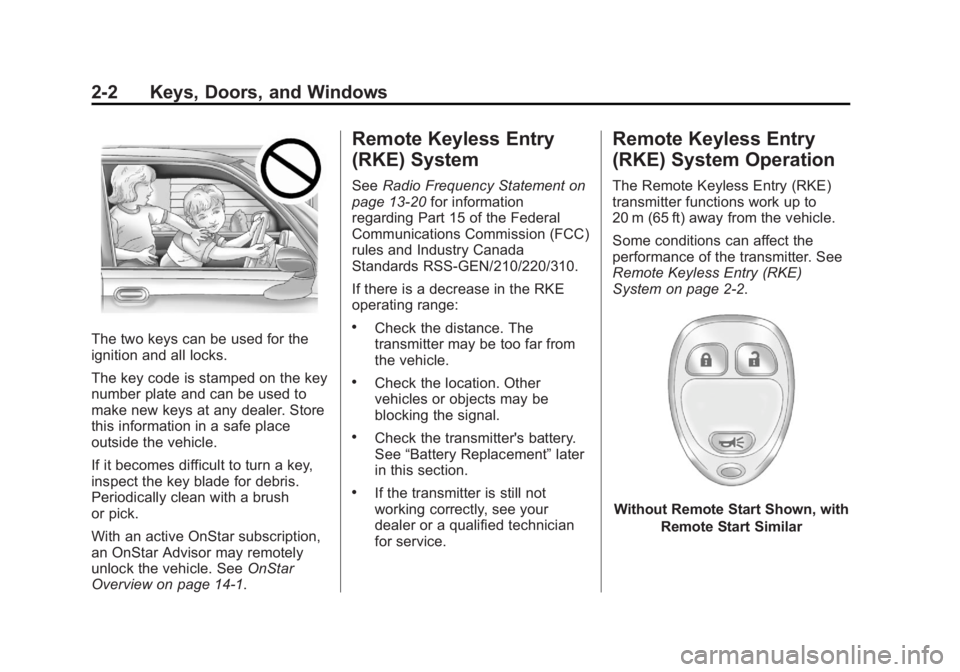
The two keys can be used for the
ignition and all locks.
The key code is stamped on the key
number plate and can be used to
make new keys at any dealer. Store
this information in a safe place
outside the vehicle.
If it becomes difficult to turn a key,
inspect the key blade for debris.
Periodically clean with a brush
or pick.
With an active OnStar subscription,
an OnStar Advisor may remotely
unlock the vehicle. See OnStar
Overview on page 14 ‑ 1 . Remote Keyless Entry
(RKE) System See Radio Frequency Statement on
page 13 ‑ 20 for information
regarding Part 15 of the Federal
Communications Commission (FCC)
rules and Industry Canada
Standards RSS-GEN/210/220/310.
If there is a decrease in the RKE
operating range: .
Check the distance. The
transmitter may be too far from
the vehicle. .
Check the location. Other
vehicles or objects may be
blocking the signal. .
Check the transmitter's battery.
See “ Battery Replacement ” later
in this section. .
If the transmitter is still not
working correctly, see your
dealer or a qualified technician
for service. Remote Keyless Entry
(RKE) System Operation The Remote Keyless Entry (RKE)
transmitter functions work up to
20 m (65 ft) away from the vehicle.
Some conditions can affect the
performance of the transmitter. See
Remote Keyless Entry (RKE)
System on page 2 ‑ 2 .
Without Remote Start Shown, with
Remote Start Similar
Page 29 of 374
Black plate (3,1)Chevrolet Captiva Sport Owner Manual - 2013 - crc - 11/12/12
Keys, Doors, and Windows 2-3
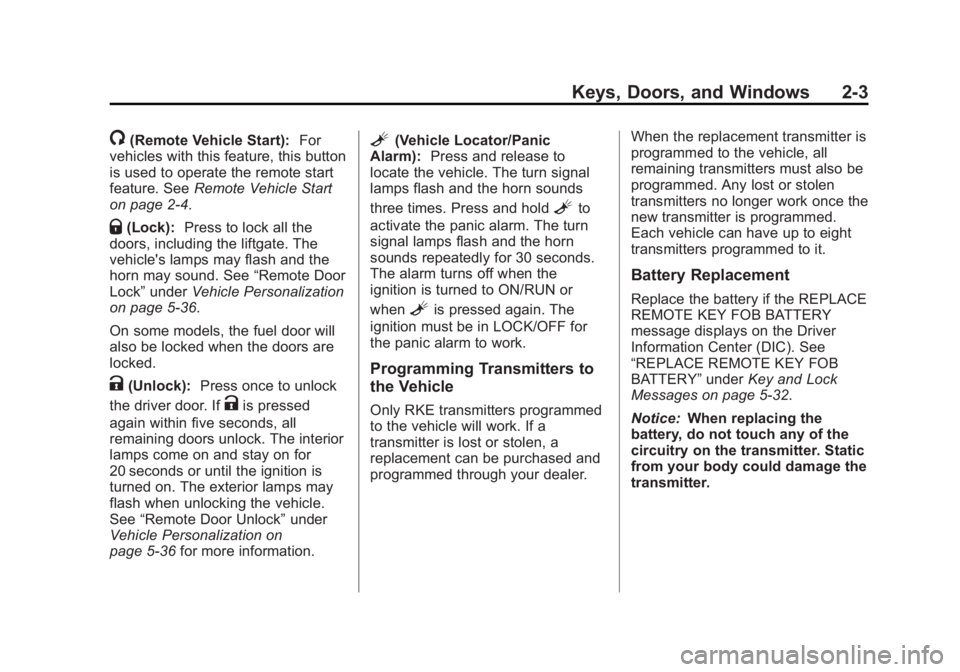
/ (Remote Vehicle Start): For
vehicles with this feature, this button
is used to operate the remote start
feature. See Remote Vehicle Start
on page 2 ‑ 4 .
Q (Lock): Press to lock all the
doors, including the liftgate. The
vehicle's lamps may flash and the
horn may sound. See “ Remote Door
Lock ” under Vehicle Personalization
on page 5 ‑ 36 .
On some models, the fuel door will
also be locked when the doors are
locked.
K (Unlock): Press once to unlock
the driver door. If
K is pressed
again within five seconds, all
remaining doors unlock. The interior
lamps come on and stay on for
20 seconds or until the ignition is
turned on. The exterior lamps may
flash when unlocking the vehicle.
See “ Remote Door Unlock ” under
Vehicle Personalization on
page 5 ‑ 36 for more information. L (Vehicle Locator/Panic
Alarm): Press and release to
locate the vehicle. The turn signal
lamps flash and the horn sounds
three times. Press and hold
L to
activate the panic alarm. The turn
signal lamps flash and the horn
sounds repeatedly for 30 seconds.
The alarm turns off when the
ignition is turned to ON/RUN or
when
L is pressed again. The
ignition must be in LOCK/OFF for
the panic alarm to work.
Programming Transmitters to
the Vehicle Only RKE transmitters programmed
to the vehicle will work. If a
transmitter is lost or stolen, a
replacement can be purchased and
programmed through your dealer. When the replacement transmitter is
programmed to the vehicle, all
remaining transmitters must also be
programmed. Any lost or stolen
transmitters no longer work once the
new transmitter is programmed.
Each vehicle can have up to eight
transmitters programmed to it.
Battery Replacement Replace the battery if the REPLACE
REMOTE KEY FOB BATTERY
message displays on the Driver
Information Center (DIC). See
“ REPLACE REMOTE KEY FOB
BATTERY ” under Key and Lock
Messages on page 5 ‑ 32 .
Notice: When replacing the
battery, do not touch any of the
circuitry on the transmitter. Static
from your body could damage the
transmitter.
Page 131 of 374
Black plate (35,1)Chevrolet Captiva Sport Owner Manual - 2013 - crc - 11/12/12
Instruments and Controls 5-35
Transmission Messages CHANGE TRANSMISSION
FLUID Notice: Use of the incorrect
automatic transmission fluid may
damage the vehicle, and the
damages may not be covered by
the vehicle warranty. Always use
the automatic transmission fluid
listed in Recommended Fluids
and Lubricants on page 11 ‑ 12 .
This message displays when the life
of the transmission fluid has expired
and it should be changed. See
Maintenance Schedule on
page 11 ‑ 3 and Recommended
Fluids and Lubricants on page 11 ‑ 12
for the proper fluid and change
intervals.
SERVICE TRANSMISSION
This message displays when there
is a problem with the transmission.
See your dealer for service. TRANSMISSION HOT IDLE
ENGINE Notice: Do not drive the vehicle
while the transmission fluid is
overheating and the transmission
temperature warning is displayed
on the instrument cluster and/or
DIC, or the transmission can be
damaged. This could lead to
costly repairs that would not be
covered by the warranty.
This message displays along with a
chime if the transmission fluid in the
vehicle gets hot. Driving with the
transmission fluid temperature high
can cause damage to the vehicle.
Stop the vehicle and let it idle to
allow the transmission to cool. This
message clears and the chime
stops when the fluid temperature
reaches a safe level. Vehicle Reminder
Messages ICE POSSIBLE DRIVE
WITH CARE This message displays when the
outside air temperature is cold
enough to create icy road
conditions. Adjust your driving
accordingly.
TURN SIGNAL ON This message displays and a chime
sounds as a reminder to turn off the
turn signal if you drive the vehicle
for more than about 1.2 km
(0.75 mile) with a turn signal on.
See Turn and Lane-Change Signals
on page 6 ‑ 3 for more information.
Page 143 of 374
Black plate (1,1)Chevrolet Captiva Sport Owner Manual - 2013 - crc - 11/12/12
Lighting 6-1
Lighting Exterior Lighting Exterior Lamp Controls . . . . . . . . 6-1
Headlamp High/Low-Beam
Changer . . . . . . . . . . . . . . . . . . . . . 6-2
Flash-to-Pass . . . . . . . . . . . . . . . . . 6-2
Daytime Running
Lamps (DRL) . . . . . . . . . . . . . . . . 6-2
Automatic Headlamp
System . . . . . . . . . . . . . . . . . . . . . . 6-3
Hazard Warning Flashers . . . . . 6-3
Turn and Lane-Change
Signals . . . . . . . . . . . . . . . . . . . . . . 6-3
Fog Lamps . . . . . . . . . . . . . . . . . . . . 6-4
Interior Lighting Instrument Panel Illumination
Control . . . . . . . . . . . . . . . . . . . . . . 6-4
Dome Lamps . . . . . . . . . . . . . . . . . 6-5
Reading Lamps . . . . . . . . . . . . . . . 6-5
Lighting Features Entry Lighting . . . . . . . . . . . . . . . . . 6-6
Battery Load Management . . . . 6-6
Battery Power Protection . . . . . . 6-6 Exterior Lighting Exterior Lamp Controls
The exterior lamp control is on the
instrument panel to the left of the
steering wheel.
Turn the control to the following
positions:
9 (Off): Turns off the exterior
lamps. The knob returns to the
AUTO position after it is released. AUTO (Automatic): Automatically
turns the exterior lamps on and off,
depending on outside lighting.
The current status of the AUTO
system is displayed in the Driver
Information Center (DIC) display.
See Vehicle Reminder Messages on
page 5 ‑ 35 .
; (Parking Lamps): Turns on the
parking lamps together with the
following: .
Sidemarker Lamps .
Taillamps .
License Plate Lamps .
Instrument Panel Lights
2 (Headlamps): Turns on the
headlamps, together with the
previously listed lamps and lights.
Lamps On Reminder
A warning chime sounds, if the
driver door is opened while the
ignition is off and the lamps are on.
Page 144 of 374
Black plate (2,1)Chevrolet Captiva Sport Owner Manual - 2013 - crc - 11/12/12
6-2 Lighting Wiper-Activated Headlamps
The headlamps and parking lamps
turn on automatically if the exterior
lamp control is set in the AUTO
position and the windshield wipers
are turned on and have completed
eight wipe cycles.
When the ignition is turned off, the
wiper-activated headlamps
immediately turn off. They also turn
off if the windshield wiper control is
turned off.
Headlamp High/
Low-Beam Changer
2 3 (Headlamp High/Low-Beam
Changer): Push the turn signal
lever away from you to turn the high
beams on.
Pull the lever toward you to return to
low beams. This indicator light turns on in the
instrument cluster when the
high-beam headlamps are on.
Flash-to-Pass To flash the high beams, pull the
turn signal lever toward you, and
release.
Daytime Running
Lamps (DRL) On vehicles equipped with Daytime
Running Lamps (DRL), the
low-beam headlamps come on in
daylight when all the following
conditions are met: .
The engine is running, .
The exterior lamp control is in
AUTO, and .
The light sensor determines it is
daytime.
Fully functional daytime running
lamps are required on all vehicles
first sold in Canada.
When the DRL are on, the
low-beam headlamps will be on.
The taillamps, sidemarker lamps,
instrument panel lights, and other
lamps will not be on.
When the exterior lamp control is
turned to the headlamp position, the
regular headlamps will come on.
The other lamps that come on with
the headlamps will also come on.
When the headlamps are turned off,
the regular lamps also turn off, and
the low-beam headlamps turn on.
The regular headlamp system
should be used when needed.
Page 145 of 374
Black plate (3,1)Chevrolet Captiva Sport Owner Manual - 2013 - crc - 11/12/12
Lighting 6-3
Automatic Headlamp
System When it is dark enough outside, the
headlamps come on automatically.
Do not cover the light sensor on top
of the instrument panel or the
headlamps will come on when they
are not needed.
The system may also turn on the
headlamps when driving through a
parking garage or tunnel. Lights On with Wipers If the windshield wipers are
activated in daylight with the engine
on, and the exterior lamp control is
in AUTO, the headlamps, parking
lamps, and other exterior lamps
come on. The transition time for the
lamps coming on varies based on
wiper speed. When the wipers are
not operating, these lamps turn off.
Move the exterior lamp control to
9or
; to disable this feature.
Hazard Warning Flashers | (Hazard Warning Flasher):
Press this button to make the front
and rear turn signal lamps flash on
and off. This warns others that you
are having trouble.
Press
| again to turn the
flashers off.
Turn and Lane-Change
Signals
Move the lever all the way up or
down to signal a turn.
An arrow on the instrument cluster
flashes in the direction of the turn or
lane change.
Page 146 of 374
Black plate (4,1)Chevrolet Captiva Sport Owner Manual - 2013 - crc - 11/12/12
6-4 Lighting Raise or lower the lever until the
arrow starts to flash and then
release, to signal a lane change.
The turn signal flashes
automatically three times.
The lever returns to its starting
position whenever it is released.
If after signaling a turn or lane
change the arrow flashes rapidly or
does not come on, a signal bulb
may be burned out.
Have any burned out bulbs
replaced. If a bulb is not burned out,
check the fuse. See Instrument
Panel Fuse Block on page 10 ‑ 33 .
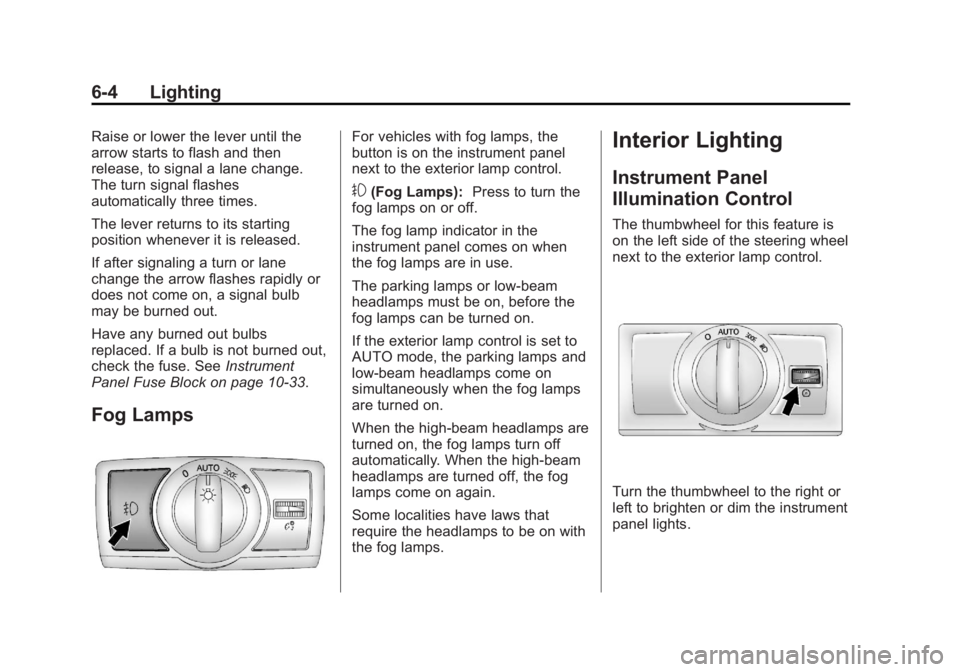
Fog Lamps For vehicles with fog lamps, the
button is on the instrument panel
next to the exterior lamp control.
# (Fog Lamps): Press to turn the
fog lamps on or off.
The fog lamp indicator in the
instrument panel comes on when
the fog lamps are in use.
The parking lamps or low-beam
headlamps must be on, before the
fog lamps can be turned on.
If the exterior lamp control is set to
AUTO mode, the parking lamps and
low-beam headlamps come on
simultaneously when the fog lamps
are turned on.
When the high-beam headlamps are
turned on, the fog lamps turn off
automatically. When the high-beam
headlamps are turned off, the fog
lamps come on again.
Some localities have laws that
require the headlamps to be on with
the fog lamps. Interior Lighting Instrument Panel
Illumination Control The thumbwheel for this feature is
on the left side of the steering wheel
next to the exterior lamp control.
Turn the thumbwheel to the right or
left to brighten or dim the instrument
panel lights.
Page 153 of 374
Black plate (5,1)Chevrolet Captiva Sport Owner Manual - 2013 - crc - 11/12/12
Infotainment System 7-5The volume level changes between
Normal and Loud. The selected
volume level appears on the radio
display.
Removing the radio and not
replacing it with a factory radio or
chime module will disable vehicle
chimes.
Radio Messages Calibration Error: The audio
system has been calibrated for the
vehicle from the factory.
If Calibration Error displays, it
means that the radio has not been
configured properly for the vehicle
and it must be returned to your
dealer for service.
Locked: This message displays
when the TheftLock system has
locked up the radio. Take the
vehicle to your dealer for service.
If any error occurs repeatedly or if
an error cannot be corrected,
contact your dealer. Radio AM-FM Radio Radio Data System (RDS) The RDS feature is available for use
only on FM stations that broadcast
RDS information. This system relies
upon receiving specific information
from these stations and only works
when the information is available.
While the radio is tuned to an
FM-RDS station, the station name
or call letters display. In rare cases,
a radio station could broadcast
incorrect information that causes the
radio features to work improperly.
If this happens, contact the radio
station.
Finding a Station
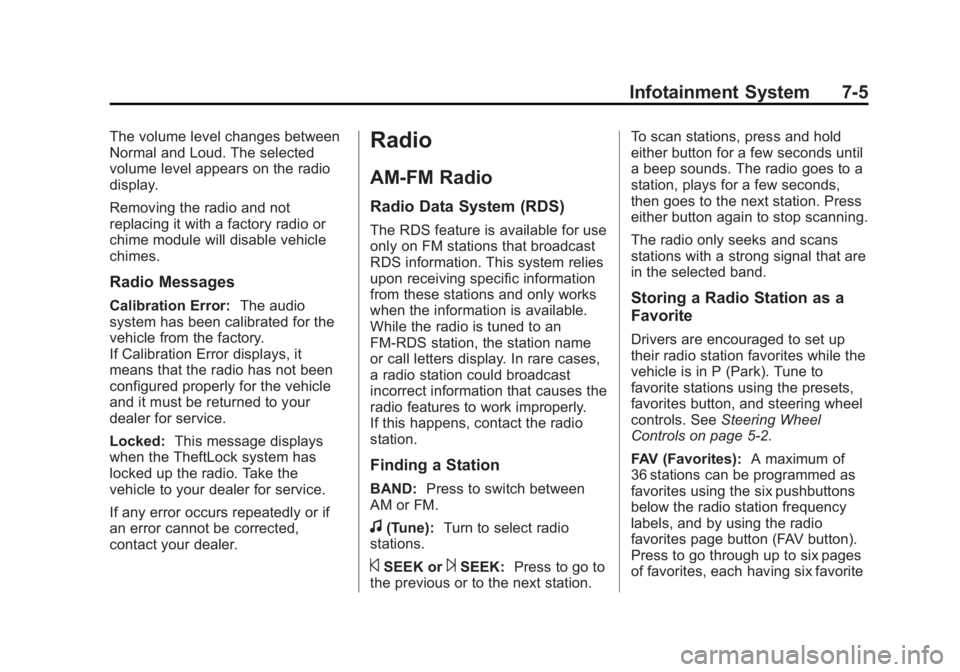
BAND: Press to switch between
AM or FM.
f (Tune): Turn to select radio
stations.
© SEEK or
¨ SEEK: Press to go to
the previous or to the next station. To scan stations, press and hold
either button for a few seconds until
a beep sounds. The radio goes to a
station, plays for a few seconds,
then goes to the next station. Press
either button again to stop scanning.
The radio only seeks and scans
stations with a strong signal that are
in the selected band.
Storing a Radio Station as a
Favorite Drivers are encouraged to set up
their radio station favorites while the
vehicle is in P (Park). Tune to
favorite stations using the presets,
favorites button, and steering wheel
controls. See Steering Wheel
Controls on page 5 ‑ 2 .
FAV (Favorites): A maximum of
36 stations can be programmed as
favorites using the six pushbuttons
below the radio station frequency
labels, and by using the radio
favorites page button (FAV button).
Press to go through up to six pages
of favorites, each having six favorite