ECO mode CHEVROLET COLORADO 2017 2.G User Guide
[x] Cancel search | Manufacturer: CHEVROLET, Model Year: 2017, Model line: COLORADO, Model: CHEVROLET COLORADO 2017 2.GPages: 419, PDF Size: 7.38 MB
Page 182 of 419
Chevrolet Colorado Owner Manual (GMNA-Localizing-U.S./Canada/Mexico-10122675) - 2017 - crc - 8/22/16
Infotainment System 181
Voice Recognition
If equipped, voice recognition allowsfor hands-free operation within theaudio and phone applications. Thisfeature can be started by pressinggon the steering wheel or by
selectinggon the infotainment
display.
However, not all features withinthese areas are supported by voicecommands. Generally, only complextasks that require multiple manualinteractions to complete aresupported by voice commands.
For example, tasks that take morethan one or two button presses suchas selecting a song or artist to playfrom a media device would besupported by voice commands.Other tasks, like adjusting thevolume or seeking up or down areaudio features that are easilyperformed by pressing one or twobuttons, and are not supported byvoice commands.
In general there are flexible ways tospeak commands for completing thetasks. Most of them, except
destination entry and voice keypad,can be completed in a singlecommand. If the task takes morethan one command to complete, thefirst command would be to indicatethe kind of task that is to beperformed. The system replies withprompts that lead through a dialogto enter the necessary information.
Voice recognition can be used whenthe ignition is on or when RetainedAccessory Power (RAP) is active.SeeRetained Accessory Power(RAP)0237.
Using Voice Recognition
Voice recognition becomes availableonce the system has beeninitialized. This begins when theignition is turned on. Initializationmay take a few moments.
1. Pressgon the steering wheel
to activate voice recognition,
or selectgon the infotainment
display.
.If voice recognition isstarted from the steeringwheel control, the
instrument cluster displaysthe selections and visualdialog content.
.If voice recognition isstarted from theinfotainment display, theselections and visual dialogcontent appear on both theinfotainment display andthe instrument clusterdisplay.
2. The audio system mutes andthe system plays a promptfollowed by a beep.
3. Wait until after the beepcompletes, then clearly speakone of the commandsdescribed in this section.
Pressgto interrupt any voice
recognition system prompt. Forexample, if the prompt seemsto be taking too long to finish,
pressgagain and the beep
should happen right away.
There are two voice prompt modessupported:
Page 188 of 419
Chevrolet Colorado Owner Manual (GMNA-Localizing-U.S./Canada/Mexico-10122675) - 2017 - crc - 8/22/16
Infotainment System 187
Phone
Bluetooth (Overview)
Instructions for using the cell phonemay differ between infotainmentsystems. The base radio and baseradio with touchscreen instructionsare included in this manual. See theinfotainment manual for instructionson the uplevel radios.
Bluetooth-capable systems caninteract with many cell phones,allowing:
.Placement and receipt of calls inahands-freemode.
.Sharing of the cell phone’saddress book or contact list withthe vehicle.
To m i n i m i z e d r i v e r d i s t r a c t i o n ,before driving, and with the vehicleparked:
.Become familiar with thefeatures of the cell phone.Organize the phone book andcontact lists clearly and delete
duplicate or rarely used entries.If possible, program speed dialor other shortcuts.
.Review the controls andoperation of the infotainmentsystem.
.Pair cell phone(s) to the vehicle.The system may not work withall cell phones. See“Pairing”inthis section.
.If the cell phone has voicedialing capability, learn to usethat feature to access theaddress book or contact list.
.See“Deleting a Paired Phone”and/or“Deleting a BluetoothDevice”in this section.
{Warning
When using a cell phone, it can
be distracting to look too long or
too often at the screen of the
phone or the infotainment system.
Ta k i n g y o u r e y e s o f f t h e r o a d t o o
long or too often could cause a
crash resulting in injury or death.
Focus your attention on driving.
Vehicles with a Bluetooth systemcan use a Bluetooth-capable cellphone with a Hands-Free Profile tomake and receive phone calls. Theinfotainment system and voicerecognition are used to control thesystem. The system can be usedwhile in ON/RUN or ACC/ACCESSORY. The range of theBluetooth system can be up to 9.1 m(30 ft). Not all phones support allfunctions and not all phones workwith the Bluetooth system. Seewww.gm.com/bluetooth or see yourdealer for more information aboutcompatible phones.
Bluetooth Controls
Use the controls on the infotainmentdisplay, center stack, and thesteering wheel to operate theBluetooth system.
Steering Wheel Controls
SeeSteering Wheel Controls0104.
Page 189 of 419
Chevrolet Colorado Owner Manual (GMNA-Localizing-U.S./Canada/Mexico-10122675) - 2017 - crc - 8/22/16
188 Infotainment System
Infotainment System Controls
For information about how tonavigate the menu system using theinfotainment controls, seeOverview(Base Radio)0155orOverview(Base Radio withTo u c h s c r e e n )0157.
MENU :Turn to scroll through a list.Press to select the highlighted listoption.
{:Press to go to the Home Page.SeeHome Page (Base Radio)0158orHome Page (Base Radiowith Touchscreen)0160.
#:Select to enter the phone mainmenu. SeeBluetooth (Overview)0187orBluetooth (InfotainmentControls - Base Radio)0188orBluetooth (Voice Recognition)0192orBluetooth (Infotainment Controls -Base Radio withTo u c h s c r e e n )0197.
Voice Recognition
If equipped, the voice recognitionsystem uses commands to controlthe system and dial phone numbers.
Noise :The system may notrecognize voice commands if thereis too much background noise, suchas noise from open windows or loudtalking inside the vehicle.
When to Speak :Atonesoundstoindicate that the system is ready foravoicecommand.Waitforthetoneand then speak.
How to Speak :Speak clearly in acalm and natural voice.
Audio System
When using the Bluetooth system,sound comes through the vehicle'sfront audio system speakers andoverrides the audio system. Use theOknob during a call to change thevolume level. The system maintainsaminimumvolumelevel.
Bluetooth Audio Quality
Turn off the Echo and Noisecancellation feature on your phone,if supported, for the best hands-freeperformance.
See www.gm.com/bluetooth or seeyour dealer.
Bluetooth (Infotainment
Controls - Base Radio)
For information about how tonavigate the menu system using theinfotainment controls, seeOverview(Base Radio)0155orOverview(Base Radio withTo u c h s c r e e n )0157.
Switching to Handset or
Hands-Free Mode
To s w i t c h b e t w e e n h a n d s e t m o d eand hands-free mode, use theOnStar command,“transfer call.”
Pairing
ABluetooth-enabledcellphonemust be paired to the Bluetoothsystem and then connected to thevehicle before it can be used. Seeyour cell phone manufacturer's userguide for Bluetooth functions beforepairing the cell phone. If a Bluetoothphone is not connected, calls canbe made using OnStar Hands-FreeCalling, if available. SeeOnStarOverview0397,ifequipped.
Page 201 of 419
Chevrolet Colorado Owner Manual (GMNA-Localizing-U.S./Canada/Mexico-10122675) - 2017 - crc - 8/22/16
200 Infotainment System
versions over 1.2 must beregistered and connected to theproduct.
.From the cell phone or Bluetoothdevice, find the Bluetooth devicetype to set/connect the item as astereo headset.
.ewill appear on the screen if
the stereo headset issuccessfully connected.
.The sound played by theBluetooth device is deliveredthrough the infotainment system.
.Bluetooth music can be playedonly when a Bluetooth devicehas been connected. To playBluetooth music, connect theBluetooth phone to theinfotainment system.
.If the Bluetooth device isdisconnected while playingphone music, the music isdiscontinued. The audiostreaming function may not besupported in some Bluetoothphones. Only one function canbe used at a time between theBluetooth hands-free or Phone
music function. For example,if you convert to Bluetoothhands-free while playing Phonemusic, the music isdiscontinued. Playing music fromthe car is not possible whenthere are no music files stored inthe cell phone.
Playing Bluetooth Music
1. Press{.
2. Touch AUDIO.
3. Touch Source.
4. Touch Bluetooth.
Pause
To u c hjto pause.
To u c hrto resume.
Playing the Next Song
To u c hl.
Playing the Previous Song
To u c hgwithin two seconds of
playback time to play theprevious song.
Returning to the Beginning of theCurrent Song
To u c hgafter two seconds of
playback time.
Search
To u c h a n d h o l dgorlto rewind
or fast forward.
Playing Music Randomly
To u c hZduring playback. Touch
again to return to normal play.
This function may not be supporteddepending on the Bluetooth device.
Do not change the track too quicklywhen playing Bluetooth music.
Conditions that may occur whenplaying Bluetooth music:
.It takes time to transmit datafrom the Bluetooth device to theinfotainment system.
.If the cell phone or Bluetoothdevice is not in the waitingscreen mode, it may notautomatically play.
Page 209 of 419
Chevrolet Colorado Owner Manual (GMNA-Localizing-U.S./Canada/Mexico-10122675) - 2017 - crc - 8/22/16
208 Climate Controls
Climate Controls
Climate Control Systems
Climate Control Systems . . . . . 208Automatic Climate ControlSystem . . . . . . . . . . . . . . . . . . . . . . 210
Air Vents
Air Vents . . . . . . . . . . . . . . . . . . . . . 212
Maintenance
Passenger Compartment AirFilter . . . . . . . . . . . . . . . . . . . . . . . . 213
Climate Control Systems
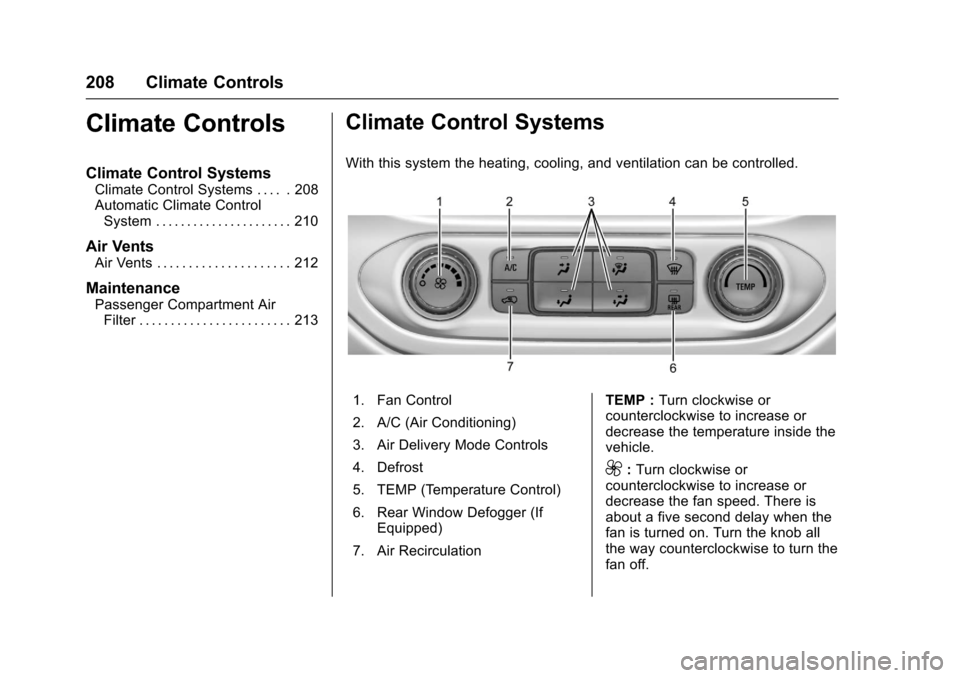
With this system the heating, cooling, and ventilation can be controlled.
1. Fan Control
2. A/C (Air Conditioning)
3. Air Delivery Mode Controls
4. Defrost
5. TEMP (Temperature Control)
6. Rear Window Defogger (IfEquipped)
7. Air Recirculation
TEMP :Turn clockwise orcounterclockwise to increase ordecrease the temperature inside thevehicle.
9:Turn clockwise orcounterclockwise to increase ordecrease the fan speed. There isabout a five second delay when thefan is turned on. Turn the knob allthe way counterclockwise to turn thefan off.
Page 211 of 419
Chevrolet Colorado Owner Manual (GMNA-Localizing-U.S./Canada/Mexico-10122675) - 2017 - crc - 8/22/16
210 Climate Controls
Automatic Climate Control System
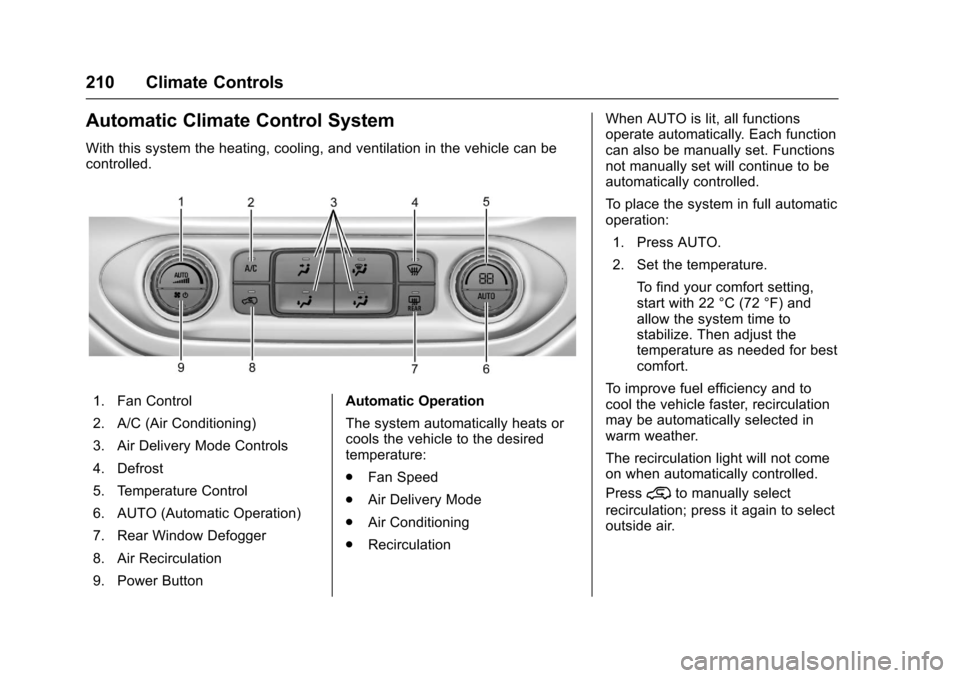
With this system the heating, cooling, and ventilation in the vehicle can becontrolled.
1. Fan Control
2. A/C (Air Conditioning)
3. Air Delivery Mode Controls
4. Defrost
5. Temperature Control
6. AUTO (Automatic Operation)
7. Rear Window Defogger
8. Air Recirculation
9. Power Button
Automatic Operation
The system automatically heats orcools the vehicle to the desiredtemperature:
.Fan Speed
.Air Delivery Mode
.Air Conditioning
.Recirculation
When AUTO is lit, all functionsoperate automatically. Each functioncan also be manually set. Functionsnot manually set will continue to beautomatically controlled.
To p l a c e t h e s y s t e m i n f u l l a u t o m a t i coperation:
1. Press AUTO.
2. Set the temperature.
To f i n d y o u r c o m f o r t s e t t i n g ,start with 22 °C (72 °F) andallow the system time tostabilize. Then adjust thetemperature as needed for bestcomfort.
To i m p r o v e f u e l e f f i c i e n c y a n d t ocool the vehicle faster, recirculationmay be automatically selected inwarm weather.
The recirculation light will not comeon when automatically controlled.
Press@to manually select
recirculation; press it again to selectoutside air.
Page 212 of 419
Chevrolet Colorado Owner Manual (GMNA-Localizing-U.S./Canada/Mexico-10122675) - 2017 - crc - 8/22/16
Climate Controls 211
Do not cover the solar sensor on thetop of the instrument panel near thewindshield. This sensor regulatesair temperature based on sun load.See“Sensors”later in this section.
Manual Operation
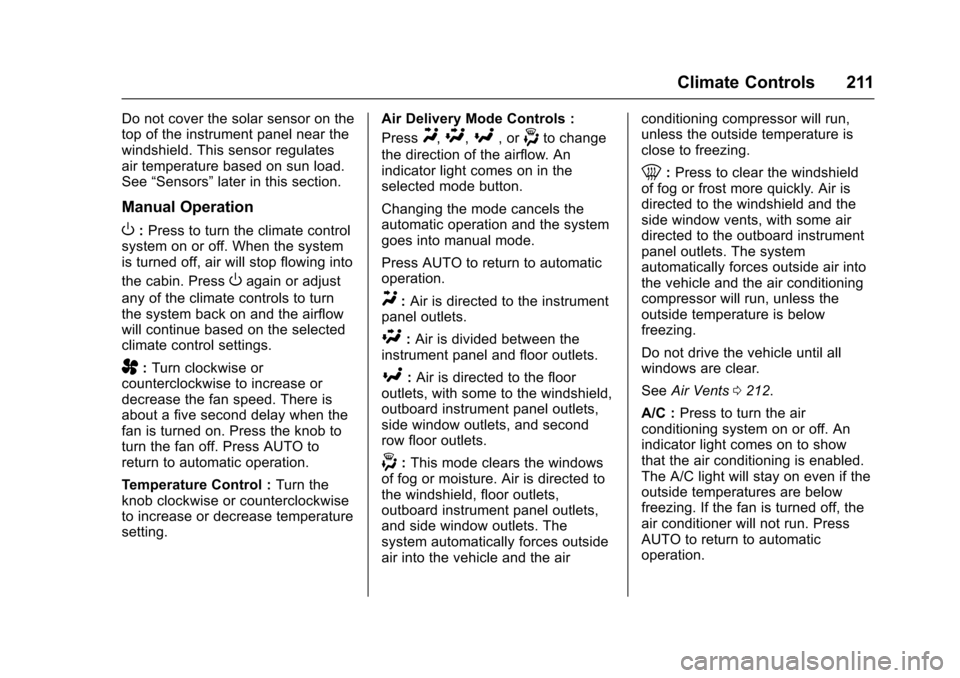
O:Press to turn the climate controlsystem on or off. When the systemis turned off, air will stop flowing into
the cabin. PressOagain or adjust
any of the climate controls to turnthe system back on and the airflowwill continue based on the selectedclimate control settings.
A:Turn clockwise orcounterclockwise to increase ordecrease the fan speed. There isabout a five second delay when thefan is turned on. Press the knob toturn the fan off. Press AUTO toreturn to automatic operation.
Te m p e r a t u r e C o n t r o l :Turn theknob clockwise or counterclockwiseto increase or decrease temperaturesetting.
Air Delivery Mode Controls :
PressY,\,[,or-to change
the direction of the airflow. Anindicator light comes on in theselected mode button.
Changing the mode cancels theautomatic operation and the systemgoes into manual mode.
Press AUTO to return to automaticoperation.
Y:Air is directed to the instrumentpanel outlets.
\:Air is divided between theinstrument panel and floor outlets.
[:Air is directed to the flooroutlets, with some to the windshield,outboard instrument panel outlets,side window outlets, and secondrow floor outlets.
-:This mode clears the windowsof fog or moisture. Air is directed tothe windshield, floor outlets,outboard instrument panel outlets,and side window outlets. Thesystem automatically forces outsideair into the vehicle and the air
conditioning compressor will run,unless the outside temperature isclose to freezing.
0:Press to clear the windshieldof fog or frost more quickly. Air isdirected to the windshield and theside window vents, with some airdirected to the outboard instrumentpanel outlets. The systemautomatically forces outside air intothe vehicle and the air conditioningcompressor will run, unless theoutside temperature is belowfreezing.
Do not drive the vehicle until allwindows are clear.
SeeAir Vents0212.
A/C :Press to turn the airconditioning system on or off. Anindicator light comes on to showthat the air conditioning is enabled.The A/C light will stay on even if theoutside temperatures are belowfreezing. If the fan is turned off, theair conditioner will not run. PressAUTO to return to automaticoperation.
Page 213 of 419
Chevrolet Colorado Owner Manual (GMNA-Localizing-U.S./Canada/Mexico-10122675) - 2017 - crc - 8/22/16
212 Climate Controls
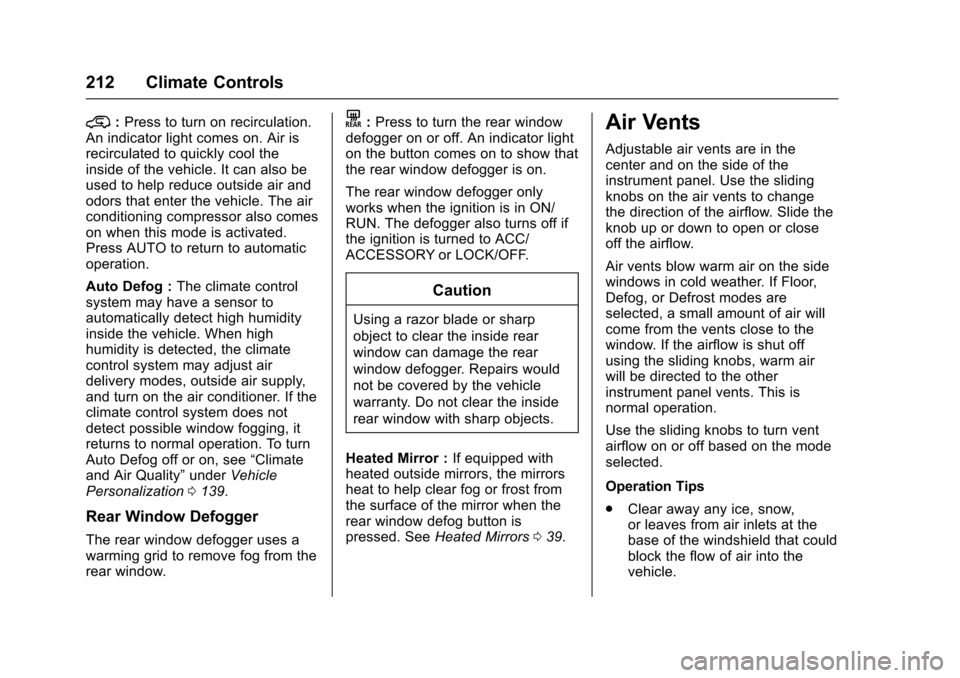
@:Press to turn on recirculation.An indicator light comes on. Air isrecirculated to quickly cool theinside of the vehicle. It can also beused to help reduce outside air andodors that enter the vehicle. The airconditioning compressor also comeson when this mode is activated.Press AUTO to return to automaticoperation.
Auto Defog :The climate controlsystem may have a sensor toautomatically detect high humidityinside the vehicle. When highhumidity is detected, the climatecontrol system may adjust airdelivery modes, outside air supply,and turn on the air conditioner. If theclimate control system does notdetect possible window fogging, itreturns to normal operation. To turnAuto Defog off or on, see“Climateand Air Quality”underVehiclePersonalization0139.
Rear Window Defogger
The rear window defogger uses awarming grid to remove fog from therear window.
K:Press to turn the rear windowdefogger on or off. An indicator lighton the button comes on to show thatthe rear window defogger is on.
The rear window defogger onlyworks when the ignition is in ON/RUN. The defogger also turns off ifthe ignition is turned to ACC/ACCESSORY or LOCK/OFF.
Caution
Using a razor blade or sharp
object to clear the inside rear
window can damage the rear
window defogger. Repairs would
not be covered by the vehicle
warranty. Do not clear the inside
rear window with sharp objects.
Heated Mirror :If equipped withheated outside mirrors, the mirrorsheat to help clear fog or frost fromthe surface of the mirror when therear window defog button ispressed. SeeHeated Mirrors039.
Air Vents
Adjustable air vents are in thecenter and on the side of theinstrument panel. Use the slidingknobs on the air vents to changethe direction of the airflow. Slide theknob up or down to open or closeoff the airflow.
Air vents blow warm air on the sidewindows in cold weather. If Floor,Defog, or Defrost modes areselected, a small amount of air willcome from the vents close to thewindow. If the airflow is shut offusing the sliding knobs, warm airwill be directed to the otherinstrument panel vents. This isnormal operation.
Use the sliding knobs to turn ventairflow on or off based on the modeselected.
Operation Tips
.Clear away any ice, snow,or leaves from air inlets at thebase of the windshield that couldblock the flow of air into thevehicle.
Page 215 of 419
Chevrolet Colorado Owner Manual (GMNA-Localizing-U.S./Canada/Mexico-10122675) - 2017 - crc - 8/22/16
214 Driving and Operating
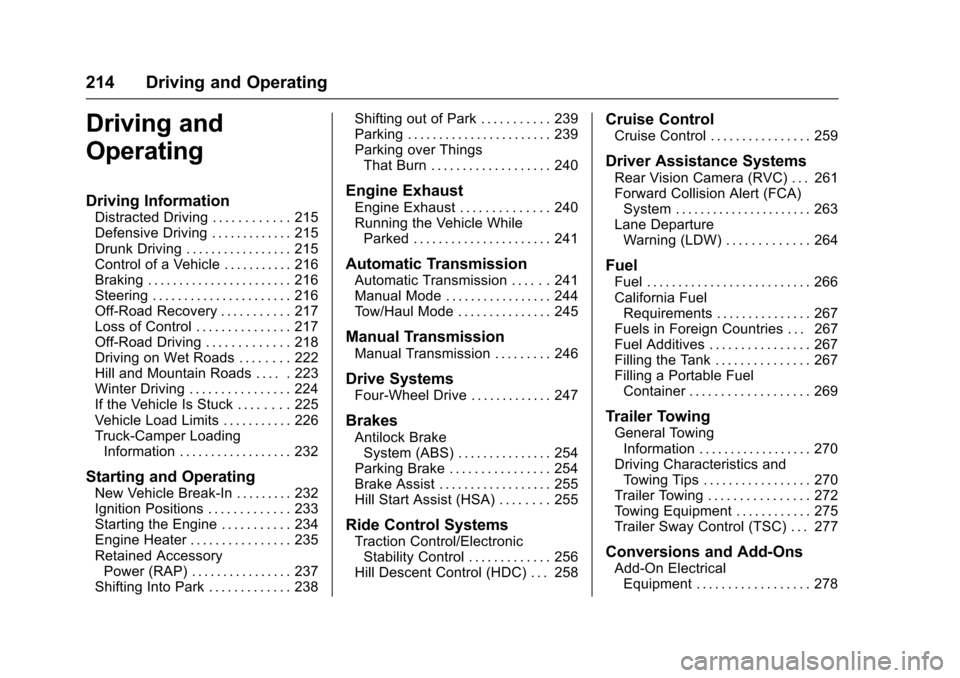
Driving and
Operating
Driving Information
Distracted Driving . . . . . . . . . . . . 215Defensive Driving . . . . . . . . . . . . . 215Drunk Driving . . . . . . . . . . . . . . . . . 215Control of a Vehicle . . . . . . . . . . . 216Braking . . . . . . . . . . . . . . . . . . . . . . . 216Steering . . . . . . . . . . . . . . . . . . . . . . 216Off-Road Recovery . . . . . . . . . . . 217Loss of Control . . . . . . . . . . . . . . . 217Off-Road Driving . . . . . . . . . . . . . 218Driving on Wet Roads . . . . . . . . 222Hill and Mountain Roads . . . . . 223Winter Driving . . . . . . . . . . . . . . . . 224If the Vehicle Is Stuck . . . . . . . . 225Vehicle Load Limits . . . . . . . . . . . 226Truck-Camper LoadingInformation . . . . . . . . . . . . . . . . . . 232
Starting and Operating
New Vehicle Break-In . . . . . . . . . 232Ignition Positions . . . . . . . . . . . . . 233Starting the Engine . . . . . . . . . . . 234Engine Heater . . . . . . . . . . . . . . . . 235Retained AccessoryPower (RAP) . . . . . . . . . . . . . . . . 237Shifting Into Park . . . . . . . . . . . . . 238
Shifting out of Park . . . . . . . . . . . 239Parking . . . . . . . . . . . . . . . . . . . . . . . 239Parking over ThingsThat Burn . . . . . . . . . . . . . . . . . . . 240
Engine Exhaust
Engine Exhaust . . . . . . . . . . . . . . 240Running the Vehicle WhileParked . . . . . . . . . . . . . . . . . . . . . . 241
Automatic Transmission
Automatic Transmission . . . . . . 241Manual Mode . . . . . . . . . . . . . . . . . 244To w / H a u l M o d e . . . . . . . . . . . . . . . 2 4 5
Manual Transmission
Manual Transmission . . . . . . . . . 246
Drive Systems
Four-Wheel Drive . . . . . . . . . . . . . 247
Brakes
Antilock BrakeSystem (ABS) . . . . . . . . . . . . . . . 254Parking Brake . . . . . . . . . . . . . . . . 254Brake Assist . . . . . . . . . . . . . . . . . . 255Hill Start Assist (HSA) . . . . . . . . 255
Ride Control Systems
Traction Control/ElectronicStability Control . . . . . . . . . . . . . 256Hill Descent Control (HDC) . . . 258
Cruise Control
Cruise Control . . . . . . . . . . . . . . . . 259
Driver Assistance Systems
Rear Vision Camera (RVC) . . . 261Forward Collision Alert (FCA)System . . . . . . . . . . . . . . . . . . . . . . 263Lane DepartureWarning (LDW) . . . . . . . . . . . . . 264
Fuel
Fuel . . . . . . . . . . . . . . . . . . . . . . . . . . 266California FuelRequirements . . . . . . . . . . . . . . . 267Fuels in Foreign Countries . . . 267Fuel Additives . . . . . . . . . . . . . . . . 267Filling the Tank . . . . . . . . . . . . . . . 267Filling a Portable FuelContainer . . . . . . . . . . . . . . . . . . . 269
Trailer Towing
General TowingInformation . . . . . . . . . . . . . . . . . . 270Driving Characteristics andTo w i n g T i p s . . . . . . . . . . . . . . . . . 2 7 0Trailer Towing . . . . . . . . . . . . . . . . 272To w i n g E q u i p m e n t . . . . . . . . . . . . 2 7 5Trailer Sway Control (TSC) . . . 277
Conversions and Add-Ons
Add-On ElectricalEquipment . . . . . . . . . . . . . . . . . . 278
Page 246 of 419
Chevrolet Colorado Owner Manual (GMNA-Localizing-U.S./Canada/Mexico-10122675) - 2017 - crc - 8/22/16
Driving and Operating 245
Gear before shifting from D(Drive) to M (Manual Mode)6th 5th 4th 3rd 2nd 1st
Range after shifting from D(Drive) to M (Manual Mode)M4 M4 M3 M2 M2 M1
Grade Braking is not available whenRange Selection Mode is active.SeeTo w / H a u l M o d e0245.
While using Range Selection Mode,cruise control and the Tow/HaulMode can be used.
Caution
Spinning the tires or holding the
vehicle in one place on a hill
using only the accelerator pedal
may damage the transmission.
The repair will not be covered by
the vehicle warranty. If you are
stuck, do not spin the tires. When
stopping on a hill, use the brakes
to hold the vehicle in place.
Low Traction Mode
Low Traction Mode assists invehicle acceleration when roadconditions are slippery, such as withice or snow. While the vehicle is at astop, select M2 using RangeSelection Mode. This will limittorque to the wheels and help toprevent the tires from spinning.
Tow/Haul Mode
If equipped, Tow/Haul Mode adjuststhe transmission shift pattern toreduce shift cycling. This providesincreased performance, vehiclecontrol, and transmission coolingwhen driving down steep hills ormountain grades, towing, or haulingheavy loads.
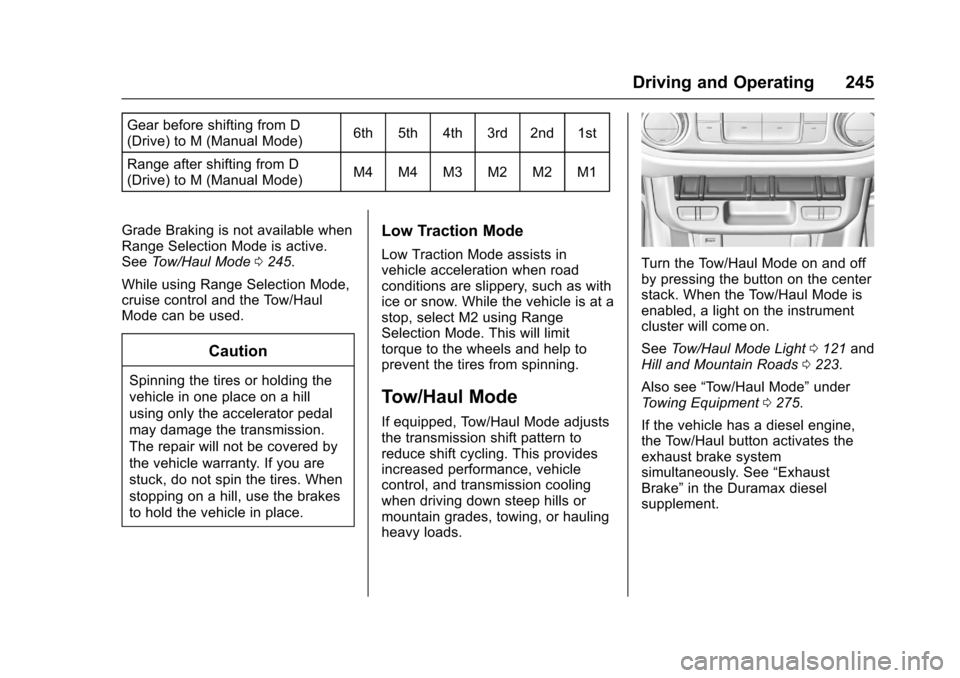
Turn the Tow/Haul Mode on and offby pressing the button on the centerstack. When the Tow/Haul Mode isenabled, a light on the instrumentcluster will come on.
SeeTo w / H a u l M o d e L i g h t0121andHill and Mountain Roads0223.
Also see“To w / H a u l M o d e”underTo w i n g E q u i p m e n t0275.
If the vehicle has a diesel engine,the Tow/Haul button activates theexhaust brake systemsimultaneously. See“ExhaustBrake”in the Duramax dieselsupplement.