wheel CHEVROLET COLORADO 2017 2.G User Guide
[x] Cancel search | Manufacturer: CHEVROLET, Model Year: 2017, Model line: COLORADO, Model: CHEVROLET COLORADO 2017 2.GPages: 419, PDF Size: 7.38 MB
Page 59 of 419
Chevrolet Colorado Owner Manual (GMNA-Localizing-U.S./Canada/Mexico-10122675) - 2017 - crc - 8/22/16
58 Seats and Restraints
have been stressed or damaged.See your dealer to have the safetybelt assemblies inspected orreplaced.
New parts and repairs may benecessary even if the safety beltsystem was not being used at thetime of the crash.
Have the safety belt pretensionerschecked if the vehicle has been in acrash, or if the airbag readiness lightstays on after you start the vehicleor while you are driving. SeeAirbagReadiness Light011 7.
Airbag System
The vehicle has the followingairbags:
.Afrontalairbagforthedriver.
.Afrontalairbagforthefrontoutboard passenger.
.Aseat-mountedsideimpactairbag for the driver.
.Aseat-mountedsideimpactairbag for the front outboardpassenger.
.Aroof-railairbagforthedriverand the passenger seateddirectly behind the driver.
.Aroof-railairbagforthefrontoutboard passenger and thepassenger seated directlybehind the front outboardpassenger.
All vehicle airbags have the wordAIRBAG on the trim or on a labelnear the deployment opening.
For frontal airbags, the wordAIRBAG is on the center of thesteering wheel for the driver and onthe instrument panel for the frontoutboard passenger.
For seat-mounted side impactairbags, the word AIRBAG is on theside of the seatback closest tothe door.
For roof-rail airbags, the wordAIRBAG is on the ceiling or trim.
Airbags are designed to supplementthe protection provided by safetybelts. Even though today's airbagsare also designed to help reducethe risk of injury from the force of aninflating bag, all airbags must inflatevery quickly to do their job.
Here are the most important thingsto know about the airbag system:
{Warning
Yo u c a n b e s e v e r e l y i n j u r e d o r
killed in a crash if you are not
wearing your safety belt, even
with airbags. Airbags are
(Continued)
Page 61 of 419
Chevrolet Colorado Owner Manual (GMNA-Localizing-U.S./Canada/Mexico-10122675) - 2017 - crc - 8/22/16
60 Seats and Restraints
Where Are the Airbags?
The driver frontal airbag is in thecenter of the steering wheel.
The front outboard passengerfrontal airbag is in the passengerside instrument panel.
Driver Side Shown, Passenger
Side Similar
The driver and front outboardpassenger seat-mounted sideimpact airbags are in the side of theseatbacks closest to the door.
Driver Side Crew Cab Shown,
Passenger Side and Extended Cab
Similar
The roof-rail airbags for the driver,front outboard passenger, andsecond row outboard passengersare in the ceiling above the sidewindows.
{Warning
If something is between an
occupant and an airbag, the
airbag might not inflate properly
or it might force the object into
that person causing severe injury
(Continued)
Page 62 of 419
Chevrolet Colorado Owner Manual (GMNA-Localizing-U.S./Canada/Mexico-10122675) - 2017 - crc - 8/22/16
Seats and Restraints 61
Warning (Continued)
or even death. The path of an
inflating airbag must be kept
clear. Do not put anything
between an occupant and an
airbag, and do not attach or put
anything on the steering wheel
hub or on or near any other
airbag covering.
Do not use seat accessories that
block the inflation path of a
seat-mounted side impact airbag.
Never secure anything to the roof
of a vehicle with roof-rail airbags
by routing a rope or tie⇣down
through any door or window
opening. If you do, the path of an
inflating roof-rail airbag will be
blocked.
When Should an Airbag
Inflate?
This vehicle is equipped withairbags. SeeAirbag System058.Airbags are designed to inflate if theimpact exceeds the specific airbag
system's deployment threshold.Deployment thresholds are used topredict how severe a crash is likelyto be in time for the airbags toinflate and help restrain theoccupants. The vehicle haselectronic sensors that help theairbag system determine theseverity of the impact. Deploymentthresholds can vary with specificvehicle design.
Frontal airbags are designed toinflate in moderate to severe frontalor near frontal crashes to helpreduce the potential for severeinjuries, mainly to the driver's orfront outboard passenger's headand chest.
Whether the frontal airbags will orshould inflate is not based primarilyon how fast the vehicle is traveling.It depends on what is hit, thedirection of the impact, and howquickly the vehicle slows down.
Frontal airbags may inflate atdifferent crash speeds depending onwhether the vehicle hits an objectstraight on or at an angle, and
whether the object is fixed ormoving, rigid or deformable, narrowor wide.
Frontal airbags are not intended toinflate during vehicle rollovers, inrear impacts, or in many sideimpacts.
In addition, the vehicle hasadvanced technology frontalairbags. Advanced technologyfrontal airbags adjust the restraintaccording to crash severity.
Seat-mounted side impact airbagsare designed to inflate in moderateto severe side crashes dependingon the location of the impact.Seat-mounted side impact airbagsare not designed to inflate in frontalimpacts, near frontal impacts,rollovers, or rear impacts.Aseat-mountedsideimpactairbagis designed to inflate on the side ofthe vehicle that is struck.
Roof-rail airbags are designed toinflate in moderate to severe sidecrashes depending on the locationof the impact. In addition, theseroof-rail airbags are designed toinflate during a rollover or in a
Page 63 of 419
Chevrolet Colorado Owner Manual (GMNA-Localizing-U.S./Canada/Mexico-10122675) - 2017 - crc - 8/22/16
62 Seats and Restraints
severe frontal impact. Roof-railairbags are not designed to inflate inrear impacts. Both roof-rail airbagswill inflate when either side of thevehicle is struck, if the sensingsystem predicts that the vehicle isabout to roll over on its side, or in asevere frontal impact.
In any particular crash, no one cansay whether an airbag should haveinflated simply because of thevehicle damage or repair costs.
What Makes an Airbag
Inflate?
In a deployment event, the sensingsystem sends an electrical signaltriggering a release of gas from theinflator. Gas from the inflator fills theairbag causing the bag to break outof the cover. The inflator, the airbag,and related hardware are all part ofthe airbag module.
For airbag locations, seeWhere Arethe Airbags?060.
How Does an Airbag
Restrain?
In moderate to severe frontal ornear frontal collisions, even beltedoccupants can contact the steeringwheel or the instrument panel. Inmoderate to severe side collisions,even belted occupants can contactthe inside of the vehicle.
Airbags supplement the protectionprovided by safety belts bydistributing the force of the impactmore evenly over theoccupant's body.
Rollover capable roof-rail airbagsare designed to help contain thehead and chest of occupants in theoutboard seating positions in thefirst and second rows. The rollovercapable roof-rail airbags aredesigned to help reduce the risk offull or partial ejection in rolloverevents, although no system canprevent all such ejections.
But airbags would not help in manytypes of collisions, primarilybecause the occupant's motion isnot toward those airbags. SeeWhenShould an Airbag Inflate?061.
Airbags should never be regardedas anything more than a supplementto safety belts.
What Will You See after
an Airbag Inflates?
After the frontal airbags andseat-mounted side impact airbagsinflate, they quickly deflate, soquickly that some people may noteven realize an airbag inflated.Roof-rail airbags may still be at leastpartially inflated for some time afterthey inflate. Some components ofthe airbag module may be hot forseveral minutes. For location of theairbags, seeWhere Are theAirbags?060.
The parts of the airbag that comeinto contact with you may be warm,but not too hot to touch. There maybe some smoke and dust comingfrom the vents in the deflatedairbags. Airbag inflation does not
Page 69 of 419
Chevrolet Colorado Owner Manual (GMNA-Localizing-U.S./Canada/Mexico-10122675) - 2017 - crc - 8/22/16
68 Seats and Restraints
Warning (Continued)
seatback may interfere with the
proper operation of the passenger
sensing system.
Servicing the
Airbag-Equipped Vehicle
Airbags affect how the vehicleshould be serviced. There are partsof the airbag system in severalplaces around the vehicle. Yourdealer and the service manual haveinformation about servicing thevehicle and the airbag system. Topurchase a service manual, seeService Publications OrderingInformation0392.
{Warning
For up to 10 seconds after the
vehicle is turned off and the
battery is disconnected, an airbag
can still inflate during improper
service. You can be injured if you
(Continued)
Warning (Continued)
are close to an airbag when it
inflates. Avoid yellow connectors.
They are probably part of the
airbag system. Be sure to follow
proper service procedures, and
make sure the person performing
work for you is qualified to do so.
Adding Equipment to the
Airbag-Equipped Vehicle
{Warning
If a snow plow or similar
equipment is installed on the
vehicle, the airbag system may
not function properly. An airbag
could inflate when it is not
supposed to inflate. People riding
in the vehicle could be injured,
and the vehicle and/or snow plow
could be damaged. Do not install
asnowploworsimilarequipment
on the vehicle.
Adding accessories that change thevehicle's frame, bumper system,height, front end, or side sheetmetal may keep the airbag systemfrom working properly. Theoperation of the airbag system canalso be affected by changing anyparts of the front seats, safety belts,airbag sensing and diagnosticmodule, steering wheel, instrumentpanel, any of the airbag modules,ceiling or pillar garnish trim,overhead console, front sensors,side impact sensors, or airbagwiring.
Yo u r d e a l e r a n d t h e s e r v i c e m a n u a lhave information about the locationof the airbag sensors, sensing anddiagnostic module, and airbagwiring.
In addition, the vehicle has apassenger sensing system for thefront outboard passenger position,which includes sensors that are partof the passenger seat. Thepassenger sensing system may notoperate properly if the original seattrim is replaced with non-GMcovers, upholstery, or trim; or withGM covers, upholstery, or trim
Page 70 of 419
Chevrolet Colorado Owner Manual (GMNA-Localizing-U.S./Canada/Mexico-10122675) - 2017 - crc - 8/22/16
Seats and Restraints 69
designed for a different vehicle. Anyobject, such as an aftermarket seatheater or a comfort-enhancing pador device, installed under or on topof the seat fabric, could alsointerfere with the operation of thepassenger sensing system. Thiscould either prevent properdeployment of the passengerairbag(s) or prevent the passengersensing system from properlyturning off the passenger airbag(s).SeePassenger SensingSystem064.
If the vehicle has rollover roof-railairbags, seeDifferent Size Tiresand Wheels0332for additionalimportant information.
If you have to modify your vehiclebecause you have a disability andyou have questions about whetherthe modifications will affect thevehicle's airbag system, or if youhave questions about whether theairbag system will be affected if thevehicle is modified for any otherreason, call Customer Assistance.SeeCustomer AssistanceOffices0385.
Airbag System Check
The airbag system does not needregularly scheduled maintenance orreplacement. Make sure the airbagreadiness light is working. SeeAirbag Readiness Light011 7.
Caution
If an airbag covering is damaged,
opened, or broken, the airbag
may not work properly. Do not
open or break the airbag
coverings. If there are any
opened or broken airbag
coverings, have the airbag
covering and/or airbag module
replaced. For the location of the
airbags, seeWhere Are the
Airbags?060.Seeyourdealer
for service.
Replacing Airbag System
Parts after a Crash
{Warning
Acrashcandamagetheairbag
systems in the vehicle.
Adamagedairbagsystemmay
not properly protect you and your
passenger(s) in a crash, resulting
in serious injury or even death. To
help make sure the airbag
systems are working properly
after a crash, have them
inspected and any necessary
replacements made as soon as
possible.
If an airbag inflates, you will need toreplace airbag system parts. Seeyour dealer for service.
If the airbag readiness light stays onafter the vehicle is started or comeson when you are driving, the airbagsystem may not work properly. Havethe vehicle serviced right away. SeeAirbag Readiness Light011 7.
Page 103 of 419
Chevrolet Colorado Owner Manual (GMNA-Localizing-U.S./Canada/Mexico-10122675) - 2017 - crc - 8/22/16
102 Instruments and Controls
Instruments and
Controls
Controls
Steering Wheel Adjustment . . . 103Steering Wheel Controls . . . . . . 104Horn . . . . . . . . . . . . . . . . . . . . . . . . . . 104Windshield Wiper/Washer . . . . 104Compass . . . . . . . . . . . . . . . . . . . . . 105Clock . . . . . . . . . . . . . . . . . . . . . . . . . 106Power Outlets . . . . . . . . . . . . . . . . 107Wireless Charging . . . . . . . . . . . . 107
Warning Lights, Gauges, and
Indicators
Warning Lights, Gauges, andIndicators . . . . . . . . . . . . . . . . . . . 109Instrument Cluster (BaseLevel) . . . . . . . . . . . . . . . . . . . . . . . 110Instrument Cluster(Uplevel) . . . . . . . . . . . . . . . . . . . . 112Speedometer . . . . . . . . . . . . . . . . . 114Odometer . . . . . . . . . . . . . . . . . . . . . 114Trip Odometer . . . . . . . . . . . . . . . . 114Ta c h o m e t e r . . . . . . . . . . . . . . . . . . . 11 4Fuel Gauge . . . . . . . . . . . . . . . . . . . 114Engine Coolant TemperatureGauge . . . . . . . . . . . . . . . . . . . . . . 115Safety Belt Reminders . . . . . . . . 116
Airbag Readiness Light . . . . . . . 117Passenger Airbag StatusIndicator . . . . . . . . . . . . . . . . . . . . . 117Charging System Light . . . . . . . 118Malfunction Indicator Lamp(Check Engine Light) . . . . . . . . 118Brake System WarningLight . . . . . . . . . . . . . . . . . . . . . . . . 120Antilock Brake System (ABS)Warning Light . . . . . . . . . . . . . . . 121Up-Shift Light (ManualTransmission) . . . . . . . . . . . . . . . 121To w / H a u l M o d e L i g h t . . . . . . . . . 1 2 1Hill Descent Control Light . . . . 121Lane Departure Warning(LDW) Light . . . . . . . . . . . . . . . . . 122Vehicle Ahead Indicator . . . . . . 122Traction Off Light . . . . . . . . . . . . . 122StabiliTrak®OFF Light . . . . . . . . 122Traction Control System (TCS)/StabiliTrak®Light . . . . . . . . . . . 123Tire Pressure Light . . . . . . . . . . . 123Engine Oil Pressure Light . . . . 124Low Fuel Warning Light (BaseLevel) . . . . . . . . . . . . . . . . . . . . . . . 124Low Fuel Warning Light(Uplevel) . . . . . . . . . . . . . . . . . . . . 124Security Light . . . . . . . . . . . . . . . . . 125High-Beam On Light . . . . . . . . . . 125Front Fog Lamp Light . . . . . . . . . 125Lamps On Reminder . . . . . . . . . 125
Cruise Control Light . . . . . . . . . . 125Door Ajar Light (UplevelCluster) . . . . . . . . . . . . . . . . . . . . . 126
Information Displays
Driver Information Center (DIC)(Base Level) . . . . . . . . . . . . . . . . 126Driver Information Center (DIC)(Uplevel) . . . . . . . . . . . . . . . . . . . . 129
Vehicle Messages
Vehicle Messages . . . . . . . . . . . . 132Battery Voltage and ChargingMessages . . . . . . . . . . . . . . . . . . . 132Brake System Messages . . . . . 133Compass Messages . . . . . . . . . . 133Door Ajar Messages . . . . . . . . . . 133Engine Cooling SystemMessages . . . . . . . . . . . . . . . . . . . 133Engine Oil Messages . . . . . . . . . 134Engine Power Messages . . . . . 134Fuel System Messages . . . . . . . 135Key and Lock Messages . . . . . 135Lamp Messages . . . . . . . . . . . . . . 135Object Detection SystemMessages . . . . . . . . . . . . . . . . . . . 135Ride Control SystemMessages . . . . . . . . . . . . . . . . . . . 136Airbag System Messages . . . . 136Safety Belt Messages . . . . . . . . 136Security Messages . . . . . . . . . . . 137
Page 104 of 419
Chevrolet Colorado Owner Manual (GMNA-Localizing-U.S./Canada/Mexico-10122675) - 2017 - crc - 8/22/16
Instruments and Controls 103
Steering SystemMessages . . . . . . . . . . . . . . . . . . . 137Starting the VehicleMessages . . . . . . . . . . . . . . . . . . . 137Tire Messages . . . . . . . . . . . . . . . . 137Transmission Messages . . . . . . 138Vehicle ReminderMessages . . . . . . . . . . . . . . . . . . . 139Vehicle Speed Messages . . . . . 139
Vehicle Personalization
Vehicle Personalization . . . . . . . 139
Controls
Steering Wheel
Adjustment
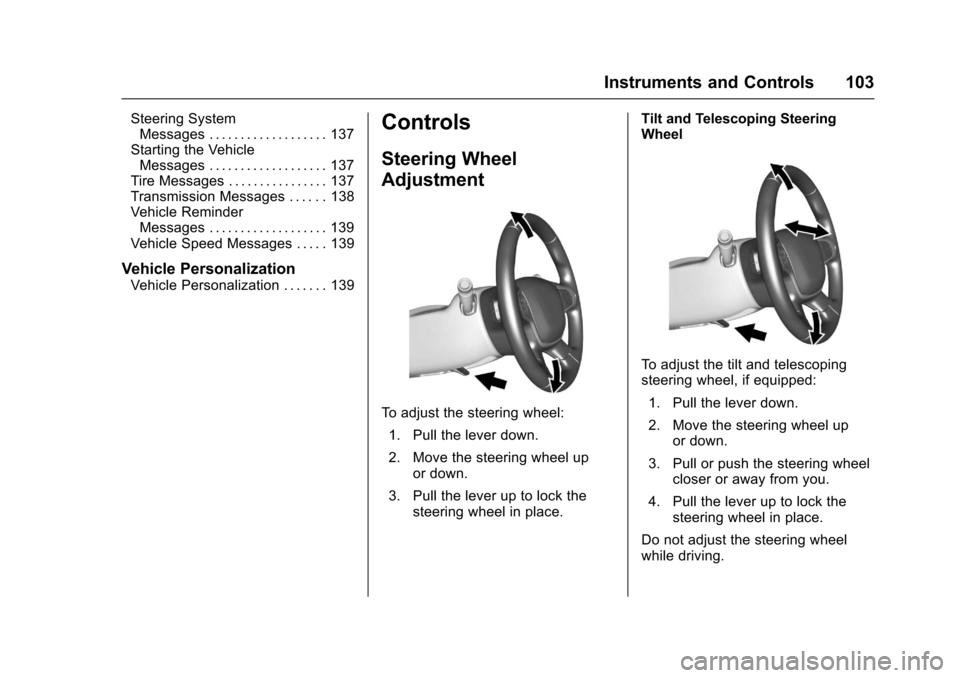
To a d j u s t t h e s t e e r i n g w h e e l :
1. Pull the lever down.
2. Move the steering wheel upor down.
3. Pull the lever up to lock thesteering wheel in place.
Tilt and Telescoping SteeringWheel
To a d j u s t t h e t i l t a n d t e l e s c o p i n gsteering wheel, if equipped:
1. Pull the lever down.
2. Move the steering wheel upor down.
3. Pull or push the steering wheelcloser or away from you.
4. Pull the lever up to lock thesteering wheel in place.
Do not adjust the steering wheelwhile driving.
Page 105 of 419
Chevrolet Colorado Owner Manual (GMNA-Localizing-U.S./Canada/Mexico-10122675) - 2017 - crc - 8/22/16
104 Instruments and Controls
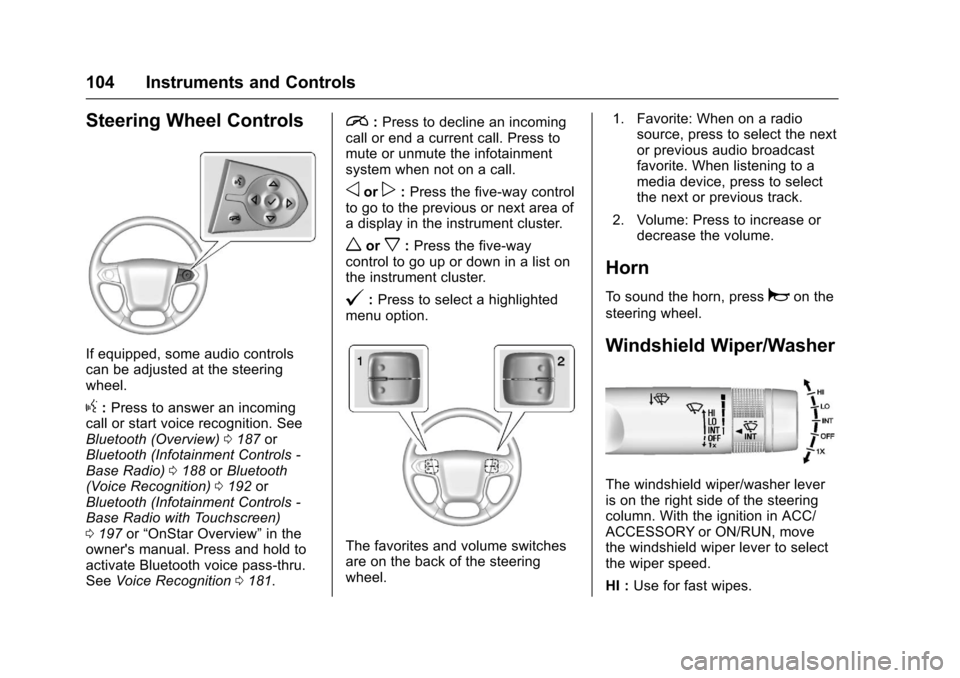
Steering Wheel Controls
If equipped, some audio controlscan be adjusted at the steeringwheel.
g:Press to answer an incomingcall or start voice recognition. SeeBluetooth (Overview)0187orBluetooth (Infotainment Controls -Base Radio)0188orBluetooth(Voice Recognition)0192orBluetooth (Infotainment Controls -Base Radio with Touchscreen)0197or“OnStar Overview”in theowner's manual. Press and hold toactivate Bluetooth voice pass-thru.SeeVoice Recognition0181.
i:Press to decline an incomingcall or end a current call. Press tomute or unmute the infotainmentsystem when not on a call.
oorp:Press the five-way controlto go to the previous or next area ofadisplayintheinstrumentcluster.
worx:Press the five-waycontrol to go up or down in a list onthe instrument cluster.
@:Press to select a highlightedmenu option.
The favorites and volume switchesare on the back of the steeringwheel.
1. Favorite: When on a radiosource, press to select the nextor previous audio broadcastfavorite. When listening to amedia device, press to selectthe next or previous track.
2. Volume: Press to increase ordecrease the volume.
Horn
To s o u n d t h e h o r n , p r e s saon the
steering wheel.
Windshield Wiper/Washer
The windshield wiper/washer leveris on the right side of the steeringcolumn. With the ignition in ACC/ACCESSORY or ON/RUN, movethe windshield wiper lever to selectthe wiper speed.
HI :Use for fast wipes.
Page 114 of 419
Chevrolet Colorado Owner Manual (GMNA-Localizing-U.S./Canada/Mexico-10122675) - 2017 - crc - 8/22/16
Instruments and Controls 113
If the vehicle has a diesel engine,see the Duramax diesel supplementfor more information.
Cluster Menu
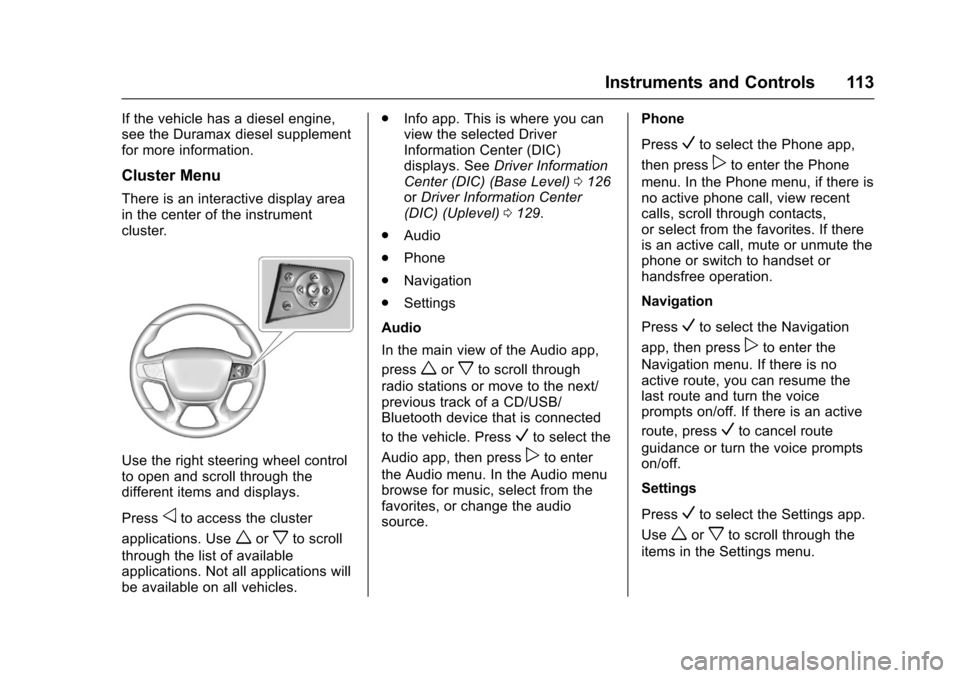
There is an interactive display areain the center of the instrumentcluster.
Use the right steering wheel controlto open and scroll through thedifferent items and displays.
Pressoto access the cluster
applications. Useworxto scroll
through the list of availableapplications. Not all applications willbe available on all vehicles.
.Info app. This is where you canview the selected DriverInformation Center (DIC)displays. SeeDriver InformationCenter (DIC) (Base Level)0126orDriver Information Center(DIC) (Uplevel)0129.
.Audio
.Phone
.Navigation
.Settings
Audio
In the main view of the Audio app,
pressworxto scroll through
radio stations or move to the next/previous track of a CD/USB/Bluetooth device that is connected
to the vehicle. PressVto select the
Audio app, then presspto enter
the Audio menu. In the Audio menubrowse for music, select from thefavorites, or change the audiosource.
Phone
PressVto select the Phone app,
then presspto enter the Phone
menu. In the Phone menu, if there isno active phone call, view recentcalls, scroll through contacts,or select from the favorites. If thereis an active call, mute or unmute thephone or switch to handset orhandsfree operation.
Navigation
PressVto select the Navigation
app, then presspto enter the
Navigation menu. If there is noactive route, you can resume thelast route and turn the voiceprompts on/off. If there is an active
route, pressVto cancel route
guidance or turn the voice promptson/off.
Settings
PressVto select the Settings app.
Useworxto scroll through the
items in the Settings menu.