wheel CHEVROLET COLORADO 2017 2.G Workshop Manual
[x] Cancel search | Manufacturer: CHEVROLET, Model Year: 2017, Model line: COLORADO, Model: CHEVROLET COLORADO 2017 2.GPages: 419, PDF Size: 7.38 MB
Page 232 of 419
Chevrolet Colorado Owner Manual (GMNA-Localizing-U.S./Canada/Mexico-10122675) - 2017 - crc - 8/22/16
Driving and Operating 231
When using this upper load
platform, be sure the load is
securely tied down to prevent it
from shifting. The load's center
of gravity should be positioned
in a zone over the rear axle. The
zone is located in the area
between the front of each wheel
well and the rear of each wheel
well. The center of gravity height
must not extend above the top
of the pickup box flareboard.
Any load that extends beyond
the vehicle's taillamp area must
be properly marked according to
local laws and regulations.
Remember not to exceed the
Gross Axle Weight
Rating (GAWR) of the front or
rear axle.
Add-On Equipment
When carrying removable items,
alimitonhowmanypeople
carried inside the vehicle may
be necessary. Be sure to weigh
the vehicle before buying and
installing the new equipment.
Caution
Overloading the vehicle may
cause damage. Repairs would not
be covered by the vehicle
warranty. Do not overload the
vehicle.
Remember not to exceed the
Gross Axle Weight
Rating (GAWR) of the front or
rear axle.
*Equipment
Maximum
Weight
Ladder Rack
and Cargo
340 kg (750 lb)
Cross Toolbox
and Cargo
181 kg (400 lb)
*Equipment
Maximum
Weight
Side Boxes
and Cargo
11 3 k g p e r
side (250 lb
per side)
*Thecombinedweightforall
rail-mounted equipment should
not exceed 454 kg (1,000 lb).
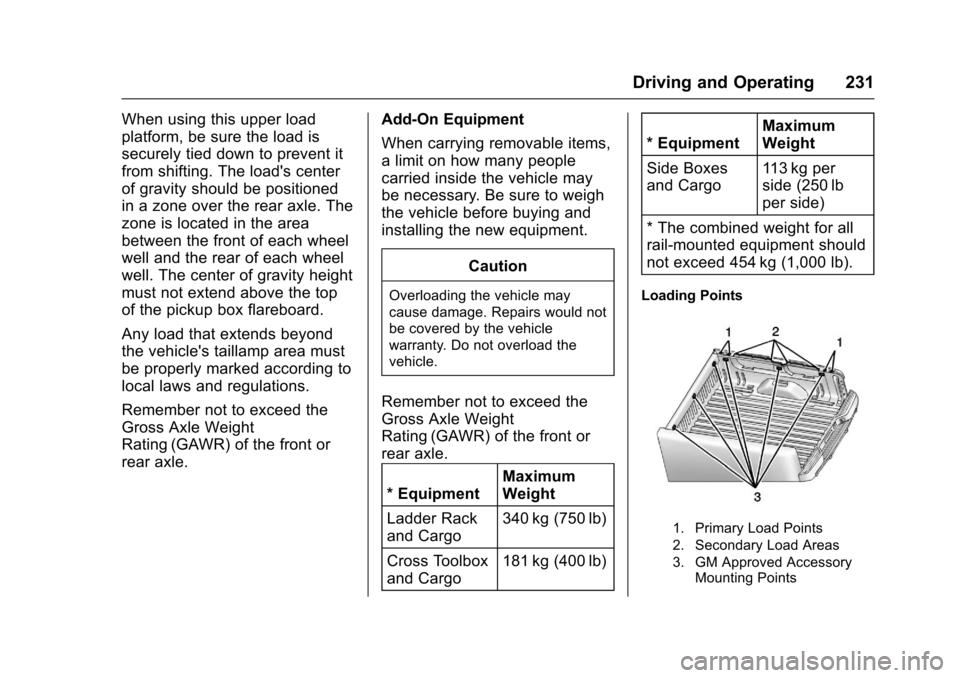
Loading Points
1. Primary Load Points
2. Secondary Load Areas
3. GM Approved AccessoryMounting Points
Page 234 of 419
Chevrolet Colorado Owner Manual (GMNA-Localizing-U.S./Canada/Mexico-10122675) - 2017 - crc - 8/22/16
Driving and Operating 233
Ignition Positions
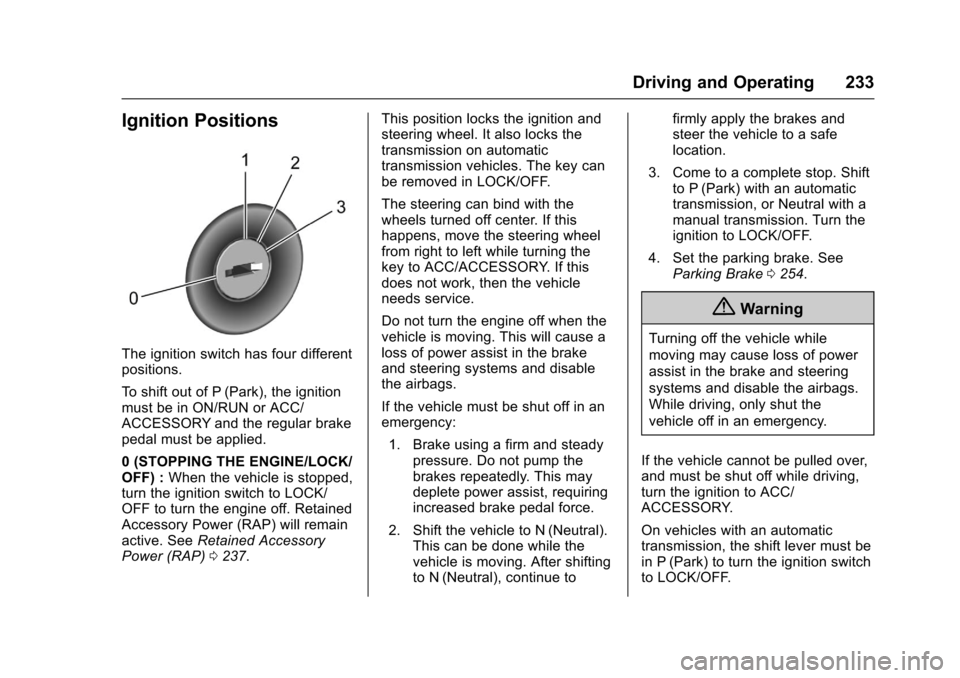
The ignition switch has four differentpositions.
To s h i f t o u t o f P ( P a r k ) , t h e i g n i t i o nmust be in ON/RUN or ACC/ACCESSORY and the regular brakepedal must be applied.
0(STOPPINGTHEENGINE/LOCK/OFF) :When the vehicle is stopped,turn the ignition switch to LOCK/OFF to turn the engine off. RetainedAccessory Power (RAP) will remainactive. SeeRetained AccessoryPower (RAP)0237.
This position locks the ignition andsteering wheel. It also locks thetransmission on automatictransmission vehicles. The key canbe removed in LOCK/OFF.
The steering can bind with thewheels turned off center. If thishappens, move the steering wheelfrom right to left while turning thekey to ACC/ACCESSORY. If thisdoes not work, then the vehicleneeds service.
Do not turn the engine off when thevehicle is moving. This will cause aloss of power assist in the brakeand steering systems and disablethe airbags.
If the vehicle must be shut off in anemergency:
1. Brake using a firm and steadypressure. Do not pump thebrakes repeatedly. This maydeplete power assist, requiringincreased brake pedal force.
2. Shift the vehicle to N (Neutral).This can be done while thevehicle is moving. After shiftingto N (Neutral), continue to
firmly apply the brakes andsteer the vehicle to a safelocation.
3. Come to a complete stop. Shiftto P (Park) with an automatictransmission, or Neutral with amanual transmission. Turn theignition to LOCK/OFF.
4. Set the parking brake. SeeParking Brake0254.
{Warning
Turning off the vehicle while
moving may cause loss of power
assist in the brake and steering
systems and disable the airbags.
While driving, only shut the
vehicle off in an emergency.
If the vehicle cannot be pulled over,and must be shut off while driving,turn the ignition to ACC/ACCESSORY.
On vehicles with an automatictransmission, the shift lever must bein P (Park) to turn the ignition switchto LOCK/OFF.
Page 235 of 419
Chevrolet Colorado Owner Manual (GMNA-Localizing-U.S./Canada/Mexico-10122675) - 2017 - crc - 8/22/16
234 Driving and Operating
Caution
Using a tool to force the key to
turn in the ignition could cause
damage to the switch or break the
key. Use the correct key, make
sure it is all the way in, and turn it
only with your hand. If the key
cannot be turned by hand, see
your dealer.
1(ACC/ACCESSORY):Thisposition lets things like the radioand the windshield wipers operatewhile the engine is off. It alsounlocks the steering wheel. Use thisposition if the vehicle must bepushed or towed.
2(ON/RUN):This position can beused to operate the electricalaccessories and to display someinstrument cluster warning andindicator lights. This position canalso be used for service anddiagnostics, and to verify the properoperation of the malfunctionindicator lamp as may be requiredfor emission inspection purposes.The switch stays in this position
when the engine is running. Thetransmission is also unlocked in thisposition on automatic transmissionvehicles.
If the key is left in the ACC/ACCESSORY or ON/RUN positionwith the engine off, the battery couldbe drained. The vehicle may notstart if the battery is allowed to drainfor an extended period of time.
3(START):This is the position thatstarts the engine. When the enginestarts, release the key. The ignitionswitch returns to ON/RUN fordriving.
Awarningtonewillsoundwhenthedriver door is opened, the ignition isin ACC/ACCESSORY or LOCK/OFF, and the key is in the ignition.
Starting the Engine
If the vehicle has a diesel engine,see the Duramax dieselsupplement.
Caution
If you add electrical parts or
accessories, you could change
the way the engine operates. Any
resulting damage would not be
covered by the vehicle warranty.
SeeAdd-On Electrical
Equipment0278.
Place the transmission in theproper gear.
Automatic Transmission
Move the shift lever to P (Park) orN(Neutral). The engine will not startin any other position. To restart theengine when the vehicle is alreadymoving, use N (Neutral) only.
Caution
Do not try to shift to P (Park) if the
vehicle is moving. If you do, you
could damage the transmission.
Shift to P (Park) only when the
vehicle is stopped.
Page 239 of 419
Chevrolet Colorado Owner Manual (GMNA-Localizing-U.S./Canada/Mexico-10122675) - 2017 - crc - 8/22/16
238 Driving and Operating
Shifting Into Park
{Warning
It can be dangerous to get out of
the vehicle if the shift lever is not
fully in P (Park) with the parking
brake firmly set. The vehicle can
roll. If you have left the engine
running, the vehicle can move
suddenly. You or others could be
injured. To be sure the vehicle will
not move, even when you are on
fairly level ground, use the steps
that follow. With four-wheel drive,
if the transfer case is in
N(Neutral), the vehicle will be
free to roll, even if the shift lever
is in P (Park). Be sure the transfer
case is in a drive gear. If towing a
trailer, seeDriving Characteristics
and Towing Tips0270.
1. Hold the brake pedal down,then set the parking brake.
SeeParking Brake0254.
2. Hold the button on the shiftlever and push the lever towardthe front of the vehicle intoP(Park).
3. Be sure the transfer case (ifequipped) is in a drivegear—not in N (Neutral).
4. Turn the ignition key toLOCK/OFF.
5. Remove the key and take itwith you. If you can leave thevehicle with the ignition key inyour hand, the vehicle is inP(Park).
Leaving the Vehicle with the
Engine Running
{Warning
It can be dangerous to leave the
vehicle with the engine running.
The vehicle could move suddenly
if the shift lever is not fully in
P(Park) with the parking brake
firmly set.
(Continued)
Warning (Continued)
If you have four-wheel drive and
the transfer case is in N (Neutral),
the vehicle will be free to roll,
even if the shift lever is in
P(Park). So be sure the transfer
case is in a drive gear–not in
N(Neutral).
And, if you leave the vehicle with
the engine running, it could
overheat and even catch fire. You
or others could be injured. Do not
leave the vehicle with the engine
running unless you have to.
If you have to leave the vehicle withthe engine running, be sure thevehicle is in P (Park) and theparking brake is firmly set beforeyou leave it. After you move the shiftlever into P (Park), hold the regularbrake pedal down. Then, see if youcan move the shift lever away fromP(Park) without pressing the buttonon the shift lever. If you can, itmeans that the shift lever was notfully locked into P (Park).
Page 242 of 419
Chevrolet Colorado Owner Manual (GMNA-Localizing-U.S./Canada/Mexico-10122675) - 2017 - crc - 8/22/16
Driving and Operating 241
Running the Vehicle
While Parked
It is better not to park with theengine running.
If the vehicle is left with the enginerunning, follow the proper steps tobe sure the vehicle will not move.SeeShifting Into Park0238andEngine Exhaust0240.Ifthevehiclehas a manual transmission, seeParking0239.
If parking on a hill and pulling atrailer, seeDriving Characteristicsand Towing Tips0270.
Automatic
Transmission
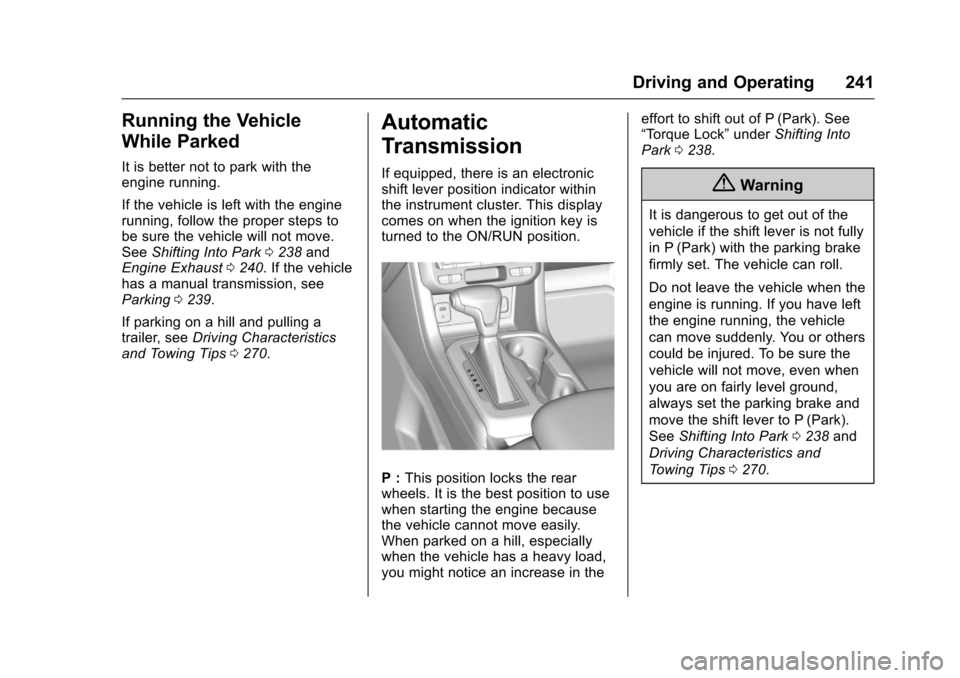
If equipped, there is an electronicshift lever position indicator withinthe instrument cluster. This displaycomes on when the ignition key isturned to the ON/RUN position.
P:This position locks the rearwheels. It is the best position to usewhen starting the engine becausethe vehicle cannot move easily.When parked on a hill, especiallywhen the vehicle has a heavy load,you might notice an increase in the
effort to shift out of P (Park). See“To r q u e L o c k”underShifting IntoPark0238.
{Warning
It is dangerous to get out of the
vehicle if the shift lever is not fully
in P (Park) with the parking brake
firmly set. The vehicle can roll.
Do not leave the vehicle when the
engine is running. If you have left
the engine running, the vehicle
can move suddenly. You or others
could be injured. To be sure the
vehicle will not move, even when
you are on fairly level ground,
always set the parking brake and
move the shift lever to P (Park).
SeeShifting Into Park0238and
Driving Characteristics and
To w i n g T i p s0270.
Page 243 of 419
Chevrolet Colorado Owner Manual (GMNA-Localizing-U.S./Canada/Mexico-10122675) - 2017 - crc - 8/22/16
242 Driving and Operating
{Warning
If you have four-wheel drive, the
vehicle will be free to roll—even
if the shift lever is in P (Park)—if
the transfer case is in N (Neutral).
So, be sure the transfer case is in
adrivegear,Two-WheelDrive
High or Four-Wheel Drive High or
Four-Wheel Drive Low—not in
N(Neutral). SeeShifting Into
Park0238.
R:Use this gear to back up.
Caution
Shifting to R (Reverse) while the
vehicle is moving forward could
damage the transmission. The
repairs would not be covered by
the vehicle warranty. Shift to
R(Reverse) only after the vehicle
is stopped.
To r o c k t h e v e h i c l e b a c k a n d f o r t h t oget out of snow, ice, or sand withoutdamaging the transmission, seeIfthe Vehicle Is Stuck0225.
N:In this position, the engine doesnot connect with the wheels. Torestart when you are alreadymoving, use N (Neutral) only. Also,use N (Neutral) when the vehicle isbeing towed.
{Warning
Shifting into a drive gear while the
engine is running at high speed is
dangerous. Unless your foot is
firmly on the brake pedal, the
vehicle could move very rapidly.
Yo u c o u l d l o s e c o n t r o l a n d h i t
people or objects. Do not shift
into a drive gear while the engine
is running at high speed.
Caution
Shifting out of P (Park) or
N(Neutral) with the engine
running at high speed may
damage the transmission. The
repairs would not be covered by
the vehicle warranty. Be sure the
engine is not running at high
speed when shifting the vehicle.
D:This position is for normaldriving. It provides the best fueleconomy. If you need more powerfor passing, and you are:
.Going less than about 55 km/h(35 mph), push the acceleratorpedal about halfway down.
.Going about 55 km/h (35 mph) ormore, push the accelerator allthe way down.
By doing this, the vehicle shiftsdown to the next gear and hasmore power.
D(Drive) can be used when towingatrailer,carryingaheavyload,driving on steep hills, or driving
Page 246 of 419
Chevrolet Colorado Owner Manual (GMNA-Localizing-U.S./Canada/Mexico-10122675) - 2017 - crc - 8/22/16
Driving and Operating 245
Gear before shifting from D(Drive) to M (Manual Mode)6th 5th 4th 3rd 2nd 1st
Range after shifting from D(Drive) to M (Manual Mode)M4 M4 M3 M2 M2 M1
Grade Braking is not available whenRange Selection Mode is active.SeeTo w / H a u l M o d e0245.
While using Range Selection Mode,cruise control and the Tow/HaulMode can be used.
Caution
Spinning the tires or holding the
vehicle in one place on a hill
using only the accelerator pedal
may damage the transmission.
The repair will not be covered by
the vehicle warranty. If you are
stuck, do not spin the tires. When
stopping on a hill, use the brakes
to hold the vehicle in place.
Low Traction Mode
Low Traction Mode assists invehicle acceleration when roadconditions are slippery, such as withice or snow. While the vehicle is at astop, select M2 using RangeSelection Mode. This will limittorque to the wheels and help toprevent the tires from spinning.
Tow/Haul Mode
If equipped, Tow/Haul Mode adjuststhe transmission shift pattern toreduce shift cycling. This providesincreased performance, vehiclecontrol, and transmission coolingwhen driving down steep hills ormountain grades, towing, or haulingheavy loads.
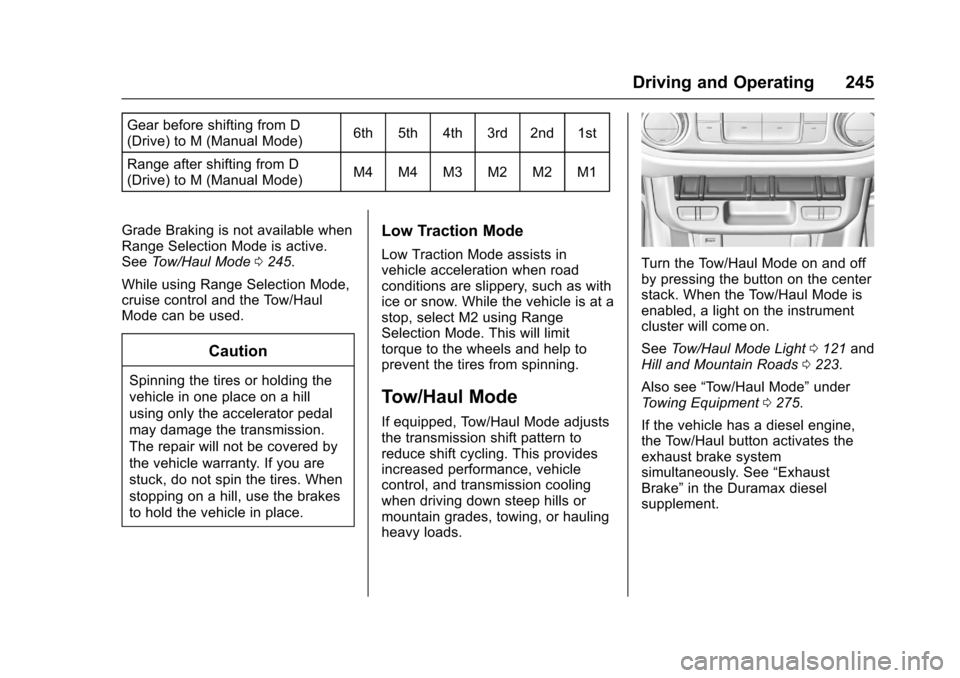
Turn the Tow/Haul Mode on and offby pressing the button on the centerstack. When the Tow/Haul Mode isenabled, a light on the instrumentcluster will come on.
SeeTo w / H a u l M o d e L i g h t0121andHill and Mountain Roads0223.
Also see“To w / H a u l M o d e”underTo w i n g E q u i p m e n t0275.
If the vehicle has a diesel engine,the Tow/Haul button activates theexhaust brake systemsimultaneously. See“ExhaustBrake”in the Duramax dieselsupplement.
Page 248 of 419
Chevrolet Colorado Owner Manual (GMNA-Localizing-U.S./Canada/Mexico-10122675) - 2017 - crc - 8/22/16
Driving and Operating 247
Caution
Shifting to R (Reverse) while the
vehicle is moving forward could
damage the transmission. The
repairs would not be covered by
the vehicle warranty. Shift to
R(Reverse) only after the vehicle
is stopped.
Use R (Reverse), along with theparking brake, for parking thevehicle.
Shift Speeds
{Warning
If you skip a gear when
downshifting, you could lose
control of the vehicle. You could
injure yourself or others. Do not
shift down more than one gear at
atimewhendownshifting.
Shift Indicator
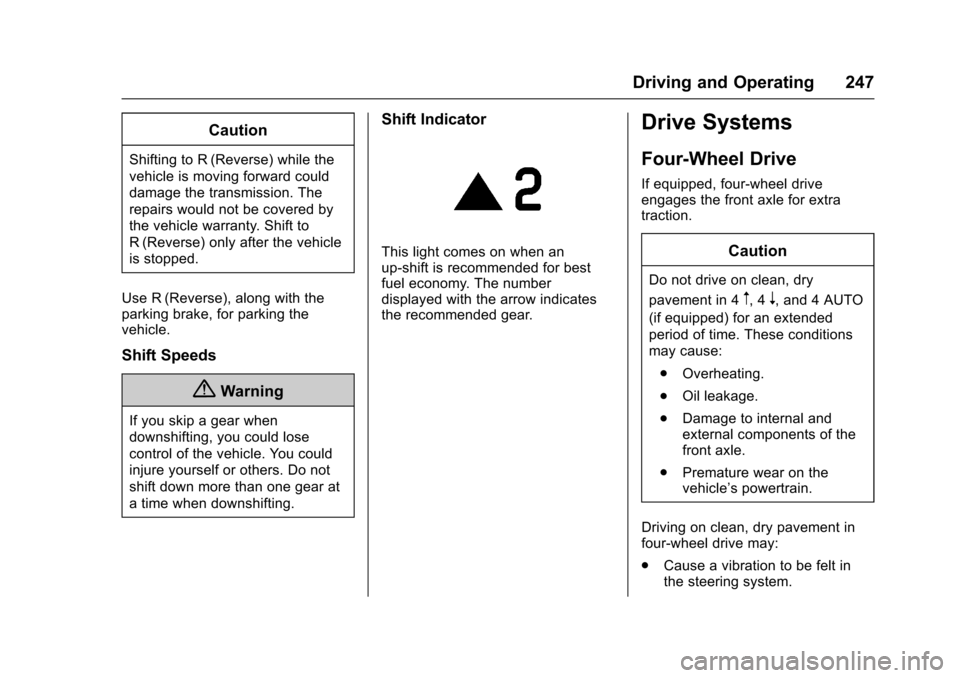
This light comes on when anup-shift is recommended for bestfuel economy. The numberdisplayed with the arrow indicatesthe recommended gear.
Drive Systems
Four-Wheel Drive
If equipped, four-wheel driveengages the front axle for extratraction.
Caution
Do not drive on clean, dry
pavement in 4m,4n,and4AUTO
(if equipped) for an extended
period of time. These conditions
may cause:
.Overheating.
.Oil leakage.
.Damage to internal andexternal components of thefront axle.
.Premature wear on thevehicle’spowertrain.
Driving on clean, dry pavement infour-wheel drive may:
.Cause a vibration to be felt inthe steering system.
Page 249 of 419
Chevrolet Colorado Owner Manual (GMNA-Localizing-U.S./Canada/Mexico-10122675) - 2017 - crc - 8/22/16
248 Driving and Operating
.Cause tires to wear faster.
.Cause additional driveline noise.
{Warning
Shifting the transfer case to
N(Neutral) can cause the vehicle
to roll even if the transmission is
in P (Park). You or someone else
could be seriously injured. Be
sure to set the parking brake
before placing the transfer case in
N(Neutral). SeeParking
Brake0254.
Caution
Extended high-speed operation in
4nmay damage or shorten the
life of the drivetrain.
Engagement noise and bump when
shifting between 4nand 4mor from
N(Neutral), with the engine running,is normal.
Shifting into 4nwill turn Traction
Control and StabiliTrak®off. SeeTr a c t i o n C o n t r o l / E l e c t r o n i c S t a b i l i t yControl0256.
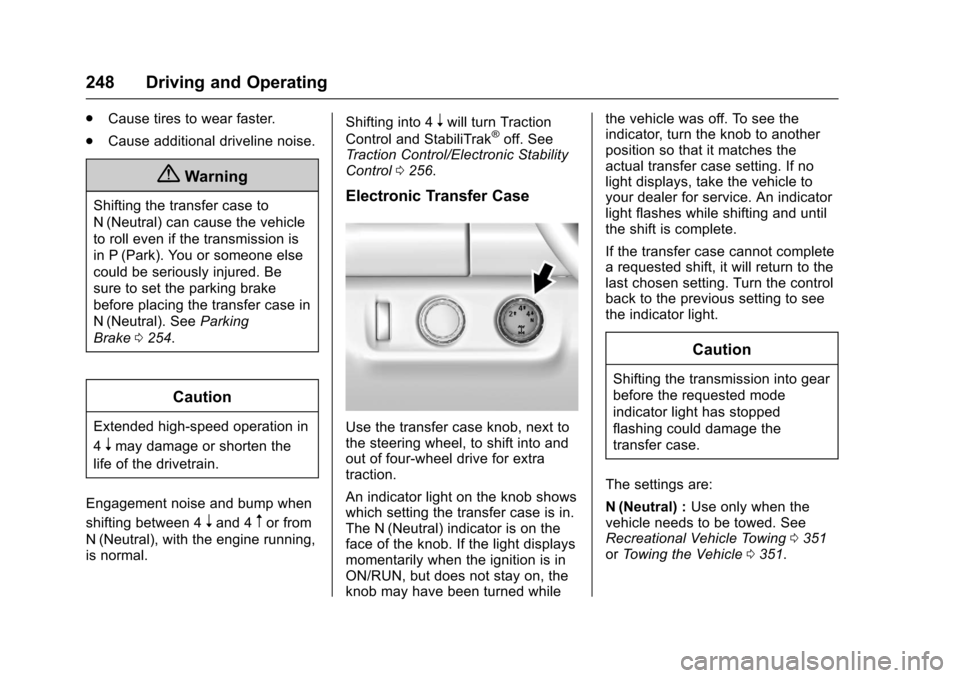
Electronic Transfer Case
Use the transfer case knob, next tothe steering wheel, to shift into andout of four-wheel drive for extratraction.
An indicator light on the knob showswhich setting the transfer case is in.The N (Neutral) indicator is on theface of the knob. If the light displaysmomentarily when the ignition is inON/RUN, but does not stay on, theknob may have been turned while
the vehicle was off. To see theindicator, turn the knob to anotherposition so that it matches theactual transfer case setting. If nolight displays, take the vehicle toyour dealer for service. An indicatorlight flashes while shifting and untilthe shift is complete.
If the transfer case cannot completearequestedshift,itwillreturntothelast chosen setting. Turn the controlback to the previous setting to seethe indicator light.
Caution
Shifting the transmission into gear
before the requested mode
indicator light has stopped
flashing could damage the
transfer case.
The settings are:
N(Neutral) :Use only when thevehicle needs to be towed. SeeRecreational Vehicle Towing0351orTo w i n g t h e V e h i c l e0351.
Page 250 of 419
Chevrolet Colorado Owner Manual (GMNA-Localizing-U.S./Canada/Mexico-10122675) - 2017 - crc - 8/22/16
Driving and Operating 249
2m(Two-Wheel Drive High) :Use
for driving on most streets andhighways. The front axle is notengaged. This setting provides thebest fuel economy.
4n(Four-Wheel Drive Low) :This
setting engages the front axle and
delivers extra torque. Choose 4nif
driving off-road in deep sand, deepmud, or deep snow, and whileclimbing or descending steep hills.When engaged, keep vehicle speedbelow 72 km/h (45 mph).
Shifting into 4nwill turn Traction
Control and StabiliTrak off. SeeTr a c t i o n C o n t r o l / E l e c t r o n i c S t a b i l i t yControl0256.
4m(Four-Wheel Drive High) :Use
when extra traction is needed. Thefront axle engages and helps whendriving on snowy or icy roads, andwhen off-roading. The vehicle can
be shifted from 2mto 4mwhile the
vehicle is moving.
Shifting Into 4m
Turn the knob to 4mat any speed
up to 121 km/h (75 mph), except
from 4n.Theindicatorlightwillflash
while shifting and will remain on theselected setting.
Shifting Into 2m
Turn the knob to 2mat any speed,
except when shifting from 4n.
Shifting Into 4n
When 4nis engaged, vehicle speed
should be kept below 72 km/h(45 mph).
1. The ignition must be in ON/RUN and the vehicle must bestopped or moving less than5km/h (3mph) with thetransmission in N (Neutral). It isbest for the vehicle to bemoving 1.6 to 3.2 km/h(1 to 2 mph).
2. Turn the knob to 4n.Waitfor
the 4nindicator light to stop
flashing before shifting thetransmission into gear.
If the transmission is in gear and/ormoving more than 5 km/h (3 mph),
the 4nindicator light will flash for
30 seconds and not complete theshift. After 30 seconds the transfer
case will shift to 4m.Turntheknob
to 4mto see the indicator. With the
vehicle moving less than 5 km/h(3 mph), and the transmission inN(Neutral), attempt the shift again.
Shifting Out of 4n
1. To shift out of 4nthe vehicle
must be stopped or movingless than 5 km/h (3 mph) withthe transmission in N (Neutral)and the ignition in ON/RUN.It is best for the vehicle to bemoving 1.6 to 3.2 km/h(1 to 2 mph).