clock CHEVROLET COLORADO 2021 User Guide
[x] Cancel search | Manufacturer: CHEVROLET, Model Year: 2021, Model line: COLORADO, Model: CHEVROLET COLORADO 2021Pages: 359, PDF Size: 8.03 MB
Page 287 of 359
Chevrolet Colorado Owner Manual (GMNA-Localizing-U.S./Canada/Mexico-
14430421) - 2021 - CRC - 2/10/20
286 Vehicle Care
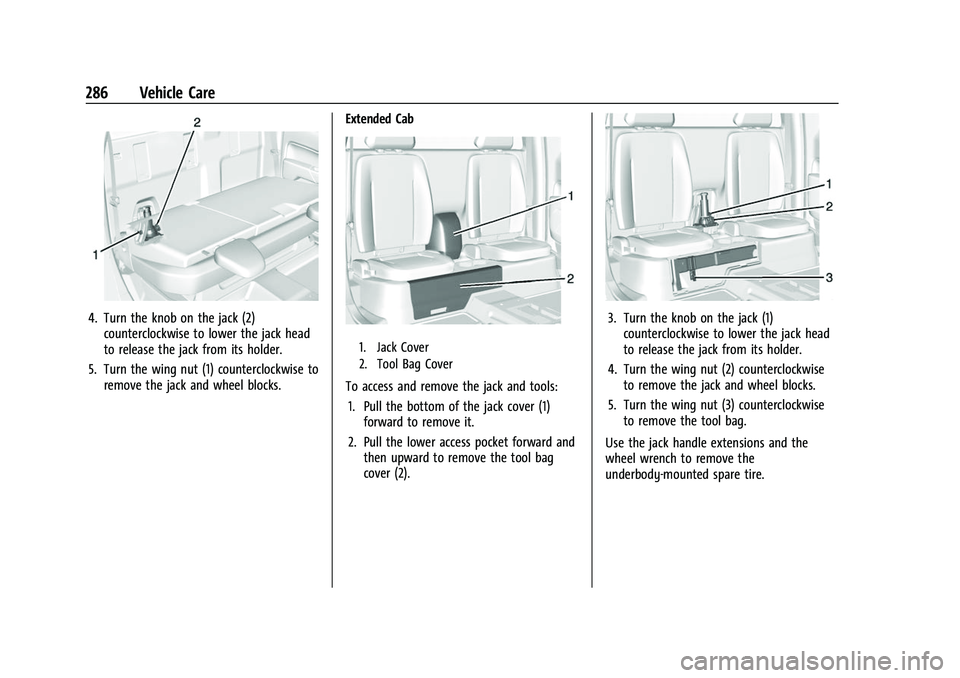
4. Turn the knob on the jack (2)counterclockwise to lower the jack head
to release the jack from its holder.
5. Turn the wing nut (1) counterclockwise to remove the jack and wheel blocks. Extended Cab
1. Jack Cover
2. Tool Bag Cover
To access and remove the jack and tools:
1. Pull the bottom of the jack cover (1) forward to remove it.
2. Pull the lower access pocket forward and then upward to remove the tool bag
cover (2).
3. Turn the knob on the jack (1)counterclockwise to lower the jack head
to release the jack from its holder.
4. Turn the wing nut (2) counterclockwise to remove the jack and wheel blocks.
5. Turn the wing nut (3) counterclockwise to remove the tool bag.
Use the jack handle extensions and the
wheel wrench to remove the
underbody-mounted spare tire.
Page 288 of 359
Chevrolet Colorado Owner Manual (GMNA-Localizing-U.S./Canada/Mexico-
14430421) - 2021 - CRC - 2/10/20
Vehicle Care 287
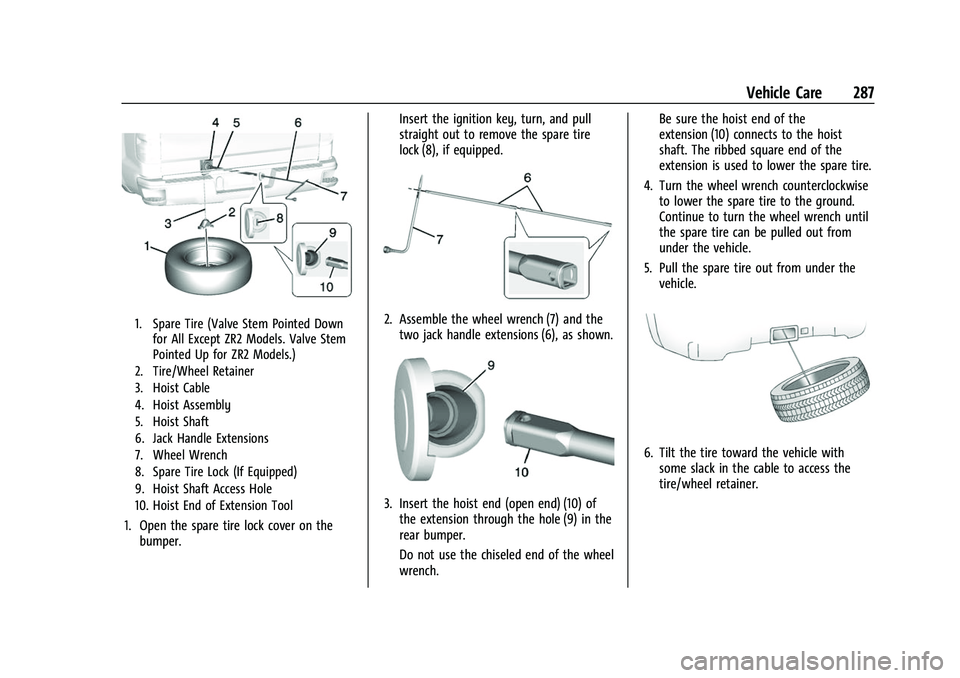
1. Spare Tire (Valve Stem Pointed Downfor All Except ZR2 Models. Valve Stem
Pointed Up for ZR2 Models.)
2. Tire/Wheel Retainer
3. Hoist Cable
4. Hoist Assembly
5. Hoist Shaft
6. Jack Handle Extensions
7. Wheel Wrench
8. Spare Tire Lock (If Equipped)
9. Hoist Shaft Access Hole
10. Hoist End of Extension Tool
1. Open the spare tire lock cover on the bumper. Insert the ignition key, turn, and pull
straight out to remove the spare tire
lock (8), if equipped.
2. Assemble the wheel wrench (7) and the
two jack handle extensions (6), as shown.
3. Insert the hoist end (open end) (10) ofthe extension through the hole (9) in the
rear bumper.
Do not use the chiseled end of the wheel
wrench. Be sure the hoist end of the
extension (10) connects to the hoist
shaft. The ribbed square end of the
extension is used to lower the spare tire.
4. Turn the wheel wrench counterclockwise to lower the spare tire to the ground.
Continue to turn the wheel wrench until
the spare tire can be pulled out from
under the vehicle.
5. Pull the spare tire out from under the vehicle.
6. Tilt the tire toward the vehicle withsome slack in the cable to access the
tire/wheel retainer.
Page 289 of 359
Chevrolet Colorado Owner Manual (GMNA-Localizing-U.S./Canada/Mexico-
14430421) - 2021 - CRC - 2/10/20
288 Vehicle Care
Tilt the retainer and pull it through the
center of the wheel along with the cable
and spring.
7. Put the spare tire near the flat tire.
Removing the Flat Tire and Installing the
Spare Tire
Use the following pictures and instructions
to remove the flat tire and raise the vehicle.
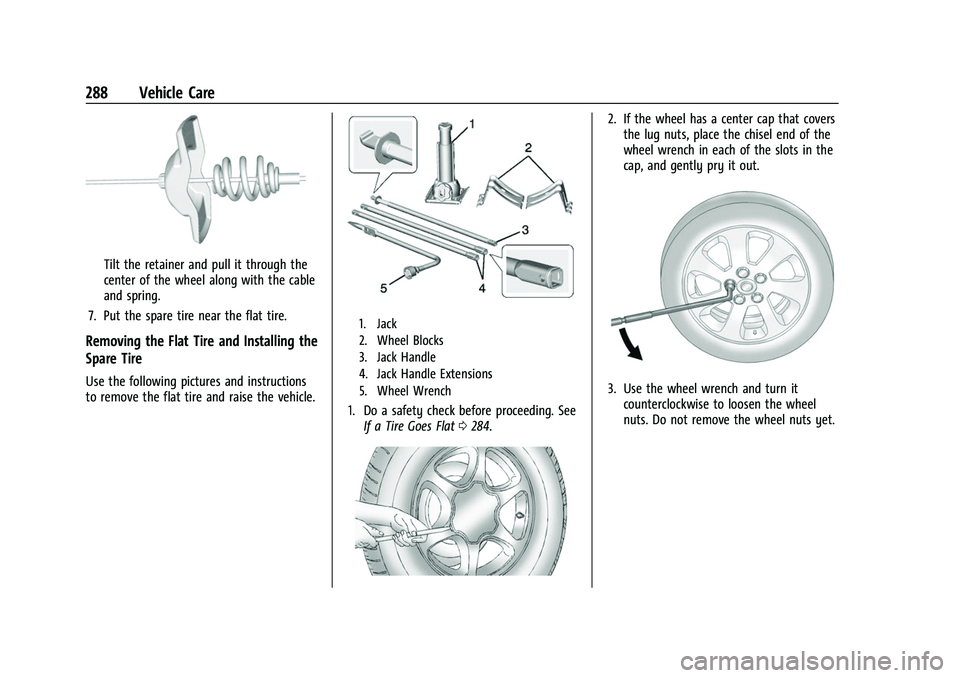
1. Jack
2. Wheel Blocks
3. Jack Handle
4. Jack Handle Extensions
5. Wheel Wrench
1. Do a safety check before proceeding. See If a Tire Goes Flat 0284.
2. If the wheel has a center cap that covers
the lug nuts, place the chisel end of the
wheel wrench in each of the slots in the
cap, and gently pry it out.
3. Use the wheel wrench and turn itcounterclockwise to loosen the wheel
nuts. Do not remove the wheel nuts yet.
Page 291 of 359
Chevrolet Colorado Owner Manual (GMNA-Localizing-U.S./Canada/Mexico-
14430421) - 2021 - CRC - 2/10/20
290 Vehicle Care
Warning (Continued)
overextended position or not lower fully.
Do not attempt to force the jack higher
once the height limit is reached.
6. Turn the wheel wrench clockwise to raise the vehicle. Raise the vehicle far enough
off the ground so there is enough room
for the spare tire to fit under the
wheel well.
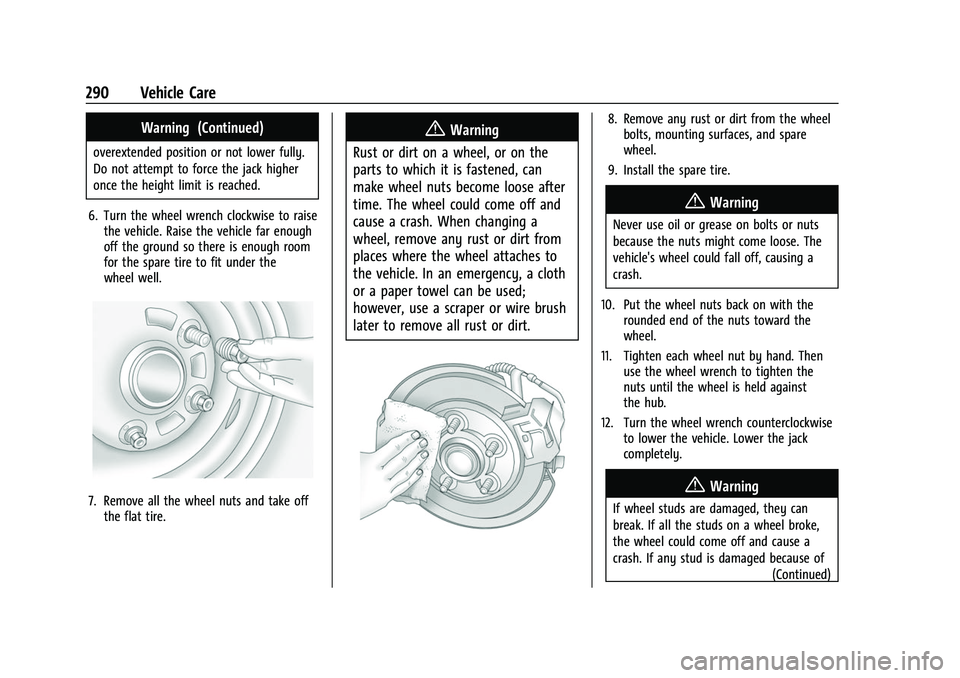
7. Remove all the wheel nuts and take offthe flat tire.
{Warning
Rust or dirt on a wheel, or on the
parts to which it is fastened, can
make wheel nuts become loose after
time. The wheel could come off and
cause a crash. When changing a
wheel, remove any rust or dirt from
places where the wheel attaches to
the vehicle. In an emergency, a cloth
or a paper towel can be used;
however, use a scraper or wire brush
later to remove all rust or dirt.8. Remove any rust or dirt from the wheel bolts, mounting surfaces, and spare
wheel.
9. Install the spare tire.
{Warning
Never use oil or grease on bolts or nuts
because the nuts might come loose. The
vehicle's wheel could fall off, causing a
crash.
10. Put the wheel nuts back on with the rounded end of the nuts toward the
wheel.
11. Tighten each wheel nut by hand. Then use the wheel wrench to tighten the
nuts until the wheel is held against
the hub.
12. Turn the wheel wrench counterclockwise to lower the vehicle. Lower the jack
completely.
{Warning
If wheel studs are damaged, they can
break. If all the studs on a wheel broke,
the wheel could come off and cause a
crash. If any stud is damaged because of
(Continued)
Page 292 of 359
Chevrolet Colorado Owner Manual (GMNA-Localizing-U.S./Canada/Mexico-
14430421) - 2021 - CRC - 2/10/20
Vehicle Care 291
Warning (Continued)
a loose-running wheel, it could be that all
of the studs are damaged. To be sure,
replace all studs on the wheel. If the stud
holes in a wheel have become larger, the
wheel could collapse in operation. Replace
any wheel if its stud holes have become
larger or distorted in any way. Inspect
hubs and hub‐piloted wheels for damage.
Because of loose running wheels, piloting
pad damage may occur and require
replacement of the entire hub, for proper
centering of the wheels. When replacing
studs, hubs, wheel nuts or wheels, be
sure to use GM original equipment parts.
{Warning
Wheel nuts that are improperly or
incorrectly tightened can cause the
wheels to become loose or come off. The
wheel nuts should be tightened with a
torque wrench to the proper torque
specification after replacing. Follow the
torque specification supplied by the
aftermarket manufacturer when using(Continued)
Warning (Continued)
accessory locking wheel nuts. See
Capacities and Specifications0325 for
original equipment wheel nut torque
specifications.
Caution
Improperly tightened wheel nuts can lead
to brake pulsation and rotor damage. To
avoid expensive brake repairs, evenly
tighten the wheel nuts in the proper
sequence and to the proper torque
specification. See Capacities and
Specifications 0325 for the wheel nut
torque specification.
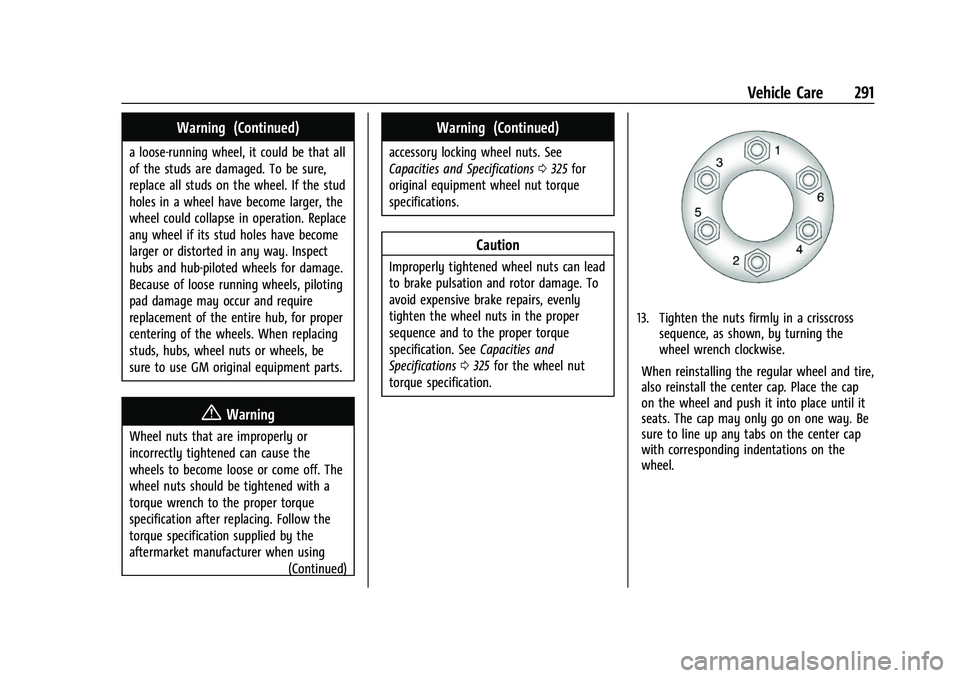
13. Tighten the nuts firmly in a crisscross sequence, as shown, by turning the
wheel wrench clockwise.
When reinstalling the regular wheel and tire,
also reinstall the center cap. Place the cap
on the wheel and push it into place until it
seats. The cap may only go on one way. Be
sure to line up any tabs on the center cap
with corresponding indentations on the
wheel.
Page 294 of 359
Chevrolet Colorado Owner Manual (GMNA-Localizing-U.S./Canada/Mexico-
14430421) - 2021 - CRC - 2/10/20
Vehicle Care 293
2. Pull the cable and spring through thecenter of the wheel. Tilt the wheel
retainer plate down and through the
center of the wheel.
Make sure the retainer is fully seated
across the underside of the wheel.
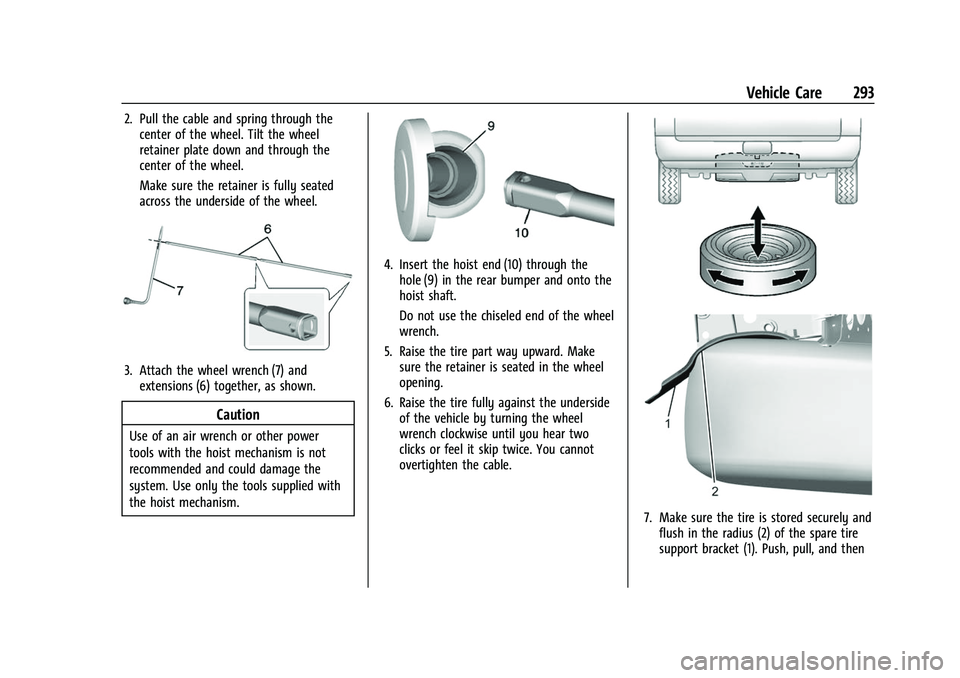
3. Attach the wheel wrench (7) andextensions (6) together, as shown.
Caution
Use of an air wrench or other power
tools with the hoist mechanism is not
recommended and could damage the
system. Use only the tools supplied with
the hoist mechanism.
4. Insert the hoist end (10) through thehole (9) in the rear bumper and onto the
hoist shaft.
Do not use the chiseled end of the wheel
wrench.
5. Raise the tire part way upward. Make sure the retainer is seated in the wheel
opening.
6. Raise the tire fully against the underside of the vehicle by turning the wheel
wrench clockwise until you hear two
clicks or feel it skip twice. You cannot
overtighten the cable.
7. Make sure the tire is stored securely andflush in the radius (2) of the spare tire
support bracket (1). Push, pull, and then
Page 349 of 359
Chevrolet Colorado Owner Manual (GMNA-Localizing-U.S./Canada/Mexico-
14430421) - 2021 - CRC - 2/10/20
348 Index
Automatic (cont'd)Transmission Fluid . . . . . . . . . . . . . . . . . . . . . 246
Automatic Transmission Manual Mode . . . . . . . . . . . . . . . . . . . . . . . . . 193
Shift Lock Control Function Check . . . . . . 256
Auxiliary Jack . . . . . . . . . . . . . . . . . . . . . . . . . . . . . 121
Avoiding Untrusted Media Devices . . . . . . . . 118
Axle Locking Front . . . . . . . . . . . . . . . . . . . . . . . . . . 207
Axle, Front . . . . . . . . . . . . . . . . . . . . . . . . . . . . . . . 255
Axle, Rear . . . . . . . . . . . . . . . . . . . . . . . . . . . . . . . . 255
B
Battery Exterior Lighting Battery Saver . . . . . . . . 107
Load Management . . . . . . . . . . . . . . . . . . . . . 106
Power Protection . . . . . . . . . . . . . . . . . . . . . . 106
Battery - North America . . . . . . . . . . . . 254, 296
Blade Replacement, Wiper . . . . . . . . . . . . . . . 257
Blind Spot Mirrors . . . . . . . . . . . . . . . . . . . . . . . . .16
Bluetooth Overview . . . . . . . . . . . . . . . . . . . . . . . . . . 140, 141
Bluetooth Audio . . . . . . . . . . . . . . . . . . . . . . . . . . 121
Brake System Warning Light . . . . . . . . . . . . . . . . . . 87
Brakes . . . . . . . . . . . . . . . . . . . . . . . . . . . . . . . . . . . 252
Antilock . . . . . . . . . . . . . . . . . . . . . . . . . . . . . . . . 201
Assist . . . . . . . . . . . . . . . . . . . . . . . . . . . . . . . . . . 202 Brakes (cont'd)
Fluid . . . . . . . . . . . . . . . . . . . . . . . . . . . . . . . . . . . 253
Parking . . . . . . . . . . . . . . . . . . . . . . . . . . . . . . . . 201
Braking . . . . . . . . . . . . . . . . . . . . . . . . . . . . . . . . . . . 171 Automatic Emergency (AEB) . . . . . . . . . . . 214
Break-In, New Vehicle . . . . . . . . . . . . . . . . . . . . 184
Buckle To Drive . . . . . . . . . . . . . . . . . . . . . . . . . . . 28
Bulb Replacement Halogen Bulbs . . . . . . . . . . . . . . . . . . . . . . . . . 259
Headlamp Aiming . . . . . . . . . . . . . . . . . . . . . . 258
Headlamps . . . . . . . . . . . . . . . . . . . . . . . . . . . . 258
Headlamps, Front Turn Signal,Sidemarker, and Parking Lamps . . . . . . 259
Taillamps, Stoplamps, and Back-Up Lamps . . . . . . . . . . . . . . . . . . . . . . . . . . . . . . . 259
Buying New Tires . . . . . . . . . . . . . . . . . . . . . . . . 280
C
Calibration . . . . . . . . . . . . . . . . . . . . . . . . . . . . . . . . .77
California
Perchlorate Materials Requirements . . . 237
California Proposition
65 Warning . . . . . . . . . . . . . . . . . . .237, 254, 296, Back Cover
Canadian Vehicle Owners . . . . . . . . . . . . . . . . . . .2
Capacities and Specifications . . . . . . . . . . . . . 325
Carbon Monoxide Engine Exhaust . . . . . . . . . . . . . . . . . . . . . . . . 190 Carbon Monoxide (cont'd)
Tailgate . . . . . . . . . . . . . . . . . . . . . . . . . . . . . . . . . 14
Winter Driving . . . . . . . . . . . . . . . . . . . . . . . . . . 177
Caution, Danger, and Warning . . . . . . . . . . . . . .2
Center Console Storage . . . . . . . . . . . . . . . . . . . .73
Chains, Tire . . . . . . . . . . . . . . . . . . . . . . . . . . . . . . 283
Charging Wireless . . . . . . . . . . . . . . . . . . . . . . . . . . . . . . . . 77
Charging System Light . . . . . . . . . . . . . . . . . . . . 86
Check Engine Light (Malfunction Indicator) . . . . 86
Ignition Transmission Lock . . . . . . . . . . . . . 256
Child Restraints Infants and Young Children . . . . . . . . . . . . . 45
Lower Anchors and Tethers forChildren . . . . . . . . . . . . . . . . . . . . . . . . . . . . . . . . 51
Older Children . . . . . . . . . . . . . . . . . . . . . . . . . . 44
Securing . . . . . . . . . . . . . . . . . . . . . . . . . . . . 64, 69
Systems . . . . . . . . . . . . . . . . . . . . . . . . . . . . . . . . 47
Circuit Breakers . . . . . . . . . . . . . . . . . . . . . . . . . . 261
Cleaning Exterior Care . . . . . . . . . . . . . . . . . . . . . . . . . . . 303
Interior Care . . . . . . . . . . . . . . . . . . . . . . . . . . . 307
Climate Control Systems . . . . . . . . . . . . . . . . . 163 Air Conditioning . . . . . . . . . . . . . . . . . . . . . . . 163
Automatic . . . . . . . . . . . . . . . . . . . . . . . . . . . . . 165
Heating . . . . . . . . . . . . . . . . . . . . . . . . . . . . . . . . 163
Clock . . . . . . . . . . . . . . . . . . . . . . . . . . . . . . . . . . . . . .77