display CHEVROLET CORVETTE 2011 6.G User Guide
[x] Cancel search | Manufacturer: CHEVROLET, Model Year: 2011, Model line: CORVETTE, Model: CHEVROLET CORVETTE 2011 6.GPages: 428, PDF Size: 6.63 MB
Page 37 of 428
Black plate (5,1)Chevrolet Corvette Owner Manual - 2011
Keys, Doors and Windows 2-5
L(Panic):Press to sound the
horn. Press any other button on the
keyless access transmitter to stop it.
The vehicle comes with
two transmitters. Each transmitter
will have a number on top of
it, “1” or“2”. These numbers
correspond to the driver of the
vehicle. For example, the memory
seat position for driver 1 will be
recalled when using the transmitter
labeled “1”, if enabled through the
DIC. See “Memory Seat, Mirrors
and Steering Wheel” underPower
Seat Adjustment on page 3‑3
and Vehicle Personalization on
page 5‑55 for more information.
Programming Transmitters to
the Vehicle
Only keyless access transmitters
programmed to this vehicle will
work. If a transmitter is lost or
stolen, a replacement can be
purchased and programmed through
your dealer. The vehicle can be reprogrammed so that lost or stolen
transmitters no longer work.
Each vehicle can have up to
four transmitters programmed to it.
Programming with a Recognized
Transmitter
A new transmitter can be
programmed to the vehicle when
there is one recognized transmitter.
For vehicles sold in Canada, two
recognized transmitters are required
to program a new transmitter.
1. The vehicle must be off.
2. Both the recognized and new
transmitters must be with you.
3. Insert the vehicle key into the key cylinder located above the
license plate.
4. Open the hatch/trunk.
5. Turn the key five times within five seconds.
6. The DIC displays READY FOR FOB #2, 3 or 4.
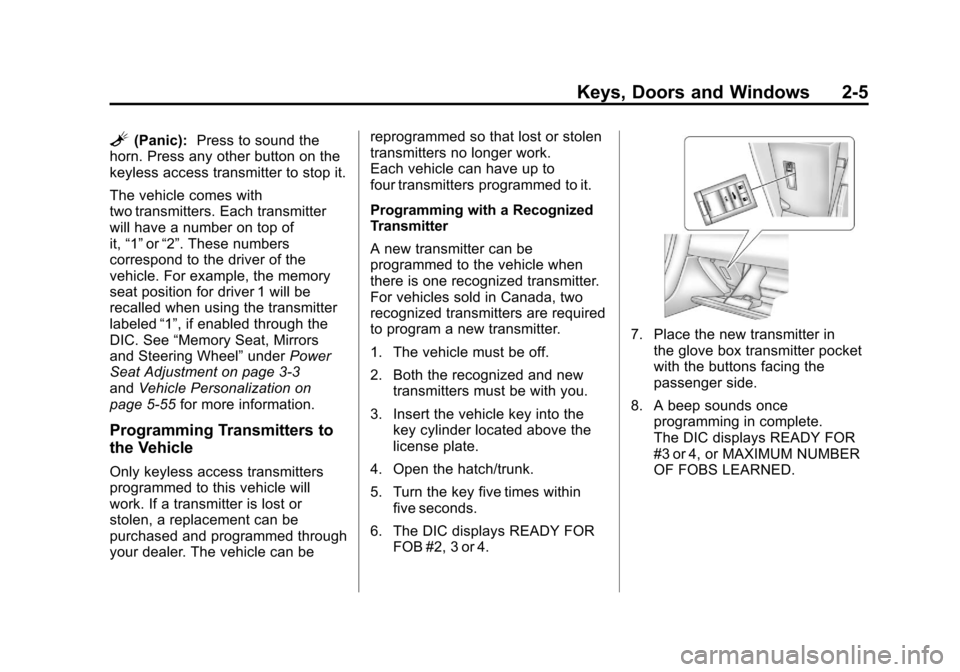
7. Place the new transmitter inthe glove box transmitter pocket
with the buttons facing the
passenger side.
8. A beep sounds once programming in complete.
The DIC displays READY FOR
#3 or 4, or MAXIMUM NUMBER
OF FOBS LEARNED.
Page 38 of 428
Black plate (6,1)Chevrolet Corvette Owner Manual - 2011
2-6 Keys, Doors and Windows
9. To program additionaltransmitters, repeat Step 7.
Press Acc. on the ignition switch
if programming is complete.
10. Press
Kon each newly
programmed transmitter to
complete the process.
Programming without a
Recognized Transmitter
This procedure requires three
ten minute cycles to complete
the programming process.
United States owners are permitted
to program a new transmitter to
their vehicle when a recognized
transmitter is not available. The Canadian immobilizer standard
requires that Canadian owners see
their dealer for programming new
transmitters when two recognized
transmitters are not available.
1. The vehicle must be off.
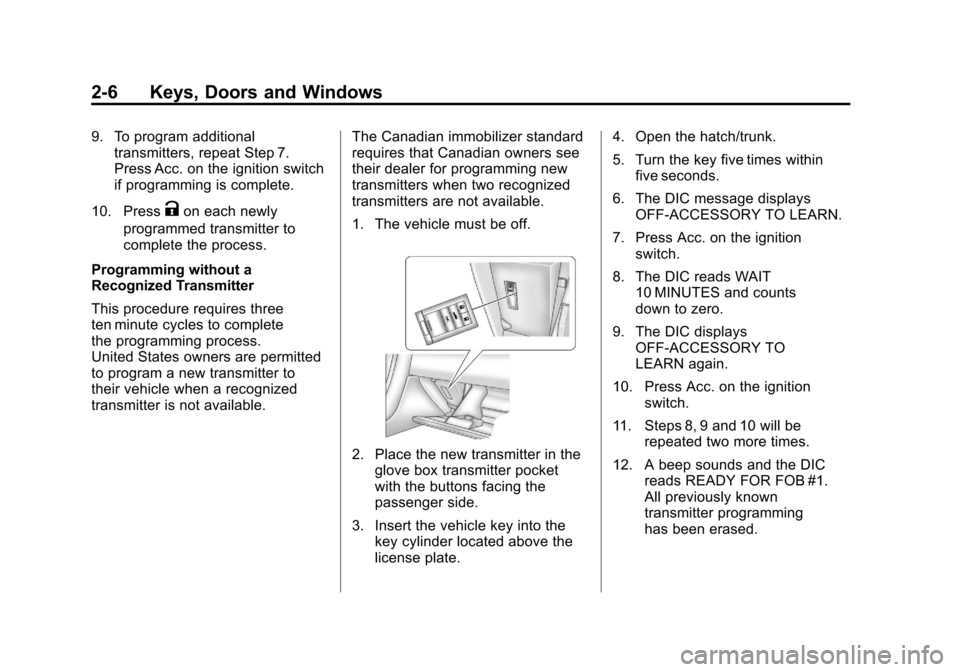
2. Place the new transmitter in the
glove box transmitter pocket
with the buttons facing the
passenger side.
3. Insert the vehicle key into the key cylinder located above the
license plate. 4. Open the hatch/trunk.
5. Turn the key five times within
five seconds.
6. The DIC message displays OFF-ACCESSORY TO LEARN.
7. Press Acc. on the ignition switch.
8. The DIC reads WAIT 10 MINUTES and counts
down to zero.
9. The DIC displays OFF-ACCESSORY TO
LEARN again.
10. Press Acc. on the ignition switch.
11. Steps 8, 9 and 10 will be repeated two more times.
12. A beep sounds and the DIC reads READY FOR FOB #1.
All previously known
transmitter programming
has been erased.
Page 39 of 428
Black plate (7,1)Chevrolet Corvette Owner Manual - 2011
Keys, Doors and Windows 2-7
13. A beep sounds onceprogramming in complete.
The DIC displays READY
FOR FOB #2.
To program additional
transmitters, take transmitter 1
out of the transmitter pocket
and place transmitter 2 in
the pocket. Up to four
transmitters can be
programmed. The DIC then
displays MAXIMUM NUMBER
OF FOBS LEARNED and exits
the programming mode.
Press Acc. on the ignition
switch to complete the process.
14. Press Acc. on the ignition switch if programming is
complete.
15. Press
Kon each newly
programmed transmitter to
complete the process.
Starting the Vehicle with a Low
Transmitter Battery
If the transmitter battery is weak,
the DIC may display NO FOBS
DETECTED when trying to start the
vehicle. To start the vehicle, place
the transmitter in the glove box
transmitter pocket with the buttons
facing the passenger side. Then,
with the vehicle in P (Park) for an
automatic transmission, press the
brake pedal and
/. If the vehicle
has a manual transmission, press
the clutch and
/. Replace the
transmitter battery as soon as
possible. Change the transmitter
battery if the DIC displays
FOB BATTERY LOW.
Battery Replacement
Notice: When replacing the
battery, do not touch any of
the circuitry on the transmitter.
Static from your body could
damage the transmitter.
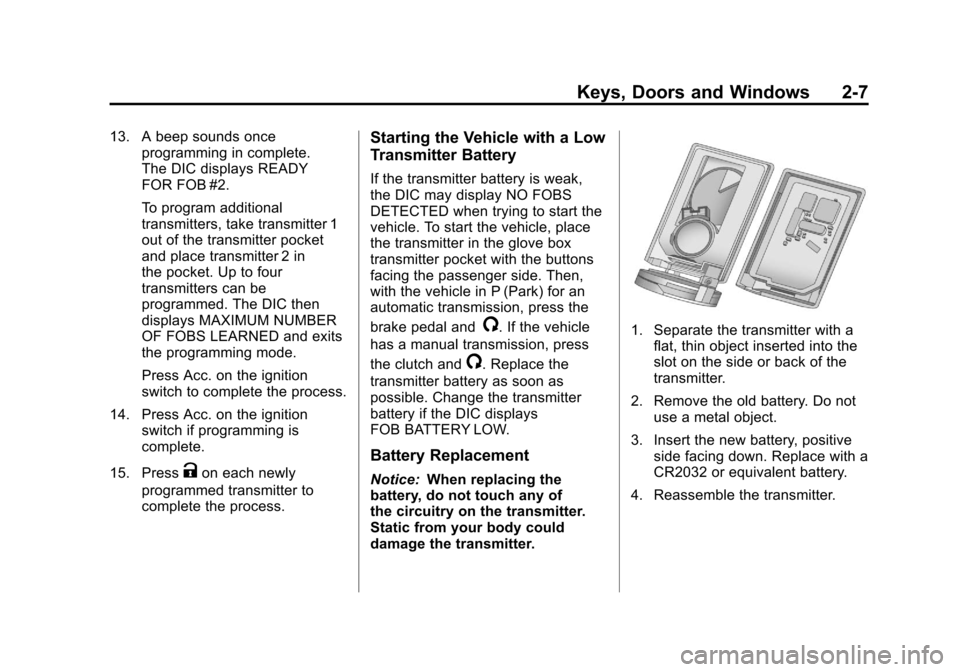
1. Separate the transmitter with a
flat, thin object inserted into the
slot on the side or back of the
transmitter.
2. Remove the old battery. Do not use a metal object.
3. Insert the new battery, positive side facing down. Replace with a
CR2032 or equivalent battery.
4. Reassemble the transmitter.
Page 48 of 428
Black plate (16,1)Chevrolet Corvette Owner Manual - 2011
2-16 Keys, Doors and Windows
Folding Mirrors
Manually fold the mirrors inward
to prevent damage when going
through an automatic car wash.
To fold, pull the mirror toward the
vehicle. Push the mirror outward,
to return it to the original position.
Heated Mirrors
<
(Rear Window Defogger):
Press to heat the mirrors.
See “Rear Window Defogger” under
Dual Automatic Climate Control
System on page 8‑1 for more
information.
Automatic Dimming
Mirror
If the vehicle has this feature, the
driver side outside mirror adjusts for
the glare of headlamps behind you.
This feature is controlled by the
on and off setting on the inside
rearview mirror.
Interior Mirrors
Automatic Dimming
Rearview Mirror
Vehicles with an automatic dimming
inside rearview mirror, compass
display, and/or map lamps, and
OnStar
®will automatically change
to reduce glare from headlamps
behind you. A time delay feature
prevents rapid changing from the
day to night positions while driving
under lights and through traffic.
If the vehicle has OnStar
®, there
are three control buttons located at
the bottom of the mirror. See the
OnStar
®owner's guide for more
information on the services OnStar®
provides.
P(On/Off): The automatic
dimming feature is activated
when the vehicle is started.
Press and hold this button for
up to six seconds to turn this
feature on or off.
T(Indicator Light): This light turns
on when the automatic dimming
feature is active.
Map Lamps
If the mirror has map lamps, they
are located at the bottom of the
mirror. To manually turn the lamps
on or off, press the button next to
each lamp.
Cleaning the Mirror
Do not spray glass cleaner directly
on the mirror. Use a soft towel
dampened with water.
Page 61 of 428
Black plate (29,1)Chevrolet Corvette Owner Manual - 2011
Keys, Doors and Windows 2-29
4. Return the convertible top frontlatch to the closed position.
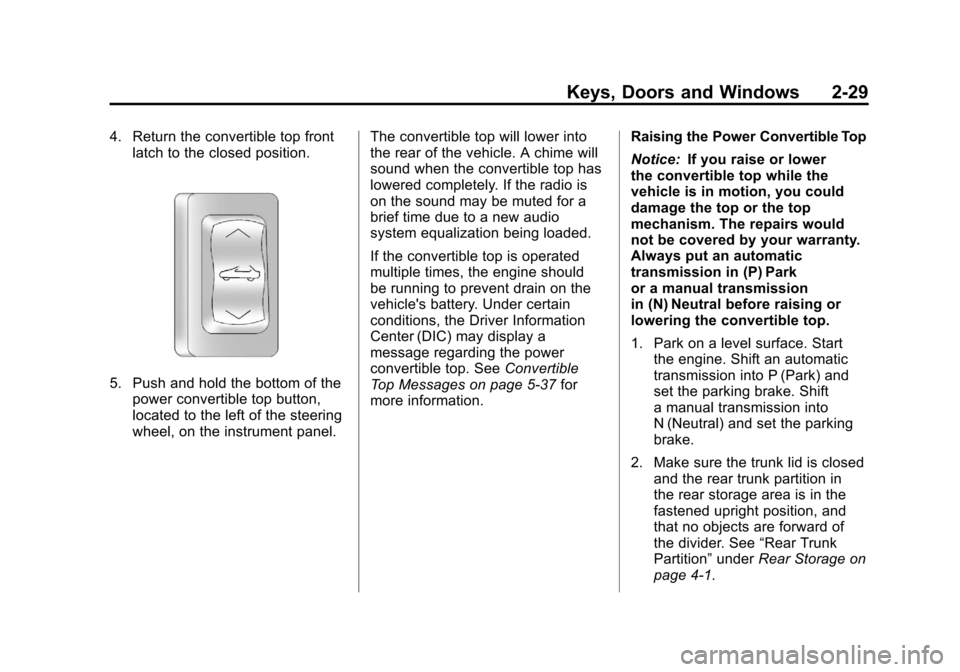
5. Push and hold the bottom of thepower convertible top button,
located to the left of the steering
wheel, on the instrument panel. The convertible top will lower into
the rear of the vehicle. A chime will
sound when the convertible top has
lowered completely. If the radio is
on the sound may be muted for a
brief time due to a new audio
system equalization being loaded.
If the convertible top is operated
multiple times, the engine should
be running to prevent drain on the
vehicle's battery. Under certain
conditions, the Driver Information
Center (DIC) may display a
message regarding the power
convertible top. See
Convertible
Top Messages on page 5‑37 for
more information. Raising the Power Convertible Top
Notice:
If you raise or lower
the convertible top while the
vehicle is in motion, you could
damage the top or the top
mechanism. The repairs would
not be covered by your warranty.
Always put an automatic
transmission in (P) Park
or a manual transmission
in (N) Neutral before raising or
lowering the convertible top.
1. Park on a level surface. Start the engine. Shift an automatic
transmission into P (Park) and
set the parking brake. Shift
a manual transmission into
N (Neutral) and set the parking
brake.
2. Make sure the trunk lid is closed and the rear trunk partition in
the rear storage area is in the
fastened upright position, and
that no objects are forward of
the divider. See “Rear Trunk
Partition” underRear Storage on
page 4‑1.
Page 63 of 428
Black plate (31,1)Chevrolet Corvette Owner Manual - 2011
Keys, Doors and Windows 2-31
Be careful when opening
the tonneau cover by hand.
If the tonneau cover is opened
quickly, damage can occur to the
hinging mechanism, which can
prevent proper operation of the
convertible top.
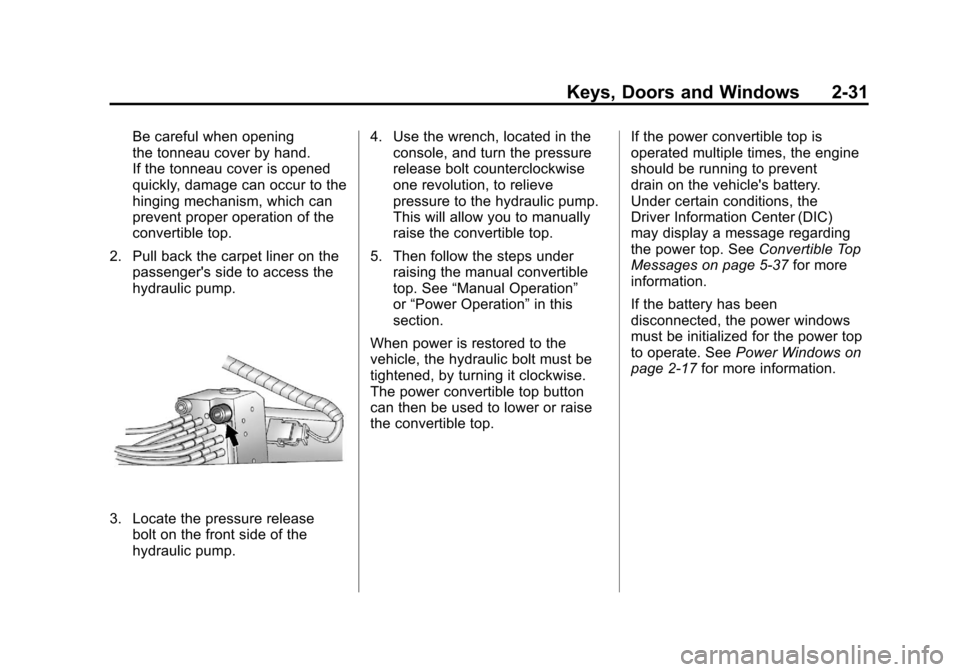
2. Pull back the carpet liner on the passenger's side to access the
hydraulic pump.
3. Locate the pressure releasebolt on the front side of the
hydraulic pump. 4. Use the wrench, located in the
console, and turn the pressure
release bolt counterclockwise
one revolution, to relieve
pressure to the hydraulic pump.
This will allow you to manually
raise the convertible top.
5. Then follow the steps under raising the manual convertible
top. See “Manual Operation”
or “Power Operation” in this
section.
When power is restored to the
vehicle, the hydraulic bolt must be
tightened, by turning it clockwise.
The power convertible top button
can then be used to lower or raise
the convertible top. If the power convertible top is
operated multiple times, the engine
should be running to prevent
drain on the vehicle's battery.
Under certain conditions, the
Driver Information Center (DIC)
may display a message regarding
the power top. See
Convertible Top
Messages on page 5‑37 for more
information.
If the battery has been
disconnected, the power windows
must be initialized for the power top
to operate. See Power Windows on
page 2‑17 for more information.
Page 118 of 428
Black plate (2,1)Chevrolet Corvette Owner Manual - 2011
4-2 Storage
Rear Trunk Partition
For vehicles with the power
convertible top option only,
there is a trunk partition to keep
cargo from getting in the way of
the convertible top. The trunk
partition must be in place for the
convertible top to move. If the trunk
partition is not properly in place
the ATTACH TRUNK PARTITION
message displays. SeeConvertible
Top Messages on page 5‑37 for
more information.
The trunk partition is a flat carpeted
board with a horizontal flap that can
be attached to the top of the trunk to
divide the storage compartment or it
stores flat when not in use.
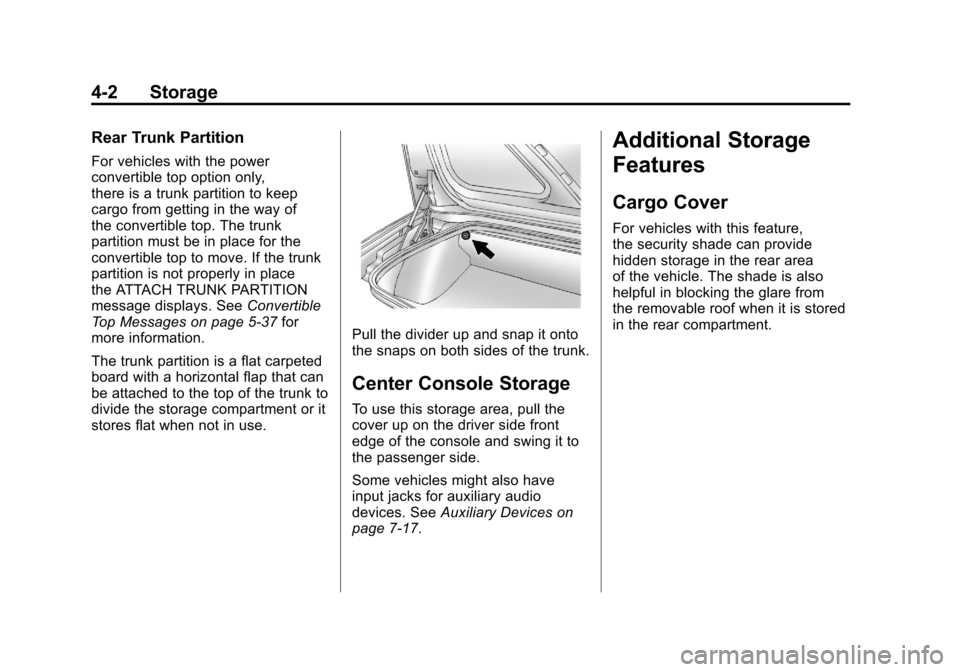
Pull the divider up and snap it onto
the snaps on both sides of the trunk.
Center Console Storage
To use this storage area, pull the
cover up on the driver side front
edge of the console and swing it to
the passenger side.
Some vehicles might also have
input jacks for auxiliary audio
devices. See Auxiliary Devices on
page 7‑17.
Additional Storage
Features
Cargo Cover
For vehicles with this feature,
the security shade can provide
hidden storage in the rear area
of the vehicle. The shade is also
helpful in blocking the glare from
the removable roof when it is stored
in the rear compartment.
Page 121 of 428
Black plate (1,1)Chevrolet Corvette Owner Manual - 2011
Instruments and Controls 5-1
Instruments and
Controls
Controls
Steering Wheel Adjustment . . . 5-2
Steering Wheel Controls . . . . . . 5-3
Horn . . . . . . . . . . . . . . . . . . . . . . . . . . 5-4
Windshield Wiper/Washer . . . . . 5-4
Compass . . . . . . . . . . . . . . . . . . . . . 5-5
Clock . . . . . . . . . . . . . . . . . . . . . . . . . 5-6
Power Outlets . . . . . . . . . . . . . . . . . 5-6
Cigarette Lighter . . . . . . . . . . . . . . 5-7
Ashtrays . . . . . . . . . . . . . . . . . . . . . . 5-8
Warning Lights, Gauges, and
Indicators
Warning Lights, Gauges, andIndicators . . . . . . . . . . . . . . . . . . . . 5-8
Instrument Cluster . . . . . . . . . . . . 5-9
Speedometer . . . . . . . . . . . . . . . . 5-11
Odometer . . . . . . . . . . . . . . . . . . . . 5-11
Tachometer . . . . . . . . . . . . . . . . . . 5-11
Fuel Gauge . . . . . . . . . . . . . . . . . . 5-11
Boost Gauge (ZR1) . . . . . . . . . . 5-12
Engine Oil Pressure Gauge . . . . . . . . . . . . . . . . . . . . . . 5-13 Engine Coolant Temperature
Gauge . . . . . . . . . . . . . . . . . . . . . . 5-15
Voltmeter Gauge . . . . . . . . . . . . . 5-15
Safety Belt Reminders . . . . . . . 5-16
Airbag Readiness Light . . . . . . 5-16
Passenger Airbag Status Indicator . . . . . . . . . . . . . . . . . . . . 5-17
Malfunction Indicator Lamp . . . . . . . . . . . . . 5-18
Brake System Warning Light . . . . . . . . . . . . . . . . . . . . . . . 5-21
Antilock Brake System (ABS) Warning Light . . . . . . . . . . . . . . 5-22
One-to-Four Shift Light (Manual Transmission) . . . . . 5-22
Active Handling System Light . . . . . . . . . . . . . . . . . . . . . . . 5-23
Traction Control System (TCS) Warning Light . . . . . . . 5-23
Tire Pressure Light . . . . . . . . . . 5-24
Security Light . . . . . . . . . . . . . . . . 5-24
High-Beam on Light . . . . . . . . . 5-25
Front Fog Lamp Light . . . . . . . . 5-25
Lamps on Reminder . . . . . . . . . 5-25
Information Displays
Driver Information Center (DIC) . . . . . . . . . . . . . . . 5-25
Head-Up Display (HUD) . . . . . 5-31
Vehicle Messages
Vehicle Messages . . . . . . . . . . . 5-35
Battery Voltage and Charging Messages . . . . . . . . . . . . . . . . . . 5-35
Brake System Messages . . . . 5-36
Convertible Top Messages . . . 5-37
Cruise Control Messages . . . . 5-38
Door Ajar Messages . . . . . . . . . 5-39
Engine Cooling System Messages . . . . . . . . . . . . . . . . . . 5-39
Engine Oil Messages . . . . . . . . 5-40
Engine Power Messages . . . . 5-41
Fuel System Messages . . . . . . 5-41
Key and Lock Messages . . . . . 5-42
Lamp Messages . . . . . . . . . . . . . 5-44
Ride Control System Messages . . . . . . . . . . . . . . . . . . 5-44
Safety Belt Messages . . . . . . . 5-49
Anti-Theft Alarm System Messages . . . . . . . . . . . . . . . . . . 5-50
Service Vehicle Messages . . . 5-50
Starting the Vehicle Messages . . . . . . . . . . . . . . . . . . 5-50
Tire Messages . . . . . . . . . . . . . . . 5-51
Transmission Messages . . . . . 5-53
Vehicle Reminder Messages . . . . . . . . . . . . . . . . . . 5-54
Washer Fluid Messages . . . . . 5-54
Page 123 of 428
Black plate (3,1)Chevrolet Corvette Owner Manual - 2011
Instruments and Controls 5-3
The telescopic steering column
position can be stored with your
memory settings. See“Memory
Seat, Mirrors and Steering Wheel”
under Power Seat Adjustment on
page 3‑3 for more information.
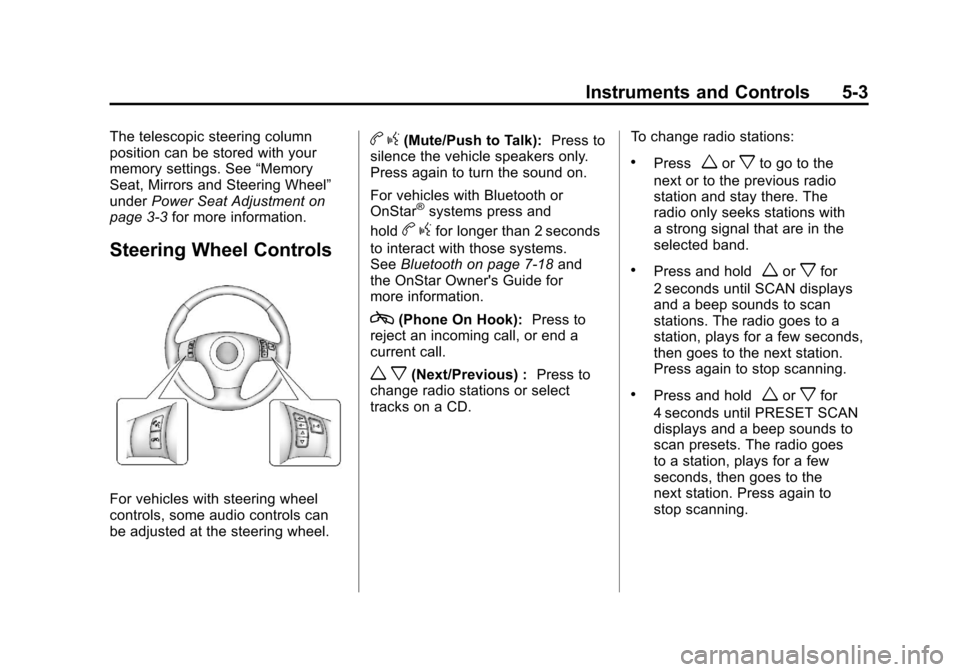
Steering Wheel Controls
For vehicles with steering wheel
controls, some audio controls can
be adjusted at the steering wheel.
bg(Mute/Push to Talk): Press to
silence the vehicle speakers only.
Press again to turn the sound on.
For vehicles with Bluetooth or
OnStar
®systems press and
hold
b gfor longer than 2 seconds
to interact with those systems.
See Bluetooth on page 7‑18 and
the OnStar Owner's Guide for
more information.
c(Phone On Hook): Press to
reject an incoming call, or end a
current call.
w x(Next/Previous) : Press to
change radio stations or select
tracks on a CD. To change radio stations:
.Pressworxto go to the
next or to the previous radio
station and stay there. The
radio only seeks stations with
a strong signal that are in the
selected band.
.Press and holdworxfor
2 seconds until SCAN displays
and a beep sounds to scan
stations. The radio goes to a
station, plays for a few seconds,
then goes to the next station.
Press again to stop scanning.
.Press and holdworxfor
4 seconds until PRESET SCAN
displays and a beep sounds to
scan presets. The radio goes
to a station, plays for a few
seconds, then goes to the
next station. Press again to
stop scanning.
Page 125 of 428
Black plate (5,1)Chevrolet Corvette Owner Manual - 2011
Instruments and Controls 5-5
Heavy snow or ice can overload
the wipers. If this occurs, a circuit
breaker will stop the wipers until the
motor cools. Clear all ice and snow
from the wiper blades before using
them. If frozen to the windshield,
carefully loosen them or thaw them.
Damaged wiper blades should
be replaced. SeeWiper Blade
Replacement on page 10‑46.
Windshield Washer
The lever on the right side of the
steering column also controls the
windshield washer. There is a
button at the end of the lever.
To spray washer fluid on the
windshield, press the button and
hold it. The washer will spray until
you release the button. The wipers
will continue to clear the window for
about six seconds after the button
is released and then stop or return
to your preset speed.
{WARNING
In freezing weather, do not
use your washer until the
windshield is warmed. Otherwise
the washer fluid can form ice on
the windshield, blocking your
vision.
If the fluid in the windshield washer
fluid reservoir is low, the message
CHECK WASHER FLUID will
appear on the Driver Information
Center (DIC) display. It will take
15 seconds after the bottle is
refilled for this message to turn
off. For information on the correct
washer fluid to use, see Washer
Fluid on page 10‑37 and
Recommended Fluids and
Lubricants on page 11‑6.
Compass
Compass Operation
With the compass feature on, each
time the vehicle is started, the
compass will take a few seconds
to adjust and display the current
compass heading. For example,
NE is displayed for north-east.
Compass Calibration
PressPonce to turn the compass
display on or off.
If after several seconds the display
does not show a compass heading,
there may be a strong magnetic
field interfering with the compass.
Interference can be caused by a
magnetic antenna mount, note
pad holder or similar object. If the
letter C or CAL appears in the
compass window, the compass
needs calibration.