brake CHEVROLET CORVETTE 2017 7.G Workshop Manual
[x] Cancel search | Manufacturer: CHEVROLET, Model Year: 2017, Model line: CORVETTE, Model: CHEVROLET CORVETTE 2017 7.GPages: 360, PDF Size: 6.3 MB
Page 210 of 360
Chevrolet Corvette Owner Manual (GMNA-Localizing-U.S./Canada/Mexico-
9956103) - 2017 - crc - 4/28/16
Driving and Operating 209
amount of change for the
conditions. With eLSD, the
vehicle has:
.Enhanced high-speed control.
. Improved traction through
corners, allowing more
acceleration.
. More precise steering.
. Increased vehicle agility.
. Integration with StabiliTrak.
For vehicles with eLSD, driven
under severe conditions, the rear
axle fluid should be changed. See
Competitive Driving Mode 0205
and Maintenance Schedule 0307.Cruise Control
With cruise control, a speed of
about 40 km/h (25 mph) or more
can be maintained without keeping
your foot on the accelerator. Cruise
control does not work at speeds
below about 40 km/h (25 mph).
{Warning
Cruise control can be dangerous
where you cannot drive safely at
a steady speed. Do not use
cruise control on winding roads or
in heavy traffic.
Cruise control can be dangerous
on slippery roads. On such roads,
fast changes in tire traction can
cause excessive wheel slip, and
you could lose control. Do not use
cruise control on slippery roads.
If equipped with a manual
transmission, the cruise control will
remain active when the gears are
shifted. The cruise is disengaged if
the clutch is pressed for several
seconds. If the Traction Control System (TCS)
begins to limit wheel spin while you
are using cruise control, the cruise
control automatically disengages.
See
Traction Control/Electronic
Stability Control 0199. When road
conditions allow for using safely
again, cruise control can be turned
back on.
If the brakes are applied, cruise
control disengages.
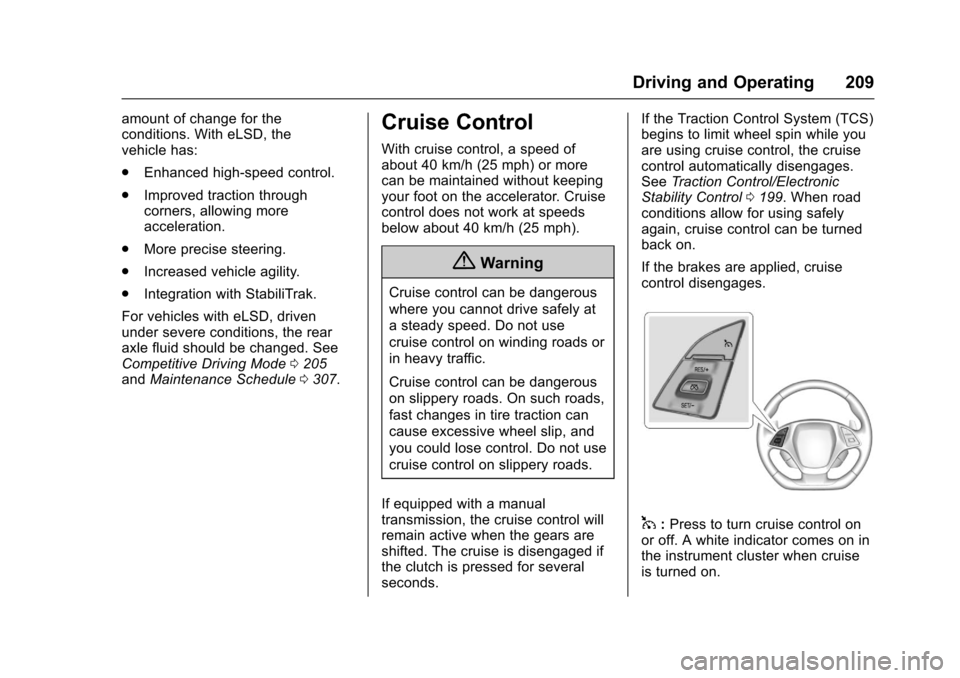
1: Press to turn cruise control on
or off. A white indicator comes on in
the instrument cluster when cruise
is turned on.
Page 211 of 360
Chevrolet Corvette Owner Manual (GMNA-Localizing-U.S./Canada/Mexico-
9956103) - 2017 - crc - 4/28/16
210 Driving and Operating
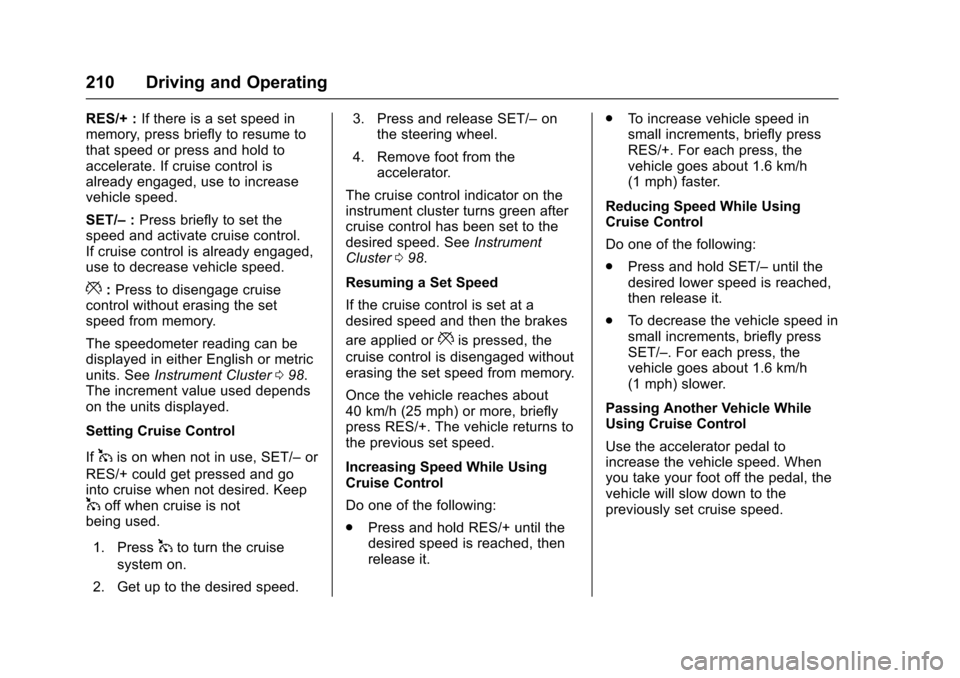
RES/+ :If there is a set speed in
memory, press briefly to resume to
that speed or press and hold to
accelerate. If cruise control is
already engaged, use to increase
vehicle speed.
SET/– :Press briefly to set the
speed and activate cruise control.
If cruise control is already engaged,
use to decrease vehicle speed.
*: Press to disengage cruise
control without erasing the set
speed from memory.
The speedometer reading can be
displayed in either English or metric
units. See Instrument Cluster 098.
The increment value used depends
on the units displayed.
Setting Cruise Control
If
1is on when not in use, SET/– or
RES/+ could get pressed and go
into cruise when not desired. Keep
1off when cruise is not
being used.
1. Press
1to turn the cruise
system on.
2. Get up to the desired speed. 3. Press and release SET/–
on
the steering wheel.
4. Remove foot from the accelerator.
The cruise control indicator on the
instrument cluster turns green after
cruise control has been set to the
desired speed. See Instrument
Cluster 098.
Resuming a Set Speed
If the cruise control is set at a
desired speed and then the brakes
are applied or
*is pressed, the
cruise control is disengaged without
erasing the set speed from memory.
Once the vehicle reaches about
40 km/h (25 mph) or more, briefly
press RES/+. The vehicle returns to
the previous set speed.
Increasing Speed While Using
Cruise Control
Do one of the following:
. Press and hold RES/+ until the
desired speed is reached, then
release it. .
To increase vehicle speed in
small increments, briefly press
RES/+. For each press, the
vehicle goes about 1.6 km/h
(1 mph) faster.
Reducing Speed While Using
Cruise Control
Do one of the following:
. Press and hold SET/– until the
desired lower speed is reached,
then release it.
. To decrease the vehicle speed in
small increments, briefly press
SET/–. For each press, the
vehicle goes about 1.6 km/h
(1 mph) slower.
Passing Another Vehicle While
Using Cruise Control
Use the accelerator pedal to
increase the vehicle speed. When
you take your foot off the pedal, the
vehicle will slow down to the
previously set cruise speed.
Page 212 of 360
Chevrolet Corvette Owner Manual (GMNA-Localizing-U.S./Canada/Mexico-
9956103) - 2017 - crc - 4/28/16
Driving and Operating 211
While pressing the accelerator pedal
or shortly following the release to
override cruise control, briefly
pressing SET/–will result in cruise
set to the current vehicle speed.
Using Cruise Control on Hills
How well the cruise control works
on hills depends upon the vehicle
speed, load, and the steepness of
the hills. When going up steep hills,
you might have to step on the
accelerator pedal to maintain your
speed. When going downhill, you
might have to brake or shift to a
lower gear to keep your speed
down. If the brake pedal is applied,
cruise control will disengage.
Cruise Control in Manual Paddle
Shift Gear Selection
When the vehicle is in M (Manual
Mode) and the manual paddle shift
controls are not being used, cruise
control operates in the same
manner as D (Drive). When the vehicle is in M (Manual
Mode) and the manual paddle shift
controls are being used, cruise
control operates as follows:
.
If cruise control is active and a
gear is selected with the manual
paddle shift controls, the vehicle
speed is maintained in the driver
selected gear and will not
automatically upshift or
downshift the transmission while
the driver ’s gear selection is
active.
. If driving in hilly terrain, cruise
control may not be able to
maintain vehicle speed if an
upshift or downshift is not
selected by the driver. While
driving on hilly terrain and cruise
control is active with a manual
paddle shift gear selection, the
driver must select the proper
gear for the terrain or select D
(Drive) on the shift lever for full
automatic transmission
operation. Ending Cruise Control
.
Step lightly on the brake pedal.
. Press the clutch pedal for
several seconds or shift to
N (Neutral) (manual
transmissions).
. Shift the transmission to
N (Neutral) (automatic
transmissions).
. Press
*.
. To turn off cruise control,
press
1.
Erasing Speed Memory
The cruise control set speed is
erased from memory if
1is pressed
or if the ignition is turned off.
Page 220 of 360
Chevrolet Corvette Owner Manual (GMNA-Localizing-U.S./Canada/Mexico-
9956103) - 2017 - crc - 4/28/16
Vehicle Care 219
Vehicle Care
General Information
General Information . . . . . . . . . . 220
California Proposition65 Warning . . . . . . . . . . . . . . . . . 220
California Perchlorate Materials Requirements . . . . . 220
Accessories and Modifications . . . . . . . . . . . . . . . . 220
Lifting the Vehicle . . . . . . . . . . . . 221
Vehicle Checks
Doing Your Own Service Work . . . . . . . . . . . . . . . 223
Hood . . . . . . . . . . . . . . . . . . . . . . . . . 224
Engine Compartment Overview . . . . . . . . . . . . . . . . . . . . 225
Engine Oil . . . . . . . . . . . . . . . . . . . . 230
Engine Oil Life System . . . . . . . 235
Automatic Transmission Fluid . . . . . . . . . . . . . . . . . . . . . . . . 236
Manual Transmission Fluid . . . 237
Hydraulic Clutch . . . . . . . . . . . . . . 237
Engine Air Cleaner/Filter . . . . . . 237
Cooling System (Engine) . . . . . 239
Cooling System (Aero Panel) . . . . . . . . . . . . . . . . . . . . . . . 241
Engine Coolant . . . . . . . . . . . . . . . 242
Engine Overheating . . . . . . . . . . 244 Washer Fluid . . . . . . . . . . . . . . . . . 246
Brakes . . . . . . . . . . . . . . . . . . . . . . . 246
Brake Fluid . . . . . . . . . . . . . . . . . . . 247
Battery - North America . . . . . . 248
Rear Axle . . . . . . . . . . . . . . . . . . . . 250
Starter Switch Check . . . . . . . . . 250
Automatic Transmission Shift
Lock Control Function
Check . . . . . . . . . . . . . . . . . . . . . . . 251
Park Brake and P (Park) Mechanism Check . . . . . . . . . . 251
Wiper Blade Replacement . . . . 251
Windshield Replacement . . . . . 252Headlamp Aiming
Headlamp Aiming . . . . . . . . . . . . 252
Bulb Replacement
Bulb Replacement . . . . . . . . . . . . 253
High Intensity Discharge (HID) Lighting . . . . . . . . . . . . . . . . . . . . . 253
LED Lighting . . . . . . . . . . . . . . . . . 253
License Plate Lamp . . . . . . . . . . 253
Replacement Bulbs . . . . . . . . . . . 254
Electrical System
Electrical System Overload . . . 254
Fuses . . . . . . . . . . . . . . . . . . . . . . . . 254
Engine Compartment Fuse Block . . . . . . . . . . . . . . . . . . . . . . . . 255
Rear Compartment Fuse Block . . . . . . . . . . . . . . . . . . . . . . . . 259
Wheels and Tires
Tires . . . . . . . . . . . . . . . . . . . . . . . . . . 262
Winter Tires . . . . . . . . . . . . . . . . . . 263
Run-Flat Tires . . . . . . . . . . . . . . . . 263
Low-Profile Tires . . . . . . . . . . . . . 264
Competition Oriented Tires . . . 265
Summer Tires . . . . . . . . . . . . . . . . 265
Tire Sidewall Labeling . . . . . . . . 266
Tire Designations . . . . . . . . . . . . . 267
Tire Terminology andDefinitions . . . . . . . . . . . . . . . . . . 268
Tire Pressure . . . . . . . . . . . . . . . . . 270
Tire Pressure for High-Speed Operation . . . . . . . . . . . . . . . . . . . 272
Tire Pressure Monitor System . . . . . . . . . . . . . . . . . . . . . . 273
Tire Pressure Monitor Operation . . . . . . . . . . . . . . . . . . . 274
Tire Inspection . . . . . . . . . . . . . . . . 275
Tire Rotation . . . . . . . . . . . . . . . . . 276
When It Is Time for New Tires . . . . . . . . . . . . . . . . . . . . . . . . 277
Buying New Tires . . . . . . . . . . . . . 278
Different Size Tires and Wheels . . . . . . . . . . . . . . . . . . . . . . 279
Uniform Tire Quality Grading . . . . . . . . . . . . . . . . . . . . . 279
Wheel Alignment and Tire Balance . . . . . . . . . . . . . . . . . . . . . 281
Wheel Replacement . . . . . . . . . . 281
Tire Chains . . . . . . . . . . . . . . . . . . . 283
Page 222 of 360
Chevrolet Corvette Owner Manual (GMNA-Localizing-U.S./Canada/Mexico-
9956103) - 2017 - crc - 4/28/16
Vehicle Care 221
safety, including such things as
airbags, braking, stability, ride and
handling, emissions systems,
aerodynamics, durability, and
electronic systems like antilock
brakes, traction control, and stability
control. These accessories or
modifications could even cause
malfunction or damage not covered
by the vehicle warranty.
Damage to suspension components
caused by modifying vehicle height
outside of factory settings will not be
covered by the vehicle warranty.
Damage to vehicle components
resulting from modifications or the
installation or use of non-GM
certified parts, including control
module or software modifications, is
not covered under the terms of the
vehicle warranty and may affect
remaining warranty coverage for
affected parts.
GM Accessories are designed to
complement and function with other
systems on the vehicle. See your
dealer to accessorize the vehicle
using genuine GM Accessories
installed by a dealer technician.Also, see
Adding Equipment to the
Airbag-Equipped Vehicle 078.
Lifting the Vehicle
{Warning
Lifting a vehicle can cause an
injury. The vehicle can slip off the
jack and roll over you or other
people. You and they could be
badly injured. Find a level place
to lift your vehicle. To help
prevent the vehicle from moving:
1. Set the parking brake firmly.
2. Put an automatictransmission in P (Park) or a
manual transmission in
1 (First) or R (Reverse).
3. Turn off the engine.
To be even more certain the
vehicle will not move, put blocks
in front of and behind the wheels.
{Warning
Getting under a vehicle when it is
lifted on a jack is dangerous.
If the vehicle slips off the jack,
you could be badly injured or
killed. Never get under a vehicle
when it is supported only by
a jack.
{Warning
Raising the vehicle with the jack
improperly positioned can
damage the vehicle or the vehicle
may fall and cause injury to you
or others.
If a jack is used to lift the vehicle,
follow the instructions that came
with the jack, and be sure to use the
correct lifting points to avoid
damaging the vehicle.
Page 227 of 360

Chevrolet Corvette Owner Manual (GMNA-Localizing-U.S./Canada/Mexico-
9956103) - 2017 - crc - 4/28/16
226 Vehicle Care
1.Passenger Compartment Air
Filter 0158 (Out of View). See
Passenger Compartment Air
Filter 0158.
2. Coolant Surge Tank and Pressure Cap. See Engine
Coolant 0242.
3. Engine Compartment Fuse
Block 0255.
4. Engine Air Cleaner/Filter 0237.
5. Engine Cooling Fan (Out of View). See Cooling System
(Engine) 0239 orCooling
System (Aero Panel) 0241.
6. Engine Oil Fill Cap. See “When
to Add Engine Oil” under
Engine Oil 0230.
7. Engine Oil Dipstick. See “Checking Engine Oil” under
Engine Oil 0230.
8. Brake Fluid Reservoir. See Brake Fluid 0247.
9. Clutch Master Cylinder Reservoir (If Equipped). See
Hydraulic Clutch 0237. 10. Windshield Washer Fluid
Reservoir. See “Adding Washer
Fluid” under Washer
Fluid 0246.
Page 229 of 360

Chevrolet Corvette Owner Manual (GMNA-Localizing-U.S./Canada/Mexico-
9956103) - 2017 - crc - 4/28/16
228 Vehicle Care
1. Engine Oil Dipstick. See“Checking Engine Oil” under
Engine Oil 0230.
2. Dry Sump Engine Oil Tank Fill Cap. See “Changing Engine Oil
and Filter” Engine Oil 0230.
3. Passenger Compartment Air
Filter 0158 (Out of View). See
Passenger Compartment Air
Filter 0158.
4. Coolant Surge Tank and Pressure Cap. See Engine
Coolant 0242.
5. Engine Compartment Fuse
Block 0255.
6. Engine Air Cleaner/Filter 0237.
7. Engine Cooling Fan (Out of View). See Cooling System
(Engine) 0239 orCooling
System (Aero Panel) 0241.
8. Brake Fluid Reservoir. See Brake Fluid 0247.
9. Clutch Master Cylinder Reservoir (If Equipped). See
Hydraulic Clutch 0237. 10. Windshield Washer Fluid
Reservoir. See “Adding Washer
Fluid” under Washer
Fluid 0246.
Page 231 of 360
Chevrolet Corvette Owner Manual (GMNA-Localizing-U.S./Canada/Mexico-
9956103) - 2017 - crc - 4/28/16
230 Vehicle Care
1. Engine Oil Dipstick. See“Checking Engine Oil” under
Engine Oil 0230.
2. Dry Sump Engine Oil Tank Fill Cap. See “Changing Engine Oil
and Filter” Engine Oil 0230.
3. Passenger Compartment Air
Filter 0158 (Out of View). See
Passenger Compartment Air
Filter 0158.
4. Coolant Surge Tank and Pressure Cap. See Engine
Coolant 0242.
5. Engine Compartment Fuse
Block 0255.
6. Engine Air Cleaner/Filter 0237.
7. Engine Cooling Fan (Out of View). See Cooling System
(Engine) 0239 orCooling
System (Aero Panel) 0241.
8. Brake Fluid Reservoir. See Brake Fluid 0247.
9. Clutch Master Cylinder Reservoir (If Equipped). See
Hydraulic Clutch 0237. 10. Windshield Washer Fluid
Reservoir. See “Adding Washer
Fluid” under Washer
Fluid 0246.
Engine Oil
To ensure proper engine
performance and long life, careful
attention must be paid to engine oil.
Following these simple, but
important steps will help protect
your investment:
.
Use engine oil approved to the
proper specification and of the
proper viscosity grade. See
“Selecting the Right Engine Oil”
in this section.
. Check the engine oil level
regularly and maintain the
proper oil level. See “Checking
Engine Oil” and“When to Add
Engine Oil” in this section.
. Change the engine oil at the
appropriate time. See Engine Oil
Life System 0235.
. Always dispose of engine oil
properly. See “What to Do with
Used Oil” in this section.
Checking Engine Oil (Except
Z06, Grand Sport, and Stingray
with Z51)
If the ENGINE OIL LOW–ADD OIL
message displays on the Driver
Information Center (DIC), check the
engine oil level right away. See
Engine Oil Messages 0125.
Check the engine oil level regularly
(every 650 km (400 mi), especially
prior to a long trip. The engine oil
dipstick handle is a loop. See
Engine Compartment Overview
0 225 for the location.
{Warning
The engine oil dipstick handle
may be hot; it could burn you.
Use a towel or glove to touch the
dipstick handle.
If a low oil Driver Information Center
(DIC) message displays, check the
oil level.
Page 247 of 360
Chevrolet Corvette Owner Manual (GMNA-Localizing-U.S./Canada/Mexico-
9956103) - 2017 - crc - 4/28/16
246 Vehicle Care
back on, continue to drive normally
and have the cooling system
checked for proper fill and function.
If the warning continues, pull over,
stop, and park the vehicle
right away.
If there is no sign of steam, idle the
engine for three minutes while
parked. If the warning is still
displayed, turn off the engine until it
cools down.
Washer Fluid
What to Use
When the vehicle needs windshield
washer fluid, be sure to read the
manufacturer instructions before
use. If the vehicle will be operating
in an area where the temperature
may fall below freezing, use a fluid
that has sufficient protection against
freezing.
Adding Washer Fluid
Open the cap with the washer
symbol on it. Add washer fluid until
the tank is full. SeeEngine
Compartment Overview 0225.
Caution
.
Do not use washer fluid that
contains any type of water
repellent coating. This can
cause the wiper blades to
chatter or skip.
. Do not use engine coolant
(antifreeze) in the
windshield washer. It can
damage the windshield
washer system and paint.
. Do not mix water with
ready-to-use washer fluid.
Water can cause the
(Continued)
Caution (Continued)
solution to freeze and
damage the washer fluid
tank and other parts of the
washer system.
. When using concentrated
washer fluid, follow the
manufacturer instructions for
adding water.
. Fill the washer fluid tank
only three-quarters full when
it is very cold. This allows
for fluid expansion if
freezing occurs, which could
damage the tank if it is
completely full.
Brakes
Brake Wear
Disc brake pads have built-in wear
indicators that make a high-pitched
warning sound when the brake pads
are worn and new pads are needed.
The sound can come and go or be
Page 248 of 360
Chevrolet Corvette Owner Manual (GMNA-Localizing-U.S./Canada/Mexico-
9956103) - 2017 - crc - 4/28/16
Vehicle Care 247
heard all the time the vehicle is
moving, except when applying the
brake pedal firmly.
{Warning
The brake wear warning sound
means that soon the brakes will
not work well. That could lead to
a crash. When the brake wear
warning sound is heard, have the
vehicle serviced.
Caution
Continuing to drive with worn-out
brake pads could result in costly
brake repair.
Under certain weather or operating
conditions, occasional brake squeal
might be heard with the vehicle's
performance braking system. This
brake system is designed for
superior fade resistance and
consistent operation using high performance brake pads. Brake
squeal is normal and does not affect
system performance.
If equipped with high performance
brake linings, there could be an
increased build-up of brake dust as
well as minor noises as compared
to standard brake linings.
Brake linings should always be
replaced as complete axle sets.
Brake Wear (Grand Sport and Z06
Model with J57 Ceramic Brakes)
This vehicle does not have built-in
brake pad wear indicators. The
brake pads should be inspected
periodically and any time the tires
are removed. See your dealer.
Brake Pedal Travel
See your dealer if the brake pedal
does not return to normal height,
or if there is a rapid increase in
pedal travel. This could be a sign
that brake service may be required.
Replacing Brake System Parts
Always replace brake system parts
with new, approved replacement
parts. If this is not done, the brakesmay not work properly. The braking
performance expected can change
in many other ways if the wrong
replacement brake parts are
installed or parts are improperly
installed.
Brake Fluid
The brake master cylinder reservoir
is filled with GM approved DOT 3
brake fluid as indicated on the
reservoir cap. See
Engine
Compartment Overview 0225 for
the location of the reservoir.
Checking Brake Fluid
With the vehicle in P (Park) on a
level surface, the brake fluid level
should be between the minimum
and maximum marks on the brake
fluid reservoir.