warning CHEVROLET CORVETTE 2020 User Guide
[x] Cancel search | Manufacturer: CHEVROLET, Model Year: 2020, Model line: CORVETTE, Model: CHEVROLET CORVETTE 2020Pages: 336, PDF Size: 5.21 MB
Page 35 of 336
Chevrolet Corvette Owner Manual (GMNA-Localizing-U.S./Canada/Mexico-
12470550) - 2020 - CRC - 4/23/20
34 Keys, Doors, and Windows
{Warning
The Rear Camera Mirror (RCM)
has a limited view. Portions of the
road, vehicles, and other objects
may not be seen. Do not drive or
park the vehicle using only this
camera. Objects may appear
closer than they are. Check the
outside mirrors or glance over
your shoulder when making lane
changes or merging. Failure to
use proper care may result in
injury, death, or vehicle damage.Troubleshooting
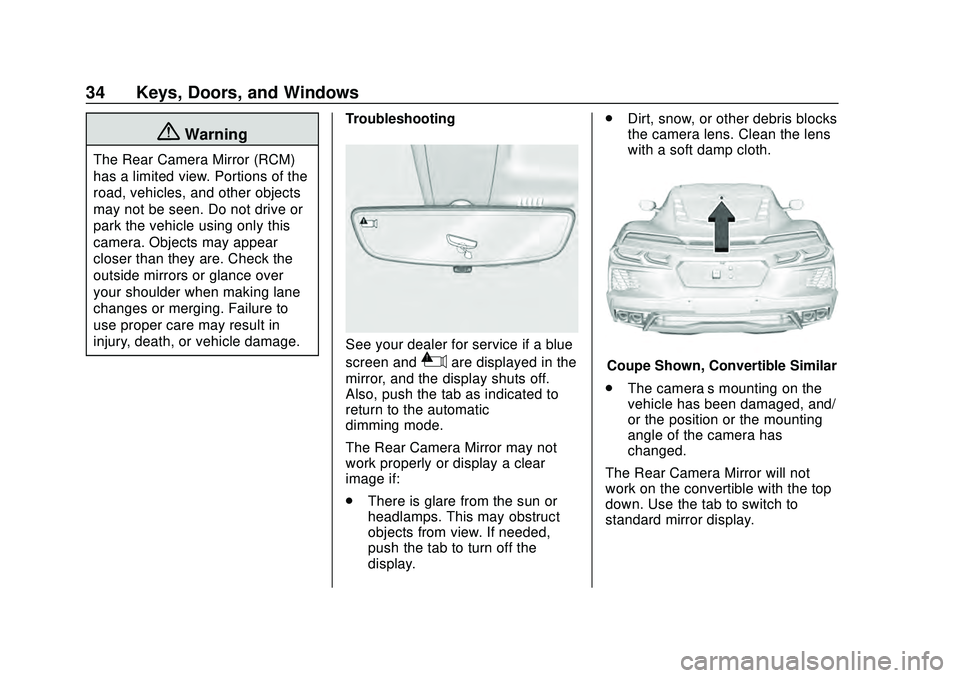
See your dealer for service if a blue
screen and
3are displayed in the
mirror, and the display shuts off.
Also, push the tab as indicated to
return to the automatic
dimming mode.
The Rear Camera Mirror may not
work properly or display a clear
image if:
. There is glare from the sun or
headlamps. This may obstruct
objects from view. If needed,
push the tab to turn off the
display. .
Dirt, snow, or other debris blocks
the camera lens. Clean the lens
with a soft damp cloth.Coupe Shown, Convertible Similar
. The camera’s mounting on the
vehicle has been damaged, and/
or the position or the mounting
angle of the camera has
changed.
The Rear Camera Mirror will not
work on the convertible with the top
down. Use the tab to switch to
standard mirror display.
Page 36 of 336
Chevrolet Corvette Owner Manual (GMNA-Localizing-U.S./Canada/Mexico-
12470550) - 2020 - CRC - 4/23/20
Keys, Doors, and Windows 35
Windows
{Warning
Never leave a child, a helpless
adult, or a pet alone in a vehicle,
especially with the windows
closed in warm or hot weather.
They can be overcome by the
extreme heat and suffer
permanent injuries or even death
from heat stroke.
Power Windows
{Warning
Children could be seriously
injured or killed if caught in the
path of a closing window. Never
leave the remote key in a vehicle
with children. When there are
children in the rear seat, use the
window lockout switch to prevent
operation of the windows. See
Keys07.
Power windows work when the
vehicle is on or in ACC/
ACCESSORY, or when Retained
Accessory Power (RAP) is active.
See Retained Accessory Power
(RAP) 0168.
Convertible Shown, Coupe Similar
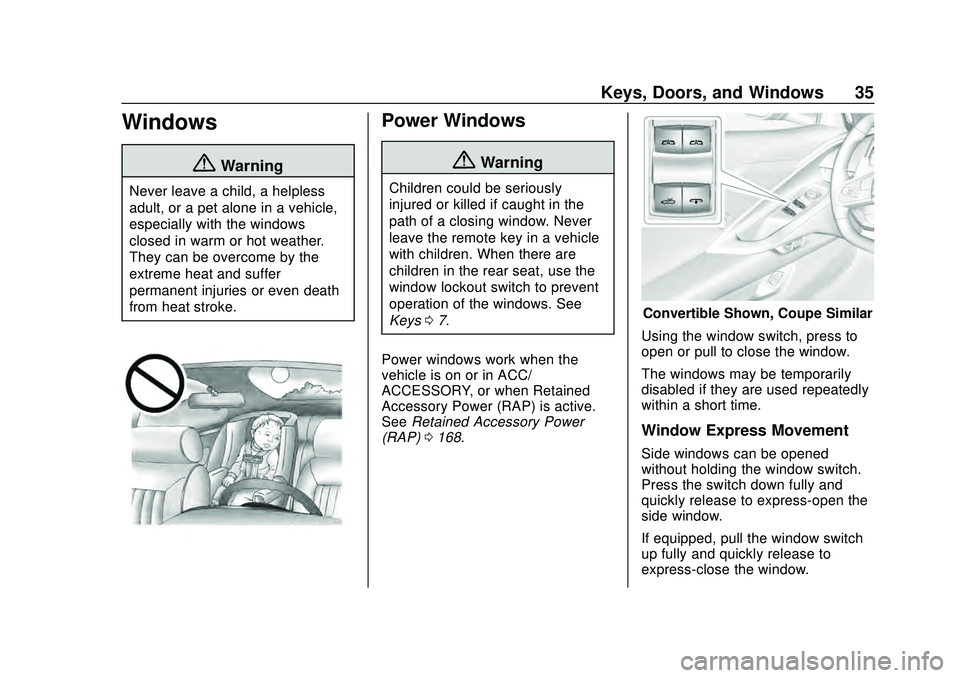
Using the window switch, press to
open or pull to close the window.
The windows may be temporarily
disabled if they are used repeatedly
within a short time.
Window Express Movement
Side windows can be opened
without holding the window switch.
Press the switch down fully and
quickly release to express-open the
side window.
If equipped, pull the window switch
up fully and quickly release to
express-close the window.
Page 37 of 336
Chevrolet Corvette Owner Manual (GMNA-Localizing-U.S./Canada/Mexico-
12470550) - 2020 - CRC - 4/23/20
36 Keys, Doors, and Windows
Briefly press or pull the window
switch in the same direction to stop
the window express movement.
Window Automatic Reversal
System
The express-close feature will
reverse window movement if it
comes in contact with an object.
Extreme cold or ice could cause the
window to auto-reverse. The
window will operate normally after
the object or condition is removed.
Automatic Reversal System
Override
{Warning
If automatic reversal system
override is active, the window will
not reverse automatically. You or
others could be injured and the
window could be damaged.
Before using automatic reversal
system override, make sure that
all people and obstructions are
clear of the window path.Override the automatic reversal
system by releasing, then pulling
and holding the window switch after
an automatic reversal.
Programming the Power
Windows
Programming may be necessary if
the vehicle battery has been
disconnected or discharged. If the
window will not express-close,
program each express-close
window:
1. Close all doors.
2. Turn the ignition on or to ACC/ ACCESSORY.
3. Partially open the window to be programmed. Then close it and
continue to pull the switch
briefly after the window has
fully closed.
4. Open the window and continue to press the switch briefly after
the window has fully opened.
Window Operation with
Convertible Top
Windows lower when the convertible
top is lowered or raised. See
Convertible Top 041.
Remote Window Operation
If equipped, this feature allows the
side windows to be opened
remotely. If enabled in vehicle
personalization, press and hold
K
on the remote key. See Vehicle
Personalization 0116.
Window Indexing
When fully closed, indexing
automatically lowers the window a
small amount when the door is
opened. When the door is closed,
the window will raise to its previous
position. If either window does not
index properly, it could be due to
loss of power. Before seeing your
dealer for service, program the
power windows.
Page 39 of 336
Chevrolet Corvette Owner Manual (GMNA-Localizing-U.S./Canada/Mexico-
12470550) - 2020 - CRC - 4/23/20
38 Keys, Doors, and Windows
Removing the Roof Panel
{Warning
Do not remove a roof panel while
the vehicle is moving. The panel
could fall into the vehicle and
strike an occupant and cause you
to lose control. It could also fly off
and strike another vehicle.
Remove the roof panel only when
the vehicle is parked.
It may be necessary to have help
removing the roof panel.
To remove: 1. Shift transmission into P (Park).
2. Turn the ignition off and set the parking brake.
3. Lower both sun visors.
4. Open the rear hatch/trunk and remove any items that may
interfere with proper storage of
the roof panel.
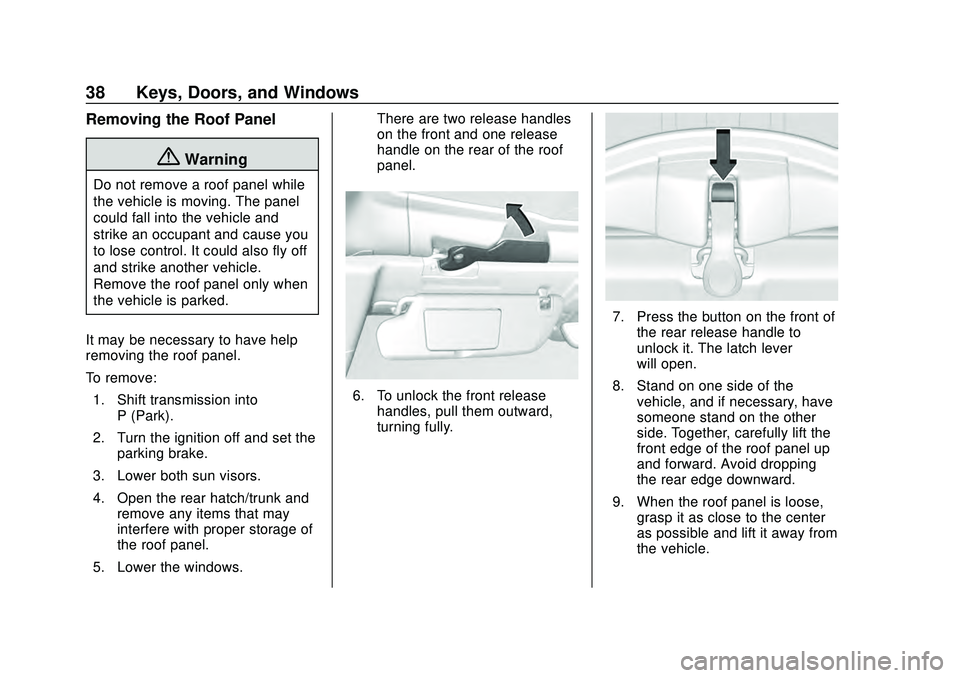
5. Lower the windows. There are two release handles
on the front and one release
handle on the rear of the roof
panel.
6. To unlock the front release
handles, pull them outward,
turning fully.
7. Press the button on the front ofthe rear release handle to
unlock it. The latch lever
will open.
8. Stand on one side of the vehicle, and if necessary, have
someone stand on the other
side. Together, carefully lift the
front edge of the roof panel up
and forward. Avoid dropping
the rear edge downward.
9. When the roof panel is loose, grasp it as close to the center
as possible and lift it away from
the vehicle.
Page 40 of 336
Chevrolet Corvette Owner Manual (GMNA-Localizing-U.S./Canada/Mexico-
12470550) - 2020 - CRC - 4/23/20
Keys, Doors, and Windows 39
Storing the Roof Panel
{Warning
If a roof panel is not stored
properly, it could be thrown about
the vehicle in a crash or sudden
maneuver. People in the vehicle
could be injured. Always use the
stowage receivers.
1. Position the roof so that the interior is facing away from you
and the front of the panel is
facing up.
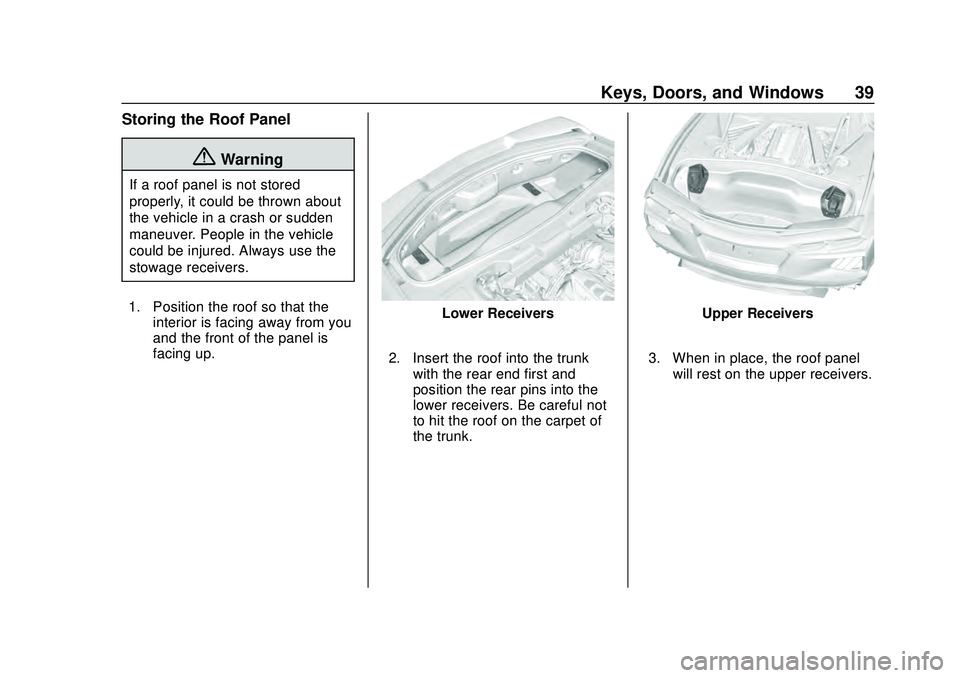
Lower Receivers
2. Insert the roof into the trunk with the rear end first and
position the rear pins into the
lower receivers. Be careful not
to hit the roof on the carpet of
the trunk.Upper Receivers
3. When in place, the roof panel will rest on the upper receivers.
Page 41 of 336
Chevrolet Corvette Owner Manual (GMNA-Localizing-U.S./Canada/Mexico-
12470550) - 2020 - CRC - 4/23/20
40 Keys, Doors, and Windows
{Warning
Do not push from the sides of the
roof panel when seating the panel
into the upper receivers for
storage. Pushing from the sides
may result in injury from pinched
fingers. Only push along the top
edge of the roof panel.
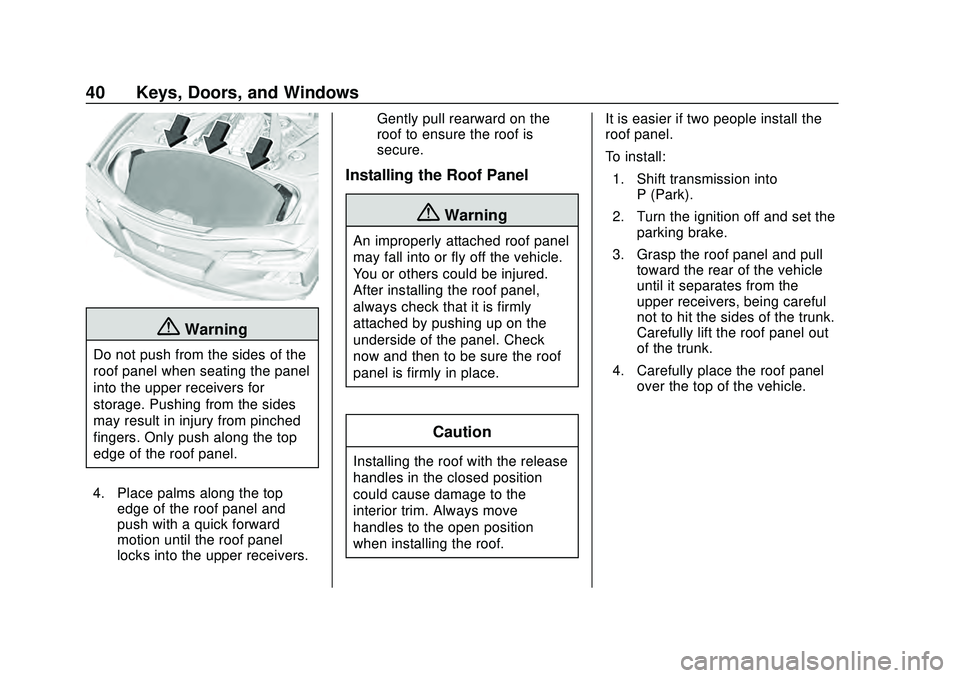
4. Place palms along the top edge of the roof panel and
push with a quick forward
motion until the roof panel
locks into the upper receivers. Gently pull rearward on the
roof to ensure the roof is
secure.
Installing the Roof Panel
{Warning
An improperly attached roof panel
may fall into or fly off the vehicle.
You or others could be injured.
After installing the roof panel,
always check that it is firmly
attached by pushing up on the
underside of the panel. Check
now and then to be sure the roof
panel is firmly in place.
Caution
Installing the roof with the release
handles in the closed position
could cause damage to the
interior trim. Always move
handles to the open position
when installing the roof.
It is easier if two people install the
roof panel.
To install:
1. Shift transmission into P (Park).
2. Turn the ignition off and set the parking brake.
3. Grasp the roof panel and pull toward the rear of the vehicle
until it separates from the
upper receivers, being careful
not to hit the sides of the trunk.
Carefully lift the roof panel out
of the trunk.
4. Carefully place the roof panel over the top of the vehicle.
Page 43 of 336
Chevrolet Corvette Owner Manual (GMNA-Localizing-U.S./Canada/Mexico-
12470550) - 2020 - CRC - 4/23/20
42 Keys, Doors, and Windows
{Warning
Components under the tonneau,
close to the engine, can get hot
from running the engine. To help
avoid the risk of burning
unprotected skin, never touch
these components until they have
cooled, and always use a glove or
towel to avoid direct skin contact.
{Warning
While opening or closing the
convertible top, people can be
injured by the moving parts of the
tonneau cover or convertible top.
Maintain visual contact with the
top while it is being operated.
Caution
Follow these guidelines when
operating the convertible top or
damage can occur:. Remove all items from the
roof, trunk lid, or tonneau
cover before operating.
. Remove all objects that may
contact the convertible top
when it is operated.
. Do not leave the vehicle
with the convertible
top open.
. Do not exceed 50 km/h
(31 mph) until the top has
completely closed or
opened.
. Do not open or close the top
while driving in high wind
conditions.
. Do not operate the
convertible top multiple
times in a short period of
(Continued)
Caution (Continued)
time without starting the
engine to avoid draining the
vehicle battery.
. Only store the vehicle with
the top fully closed.
Opening the Convertible Top —
Driver Door Switch
1. Ensure the roof and tonneau cover are clear of any objects.
2. The trunk must be closed.
3. Start the vehicle or place it in ACC/ACCESSORY.
4. When possible, operate the convertible top when the
vehicle is stopped. The top can
be operated while driving
below 50 km/h (31 mph) and
will stop if that speed is
exceeded. The top operation
will take approximately
17 seconds. Make sure the top
operation can be completed
before that speed is reached.
Page 46 of 336
Chevrolet Corvette Owner Manual (GMNA-Localizing-U.S./Canada/Mexico-
12470550) - 2020 - CRC - 4/23/20
Keys, Doors, and Windows 45
.When driving with the top not
fully secured, chimes can be
heard above 50 km/h (31 mph).
If the vehicle battery has been
disconnected and reconnected,
if the fuses were pulled or replaced,
or if a jump start was performed, a
message indicating the top is not
secure may display. Press and
release
Kand then quickly press
and hold
Mon the remote key,
or press and hold
Mon the driver
door switch to open the top, or pull
and hold
Mon the driver door
switch to close the top until this
message clears.
Partial Top Cycling
If the convertible top operation is
stopped before completion, the top
will temporarily hold its position.
Over time, the tonneau may drift to
a near closed position. Opening the Tonneau Cover
—
Engine Access
{Warning
When opening or closing the
tonneau cover, people can be
injured by the moving parts of the
tonneau cover. Maintain visual
contact with the tonneau cover
when it is in motion and keep
hands and objects away from the
moving parts.
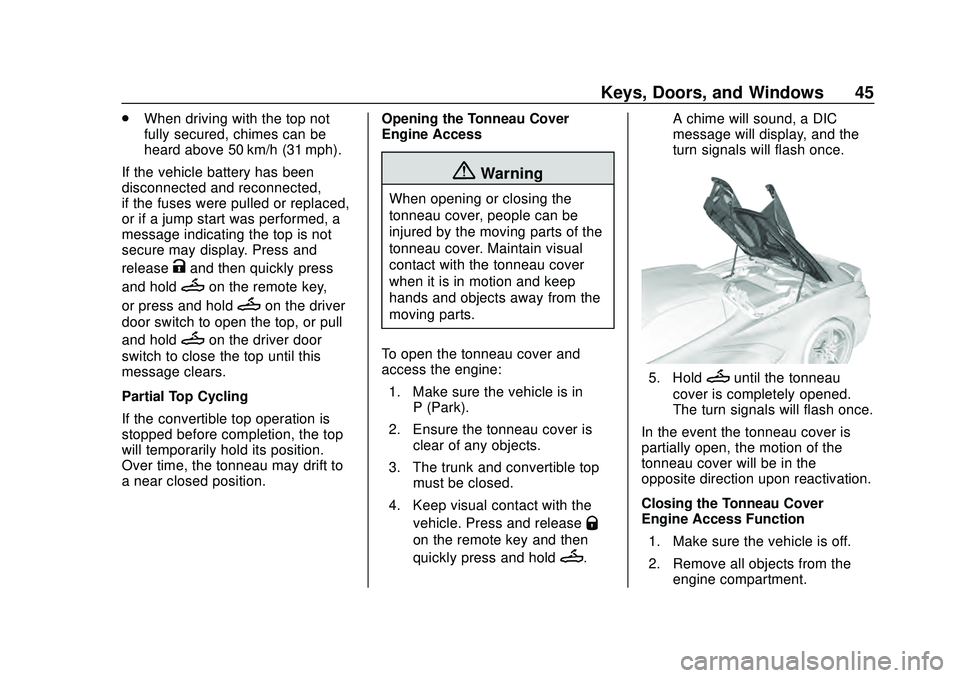
To open the tonneau cover and
access the engine: 1. Make sure the vehicle is in P (Park).
2. Ensure the tonneau cover is clear of any objects.
3. The trunk and convertible top must be closed.
4. Keep visual contact with the vehicle. Press and release
Q
on the remote key and then
quickly press and hold
M. A chime will sound, a DIC
message will display, and the
turn signals will flash once.
5. HoldMuntil the tonneau
cover is completely opened.
The turn signals will flash once.
In the event the tonneau cover is
partially open, the motion of the
tonneau cover will be in the
opposite direction upon reactivation.
Closing the Tonneau Cover —
Engine Access Function
1. Make sure the vehicle is off.
2. Remove all objects from the engine compartment.
Page 49 of 336
Chevrolet Corvette Owner Manual (GMNA-Localizing-U.S./Canada/Mexico-
12470550) - 2020 - CRC - 4/23/20
48 Seats and Restraints
Front Seats
Power Seat Adjustment
{Warning
The power seats will work with
the ignition off. Children could
operate the power seats and be
injured. Never leave children
alone in the vehicle.
{Warning
You can lose control of the
vehicle if you try to adjust a driver
seat while the vehicle is moving.
Adjust the driver seat only when
the vehicle is not moving.
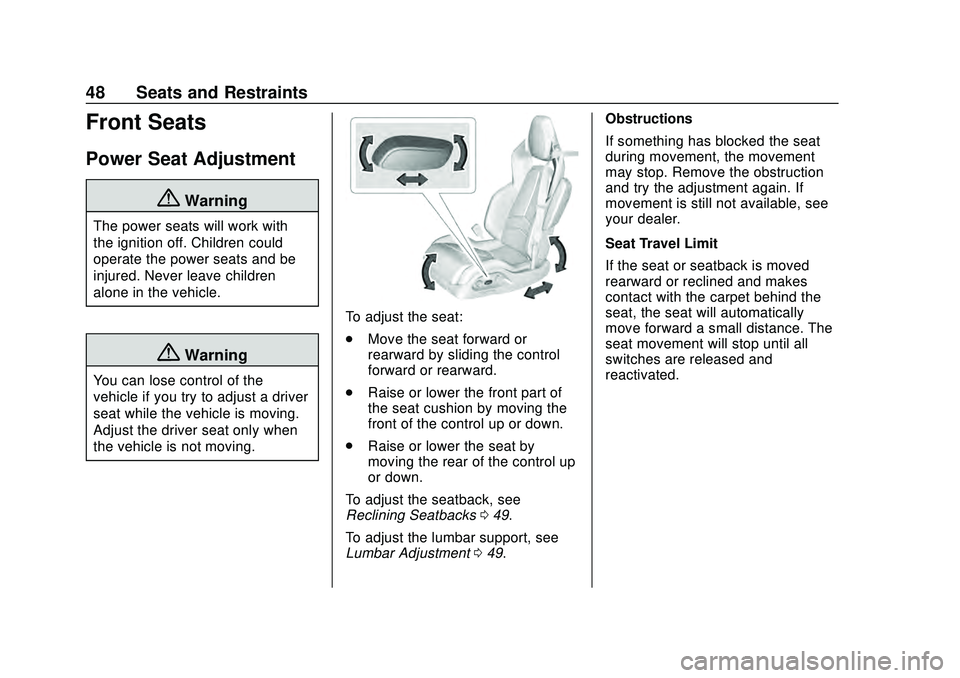
To adjust the seat:
.Move the seat forward or
rearward by sliding the control
forward or rearward.
. Raise or lower the front part of
the seat cushion by moving the
front of the control up or down.
. Raise or lower the seat by
moving the rear of the control up
or down.
To adjust the seatback, see
Reclining Seatbacks 049.
To adjust the lumbar support, see
Lumbar Adjustment 049. Obstructions
If something has blocked the seat
during movement, the movement
may stop. Remove the obstruction
and try the adjustment again. If
movement is still not available, see
your dealer.
Seat Travel Limit
If the seat or seatback is moved
rearward or reclined and makes
contact with the carpet behind the
seat, the seat will automatically
move forward a small distance. The
seat movement will stop until all
switches are released and
reactivated.
Page 51 of 336
Chevrolet Corvette Owner Manual (GMNA-Localizing-U.S./Canada/Mexico-
12470550) - 2020 - CRC - 4/23/20
50 Seats and Restraints
{Warning
Sitting in a reclined position when
the vehicle is in motion can be
dangerous. Even when buckled
up, the seat belts cannot do
their job.
For proper protection when the
vehicle is in motion, have the
seatback upright. Then sit well
back in the seat and wear the
seat belt properly.
Memory Seats
If equipped, memory seats allow two
drivers to save and recall their
unique seat positions for driving the
vehicle, and a shared exit position
for getting out of the vehicle. Other
feature positions may also be
saved, such as power mirrors and
power steering wheel, if equipped.
Memory positions are linked to
remote key 1 or 2 for automatic
memory recalls.
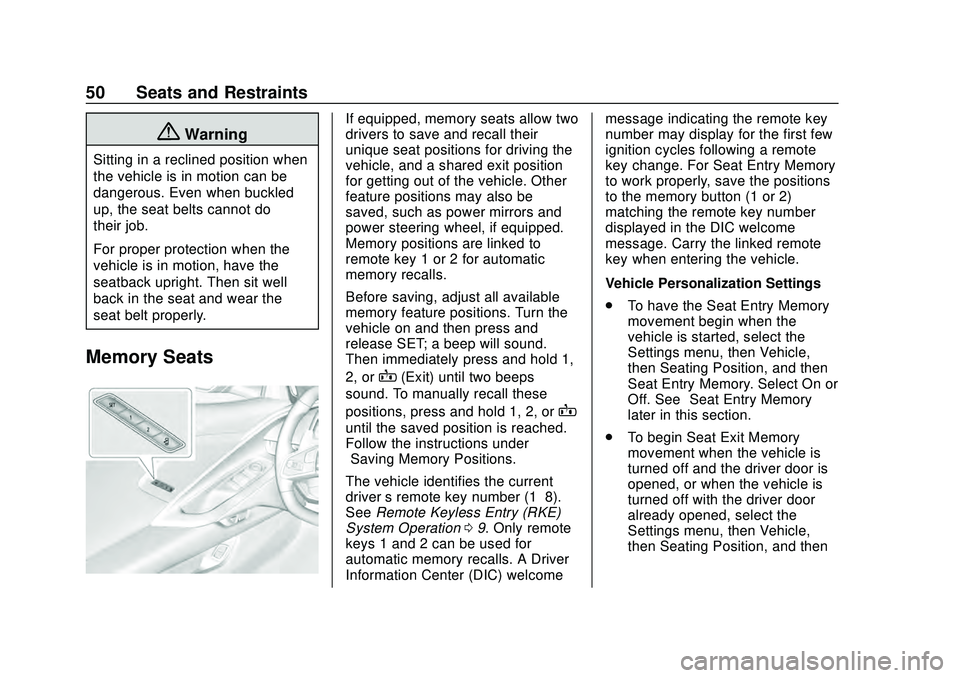
Before saving, adjust all available
memory feature positions. Turn the
vehicle on and then press and
release SET; a beep will sound.
Then immediately press and hold 1,
2, or
B(Exit) until two beeps
sound. To manually recall these
positions, press and hold 1, 2, or
B
until the saved position is reached.
Follow the instructions under
“Saving Memory Positions.”
The vehicle identifies the current
driver ’s remote key number (1–8).
See Remote Keyless Entry (RKE)
System Operation 09. Only remote
keys 1 and 2 can be used for
automatic memory recalls. A Driver
Information Center (DIC) welcome message indicating the remote key
number may display for the first few
ignition cycles following a remote
key change. For Seat Entry Memory
to work properly, save the positions
to the memory button (1 or 2)
matching the remote key number
displayed in the DIC welcome
message. Carry the linked remote
key when entering the vehicle.
Vehicle Personalization Settings
.
To have the Seat Entry Memory
movement begin when the
vehicle is started, select the
Settings menu, then Vehicle,
then Seating Position, and then
Seat Entry Memory. Select On or
Off. See “Seat Entry Memory”
later in this section.
. To begin Seat Exit Memory
movement when the vehicle is
turned off and the driver door is
opened, or when the vehicle is
turned off with the driver door
already opened, select the
Settings menu, then Vehicle,
then Seating Position, and then